set LEXUS UX200 2019 Owners Manual
[x] Cancel search | Manufacturer: LEXUS, Model Year: 2019, Model line: UX200, Model: LEXUS UX200 2019Pages: 452, PDF Size: 10.06 MB
Page 267 of 452
2675-3. Using the air conditioning system and defogger
5
Interior features
(P.265)
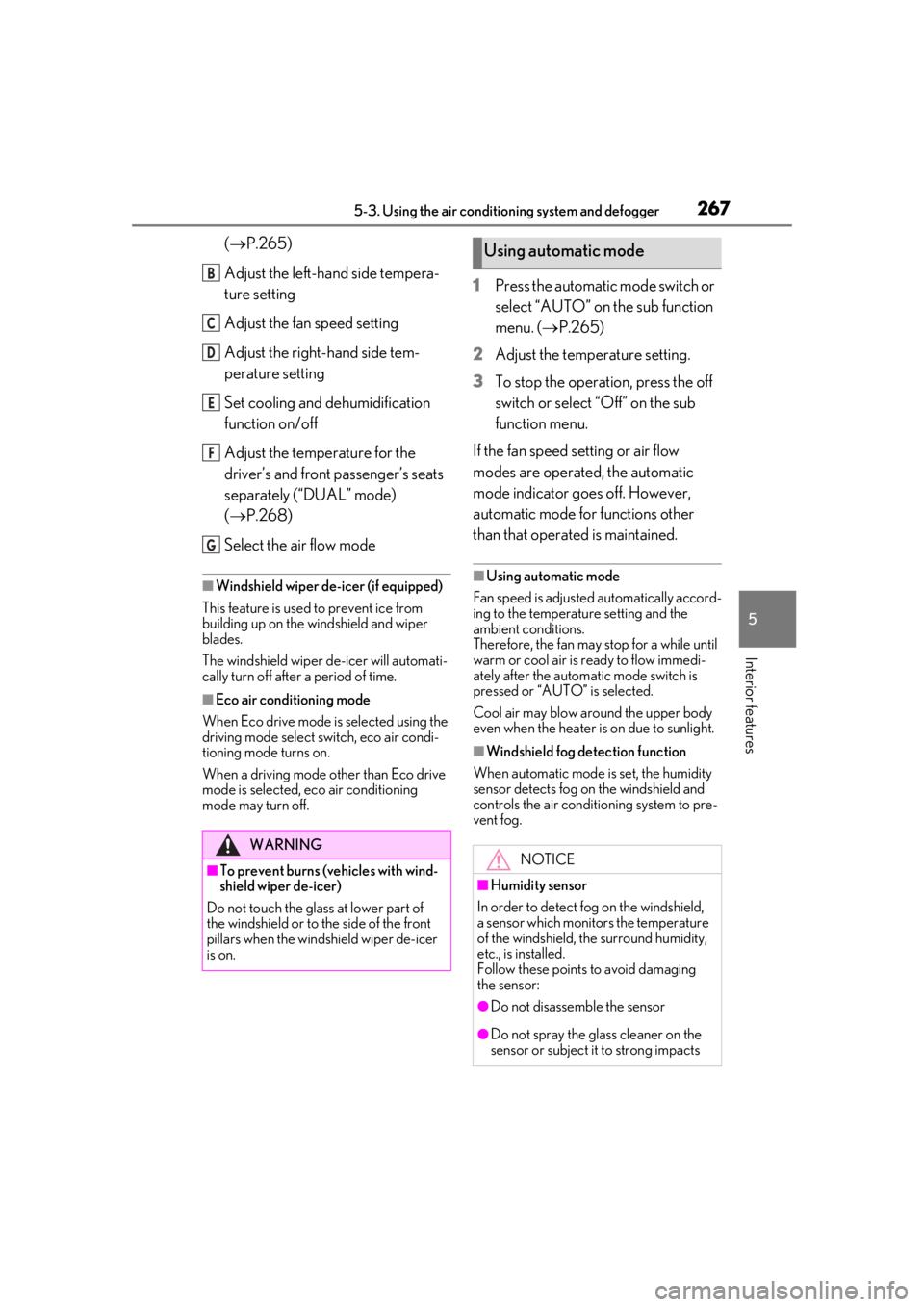
Adjust the left-hand side tempera-
ture setting
Adjust the fan speed setting
Adjust the right-hand side tem-
perature setting
Set cooling and dehumidification
function on/off
Adjust the temperature for the
driver’s and front passenger’s seats
separately (“DUAL” mode)
( P.268)
Select the air flow mode
■Windshield wiper de-icer (if equipped)
This feature is used to prevent ice from
building up on the wi ndshield and wiper
blades.
The windshield wiper de-icer will automati-
cally turn off after a period of time.
■Eco air conditioning mode
When Eco drive mode is selected using the
driving mode select switch, eco air condi-
tioning mode turns on.
When a driving mode other than Eco drive
mode is selected, eco air conditioning
mode may turn off.
1Press the automatic mode switch or
select “AUTO” on the sub function
menu. ( P.265)
2
Adjust the temperature setting.
3
To stop the operation, press the off
switch or select “Off” on the sub
function menu.
If the fan speed setting or air flow
modes are operated, the automatic
mode indicator goes off. However,
automatic mode for functions other
than that operated is maintained.
■Using automatic mode
Fan speed is adjusted automatically accord-
ing to the temperature setting and the
ambient conditions.
Therefore, the fan may stop for a while until
warm or cool air is ready to flow immedi-
ately after the automatic mode switch is
pressed or “AUTO” is selected.
Cool air may blow around the upper body
even when the heater is on due to sunlight.
■Windshield fog detection function
When automatic mode is set, the humidity
sensor detects fog on the windshield and
controls the air condit ioning system to pre-
vent fog.
WARNING
■To prevent burns (vehicles with wind-
shield wiper de-icer)
Do not touch the glass at lower part of
the windshield or to the side of the front
pillars when the wind shield wiper de-icer
is on.
B
C
D
E
F
G
Using automatic mode
NOTICE
■Humidity sensor
In order to detect fog on the windshield,
a sensor which monitors the temperature
of the windshield, the surround humidity,
etc., is installed.
Follow these points to avoid damaging
the sensor:
●Do not disassemble the sensor
●Do not spray the glass cleaner on the
sensor or subject it to strong impacts
Page 268 of 452
2685-3. Using the air conditioning system and defogger
To turn on the “DUAL” mode, perform
any of the following procedures:
Select “DUAL” on the sub function
menu. ( P.265)
Select “DUAL” on the option con-
trol screen.
Adjust the front passenger’s side
temperature setting.
The indicator comes on when the “DUAL”
mode is on.
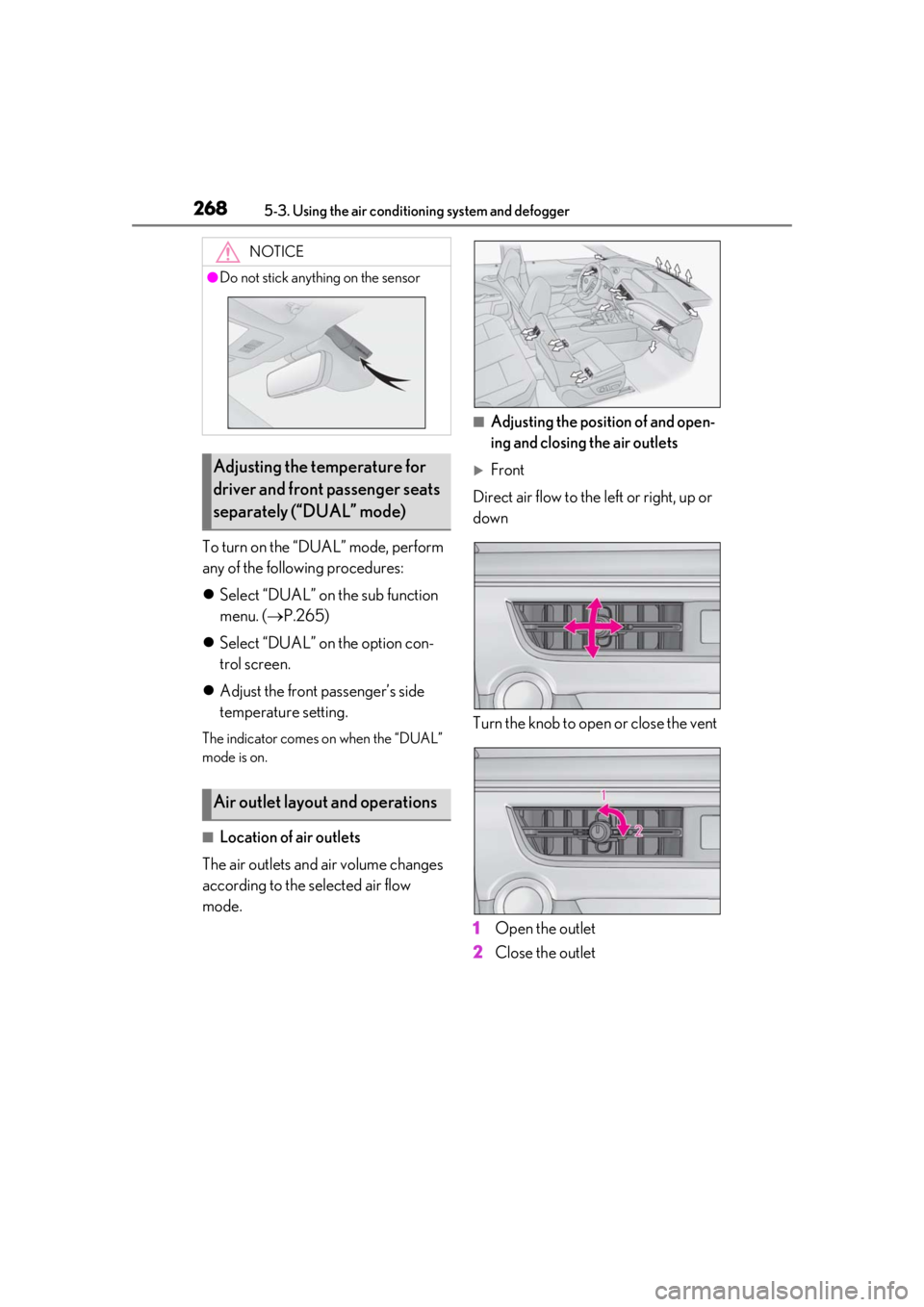
■Location of air outlets
The air outlets and air volume changes
according to the selected air flow
mode.
■Adjusting the position of and open-
ing and closing the air outlets
Front
Direct air flow to the left or right, up or
down
Turn the knob to open or close the vent
1
Open the outlet
2
Close the outlet
NOTICE
●Do not stick anything on the sensor
Adjusting the temperature for
driver and front passenger seats
separately (“DUAL” mode)
Air outlet layout and operations
Page 272 of 452
2725-3. Using the air conditioning system and defogger
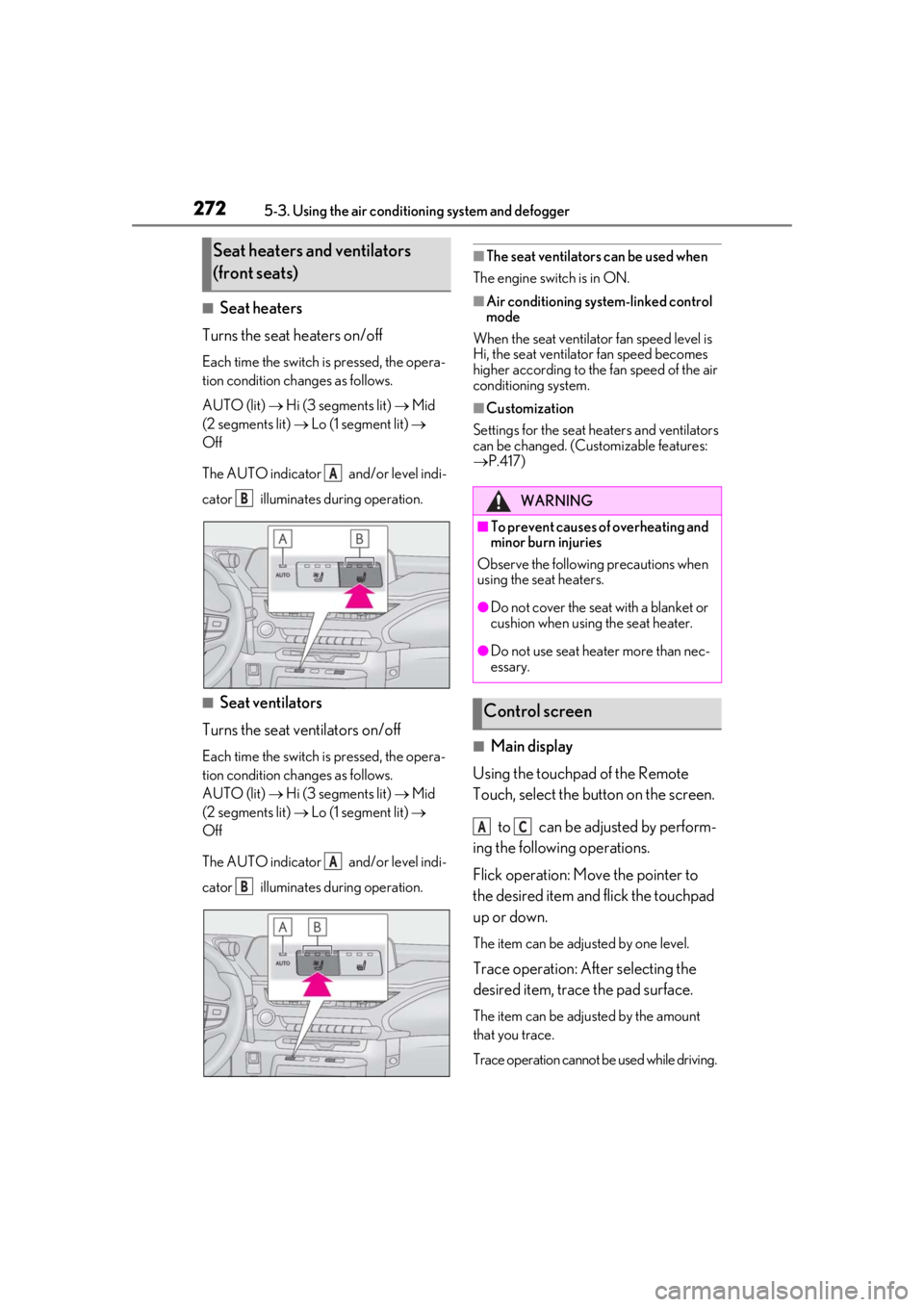
■Seat heaters
Turns the seat heaters on/off
Each time the switch is pressed, the opera-
tion condition changes as follows.
AUTO (lit) Hi (3 segments lit) Mid
(2 segments lit) Lo (1 segment lit)
Off
The AUTO indicator and/or level indi-
cator illuminates during operation.
■Seat ventilators
Turns the seat ventilators on/off
Each time the switch is pressed, the opera-
tion condition changes as follows.
AUTO (lit) Hi (3 segments lit) Mid
(2 segments lit) Lo (1 segment lit)
Off
The AUTO indicator and/or level indi-
cator illuminates during operation.
■The seat ventilators can be used when
The engine switch is in ON.
■Air conditioning system-linked control
mode
When the seat ventilator fan speed level is
Hi, the seat ventilator fan speed becomes
higher according to the fan speed of the air
conditioning system.
■Customization
Settings for the seat heaters and ventilators
can be changed. (Customizable features:
P.417)
■Main display
Using the touchpad of the Remote
Touch, select the button on the screen.
to can be adjusted by perform-
ing the following operations.
Flick operation: Move the pointer to
the desired item and flick the touchpad
up or down.
The item can be adjusted by one level.
Trace operation: After selecting the
desired item, trace the pad surface.
The item can be adjusted by the amount
that you trace.
Trace operation cannot be used while driving.
Seat heaters and ventilators
(front seats)
A
B
A
B
WARNING
■To prevent causes of overheating and
minor burn injuries
Observe the following precautions when
using the seat heaters.
●Do not cover the seat with a blanket or
cushion when using the seat heater.
●Do not use seat heater more than nec-
essary.
Control screen
AC
Page 273 of 452
2735-3. Using the air conditioning system and defogger
5
Interior features
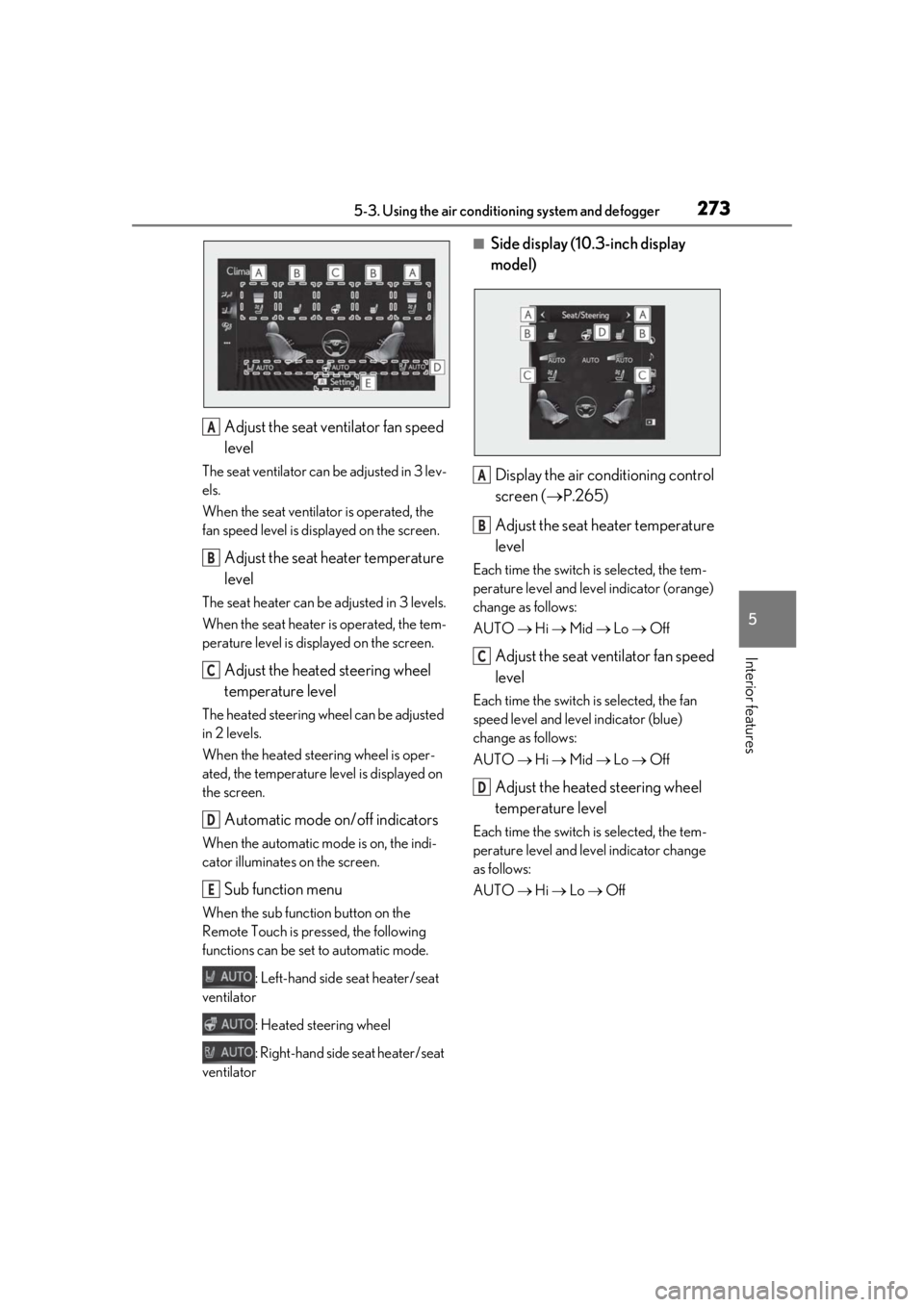
Adjust the seat ventilator fan speed
level
The seat ventilator can be adjusted in 3 lev-
els.
When the seat ventilator is operated, the
fan speed level is disp layed on the screen.
Adjust the seat heater temperature
level
The seat heater can be adjusted in 3 levels.
When the seat heater is operated, the tem-
perature level is displayed on the screen.
Adjust the heated steering wheel
temperature level
The heated steering wheel can be adjusted
in 2 levels.
When the heated steering wheel is oper-
ated, the temperature level is displayed on
the screen.
Automatic mode on/off indicators
When the automatic mode is on, the indi-
cator illuminates on the screen.
Sub function menu
When the sub function button on the
Remote Touch is pressed, the following
functions can be set to automatic mode.
: Left-hand side seat heater/seat
ventilator
: Heated steering wheel
: Right-hand side seat heater/seat
ventilator
■Side display (10. 3-inch display
model)
Display the air conditioning control
screen ( P.265)
Adjust the seat heater temperature
level
Each time the switch is selected, the tem-
perature level and level indicator (orange)
change as follows:
AUTO Hi Mid Lo Off
Adjust the seat ventilator fan speed
level
Each time the switch is selected, the fan
speed level and level indicator (blue)
change as follows:
AUTO Hi Mid Lo Off
Adjust the heated steering wheel
temperature level
Each time the switch is selected, the tem-
perature level and le vel indicator change
as follows:
AUTO Hi Lo Off
A
B
C
D
E
A
B
C
D
Page 275 of 452
2755-4. Using the interior lights
5
Interior features
■Automatic turning on of the interior
lights
If any of the SRS airbags deploy (inflate) or
in the event of a strong rear impact, the inte-
rior lights will turn on automatically. The
interior lights will turn off automatically after
approximately 20 minutes. The interior
lights can be turned off manually. However,
in order to help prevent further collisions, it
is recommended that th ey be left on until
safety can be ensured. (The interior lights
may not turn on automatically depending
on the force of the impact and conditions of
the collision.)
■Customization
Setting (e.g. the time elapsed before lights
turn off) can be changed. (Customizable
features: P.412)
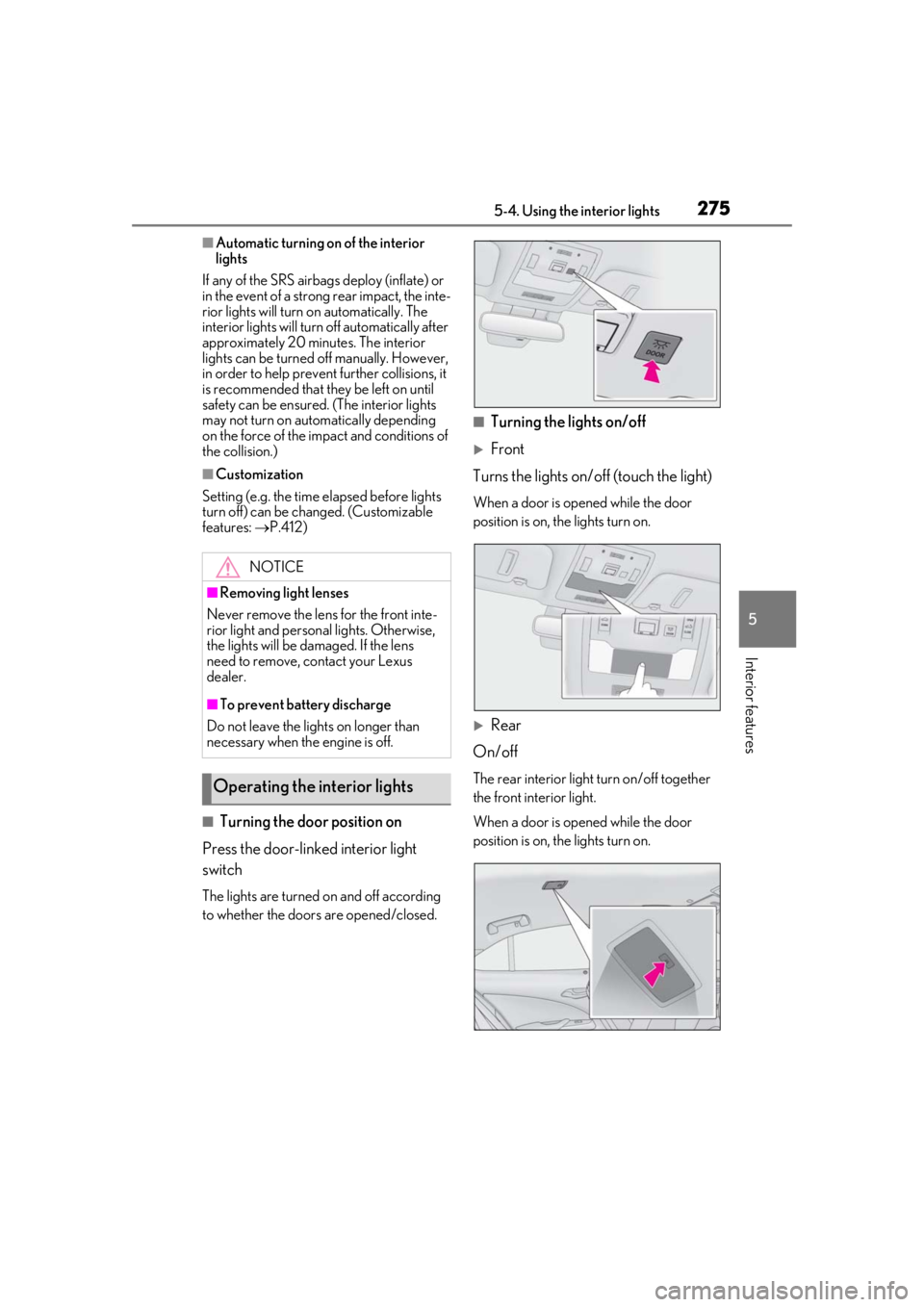
■Turning the door position on
Press the door-linked interior light
switch
The lights are turned on and off according
to whether the doors are opened/closed.
■Turning the lights on/off
Front
Turns the lights on/off (touch the light)
When a door is opened while the door
position is on, the lights turn on.
Rear
On/off
The rear interior light turn on/off together
the front interior light.
When a door is opened while the door
position is on, the lights turn on.
NOTICE
■Removing light lenses
Never remove the lens for the front inte-
rior light and personal lights. Otherwise,
the lights will be damaged. If the lens
need to remove, contact your Lexus
dealer.
■To prevent battery discharge
Do not leave the lights on longer than
necessary when the engine is off.
Operating the interior lights
Page 285 of 452
2855-6. Using the other interior features
5
Interior features
5-6.Using the other interior features
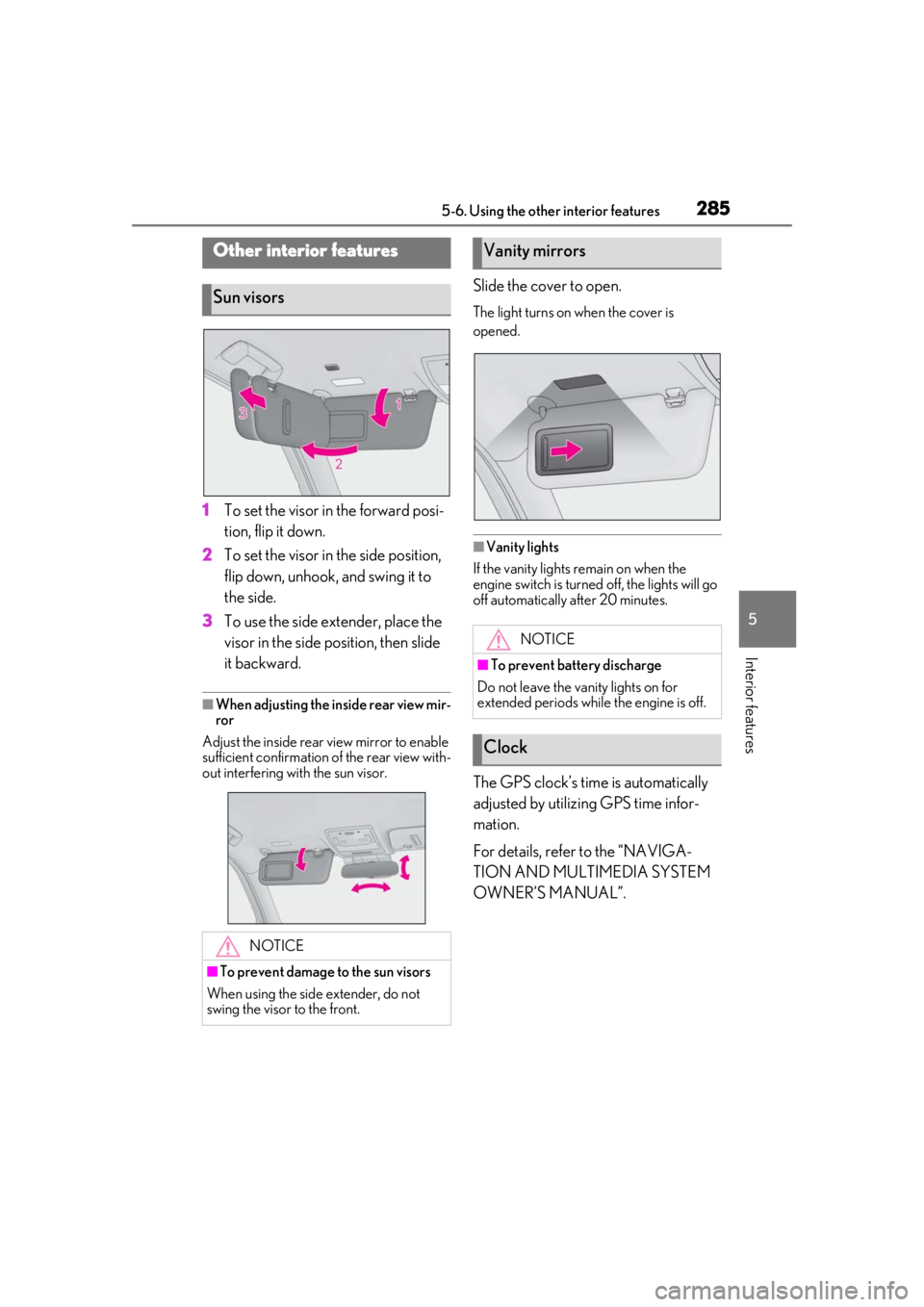
1To set the visor in the forward posi-
tion, flip it down.
2
To set the visor in the side position,
flip down, unhook, and swing it to
the side.
3
To use the side extender, place the
visor in the side position, then slide
it backward.
■When adjusting the inside rear view mir-
ror
Adjust the inside rear view mirror to enable
sufficient confirmation of the rear view with-
out interfering with the sun visor.
Slide the cover to open.
The light turns on when the cover is
opened.
■Vanity lights
If the vanity lights remain on when the
engine switch is turned off, the lights will go
off automatically after 20 minutes.
The GPS clock’s time is automatically
adjusted by utilizing GPS time infor-
mation.
For details, refer to the “NAVIGA-
TION AND MULTIMEDIA SYSTEM
OWNER’S MANUAL”.
Other interior features
Sun visors
NOTICE
■To prevent damage to the sun visors
When using the side extender, do not
swing the visor to the front.
Vanity mirrors
NOTICE
■To prevent battery discharge
Do not leave the vanity lights on for
extended periods while the engine is off.
Clock
Page 306 of 452
3066-1. Maintenance and care
6-1.Maintenance and care
Working from top to bottom, liber-
ally apply water to the vehicle body,
wheel wells and underside of the
vehicle to remove any dirt and dust.
Wash the vehicle body using a
sponge or soft cloth, such as a
chamois.
For hard-to-remove marks, use car
wash soap and rinse thoroughly with
water.
Wipe away any water.
Wax the vehicle when the water-
proof coating deteriorates.
If water does not bead on a clean surface,
apply wax when the vehicle body is cool.
■Self-restoring coat
The vehicle body has a self-restoring coat-
ing that is resistant to small surface
scratches caused in a car wash, etc.
●The coating lasts for 5 to 8 years from
when the vehicle is delivered from the
plant.
●The restoration time differs depending on
the depth of the scratch and outside tem-
perature. The restoration time may
become shorter when the coating is
warmed by applying warm water.
●Deep scratches caused by keys, coins,
etc. cannot be restored.
●Do not use wax that contain abrasives.
■Automatic car washes
●Before washing the vehicle:
• Fold the mirrors
• Turn off the power back door (if equipped)
Start washing from the front of the vehicle.
Extend the mirrors before driving.
●Brushes used in automatic car washes
may scratch the vehicl e surface and harm
your vehicle’s paint.
●Rear spoiler may not be washable in
some automatic car washes. There may
also be an increased risk of damage to
vehicle.
■High pressure car washes
●Do not allow the nozzles of the car wash
to come within close proximity of open-
ing and closing part of the doors or side
windows, and do not continuously let
water hit at the same place.
●Before using the car wash, check that the
fuel filler door on your vehicle is closed
properly.
■Note for a smart access system with
push-button start
●If the door handle becomes wet while the
electronic key is within the effective
range, the door may lock and unlock
repeatedly. In that case, follow the follow-
ing correction procedures to wash the
vehicle:
• Place the key in a position 6 ft. (2 m) or more separate from the vehicle while the
vehicle is being wash ed. (Take care to
ensure that the key is not stolen.)
• Set the electronic key to battery-saving
mode to disable the smart access system
with push-button start. ( P.115)
●If the electronic key is inside the vehicle
and a door handle becomes wet during a
car wash, a buzzer may sound outside the
vehicle and “Key Detected in Vehicle”
may be shown on the multi-information
display. To turn off the alarm, lock all the
doors.
■Aluminum wheels
●Remove any dirt immediately by using a
neutral detergent.
Cleaning and protecting the
vehicle exterior
Perform cleaning in a manner
appropriate to each component
and its material.
Cleaning instructions
Page 307 of 452
3076-1. Maintenance and care
6
Maintenance and care
●Wash detergent off with water immedi-
ately after use.
●To protect the paint from damage, make
sure to observe the following precau-
tions.
• Do not use acidic, a lkaline or abrasive
detergent
• Do not use hard brushes
• Do not use detergent on the wheels when
they are hot, such as after driving or park-
ing in hot weather
■Bumpers
Do not scrub with abrasive cleaners.
■Front side windows water-repellent
coating
●The following precautions can extend the
effectiveness of the water-repellent coat-
ing.
• Remove any dirt, etc. from the front side windows regularly.
• Do not allow dirt and dust to accumulate on the windows for a long period.
Clean the windows with a soft, damp
cloth as soon as possible.
• Do not use wax or glass cleaners that contain abrasives when cleaning the win-
dows.
• Do not use any metallic objects to remove condensation build up.
●When the water-repellent performance
has become insufficie nt, the coating can
be repaired. Contact your Lexus dealer.
WARNING
■When washing the vehicle
Do not apply water to the inside of the
engine compartment. Doing so may
cause the electrical components, etc. to
catch fire.
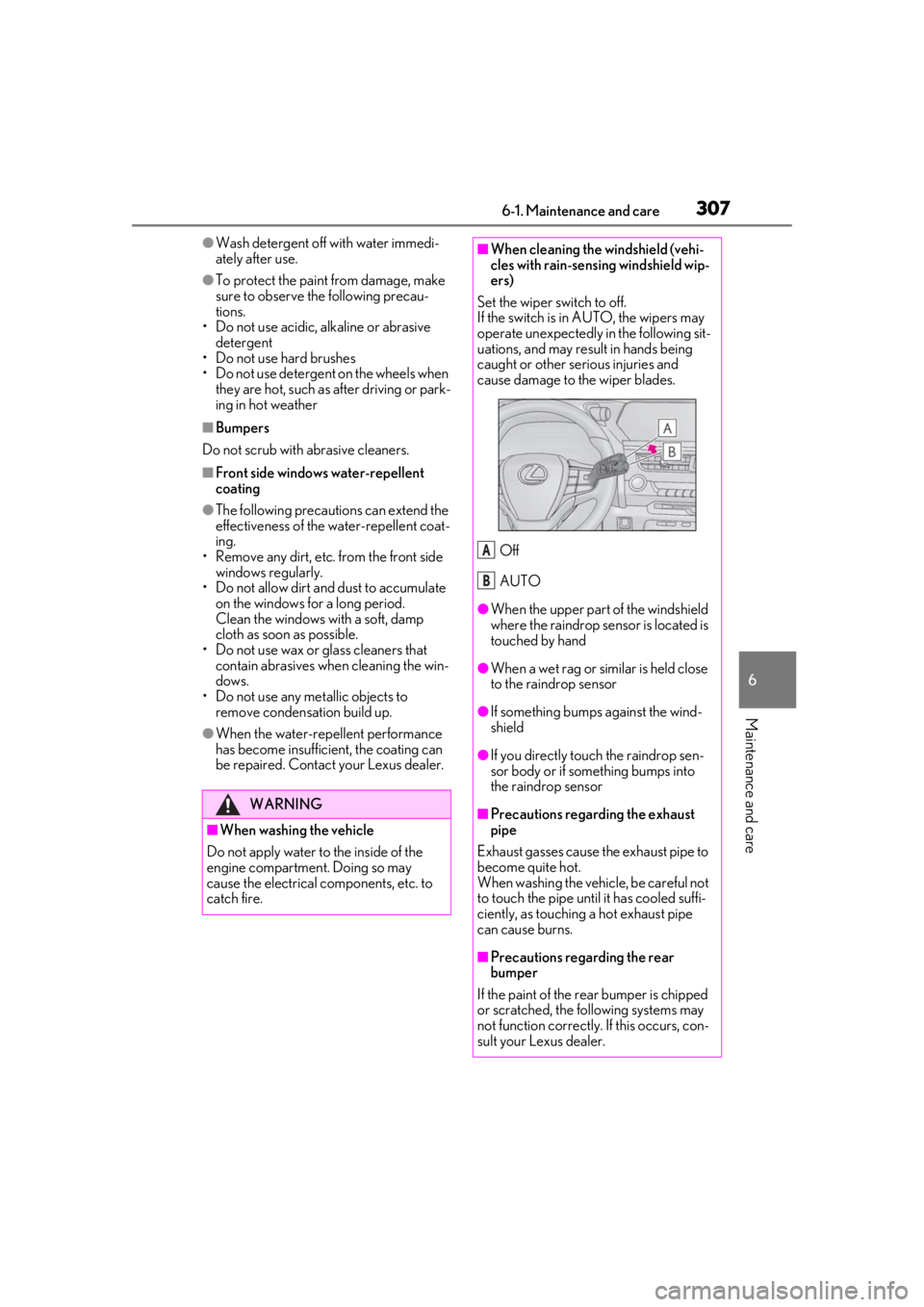
■When cleaning the windshield (vehi-
cles with rain-sensing windshield wip-
ers)
Set the wiper switch to off.
If the switch is in AUTO, the wipers may
operate unexpectedly in the following sit-
uations, and may result in hands being
caught or other serious injuries and
cause damage to the wiper blades.
Off
AUTO
●When the upper part of the windshield
where the raindrop sensor is located is
touched by hand
●When a wet rag or similar is held close
to the raindrop sensor
●If something bumps against the wind-
shield
●If you directly touch the raindrop sen-
sor body or if something bumps into
the raindrop sensor
■Precautions regarding the exhaust
pipe
Exhaust gasses cause the exhaust pipe to
become quite hot.
When washing the vehicle, be careful not
to touch the pipe until it has cooled suffi-
ciently, as touching a hot exhaust pipe
can cause burns.
■Precautions regarding the rear
bumper
If the paint of the rear bumper is chipped
or scratched, the following systems may
not function correctly. If this occurs, con-
sult your Lexus dealer.
A
B
Page 308 of 452
3086-1. Maintenance and care
WARNING
●Lexus Safety System+2.0
●BSM (if equipped)
●RCTA (if equipped)
●PKSB (if equipped)NOTICE
■To prevent paint deterioration and
corrosion on the body and compo-
nents (aluminum wheels, etc.)
●Wash the vehicle immediately in the
following cases:
• After driving near the sea coast
• After driving on salted roads
• If coal tar or tree sap is present on the paint surface
• If dead insects, insect droppings or bird droppings are present on the
paint surface
• After driving in an area contaminated with soot, oily smoke, mine dust, iron
powder or chemical substances
• If the vehicle becomes heavily soiled with dust or mud
• If liquids such as benzene and gasoline are spilled on the paint surface
●If the paint is chip ped or scratched,
have it repaired immediately.
●To prevent the wheels from corroding,
remove any dirt and store in a place
with low humidity when storing the
wheels.
■Cleaning the exterior lights
●Wash carefully. Do not use organic
substances or scrub with a hard brush.
This may damage the surfaces of the
lights.
●Do not apply wax to the surfaces of the
lights.
Wax may cause damage to the lenses.
■When using an automatic car wash
(vehicles with rain-sensing windshield
wipers)
Set the wiper switch to the off position.
If the wiper switch is in AUTO, the wipers
may operate and the wiper blades may
be damaged.
■When using a high pressure car wash
●When washing the vehicle, do not let
water of the high pressure washer hit
directly or the vicinity of the camera.
Due to the shock from the high pres-
sure water, it is possible the device may
not operate as normal.
●Do not bring the nozzle tip close to
boots (rubber or resin manufactured
cover), connectors or the following
parts. The parts may be damaged if
they come into contact with high-pres-
sure water.
• Traction related parts
• Steering parts
• Suspension parts
• Brake parts
●Keep the cleaning nozzle at least 11.9
in. (30 cm) away from the vehicle
body. Otherwise resin section, such as
molding and bumpers, may be
deformed and damaged. Also, do not
continuously hold the nozzle in the
same place.
●Do not continuously let water hit at the
lower part of the windshield. As there
is the air inlet vents, the air condition-
ing system may not operate properly.
Page 312 of 452
3126-2. Maintenance
6-2.Maintenance
■Repair and replacement
It is recommended that genuine Lexus parts
be used for repairs to ensure performance
of each system. If non-Lexus parts are used
in replacement or if a repair shop other than
a Lexus dealer perfor ms repairs, confirm
the warranty coverage.
■Allow inspection and repairs to be per-
formed by a Lexus dealer
●Lexus technicians are well-trained spe-
cialists and are kept up to date with the
latest service information. They are well
informed about the operation of all sys-
tems on your vehicle.
●Keep a copy of the repa ir order. It proves
that the maintenance that has been per-
formed is under warra nty coverage. If any
problem should arise while your vehicle is
under warranty, your Lexus dealer will
promptly take care of it.
General maintenance should be per-
formed on a daily basis. This can be
done by yourself or by a Lexus dealer.
Scheduled maintenance should be
performed at specified intervals
according to the maintenance sched-
ule.
For details about ma intenance items and
schedules, refer to the “Warranty and Ser-
vice Guide”, “Owner’s Manual Supple-
ment” or “Scheduled Maintenance”.
■Resetting the message indicating main-
tenance is required
After the required maintenance is per-
formed according to the maintenance
schedule, please reset the message.
To reset the message, follow the procedures
described below:
1
Press or of the meter control
switches and select .
2
Press or of the meter control
switches, select “Vehicle Settings” and
then press “OK”.
Maintenance requirements
To ensure safe and economical driv-
ing, day-to-day care and regular
maintenance are essential. It is the
owner’s responsibility to perform
regular checks. Lexus recommends
the following maintenance:
WARNING
■If your vehicle is not properly main-
tained
Improper maintenanc e could result in
serious damage to the vehicle and possi-
ble serious injury or death.
■Handling of the battery
●Engine exhaust, some of its constitu-
ents, and a wide variety of automobile
components contain or emit chemicals
known to the State of California to
cause cancer and birth defects and
other reproductive harm. Work in a
well ventilated area.
●Oils, fuels and fluids contained in vehi-
cles as well as waste produced by
component wear contain or emit
chemicals known to the State of Cali-
fornia to cause cancer and birth
defects or other reproductive harm.
Avoid exposure and wash any affected
area immediately.
●Battery posts, terminals and related
accessories contain lead and lead
compounds which are known to cause
brain damage. Wash your hands after
handling. ( P.325)
General maintenance
Scheduled maintenance