warning LEXUS UX200 2019 Owners Manual
[x] Cancel search | Manufacturer: LEXUS, Model Year: 2019, Model line: UX200, Model: LEXUS UX200 2019Pages: 452, PDF Size: 10.06 MB
Page 277 of 452
2775-5. Using the storage features
5
Interior features
5-5.Using the storage features
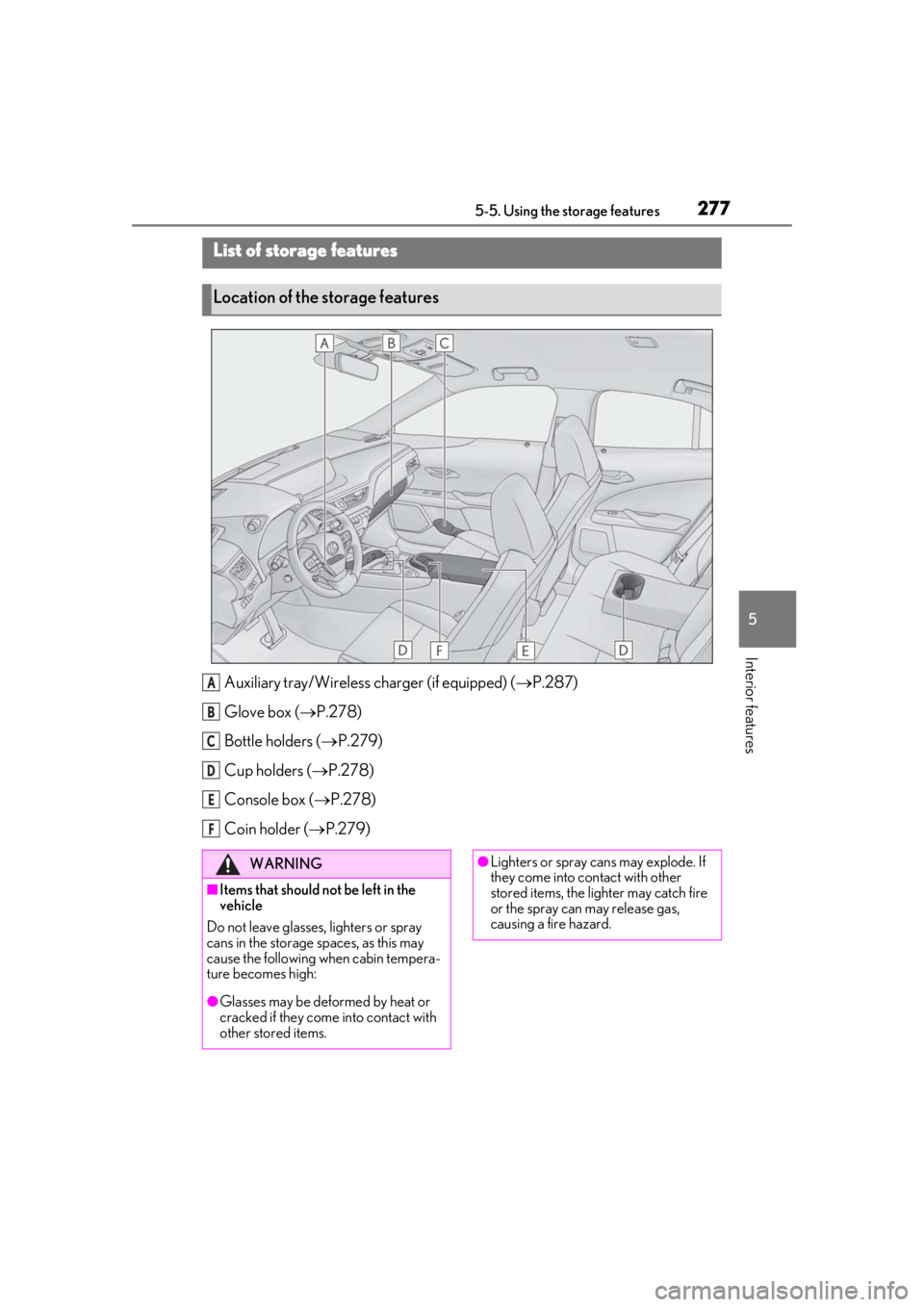
Auxiliary tray/Wireless charger (if equipped) (P.287)
Glove box ( P.278)
Bottle holders ( P.279)
Cup holders ( P.278)
Console box ( P.278)
Coin holder ( P.279)
List of storage features
Location of the storage features
A
B
C
D
E
F
WARNING
■Items that should not be left in the
vehicle
Do not leave glasses, lighters or spray
cans in the storage spaces, as this may
cause the following when cabin tempera-
ture becomes high:
●Glasses may be deformed by heat or
cracked if they come into contact with
other stored items.
●Lighters or spray ca ns may explode. If
they come into contact with other
stored items, the lighter may catch fire
or the spray can may release gas,
causing a fire hazard.
Page 278 of 452
2785-5. Using the storage features
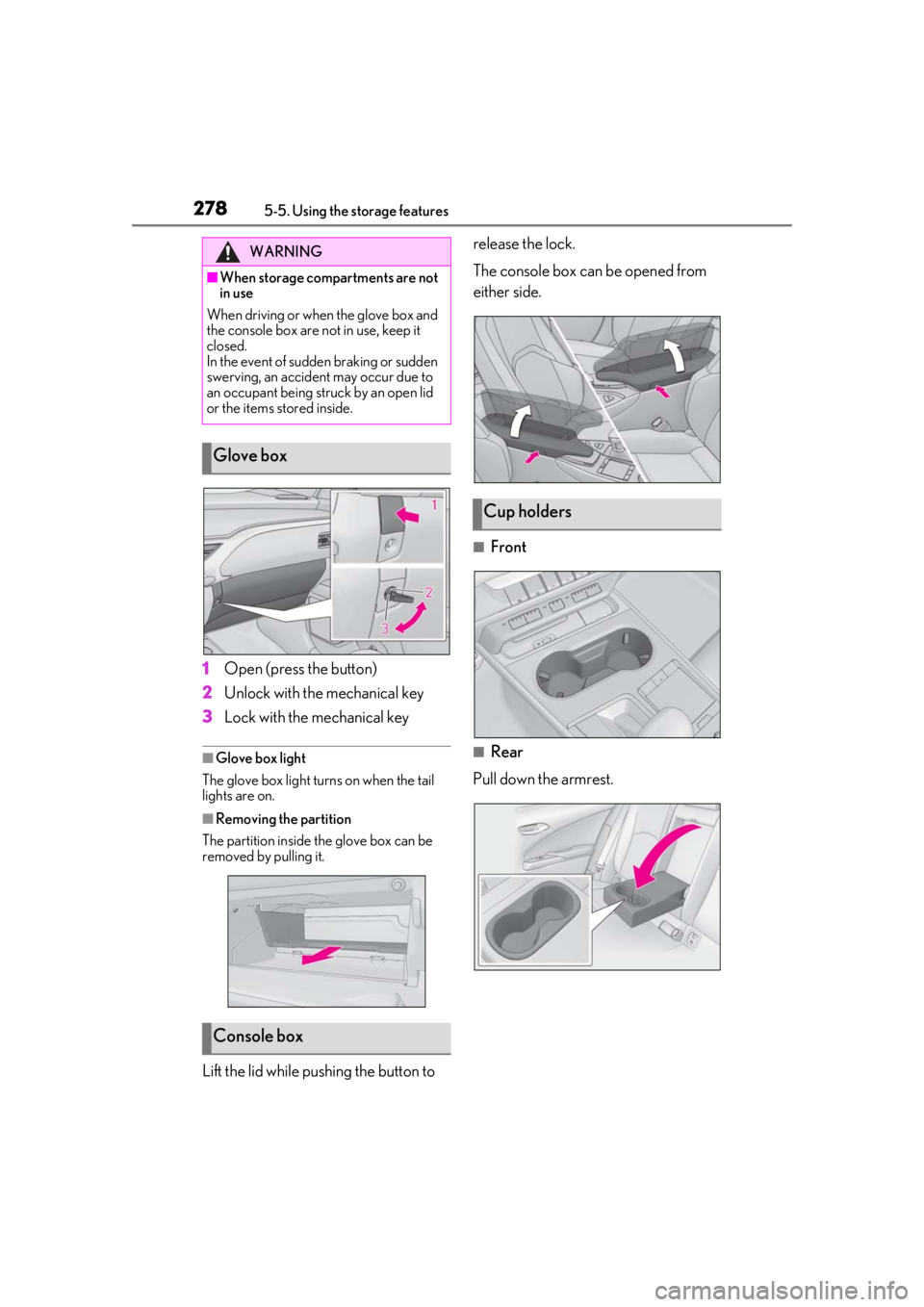
1Open (press the button)
2
Unlock with the mechanical key
3
Lock with the mechanical key
■Glove box light
The glove box light turns on when the tail
lights are on.
■Removing the partition
The partition inside the glove box can be
removed by pulling it.
Lift the lid while pushing the button to release the lock.
The console box can be opened from
either side.
■Front
■Rear
Pull down the armrest.
WARNING
■When storage compartments are not
in use
When driving or when the glove box and
the console box are not in use, keep it
closed.
In the event of sudden braking or sudden
swerving, an accident may occur due to
an occupant being struck by an open lid
or the items stored inside.
Glove box
Console box
Cup holders
Page 279 of 452
2795-5. Using the storage features
5
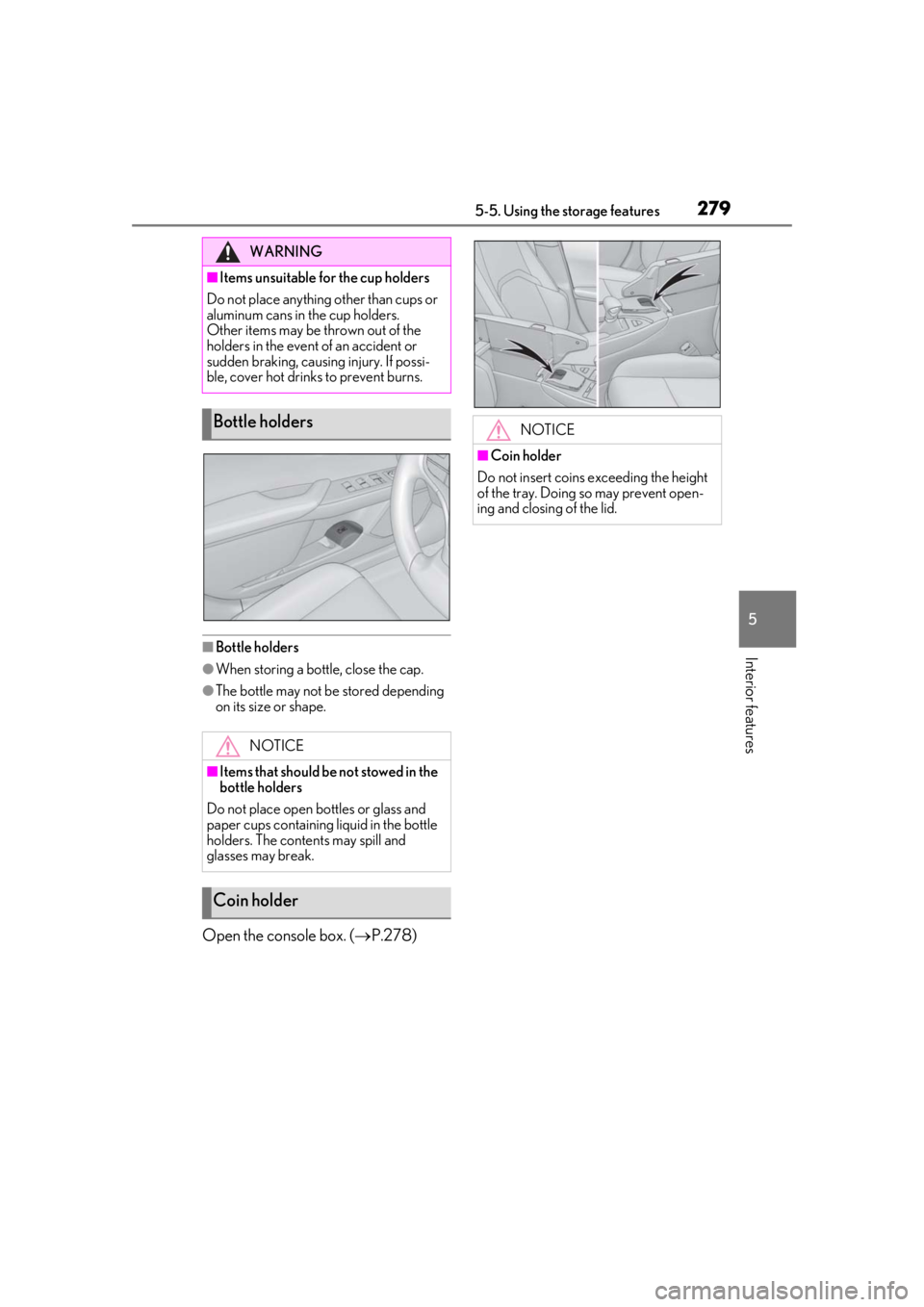
Interior features■Bottle holders
●When storing a bottle, close the cap.
●The bottle may not be stored depending
on its size or shape.
Open the console box. (P.278)
WARNING
■Items unsuitable for the cup holders
Do not place anything other than cups or
aluminum cans in the cup holders.
Other items may be thrown out of the
holders in the event of an accident or
sudden braking, causing injury. If possi-
ble, cover hot drinks to prevent burns.
Bottle holders
NOTICE
■Items that should be not stowed in the
bottle holders
Do not place open bottles or glass and
paper cups containing liquid in the bottle
holders. The contents may spill and
glasses may break.
Coin holder
NOTICE
■Coin holder
Do not insert coins exceeding the height
of the tray. Doing so may prevent open-
ing and closing of the lid.
Page 280 of 452
2805-5. Using the storage features
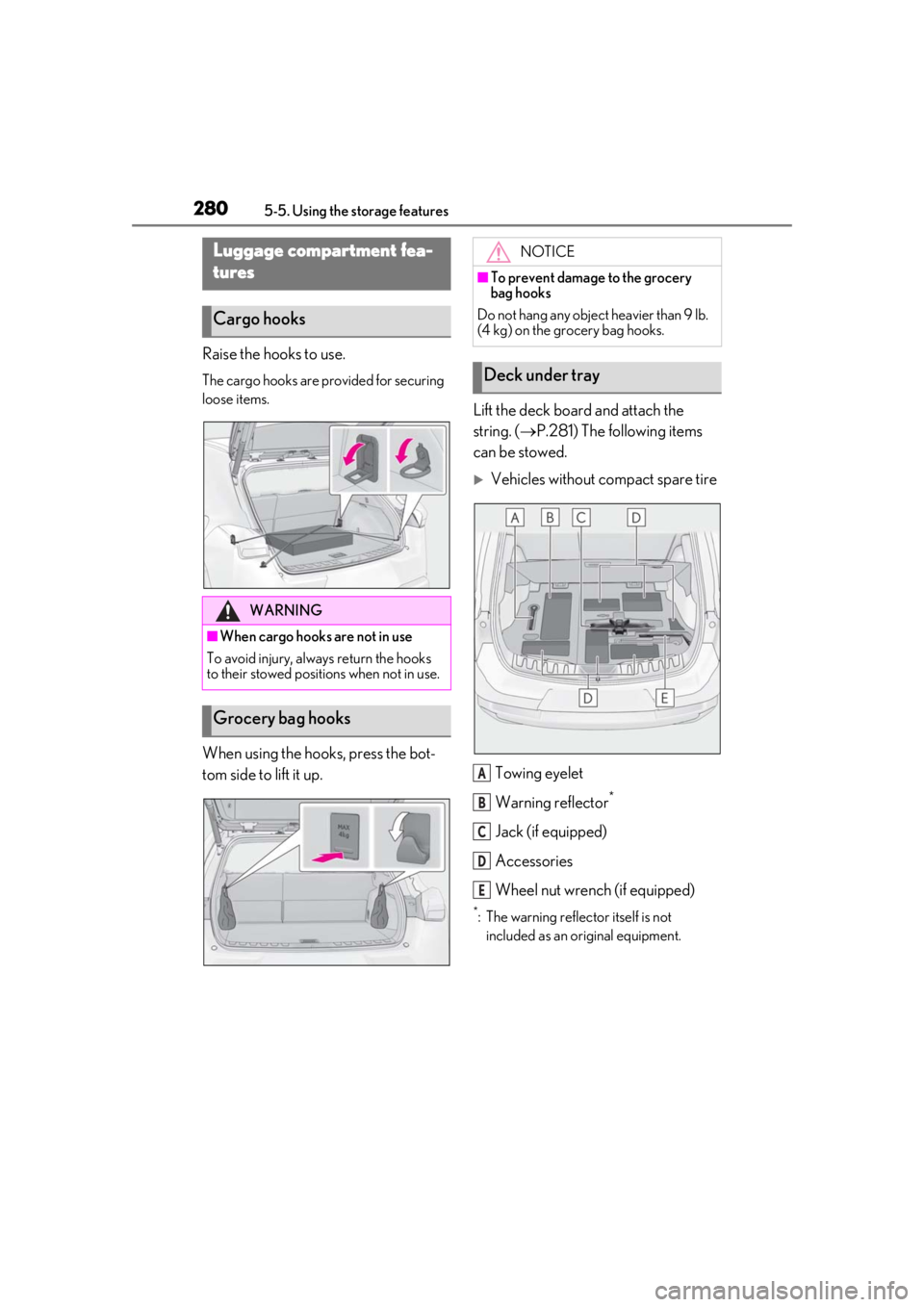
Raise the hooks to use.
The cargo hooks are provided for securing
loose items.
When using the hooks, press the bot-
tom side to lift it up.Lift the deck board and attach the
string. (
P.281) The following items
can be stowed.
Vehicles without compact spare tire
Towing eyelet
Warning reflector
*
Jack (if equipped)
Accessories
Wheel nut wrench (if equipped)
*: The warning reflec tor itself is not
included as an original equipment.
Luggage compartment fea-
tures
Cargo hooks
WARNING
■When cargo hooks are not in use
To avoid injury, always return the hooks
to their stowed positions when not in use.
Grocery bag hooks
NOTICE
■To prevent damage to the grocery
bag hooks
Do not hang any object heavier than 9 lb.
(4 kg) on the grocery bag hooks.
Deck under tray
A
B
C
D
E
Page 281 of 452
2815-5. Using the storage features
5
Interior features
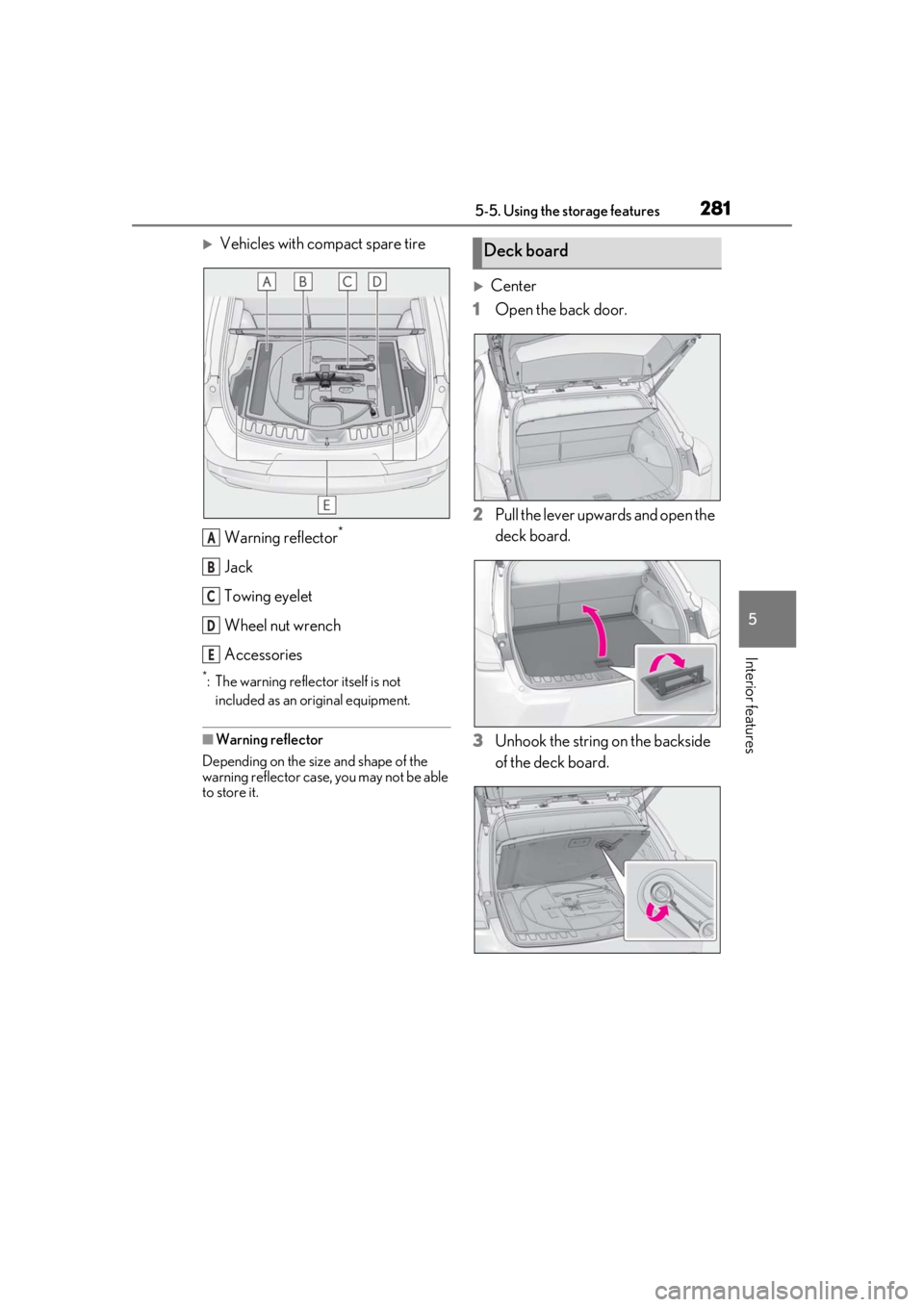
Vehicles with compact spare tireWarning reflector
*
Jack
Towing eyelet
Wheel nut wrench
Accessories
*: The warning reflector itself is not included as an original equipment.
■Warning reflector
Depending on the size and shape of the
warning reflector case, you may not be able
to store it.
Center
1 Open the back door.
2 Pull the lever upwards and open the
deck board.
3 Unhook the string on the backside
of the deck board.
A
B
C
D
E
Deck board
Page 282 of 452
2825-5. Using the storage features
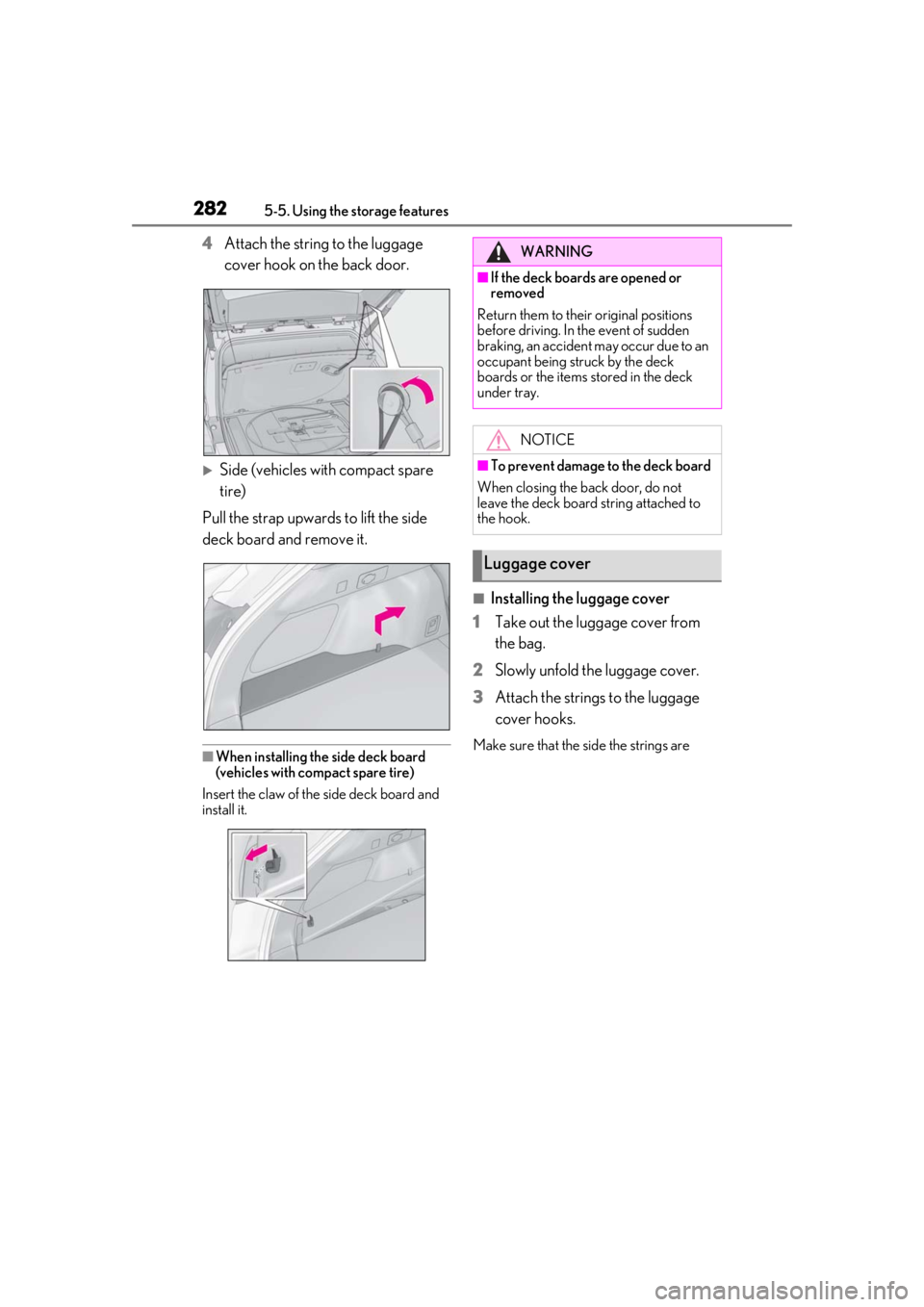
4Attach the string to the luggage
cover hook on the back door.
Side (vehicles with compact spare
tire)
Pull the strap upwards to lift the side
deck board and remove it.
■When installing the side deck board
(vehicles with compact spare tire)
Insert the claw of the side deck board and
install it.
■Installing the luggage cover
1
Take out the luggage cover from
the bag.
2
Slowly unfold the luggage cover.
3
Attach the strings to the luggage
cover hooks.
Make sure that the side the strings are
WARNING
■If the deck boards are opened or
removed
Return them to their original positions
before driving. In the event of sudden
braking, an accident may occur due to an
occupant being struck by the deck
boards or the items stored in the deck
under tray.
NOTICE
■To prevent damage to the deck board
When closing the back door, do not
leave the deck board string attached to
the hook.
Luggage cover
Page 283 of 452
2835-5. Using the storage features
5
Interior features
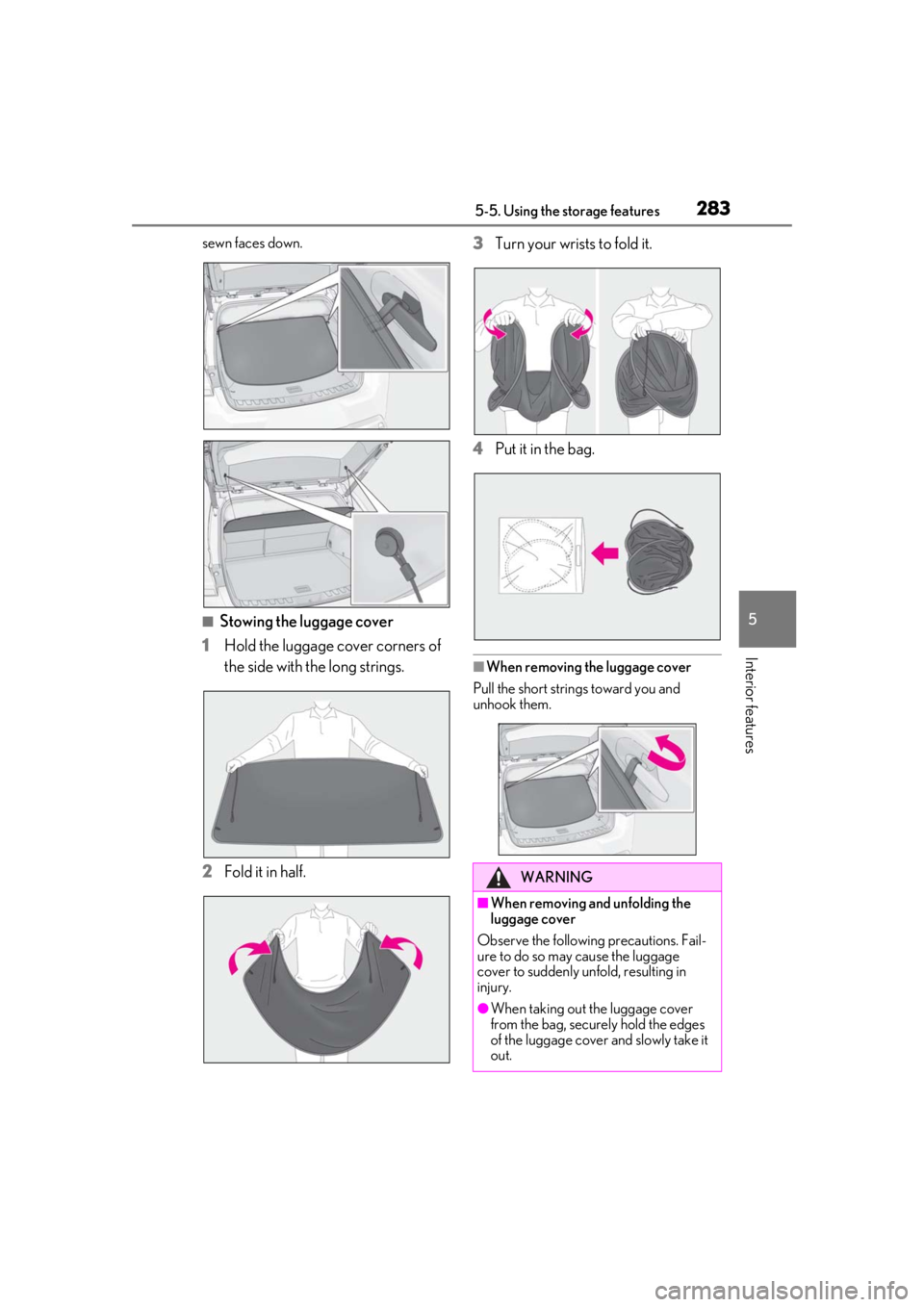
sewn faces down.
■Stowing the luggage cover
1
Hold the luggage cover corners of
the side with the long strings.
2
Fold it in half. 3
Turn your wrists
to fold it.
4
Put it in the bag.
■When removing the luggage cover
Pull the short strings toward you and
unhook them.
WARNING
■When removing and unfolding the
luggage cover
Observe the following precautions. Fail-
ure to do so may cause the luggage
cover to suddenly unfold, resulting in
injury.
●When taking out the luggage cover
from the bag, securely hold the edges
of the luggage cover and slowly take it
out.
Page 284 of 452
2845-5. Using the storage features
WARNING
●When unfolding the luggage cover,
hold it securely in both hands and
slowly unfold it.
●Do not unfold the luggage cover near
your face.
●When unfolding the luggage cover, do
not release your hand from the cover.
●Do not unfold the luggage cover near
other people.
■When installing the luggage cover
Observe the following precautions. Fail-
ure to do so may cause an accident.
●Make sure that the rear edge of the
luggage cover is laying flat to prevent
the driver’s view from being
obstructed.
●Make sure to attach the strings cor-
rectly.
NOTICE
■When using the luggage cover
●Do not place anything on the luggage
cover. Doing so may deform the lug-
gage cover.
●Do not open or close the back door
with the strings un hooked. Doing so
may cause damage to the luggage
cover.
●Do not hook anythi ng other than the
luggage cover and deck board strings
on the luggage cover hooks. The
hooks and back door may be dam-
aged.
Page 293 of 452
2935-6. Using the other interior features
5
Interior features
WARNING
■Caution while driving
When charging a portable device while
driving, for safety reasons, the driver
should not operate the portable device.
■Caution regarding interference with
electronic devices
People who use ca rdiac pacemakers
should use the wireless charger sepa-
rated from the installation part of the car-
diac pacemaker by 8.7 in. (22 cm) or
more.
■To prevent damage or burns
Observe the following precautions.
Failure to do so may result in the possibil-
ity of fire, equipment failure or damage,
or burns due to heat.
●Do not put any metallic objects
between the charging area and the
portable device while charging.
●Do not place containers with liquid
such as water on the wireless charger.
●Do not attach metallic objects, such as
aluminum stickers, to the charging
area.
●Do not cover the wireless charger with
a cloth or other obje ct while charging.
●Do not attempt to charge portable
devices which are not compatible with
the Qi wireless charging standard.
●Do not disassemble, modify or remove
the wireless charger.
●Do not apply force or impact to the
wireless charger.
NOTICE
■Conditions in which the wireless
charger may not operate correctly
In the following situations, the wireless
charger may not operate correctly:
●When a portable device is fully
charged
●When there is a foreign object
between the charging area and porta-
ble device
●When a portable device becomes hot
while charging
●When a portable device is placed on
the charging area with its charging sur-
face facing up
Page 295 of 452
2955-6. Using the other interior features
5
Interior features
An assist grip installed on the ceiling
can be used to support your body
while sitting on the seat.
*: If equipped
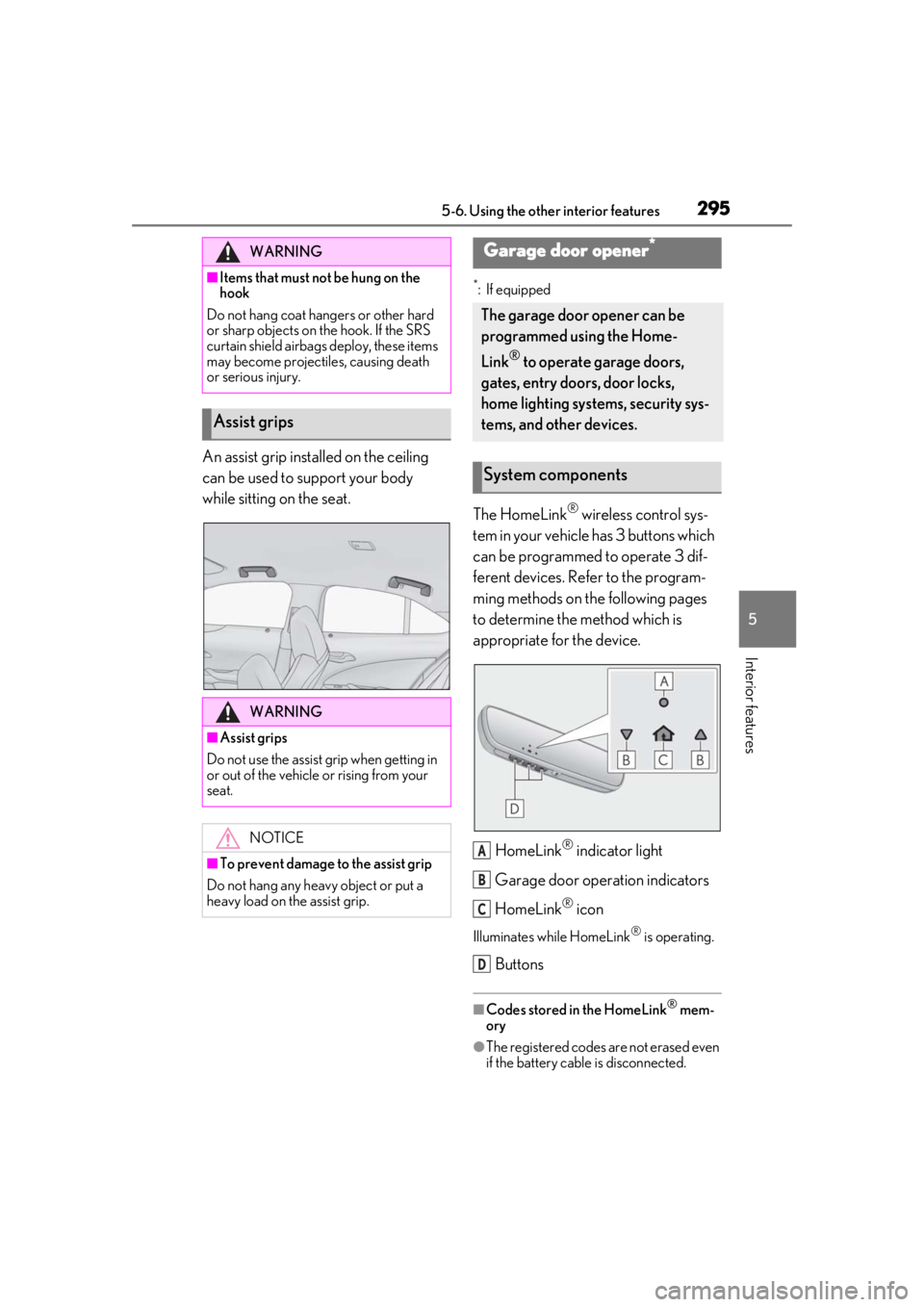
The HomeLink® wireless control sys-
tem in your vehicle has 3 buttons which
can be programmed to operate 3 dif-
ferent devices. Refer to the program-
ming methods on the following pages
to determine the method which is
appropriate for the device.
HomeLink
® indicator light
Garage door operation indicators
HomeLink
® icon
Illuminates while HomeLink® is operating.
Buttons
■Codes stored in the HomeLink® mem-
ory
●The registered codes are not erased even
if the battery cable is disconnected.
WARNING
■Items that must not be hung on the
hook
Do not hang coat hangers or other hard
or sharp objects on the hook. If the SRS
curtain shield airbags deploy, these items
may become projectiles, causing death
or serious injury.
Assist grips
WARNING
■Assist grips
Do not use the assist grip when getting in
or out of the vehicle or rising from your
seat.
NOTICE
■To prevent damage to the assist grip
Do not hang any heavy object or put a
heavy load on th e assist grip.
Garage door opener*
The garage door opener can be
programmed using the Home-
Link
® to operate garage doors,
gates, entry doors, door locks,
home lighting systems, security sys-
tems, and other devices.
System components
A
B
C
D