set LEXUS UX200 2019 Workshop Manual
[x] Cancel search | Manufacturer: LEXUS, Model Year: 2019, Model line: UX200, Model: LEXUS UX200 2019Pages: 452, PDF Size: 10.06 MB
Page 155 of 452
1554-2. Driving procedures
4
Driving
If the engine is stopped with the shift
lever in a position other than P, the
engine switch will not be turned off but
instead be turned to ACC. Perform the
following procedure to turn the switch
off:
1
Check that the parking brake is set.
2
Shift the shift lever to P.
3
Check that “Turn Power Off” is dis-
played on the multi-information dis-
play and then press the engine
switch shortly and firmly once.
4
Check that “Turn Power Off” on the
multi-information display is off.
*1: To improve fuel efficiency and reduce noise, shift the shift lever to D for normal
driving.
*2: Selecting gear steps using the M posi-tion achieves suitable engine braking
forces by operating the shift lever or
paddle shift switch es (if equipped).
■Reverse warning buzzer
When shifting into R, a buzzer will sound to
inform the driver that the shift lever is in R.
■To protect the transmission
If the automatic transmission fluid tempera-
ture is high, “Transmission Oil Temp. High
Stop in a safe place and See owner’s man-
ual” will be displayed on the multi-informa-
tion display and the vehicle will go into
transmission protection mode automati-
cally. Have the vehicle inspected by your
NOTICE
■To prevent battery discharge
●Do not leave the engine switch in ACC
or ON for long periods of time without
the engine running.
●If “ACCESSORY” or “IGNITION
ON” is displayed on the multi-informa-
tion display while the engine is not run-
ning, the engine switch is not OFF. Exit
the vehicle after turning the engine
switch off.
●Do not stop the engine when the shift
lever is in a position other than P. If the
engine is stopped in another shift lever
position, the engine switch will not be
turned off but instead be turned to
ACC. If the vehicle is left in ACC, bat-
tery discharge may occur.
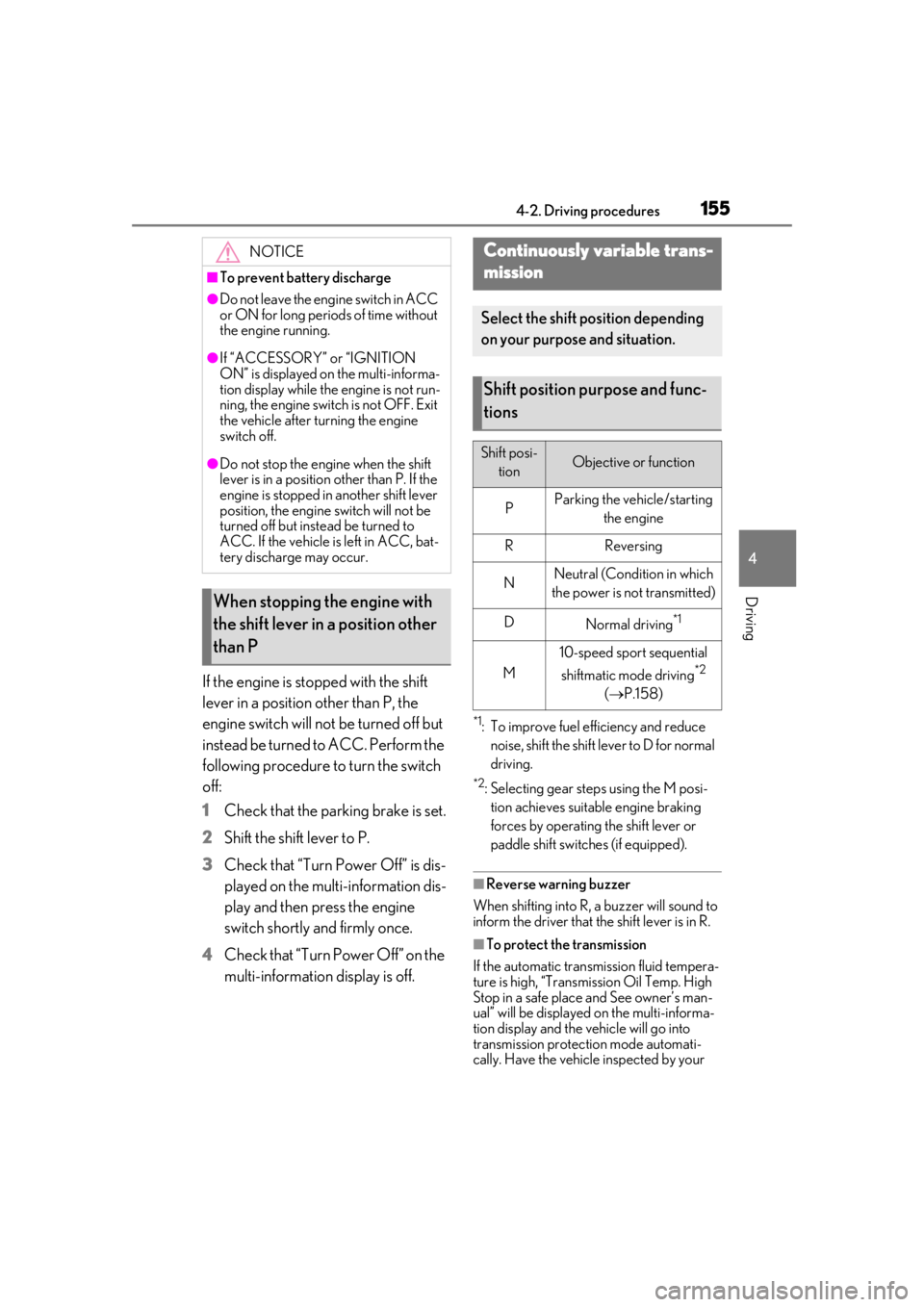
When stopping the engine with
the shift lever in a position other
than P
Continuously variable trans-
mission
Select the shift position depending
on your purpose and situation.
Shift position purpose and func-
tions
Shift posi-
tionObjective or function
PParking the vehicle/starting the engine
RReversing
NNeutral (Condition in which
the power is not transmitted)
DNormal driving*1
M
10-speed sport sequential
shiftmatic mode driving
*2
( P.158)
Page 156 of 452
1564-2. Driving procedures
Lexus dealer.
■Continuously variable transmission fail-
safe control
The system detects ma lfunctioning parts
targeted (all of the so lenoids that perform
the shifting function) by the On-Board
Diagnostics, and performs fail-safe mecha-
nisms, such as restrict ing the shifting func-
tion or transmission ratio control. In this
event, the malfunction indicator lamp turns
on.
■When driving with dynamic radar cruise
control with full-speed range activated
Even when switching the driving mode to
Sport mode while driving in D position
( P.243) with the intent of enabling engine
braking, engine braking will not activate
because radar cruise control with full-
speed range will not be canceled.
■Restraining sudden start (Drive-Start
Control)
P.143
■AI-SHIFT
AI-SHIFT automatically selects the suitable
gear step according to driver performance
and driving conditions.
AI-SHIFT automatically operates when the
driving mode is set to Normal mode with
the shift lever in the D position. (Shifting the
shift lever to the M position cancels the
function.)
■G AI-SHIFT
G AI-SHIFT automatically selects the suit-
able gear step according to driver’s input
and driving conditions. G AI-SHIFT oper-
ates automatically when the shift lever is in
the D position and Sport mode is selected
for the driving mode. (Selecting normal
mode or shifting the shift lever to the M
position cancels the function.)
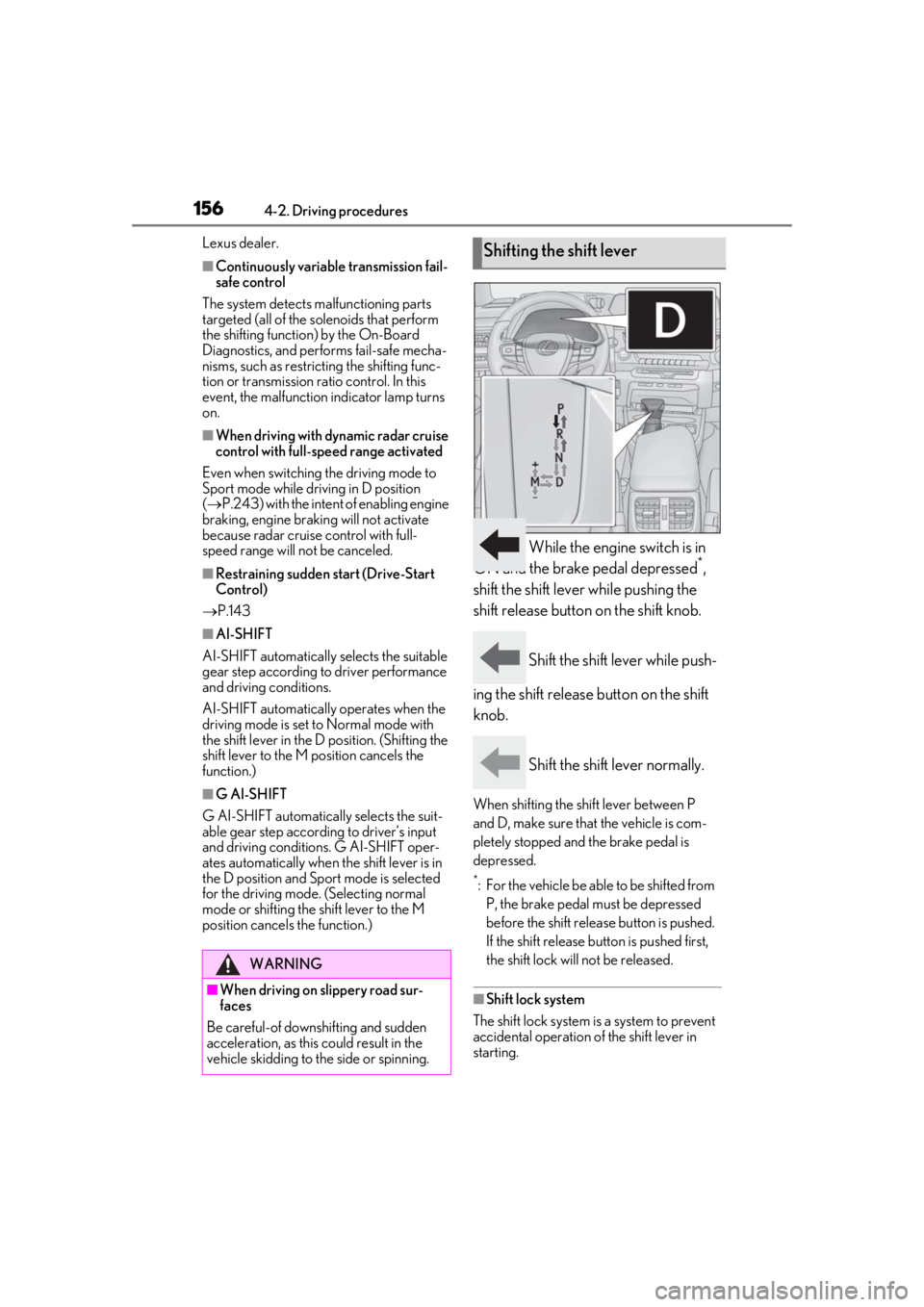
While the engine switch is in
ON and the brake pedal depressed*,
shift the shift lever while pushing the
shift release button on the shift knob.
Shift the shift lever while push-
ing the shift release button on the shift
knob.
Shift the shift lever normally.
When shifting the shift lever between P
and D, make sure that the vehicle is com-
pletely stopped and the brake pedal is
depressed.
*: For the vehicle be able to be shifted from P, the brake pedal must be depressed
before the shift releas e button is pushed.
If the shift release button is pushed first,
the shift lock will not be released.
■Shift lock system
The shift lock system is a system to prevent
accidental operation of the shift lever in
starting.
WARNING
■When driving on slippery road sur-
faces
Be careful-of downshifting and sudden
acceleration, as this could result in the
vehicle skidding to the side or spinning.
Shifting the shift lever
Page 157 of 452
1574-2. Driving procedures
4
Driving
The shift lever can be shifted from P only
when the engine switch is in ON, the brake
pedal is depressed and the shift release but-
ton is pushed.
■If the shift lever cannot be shifted from P
First, check whether the brake pedal is
being depressed.
If the shift lever cannot be shifted even
though the brake pedal is depressed and
the shift release button is pushed, there may
be a problem with the shift lock system.
Have the vehicle inspected by your Lexus
dealer immediately.
The following steps may be used as an
emergency measure to ensure that the shift
lever can be shifted.
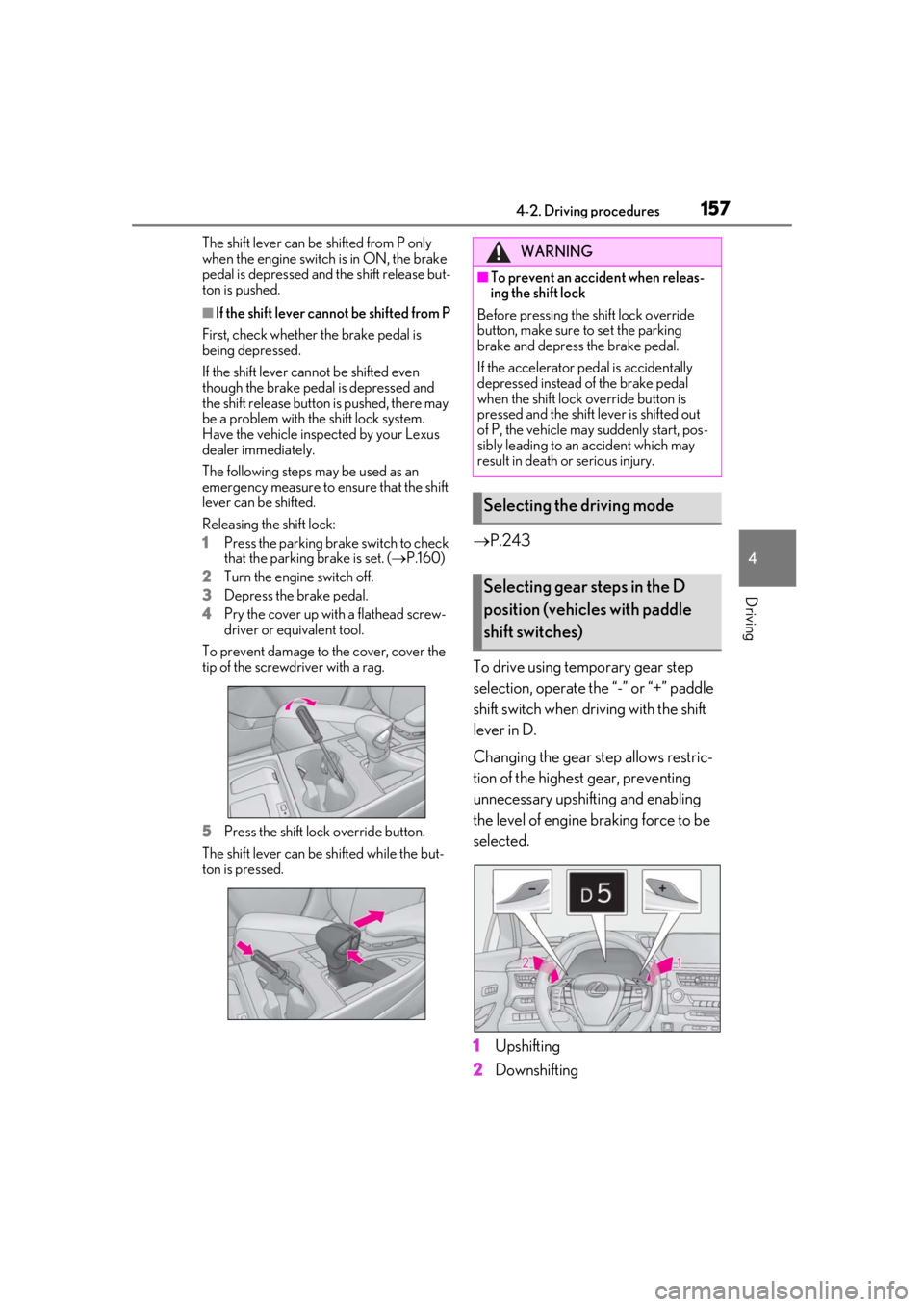
Releasing the shift lock:
1
Press the parking brake switch to check
that the parking brake is set. ( P.160)
2
Turn the engine switch off.
3
Depress the brake pedal.
4
Pry the cover up with a flathead screw-
driver or equivalent tool.
To prevent damage to the cover, cover the
tip of the screwd river with a rag.
5
Press the shift lock override button.
The shift lever can be shifted while the but-
ton is pressed.
P.243
To drive using temporary gear step
selection, operate the “-” or “+” paddle
shift switch when driving with the shift
lever in D.
Changing the gear step allows restric-
tion of the highest gear, preventing
unnecessary upshifting and enabling
the level of engine braking force to be
selected.
1
Upshifting
2
Downshifting
WARNING
■To prevent an accident when releas-
ing the shift lock
Before pressing the shift lock override
button, make sure to set the parking
brake and depress the brake pedal.
If the accelerator pe dal is accidentally
depressed instead of the brake pedal
when the shift lock override button is
pressed and the shift lever is shifted out
of P, the vehicle may suddenly start, pos-
sibly leading to an accident which may
result in death or serious injury.
Selecting the driving mode
Selecting gear steps in the D
position (vehicles with paddle
shift switches)
Page 159 of 452
1594-2. Driving procedures
4
Driving
●When the vehicle is stopped, the trans-
mission is set at M1.
■Downshifting restriction warning
buzzer
To help ensure safety and driving perfor-
mance, downshifting operation may some-
times be restricted. In some circumstances,
downshifting may not be possible even
when the shift lever or paddle shift switch (if
equipped) is operated. (A buzzer will sound
twice.)
■If the “M” indicator does not come on or
the “D” indicator is displayed even after
shifting the shift lever to M
This may indicate a malfunction in the auto-
matic transmission system. Have the vehicle
inspected by your Lexus dealer.
(In this situation, the transmission will oper-
ate in the same manner as when the shift
lever is in D.)
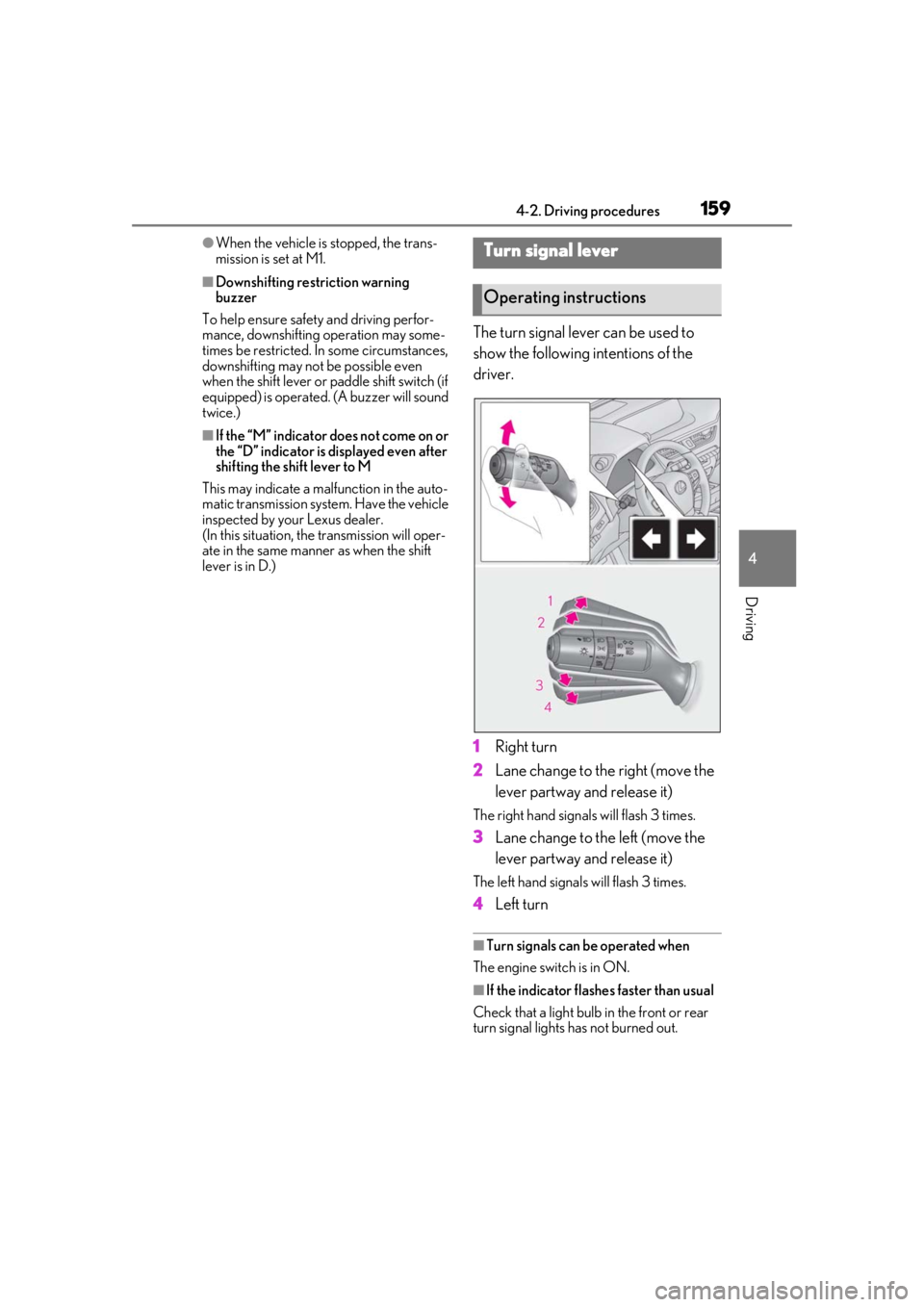
The turn signal lever can be used to
show the following intentions of the
driver.
1 Right turn
2 Lane change to the right (move the
lever partway and release it)
The right hand signals will flash 3 times.
3Lane change to the left (move the
lever partway and release it)
The left hand signals will flash 3 times.
4Left turn
■Turn signals can be operated when
The engine switch is in ON.
■If the indicator flashes faster than usual
Check that a light bulb in the front or rear
turn signal lights has not burned out.
Turn signal lever
Operating instructions
Page 160 of 452
1604-2. Driving procedures
■If the turn signals stop flashing before a
lane change has been performed
Operate the lever again.
■Using the manual mode
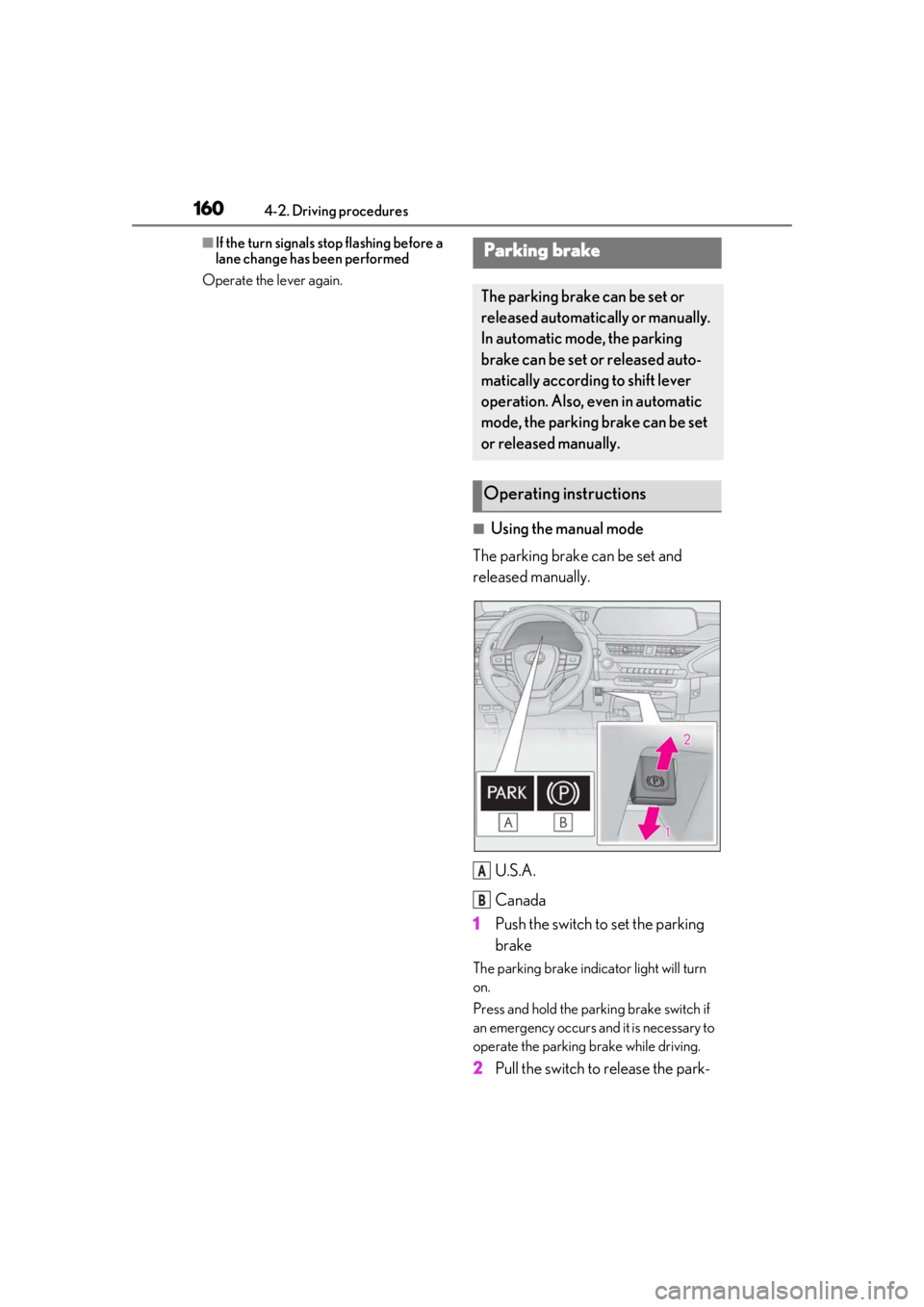
The parking brake can be set and
released manually.
U.S.A.
Canada
1 Push the switch to set the parking
brake
The parking brake indi cator light will turn
on.
Press and hold the parking brake switch if
an emergency occurs and it is necessary to
operate the parking brake while driving.
2 Pull the switch to release the park-
Parking brake
The parking brake can be set or
released automatically or manually.
In automatic mode, the parking
brake can be set or released auto-
matically according to shift lever
operation. Also, even in automatic
mode, the parking brake can be set
or released manually.
Operating instructions
A
B
Page 161 of 452
1614-2. Driving procedures
4
Driving
ing brake
• Operate the parking brake switch while depressing the brake pedal.
• Using the parking brake automatic release function, the parking brake can
be released by depressing the accelera-
tor pedal. When using this function,
slowly depress the accelerator pedal.
Make sure that the pa rking brake indicator
light turn off.
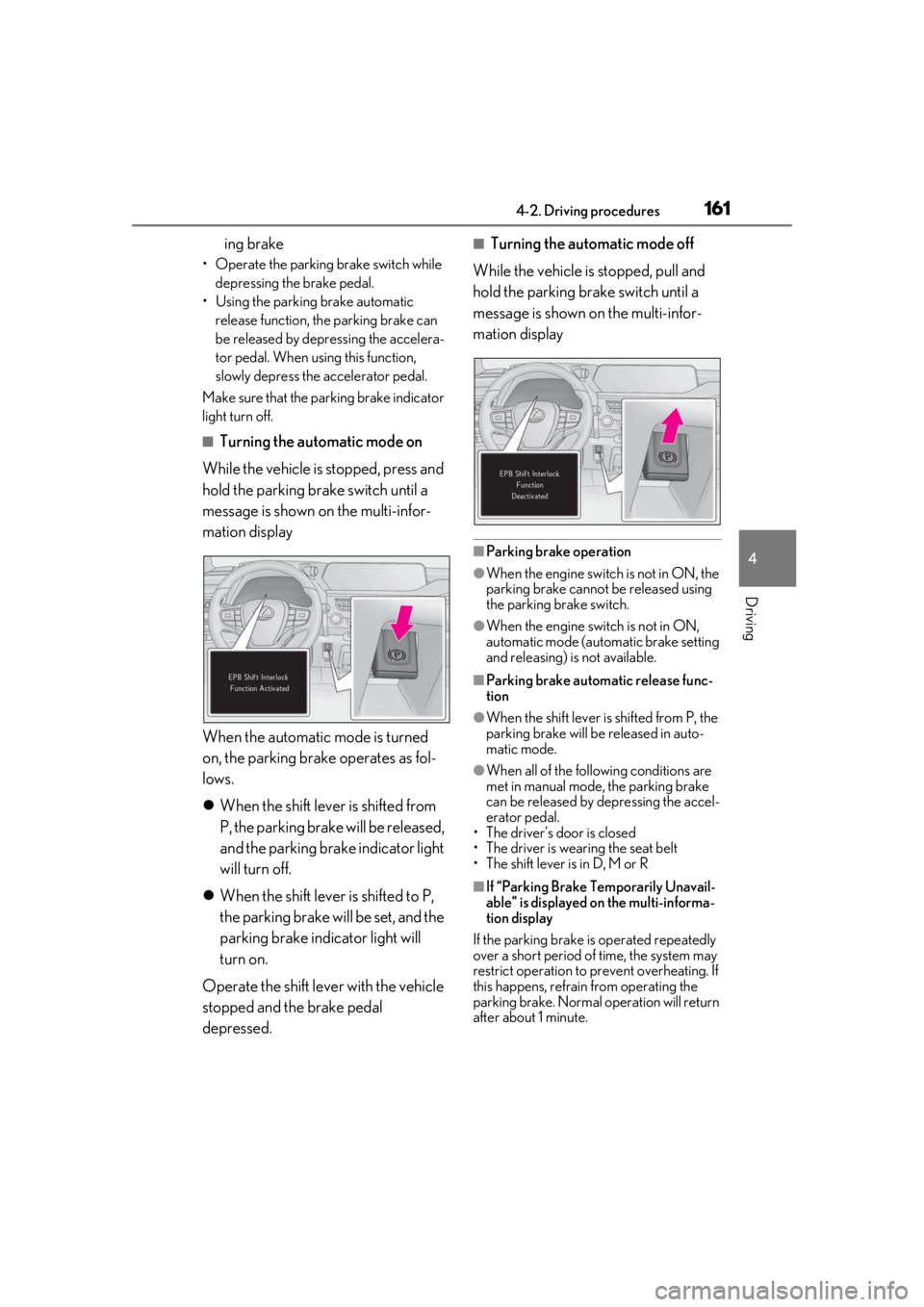
■Turning the automatic mode on
While the vehicle is stopped, press and
hold the parking brake switch until a
message is shown on the multi-infor-
mation display
When the automatic mode is turned
on, the parking brake operates as fol-
lows.
When the shift lever is shifted from
P, the parking brake will be released,
and the parking brake indicator light
will turn off.
When the shift lever is shifted to P,
the parking brake will be set, and the
parking brake indicator light will
turn on.
Operate the shift lever with the vehicle
stopped and the brake pedal
depressed.
■Turning the automatic mode off
While the vehicle is stopped, pull and
hold the parking brake switch until a
message is shown on the multi-infor-
mation display
■Parking brake operation
●When the engine switch is not in ON, the
parking brake cannot be released using
the parking brake switch.
●When the engine switch is not in ON,
automatic mode (automatic brake setting
and releasing) is not available.
■Parking brake automatic release func-
tion
●When the shift lever is shifted from P, the
parking brake will be released in auto-
matic mode.
●When all of the follo wing conditions are
met in manual mode, the parking brake
can be released by depressing the accel-
erator pedal.
• The driver’s door is closed
• The driver is wearing the seat belt
• The shift lever is in D, M or R
■If “Parking Brake Temporarily Unavail-
able” is displayed on the multi-informa-
tion display
If the parking brake is operated repeatedly
over a short period of time, the system may
restrict operation to prevent overheating. If
this happens, refrain from operating the
parking brake. Normal operation will return
after about 1 minute.
Page 162 of 452
1624-2. Driving procedures
■If “Parking Brake Unavailable” or “EPB
Unavailable” is displayed on the multi-
information display
Operate the parking brake switch. If the
message does not disappear after operat-
ing the switch several times, the system may
be malfunctioning. Have the vehicle
inspected by your Lexus dealer.
■Parking brake operation sound
When the parking brake operates, a motor
sound (whirring sound) may be heard. This
does not indicate a malfunction.
■Parking brake indicator light
●Depending on the engine switch mode,
the parking brake indi cator light will turn
on and stay on as described below:
ON: Comes on until the parking brake is
released.
Not in ON: Stays on for approximately 15
seconds.
●When the engine switch is turned off with
the parking brake set, the parking brake
indicator light will stay on for about 15
seconds. This does not indicate a mal-
function.
■When the parking brake switch mal-
functions
Automatic mode (automatic brake setting
and releasing) will be turned on automati-
cally.
■Parking the vehicle
P.142
■Parking brake engaged warning buzzer
A buzzer will sound if the vehicle is driven
with the parking brake engaged. “EPB
Applied” is displayed on the multi-informa-
tion display (with the vehicle reached a
speed of 3 mph [5 km/h]).
■If the brake system warning light comes
on
P.358
■Usage in winter time
P.249
WARNING
■When parking the vehicle
Do not leave a child in the vehicle alone.
The parking brake may be released unin-
tentionally and there is the danger of the
vehicle moving that may lead to an acci-
dent resulting in death or serious injury.
NOTICE
■When parking the vehicle
Before you leave the vehicle, shift the
shift lever to P, set the parking brake and
make sure that the vehicle does not
move.
■When the system malfunctions
Stop the vehicle in a safe place and
check the warning messages.
■When the parking brake cannot be
released due to a malfunction
Driving the vehicle with the parking
brake set will lead to brake components
overheating, which may affect braking
performance and increase brake wear.
Have the vehicle inspected by your
Lexus dealer immediately if this occurs.
Page 163 of 452
1634-2. Driving procedures
4
Driving
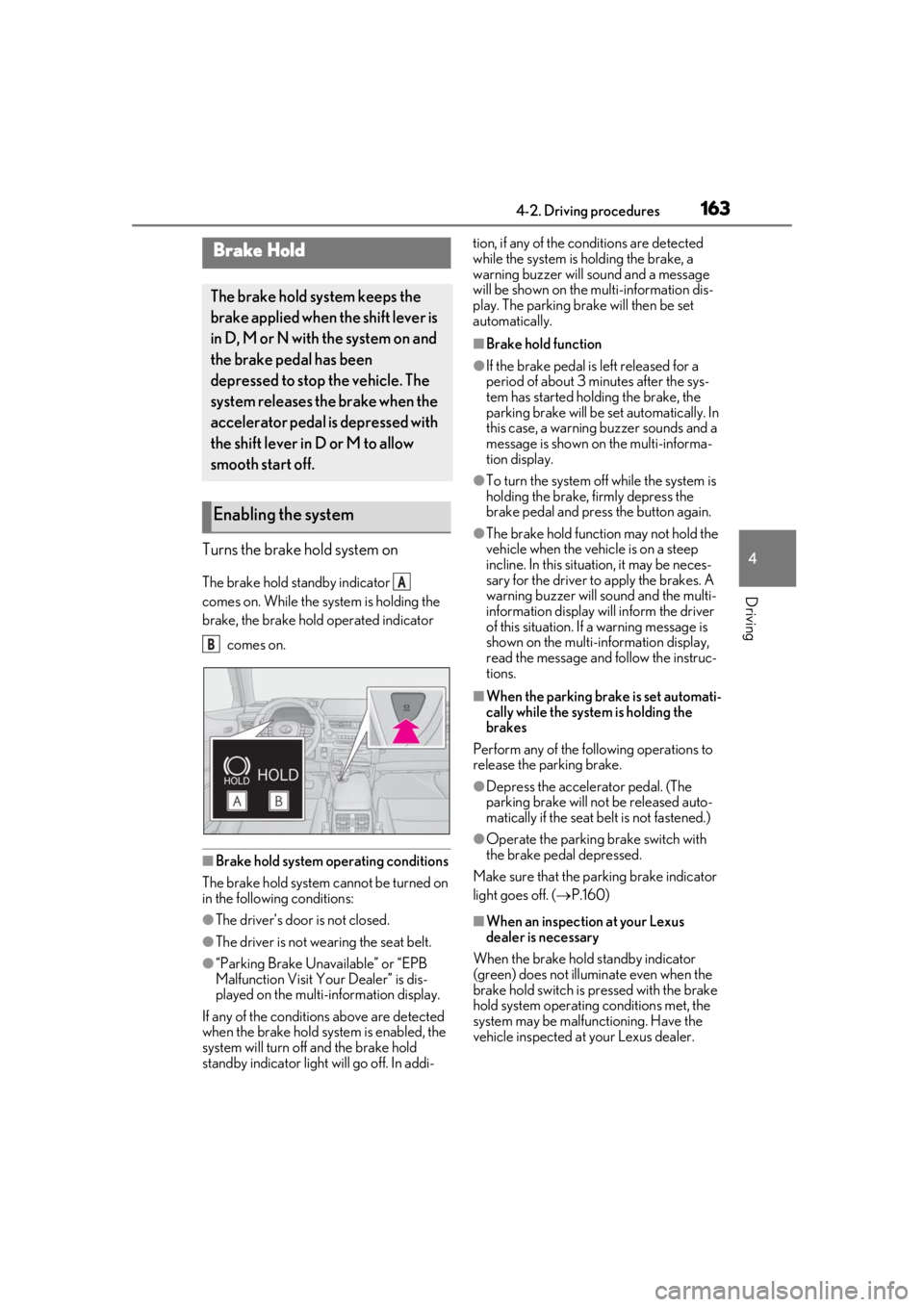
Turns the brake hold system on
The brake hold standby indicator
comes on. While the system is holding the
brake, the brake hold operated indicator comes on.
■Brake hold system operating conditions
The brake hold system cannot be turned on
in the following conditions:
●The driver’s door is not closed.
●The driver is not wearing the seat belt.
●“Parking Brake Unavailable” or “EPB
Malfunction Visit Your Dealer” is dis-
played on the multi- information display.
If any of the conditions above are detected
when the brake hold system is enabled, the
system will turn off and the brake hold
standby indicator light will go off. In addi- tion, if any of the co
nditions are detected
while the system is holding the brake, a
warning buzzer will sound and a message
will be shown on the multi-information dis-
play. The parking brake will then be set
automatically.
■Brake hold function
●If the brake pedal is left released for a
period of about 3 mi nutes after the sys-
tem has started holding the brake, the
parking brake will be set automatically. In
this case, a warning buzzer sounds and a
message is shown on the multi-informa-
tion display.
●To turn the system off while the system is
holding the brake, firmly depress the
brake pedal and press the button again.
●The brake hold function may not hold the
vehicle when the vehicle is on a steep
incline. In this situation, it may be neces-
sary for the driver to apply the brakes. A
warning buzzer will sound and the multi-
information display will inform the driver
of this situation. If a warning message is
shown on the multi-information display,
read the message and follow the instruc-
tions.
■When the parking brake is set automati-
cally while the system is holding the
brakes
Perform any of the following operations to
release the parking brake.
●Depress the accelerator pedal. (The
parking brake will not be released auto-
matically if the seat belt is not fastened.)
●Operate the parking brake switch with
the brake pedal depressed.
Make sure that the pa rking brake indicator
light goes off. ( P.160)
■When an inspection at your Lexus
dealer is necessary
When the brake hold standby indicator
(green) does not illuminate even when the
brake hold switch is pressed with the brake
hold system operating conditions met, the
system may be malfun ctioning. Have the
vehicle inspected at your Lexus dealer.
Brake Hold
The brake hold system keeps the
brake applied when the shift lever is
in D, M or N with the system on and
the brake pedal has been
depressed to stop the vehicle. The
system releases the brake when the
accelerator pedal is depressed with
the shift lever in D or M to allow
smooth start off.
Enabling the system
A
B
Page 164 of 452
1644-2. Driving procedures
■If “Brake Hold Fault Depress Brake to
Deactivate Visit Your Dealer” or “Brake
Hold Malfunction Visit Your Dealer” is
displayed on the multi-information dis-
play
The system may be malfunctioning. Have
the vehicle inspected by your Lexus dealer.
■Warning messages and buzzers
Warning messages and buzzers are used to
indicate a system malfunction or to inform
the driver of the need for caution. If a warn-
ing message is shown on the multi-informa-
tion display, read the message and follow
the instructions.
■If the brake hold operated indicator
flashes
P.361
*: If equipped
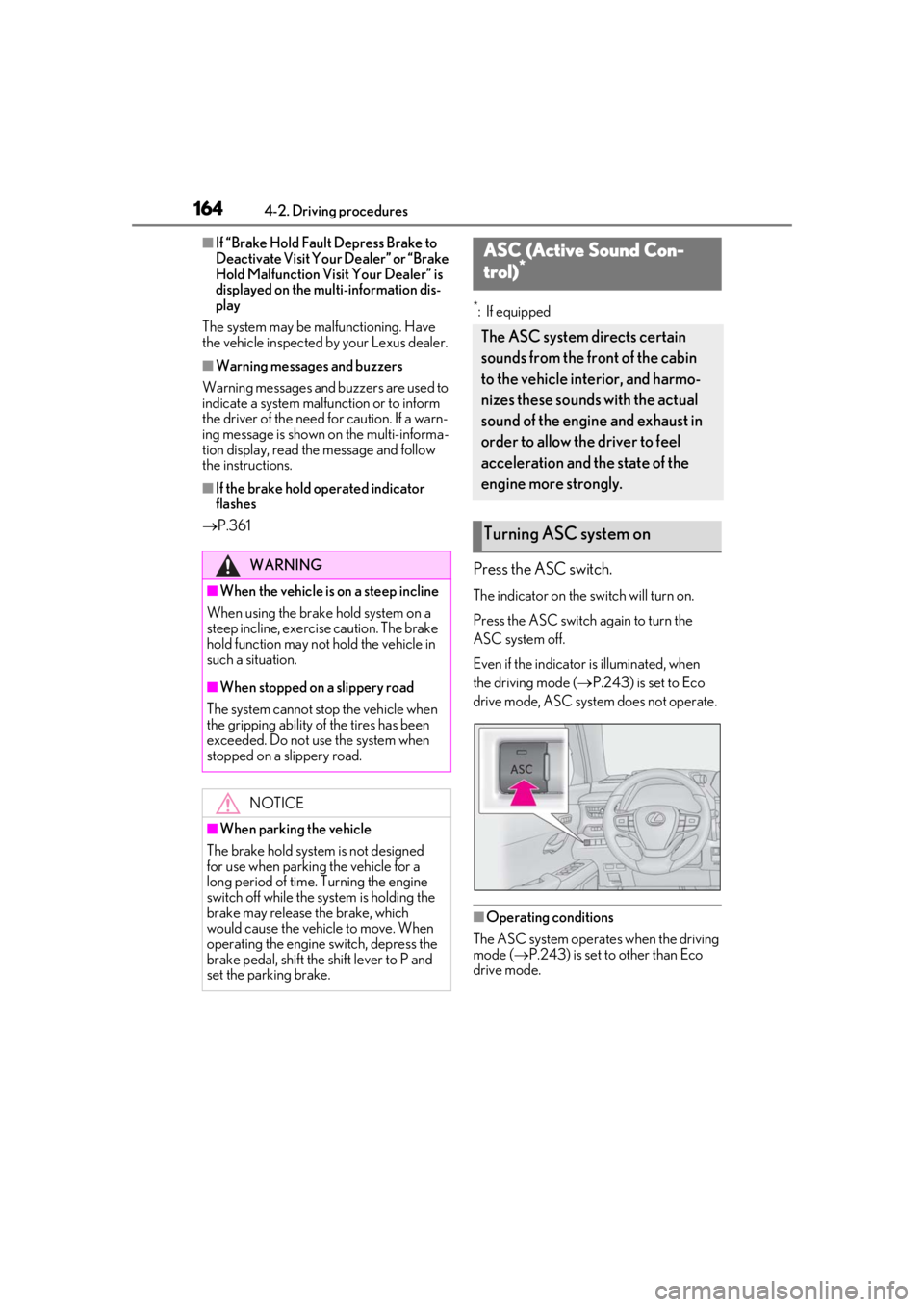
Press the ASC switch.
The indicator on the switch will turn on.
Press the ASC switch again to turn the
ASC system off.
Even if the indicator is illuminated, when
the driving mode ( P.243) is set to Eco
drive mode, ASC system does not operate.
■Operating conditions
The ASC system operates when the driving
mode ( P.243) is set to other than Eco
drive mode.
WARNING
■When the vehicle is on a steep incline
When using the brake hold system on a
steep incline, exercise caution. The brake
hold function may not hold the vehicle in
such a situation.
■When stopped on a slippery road
The system cannot stop the vehicle when
the gripping ability of the tires has been
exceeded. Do not use the system when
stopped on a slippery road.
NOTICE
■When parking the vehicle
The brake hold system is not designed
for use when parking the vehicle for a
long period of time. Turning the engine
switch off while the system is holding the
brake may release the brake, which
would cause the vehicle to move. When
operating the engine switch, depress the
brake pedal, shift the shift lever to P and
set the parking brake.
ASC (Active Sound Con-
trol)*
The ASC system directs certain
sounds from the front of the cabin
to the vehicle interior, and harmo-
nizes these sounds with the actual
sound of the engine and exhaust in
order to allow the driver to feel
acceleration and the state of the
engine more strongly.
Turning ASC system on
Page 165 of 452
1654-3. Operating the lights and wipers
4
Driving
4-3.Operating the lights and wipers
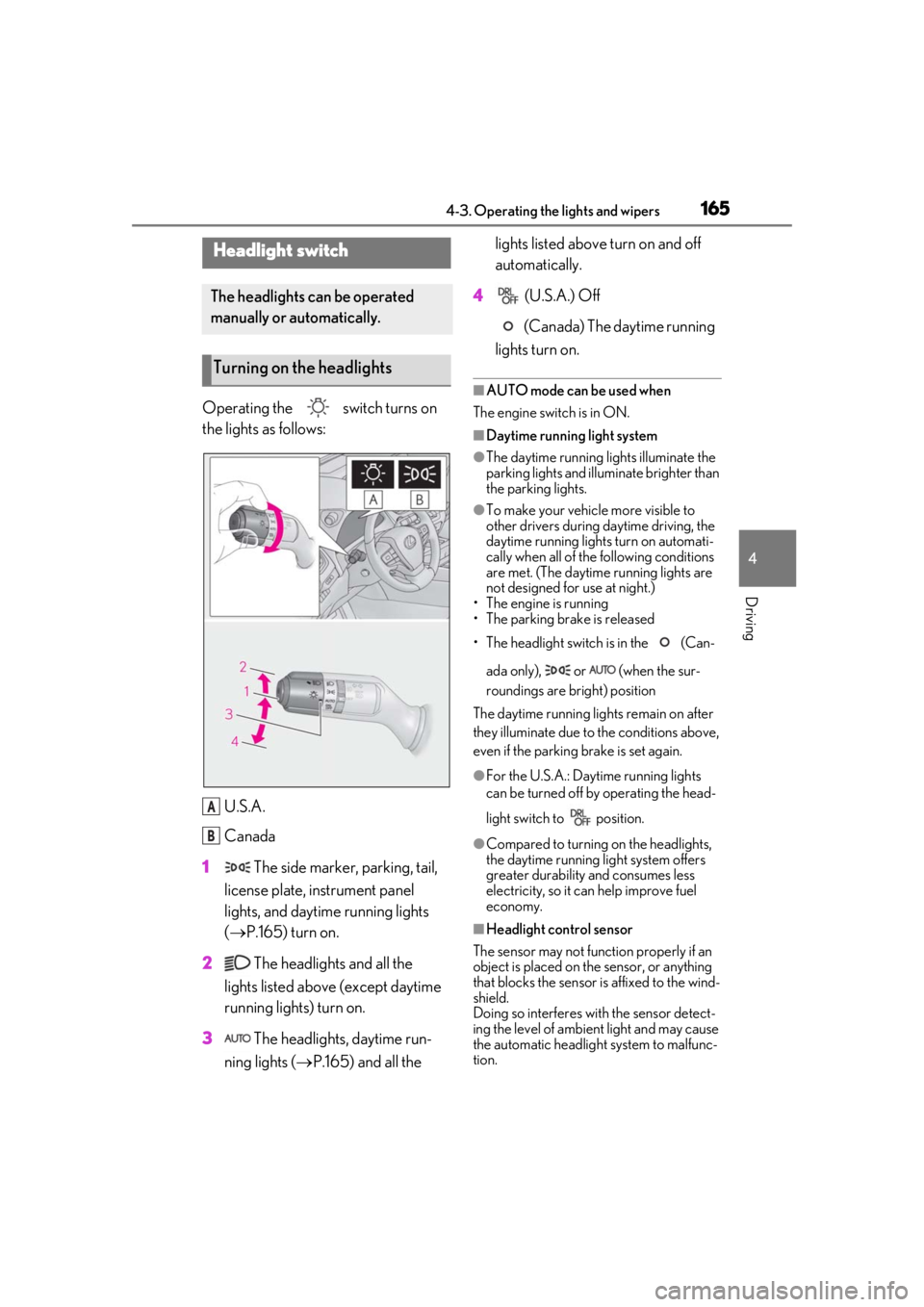
Operating the switch turns on
the lights as follows:U.S.A.
Canada
1 The side marker, parking, tail,
license plate, instrument panel
lights, and daytime running lights
( P.165) turn on.
2 The headlights and all the
lights listed above (except daytime
running lights) turn on.
3 The headlights, daytime run-
ning lights ( P.165) and all the lights listed above turn on and off
automatically.
4 (U.S.A.) Off
(Canada) The daytime running
lights turn on.
■AUTO mode can be used when
The engine switch is in ON.
■Daytime running light system
●The daytime running lights illuminate the
parking lights and illuminate brighter than
the parking lights.
●To make your vehicle more visible to
other drivers during daytime driving, the
daytime running lights turn on automati-
cally when all of the following conditions
are met. (The daytime running lights are
not designed for use at night.)
• The engine is running
• The parking brake is released
• The headlight switch is in the (Can-
ada only), or (when the sur-
roundings are bright) position
The daytime running lights remain on after
they illuminate due to the conditions above,
even if the parking brake is set again.
●For the U.S.A.: Daytime running lights
can be turned off by operating the head-
light switch to position.
●Compared to turning on the headlights,
the daytime running light system offers
greater durability and consumes less
electricity, so it can help improve fuel
economy.
■Headlight control sensor
The sensor may not function properly if an
object is placed on the sensor, or anything
that blocks the sensor is affixed to the wind-
shield.
Doing so interferes with the sensor detect-
ing the level of ambien t light and may cause
the automatic headlight system to malfunc-
tion.
Headlight switch
The headlights can be operated
manually or automatically.
Turning on the headlights
A
B