warning light LEXUS UX200 2019 Repair Manual
[x] Cancel search | Manufacturer: LEXUS, Model Year: 2019, Model line: UX200, Model: LEXUS UX200 2019Pages: 452, PDF Size: 10.06 MB
Page 295 of 452
2955-6. Using the other interior features
5
Interior features
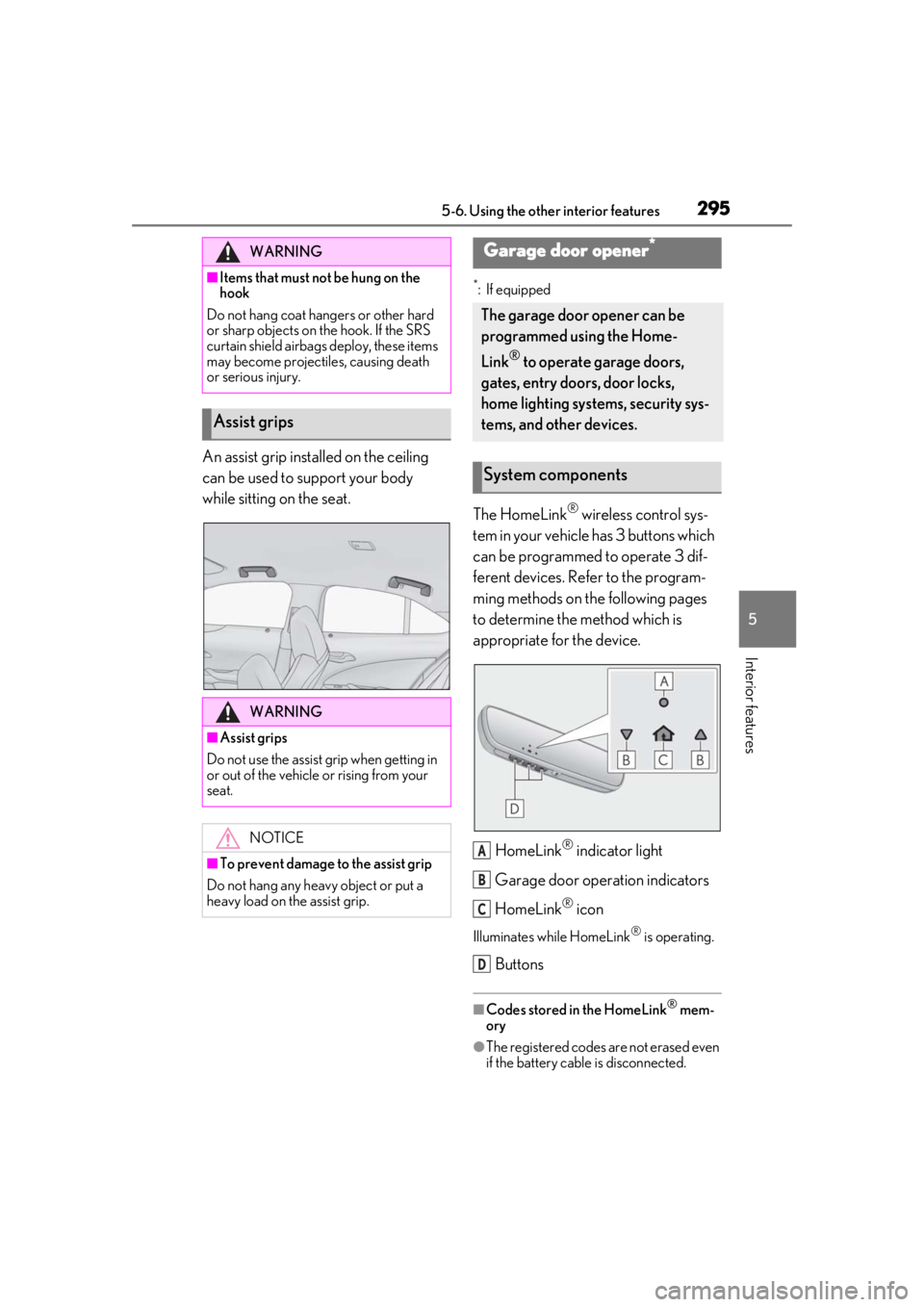
An assist grip installed on the ceiling
can be used to support your body
while sitting on the seat.
*: If equipped
The HomeLink® wireless control sys-
tem in your vehicle has 3 buttons which
can be programmed to operate 3 dif-
ferent devices. Refer to the program-
ming methods on the following pages
to determine the method which is
appropriate for the device.
HomeLink
® indicator light
Garage door operation indicators
HomeLink
® icon
Illuminates while HomeLink® is operating.
Buttons
■Codes stored in the HomeLink® mem-
ory
●The registered codes are not erased even
if the battery cable is disconnected.
WARNING
■Items that must not be hung on the
hook
Do not hang coat hangers or other hard
or sharp objects on the hook. If the SRS
curtain shield airbags deploy, these items
may become projectiles, causing death
or serious injury.
Assist grips
WARNING
■Assist grips
Do not use the assist grip when getting in
or out of the vehicle or rising from your
seat.
NOTICE
■To prevent damage to the assist grip
Do not hang any heavy object or put a
heavy load on th e assist grip.
Garage door opener*
The garage door opener can be
programmed using the Home-
Link
® to operate garage doors,
gates, entry doors, door locks,
home lighting systems, security sys-
tems, and other devices.
System components
A
B
C
D
Page 308 of 452
3086-1. Maintenance and care
WARNING
●Lexus Safety System+2.0
●BSM (if equipped)
●RCTA (if equipped)
●PKSB (if equipped)NOTICE
■To prevent paint deterioration and
corrosion on the body and compo-
nents (aluminum wheels, etc.)
●Wash the vehicle immediately in the
following cases:
• After driving near the sea coast
• After driving on salted roads
• If coal tar or tree sap is present on the paint surface
• If dead insects, insect droppings or bird droppings are present on the
paint surface
• After driving in an area contaminated with soot, oily smoke, mine dust, iron
powder or chemical substances
• If the vehicle becomes heavily soiled with dust or mud
• If liquids such as benzene and gasoline are spilled on the paint surface
●If the paint is chip ped or scratched,
have it repaired immediately.
●To prevent the wheels from corroding,
remove any dirt and store in a place
with low humidity when storing the
wheels.
■Cleaning the exterior lights
●Wash carefully. Do not use organic
substances or scrub with a hard brush.
This may damage the surfaces of the
lights.
●Do not apply wax to the surfaces of the
lights.
Wax may cause damage to the lenses.
■When using an automatic car wash
(vehicles with rain-sensing windshield
wipers)
Set the wiper switch to the off position.
If the wiper switch is in AUTO, the wipers
may operate and the wiper blades may
be damaged.
■When using a high pressure car wash
●When washing the vehicle, do not let
water of the high pressure washer hit
directly or the vicinity of the camera.
Due to the shock from the high pres-
sure water, it is possible the device may
not operate as normal.
●Do not bring the nozzle tip close to
boots (rubber or resin manufactured
cover), connectors or the following
parts. The parts may be damaged if
they come into contact with high-pres-
sure water.
• Traction related parts
• Steering parts
• Suspension parts
• Brake parts
●Keep the cleaning nozzle at least 11.9
in. (30 cm) away from the vehicle
body. Otherwise resin section, such as
molding and bumpers, may be
deformed and damaged. Also, do not
continuously hold the nozzle in the
same place.
●Do not continuously let water hit at the
lower part of the windshield. As there
is the air inlet vents, the air condition-
ing system may not operate properly.
Page 319 of 452
3196-3. Do-it-yourself maintenance
6
Maintenance and care
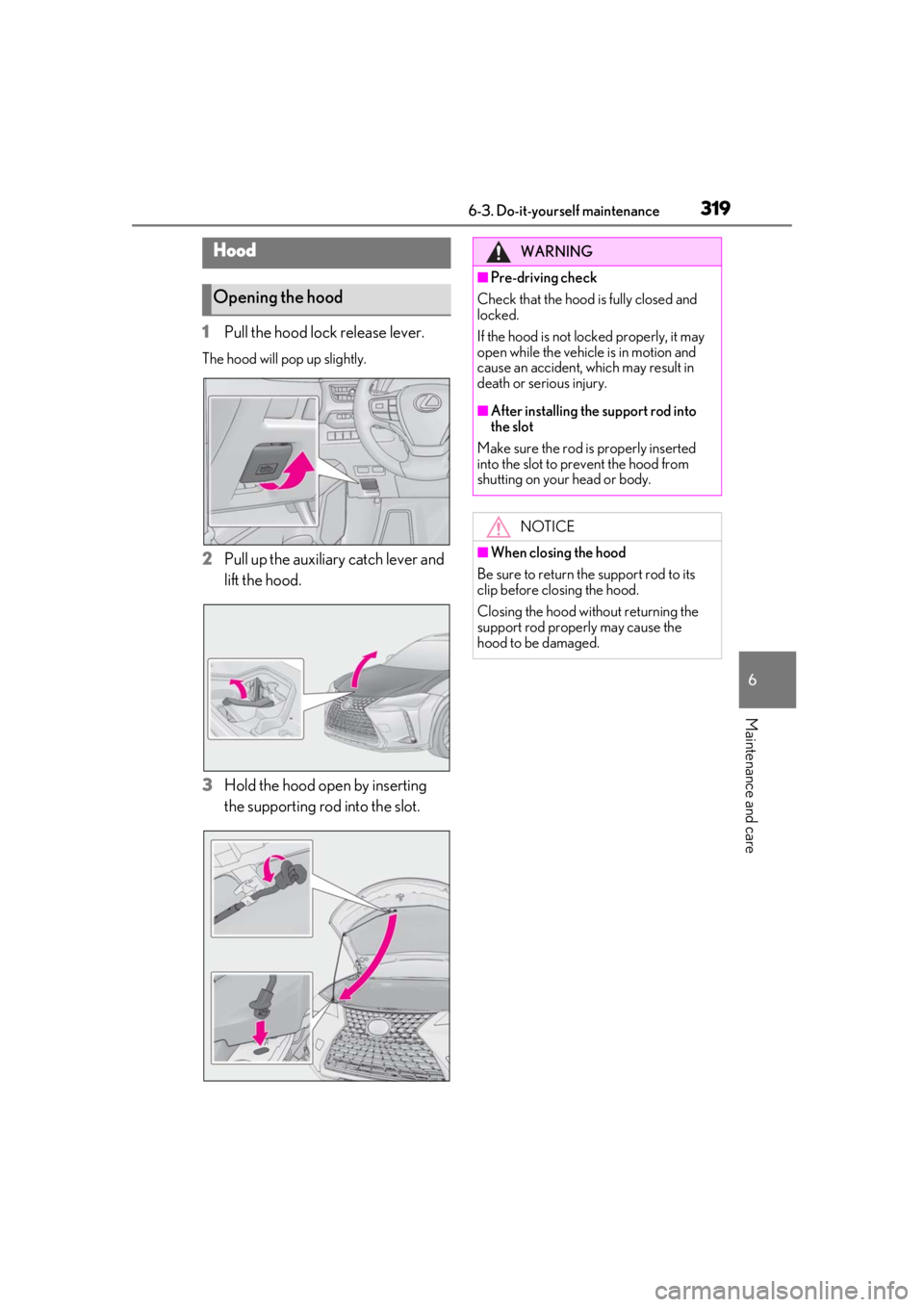
1Pull the hood lock release lever.
The hood will pop up slightly.
2Pull up the auxiliary catch lever and
lift the hood.
3
Hold the hood open by inserting
the supporting rod into the slot.
Hood
Opening the hood
WARNING
■Pre-driving check
Check that the hood is fully closed and
locked.
If the hood is not locked properly, it may
open while the vehicle is in motion and
cause an accident, which may result in
death or serious injury.
■After installing the support rod into
the slot
Make sure the rod is properly inserted
into the slot to prevent the hood from
shutting on your head or body.
NOTICE
■When closing the hood
Be sure to return the support rod to its
clip before closing the hood.
Closing the hood without returning the
support rod properly may cause the
hood to be damaged.
Page 325 of 452
3256-3. Do-it-yourself maintenance
6
Maintenance and care
brake fluid
Items
Clean funnel
■Brake fluid can absorb moisture from
the air
Excess moisture in the brake fluid can cause
a dangerous loss of braking efficiency. Use
only newly opened brake fluid.
Check the battery as follows.
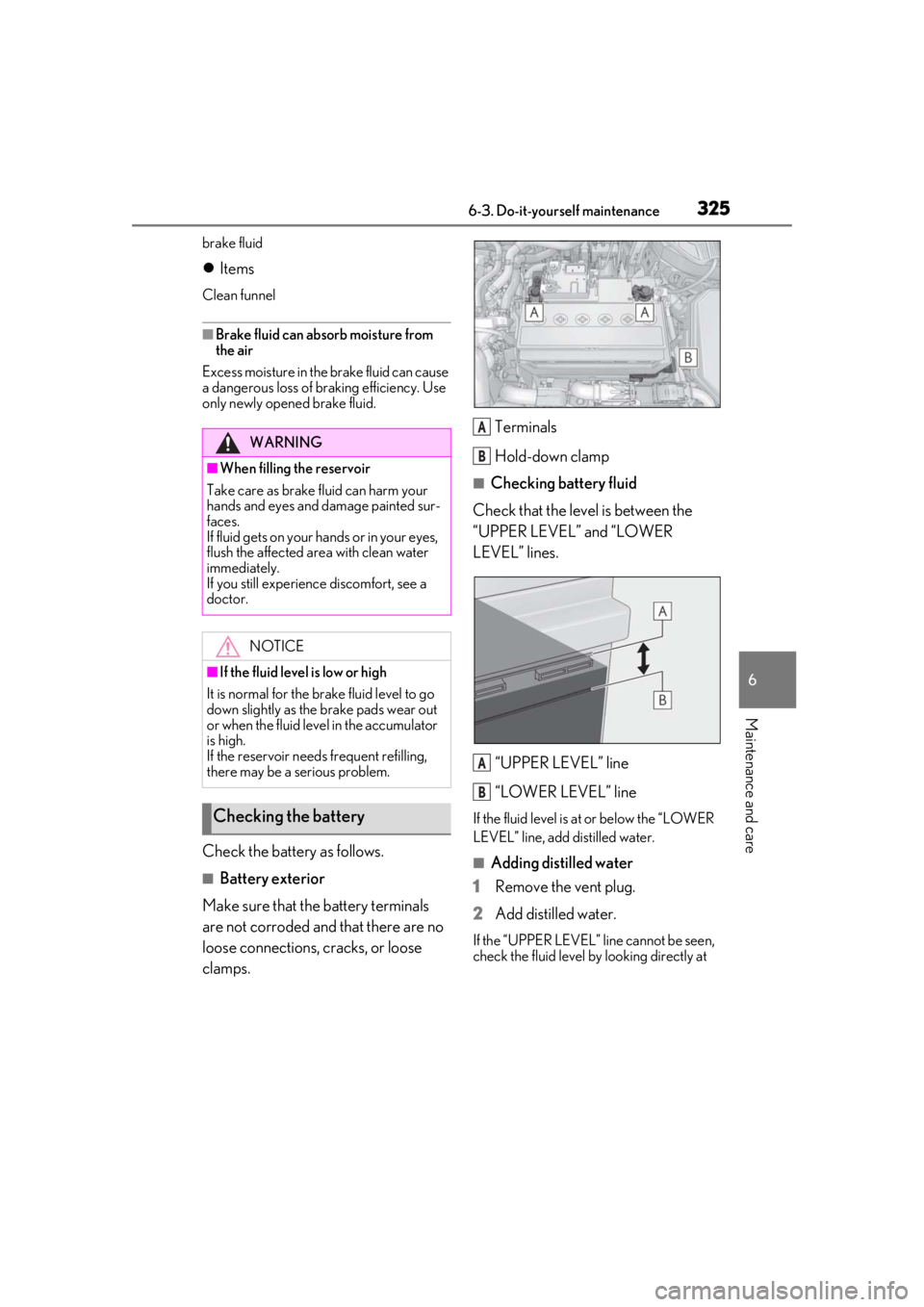
■Battery exterior
Make sure that the battery terminals
are not corroded and that there are no
loose connections, cracks, or loose
clamps. Terminals
Hold-down clamp
■Checking battery fluid
Check that the level is between the
“UPPER LEVEL” and “LOWER
LEVEL” lines.
“UPPER LEVEL” line
“LOWER LEVEL” line
If the fluid level is at or below the “LOWER
LEVEL” line, add distilled water.
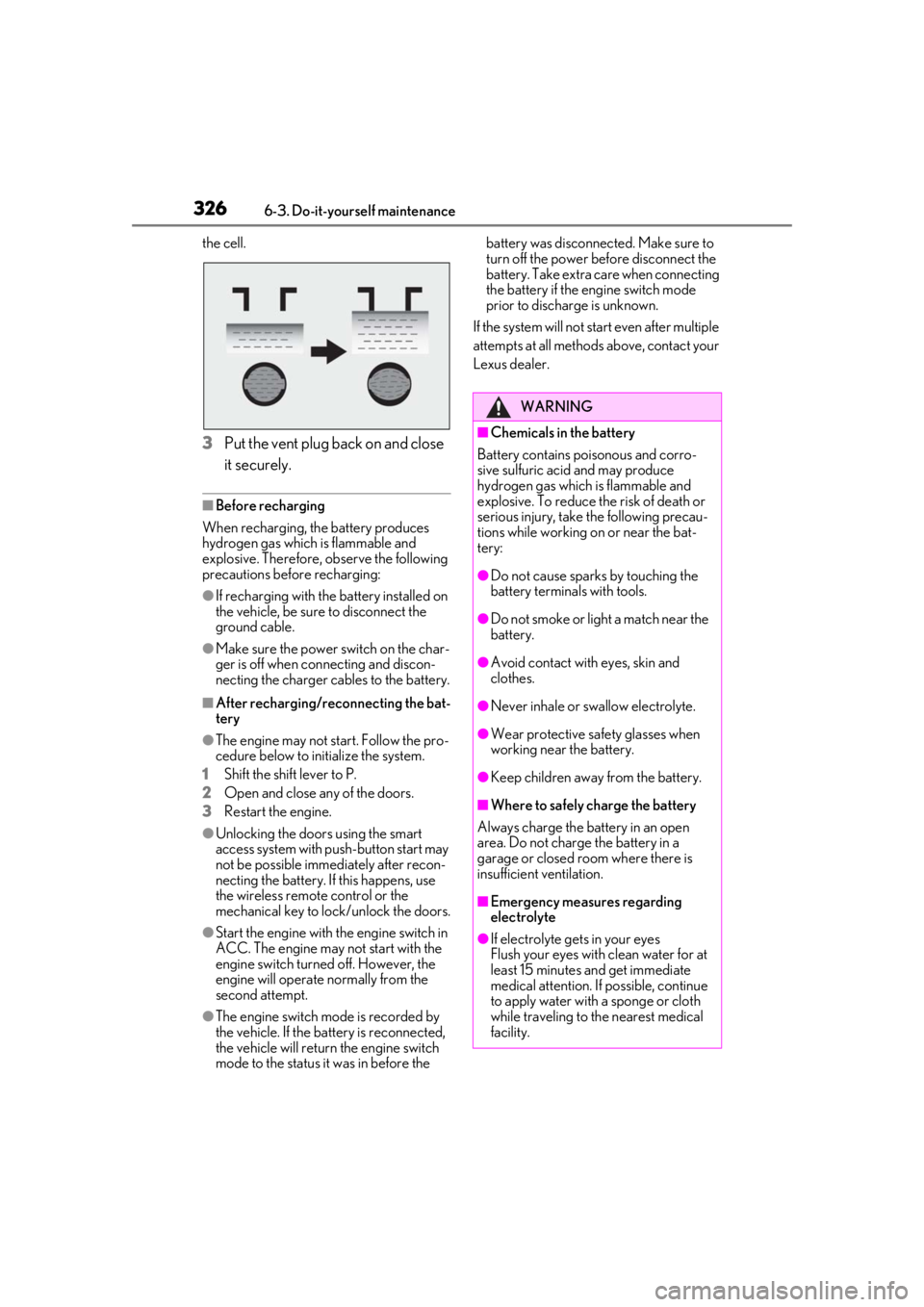
■Adding distilled water
1
Remove the vent plug.
2
Add distilled water.
If the “UPPER LEVEL” line cannot be seen,
check the fluid level by looking directly at
WARNING
■When filling the reservoir
Take care as brake fluid can harm your
hands and eyes and damage painted sur-
faces.
If fluid gets on your hands or in your eyes,
flush the affected area with clean water
immediately.
If you still experience discomfort, see a
doctor.
NOTICE
■If the fluid level is low or high
It is normal for the brake fluid level to go
down slightly as the brake pads wear out
or when the fluid level in the accumulator
is high.
If the reservoir need s frequent refilling,
there may be a serious problem.
Checking the battery
A
B
A
B
Page 326 of 452
3266-3. Do-it-yourself maintenance
the cell.
3Put the vent plug back on and close
it securely.
■Before recharging
When recharging, the battery produces
hydrogen gas which is flammable and
explosive. Therefore, observe the following
precautions before recharging:
●If recharging with the battery installed on
the vehicle, be sure to disconnect the
ground cable.
●Make sure the power switch on the char-
ger is off when connecting and discon-
necting the charger cables to the battery.
■After recharging/reconnecting the bat-
tery
●The engine may not start. Follow the pro-
cedure below to initialize the system.
1
Shift the shift lever to P.
2
Open and close any of the doors.
3
Restart the engine.
●Unlocking the doors using the smart
access system with pu sh-button start may
not be possible immediately after recon-
necting the battery. If this happens, use
the wireless remote control or the
mechanical key to lock/unlock the doors.
●Start the engine with the engine switch in
ACC. The engine may not start with the
engine switch turned off. However, the
engine will operate normally from the
second attempt.
●The engine switch mode is recorded by
the vehicle. If the battery is reconnected,
the vehicle will return the engine switch
mode to the status it was in before the battery was disconnected. Make sure to
turn off the power before disconnect the
battery. Take extra care when connecting
the battery if the engine switch mode
prior to discharge is unknown.
If the system will not start even after multiple
attempts at all methods above, contact your
Lexus dealer.
WARNING
■Chemicals in the battery
Battery contains poisonous and corro-
sive sulfuric acid and may produce
hydrogen gas which is flammable and
explosive. To reduce the risk of death or
serious injury, take the following precau-
tions while working on or near the bat-
tery:
●Do not cause sparks by touching the
battery terminals with tools.
●Do not smoke or light a match near the
battery.
●Avoid contact with eyes, skin and
clothes.
●Never inhale or swallow electrolyte.
●Wear protective sa fety glasses when
working near the battery.
●Keep children away from the battery.
■Where to safely charge the battery
Always charge the battery in an open
area. Do not charge the battery in a
garage or closed room where there is
insufficient ventilation.
■Emergency measures regarding
electrolyte
●If electrolyte gets in your eyes
Flush your eyes with clean water for at
least 15 minutes and get immediate
medical attention. If possible, continue
to apply water with a sponge or cloth
while traveling to the nearest medical
facility.
Page 330 of 452
3306-3. Do-it-yourself maintenance
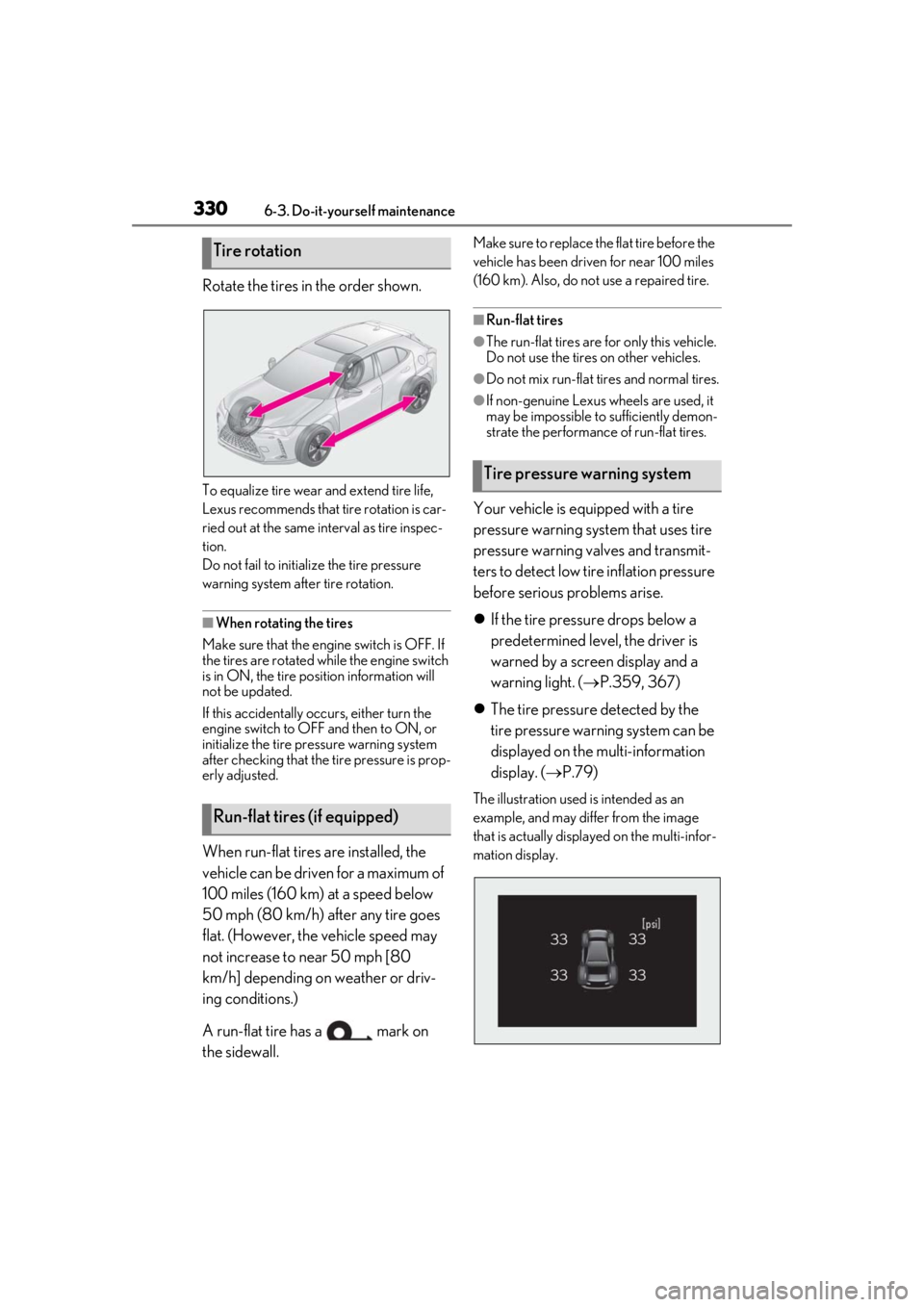
Rotate the tires in the order shown.
To equalize tire wear and extend tire life,
Lexus recommends that tire rotation is car-
ried out at the same interval as tire inspec-
tion.
Do not fail to initialize the tire pressure
warning system after tire rotation.
■When rotating the tires
Make sure that the engi ne switch is OFF. If
the tires are rotated while the engine switch
is in ON, the tire position information will
not be updated.
If this accidentally oc curs, either turn the
engine switch to OFF and then to ON, or
initialize the tire pr essure warning system
after checking that the tire pressure is prop-
erly adjusted.
When run-flat tires are installed, the
vehicle can be driven for a maximum of
100 miles (160 km) at a speed below
50 mph (80 km/h) after any tire goes
flat. (However, the vehicle speed may
not increase to near 50 mph [80
km/h] depending on weather or driv-
ing conditions.)
A run-flat tire has a mark on
the sidewall.
Make sure to replace the flat tire before the
vehicle has been driven for near 100 miles
(160 km). Also, do not use a repaired tire.
■Run-flat tires
●The run-flat tires are for only this vehicle.
Do not use the tires on other vehicles.
●Do not mix run-flat tires and normal tires.
●If non-genuine Lexus wheels are used, it
may be impossible to sufficiently demon-
strate the performance of run-flat tires.
Your vehicle is equipped with a tire
pressure warning system that uses tire
pressure warning valves and transmit-
ters to detect low ti re inflation pressure
before serious problems arise.
If the tire pressure drops below a
predetermined level, the driver is
warned by a screen display and a
warning light. ( P.359, 367)
The tire pressure detected by the
tire pressure warning system can be
displayed on the multi-information
display. ( P.79)
The illustration used is intended as an
example, and may differ from the image
that is actually displayed on the multi-infor-
mation display.
Tire rotation
Run-flat tires (if equipped)
Tire pressure warning system
Page 333 of 452
3336-3. Do-it-yourself maintenance
6
Maintenance and care
■When replacing the tires and wheels
If the ID code of the tire pressure warning
valve and transmitter is not registered, the
tire pressure warning system will not work
properly. After driving for about 20 min-
utes, the tire pressure warning light blinks
for 1 minute and stays on to indicate a sys-
tem malfunction.
■The tire pressure warning system
must be initialized in the following
circumstances:
When rotating the tires.
When the tire inflation pressure is
changed such as when changing tire
size. (When there are multiple spec-
ified pressures)
After registering the ID codes.
( P.335)
When the tire pressure warning system
is initialized, the current tire inflation
pressure is set as the benchmark pres-
sure.
■How to initialize the tire pressure
warning system
1
Park the vehicle in a safe place and
stop the engine for 20 minutes or
more.
Initialization cannot be performed while
the vehicle is moving.
2Adjust the tire inflation pressure to
the specified cold tire inflation pres-
sure level.
Make sure to adjust the tire pressure to the
specified cold tire inflation pressure level.
The tire pressure warning system will oper-
ate based on this pressure level.
3Start the engine ( P.152)
4
Press or of the meter con-
trol switches and select .
5
Press or of the meter con-
trol switches and select “Vehicle
Settings”, then press “OK”.
NOTICE
■Repairing or replacing tires, wheels,
tire pressure warning valves, trans-
mitters and tire valve caps
●When removing or fitting the wheels,
tires or the tire pressure warning
valves and transmitters, contact your
Lexus dealer as the tire pressure warn-
ing valves and transmitters may be
damaged if not handled correctly.
●Make sure to install the tire valve caps.
If the tire valve caps are not installed,
water could enter the tire pressure
warning valves and the tire pressure
warning valves could be bound.
●When replacing tire valve caps, do not
use tire valve caps other than those
specified. The cap may become stuck.
■To avoid damage to the tire pressure
warning valves and transmitters
When a tire is repaired with liquid seal-
ants, the tire pressure warning valve and
transmitter may not operate properly. If a
liquid sealant is used , contact your Lexus
dealer or other qualified service shop as
soon as possible. After use of liquid seal-
ant, make sure to re place the tire pres-
sure warning valve and transmitter when
repairing or replacing the tire.
Initializing the tire pressure
warning system
Page 334 of 452
3346-3. Do-it-yourself maintenance
6Press or of the meter con-
trol switches an d select “TPWS”,
then press “OK”.
7 Press or of the meter con-
trol switches and select “Set Pres-
sure”. Then press and hold “OK”
until the tire pressure warning light
starts blinking.
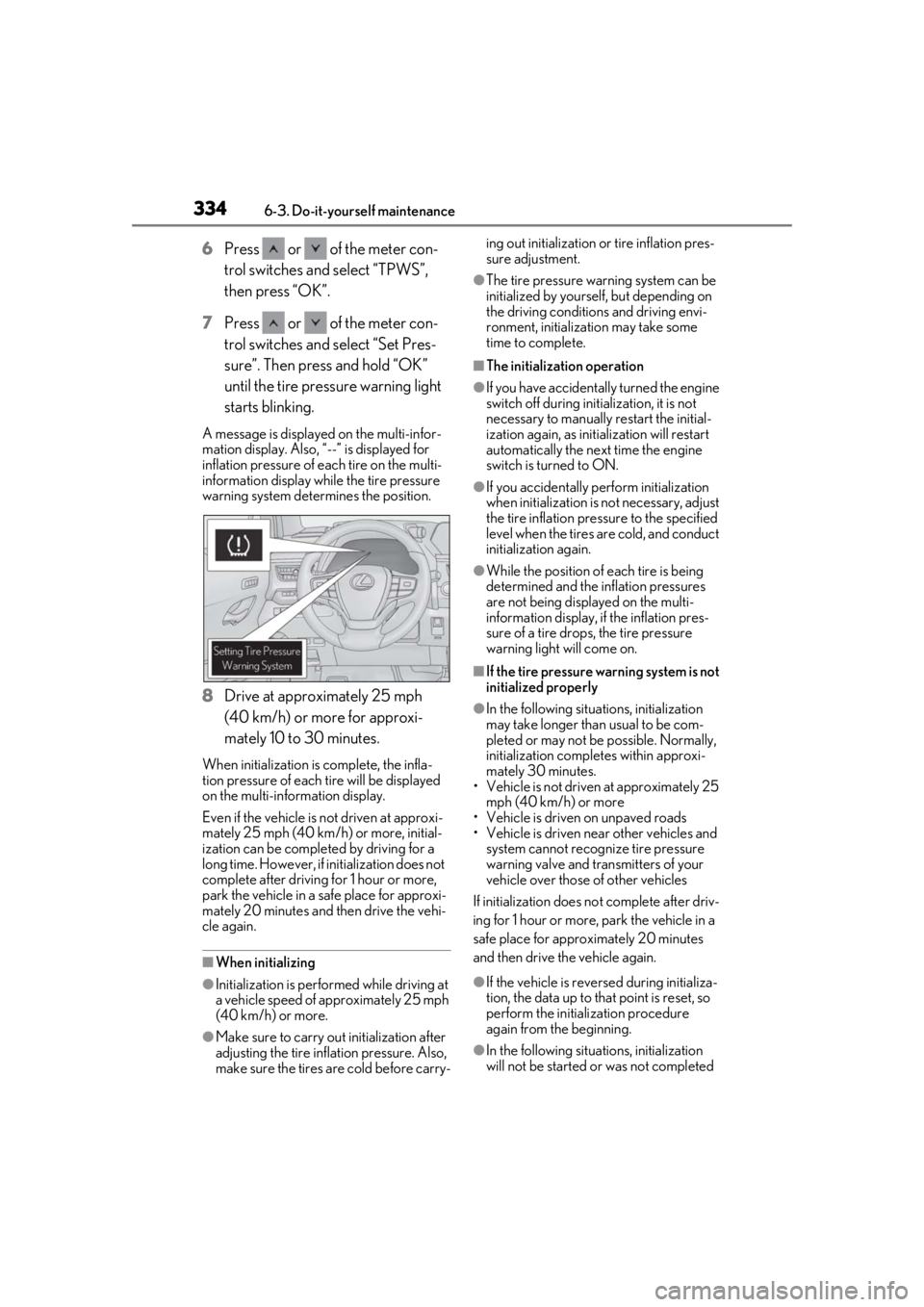
A message is displaye d on the multi-infor-
mation display. Also, “--” is displayed for
inflation pressure of each tire on the multi-
information display while the tire pressure
warning system determines the position.
8 Drive at approximately 25 mph
(40 km/h) or more for approxi-
mately 10 to 30 minutes.
When initialization is complete, the infla-
tion pressure of each tire will be displayed
on the multi-information display.
Even if the vehicle is not driven at approxi-
mately 25 mph (40 km /h) or more, initial-
ization can be completed by driving for a
long time. However, if initialization does not
complete after driving for 1 hour or more,
park the vehicle in a safe place for approxi-
mately 20 minutes and then drive the vehi-
cle again.
■When initializing
●Initialization is perfor med while driving at
a vehicle speed of approximately 25 mph
(40 km/h) or more.
●Make sure to carry ou t initialization after
adjusting the tire inflation pressure. Also,
make sure the tires are cold before carry- ing out initialization or
tire inflation pres-
sure adjustment.
●The tire pressure warning system can be
initialized by yourse lf, but depending on
the driving conditions and driving envi-
ronment, initialization may take some
time to complete.
■The initialization operation
●If you have accidentally turned the engine
switch off during initialization, it is not
necessary to manually restart the initial-
ization again, as initialization will restart
automatically the next time the engine
switch is turned to ON.
●If you accidentally perform initialization
when initialization is not necessary, adjust
the tire inflation pressure to the specified
level when the tires are cold, and conduct
initialization again.
●While the position of each tire is being
determined and the inflation pressures
are not being displayed on the multi-
information display, if the inflation pres-
sure of a tire drops, the tire pressure
warning light will come on.
■If the tire pressure warning system is not
initialized properly
●In the following situations, initialization
may take longer than usual to be com-
pleted or may not be possible. Normally,
initialization comple tes within approxi-
mately 30 minutes.
• Vehicle is not driven at approximately 25
mph (40 km/h) or more
• Vehicle is driven on unpaved roads
• Vehicle is driven near other vehicles and system cannot recognize tire pressure
warning valve and transmitters of your
vehicle over those of other vehicles
If initialization does no t complete after driv-
ing for 1 hour or more, park the vehicle in a
safe place for approximately 20 minutes
and then drive the vehicle again.
●If the vehicle is reversed during initializa-
tion, the data up to that point is reset, so
perform the initiali zation procedure
again from the beginning.
●In the following situations, initialization
will not be started or was not completed
Page 335 of 452
3356-3. Do-it-yourself maintenance
6
Maintenance and care
properly and the system will not operate
properly. Perform the initialization proce-
dure again.
• If, when attempting to start initialization, the tire pressure warning light does not
blink 3 times.
• If, when the vehicle has been driven for about 20 minutes after performing ini-
tialization, the tire pressure warning light
blinks for approximately 1 minute and
then illuminates.
If initialization cannot be completed after
performing the above procedure, contact
your Lexus dealer.
Every tire pressure warning valve and
transmitter has a unique ID code.
When replacing a tire pressure warn-
ing valve and transmitter, it is necessary
to register the ID code.
When registering the ID codes, per-
form the following procedure.
1
Park the vehicle in a safe place, wait
for approximately 20 minutes, and
then start the engine. ( P.152)
2
Press or of the meter con-
trol switches and select . 3
Press or of the meter con-
trol switches and select “Vehicle
Settings”, then press “OK”.
4
Press or of the meter con-
trol switches and select “TPWS”,
then press “OK”.
5
Press or of the meter con-
trol switches and select “Change
Wheel Set”. Then press and hold
“OK” until the tire pressure warning
light starts slowly blinking 3 times.
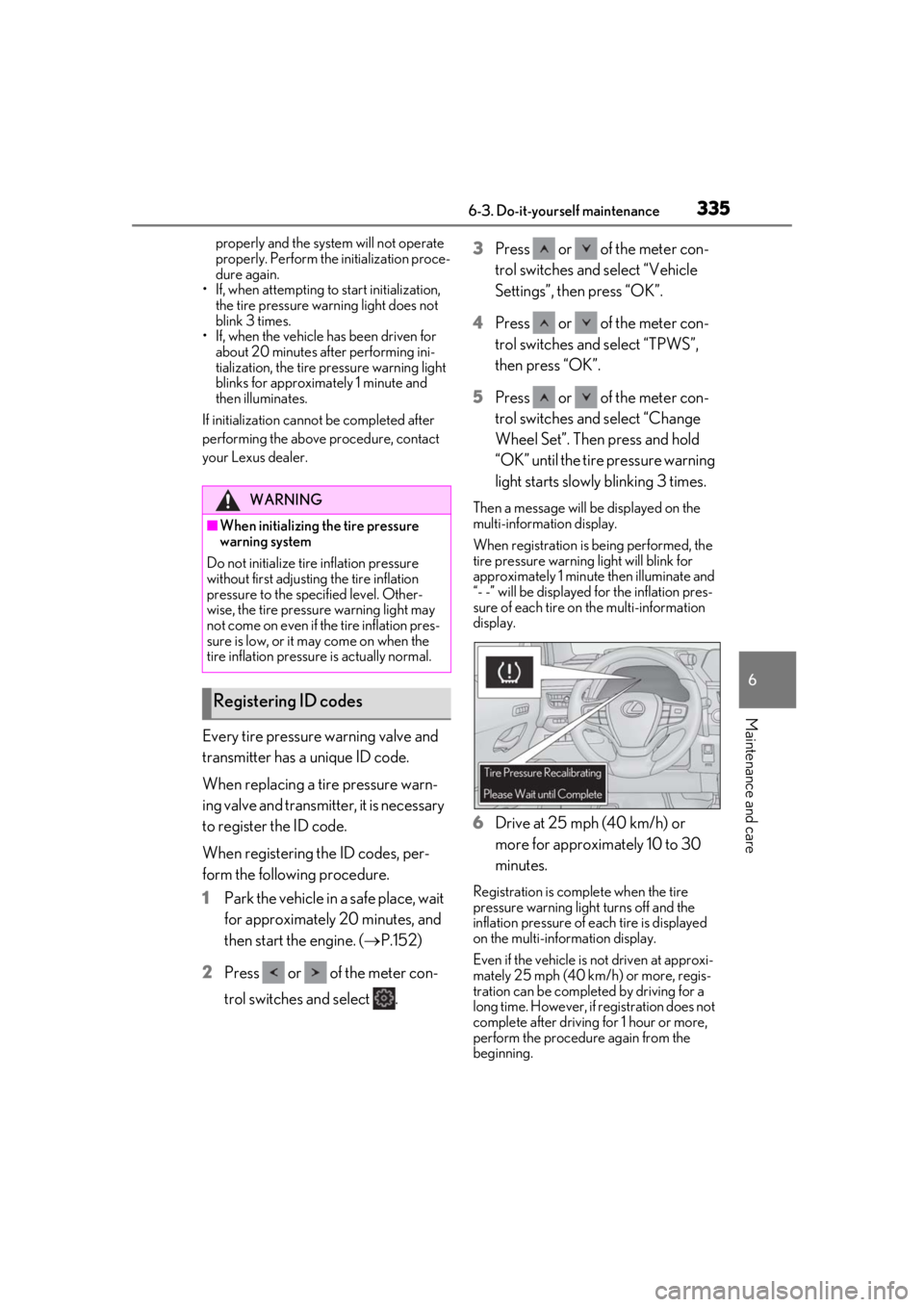
Then a message will be displayed on the
multi-information display.
When registration is being performed, the
tire pressure warning light will blink for
approximately 1 minute then illuminate and
“- -” will be displayed for the inflation pres-
sure of each tire on the multi-information
display.
6Drive at 25 mph (40 km/h) or
more for approximately 10 to 30
minutes.
Registration is complete when the tire
pressure warning light turns off and the
inflation pressure of each tire is displayed
on the multi-information display.
Even if the vehicle is not driven at approxi-
mately 25 mph (40 km/h) or more, regis-
tration can be completed by driving for a
long time. However, if registration does not
complete after driving for 1 hour or more,
perform the procedure again from the
beginning.
WARNING
■When initializing the tire pressure
warning system
Do not initialize tire inflation pressure
without first adjusting the tire inflation
pressure to the specified level. Other-
wise, the tire pressure warning light may
not come on even if the tire inflation pres-
sure is low, or it may come on when the
tire inflation pressure is actually normal.
Registering ID codes
Page 336 of 452

3366-3. Do-it-yourself maintenance
7Initialize the tire pressure warning
system. ( P.333)
■When registering ID codes
●ID code registration is performed while
driving at a vehicle speed of approxi-
mately 25 mph (40 km/h) or more.
●Before performing ID code registration,
make sure that no wheels with tire pres-
sure warning valve and transmitters
installed are near the vehicle.
●Make sure to initialize the tire pressure
warning system after registering the ID
codes. If the system is initialized before
registering the ID codes, the initialized
values will be invalid.
●ID codes can be registered by yourself,
but depending on the driving conditions
and driving environment, registration
may take some time to complete.
■Canceling ID code registration
●To cancel ID code registration after it has
been started, turn th e engine switch off
before driving the vehicle.
If the vehicle is driven after ID code regis-
tration is started, to cancel registration,
perform the ID code registration start
procedure again and turn the engine
switch off before driving.
●If ID code registration has been canceled,
the tire pressure warning light will blink
for approximately 1 minute when the
engine switch is turned to ON and then
illuminate. The tire pressure warning sys-
tem will be operational when the tire
pressure warning light turns off.
●If the warning light does not turn off even
after several minutes have elapsed, ID
code registration may not have been can-
celed correctly. To cancel registration,
perform the ID code registration start
procedure again and th en turn the engine
switch off before driving.
■If ID codes are not registered properly
●In the following situations, ID code regis-
tration may take longer than usual to be
completed or may not be possible. Nor-
mally, registration completes within
approximately 30 minutes. • Vehicle is not parked for approximately
20 minutes or more before driving
• Vehicle is not driven at approximately 25
mph (40 km/h) or more
• Vehicle is driven on unpaved roads
• Vehicle is driven near other vehicles and system cannot recognize tire pressure
warning valves and transmitters of your
vehicle over those of other vehicles
• Wheel with tire pr essure warning valve
and transmitter installe d is inside or near
the vehicle
If registration does not complete after driv-
ing for 1 hour or more, perform the ID code
registration proced ure again from the
beginning.
●If the vehicle is reve rsed during registra-
tion, the data up to that point is reset, so
perform the registration procedure again
from the beginning.
●In the following situations, ID code regis-
tration will not be started or was not com-
pleted properly and the system will not
operate properly. Pe rform the ID code
registration procedure again.
• If, when attempting to start ID code regis- tration, the tire pressure warning light
does not blink slowly 3 times.
• If, when the vehicle has been driven for about 20 minutes after performing ID
code registration, the tire pressure warn-
ing light blinks for approximately 1 minute
and then illuminates.
●If ID code registration cannot be com-
pleted after performing the above proce-
dure, contact your Lexus dealer.