change LEXUS UX250H 2019 Owners Manual
[x] Cancel search | Manufacturer: LEXUS, Model Year: 2019, Model line: UX250H, Model: LEXUS UX250H 2019Pages: 476, PDF Size: 10.51 MB
Page 348 of 476
3486-3. Do-it-yourself maintenance
■Run-flat tires
●The run-flat tires are for only this vehicle.
Do not use the tires on other vehicles.
●Do not mix run-flat tires and normal tires.
●If non-genuine Lexus wheels are used, it
may be impossible to sufficiently demon-
strate the performance of run-flat tires.
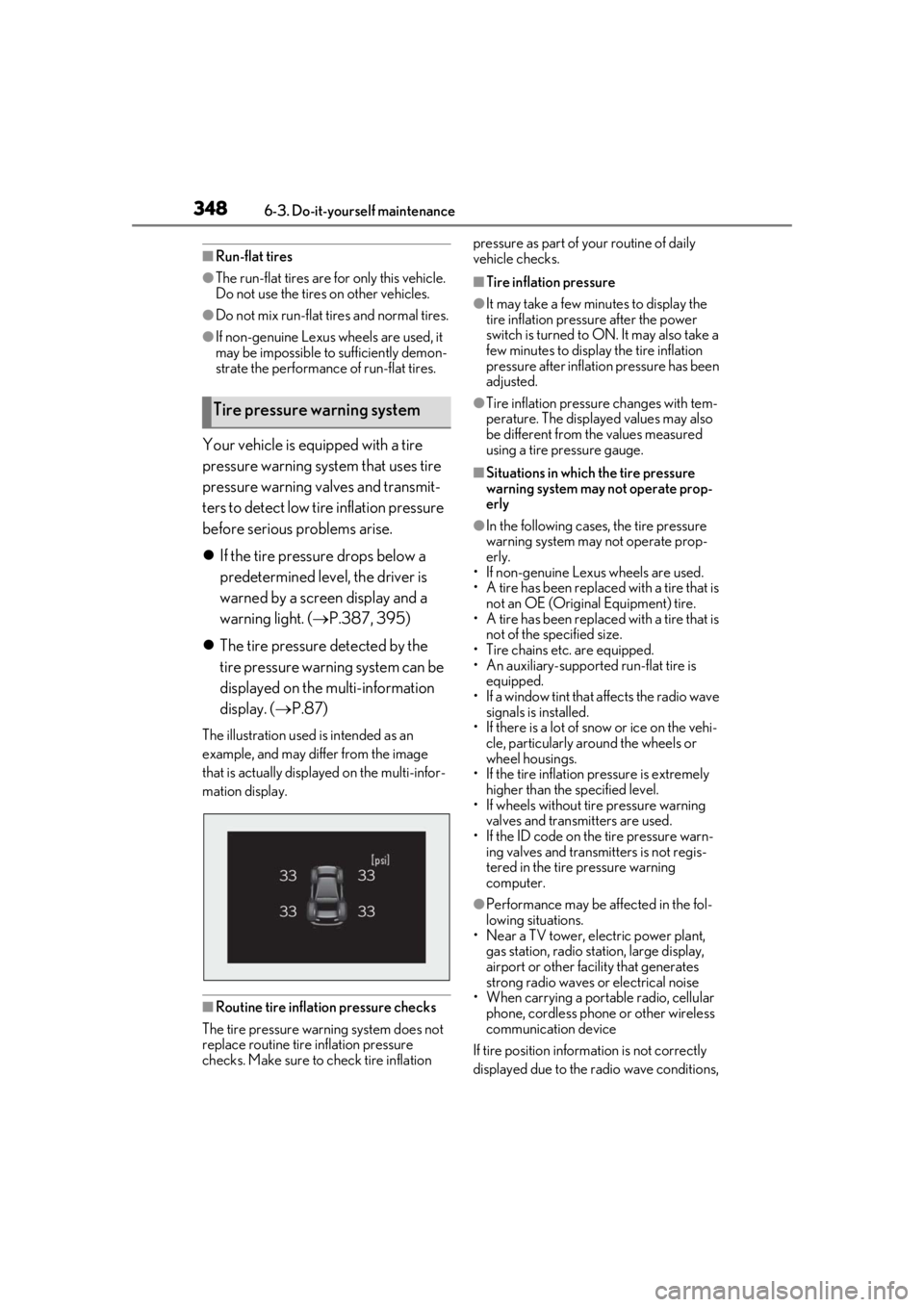
Your vehicle is equipped with a tire
pressure warning system that uses tire
pressure warning valves and transmit-
ters to detect low tire inflation pressure
before serious problems arise.
If the tire pressure drops below a
predetermined level, the driver is
warned by a screen display and a
warning light. ( P.387, 395)
The tire pressure detected by the
tire pressure warning system can be
displayed on the multi-information
display. ( P.87)
The illustration used is intended as an
example, and may differ from the image
that is actually displayed on the multi-infor-
mation display.
■Routine tire inflation pressure checks
The tire pressure warning system does not
replace routine tire inflation pressure
checks. Make sure to check tire inflation pressure as part of your routine of daily
vehicle checks.
■Tire inflation pressure
●It may take a few minutes to display the
tire inflation pressu
re after the power
switch is turned to ON. It may also take a
few minutes to display the tire inflation
pressure after inflatio n pressure has been
adjusted.
●Tire inflation pressure changes with tem-
perature. The displaye d values may also
be different from the values measured
using a tire pressure gauge.
■Situations in which the tire pressure
warning system may not operate prop-
erly
●In the following cases, the tire pressure
warning system may not operate prop-
erly.
• If non-genuine Lexus wheels are used.
• A tire has been replaced with a tire that is
not an OE (Original Equipment) tire.
• A tire has been replaced with a tire that is
not of the specified size.
• Tire chains etc. are equipped.
• An auxiliary-supported run-flat tire is equipped.
• If a window tint that affects the radio wave signals is installed.
• If there is a lot of snow or ice on the vehi- cle, particularly around the wheels or
wheel housings.
• If the tire inflation pressure is extremely higher than the specified level.
• If wheels without tire pressure warning
valves and transmitters are used.
• If the ID code on the tire pressure warn- ing valves and transmitters is not regis-
tered in the tire pressure warning
computer.
●Performance may be af fected in the fol-
lowing situations.
• Near a TV tower, electric power plant,
gas station, radio stat ion, large display,
airport or other fac ility that generates
strong radio waves or electrical noise
• When carrying a portable radio, cellular
phone, cordless phone or other wireless
communication device
If tire position information is not correctly
displayed due to the radio wave conditions,
Tire pressure warning system
Page 349 of 476
3496-3. Do-it-yourself maintenance
6
Maintenance and care
the display may be corrected by driving and
changing the radio wave conditions.
●When the vehicle is parked, the time
taken for the warning to start or go off
could be extended.
●When tire inflation pressure declines rap-
idly for example when a tire has burst, the
warning may not function.
■Warning performance of the tire pres-
sure warning system
The warning of the tire pressure warning
system will change in accordance with the
conditions under which it was initialized. For
this reason, the system may give a warning
even if the tire pressure does not reach a
low enough level, or if the pressure is higher
than the pressure that was adjusted to when
the system was initialized.
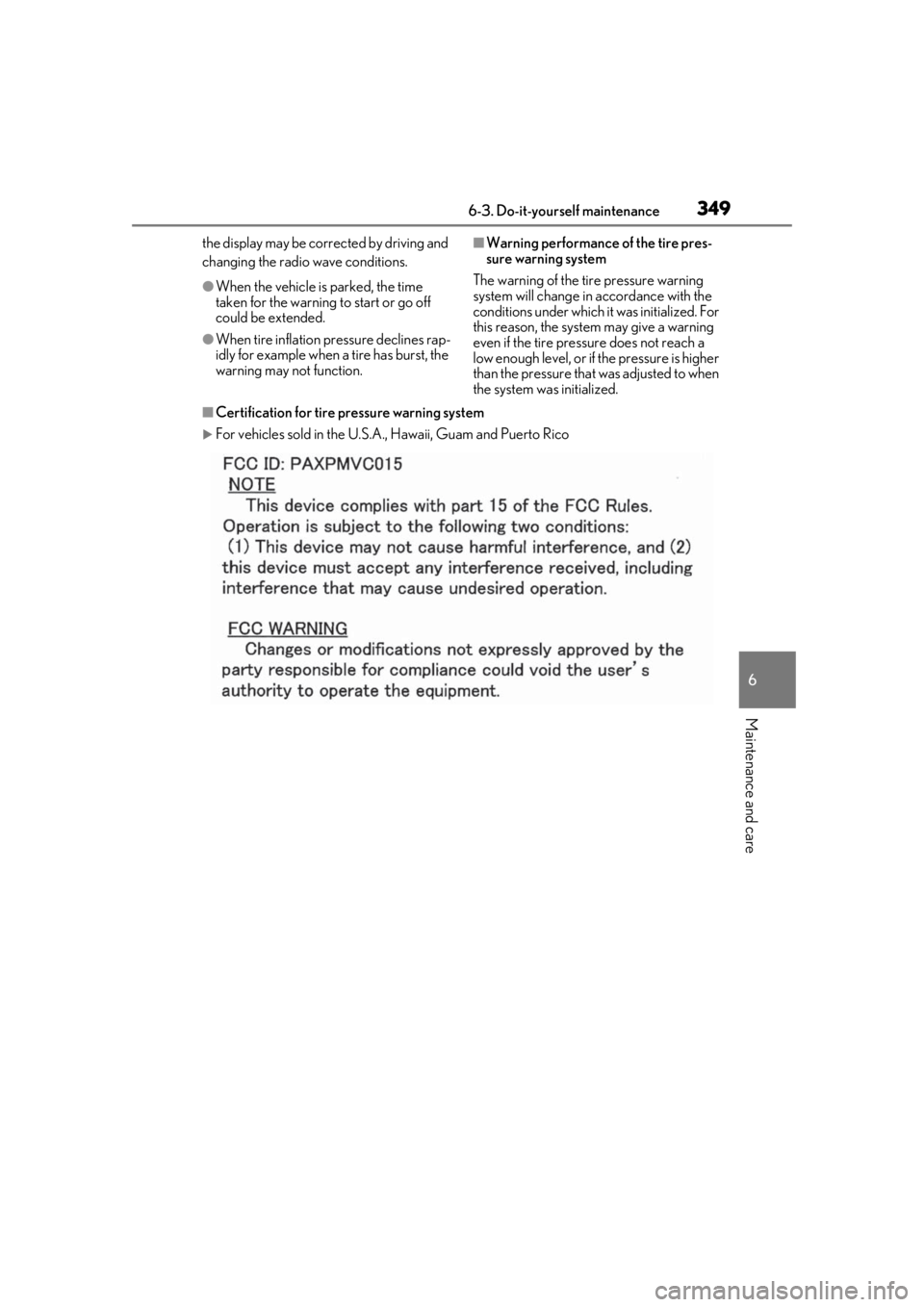
■Certification for tire pressure warning system
For vehicles sold in the U.S.A. , Hawaii, Guam and Puerto Rico
Page 351 of 476
3516-3. Do-it-yourself maintenance
6
Maintenance and care
■The tire pressure warning system
must be initialized in the following
circumstances:
When rotating the tires.
When the tire inflation pressure is
changed such as when changing tire
size. (When there are multiple spec-
ified pressures)
After registering the ID codes.
( P.352)
When the tire pressure warning system
is initialized, the current tire inflation
pressure is set as the benchmark pres-
sure.
■How to initialize the tire pressure
warning system
1
Park the vehicle in a safe place and
stop the hybrid system for 20 min-
utes or more.
Initialization cannot be performed while
the vehicle is moving.
2Adjust the tire inflation pressure to
the specified cold tire inflation pres-
sure level.
Make sure to adjust the tire pressure to the
specified cold tire inflation pressure level.
The tire pressure warning system will oper-
ate based on this pressure level.
3Start the hybrid system ( P.162)
4
Press or of the meter con-
trol switches and select .
5
Press or of the meter con-
trol switches and select “Vehicle
Settings”, then press “OK”.
6
Press or of the meter con-
trol switches and select “TPWS”,
then press “OK”.
7
Press or of the meter con-
trol switches and select “Set Pres-
sure”. Then press and hold “OK”
until the tire pressure warning light
starts blinking.
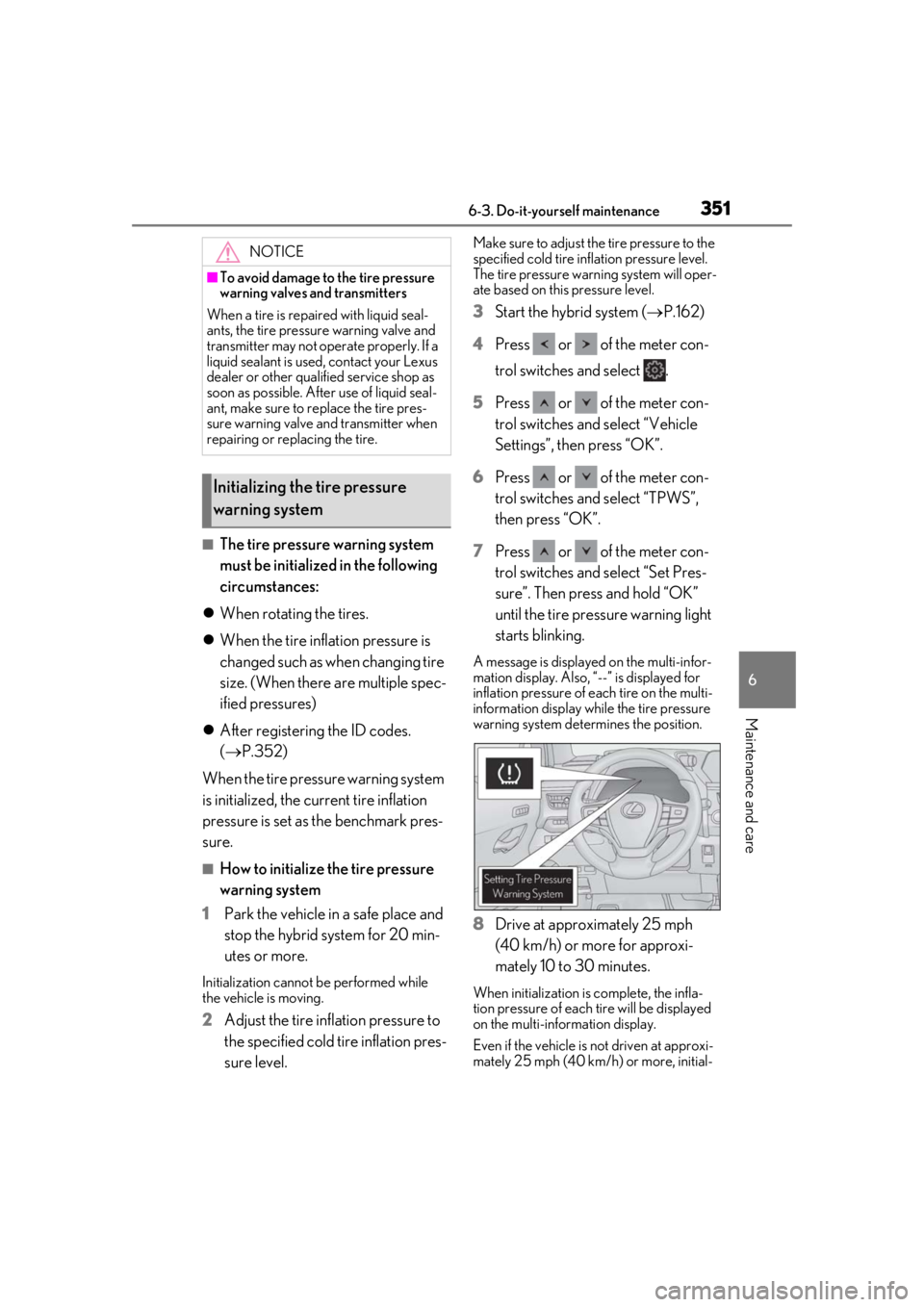
A message is displayed on the multi-infor-
mation display. Also, “--” is displayed for
inflation pressure of each tire on the multi-
information display while the tire pressure
warning system determines the position.
8Drive at approximately 25 mph
(40 km/h) or more for approxi-
mately 10 to 30 minutes.
When initialization is complete, the infla-
tion pressure of each tire will be displayed
on the multi-information display.
Even if the vehicle is not driven at approxi-
mately 25 mph (40 km/h) or more, initial-
NOTICE
■To avoid damage to the tire pressure
warning valves and transmitters
When a tire is repaired with liquid seal-
ants, the tire pressure warning valve and
transmitter may not operate properly. If a
liquid sealant is used , contact your Lexus
dealer or other qualified service shop as
soon as possible. After use of liquid seal-
ant, make sure to re place the tire pres-
sure warning valve and transmitter when
repairing or replacing the tire.
Initializing the tire pressure
warning system
Page 353 of 476
3536-3. Do-it-yourself maintenance
6
Maintenance and care
When registering the ID codes, per-
form the following procedure.
1Park the vehicle in a safe place, wait
for approximately 20 minutes, and
then start the hybrid system.
( P.162)
2 Press or of the meter con-
trol switches and select .
3 Press or of the meter con-
trol switches and select “Vehicle
Settings”, then press “OK”.
4 Press or of the meter con-
trol switches an d select “TPWS”,
then press “OK”.
5 Press or of the meter con-
trol switches and select “Change
Wheel Set”. Then press and hold
“OK” until the tire pressure warning
light starts slowly blinking 3 times.
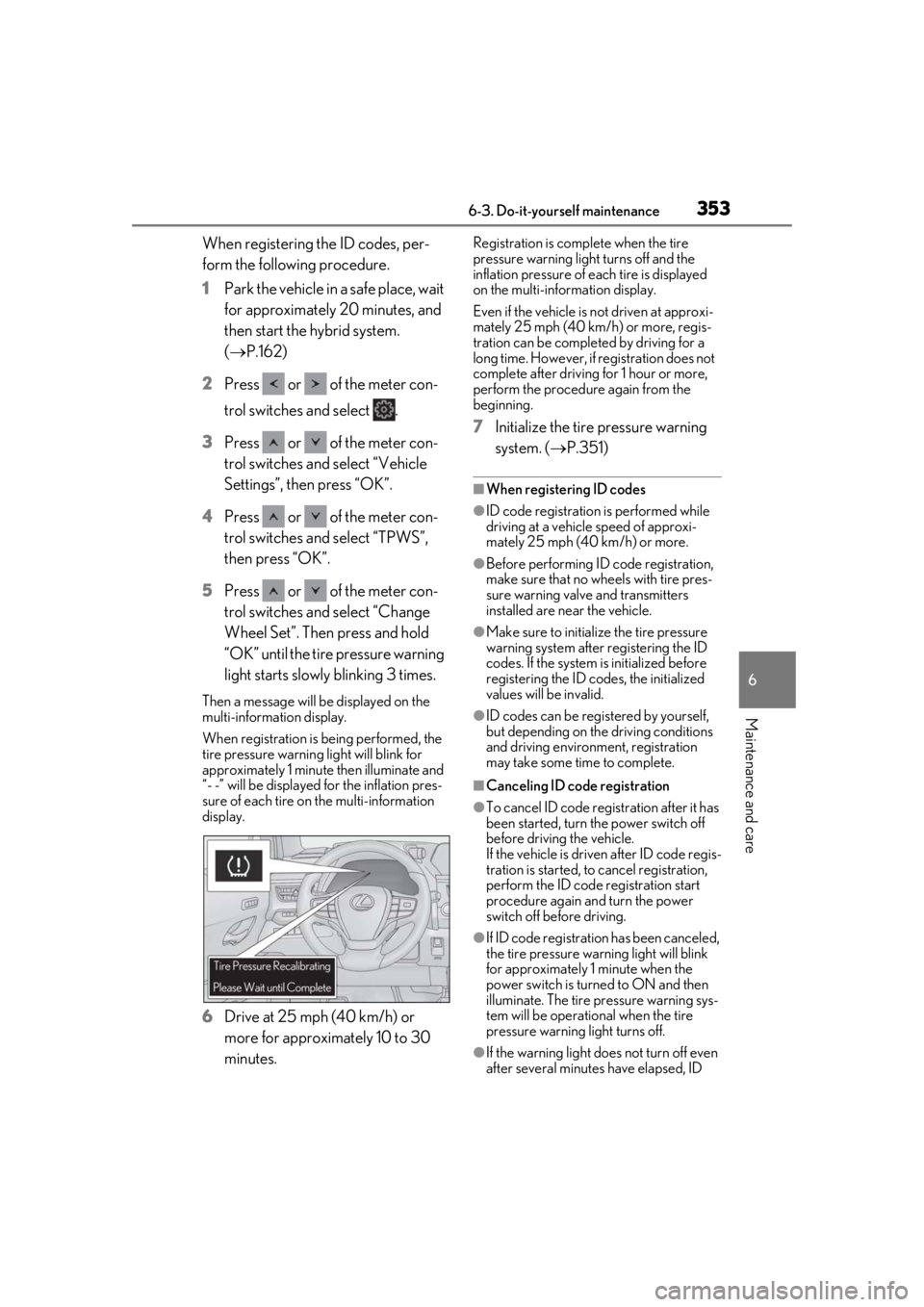
Then a message will be displayed on the
multi-information display.
When registration is being performed, the
tire pressure warning light will blink for
approximately 1 minute then illuminate and
“- -” will be displayed for the inflation pres-
sure of each tire on the multi-information
display.
6Drive at 25 mph (40 km/h) or
more for approximately 10 to 30
minutes.
Registration is complete when the tire
pressure warning light turns off and the
inflation pressure of ea ch tire is displayed
on the multi-information display.
Even if the vehicle is not driven at approxi-
mately 25 mph (40 km/h) or more, regis-
tration can be completed by driving for a
long time. However, if registration does not
complete after driving for 1 hour or more,
perform the procedure again from the
beginning.
7 Initialize the tire pressure warning
system. ( P.351)
■When registering ID codes
●ID code registration is performed while
driving at a vehicle speed of approxi-
mately 25 mph (40 km/h) or more.
●Before performing ID code registration,
make sure that no wheels with tire pres-
sure warning valve and transmitters
installed are near the vehicle.
●Make sure to initializ e the tire pressure
warning system after registering the ID
codes. If the system is initialized before
registering the ID codes, the initialized
values will be invalid.
●ID codes can be registered by yourself,
but depending on the driving conditions
and driving environment, registration
may take some time to complete.
■Canceling ID code registration
●To cancel ID code regi stration after it has
been started, turn the power switch off
before driving the vehicle.
If the vehicle is driven after ID code regis-
tration is started, to cancel registration,
perform the ID code registration start
procedure again and turn the power
switch off before driving.
●If ID code registration has been canceled,
the tire pressure warning light will blink
for approximately 1 minute when the
power switch is turned to ON and then
illuminate. The tire pressure warning sys-
tem will be operational when the tire
pressure warning light turns off.
●If the warning light does not turn off even
after several minutes have elapsed, ID
Page 364 of 476
3646-3. Do-it-yourself maintenance
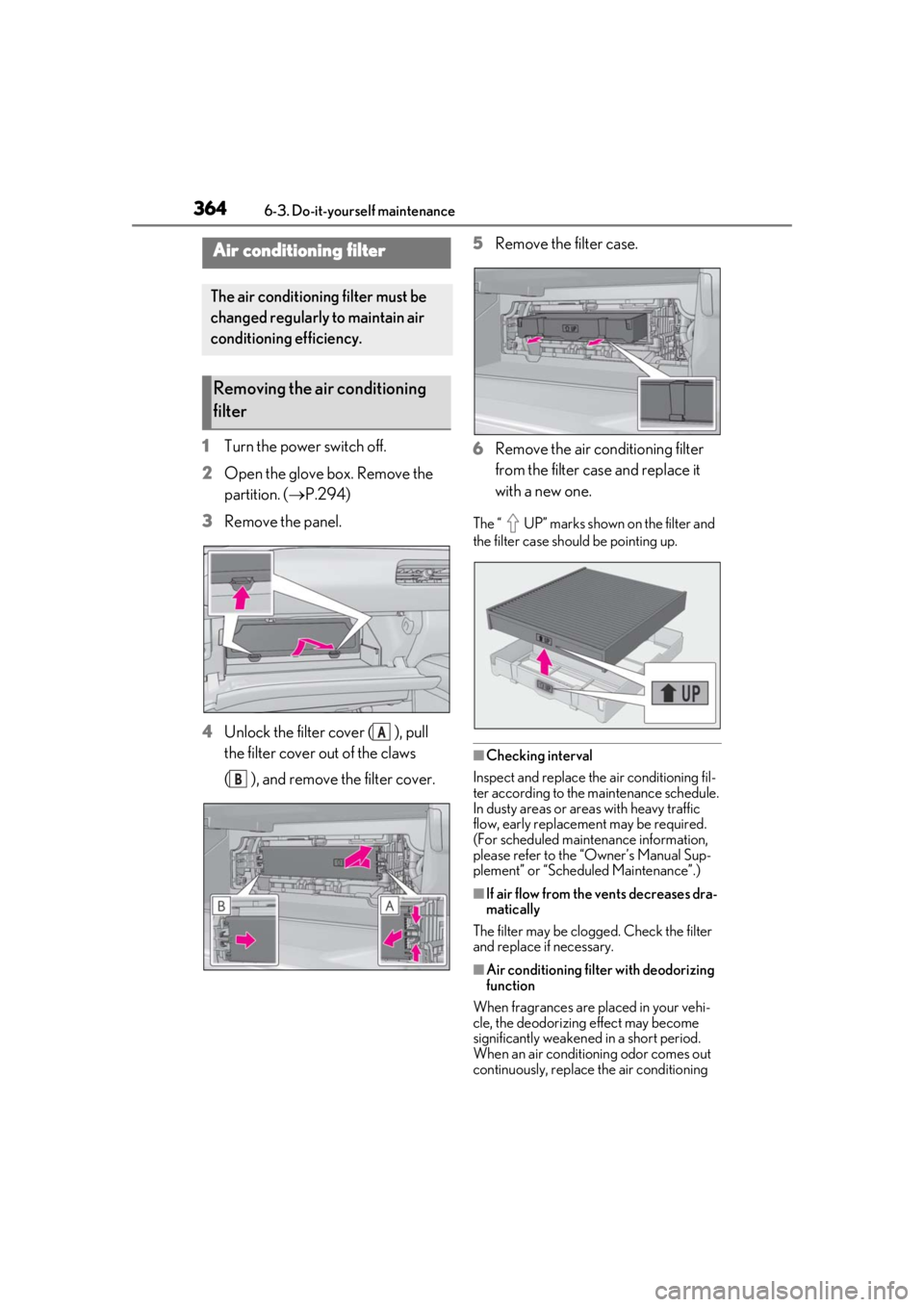
1Turn the power switch off.
2 Open the glove box. Remove the
partition. ( P.294)
3 Remove the panel.
4 Unlock the filter cover ( ), pull
the filter cover out of the claws
( ), and remove the filter cover. 5
Remove the filter case.
6 Remove the air conditioning filter
from the filter case and replace it
with a new one.
The “ UP” marks shown on the filter and
the filter case should be pointing up.
■Checking interval
Inspect and replace the air conditioning fil-
ter according to the maintenance schedule.
In dusty areas or areas with heavy traffic
flow, early replacement may be required.
(For scheduled maintenance information,
please refer to the “Owner’s Manual Sup-
plement” or “Scheduled Maintenance”.)
■If air flow from the vents decreases dra-
matically
The filter may be clogged. Check the filter
and replace if necessary.
■Air conditioning filt er with deodorizing
function
When fragrances are placed in your vehi-
cle, the deodorizing effect may become
significantly weakened in a short period.
When an air conditioning odor comes out
continuously, replace the air conditioning
Air conditioning filter
The air conditioning filter must be
changed regularly to maintain air
conditioning efficiency.
Removing the air conditioning
filter
A
B
Page 385 of 476
3857-2. Steps to take in an emergency
7
When trouble arises
Fluid leaks under the vehicle
(Water dripping from the air condi-
tioning after use is normal.)
Flat-looking tires or uneven tire
wear
Engine coolant temperature gauge
needle continually points higher
than normal
Changes in exhaust sound
Excessive tire squeal when corner-
ing
Strange noises related to the sus-
pension system
Pinging or other noises related to
the hybrid system
Engine missing, stumbling or run-
ning roughly
Appreciable loss of power
Vehicle pulls heavily to one side
when braking
Vehicle pulls heavily to one side
when driving on a level road
Loss of brake effectiveness, spongy
feeling, pedal almost touches the
floor
If you think something is
wrong
If you notice any of the following
symptoms, your vehicle probably
needs adjustment or repair. Con-
tact your Lexus dealer as soon as
possible.
Visible symptoms
Audible symptoms
Operational symptoms
Page 393 of 476
3937-2. Steps to take in an emergency
7
When trouble arises
bag sensor assembly, front impact sensors,
side impact sensors (front door), side
impact sensors (front), side impact sensors
(rear), driver’s seat position sensor, driver’s
seat belt buckle switch, front passenger
occupant classification system (ECU and
sensors), rear seat belt buckle switches (if
equipped), “AIR BAG ON” indicator light,
“AIR BAG OFF” indicator light, front pas-
senger’s seat belt buckle switch, seat belt
pretensioners, airbags, interconnecting wir-
ing and power sources. (P.31)
■Electric power steering system warning
light (warning buzzer)
When the 12-volt battery charge becomes
insufficient or the voltage temporarily
drops, the electric po wer steering system
warning light may come on and the warning
buzzer may sound.
■When the tire pressure warning light
comes on
Inspect the tires to check if a tire is punc-
tured.
If a tire is punctured: P.399
If none of the tires are punctured:
Turn the power switch off then turn it to ON.
Check if the tire pressure warning light
comes on or blinks.
If the tire pressure warning light blinks for
approximately 1 minute then stays on
There may be a malfunction in the tire pres-
sure warning system. Have the vehicle
inspected by your Lexus dealer immedi-
ately.
If the tire pressure warning light comes
on
1
After the temperature of the tires has
lowered sufficiently, check the inflation
pressure of each tire and adjust them to
the specified level.
2
If the warning light does not turn off
even after several minutes have
elapsed, check that the inflation pres-
sure of each tire is at the specified level
and perform initialization. ( P.351)
■The tire pressure warning light may
come on due to natural causes
The tire pressure warning light may come
on due to natural causes such as natural air leaks and tire inflation pressure changes
caused by temperature. In this case, adjust-
ing the tire inflation pressure will turn off the
warning light (after a few minutes).
■Conditions that the tire pressure warn-
ing system may not function properly
P.348
WARNING
■If both the ABS and the brake system
warning lights remain on
Stop your vehicle in a safe place immedi-
ately and contact your Lexus dealer.
The vehicle will become extremely
unstable during braking, and the ABS
system may fail, which could cause an
accident resulting in death or serious
injury.
■When the electric power steering
system warning light comes on
When the light comes on yellow, the
assist to the power st eering is restricted.
When the light comes on red, the assist
to the power steering is lost and handling
operations of the steering wheel become
extremely heavy.
When steering wheel operations are
heavier than usual, grip the steering
wheel firmly and operate it using more
force than usual.
■If the tire pressure warning light
comes on
Be sure to observe the following precau-
tions.
Failure to do so could cause a loss of
vehicle control and result in death or
serious injury.
●Decelerate to the lowest appropriate
speed as soon as possible. Do not
drive over 50 mph (80 km/h).
●Check and adjust the tire inflation
pressure immediately.
Page 398 of 476

3987-2. Steps to take in an emergency
reset. If necessary, perform maintenance.
Please reset the message after the mainte-
nance is performed. (P.328)
*: Refer to the separa te “Scheduled Main-
tenance” or “Owner’s Manual Supple-
ment” for the maintenance interval
applicable to your vehicle.
■If “Maintenance Required Visit Your
Dealer” is displayed
Indicates that all maintenance is required to
correspond to the driven distance on the
maintenance schedule
*.
Comes on approximately 5000 miles
(8000 km) after the message has been
reset. (The indicator will not work properly
unless the message ha s been reset.) Per-
form the necessary maintenance. Please
reset the message after the maintenance is
performed. ( P.328)
*: Refer to the separa te “Scheduled Main-
tenance” or “Owner’s Manual Supple-
ment” for the maintenance interval
applicable to your vehicle.
■If “Oil Maintenance Required Soon” is
displayed
Indicates that the engine oil should be
scheduled to be changed.
Check the engine oil and change it if neces-
sary. After changing the engine oil, make
sure to reset the message. ( P.339)
■If “Oil Maintenance Required” is dis-
played
Indicates that the engine oil should be
changed.
Check and change the en gine oil, and oil fil-
ter by your Lexus deal er. After changing the
engine oil, make sure to reset the message.
( P.339)
■If a message that in dicates the need for
visiting your Lexus dealer is displayed
The system or part shown on the multi-
information display is malfunctioning. Have
the vehicle inspected by your Lexus dealer
immediately.
■If a message that indicates the need for
referring to Owner’ s Manual is dis-
played
●If any of the following messages are
shown on the multi-information display,
follow the instructions.
• “Engine Coolant Temp High” ( P.410)
• “Front Camera Unavailable” ( P.196)
• “Radar Cruise Control Unavailable” ( P.196)
●If any of the following messages are
shown on the multi-info rmation display, it
may indicate a malf unction. Have the
vehicle inspected by your Lexus dealer
immediately.
• “Access System with Elec. Key Malfunc-
tion”
• “Hybrid system malfunction”
•“Check Engine”
• “Hybrid battery system malfunction”
• “Accelerator system malfunction”
●If any of the following messages are
shown on the multi-info rmation display, it
may indicate a malfun ction. Immediately
stop the vehicle and contact your Lexus
dealer.
• “Braking Power Low”
• “Charging System Malfunction”
• “Oil Pressure Low”
●If “Low Auxiliary Battery See Owner’s
Manual” is shown
• When the display goes off after several
seconds
*:
Maintain the hybrid system operation for
more than 15 minutes and charge the 12-
volt battery.
• When the display does not go off:
Start up the hybrid system using the proce-
dures for “If the 12-volt battery is dis-
charged” ( P.405)
*: Displays for about 6 seconds
●If “Maintenance required for Traction bat-
tery cooling parts See owner’s manual” is
shown, the filter may be clogged, the air
intake vent may be blocked, or there may
be a gap in the duct. Therefore, perform
the following correction procedure.
• If the air intake vent and filter of the hybrid battery (traction battery) are dirty, per-
Page 405 of 476
4057-2. Steps to take in an emergency
7
When trouble arises
setting, the power switch will turn to ACC.
3Firmly depress the brake pedal and
check that is shown on the
multi-information display.
4 Press the power switch.
In the event that the hybrid system still can-
not be started, contact your Lexus dealer.
■Stopping the hybrid system
Set the parking brake, shift the shift lever to
P and press the power switch as you nor-
mally do when stopping the hybrid system.
■Electronic key battery
As the above procedure is a temporary
measure, it is recomme nded that the elec-
tronic key battery be replaced immediately
when the battery is depleted. ( P.368)
■Changing power switch modes
Release the brake pedal and press the
power switch in step 3 above.
The hybrid system does not start and modes
will be changed each time the switch is
pressed. ( P.164)
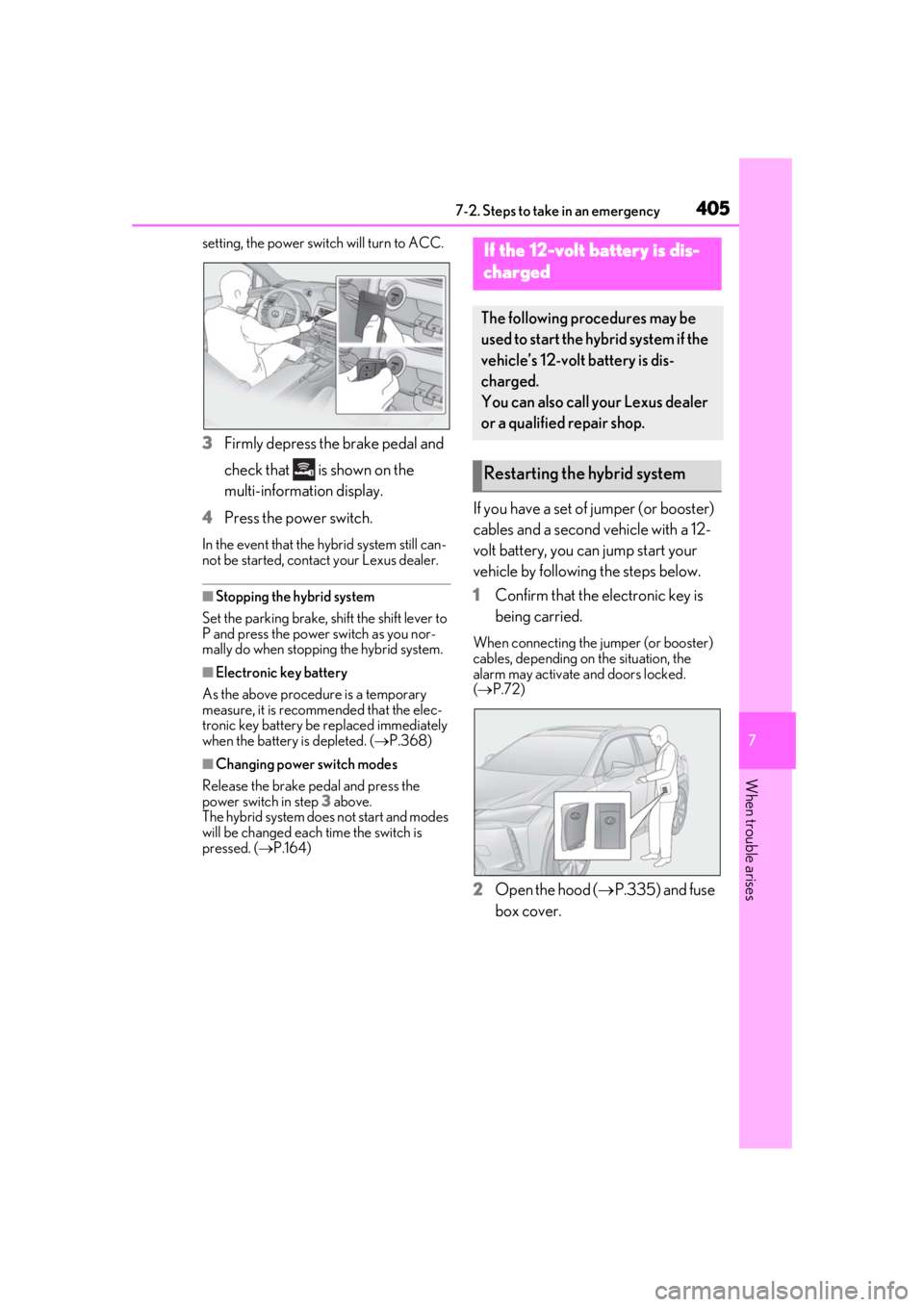
If you have a set of jumper (or booster)
cables and a second vehicle with a 12-
volt battery, you can jump start your
vehicle by following the steps below.
1 Confirm that the electronic key is
being carried.
When connecting the jumper (or booster)
cables, depending on the situation, the
alarm may activate and doors locked.
( P.72)
2 Open the hood ( P.335) and fuse
box cover.
If the 12-volt battery is dis-
charged
The following procedures may be
used to start the hybrid system if the
vehicle’s 12-volt battery is dis-
charged.
You can also call your Lexus dealer
or a qualified repair shop.
Restarting the hybrid system
Page 408 of 476

4087-2. Steps to take in an emergency
■Starting the hybrid system when the 12-
volt battery is discharged
The hybrid system cannot be started by
push-starting.
■To prevent 12-volt battery discharge
●Turn off the headlight s, the air condition-
ing system, the audio system, etc. while
the hybrid system is off.
●Turn off any unnecessary electrical com-
ponents when the vehicle is running at a
low speed for an extended period, such
as in heavy traffic.
■Charging the 12-volt battery
The electricity stored in the 12-volt battery
will discharge gradua lly even when the
vehicle is not in use, due to natural dis-
charge and the draining effects of certain
electrical appliances. If the vehicle is left for
a long time, the 12-volt battery may dis-
charge, and the hybrid system may be
unable to start. (The 12-volt battery
recharges automatically while the hybrid
system is operating.)
■When the 12-volt battery is removed or
discharged
●Information stored in the ECU is cleared.
When the 12-volt battery is depleted,
have the vehicle inspected at your Lexus
dealer.
●In some cases, it may not be possible to
unlock the doors using the smart access
system with push-button start when the
12-volt battery is discharged. Use the
wireless remote control or the mechani-
cal key to lock or unlock the doors.
●The hybrid system may not start on the
first attempt after the 12-volt battery has
recharged but will start normally after the
second attempt. This is not a malfunction.
●The power switch mode is memorized by
the vehicle. When the 12-volt battery is
reconnected, the system will return to the
mode it was in before the 12-volt battery
was discharged. Before disconnecting
the 12-volt battery, turn the power switch
off.
If you are unsure what mode the power
switch was in before the 12-volt battery discharged, be especially careful when
reconnecting the 12-volt battery.
●The power back door must be initialized.
(
P.119)
■When replacing the 12-volt battery
●Use a Central Degassing type 12-volt
battery (European Regulations).
●Use a 12-volt battery that the case size is
same as the previous one (LN1), 20 hour
rate capacity (20HR) is equivalent
(45Ah) or greater, and performance rat-
ing (CCA) is equivalent (286A) or
greater.
• If the sizes differ, the 12-volt battery can- not be properly secured.
• If an improper 12-volt battery is used, bat-
tery performance may decrease and the
hybrid system may not be able to restart.
• If the 20 hour rate capacity is low, even if
the time period where the vehicle is not
used is a short time, the 12-volt battery
may discharge and hybrid system may
not be able to start.
●Use a 12-volt battery with a handle. If a
12-volt battery without a handle is used,
removal is more difficult.
●After exchanging, firmly attach the fol-
lowing items to the exhaust hole of the 12-
volt battery.
• Confirm that the elbow is securely attached to the exhaust hose and exhaust
hole.
• Confirm that the exhaust hole plug is securely attached to the exhaust hole that
the elbow is not attached to.
• Use the elbow/exhaust hole plug included with the 12-volt battery
exchanged or the on e installed on the
battery prior to the exchange. (Depend-
ing on the 12-volt battery to be
exchanged, the exhaust hole may be
plugged.)