change LEXUS UX250H 2019 Owners Manual
[x] Cancel search | Manufacturer: LEXUS, Model Year: 2019, Model line: UX250H, Model: LEXUS UX250H 2019Pages: 476, PDF Size: 10.51 MB
Page 410 of 476
4107-2. Steps to take in an emergency
If the engine coolant temperature
gauge enters the red zone or
“Engine Coolant Temp High Stop in
a Safe Place See Owner’s Manual”
is shown on the multi-information
display
1
Stop the vehicle in a safe place and
turn off the air conditioning system,
and then stop the hybrid system.
2
If you see steam:
Carefully lift the hood after the
steam subsides.
If you do not see steam:
Carefully lift the hood.
3
After the hybrid system has cooled
down sufficiently, inspect the hoses
WARNING
■When replacing the 12-volt battery
●When the vent plug is close to the hold
down clamp, the battery fluid (acid)
may leak.
●For information regarding battery
replacement, contact your Lexus
dealer.
●After exchanging, securely attach the
elbow connected to the exhaust hose,
and exhaust hole plug to the exhaust
hole of the exchanged 12-volt battery.
If not properly installed, gases (hydro-
gen) may leak into the vehicle interior,
and there is the possible danger of the
gas igniting and exploding.
NOTICE
■When handling jumper cables
When connecting the jumper cables,
ensure that they do not become entan-
gled in the cooling fans or belt.
■To prevent damaging the vehicle
The exclusive jump starting terminal is to
be used when charging the 12-volt bat-
tery from another vehicle in an emer-
gency. It cannot be used to jump start
another vehicle.
If your vehicle overheats
The following may indicate that
your vehicle is overheating.
The engine coolant temperature
gauge ( P.78, 82) enters the
red zone, or a loss of hybrid sys-
tem power is experienced. (For
example, the vehicle speed does
not increase.)
“Engine Coolant Temp High Stop
in a Safe Place See Owner’s
Manual” or “Hybrid system over-
heated Output power reduced” is
shown on the multi-information
display.
Steam comes out from under the
hood.
Correction procedures
Page 419 of 476
4198-1. Specifications
8
Vehicle specifications
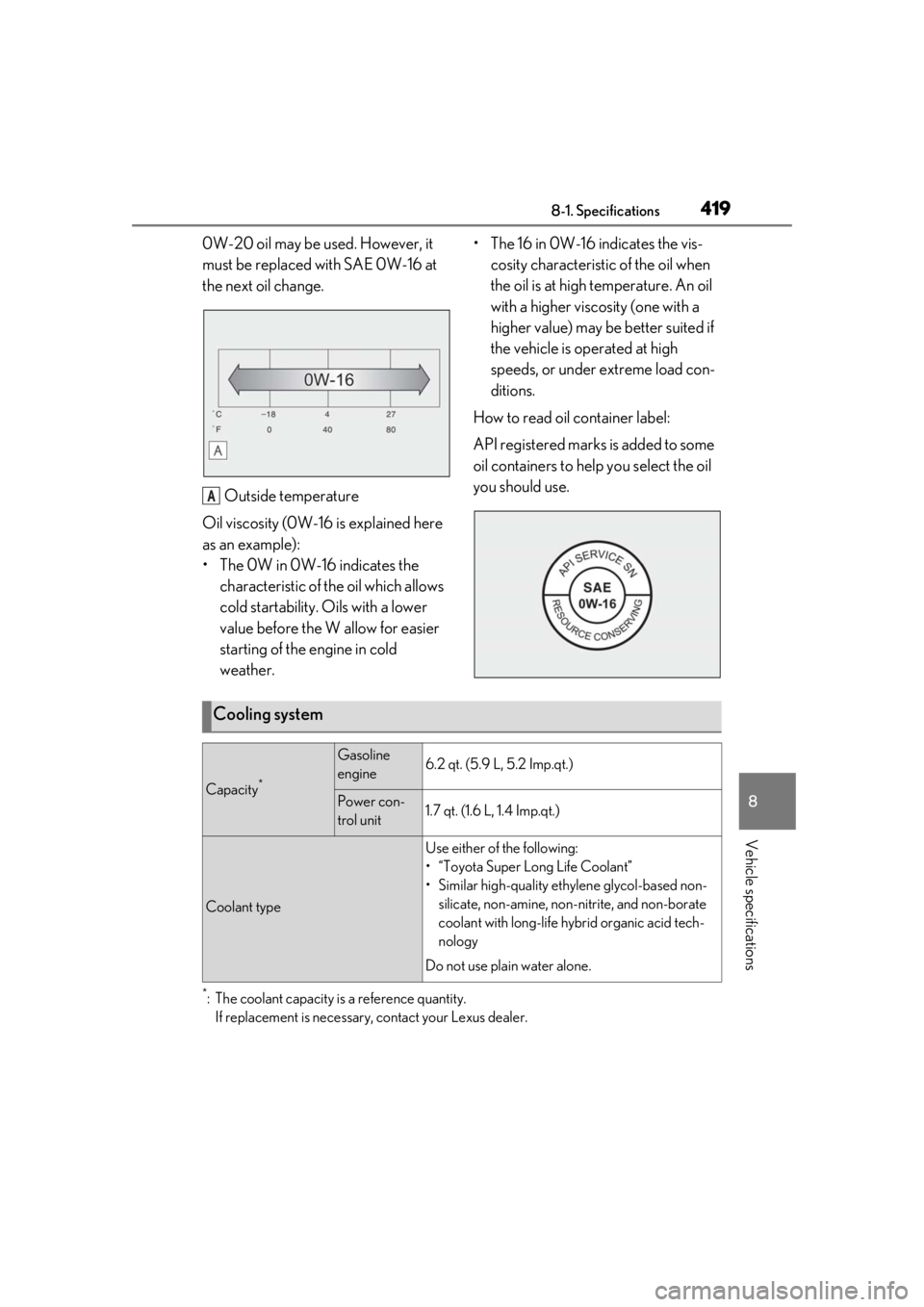
0W-20 oil may be used. However, it
must be replaced with SAE 0W-16 at
the next oil change.Outside temperature
Oil viscosity (0W-16 is explained here
as an example):
• The 0W in 0W-16 indicates the characteristic of the oil which allows
cold startability. Oils with a lower
value before the W allow for easier
starting of the engine in cold
weather. • The 16 in 0W-16 indicates the vis-
cosity characteristic of the oil when
the oil is at high temperature. An oil
with a higher viscosity (one with a
higher value) may be better suited if
the vehicle is operated at high
speeds, or under extreme load con-
ditions.
How to read oil container label:
API registered marks is added to some
oil containers to help you select the oil
you should use.
*: The coolant capacity is a reference quantity. If replacement is necessary, contact your Lexus dealer.
A
Cooling system
Capacity*
Gasoline
engine6.2 qt. (5.9 L, 5.2 Imp.qt.)
Power con-
trol unit1.7 qt. (1.6 L, 1.4 Imp.qt.)
Coolant type
Use either of the following:
• “Toyota Super Long Life Coolant”
• Similar high-quality ethy lene glycol-based non-
silicate, non-amine, non-nitrite, and non-borate
coolant with long-life hy brid organic acid tech-
nology
Do not use plain water alone.
Page 434 of 476
4348-2. Customization
8-2.Customization
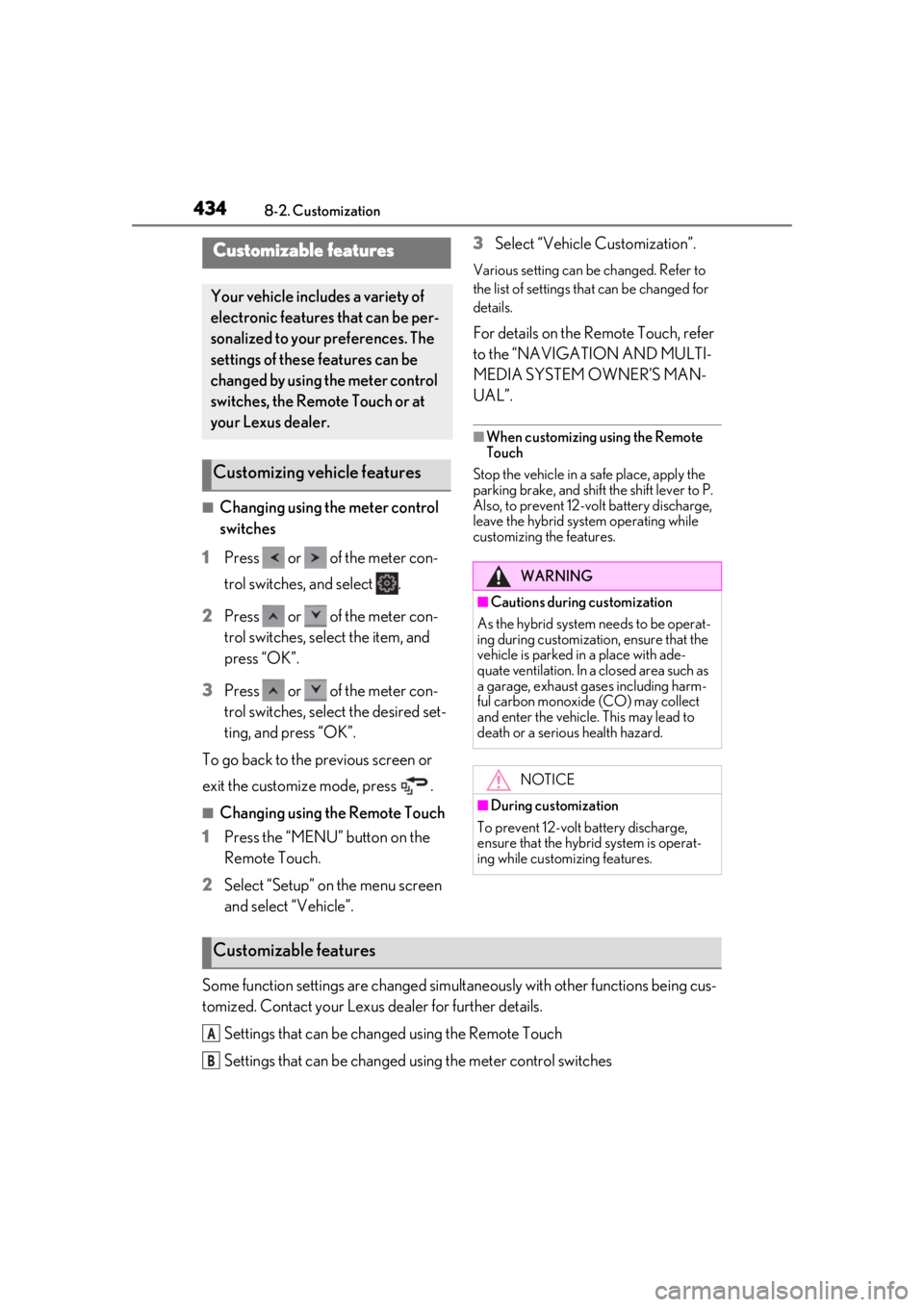
■Changing using the meter control
switches
1
Press or of the meter con-
trol switches, and select .
2
Press or of the meter con-
trol switches, select the item, and
press “OK”.
3
Press or of the meter con-
trol switches, select the desired set-
ting, and press “OK”.
To go back to the previous screen or
exit the customize mode, press .
■Changing using the Remote Touch
1
Press the “MENU” button on the
Remote Touch.
2
Select “Setup” on the menu screen
and select “Vehicle”. 3
Select “Vehicle Customization”.
Various setting can be changed. Refer to
the list of settings th
at can be changed for
details.
For details on the Remote Touch, refer
to the “NAVIGATION AND MULTI-
MEDIA SYSTEM OWNER’S MAN-
UAL”.
■When customizing using the Remote
Touch
Stop the vehicle in a safe place, apply the
parking brake, and shift the shift lever to P.
Also, to prevent 12-volt battery discharge,
leave the hybrid system operating while
customizing the features.
Some function settings are changed simultaneously with other functions being cus-
tomized. Contact your Lexus dealer for further details.
Settings that can be changed using the Remote Touch
Settings that can be changed using the meter control switches
Customizable features
Your vehicle includes a variety of
electronic features that can be per-
sonalized to your preferences. The
settings of these features can be
changed by using the meter control
switches, the Remote Touch or at
your Lexus dealer.
Customizing vehicle features
WARNING
■Cautions during customization
As the hybrid system needs to be operat-
ing during customizatio n, ensure that the
vehicle is parked in a place with ade-
quate ventilation. In a closed area such as
a garage, exhaust gases including harm-
ful carbon monoxide (CO) may collect
and enter the vehicle. This may lead to
death or a serious health hazard.
NOTICE
■During customization
To prevent 12-volt battery discharge,
ensure that the hybrid system is operat-
ing while customizing features.
Customizable features
A
B
Page 435 of 476
4358-2. Customization
8
Vehicle specifications
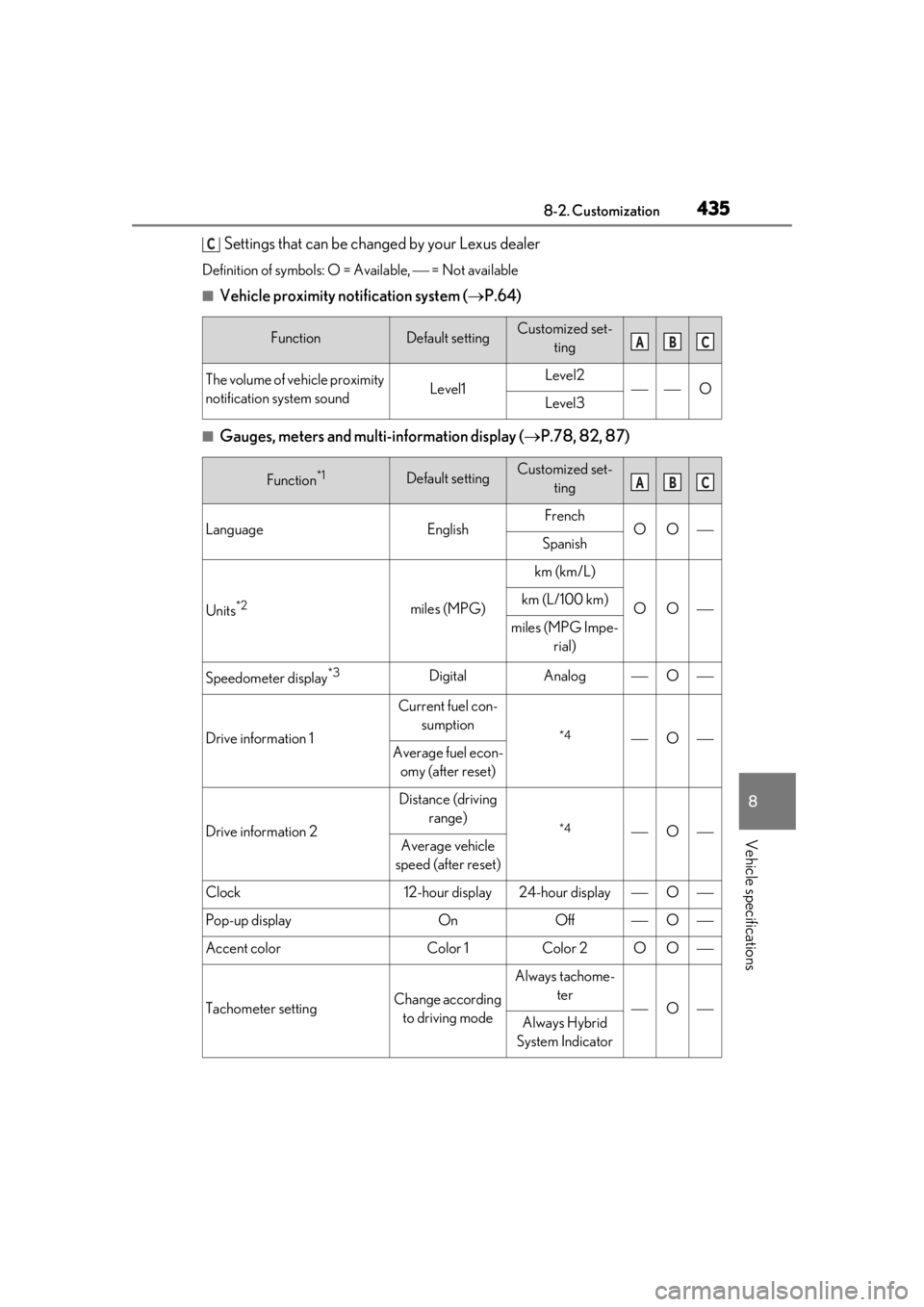
Settings that can be changed by your Lexus dealer
Definition of symbols: O = Available, = Not available
■Vehicle proximity notification system (P.64)
■Gauges, meters and multi-information display ( P.78, 82, 87)
FunctionDefault settingCustomized set-
ting
The volume of vehicle proximity
notification system soundLevel1Level2OLevel3
Function*1Default settingCustomized set-ting
LanguageEnglishFrenchOOSpanish
Units*2miles (MPG)
km (km/L)
OOkm (L/100 km)
miles (MPG Impe- rial)
Speedometer display*3DigitalAnalogO
Drive information 1
Current fuel con-sumption
*4OAverage fuel econ-omy (after reset)
Drive information 2
Distance (driving range)
*4OAverage vehicle
speed (after reset)
Clock12-hour display24-hour displayO
Pop-up displayOnOffO
Accent colorColor 1Color 2OO
Tachometer settingChange according to driving mode
Always tachome- ter
OAlways Hybrid
System Indicator
C
ABC
ABC
Page 445 of 476
4458-2. Customization
8
Vehicle specifications
■Vehicle customization
●When the smart access system with
push-button start is off, the entry unlock
function cannot be customized.
●When the doors remain closed after
unlocking the doors and the timer acti-
vated automatic door lock function acti-
vates, signals will be generated in
accordance with the operation buzzer
volume and operational signal (Emer-
gency flashers) function settings.
●Some settings can be changed using a
switch or the Center Display. If a setting is
changed using a switch, the changed set-
ting will not be reflected on the Center
Display. until the power switch is turned
off and then to ON.
■Clock settings screen
If the clock adjustment screen is displayed
continuously when attempting to change
the clock settings, the system may be mal-
functioning. Have the vehicle inspected by
your Lexus dealer.
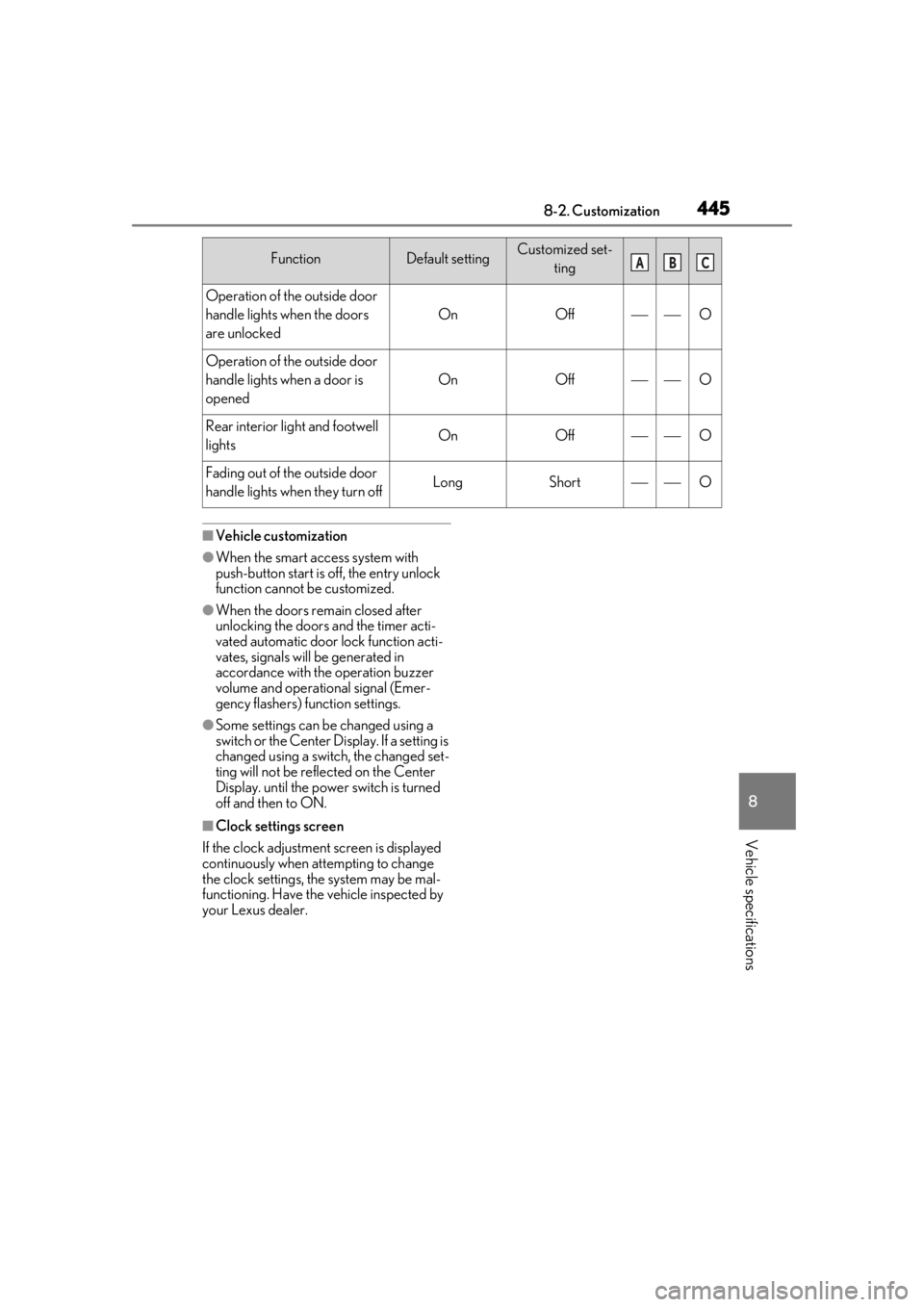
Operation of the outside door
handle lights when the doors
are unlocked
OnOffO
Operation of the outside door
handle lights when a door is
opened
OnOffO
Rear interior light and footwell
lightsOnOffO
Fading out of the outside door
handle lights when they turn offLongShortO
FunctionDefault settingCustomized set-
tingABC
Page 446 of 476
4468-3. Initialization
8-3.Initialization
*:If equipped
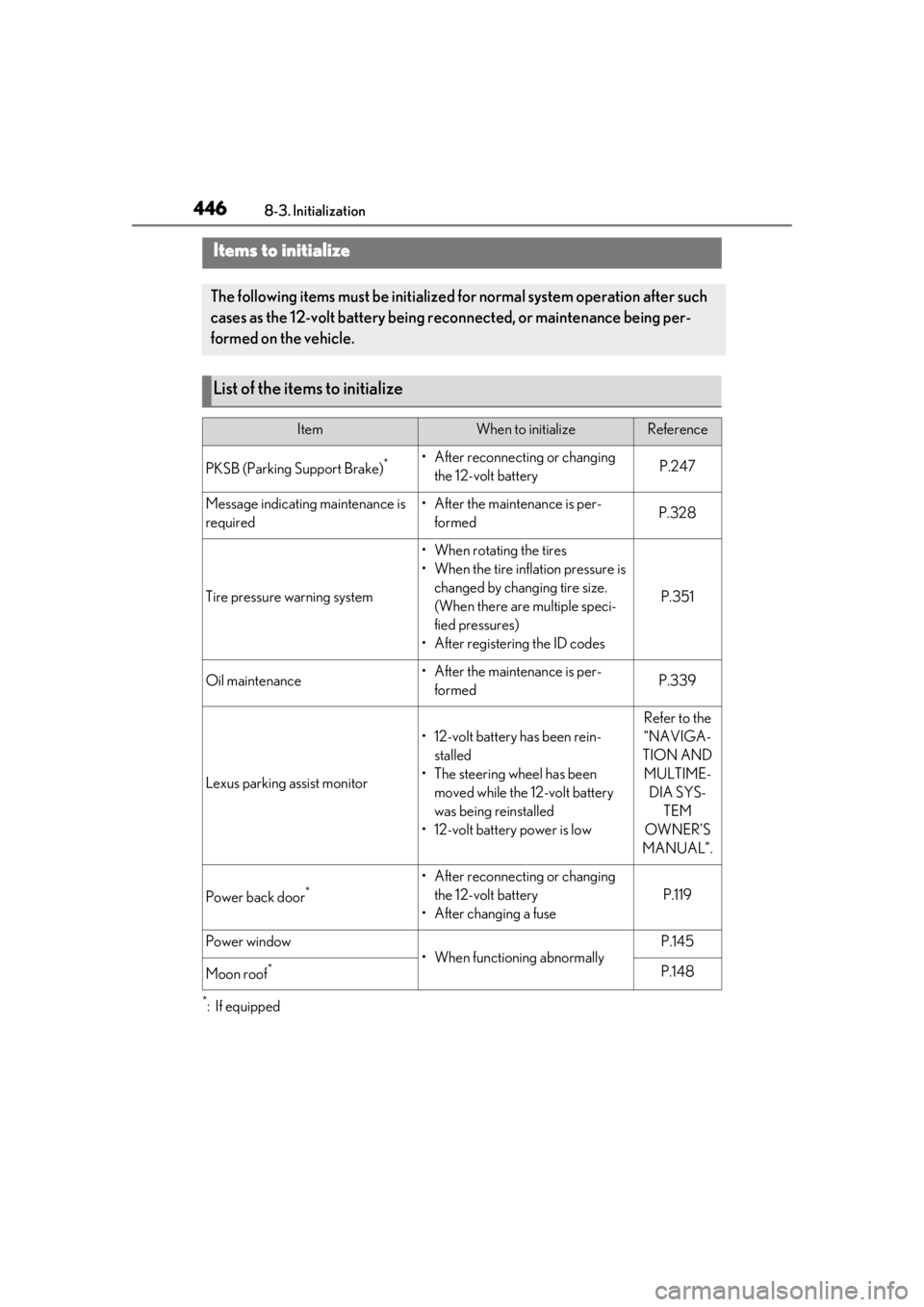
Items to initialize
The following items must be initialized for normal system operation after such
cases as the 12-volt battery being re connected, or maintenance being per-
formed on the vehicle.
List of the items to initialize
ItemWhen to initializeReference
PKSB (Parking Support Brake)*• After reconnecting or changing the 12-volt batteryP.247
Message indicating maintenance is
required• After the maintenance is per-formedP.328
Tire pressure warning system
• When rotating the tires
• When the tire inflation pressure is changed by changing tire size.
(When there are multiple speci-
fied pressures)
• After registering the ID codes
P.351
Oil maintenance• After the maintenance is per- formedP.339
Lexus parking assist monitor
• 12-volt battery has been rein-stalled
• The steering wheel has been moved while the 12-volt battery
was being reinstalled
• 12-volt battery power is low
Refer to the
“NAVIGA-
TION AND MULTIME- DIA SYS- TEM
OWNER’S
MANUAL”.
Power back door*• After reconnecting or changing the 12-volt battery
• After changing a fuse
P.119
Power window
• When functioning abnormally
P.145
Moon roof*P.148
Page 452 of 476
4529-1. For owners
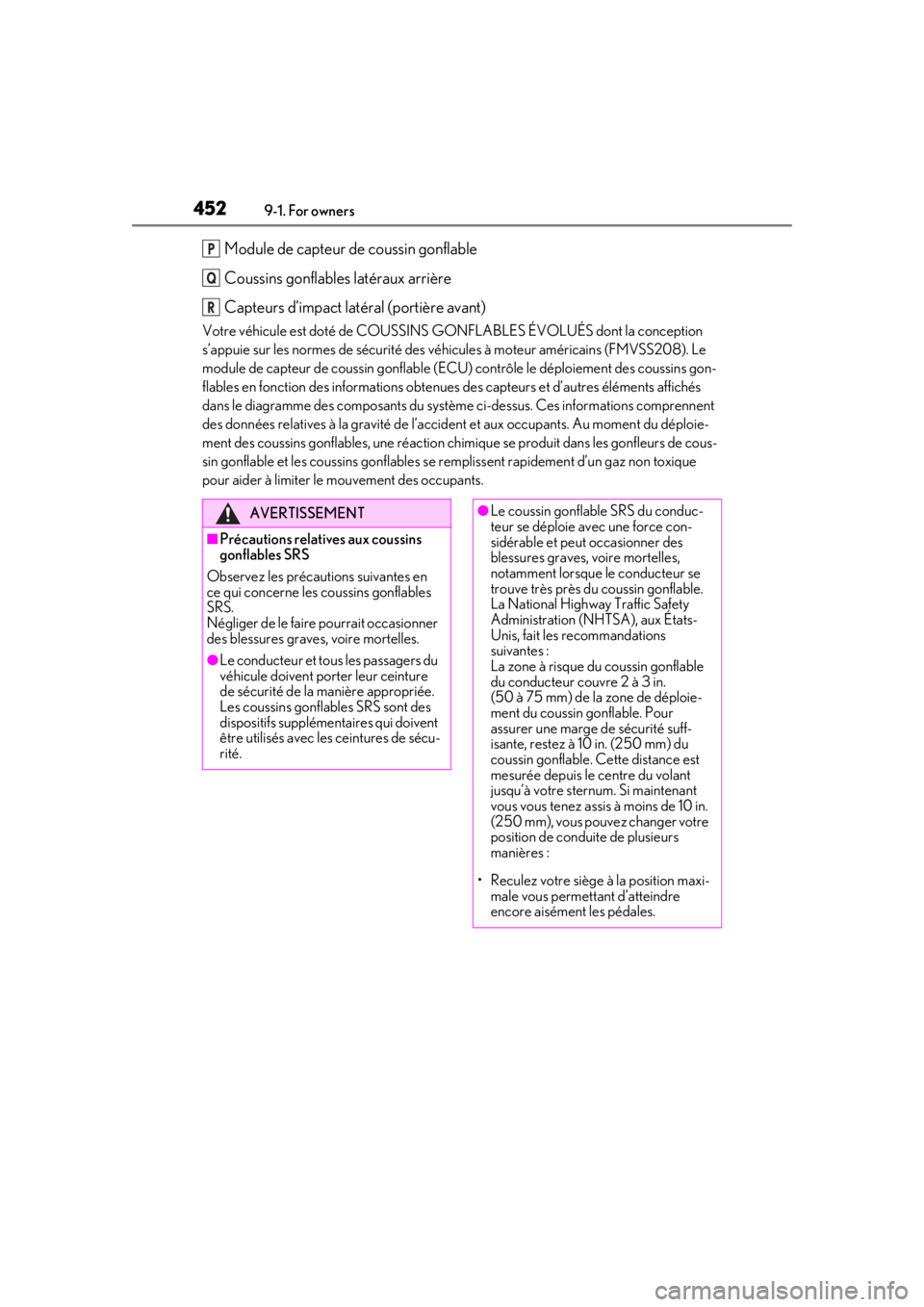
Module de capteur de coussin gonflable
Coussins gonflables latéraux arrière
Capteurs d’impact latéral (portière avant)
Votre véhicule est doté de COUSSINS GONFLABLES ÉVOLUÉS dont la conception
s’appuie sur les normes de sécurité des véhicules à moteur américains (FMVSS208). Le
module de capteur de coussin gonflable (ECU) contrôle le déploiement des coussins gon-
flables en fonction des informations obtenues des capteurs et d’autres éléments affichés
dans le diagramme des composants du systèm e ci-dessus. Ces informations comprennent
des données relatives à la grav ité de l’accident et aux occupants. Au moment du déploie-
ment des coussins gonflables, une réaction chimique se produi t dans les gonfleurs de cous-
sin gonflable et les coussins gonflables se remplissent rapidement d’un gaz non toxique
pour aider à limiter le mouvement des occupants.
P
Q
R
AVERTISSEMENT
■Précautions relatives aux coussins
gonflables SRS
Observez les précautions suivantes en
ce qui concerne les coussins gonflables
SRS.
Négliger de le faire pourrait occasionner
des blessures graves, voire mortelles.
●Le conducteur et tous les passagers du
véhicule doivent porter leur ceinture
de sécurité de la manière appropriée.
Les coussins gonflables SRS sont des
dispositifs supplémentaires qui doivent
être utilisés avec les ceintures de sécu-
rité.
●Le coussin gonflable SRS du conduc-
teur se déploie avec une force con-
sidérable et peut occasionner des
blessures graves, voire mortelles,
notamment lorsque le conducteur se
trouve très près du coussin gonflable.
La National Highway Traffic Safety
Administration (NHTSA), aux États-
Unis, fait les recommandations
suivantes :
La zone à risque du coussin gonflable
du conducteur couvre 2 à 3 in.
(50 à 75 mm) de la zone de déploie-
ment du coussin gonflable. Pour
assurer une marge de sécurité suff-
isante, restez à 10 in. (250 mm) du
coussin gonflable. Cette distance est
mesurée depuis le centre du volant
jusqu’à votre sternum. Si maintenant
vous vous tenez assis à moins de 10 in.
(250 mm), vous pouvez changer votre
position de conduite de plusieurs
manières :
• Reculez votre siège à la position maxi- male vous permettant d’atteindre
encore aisément les pédales.
Page 465 of 476

Alphabetical Index465
Head-up display ........................................... 93
Intuitive parking assist.............................. 232
LTA (Lane-Tracing Assist) .....................210
Multi-information display .......................... 87
RCTA .............................................................. 239
Warning messages ..................................395
Distance until next engine oil change .. 80, 86
Do-it-yourself maintenance .................... 333
Door lock Doors................................................................ 108
Smart access system with push-button start .................................................................. 124
Wireless remote control......................... 106
Doors Automatic door lock ing and unlocking
system ............................................................... 111
Back door..........................................................112
Door glasses ..................................................145
Door lock........................................................ 108
Open door warning bu zzer .......... 109, 111
Outside rear view mirrors ...................... 142
Rear door child-protectors ....................... 111
Side doors ...................................................... 108
Drive distance .................................................. 89
Drive info 1/Drive info 2 .............................. 89
Driver’s seat position memory .................133
Drive-start control ........................................152
Driving................................................................152 Break-in tips ...................................................153
Correct driving posture ............................ 25
Driving mode select switch .................. 255
Hybrid vehicle driving tips ...................... 261
Procedures .....................................................152
Winter drive tips......................................... 263
Driving information display ........................ 88
Driving position memory............................133 Memory recall function ............................135
Driving range ................................................... 89
Driving support system information display ............................................................................. 90
Dynamic radar cruise control with full- speed range..................................................216
Warning message .........................224, 395
E
ECB (Electronically Controlled Brake Sys-
tem) ................................................................ 256
Eco drive mode ............................................ 255
EDR (Event data recorder) ........................... 8
E-Four .............................................................. 257
Elapsed time ..................................................... 89
Electric motor Location ............................................................. 62
Electric Power Steering (EPS) Function .......................................................... 257
Warning light .............................................. 388
Electronically Controlled Brake System (ECB) ............................................................ 256
Electronic key ................................................ 104 Battery-saving function............................ 125
If the electronic key does not operate properly ...................................................... 403
Replacing the battery .............................. 368
Emergency, in case of If a warning buzzer sounds.................. 386
If a warning light turns on...................... 386
If a warning message is displayed .... 395
If the 12-volt battery is discharged ... 405
If the electronic key does not operate properly ...................................................... 403
If the fuel filler do or cannot be opened
..........................................................................402
If the hybrid system will not start ....... 400
If the vehicle is trapped in rising water .......................................................................... 379
If you have a flat tire ................................. 399
If you lose your keys .................................402
If you think something is wrong......... 385
If your vehicle becomes stuck ...............413
If your vehicle has to be stopped in an emergency .................................................378
If your vehicle needs to be towed ...... 381
If your vehicle overheats ......................... 410