power LEXUS UX250H 2019 Owners Manual
[x] Cancel search | Manufacturer: LEXUS, Model Year: 2019, Model line: UX250H, Model: LEXUS UX250H 2019Pages: 476, PDF Size: 10.51 MB
Page 303 of 476
3035-6. Using the other interior features
5
Interior features
charging only. They are not designed
for data transfer or other purposes.
Depending on the external device, it
may not charge properly. Refer to the
manual included with the device
before using a USB charging port.
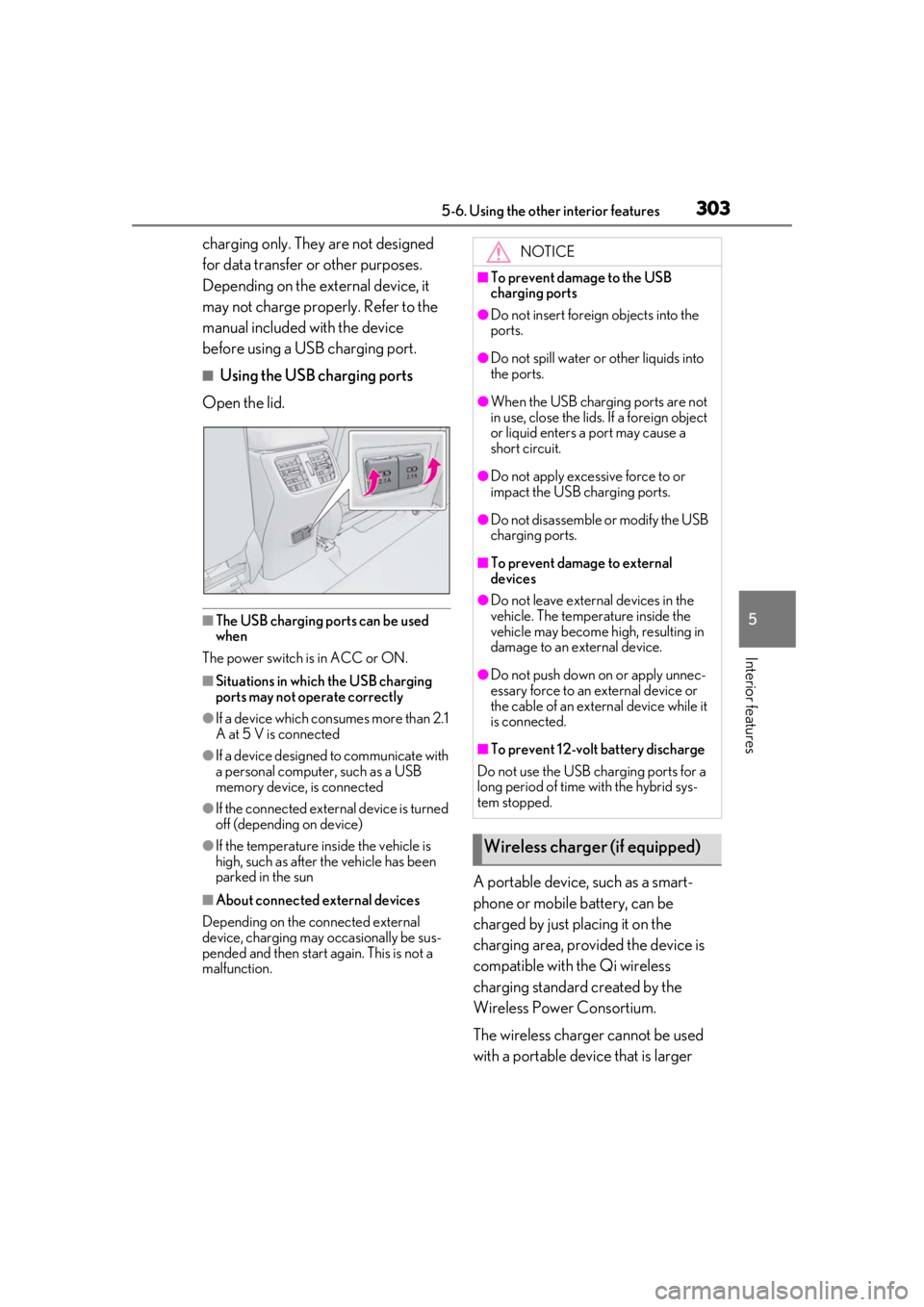
■Using the USB charging ports
Open the lid.
■The USB charging ports can be used
when
The power switch is in ACC or ON.
■Situations in which the USB charging
ports may not operate correctly
●If a device which consumes more than 2.1
A at 5 V is connected
●If a device designed to communicate with
a personal computer, such as a USB
memory device, is connected
●If the connected extern al device is turned
off (depending on device)
●If the temperature inside the vehicle is
high, such as after the vehicle has been
parked in the sun
■About connected external devices
Depending on the connected external
device, charging may occasionally be sus-
pended and then start again. This is not a
malfunction.
A portable device, such as a smart-
phone or mobile battery, can be
charged by just placing it on the
charging area, provided the device is
compatible with the Qi wireless
charging standard created by the
Wireless Power Consortium.
The wireless charger cannot be used
with a portable device that is larger
NOTICE
■To prevent damage to the USB
charging ports
●Do not insert foreign objects into the
ports.
●Do not spill water or other liquids into
the ports.
●When the USB charging ports are not
in use, close the lids. If a foreign object
or liquid enters a port may cause a
short circuit.
●Do not apply excessive force to or
impact the USB charging ports.
●Do not disassemble or modify the USB
charging ports.
■To prevent damage to external
devices
●Do not leave external devices in the
vehicle. The temperature inside the
vehicle may become high, resulting in
damage to an external device.
●Do not push down on or apply unnec-
essary force to an external device or
the cable of an external device while it
is connected.
■To prevent 12-volt battery discharge
Do not use the USB charging ports for a
long period of time with the hybrid sys-
tem stopped.
Wireless charger (if equipped)
Page 304 of 476
3045-6. Using the other interior features
than the charging area. Additionally,
depending on the portable device, the
wireless charger may not operate
properly. Refer to the operation man-
ual of the portable device.
■The “Qi” symbol
The “Qi” symbol is a trademark of the
Wireless Power Consortium.
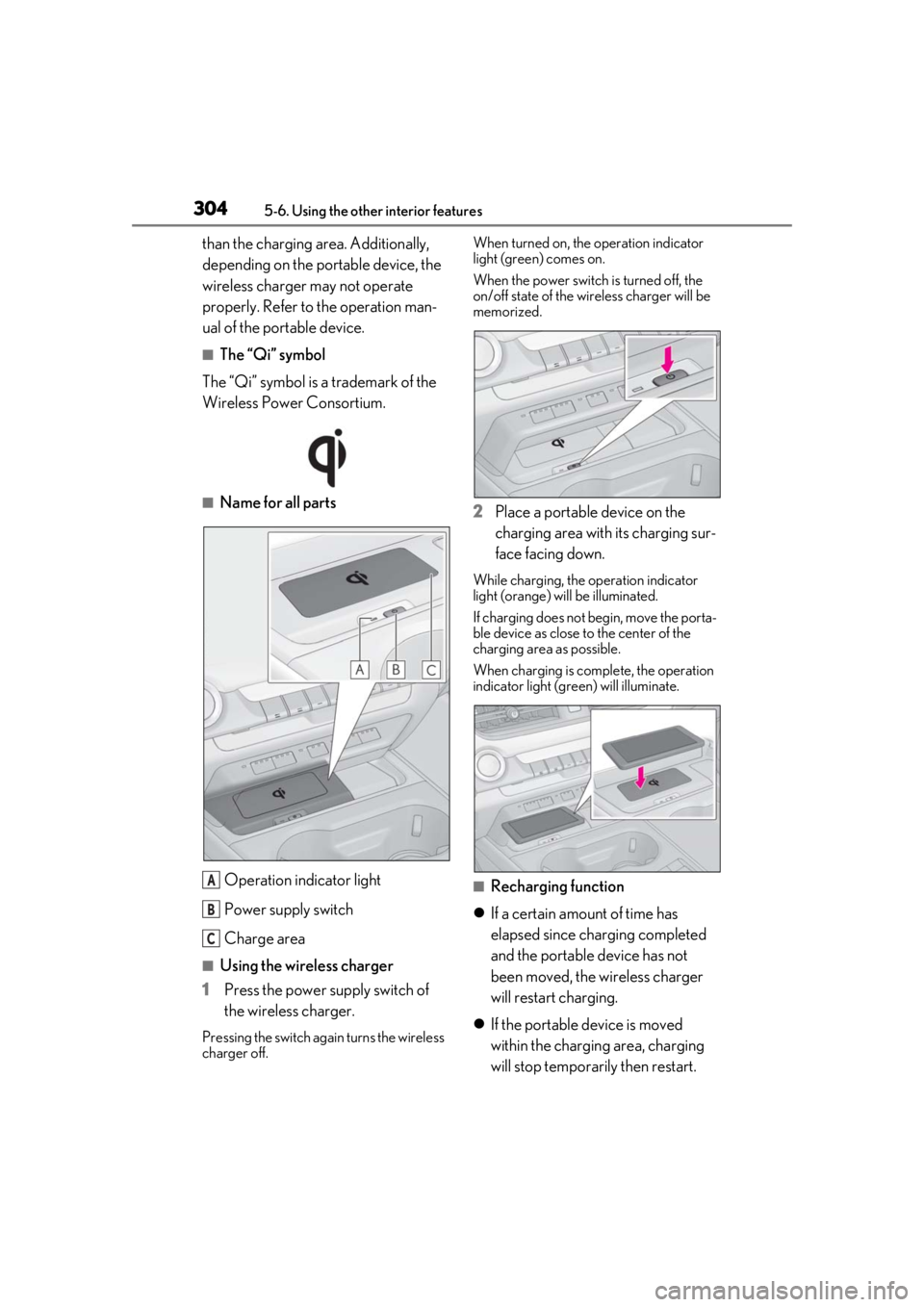
■Name for all parts
Operation indicator light
Power supply switch
Charge area
■Using the wireless charger
1 Press the power supply switch of
the wireless charger.
Pressing the switch ag ain turns the wireless
charger off. When turned on, the operation indicator
light (green) comes on.
When the power switch is turned off, the
on/off state of the wi
reless charger will be
memorized.
2 Place a portable device on the
charging area with its charging sur-
face facing down.
While charging, the operation indicator
light (orange) will be illuminated.
If charging does not begin, move the porta-
ble device as close to the center of the
charging area as possible.
When charging is complete, the operation
indicator light (green) will illuminate.
■Recharging function
If a certain amount of time has
elapsed since charging completed
and the portable device has not
been moved, the wireless charger
will restart charging.
If the portable device is moved
within the charging area, charging
will stop temporarily then restart.A
B
C
Page 305 of 476
3055-6. Using the other interior features
5
Interior features
■Operation indicator light status
*: Depending on the portable device, the operation indicator light may stay illumi-
nated (orange) after charging has com-
pleted.
If the operation indicator light blinks
If an error is detected, the operation indi-
cator light will blink (orange). Take the
appropriate measures according to the
table below.
• Blinks (orange) at a one second interval continuously
• Blinks (orange) 3 times repeatedly • Blinks (orange) 4 times repeatedly
■The wireless charger can be operated
when
The power switch is in ACC or ON.
■Portable devices that can be charged
●Portable devices compatible with the Qi
wireless charging standard can be
charged by the wireless charger. How-
ever, compatibility with all devices which
meet the Qi wireless charging standard is
not guaranteed.
●The wireless charger is designed to sup-
ply low power electricity (5 W or less) to
a cellular phone, smartphone, or other
portable device.
■If a cover or accessory is attached to the
portable device
Do not charge a portable device if a cover
or accessory which is not Qi compatible is
attached. Depending on the type of cover
and/or accessory attached, it may not be
possible to charge the portable device. If
the portable device is placed on the
charging area and does not charge, remove
the cover and/or accessories.
■If interference is heard in AM radio
broadcasts while charging
Turn off the wireless charger and check if
Operation indicator lightState
OffThe Wireless char-
ger is off
Green (illuminated)
Standby (charging is
possible)
Charging is com-
plete
*
Orange (illumi-
nated)
A portable device
has been placed on
the charging area
(identifying the por-
table device)
Charging in prog-
ress
Suspected causesMeasure
Vehicle to charger
communication fail-
ure.Contact your Lexus
dealer.
Suspected causesMeasure
A foreign object
exists between the
portable device and
charging area.
Remove the foreign
object.
Portable device is
not positioned prop-
erly on the charging
area.Move the portable
device toward the
center of the
charging area.
Suspected causesMeasure
The temperature of
the wireless charger
is excessively high.Stop charging
immediately and
continue charging
after a while.
Page 306 of 476
3065-6. Using the other interior features
the noise is reduced. If noise is reduced,
press and hold the power supply switch of
the wireless charger for 2 seconds. The fre-
quency of the wireless charger is changed
and noise may be reduced. When the fre-
quency is changed, the operation indicator
light will blink (orange) 2 times.
■Charging precautions
●If the electronic key cannot be detected
in the cabin, charging cannot be per-
formed. When a door is opened and
closed, charging may be temporarily sus-
pended.
●While charging, the wireless charger and
the portable device will become warm.
This is not a malfunction.
If a portable device becomes warm while
charging and charging stops due to the
protection function of the portable
device, wait until the portable device
cools down and charge it again.
■Sound generated during operation
When the power supply switch is turned on
or while a portable de vice is being identi-
fied, operation sounds may be heard. This is
not a malfunction.
■Cleaning the wireless charger
P.325
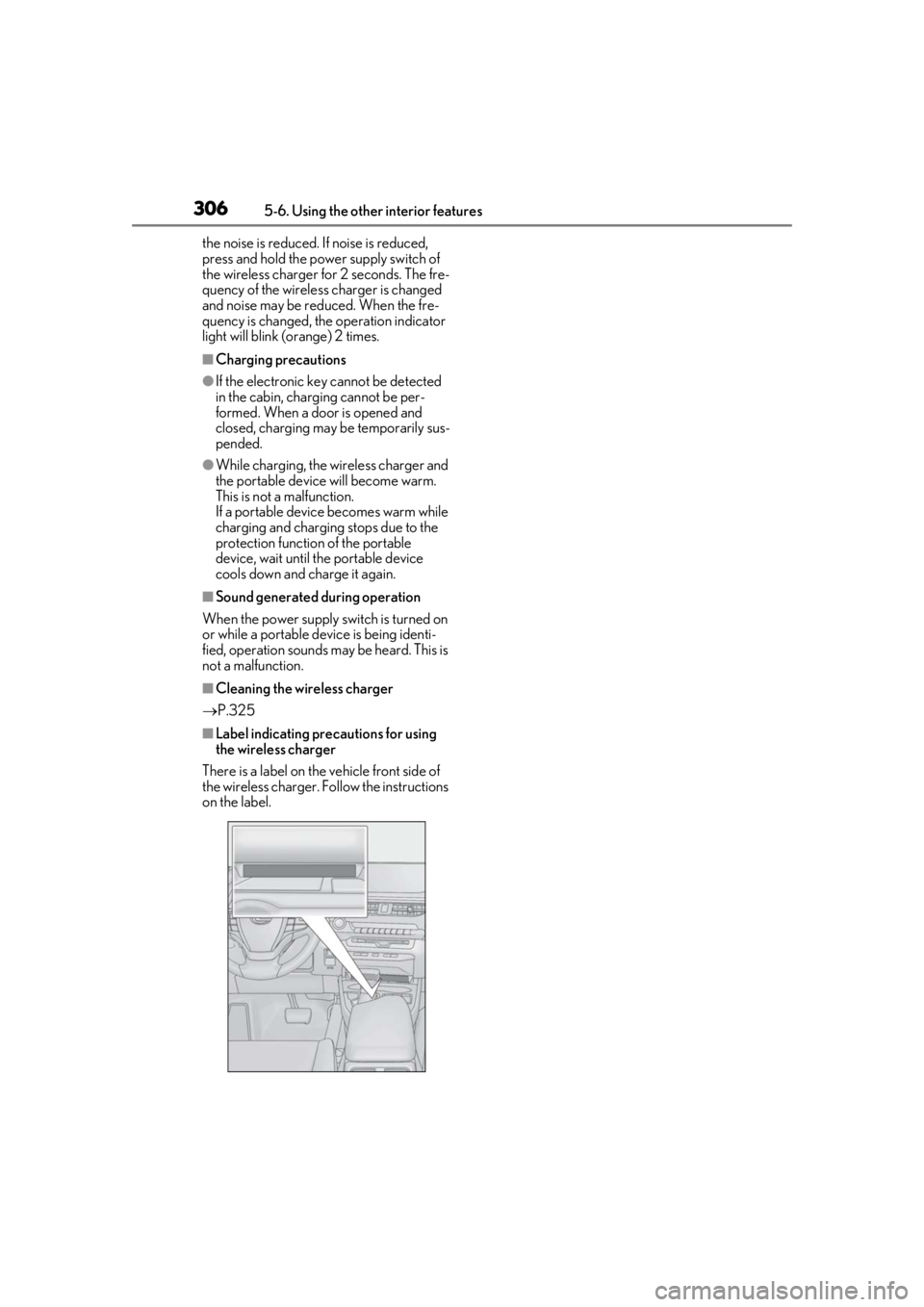
■Label indicating precautions for using
the wireless charger
There is a label on the vehicle front side of
the wireless charger. Follow the instructions
on the label.
Page 310 of 476
3105-6. Using the other interior features
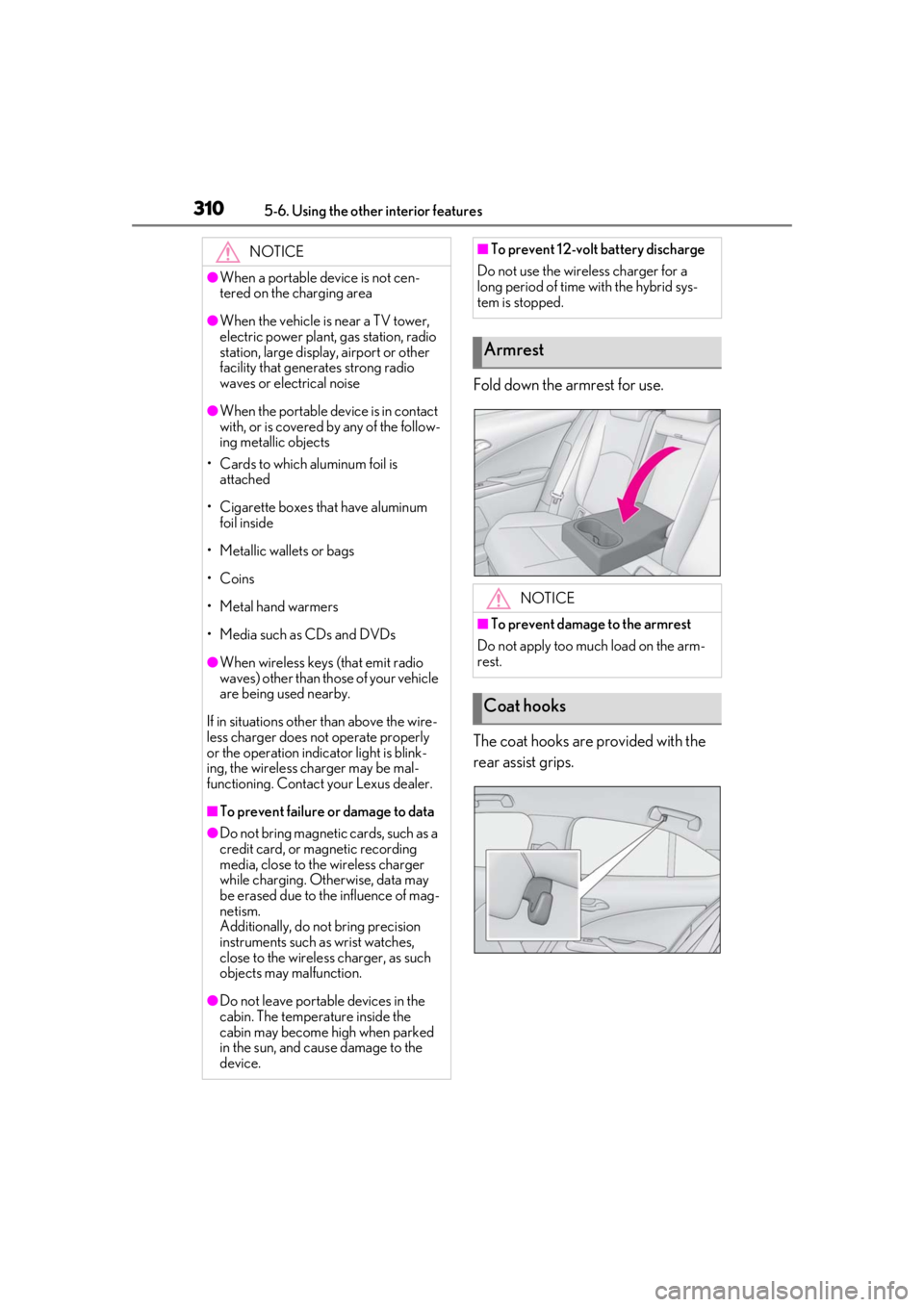
Fold down the armrest for use.
The coat hooks are provided with the
rear assist grips.
NOTICE
●When a portable device is not cen-
tered on the charging area
●When the vehicle is near a TV tower,
electric power plant, gas station, radio
station, large display, airport or other
facility that generates strong radio
waves or electrical noise
●When the portable device is in contact
with, or is covered by any of the follow-
ing metallic objects
• Cards to which aluminum foil is attached
• Cigarette boxes that have aluminum foil inside
• Metallic wallets or bags
• Coins
• Metal hand warmers
• Media such as CDs and DVDs
●When wireless keys (that emit radio
waves) other than those of your vehicle
are being used nearby.
If in situations other than above the wire-
less charger does not operate properly
or the operation indicator light is blink-
ing, the wireless charger may be mal-
functioning. Contact your Lexus dealer.
■To prevent failure or damage to data
●Do not bring magnetic cards, such as a
credit card, or magnetic recording
media, close to the wireless charger
while charging. Otherwise, data may
be erased due to the influence of mag-
netism.
Additionally, do not bring precision
instruments such as wrist watches,
close to the wireless charger, as such
objects may malfunction.
●Do not leave portab le devices in the
cabin. The temperature inside the
cabin may become high when parked
in the sun, and cause damage to the
device.
■To prevent 12-volt battery discharge
Do not use the wireless charger for a
long period of time with the hybrid sys-
tem is stopped.
Armrest
NOTICE
■To prevent damage to the armrest
Do not apply too much load on the arm-
rest.
Coat hooks
Page 317 of 476
3175-6. Using the other interior features
5
Interior features
*: If equipped
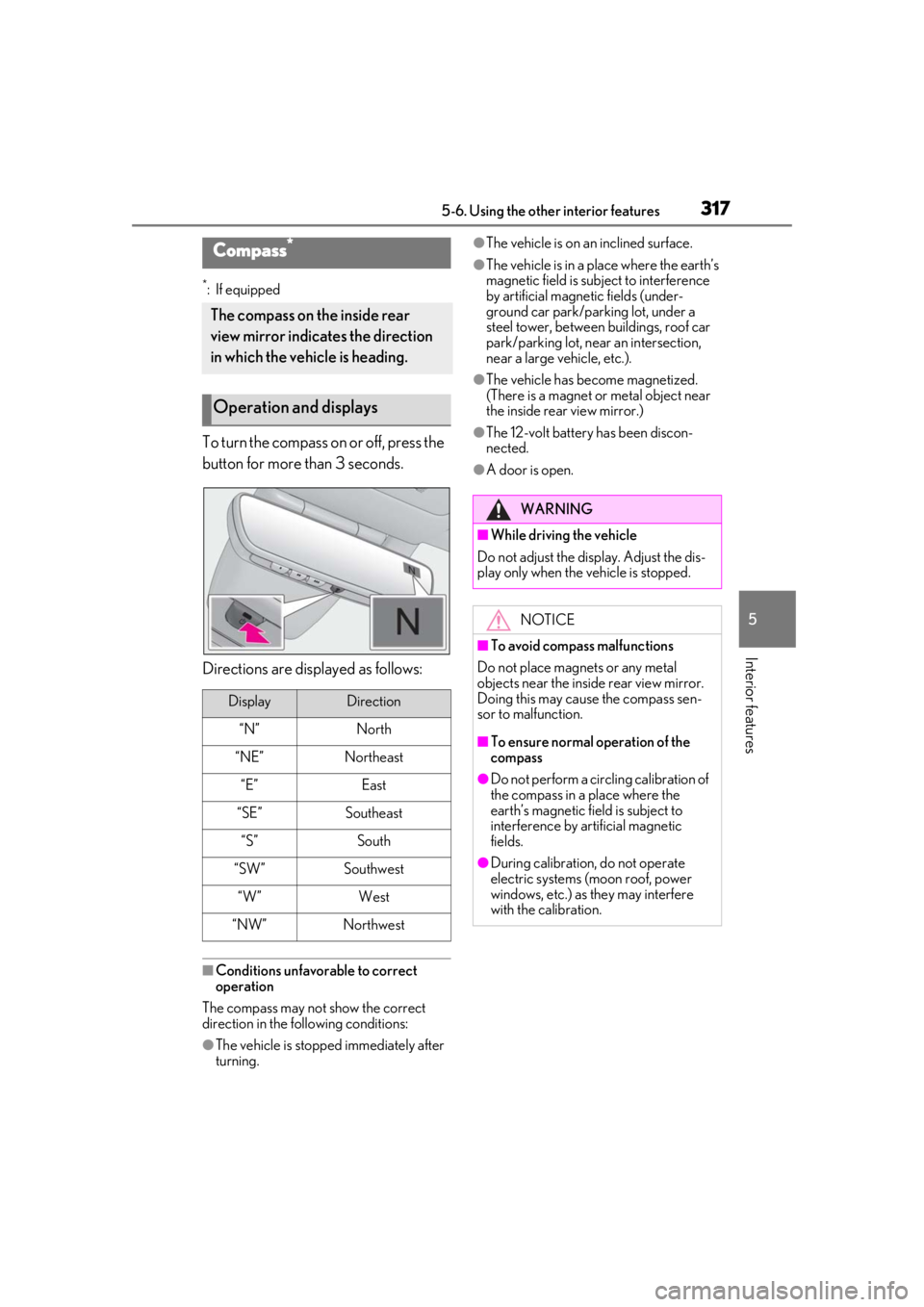
To turn the compass on or off, press the
button for more than 3 seconds.
Directions are displayed as follows:
■Conditions unfavorable to correct
operation
The compass may not show the correct
direction in the following conditions:
●The vehicle is stopped immediately after
turning.
●The vehicle is on an inclined surface.
●The vehicle is in a place where the earth’s
magnetic field is subject to interference
by artificial magnetic fields (under-
ground car park/parking lot, under a
steel tower, between buildings, roof car
park/parking lot, near an intersection,
near a large vehicle, etc.).
●The vehicle has become magnetized.
(There is a magnet or metal object near
the inside rear view mirror.)
●The 12-volt battery has been discon-
nected.
●A door is open.
Compass*
The compass on the inside rear
view mirror indicates the direction
in which the vehicle is heading.
Operation and displays
DisplayDirection
“N”North
“NE”Northeast
“E”East
“SE”Southeast
“S”South
“SW”Southwest
“W”West
“NW”Northwest
WARNING
■While driving the vehicle
Do not adjust the display. Adjust the dis-
play only when the vehicle is stopped.
NOTICE
■To avoid compass malfunctions
Do not place magnets or any metal
objects near the inside rear view mirror.
Doing this may cause the compass sen-
sor to malfunction.
■To ensure normal operation of the
compass
●Do not perform a circling calibration of
the compass in a place where the
earth’s magnetic field is subject to
interference by artificial magnetic
fields.
●During calibration, do not operate
electric systems (moon roof, power
windows, etc.) as they may interfere
with the calibration.
Page 322 of 476

3226-1. Maintenance and care
6-1.Maintenance and care
Working from top to bottom, liber-
ally apply water to the vehicle body,
wheel wells and underside of the
vehicle to remove any dirt and dust.
Wash the vehicle body using a
sponge or soft cloth, such as a
chamois.
For hard-to-remove marks, use car
wash soap and rinse thoroughly with
water.
Wipe away any water.
Wax the vehicle when the water-
proof coating deteriorates.
If water does not bead on a clean surface,
apply wax when the vehicle body is cool.
■Self-restoring coat
The vehicle body has a self-restoring coat-
ing that is resistant to small surface
scratches caused in a car wash etc.
●The coating lasts for 5 to 8 years from
when the vehicle is delivered from the
plant.
●The restoration time differs depending on
the depth of the scratch and outside tem-
perature. The restoration time may
become shorter when the coating is
warmed by applying warm water.
●Deep scratches caused by keys, coins,
etc. cannot be restored.
●Do not use wax that contain abrasives.
■Automatic car washes
●Before washing the vehicle:
• Fold the mirrors
• Turn off the power back door (if equipped)
Start washing from the front of the vehicle.
Extend the mirrors before driving.
●Brushes used in automatic car washes
may scratch the vehicl e surface and harm
your vehicle’s paint.
●Rear spoiler may not be washable in
some automatic car washes. There may
also be an increased risk of damage to
vehicle.
■High pressure car washes
As water may enter the cabin, do not bring
the nozzle tip near the gaps around the
doors or perimeter of the windows, or spray
these areas continuously.
■Note for a smart access system with
push-button start
●If the door handle becomes wet while the
electronic key is within the effective
range, the door may lock and unlock
repeatedly. In that case, follow the follow-
ing correction procedures to wash the
vehicle:
• Place the key in a position 6 ft. (2 m) or
more separate from the vehicle while the
vehicle is being wash ed. (Take care to
ensure that the key is not stolen.)
• Set the electronic key to battery-saving mode to disable the smart access system
with push-button start. ( P.125)
●If the electronic key is inside the vehicle
and a door handle becomes wet during a
car wash, a buzzer may sound outside the
vehicle and “Key Detected in Vehicle”
may be shown on the multi-information
display. To turn off the alarm, lock all the
doors.
■Aluminum wheels
●Remove any dirt immediately by using a
neutral detergent.
●Wash detergent off with water immedi-
ately after use.
●To protect the paint from damage, make
sure to observe the following precau-
Cleaning and protecting the
vehicle exterior
Perform cleaning in a manner
appropriate to each component
and its material.
Cleaning instructions
Page 329 of 476
3296-2. Maintenance
6
Maintenance and care
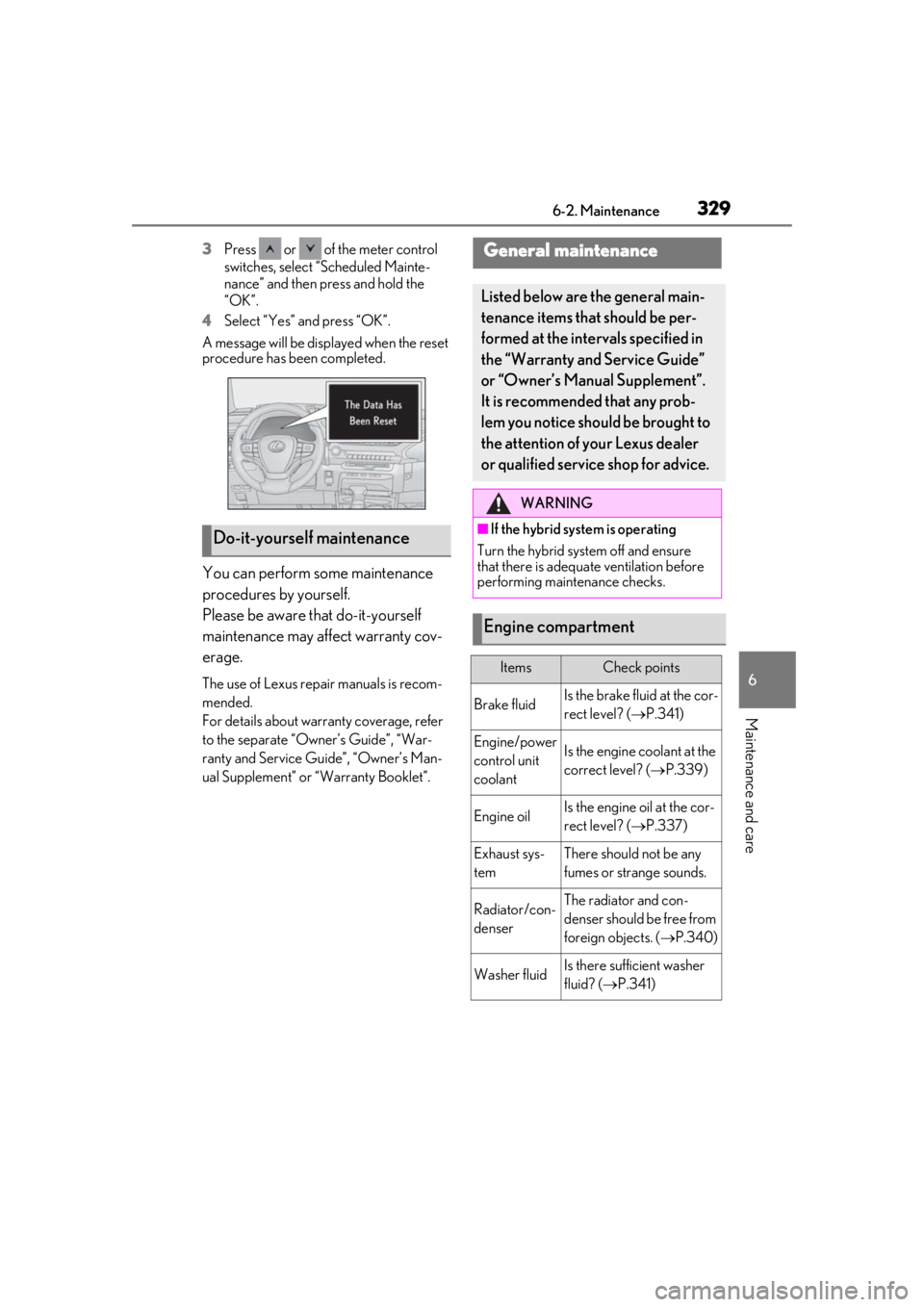
3Press or of the meter control
switches, select “Scheduled Mainte-
nance” and then press and hold the
“OK”.
4
Select “Yes” and press “OK”.
A message will be disp layed when the reset
procedure has been completed.
You can perform some maintenance
procedures by yourself.
Please be aware that do-it-yourself
maintenance may affect warranty cov-
erage.
The use of Lexus repair manuals is recom-
mended.
For details about warranty coverage, refer
to the separate “Owner’s Guide”, “War-
ranty and Service Guide”, “Owner’s Man-
ual Supplement” or “Warranty Booklet”.
Do-it-yourself maintenance
General maintenance
Listed below are the general main-
tenance items that should be per-
formed at the intervals specified in
the “Warranty and Service Guide”
or “Owner’s Manual Supplement”.
It is recommended that any prob-
lem you notice should be brought to
the attention of your Lexus dealer
or qualified service shop for advice.
WARNING
■If the hybrid system is operating
Turn the hybrid system off and ensure
that there is adequate ventilation before
performing maintenance checks.
Engine compartment
ItemsCheck points
Brake fluidIs the brake fluid at the cor-
rect level? ( P.341)
Engine/power
control unit
coolantIs the engine coolant at the
correct level? ( P.339)
Engine oilIs the engine oil at the cor-
rect level? ( P.337)
Exhaust sys-
temThere should not be any
fumes or strange sounds.
Radiator/con-
denserThe radiator and con-
denser should be free from
foreign objects. ( P.340)
Washer fluidIs there sufficient washer
fluid? ( P.341)
Page 333 of 476
3336-3. Do-it-yourself maintenance
6
Maintenance and care
6-3.Do-it-yourself maintenance
Do-it-yourself service pre-
cautions
If you perform maintenance by
yourself, be sure to follow the cor-
rect procedure as given in these
sections.
Maintenance
ItemsParts and tools
12-volt bat-
tery condition
( P.342)•Grease
•Conventional wrench
(for terminal clamp
bolts)
Brake fluid
level
( P.341)
• FMVSS No.116 DOT 3
or SAE J1703 brake
fluid
FMVSS No.116 DOT 4
or SAE J1704 brake
fluid
• Rag or paper towel
• Funnel (used only for adding brake fluid)
Engine/power
control unit
coolant level
( P.339)
•“Toyota Super Long Life
Coolant” or a similar
high quality ethylene gly-
col-based non-silicate,
non-amine, non-nitrite
and non-borate coolant
with long-life hybrid
organic acid technology
For the U.S.A.:
“Toyota Super Long Life
Coolant” is pre-mixed
with 50% coolant and
50% deionized water.
For Canada:
“Toyota Super Long Life
Coolant” is pre-mixed
with 55% coolant and
45% deionized water.
• Funnel (used only for adding coolant)
Hybrid battery
(traction bat-
tery) air intake
vent
( P.365)
• Vacuum cleaner, etc.
• Phillips screwdriver
Engine oil
level
( P.337)
•“Toyota Genuine Motor
Oil” or equivalent
• Rag or paper towel
• Funnel (used only for adding engine oil)
Fuses
( P.370)• Fuse with same amper-
age rating as original
Light bulbs
( P.374)•Bulb with same number
and wattage rating as
original
Headlight aim• Phillips-head screw-driver
Radiator and
condenser
( P.340)
ItemsParts and tools
Page 334 of 476
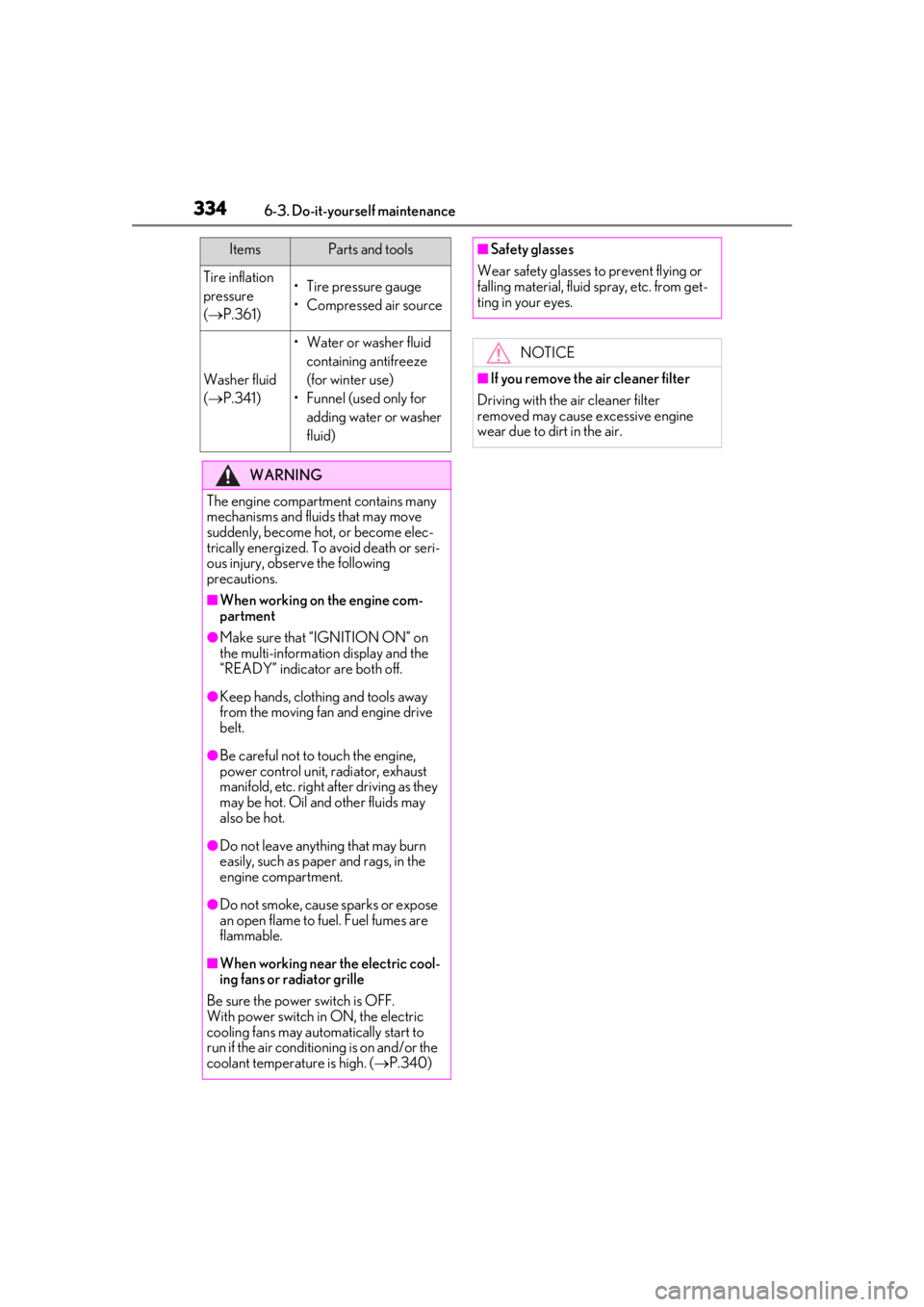
3346-3. Do-it-yourself maintenance
Tire inflation
pressure
( P.361)• Tire pressure gauge
• Compressed air source
Washer fluid
( P.341)
• Water or washer fluid
containing antifreeze
(for winter use)
• Funnel (used only for adding water or washer
fluid)
WARNING
The engine compartment contains many
mechanisms and fluids that may move
suddenly, become hot, or become elec-
trically energized. To avoid death or seri-
ous injury, observe the following
precautions.
■When working on the engine com-
partment
●Make sure that “IGNITION ON” on
the multi-information display and the
“READY” indicator are both off.
●Keep hands, clothi ng and tools away
from the moving fan and engine drive
belt.
●Be careful not to touch the engine,
power control unit, radiator, exhaust
manifold, etc. right after driving as they
may be hot. Oil and other fluids may
also be hot.
●Do not leave anything that may burn
easily, such as paper and rags, in the
engine compartment.
●Do not smoke, cause sparks or expose
an open flame to fuel. Fuel fumes are
flammable.
■When working near the electric cool-
ing fans or radiator grille
Be sure the power switch is OFF.
With power switch in ON, the electric
cooling fans may automatically start to
run if the air conditioning is on and/or the
coolant temperature is high. ( P.340)
ItemsParts and tools■Safety glasses
Wear safety glasses to prevent flying or
falling material, fluid spray, etc. from get-
ting in your eyes.
NOTICE
■If you remove the air cleaner filter
Driving with the air cleaner filter
removed may cause excessive engine
wear due to dirt in the air.