power LEXUS UX250H 2019 Manual Online
[x] Cancel search | Manufacturer: LEXUS, Model Year: 2019, Model line: UX250H, Model: LEXUS UX250H 2019Pages: 476, PDF Size: 10.51 MB
Page 181 of 476
1814-3. Operating the lights and wipers
4
Driving
out its headlights turned on is detected.
●House lights, street lights, traffic signals,
and illuminated billboards or signs and
other reflective objects may cause the
high beams to change to the low beams,
or the low beams to remain on.
●The following factors may affect the
amount of time taken for the high beams
to turn on or off:
• The brightness of the headlights, fog
lights, and tail lights of vehicles ahead
• The movement and direction of vehicles ahead
• When a vehicle ahead only has opera- tional lights on one side
• When a vehicle ahead is a two-wheeled
vehicle
• The condition of the road (gradient, curve, condition of th e road surface, etc.)
• The number of passengers and amount of luggage in the vehicle
●The high beams may turn on or off unex-
pectedly.
●Bicycles or similar vehicles may not be
detected.
●In the following situations the system may
not be able to correctly detect the sur-
rounding brightness le vel. This may cause
the low beams to remain on or the high
beams to flash or dazzle pedestrians or
vehicles ahead. In such a case, it is neces-
sary to manually switch between the high
and low beams.
• When driving in inclement weather
(heavy rain, snow, fog, sandstorms, etc.)
• When the windshield is obscured by fog, mist, ice, dirt, etc.
• When the windshield is cracked or dam- aged
• When the front camera is deformed or
dirty
• When the temperature of the front cam- era is extremely high
• When the surrounding brightness level is equal to that of head lights, tail lights or
fog lights
• When headlights or tail lights of vehicles
ahead are turned off, dirty, changing
color, or not aimed properly
• When the vehicle is hit by water, snow,
dust, etc. from a preceding vehicle
• When driving through an area of inter-mittently changing brightness and dark-
ness
• When frequently and repeatedly driving
ascending/descending roads, or roads
with rough, bumpy or uneven surfaces
(such as stone-paved roads, gravel roads,
etc.)
• When frequently and repeatedly taking curves or driving on a winding road
• When there is a highly reflective object ahead of the vehicle, such as a sign or
mirror
• When the back of a preceding vehicle is highly reflective, such as a container on a
truck
• When the vehicle’s headlights are dam- aged or dirty, or are not aimed properly
• When the vehicle is listing or titling due to
a flat tire, a trailer being towed, etc.
• When the headlights are changed between the high beams and low beams
repeatedly in an abnormal manner
• When the driver believes that the high beams may be flashing or dazzling
pedestrians or other drivers
■Temporarily lowering sensor sensitivity
The sensitivity of the sensor can be tempo-
rarily lowered.
1 Turn the power switch on while the fol-
lowing conditions are met.
●The headlight switch is in or
position.
●The headlight switch lever is in high beam
position.
●Automatic High Beam switch is on.
2 Turn the power switch to ON.
3 Within 30 seconds after step 2, repeat
pulling the headlight switch lever to the
original position then pushing it to the
high beam position quickly 10 times,
then leave the lever in high beam posi-
tion.
4 If the sensitivity is changed, the Auto-
matic High Beam indicator is turn on
and off 3 times.
Automatic High Beam (headlights) may
turn on even when the vehicle is stopped.
Page 185 of 476
1854-3. Operating the lights and wipers
4
Driving
Vehicles with headlight cleaners:
When the power switch is in ON and the
headlights are on, if the lever is pulled, the
headlight cleaners will operate once. After
this, the headlight cleaners will operate
every 5th time the lever is pulled.
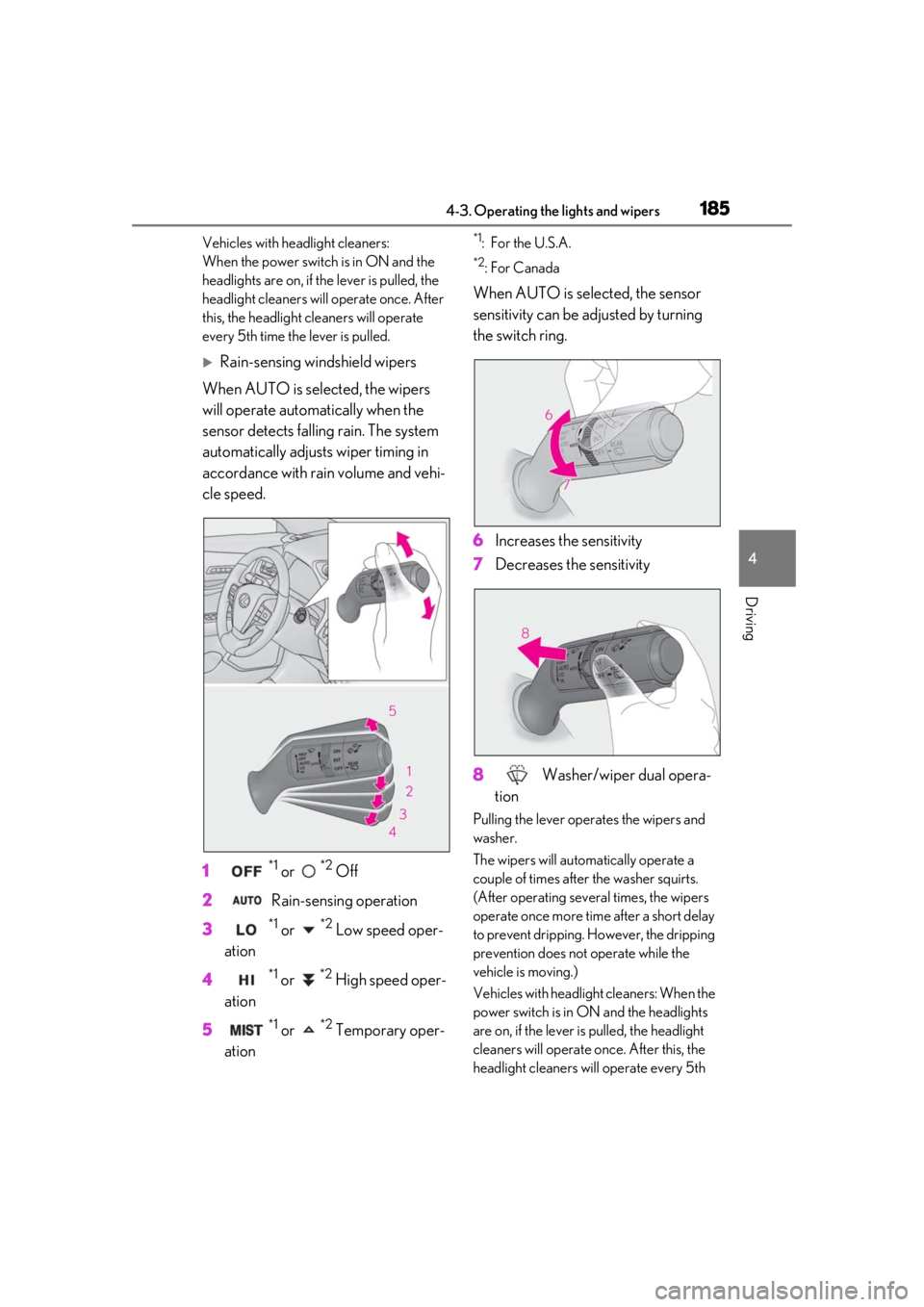
Rain-sensing windshield wipers
When AUTO is selected, the wipers
will operate automatically when the
sensor detects falling rain. The system
automatically adjusts wiper timing in
accordance with rain volume and vehi-
cle speed.
1
*1 or *2 Off
2 Rain-sensing operation
3
*1 or *2 Low speed oper-
ation
4
*1 or *2 High speed oper-
ation
5
*1 or *2 Temporary oper-
ation
*1: For the U.S.A.
*2:For Canada
When AUTO is selected, the sensor
sensitivity can be adjusted by turning
the switch ring.
6 Increases the sensitivity
7 Decreases the sensitivity
8 Washer/wiper dual opera-
tion
Pulling the lever operates the wipers and
washer.
The wipers will automatically operate a
couple of times after the washer squirts.
(After operating several times, the wipers
operate once more time after a short delay
to prevent dripping. However, the dripping
prevention does not operate while the
vehicle is moving.)
Vehicles with headlight cleaners: When the
power switch is in ON and the headlights
are on, if the lever is pulled, the headlight
cleaners will operate once. After this, the
headlight cleaners w ill operate every 5th
Page 186 of 476
1864-3. Operating the lights and wipers
time the lever is pulled.
■The windshield wipers and washer can
be operated when
The power switch is in ON.
■Effects of vehicle speed on wiper opera-
tion (vehicles with rain-sensing wind-
shield wipers)
Vehicle speed affects the Intermittent wiper
interval.
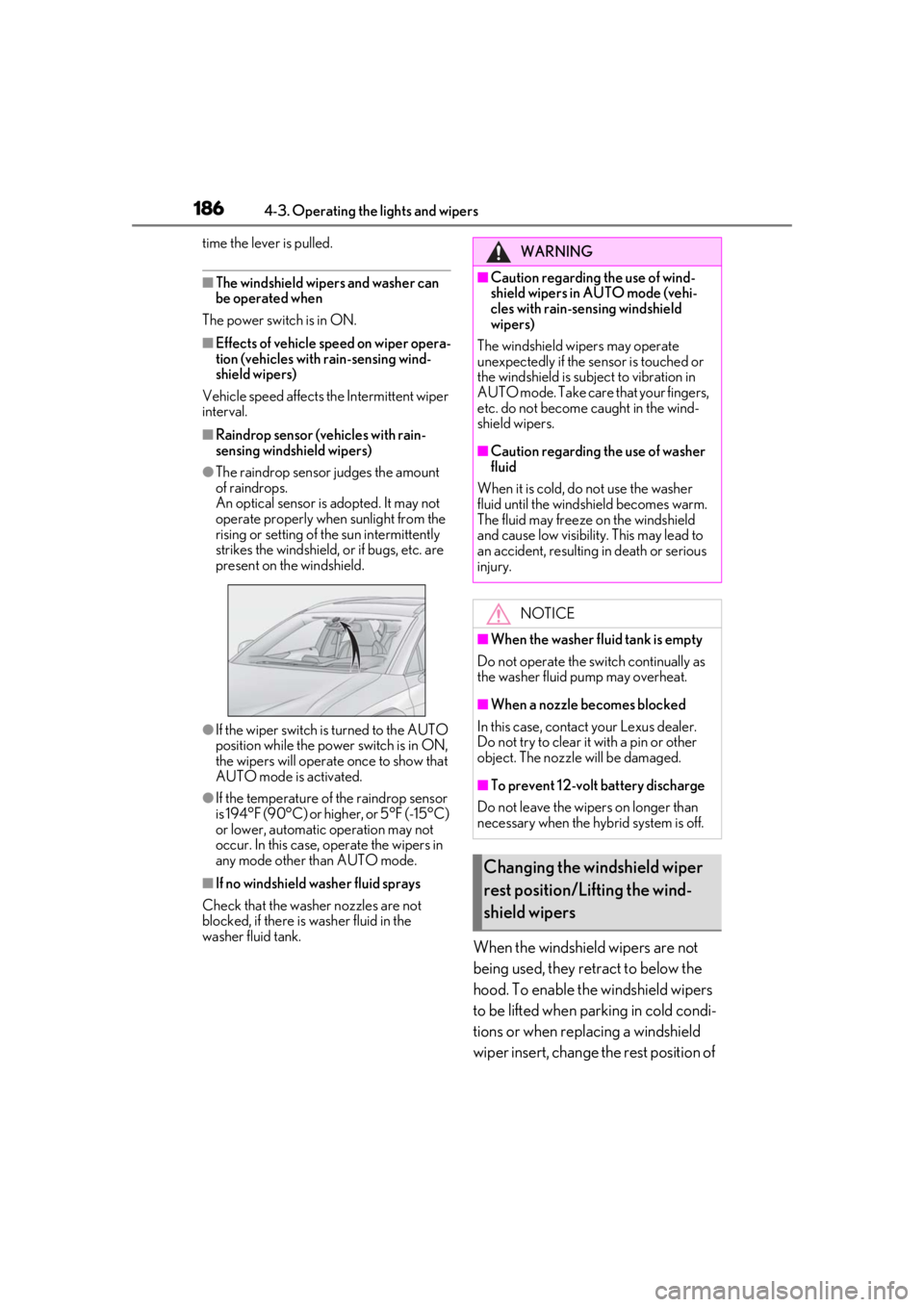
■Raindrop sensor (vehicles with rain-
sensing windshield wipers)
●The raindrop sensor judges the amount
of raindrops.
An optical sensor is adopted. It may not
operate properly when sunlight from the
rising or setting of the sun intermittently
strikes the windshield, or if bugs, etc. are
present on the windshield.
●If the wiper switch is turned to the AUTO
position while the power switch is in ON,
the wipers will operate once to show that
AUTO mode is activated.
●If the temperature of the raindrop sensor
is 194°F (90°C) or higher, or 5°F (-15°C)
or lower, automatic operation may not
occur. In this case, operate the wipers in
any mode other than AUTO mode.
■If no windshield washer fluid sprays
Check that the washer nozzles are not
blocked, if there is washer fluid in the
washer fluid tank.
When the windshield wipers are not
being used, they retract to below the
hood. To enable the windshield wipers
to be lifted when parking in cold condi-
tions or when replacing a windshield
wiper insert, change the rest position of
WARNING
■Caution regarding the use of wind-
shield wipers in AUTO mode (vehi-
cles with rain-sensing windshield
wipers)
The windshield wipers may operate
unexpectedly if the sensor is touched or
the windshield is subject to vibration in
AUTO mode. Take care that your fingers,
etc. do not become caught in the wind-
shield wipers.
■Caution regarding the use of washer
fluid
When it is cold, do not use the washer
fluid until the windshield becomes warm.
The fluid may freeze on the windshield
and cause low visibility. This may lead to
an accident, resulting in death or serious
injury.
NOTICE
■When the washer fluid tank is empty
Do not operate the switch continually as
the washer fluid pump may overheat.
■When a nozzle becomes blocked
In this case, contact your Lexus dealer.
Do not try to clear it with a pin or other
object. The nozzle will be damaged.
■To prevent 12-volt battery discharge
Do not leave the wipers on longer than
necessary when the hy brid system is off.
Changing the windshield wiper
rest position/Lifting the wind-
shield wipers
Page 187 of 476
1874-3. Operating the lights and wipers
4
Driving
the windshield wipers to the service
position using the wiper lever.
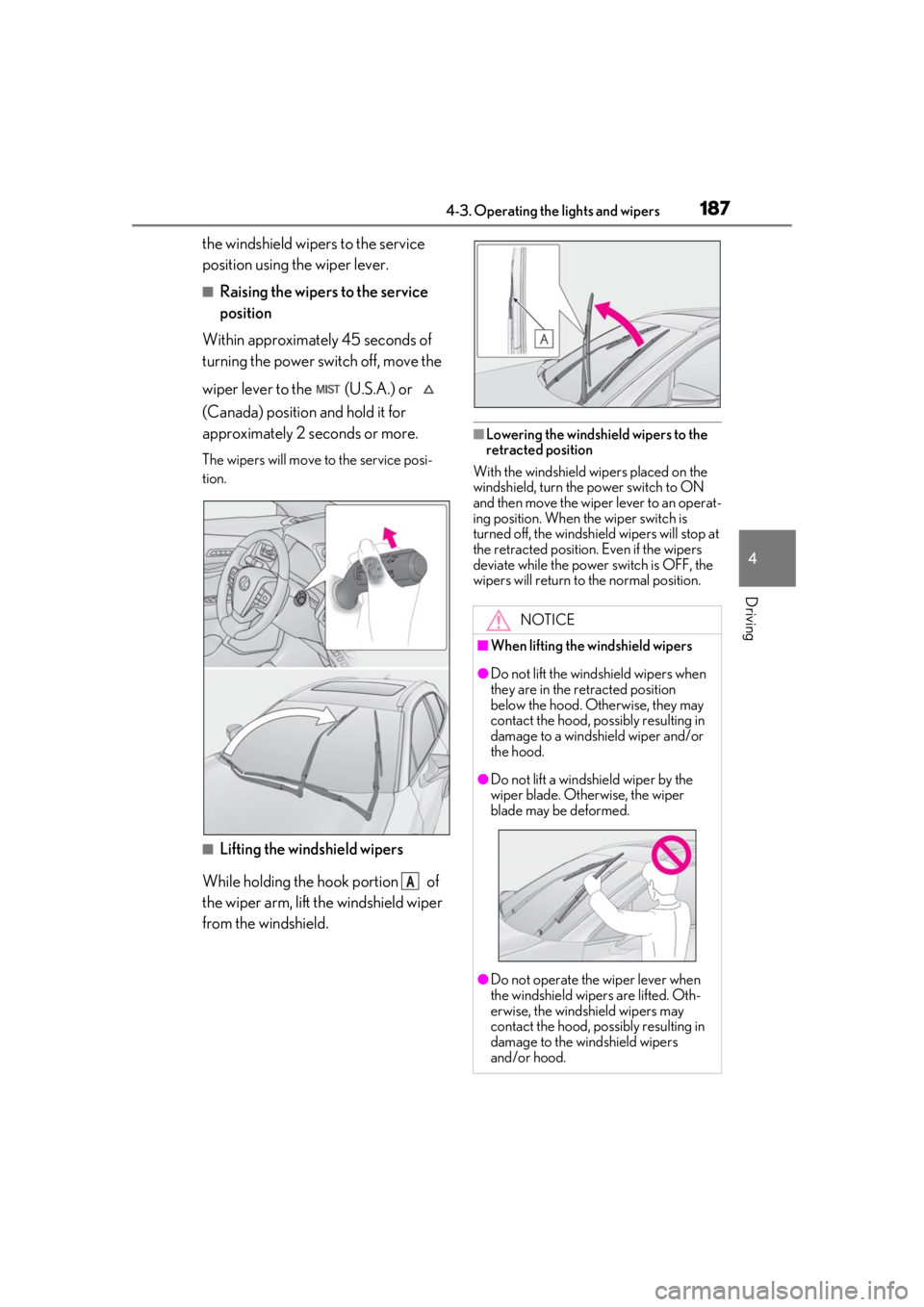
■Raising the wipers to the service
position
Within approximately 45 seconds of
turning the power switch off, move the
wiper lever to the (U.S.A.) or
(Canada) position and hold it for
approximately 2 se conds or more.
The wipers will move to the service posi-
tion.
■Lifting the windshield wipers
While holding the hook portion of
the wiper arm, lift the windshield wiper
from the windshield.
■Lowering the windshield wipers to the
retracted position
With the windshield wipers placed on the
windshield, turn the power switch to ON
and then move the wiper lever to an operat-
ing position. When the wiper switch is
turned off, the windshield wipers will stop at
the retracted position. Even if the wipers
deviate while the power switch is OFF, the
wipers will return to the normal position.
A
NOTICE
■When lifting the windshield wipers
●Do not lift the windshield wipers when
they are in the retracted position
below the hood. Otherwise, they may
contact the hood, possibly resulting in
damage to a windshield wiper and/or
the hood.
●Do not lift a windshield wiper by the
wiper blade. Otherwise, the wiper
blade may be deformed.
●Do not operate the wiper lever when
the windshield wipe rs are lifted. Oth-
erwise, the windshield wipers may
contact the hood, possibly resulting in
damage to the windshield wipers
and/or hood.
Page 188 of 476
1884-3. Operating the lights and wipers
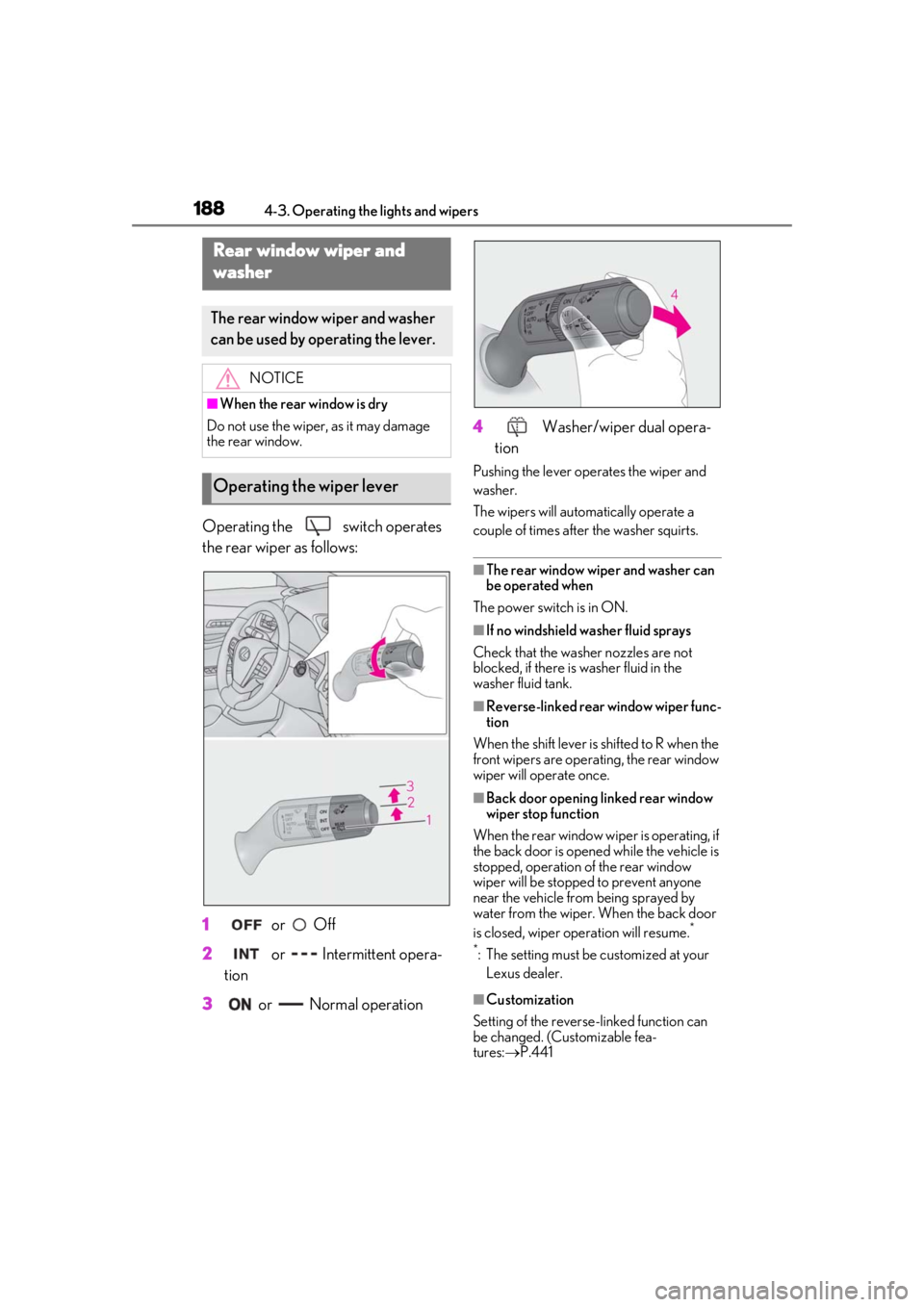
Operating the switch operates
the rear wiper as follows:
1
or Off
2
or Intermittent opera-
tion
3
or Normal operation 4
Washer/wiper dual opera-
tion
Pushing the lever oper ates the wiper and
washer.
The wipers will automatically operate a
couple of times after the washer squirts.
■The rear window wiper and washer can
be operated when
The power switch is in ON.
■If no windshield washer fluid sprays
Check that the washer nozzles are not
blocked, if there is washer fluid in the
washer fluid tank.
■Reverse-linked rear window wiper func-
tion
When the shift lever is shifted to R when the
front wipers are operating, the rear window
wiper will operate once.
■Back door opening linked rear window
wiper stop function
When the rear window wi per is operating, if
the back door is opened while the vehicle is
stopped, operation of the rear window
wiper will be stopped to prevent anyone
near the vehicle from being sprayed by
water from the wiper. When the back door
is closed, wiper operation will resume.
*
*
: The setting must be customized at your Lexus dealer.
■Customization
Setting of the reverse-linked function can
be changed. (Customizable fea-
tures: P.441
Rear window wiper and
w
asher
The rear window wiper and washer
can be used by operating the lever.
NOTICE
■When the rear window is dry
Do not use the wiper, as it may damage
the rear window.
Operating the wiper lever
Page 190 of 476
1904-4. Refueling
4-4.Refueling
Turn the power switch off and
ensure that all the doors and win-
dows are closed.
Confirm the type of fuel.
■Fuel types
P.423
■Fuel tank opening for unleaded gasoline
To help prevent incorrect fueling, your vehi-
cle has a fuel tank opening that only accom-
modates the special nozzle on unleaded
fuel pumps.
Opening the fuel tank cap
The fuel tank of your vehicle has a
special structure, which requires a
reduction in fuel tank pressure
before refueling. After the opener
switch has been pressed, it will take
several seconds until the vehicle is
ready for refueling.
Before refueling the vehicle
WARNING
■When refueling the vehicle
Observe the following precautions while
refueling the vehicle. Failure to do so may
result in death or serious injury.
●After exiting the vehicle and before
opening the fuel door, touch an
unpainted metal surface to discharge
any static electricity. It is important to
discharge static electricity before refu-
eling because sparks resulting from
static electricity can cause fuel vapors
to ignite while refueling.
●Always hold the grips on the fuel tank
cap and turn it slowly to remove it.
A whooshing sound may be heard
when the fuel tank cap is loosened.
Wait until the sound cannot be heard
before fully removing the cap. In hot
weather, pressurized fuel may spray
out of the filler neck and cause injury.
●Do not allow anyone that has not dis-
charged static electricity from their
body to come close to an open fuel
tank.
●Do not inhale vaporized fuel.
Fuel contains substances that are
harmful if inhaled.
●Do not smoke while refueling the vehi-
cle.
Doing so may cause the fuel to ignite
and cause a fire.
●Do not return to the vehicle or touch
any person or object that is statically
charged. This may cause static elec-
tricity to build up, resulting in a possible
ignition hazard.
■When refueling
Observe the following precautions to
prevent fuel overflowing from the fuel
tank:
●Securely insert the fuel nozzle into the
fuel filler neck.
●Stop filling the tank after the fuel noz-
zle automatically clicks off.
●Do not top off the fuel tank.
Page 200 of 476
2004-5. Using the driving support systems
■Enabling/disabling the pre-colli-
sion system
The pre-collision system can be
enabled/disabled on ( P.87) of
the multi-information display.
The system is automatically enabled each
time the power switch is turned to ON.
If the system is disabled, the PCS warn-
ing light will turn on and a message will
be displayed on the multi-information
display.
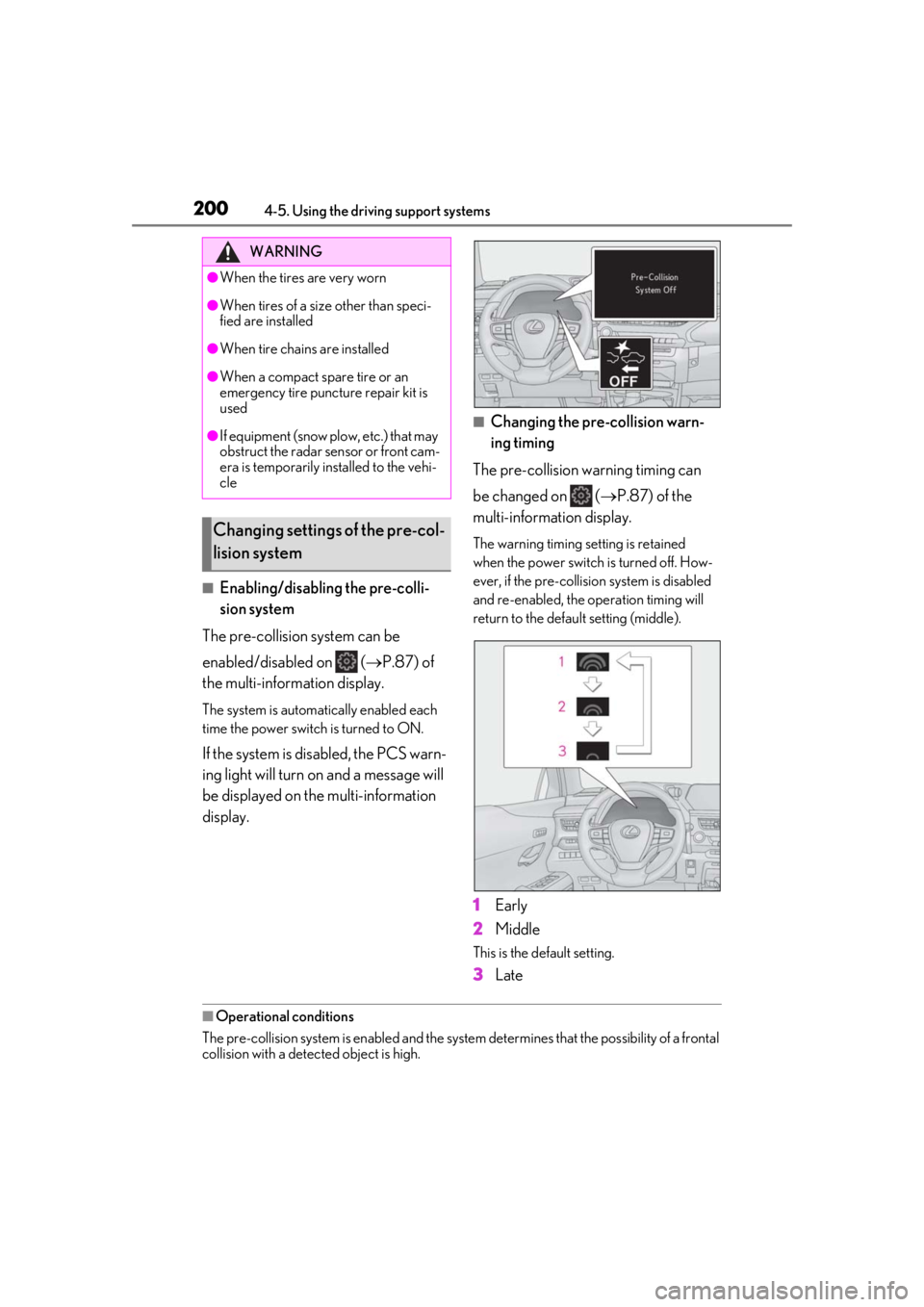
■Changing the pre-collision warn-
ing timing
The pre-collision warning timing can
be changed on ( P.87) of the
multi-information display.
The warning timing setting is retained
when the power switch is turned off. How-
ever, if the pre-collisio n system is disabled
and re-enabled, the operation timing will
return to the default setting (middle).
1Early
2
Middle
This is the default setting.
3Late
■Operational conditions
The pre-collision system is enabled and the system determines that the possibility of a frontal
collision with a detect ed object is high.
WARNING
●When the tires are very worn
●When tires of a size other than speci-
fied are installed
●When tire chains are installed
●When a compact spare tire or an
emergency tire puncture repair kit is
used
●If equipment (snow plow, etc.) that may
obstruct the radar sensor or front cam-
era is temporarily installed to the vehi-
cle
Changing settings of the pre-col-
lision system
Page 203 of 476
2034-5. Using the driving support systems
4
Driving
that may contact your vehicle, such as
thick grass, tree branches, or a banner
• When driving through steam or smoke
• When driving near an object that reflects
radio waves, such as a large truck or
guardrail
• When driving near a TV tower, broad- casting station, electric power plant, or
other location where strong radio waves
or electrical noise may be present
■Situations in which the system may not
operate properly
●In some situations such as the following,
an object may not be detected by the
radar sensor and front camera, prevent-
ing the system from operating properly:
• When a detectable object is approaching
your vehicle
• When your vehicle or a detectable object
is wobbling
• If a detectable object makes an abrupt maneuver (such as sudden swerving,
acceleration or deceleration)
• When your vehicle approaches a detect- able object rapidly
• When a detectable object is not directly
in front of your vehicle
• When a detectable object is near a wall, fence, guardrail, manhole cover, vehicle,
steel plate on the road, etc.
• When a detectable object is under a structure
•When part of a detect able object is hid-
den by an object, such as large baggage, an umbrella, or guardrail
• When multiple dete ctable objects are
close together
• If the sun or other light is shining directly on a detectable object
• When a detectable object is a shade of
white and looks extremely bright
• When a detectable ob ject appears to be
nearly the same color or brightness as its
surroundings
• If a detectable object cuts or suddenly emerges in front of your vehicle
• When the front of your vehicle is hit by water, snow, dust, etc.
• When a very bright light ahead, such as
the sun or the head lights of oncoming
traffic, shines direct ly into the front cam-
era
• When approaching the side or front of a vehicle ahead
• If a vehicle ahead is a motorcycle
• If a vehicle ahead is narrow, such as a per-
sonal mobility vehicle
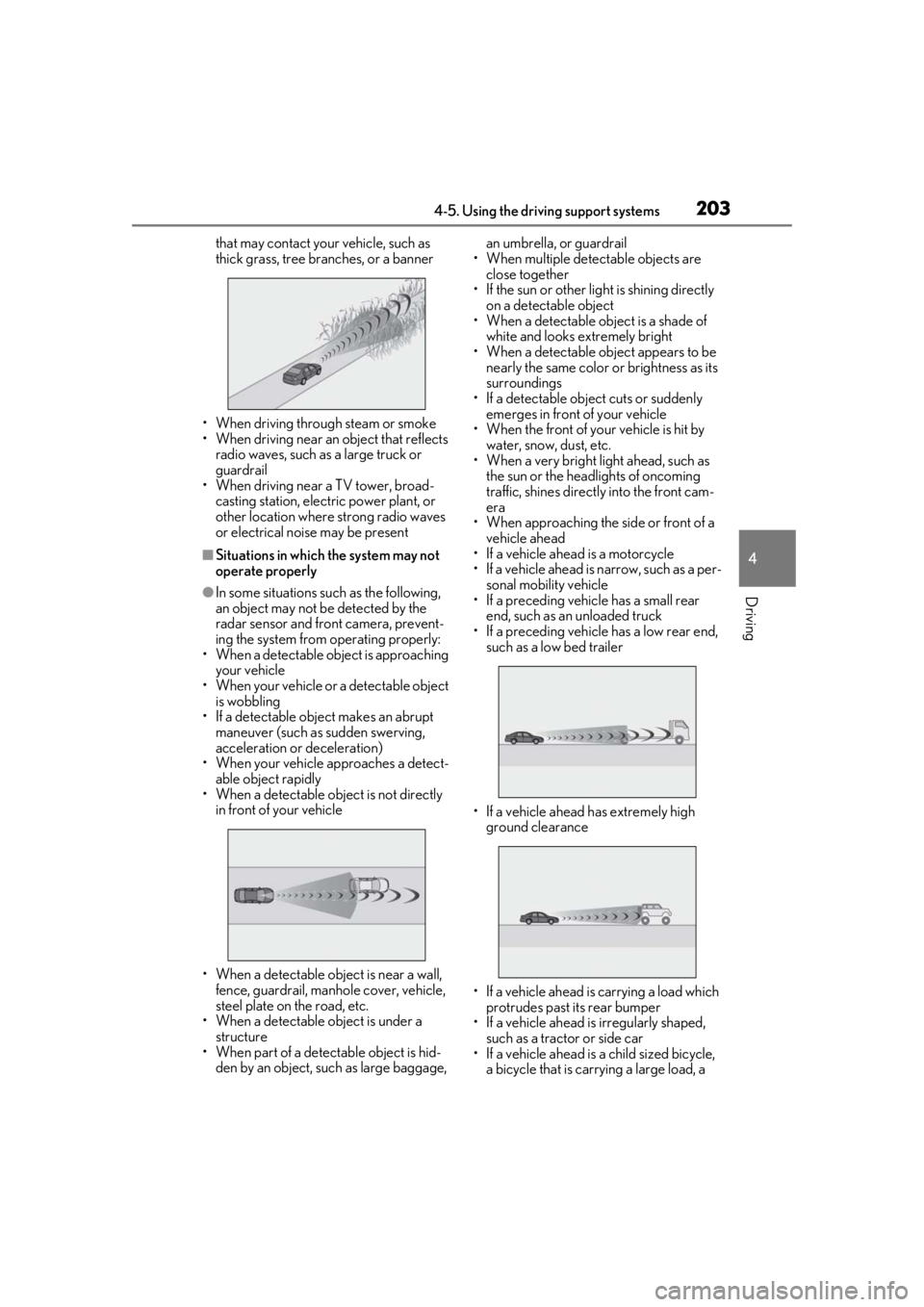
• If a preceding vehicle has a small rear
end, such as an unloaded truck
• If a preceding vehicle has a low rear end, such as a low bed trailer
• If a vehicle ahead has extremely high ground clearance
• If a vehicle ahead is carrying a load which protrudes past its rear bumper
• If a vehicle ahead is irregularly shaped,
such as a tractor or side car
• If a vehicle ahead is a child sized bicycle, a bicycle that is carrying a large load, a
Page 216 of 476
2164-5. Using the driving support systems
currently traveled lane, such a sign exists
directly after a freeway branches, or in an
adjacent lane just before merging.
●Stickers are attached to the rear of the
preceding vehicle.
●A sign resembling a system compatible
sign is recognized.
●Side road speed signs may be detected
and displayed (if positioned in sight of the
front camera) while the vehicle is travel-
ing on the main road.
●Roundabout exit road speed signs may
be detected and displayed (if positioned
in sight of the front camera) while travel-
ing on a roundabout.
●The front of the vehicle is raised or low-
ered due to the carried load.
●The surrounding brightness is not suffi-
cient or changes suddenly.
●When a sign intended for trucks, etc. is
recognized.
●Vehicles with navigation system: The
speed information displayed on the
meter and that displayed on the naviga-
tion system may be different due to the
navigation system using map data.
■Speed limit sign display
If the power switch was last turned off while
a speed limit sign wa s displayed on the
multi-information display, the same sign dis-
plays again when the power switch is turned
to ON.
■Customization
Some functions can be customized. (Cus-
tomizable features: P.442)
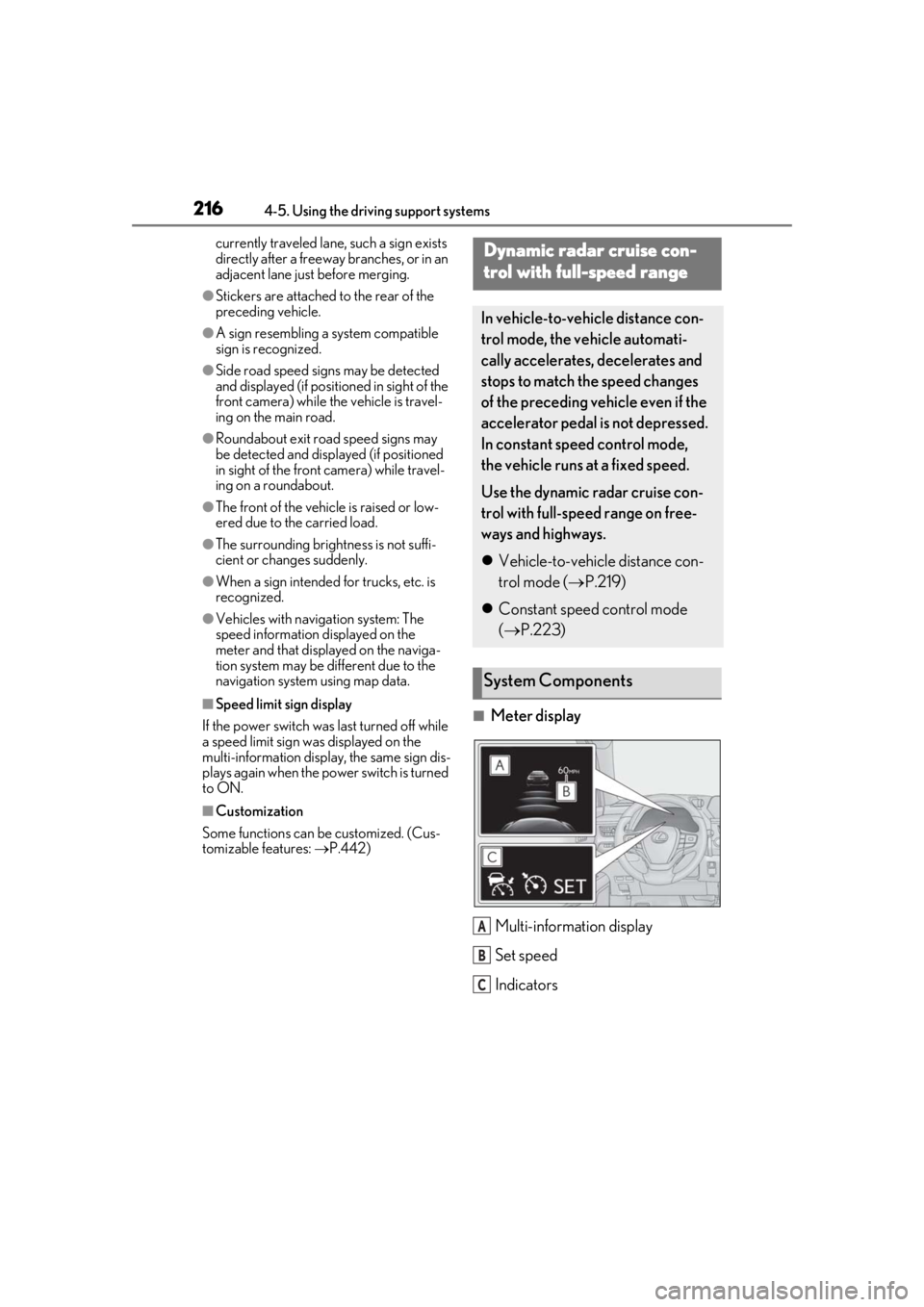
■Meter display
Multi-information display
Set speed
Indicators
Dynamic radar cruise con-
trol with full-speed range
In vehicle-to-vehicle distance con-
trol mode, the ve hicle automati-
cally accelerates, decelerates and
stops to match the speed changes
of the preceding vehicle even if the
accelerator pedal is not depressed.
In constant speed control mode,
the vehicle runs at a fixed speed.
Use the dynamic radar cruise con-
trol with full-speed range on free-
ways and highways.
Vehicle-to-vehicle distance con-
trol mode ( P.219)
Constant speed control mode
( P.223)
System Components
A
B
C
Page 221 of 476
2214-5. Using the driving support systems
4
Driving
In the vehicle-to-vehicle distance con-
trol mode, the set speed will be
increased or decreased as follows:
For the U.S. mainland and Hawaii
Fine adjustment: By 1 mph (1.6 km/h)*1 or 1
km/h (0.6mph)
*2 each time the switch is
pressed
Large adjustment: Increases or decreases
in 1 mph (1.6 km/h)
*1 or 1 km/h (0.6 mph)*2
increments for as long as the switch is held
Except for the U.S. mainland and
Hawaii
Fine adjustment: By 1 mph (1.6 km/h)*1 or 1
km/h (0.6mph)
*2 each time the switch is
pressed
Large adjustment: Increases or decreases
in 5 mph (8 km/h)
*1 or 5 km/h (3.1 mph)*2
increments for as long as the switch is held
In the constant speed control mode
( P.223), the set speed will be
increased or decreased as follows:
Fine adjustment: By 1 mph (1.6 km/h)*1 or 1
km/h (0.6 mph)
*2 each time the switch is
pressed
Large adjustment: The speed will continue
to change while the switch is held.
*1: When the set speed is shown in “MPH”
*2: When the set speed is shown in “km/h”
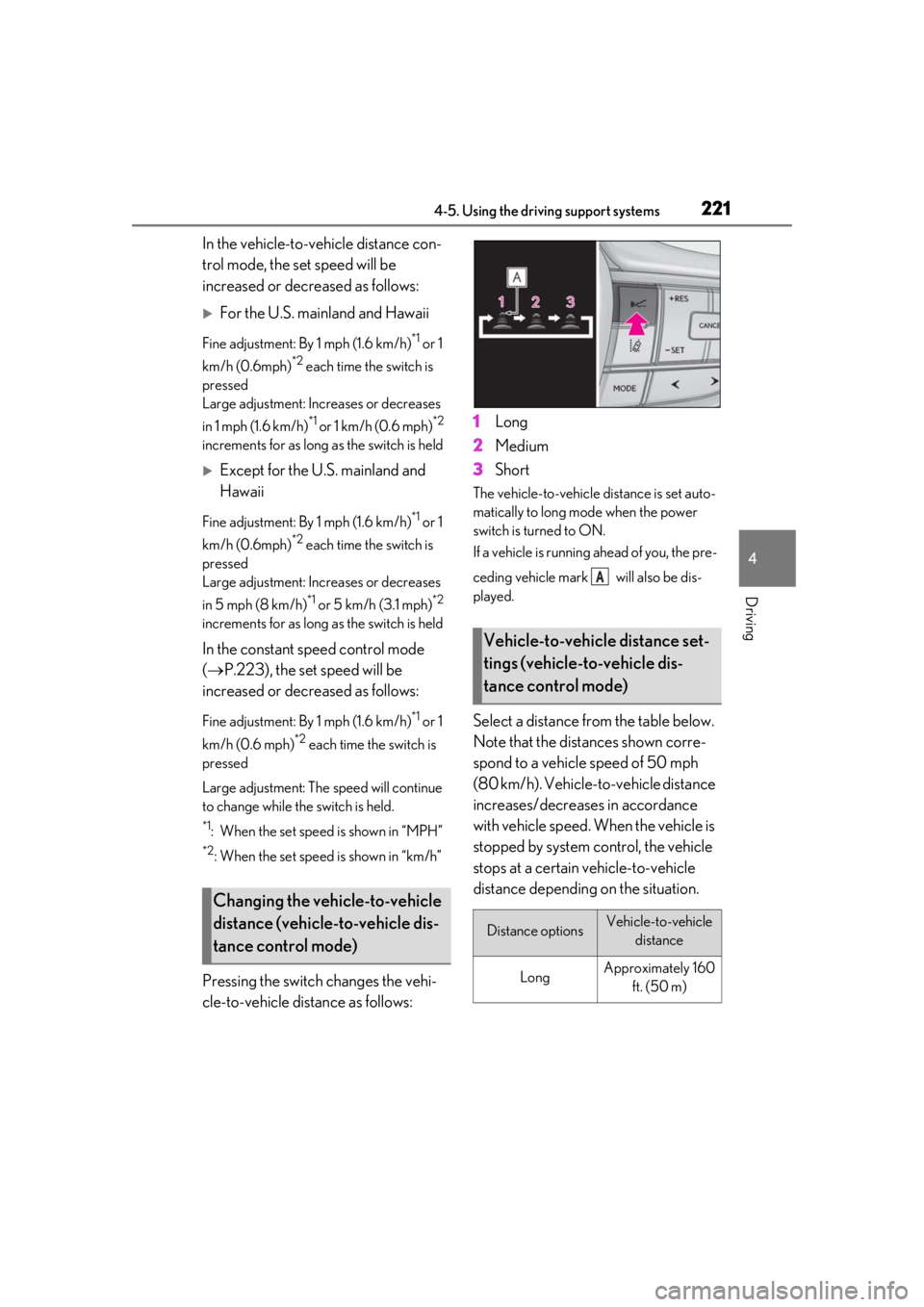
Pressing the switch changes the vehi-
cle-to-vehicle distance as follows: 1
Long
2 Medium
3 Short
The vehicle-to-vehicle distance is set auto-
matically to long mode when the power
switch is turned to ON.
If a vehicle is running ahead of you, the pre-
ceding vehicle mark will also be dis-
played.
Select a distance from the table below.
Note that the distances shown corre-
spond to a vehicle speed of 50 mph
(80 km/h). Vehicle-to-vehicle distance
increases/decreases in accordance
with vehicle speed. When the vehicle is
stopped by system control, the vehicle
stops at a certain vehicle-to-vehicle
distance depending on the situation.
Changing the vehicle-to-vehicle
distance (vehicle-to-vehicle dis-
tance control mode)
Vehicle-to-vehicle distance set-
tings (vehicle-to-vehicle dis-
tance control mode)
Distance optionsVehicle-to-vehicle
distance
LongApproximately 160 ft. (50 m)
A