set LEXUS UX250H 2019 Owners Manual
[x] Cancel search | Manufacturer: LEXUS, Model Year: 2019, Model line: UX250H, Model: LEXUS UX250H 2019Pages: 476, PDF Size: 10.51 MB
Page 353 of 476
3536-3. Do-it-yourself maintenance
6
Maintenance and care
When registering the ID codes, per-
form the following procedure.
1Park the vehicle in a safe place, wait
for approximately 20 minutes, and
then start the hybrid system.
( P.162)
2 Press or of the meter con-
trol switches and select .
3 Press or of the meter con-
trol switches and select “Vehicle
Settings”, then press “OK”.
4 Press or of the meter con-
trol switches an d select “TPWS”,
then press “OK”.
5 Press or of the meter con-
trol switches and select “Change
Wheel Set”. Then press and hold
“OK” until the tire pressure warning
light starts slowly blinking 3 times.
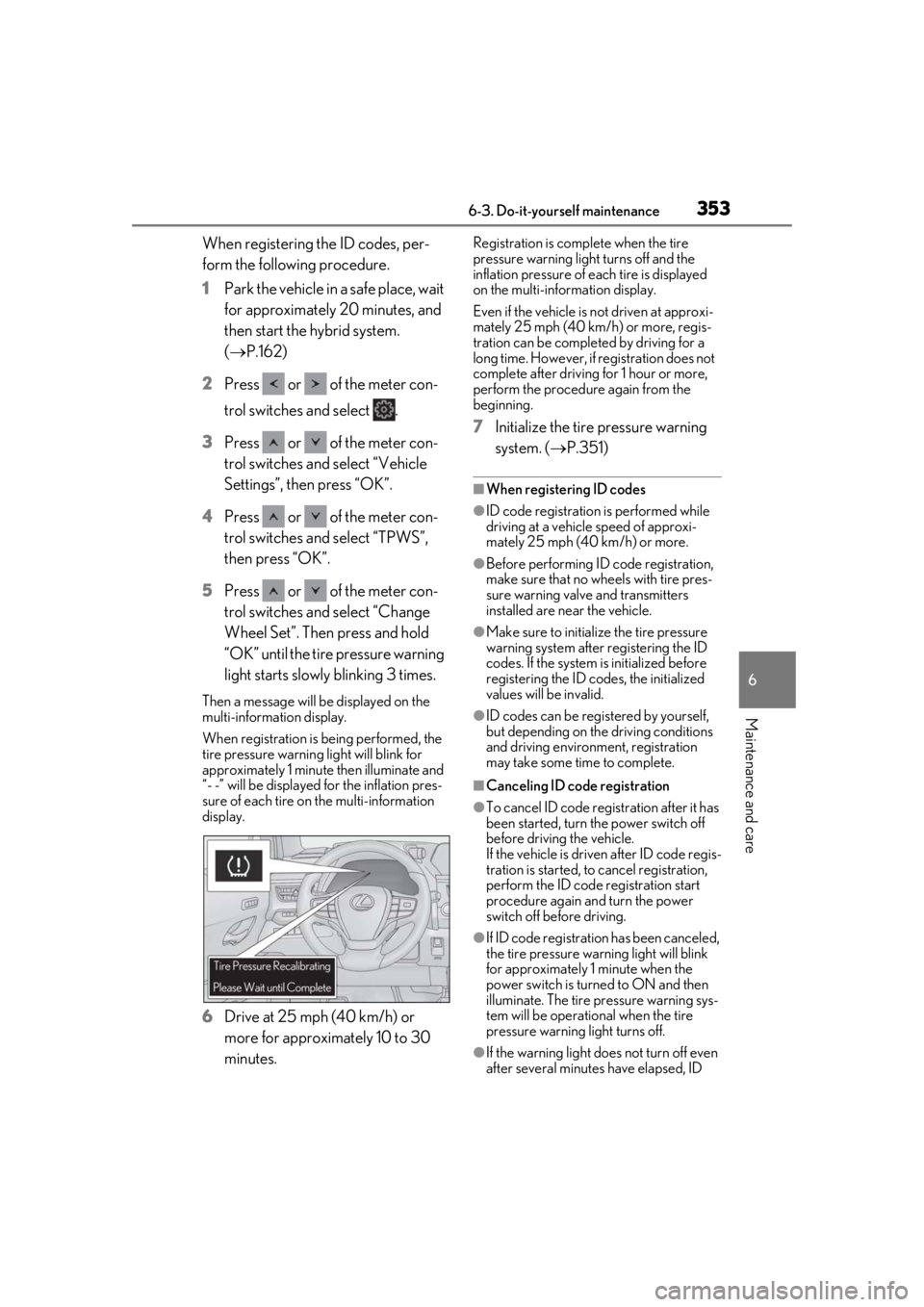
Then a message will be displayed on the
multi-information display.
When registration is being performed, the
tire pressure warning light will blink for
approximately 1 minute then illuminate and
“- -” will be displayed for the inflation pres-
sure of each tire on the multi-information
display.
6Drive at 25 mph (40 km/h) or
more for approximately 10 to 30
minutes.
Registration is complete when the tire
pressure warning light turns off and the
inflation pressure of ea ch tire is displayed
on the multi-information display.
Even if the vehicle is not driven at approxi-
mately 25 mph (40 km/h) or more, regis-
tration can be completed by driving for a
long time. However, if registration does not
complete after driving for 1 hour or more,
perform the procedure again from the
beginning.
7 Initialize the tire pressure warning
system. ( P.351)
■When registering ID codes
●ID code registration is performed while
driving at a vehicle speed of approxi-
mately 25 mph (40 km/h) or more.
●Before performing ID code registration,
make sure that no wheels with tire pres-
sure warning valve and transmitters
installed are near the vehicle.
●Make sure to initializ e the tire pressure
warning system after registering the ID
codes. If the system is initialized before
registering the ID codes, the initialized
values will be invalid.
●ID codes can be registered by yourself,
but depending on the driving conditions
and driving environment, registration
may take some time to complete.
■Canceling ID code registration
●To cancel ID code regi stration after it has
been started, turn the power switch off
before driving the vehicle.
If the vehicle is driven after ID code regis-
tration is started, to cancel registration,
perform the ID code registration start
procedure again and turn the power
switch off before driving.
●If ID code registration has been canceled,
the tire pressure warning light will blink
for approximately 1 minute when the
power switch is turned to ON and then
illuminate. The tire pressure warning sys-
tem will be operational when the tire
pressure warning light turns off.
●If the warning light does not turn off even
after several minutes have elapsed, ID
Page 354 of 476

3546-3. Do-it-yourself maintenance
code registration may not have been can-
celed correctly. To cancel registration,
perform the ID code registration start
procedure again and then turn the power
switch off before driving.
■If ID codes are not registered properly
●In the following situations, ID code regis-
tration may take longer than usual to be
completed or may not be possible. Nor-
mally, registration completes within
approximately 30 minutes.
• Vehicle is not parked for approximately
20 minutes or more before driving
• Vehicle is not driven at approximately 25 mph (40 km/h) or more
• Vehicle is driven on unpaved roads
• Vehicle is driven near other vehicles and system cannot recognize tire pressure
warning valves and tr ansmitters of your
vehicle over those of other vehicles
• Wheel with tire pressure warning valve
and transmitter installed is inside or near
the vehicle
If registration does not complete after driv-
ing for 1 hour or more, perform the ID code
registration procedure again from the
beginning.
●If the vehicle is reve rsed during registra-
tion, the data up to that point is reset, so
perform the registrati on procedure again
from the beginning.
●In the following situations, ID code regis-
tration will not be started or was not com-
pleted properly and the system will not
operate properly. Perform the ID code
registration procedure again.
• If, when attempting to start ID code regis- tration, the tire pressure warning light
does not blink slowly 3 times.
• If, when the vehicle has been driven for about 20 minutes after performing ID
code registration, the tire pressure warn-
ing light blinks for approximately 1 minute
and then illuminates.
●If ID code registration cannot be com-
pleted after performing the above proce-
dure, contact your Lexus dealer.
Page 355 of 476
3556-3. Do-it-yourself maintenance
6
Maintenance and care
Stop the vehicle in a safe place on a
hard, flat surface.
Set the parking brake.
Shift the shift lever to P.
Stop the hybrid system.
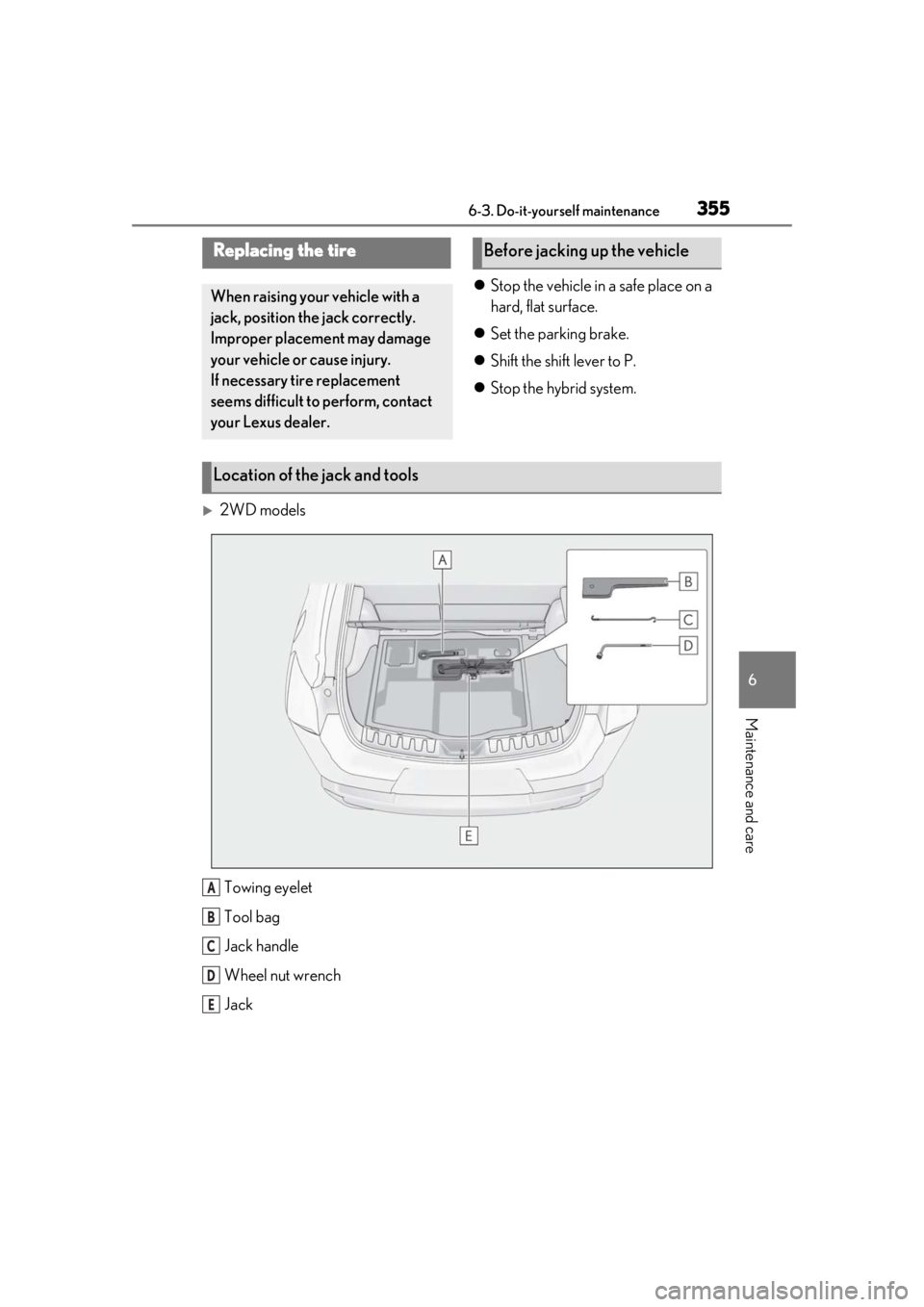
2WD models
Towing eyelet
Tool bag
Jack handle
Wheel nut wrench
Jack
Replacing the tire
When raising your vehicle with a
jack, position the jack correctly.
Improper placement may damage
your vehicle or cause injury.
If necessary tire replacement
seems difficult to perform, contact
your Lexus dealer.
Before jacking up the vehicle
Location of the jack and tools
A
B
C
D
E
Page 363 of 476
3636-3. Do-it-yourself maintenance
6
Maintenance and care
When replacing wheels, care should
be taken to ensure that they are equiv-
alent to those removed in load capac-
ity, diameter, rim width and inset
*.
Replacement wheels are available at
your Lexus dealer.
*: Conventionally referred to as offset.
Lexus does not recommend using the
following:
Wheels of different sizes or types
Used wheels
Bent wheels that have been straight-
ened
■When replacing wheels
The wheels of your vehicle are equipped
with tire pressure warning valves and trans-
mitters that allow the tire pressure warning
system to provide advance warning in the
event of a loss in tire inflation pressure.
Whenever wheels are replaced, tire pres-
sure warning valves an d transmitters must
be installed. ( P.350) Use only Lexus wheel nuts and
wrenches designed for use with
your aluminum wheels.
When rotating, repairing or chang-
ing your tires, check that the wheel
nuts are still tight after driving 1000
miles (1600 km).
Be careful not to damage the alumi-
num wheels when using tire chains.
Use only Lexus genuine balance
weights or equivalent and a plastic
or rubber hammer when balancing
your wheels.
Wheels
If a wheel is bent, cracked or heavily
corroded, it should be replaced.
Otherwise, the tire may separate
from the wheel or cause a loss of
handling control.
Wheel selection
WARNING
■When replacing wheels
●Do not use wheels that are a different
size from those recommended in the
Owner’s Manual, as this may result in a
loss of handling control.
●Never use an inner tube in a leaking
wheel which is designed for a tubeless
tire. Doing so may result in an acci-
dent, causing death or serious injury.
■Use of defective wheels prohibited
Do not use cracked or deformed wheels.
Doing so could cause the tire to leak air
during driving, possibly causing an acci-
dent.
NOTICE
■Replacing tire pressure warning
valves and transmitters
●Because tire repair or replacement
may affect the tire pressure warning
valves and transmitters, make sure to
have tires serviced by your Lexus
dealer or other qua lified service shop.
In addition, make sure to purchase
your tire pressure warning valves and
transmitters at your Lexus dealer.
●Ensure that only genuine Lexus wheels
are used on your vehicle.
Tire pressure warning valves and trans-
mitters may not work properly with
non-genuine wheels.
Aluminum wheel precautions
Page 398 of 476

3987-2. Steps to take in an emergency
reset. If necessary, perform maintenance.
Please reset the message after the mainte-
nance is performed. (P.328)
*: Refer to the separa te “Scheduled Main-
tenance” or “Owner’s Manual Supple-
ment” for the maintenance interval
applicable to your vehicle.
■If “Maintenance Required Visit Your
Dealer” is displayed
Indicates that all maintenance is required to
correspond to the driven distance on the
maintenance schedule
*.
Comes on approximately 5000 miles
(8000 km) after the message has been
reset. (The indicator will not work properly
unless the message ha s been reset.) Per-
form the necessary maintenance. Please
reset the message after the maintenance is
performed. ( P.328)
*: Refer to the separa te “Scheduled Main-
tenance” or “Owner’s Manual Supple-
ment” for the maintenance interval
applicable to your vehicle.
■If “Oil Maintenance Required Soon” is
displayed
Indicates that the engine oil should be
scheduled to be changed.
Check the engine oil and change it if neces-
sary. After changing the engine oil, make
sure to reset the message. ( P.339)
■If “Oil Maintenance Required” is dis-
played
Indicates that the engine oil should be
changed.
Check and change the en gine oil, and oil fil-
ter by your Lexus deal er. After changing the
engine oil, make sure to reset the message.
( P.339)
■If a message that in dicates the need for
visiting your Lexus dealer is displayed
The system or part shown on the multi-
information display is malfunctioning. Have
the vehicle inspected by your Lexus dealer
immediately.
■If a message that indicates the need for
referring to Owner’ s Manual is dis-
played
●If any of the following messages are
shown on the multi-information display,
follow the instructions.
• “Engine Coolant Temp High” ( P.410)
• “Front Camera Unavailable” ( P.196)
• “Radar Cruise Control Unavailable” ( P.196)
●If any of the following messages are
shown on the multi-info rmation display, it
may indicate a malf unction. Have the
vehicle inspected by your Lexus dealer
immediately.
• “Access System with Elec. Key Malfunc-
tion”
• “Hybrid system malfunction”
•“Check Engine”
• “Hybrid battery system malfunction”
• “Accelerator system malfunction”
●If any of the following messages are
shown on the multi-info rmation display, it
may indicate a malfun ction. Immediately
stop the vehicle and contact your Lexus
dealer.
• “Braking Power Low”
• “Charging System Malfunction”
• “Oil Pressure Low”
●If “Low Auxiliary Battery See Owner’s
Manual” is shown
• When the display goes off after several
seconds
*:
Maintain the hybrid system operation for
more than 15 minutes and charge the 12-
volt battery.
• When the display does not go off:
Start up the hybrid system using the proce-
dures for “If the 12-volt battery is dis-
charged” ( P.405)
*: Displays for about 6 seconds
●If “Maintenance required for Traction bat-
tery cooling parts See owner’s manual” is
shown, the filter may be clogged, the air
intake vent may be blocked, or there may
be a gap in the duct. Therefore, perform
the following correction procedure.
• If the air intake vent and filter of the hybrid battery (traction battery) are dirty, per-
Page 401 of 476
4017-2. Steps to take in an emergency
7
When trouble arises
of the problem:
The 12-volt battery may be dis-
charged. ( P.405)
The 12-volt battery terminal con-
nections may be loose or corroded.
( P.342)
One of the following may be the cause
of the problem:
The 12-volt battery may be dis-
charged. ( P.405)
One or both of the 12-volt battery
terminals may be disconnected.
( P.342)
Contact your Lexus dealer if the problem
cannot be repaired, or if repair procedures
are unknown.
When the hybrid system does not start,
the following steps can be used as an
interim measure to start the hybrid sys-
tem if the power switch is functioning
normally.
Do not use this starting procedure
except in cases of emergency.
1 Press the parking brake switch to
check that the parking brake is set.
(P.172)
Parking brake indicator will come on.
2 Shift the shift lever to P.
3 Turn the power switch to ACC. 4
Press and hold the power switch for
about 15 seconds while depressing
the brake pedal firmly.
Even if the hybrid system can be
started using the above steps, the sys-
tem may be malfunctioning. Have the
vehicle inspected by your Lexus dealer.
The interior lights and head-
lights do not turn on, or the horn
does not sound.
Starting the hybrid system in an
emergency
Page 403 of 476
4037-2. Steps to take in an emergency
7
When trouble arises
reduction in fuel tank pressure before
refueling. To prevent fuel from spilling
out, turn the cap slowly when removing
it. During refueling, fuel may spill out
from the filler opening due to air being
discharged from inside the fuel tank.
Therefore, fill the fuel tank carefully and
slowly.
■When the electronic key does not work
properly
●Make sure that the smart access system
with push-button start has not been deac-
tivated using the Remote Touch or at your
Lexus dealer. If it is off, turn the function
on.
●Check if battery-saving mode is set. If it is
set, cancel the function. (P.125)
■Unlocking the door
Use the mechanical key ( P.106) to
perform the following operations.
If the electronic key does not
o
perate properly
If communication between the
electronic key and vehicle is inter-
rupted ( P.125) or the electronic
key cannot be used because the
battery is depleted, the smart
access system with push-button
start and wireless remote control
cannot be used. In such cases, the
doors can be opened and the hybrid
system can be started by following
the procedure below.
NOTICE
■In case of a smart access system with
push-button start malfunction or
other key-related problems
Take your vehicle with all the electronic
keys provided with your vehicle, includ-
ing the card key, to your Lexus dealer.
Locking and unlocking the doors
Page 404 of 476
4047-2. Steps to take in an emergency
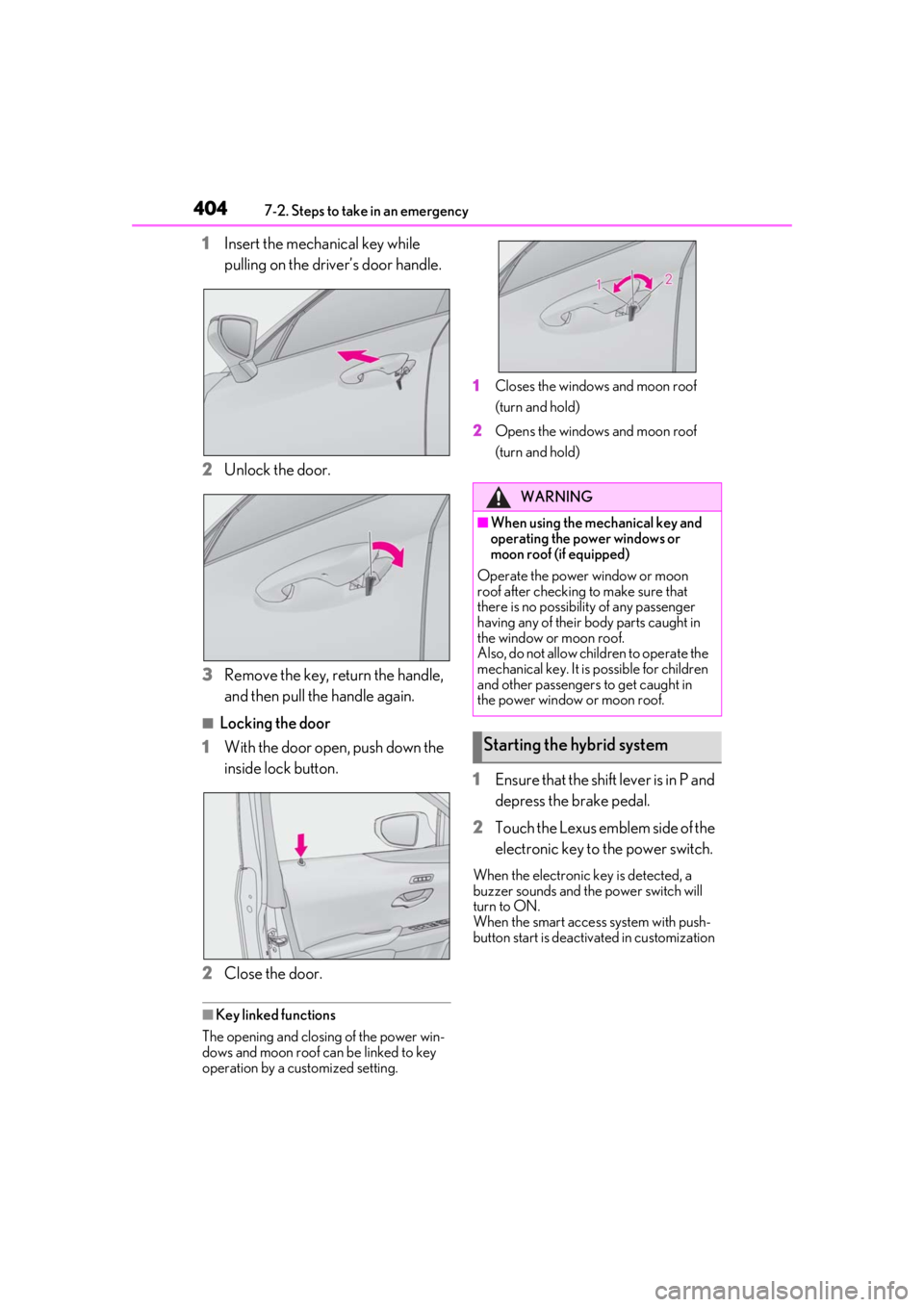
1Insert the mechanical key while
pulling on the driver’s door handle.
2
Unlock the door.
3
Remove the key, return the handle,
and then pull the handle again.
■Locking the door
1
With the door open, push down the
inside lock button.
2
Close the door.
■Key linked functions
The opening and closing of the power win-
dows and moon roof can be linked to key
operation by a customized setting. 1
Closes the windows and moon roof
(turn and hold)
2
Opens the windows and moon roof
(turn and hold)
1Ensure that the shift lever is in P and
depress the brake pedal.
2
Touch the Lexus emblem side of the
electronic key to the power switch.
When the electronic key is detected, a
buzzer sounds and the power switch will
turn to ON.
When the smart access system with push-
button start is deactivated in customization
WARNING
■When using the mechanical key and
operating the power windows or
moon roof (if equipped)
Operate the power window or moon
roof after checking to make sure that
there is no possibility of any passenger
having any of their body parts caught in
the window or moon roof.
Also, do not allow children to operate the
mechanical key. It is possible for children
and other passengers to get caught in
the power window or moon roof.
Starting the hybrid system
Page 405 of 476
4057-2. Steps to take in an emergency
7
When trouble arises
setting, the power switch will turn to ACC.
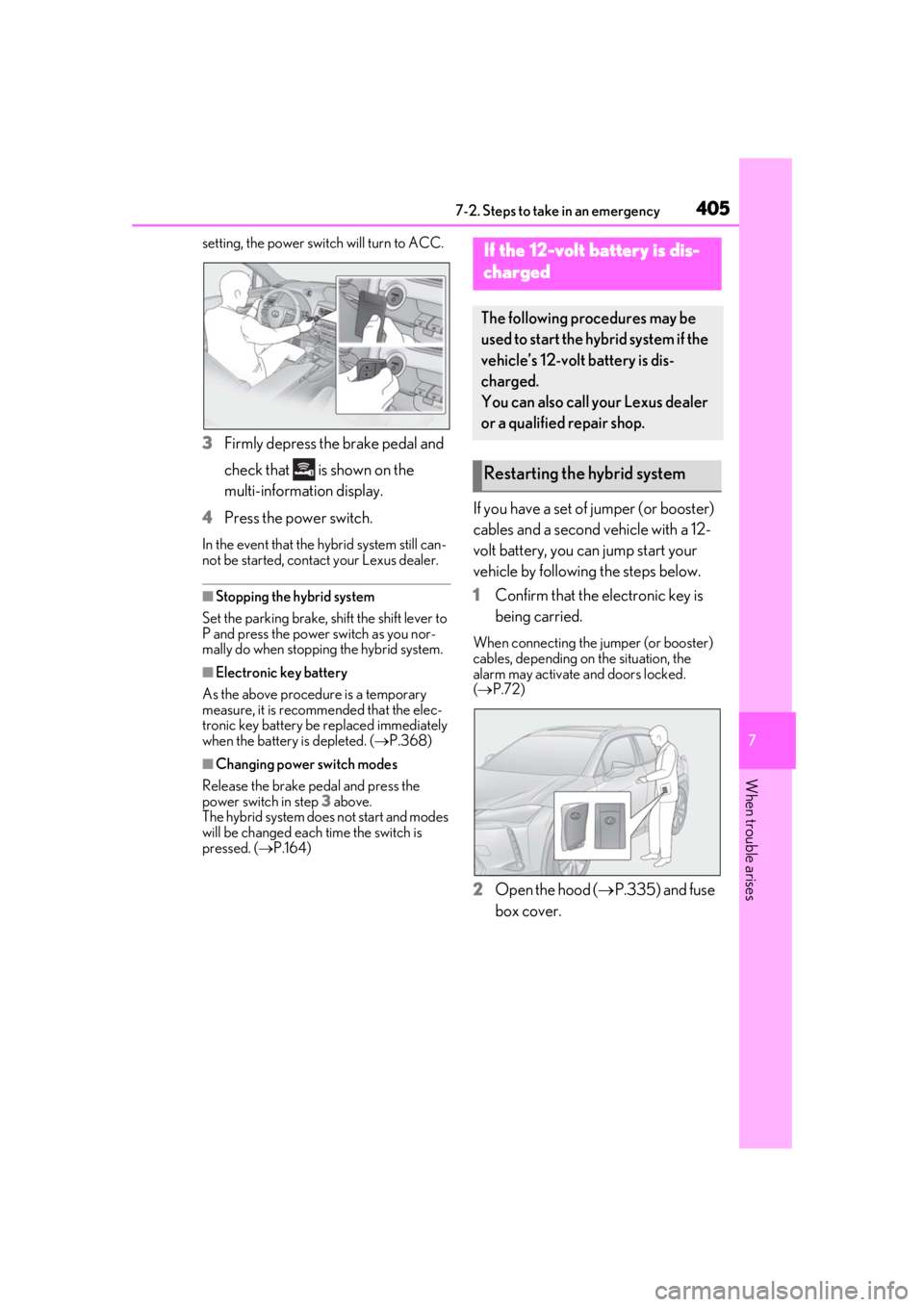
3Firmly depress the brake pedal and
check that is shown on the
multi-information display.
4 Press the power switch.
In the event that the hybrid system still can-
not be started, contact your Lexus dealer.
■Stopping the hybrid system
Set the parking brake, shift the shift lever to
P and press the power switch as you nor-
mally do when stopping the hybrid system.
■Electronic key battery
As the above procedure is a temporary
measure, it is recomme nded that the elec-
tronic key battery be replaced immediately
when the battery is depleted. ( P.368)
■Changing power switch modes
Release the brake pedal and press the
power switch in step 3 above.
The hybrid system does not start and modes
will be changed each time the switch is
pressed. ( P.164)
If you have a set of jumper (or booster)
cables and a second vehicle with a 12-
volt battery, you can jump start your
vehicle by following the steps below.
1 Confirm that the electronic key is
being carried.
When connecting the jumper (or booster)
cables, depending on the situation, the
alarm may activate and doors locked.
( P.72)
2 Open the hood ( P.335) and fuse
box cover.
If the 12-volt battery is dis-
charged
The following procedures may be
used to start the hybrid system if the
vehicle’s 12-volt battery is dis-
charged.
You can also call your Lexus dealer
or a qualified repair shop.
Restarting the hybrid system
Page 413 of 476
4137-2. Steps to take in an emergency
7
When trouble arises
1Stop the hybrid system. Shift the
shift lever to P and set the parking
brake.
2
Remove the mud, snow or sand
from around the front wheels.
3
Place wood, stones or some other
material under the front wheels to
help provide traction.
4
Restart the hybrid system.
5
Shift the shift lever to D or R and
release the parking brake. Then,
while exercising caution, depress
the accelerator pedal.
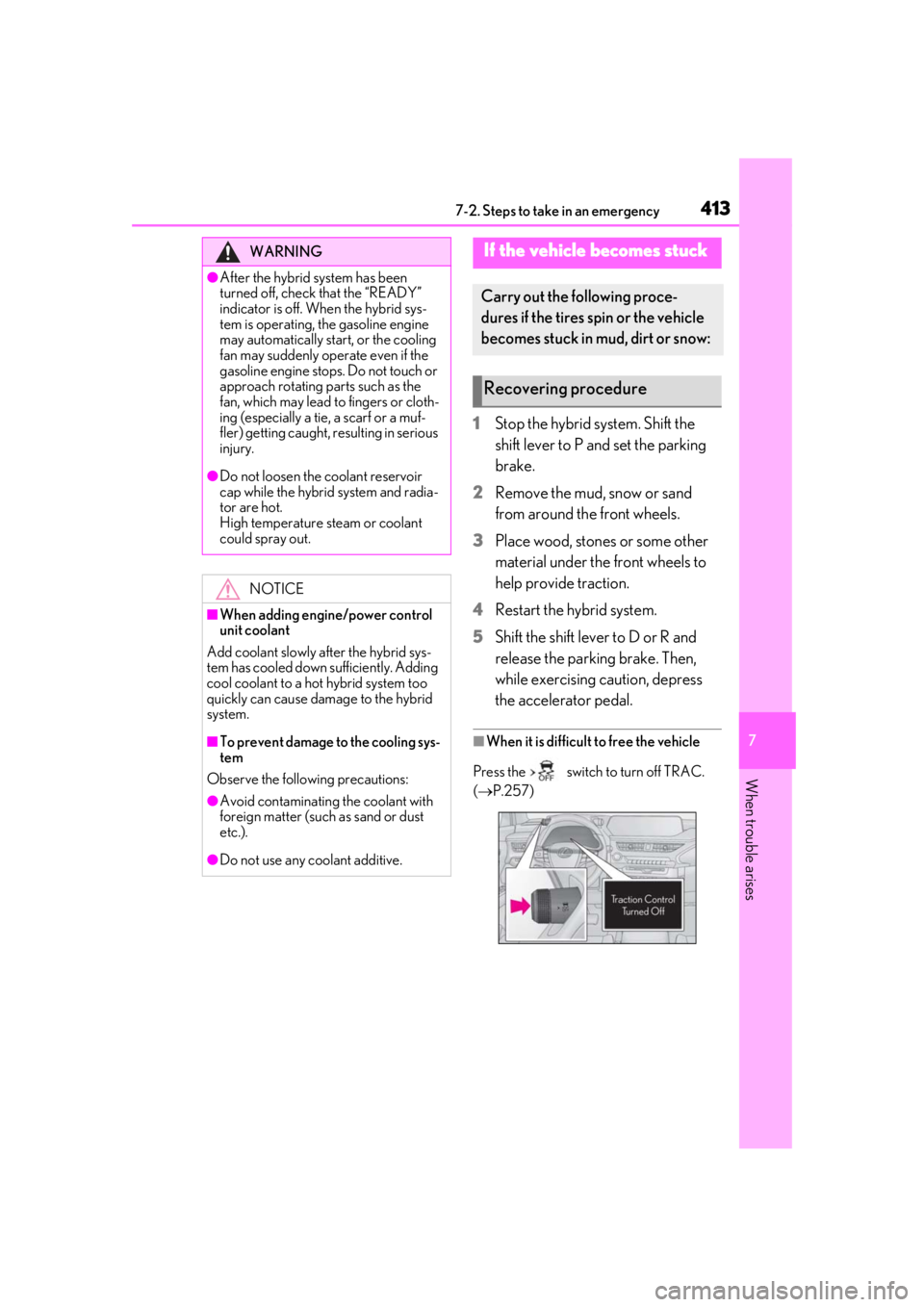
■When it is difficult to free the vehicle
Press the switch to turn off TRAC.
( P.257)
WARNING
●After the hybrid system has been
turned off, check that the “READY”
indicator is off. When the hybrid sys-
tem is operating, the gasoline engine
may automatically start, or the cooling
fan may suddenly operate even if the
gasoline engine stops. Do not touch or
approach rotating parts such as the
fan, which may lead to fingers or cloth-
ing (especially a tie, a scarf or a muf-
fler) getting caught, resulting in serious
injury.
●Do not loosen the coolant reservoir
cap while the hybrid system and radia-
tor are hot.
High temperature steam or coolant
could spray out.
NOTICE
■When adding engine/power control
unit coolant
Add coolant slowly after the hybrid sys-
tem has cooled down sufficiently. Adding
cool coolant to a hot hybrid system too
quickly can cause damage to the hybrid
system.
■To prevent damage to the cooling sys-
tem
Observe the following precautions:
●Avoid contaminating the coolant with
foreign matter (such as sand or dust
etc.).
●Do not use any coolant additive.
If the vehicle becomes stuck
Carry out the following proce-
dures if the tires spin or the vehicle
becomes stuck in mud, dirt or snow:
Recovering procedure