set LEXUS UX250H 2019 Owners Manual
[x] Cancel search | Manufacturer: LEXUS, Model Year: 2019, Model line: UX250H, Model: LEXUS UX250H 2019Pages: 476, PDF Size: 10.51 MB
Page 277 of 476
2775-3. Using the air conditioning system and defogger
5
Interior features
Right-hand side temperature control switch
■Adjusting the temperature setting
Operate the temperature control
switch upwards to increase the tem-
perature and downwards to decrease
the temperature.
■Adjusting the fan speed setting
Operate the fan speed control switch
upwards to increase the fan speed and
downwards to decrease the fan speed.
Press the off switch to turn the fan off.
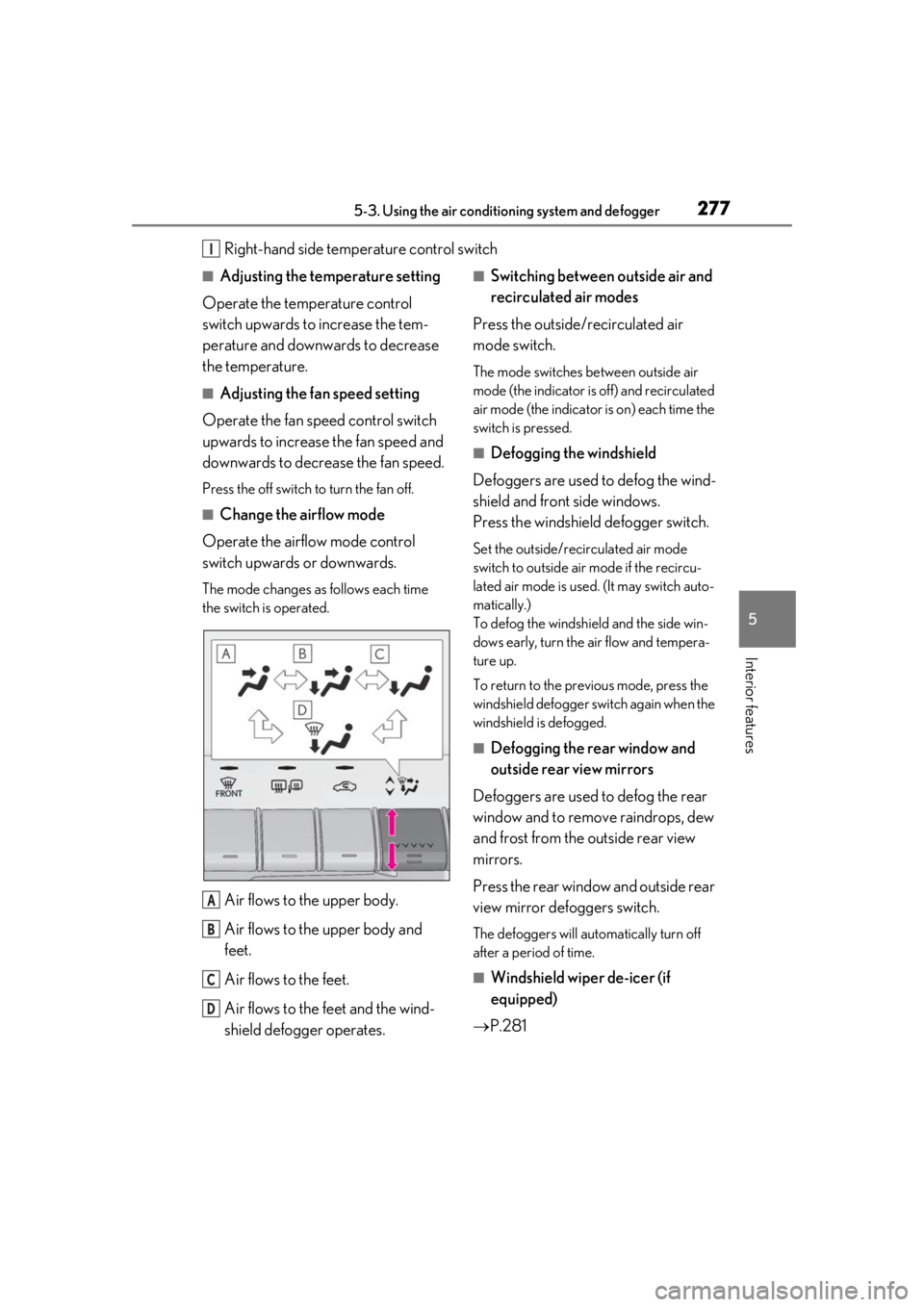
■Change the airflow mode
Operate the airflow mode control
switch upwards or downwards.
The mode changes as follows each time
the switch is operated.
Air flows to the upper body.
Air flows to the upper body and
feet.
Air flows to the feet.
Air flows to the feet and the wind-
shield defogger operates.
■Switching between outside air and
recirculated air modes
Press the outside/recirculated air
mode switch.
The mode switches between outside air
mode (the indicator is off) and recirculated
air mode (the indicator is on) each time the
switch is pressed.
■Defogging the windshield
Defoggers are used to defog the wind-
shield and front side windows.
Press the windshield defogger switch.
Set the outside/recirculated air mode
switch to outside air mode if the recircu-
lated air mode is used. (It may switch auto-
matically.)
To defog the windshield and the side win-
dows early, turn the air flow and tempera-
ture up.
To return to the previous mode, press the
windshield defogger sw itch again when the
windshield is defogged.
■Defogging the rear window and
outside rear view mirrors
Defoggers are used to defog the rear
window and to remove raindrops, dew
and frost from the outside rear view
mirrors.
Press the rear window and outside rear
view mirror defoggers switch.
The defoggers will automatically turn off
after a period of time.
■Windshield wiper de-icer (if
equipped)
P.281
I
A
B
C
D
Page 278 of 476

2785-3. Using the air conditioning system and defogger
■When the outside temperature exceeds
75°F (24°C) and the air conditioning
system is on
●In order to reduce the air conditioning
power consumption, the air conditioning
system may switch to recirculated air
mode automatically.
This may also reduce fuel consumption.
●Recirculated air mode is selected as a
default mode when the power switch is
turned to ON.
●It is possible to switch to outside air mode
at any time by pressing the outside/recir-
culated air mode switch.
■Fogging up of the windows
●The windows will easily fog up when the
humidity in the vehicle is high. Pressing
“A/C” button or selecting “A/C” will
dehumidify the air from the outlets and
defog the windshield effectively.
●If you turn “A/C” off, the windows may fog
up more easily.
●The windows may fog up if the recircu-
lated air mode is used.
■Outside/recirculated air mode
●When driving on dusty roads such as tun-
nels or in heavy traffic, set the out-
side/recirculated air mode switch to the
recirculated air mode. This is effective in
preventing outside air from entering the
vehicle interior. During cooling opera-
tion, setting the recirculated air mode will
also cool the vehicle interior effectively.
●Outside/recirculated air mode may auto-
matically switch de pending on the tem-
perature setting or the inside
temperature.
■Registering air condit ioning settings to
electronic keys (vehicles with driving
position memory)
●Unlocking the vehicle using an electronic
key and turning the power switch to ON
will recall that key’s registered air condi-
tioning settings.
●When the power switch is turned off, the
current air conditioning settings will auto-
matically be registered to the electronic
key that was used to unlock the vehicle.
●The system may not operate correctly if
more than one electr onic key is in the
vicinity or if the smart access system with
push-button start is used to unlock a pas-
senger door.
●The doors that can recall the air condi-
tioning setting when unlocked using the
smart access system with push-button
start can be changed.
* For details, con-
tact your Lexus dealer.
*: The doors that can recall the driving posi-
tion memory are changed at the same
time.
■Operation of the air conditioning sys-
tem in Eco drive mode
●In Eco drive mode, the air conditioning
system is controlled as follows to priori-
tize fuel efficiency
• Engine speed and compressor operation controlled to restrict heating/cooling
capacity
• Fan speed restricted when automatic mode is selected
●To improve air conditioning performance,
perform the following operations
• Turn off eco air conditioning mode ( P.279)
• Adjust the fan speed
•Turn off Eco drive mode
■When the outside temperature is low
The dehumidification function may not
operate even when “A/C” is pressed or
“A/C” is selected.
■Ventilation and air conditioning odors
●To let fresh air in, set the air conditioning
system to the outside air mode.
●During use, various odors from inside and
outside the vehicle may enter into and
accumulate in the air conditioning sys-
tem. This may then cause odor to be
emitted from the vents.
●To reduce potential odors from occur-
ring:
• It is recommended that the air condition- ing system be set to outside air mode
prior to turning the vehicle off.
• The start timing of the blower may be delayed for a short pe riod of time imme-
Page 279 of 476
2795-3. Using the air conditioning system and defogger
5
Interior features
diately after the air conditioning system is
started in automatic mode.
■Air conditioning filter
P.364
■Customization
Settings (e.g. A/C automatic mode switch
operation) can be changed.
(Customizable features: P.443)
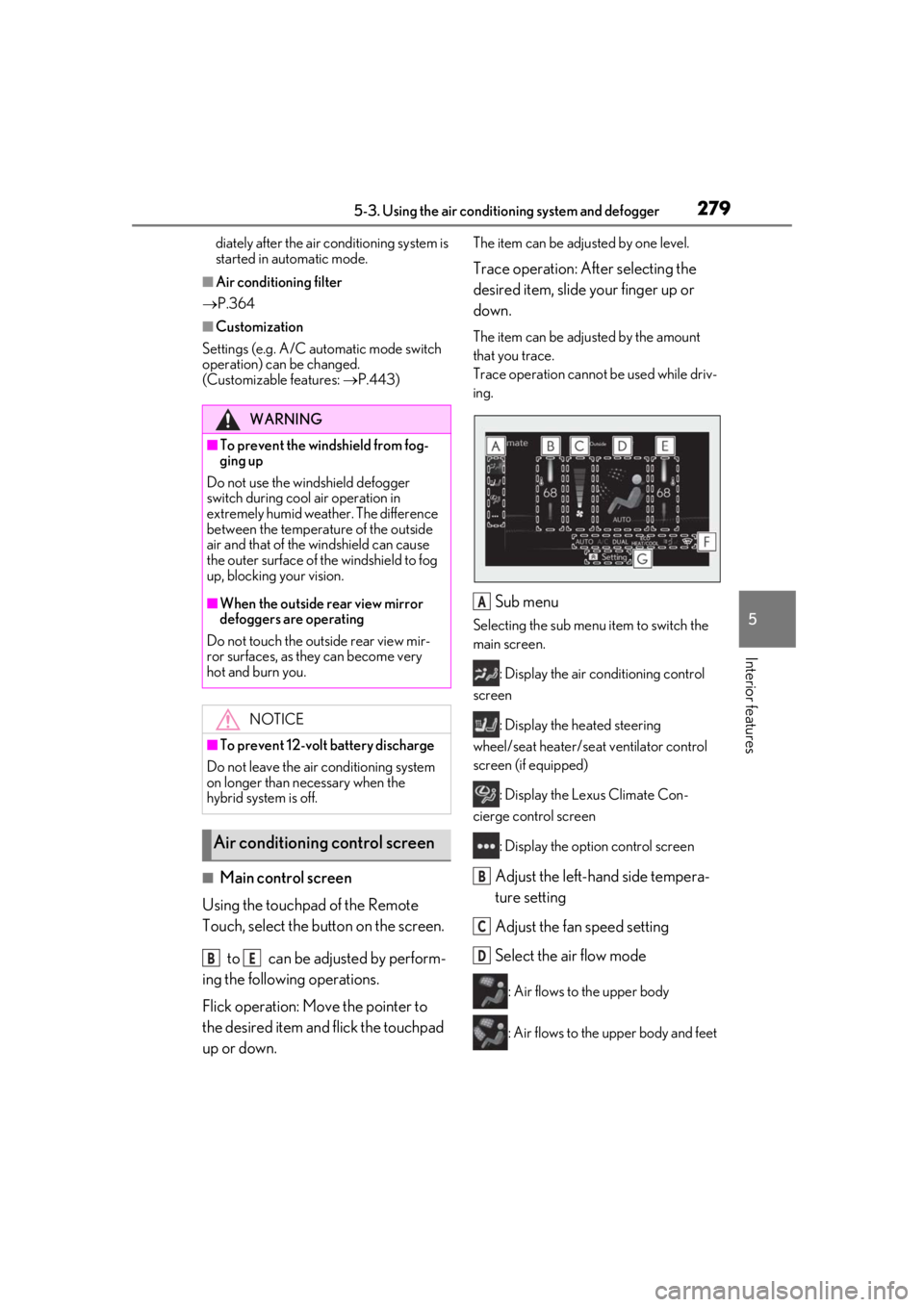
■Main control screen
Using the touchpad of the Remote
Touch, select the button on the screen.
to can be adjusted by perform-
ing the following operations.
Flick operation: Move the pointer to
the desired item and flick the touchpad
up or down.
The item can be adjusted by one level.
Trace operation: After selecting the
desired item, slide your finger up or
down.
The item can be adjusted by the amount
that you trace.
Trace operation cannot be used while driv-
ing.
Sub menu
Selecting the sub menu item to switch the
main screen.
: Display the air conditioning control
screen
: Display the heated steering
wheel/seat heater/sea t ventilator control
screen (if equipped)
: Display the Lexus Climate Con-
cierge control screen
: Display the option control screen
Adjust the left-hand side tempera-
ture setting
Adjust the fan speed setting
Select the air flow mode
: Air flows to the upper body
: Air flows to the upper body and feet
WARNING
■To prevent the windshield from fog-
ging up
Do not use the windshield defogger
switch during cool air operation in
extremely humid weather. The difference
between the temperature of the outside
air and that of the windshield can cause
the outer surface of the windshield to fog
up, blocking your vision.
■When the outside rear view mirror
defoggers are operating
Do not touch the outside rear view mir-
ror surfaces, as they can become very
hot and burn you.
NOTICE
■To prevent 12-volt battery discharge
Do not leave the air conditioning system
on longer than necessary when the
hybrid system is off.
Air conditioning control screen
BE
A
B
C
D
Page 280 of 476
2805-3. Using the air conditioning system and defogger
: Air flows to the feet
: Air flows to the feet and the wind-
shield defogger operates
Adjust the right-hand side tem-
perature setting
Function on/off indicators
When the function is on, the indicator illu-
minates on the control screen.
Sub function menu
When the sub function button on the
Remote Touch is pressed, the following
functions can be switched on and off.
: Set Lexus Climate Concierge
( P.274)
“AUTO”: Set automatic mode on/off
( P.281)
“OFF”: Turn the fan off
“A/C”: Set cooling and dehumidification
function
“DUAL”: Adjust the temperature for driver
and front passenger seats separately
(“DUAL” mode) ( P.283)
: Set eco air conditioning mode
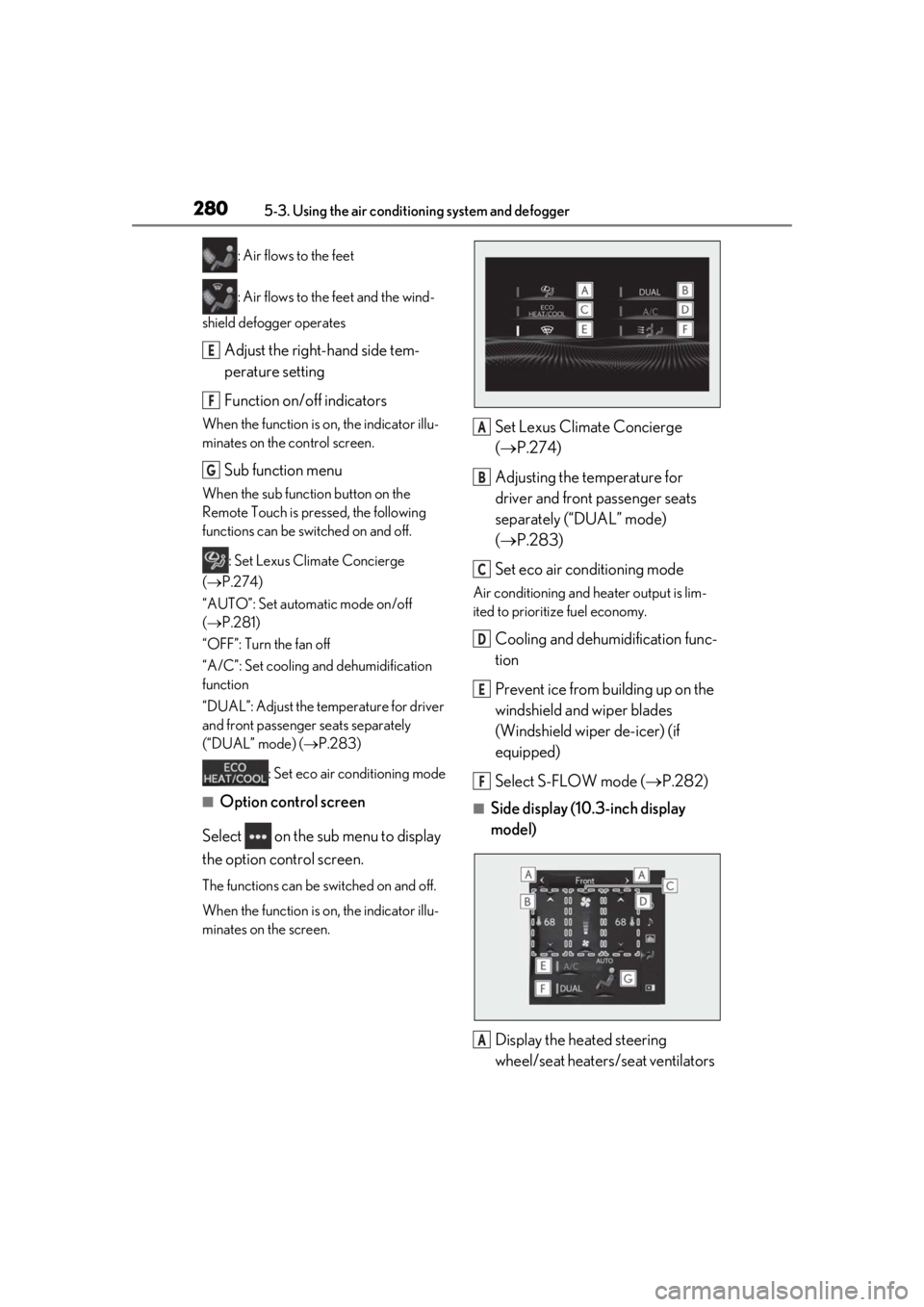
■Option control screen
Select on the sub menu to display
the option control screen.
The functions can be switched on and off.
When the function is on, the indicator illu-
minates on the screen.
Set Lexus Climate Concierge
( P.274)
Adjusting the temperature for
driver and front passenger seats
separately (“DUAL” mode)
( P.283)
Set eco air conditioning mode
Air conditioning and heater output is lim-
ited to prioritize fuel economy.
Cooling and dehumidification func-
tion
Prevent ice from building up on the
windshield and wiper blades
(Windshield wiper de-icer) (if
equipped)
Select S-FLOW mode ( P.282)
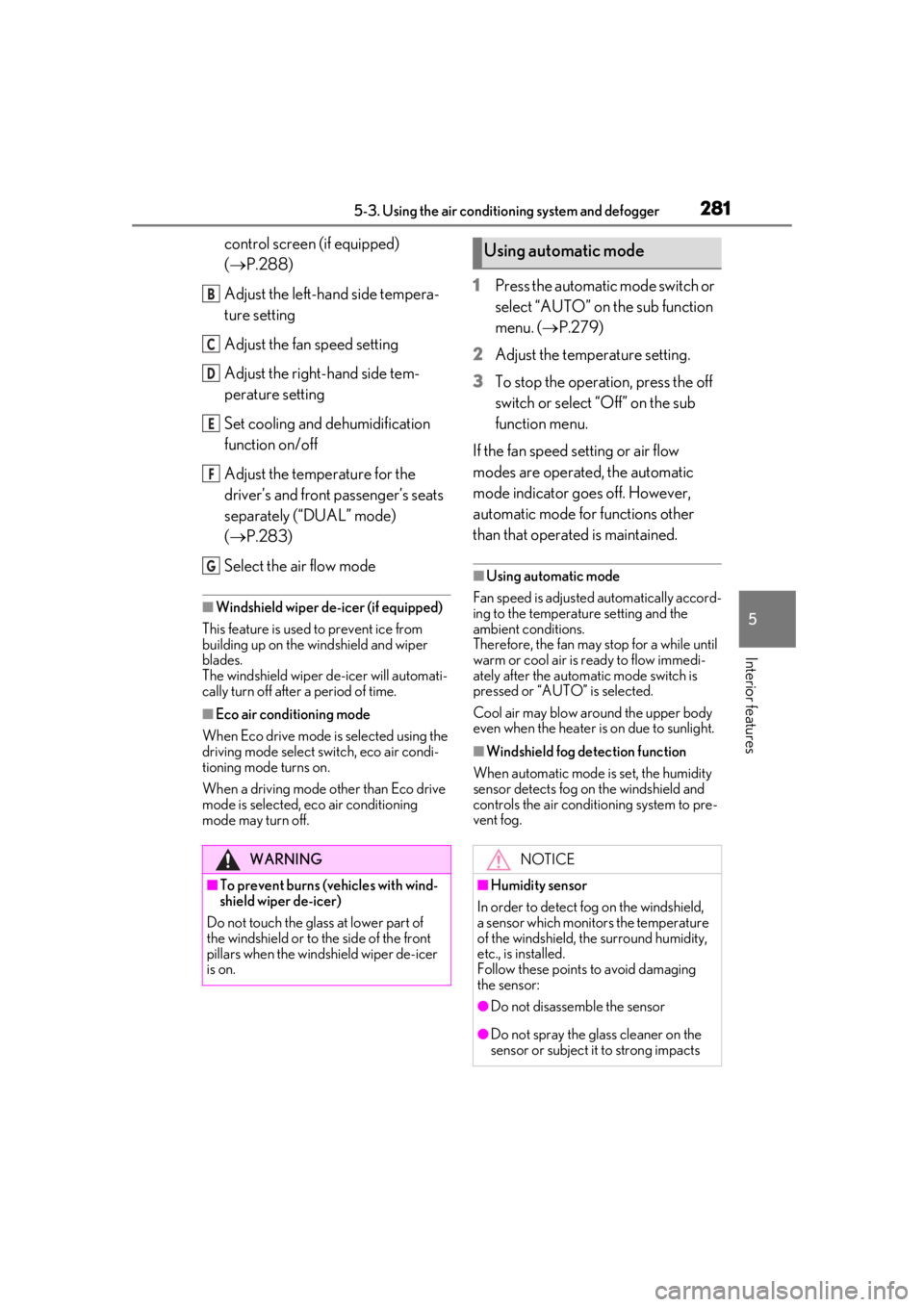
■Side display (10.3-inch display
model)
Display the heated steering
wheel/seat heaters/seat ventilators
E
F
G
A
B
C
D
E
F
A
Page 281 of 476
2815-3. Using the air conditioning system and defogger
5
Interior features
control screen (if equipped)
(P.288)
Adjust the left-hand side tempera-
ture setting
Adjust the fan speed setting
Adjust the right-hand side tem-
perature setting
Set cooling and dehumidification
function on/off
Adjust the temperature for the
driver’s and front passenger’s seats
separately (“DUAL” mode)
( P.283)
Select the air flow mode
■Windshield wiper de-icer (if equipped)
This feature is used to prevent ice from
building up on the wi ndshield and wiper
blades.
The windshield wiper de-icer will automati-
cally turn off after a period of time.
■Eco air conditioning mode
When Eco drive mode is selected using the
driving mode select switch, eco air condi-
tioning mode turns on.
When a driving mode other than Eco drive
mode is selected, eco air conditioning
mode may turn off.
1Press the automatic mode switch or
select “AUTO” on the sub function
menu. ( P.279)
2
Adjust the temperature setting.
3
To stop the operation, press the off
switch or select “Off” on the sub
function menu.
If the fan speed setting or air flow
modes are operated, the automatic
mode indicator goes off. However,
automatic mode for functions other
than that operated is maintained.
■Using automatic mode
Fan speed is adjusted automatically accord-
ing to the temperature setting and the
ambient conditions.
Therefore, the fan may stop for a while until
warm or cool air is ready to flow immedi-
ately after the automatic mode switch is
pressed or “AUTO” is selected.
Cool air may blow around the upper body
even when the heater is on due to sunlight.
■Windshield fog detection function
When automatic mode is set, the humidity
sensor detects fog on the windshield and
controls the air condit ioning system to pre-
vent fog.
WARNING
■To prevent burns (vehicles with wind-
shield wiper de-icer)
Do not touch the glass at lower part of
the windshield or to the side of the front
pillars when the wind shield wiper de-icer
is on.
B
C
D
E
F
G
Using automatic mode
NOTICE
■Humidity sensor
In order to detect fog on the windshield,
a sensor which monitors the temperature
of the windshield, the surround humidity,
etc., is installed.
Follow these points to avoid damaging
the sensor:
●Do not disassemble the sensor
●Do not spray the glass cleaner on the
sensor or subject it to strong impacts
Page 282 of 476
2825-3. Using the air conditioning system and defogger
In S-FLOW mode, priority for the air-
flow is given to the front seats, reducing
the airflow and air conditioning effect
on the rear seats.
The following S-FLOW modes are
available:
Automatic S-FLOW mode
When a rear passenger is determined
to be in the vehicle, S-FLOW mode will
be automatically disabled.
The indicator will illuminate on the air con-
ditioning control screen when S-FLOW
mode is enabled.
To enable/disable S-FLOW mode and
enter manual S-FLOW mode, select the S-
FLOW mode switch ( P.280).
Manual S-FLOW mode
When the S-FLOW mode switch is
selected, S-FLOW mode will be manu-
ally enabled/disabled.
The indicator will illuminate on the air con-
ditioning control screen when S-FLOW
mode is enabled.
The system does not determine whether a
passenger is in the rear seats by the open-
ing and closing of a rear door, so S-FLOW mode cannot be automatically disabled.
To automatically disable S-FLOW mode by
opening and closing a rear door, switch to
automatic S-FLOW mode.
■S-FLOW air conditioning control
Operation of S-FLOW mode changes
according to the following conditions.
However, depending on the set tem-
perature and air conditioning load is
high, the operation may not change.
Driver seat priority:
• When the system determines there is no
passenger in the front passenger seat in
manual S-FLOW mode
• When the system determines there are no passengers in the front passenger
seat and rear seats in automatic S-
FLOW mode
The airflow to the front passenger seat and
rear seat stops and the front passenger
temperature display turns off.
Front seat priority:
When the system determines there are no
passengers in the rear seats
S-FLOW disabled:
When the system determines there is a
passenger in the rear seats
■Passenger presence determination in S-
FLOW mode
The system determines that there is a pas-
senger in any of the following situations.
If a passenger is judged to be in the vehicle,
the system will retain the judgment for a
certain amount of time after the power
switch is turned off.
NOTICE
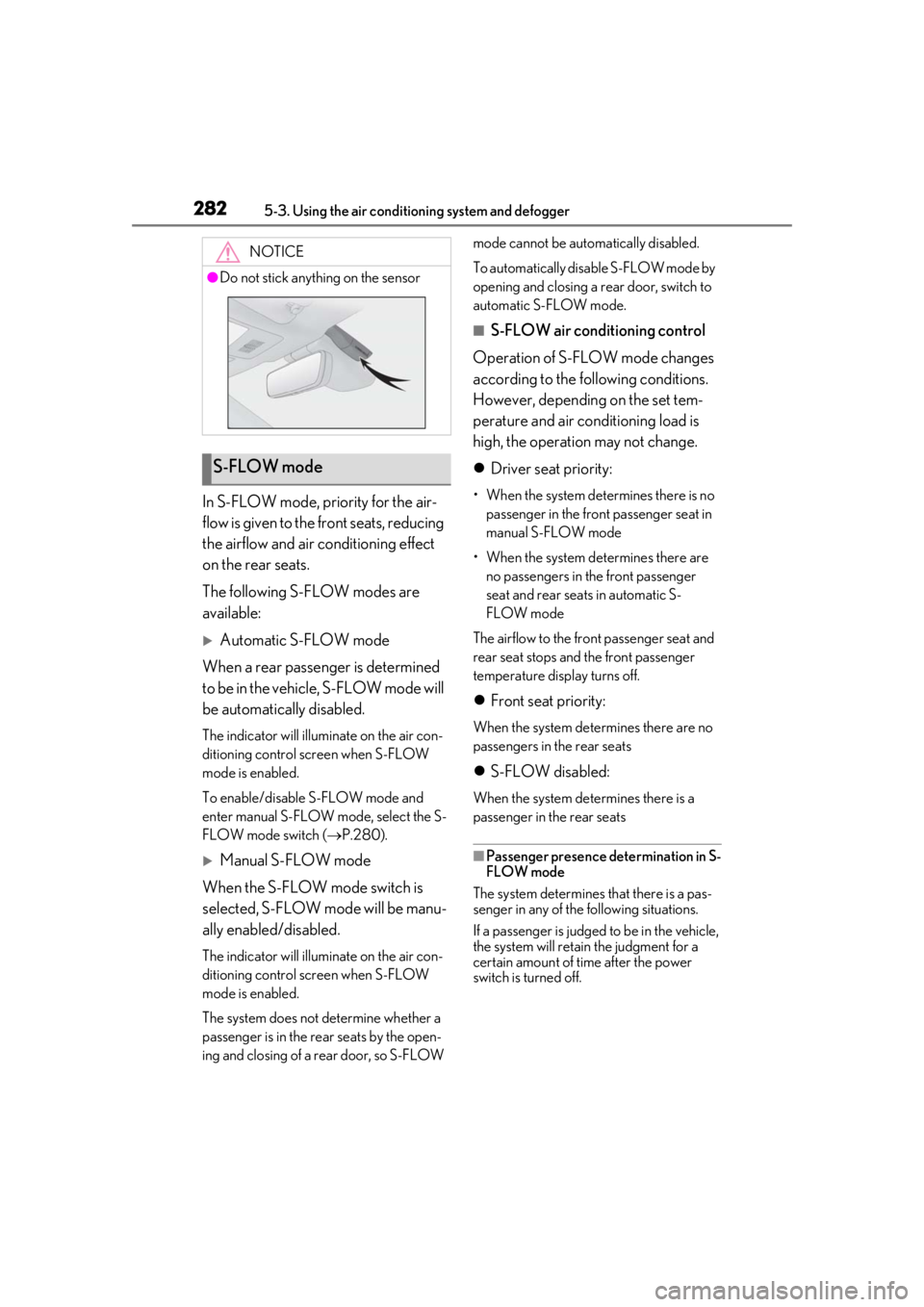
●Do not stick anything on the sensor
S-FLOW mode
Page 283 of 476
2835-3. Using the air conditioning system and defogger
5
Interior features
Front passenger seat
• When the front passenger’s door is opened and closed
• When a passenger is sitting on the front passenger seat
• When the front passenger side seat belt
is fastened
• When the front passenger seat set tem- perature is changed
After only the front passenger side door is
opened and closed, when the vehicle is
driven at 20 km/h (12 mph) or more, the
system determines that there is no passen-
ger in the front passenger seat.
Rear seats
When a rear door is opened and closed
■Operation of automatic S-FLOW mode
When the system is operating in S-FLOW
mode, if a rear door is opened and then
closed, S-FLOW mode will be disabled. To
enable S-FLOW mode, select the S-FLOW
mode switch. In this case, the system
switches to manual S-FLOW mode.
■Changing from manual S-FLOW mode
to automatic S-FLOW mode
1 Select the S-FLOW mode switch to dis-
able S-FLOW mode
2 Turn the power switch off.
3 After 60 minutes have elapsed, change
the power switch to ON.
To turn on the “DUAL” mode, perform
any of the following procedures:
Select “DUAL” on the sub function
menu. ( P.279)
Select “DUAL” on the option con-
trol screen.
Adjust the front passenger’s side
temperature setting.
The indicator comes on when the “DUAL”
mode is on.
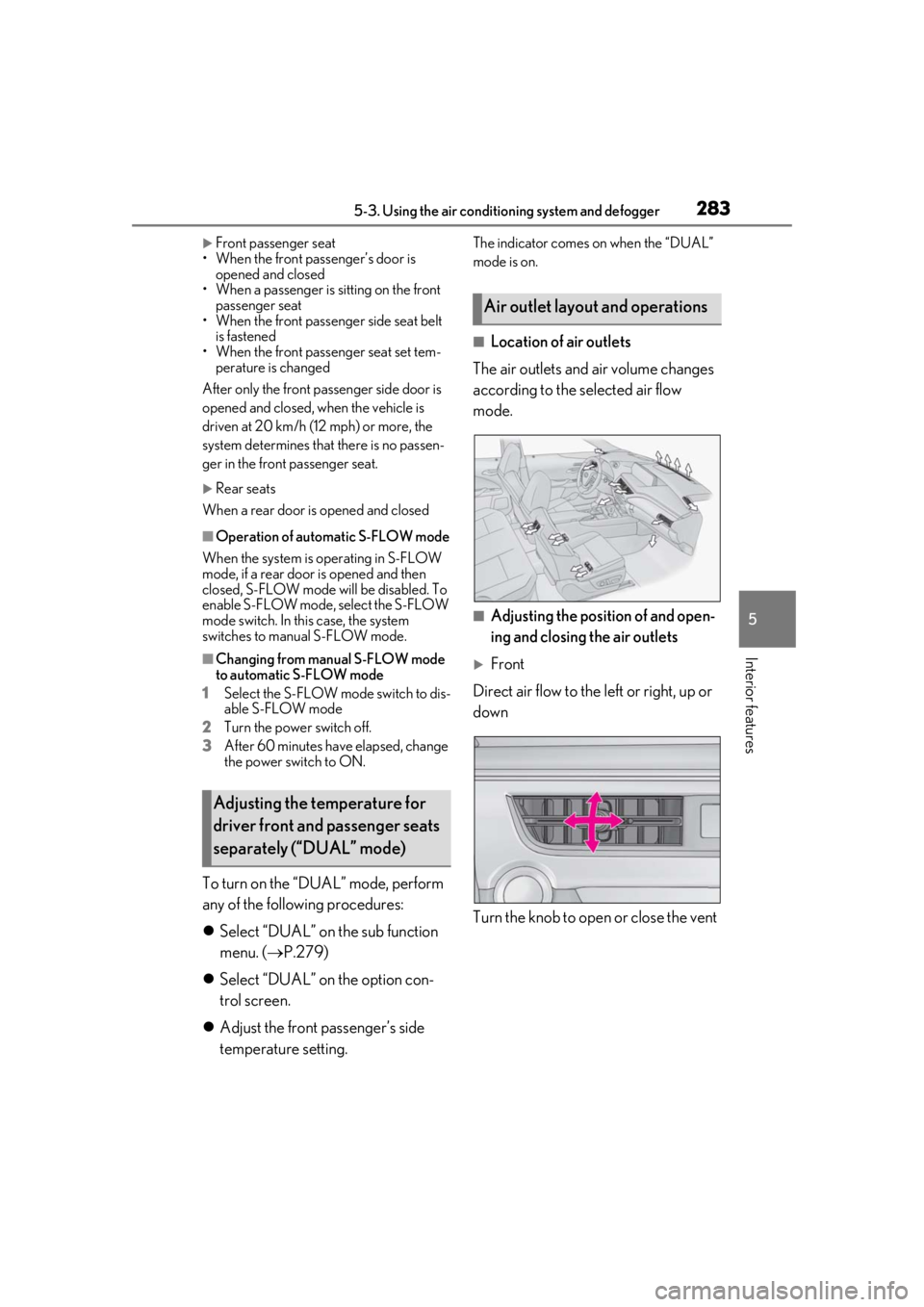
■Location of air outlets
The air outlets and air volume changes
according to the selected air flow
mode.
■Adjusting the position of and open-
ing and closing the air outlets
Front
Direct air flow to the left or right, up or
down
Turn the knob to open or close the vent
Adjusting the temperature for
driver front and passenger seats
separately (“DUAL” mode)
Air outlet layout and operations
Page 287 of 476
2875-3. Using the air conditioning system and defogger
5
Interior features
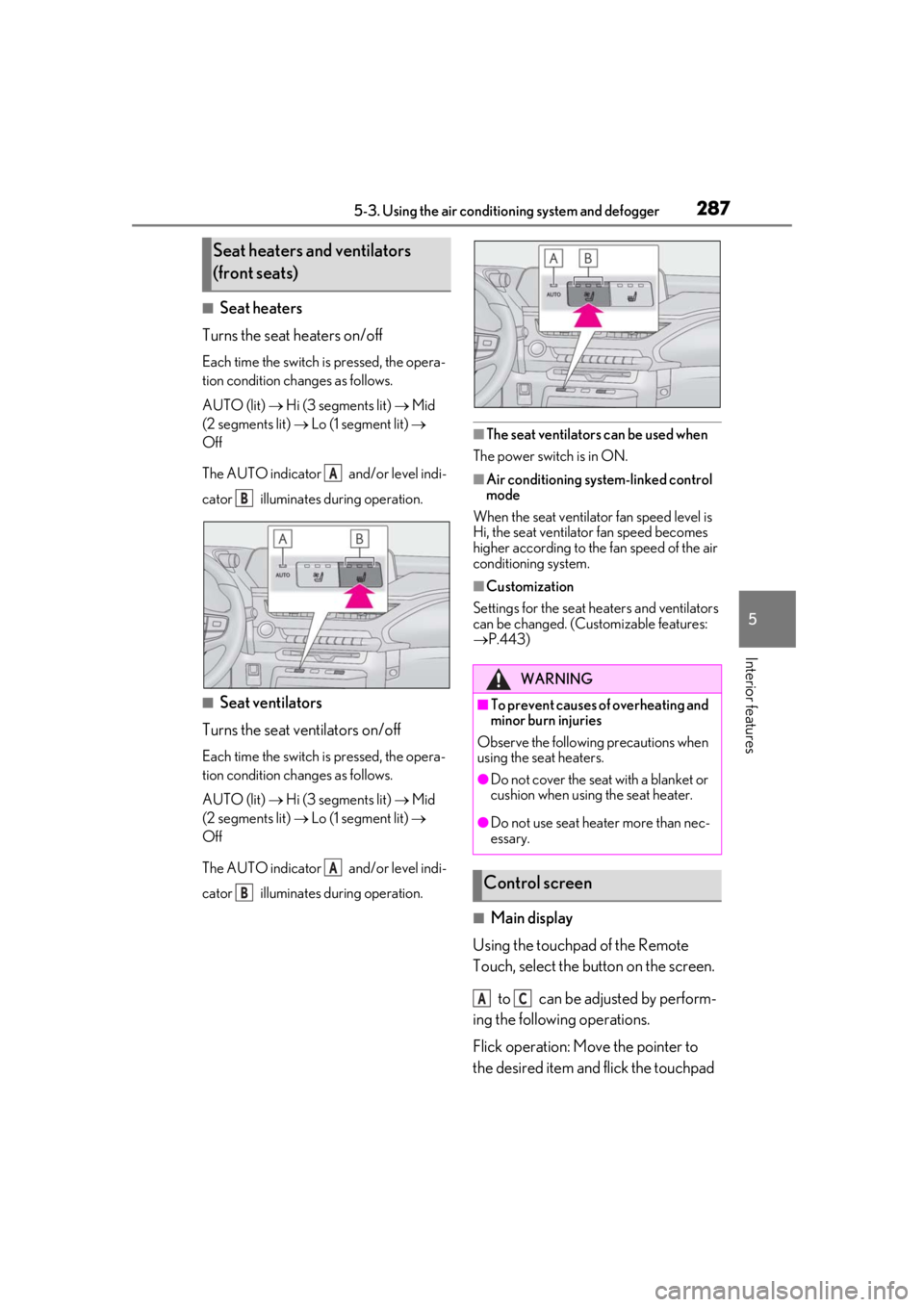
■Seat heaters
Turns the seat heaters on/off
Each time the switch is pressed, the opera-
tion condition changes as follows.
AUTO (lit) Hi (3 segments lit) Mid
(2 segments lit) Lo (1 segment lit)
Off
The AUTO indicator and/or level indi-
cator illuminates during operation.
■Seat ventilators
Turns the seat ventilators on/off
Each time the switch is pressed, the opera-
tion condition changes as follows.
AUTO (lit) Hi (3 segments lit) Mid
(2 segments lit) Lo (1 segment lit)
Off
The AUTO indicator and/or level indi-
cator illuminates during operation.
■The seat ventilators can be used when
The power switch is in ON.
■Air conditioning system-linked control
mode
When the seat ventilator fan speed level is
Hi, the seat ventilator fan speed becomes
higher according to the fan speed of the air
conditioning system.
■Customization
Settings for the seat heaters and ventilators
can be changed. (Customizable features:
P.443)
■Main display
Using the touchpad of the Remote
Touch, select the button on the screen.
to can be adjusted by perform-
ing the following operations.
Flick operation: Move the pointer to
the desired item and flick the touchpad
Seat heaters and ventilators
(front seats)
A
B
A
B
WARNING
■To prevent causes of overheating and
minor burn injuries
Observe the following precautions when
using the seat heaters.
●Do not cover the seat with a blanket or
cushion when using the seat heater.
●Do not use seat heater more than nec-
essary.
Control screen
AC
Page 288 of 476
2885-3. Using the air conditioning system and defogger
up or down.
The item can be adjusted by one level.
Trace operation: After selecting the
desired item, trace the pad surface.
The item can be adjusted by the amount
that you trace.
Trace operation cannot be used while driv-
ing.
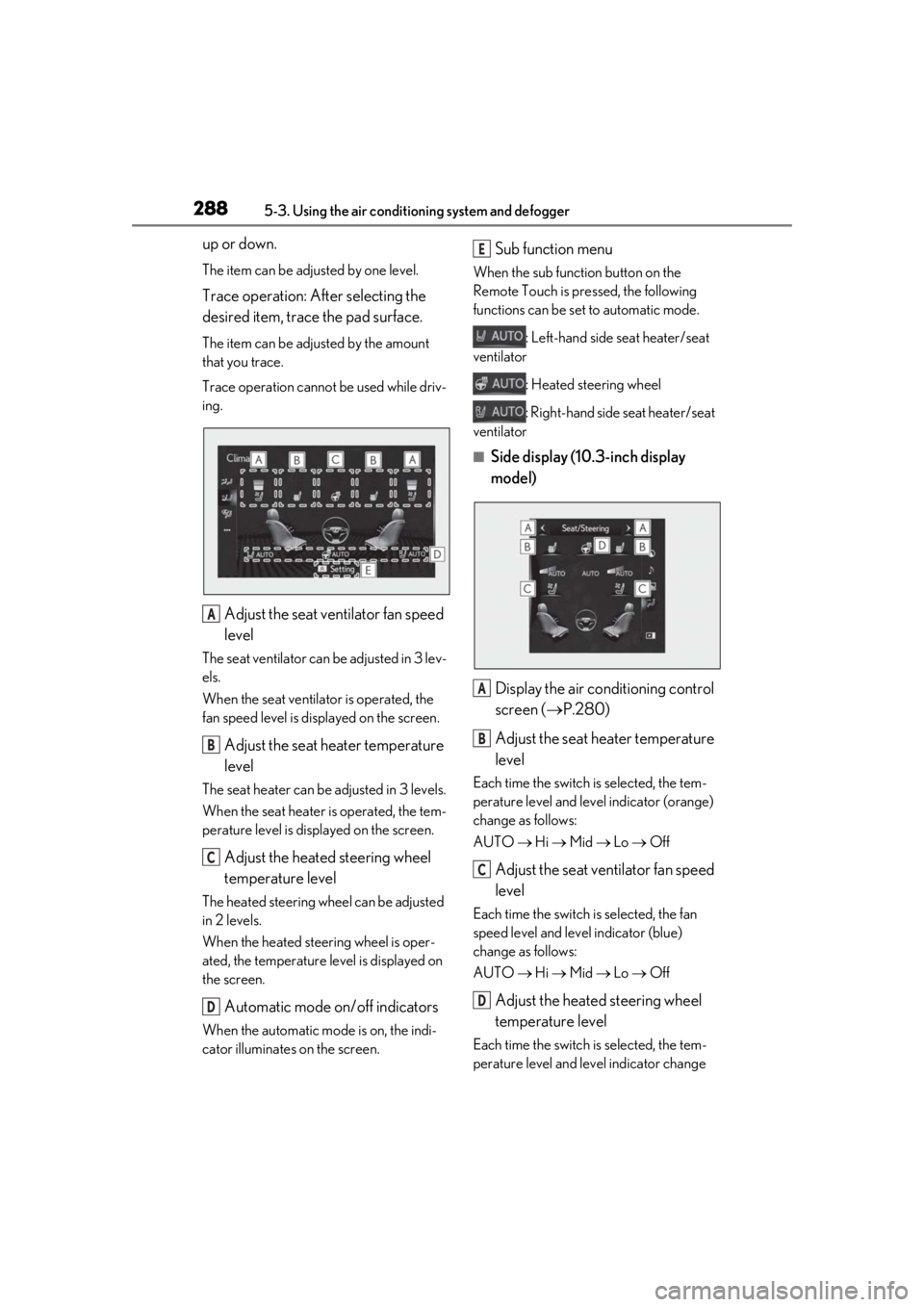
Adjust the seat ventilator fan speed
level
The seat ventilator can be adjusted in 3 lev-
els.
When the seat ventilator is operated, the
fan speed level is disp layed on the screen.
Adjust the seat heater temperature
level
The seat heater can be adjusted in 3 levels.
When the seat heater is operated, the tem-
perature level is displayed on the screen.
Adjust the heated steering wheel
temperature level
The heated steering wheel can be adjusted
in 2 levels.
When the heated steering wheel is oper-
ated, the temperature level is displayed on
the screen.
Automatic mode on/off indicators
When the automatic mode is on, the indi-
cator illuminates on the screen.
Sub function menu
When the sub function button on the
Remote Touch is pressed, the following
functions can be set to automatic mode.
: Left-hand side seat heater/seat
ventilator
: Heated steering wheel
: Right-hand side seat heater/seat
ventilator
■Side display (10. 3-inch display
model)
Display the air conditioning control
screen ( P.280)
Adjust the seat heater temperature
level
Each time the switch is selected, the tem-
perature level and level indicator (orange)
change as follows:
AUTO Hi Mid Lo Off
Adjust the seat ventilator fan speed
level
Each time the switch is selected, the fan
speed level and level indicator (blue)
change as follows:
AUTO Hi Mid Lo Off
Adjust the heated steering wheel
temperature level
Each time the switch is selected, the tem-
perature level and le vel indicator change
A
B
C
D
E
A
B
C
D
Page 291 of 476
2915-4. Using the interior lights
5
Interior features
■Automatic turning on of the interior
lights
If any of the SRS airbags deploy (inflate) or
in the event of a strong rear impact, the inte-
rior lights will turn on automatically. The
interior lights will turn off automatically after
approximately 20 minutes. The interior
lights can be turned off manually. However,
in order to help prevent further collisions, it
is recommended that th ey be left on until
safety can be ensured. (The interior lights
may not turn on automatically depending
on the force of the impact and conditions of
the collision.)
■Customization
Setting (e.g. the time elapsed before lights
turn off) can be changed. (Customizable
features: P.444)
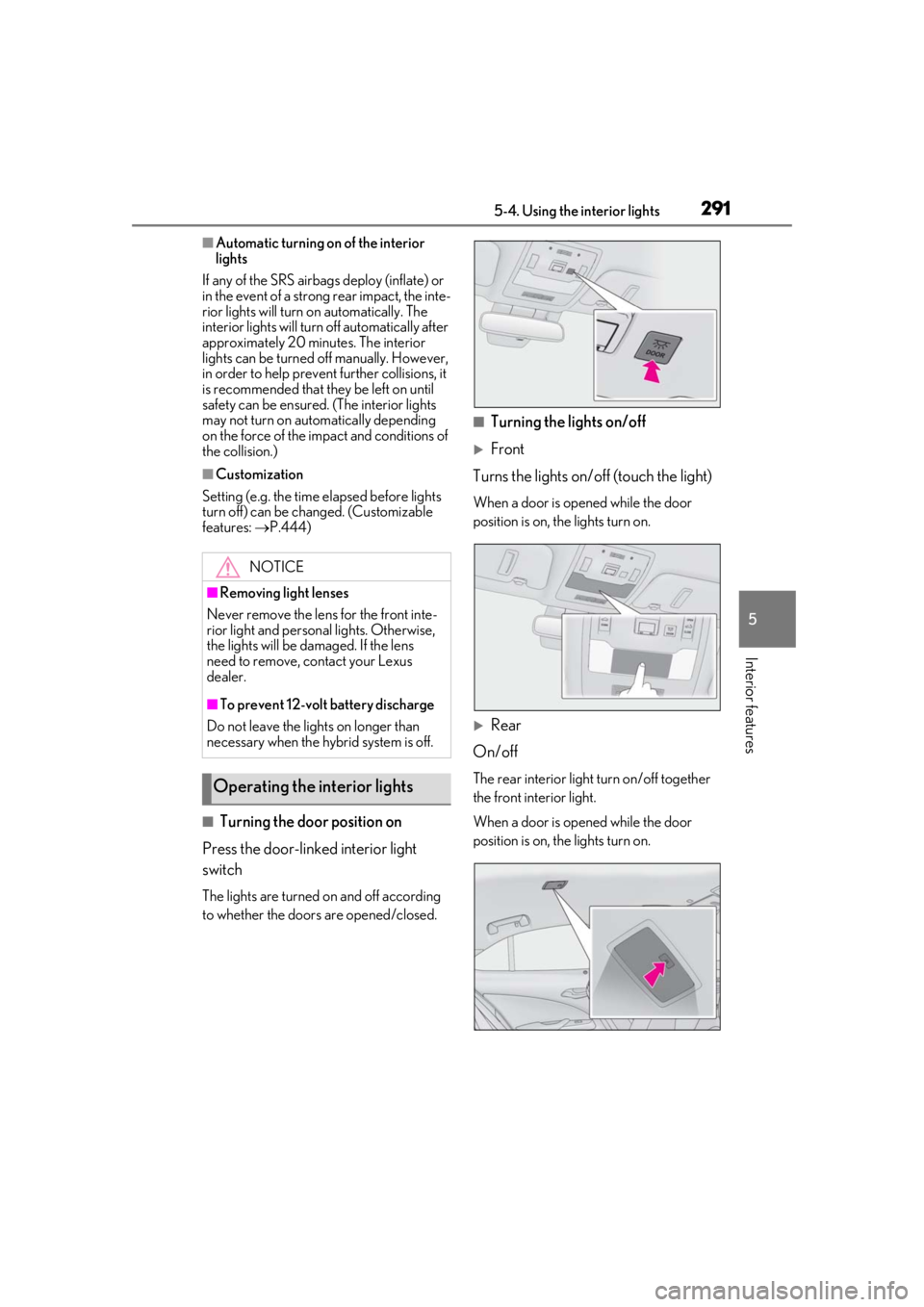
■Turning the door position on
Press the door-linked interior light
switch
The lights are turned on and off according
to whether the doors are opened/closed.
■Turning the lights on/off
Front
Turns the lights on/off (touch the light)
When a door is opened while the door
position is on, the lights turn on.
Rear
On/off
The rear interior light turn on/off together
the front interior light.
When a door is opened while the door
position is on, the lights turn on.
NOTICE
■Removing light lenses
Never remove the lens for the front inte-
rior light and personal lights. Otherwise,
the lights will be damaged. If the lens
need to remove, contact your Lexus
dealer.
■To prevent 12-volt battery discharge
Do not leave the lights on longer than
necessary when the hy brid system is off.
Operating the interior lights