turn LEXUS UX250H 2019 Owners Manual
[x] Cancel search | Manufacturer: LEXUS, Model Year: 2019, Model line: UX250H, Model: LEXUS UX250H 2019Pages: 476, PDF Size: 10.51 MB
Page 291 of 476
2915-4. Using the interior lights
5
Interior features
■Automatic turning on of the interior
lights
If any of the SRS airbags deploy (inflate) or
in the event of a strong rear impact, the inte-
rior lights will turn on automatically. The
interior lights will turn off automatically after
approximately 20 minutes. The interior
lights can be turned off manually. However,
in order to help prevent further collisions, it
is recommended that th ey be left on until
safety can be ensured. (The interior lights
may not turn on automatically depending
on the force of the impact and conditions of
the collision.)
■Customization
Setting (e.g. the time elapsed before lights
turn off) can be changed. (Customizable
features: P.444)
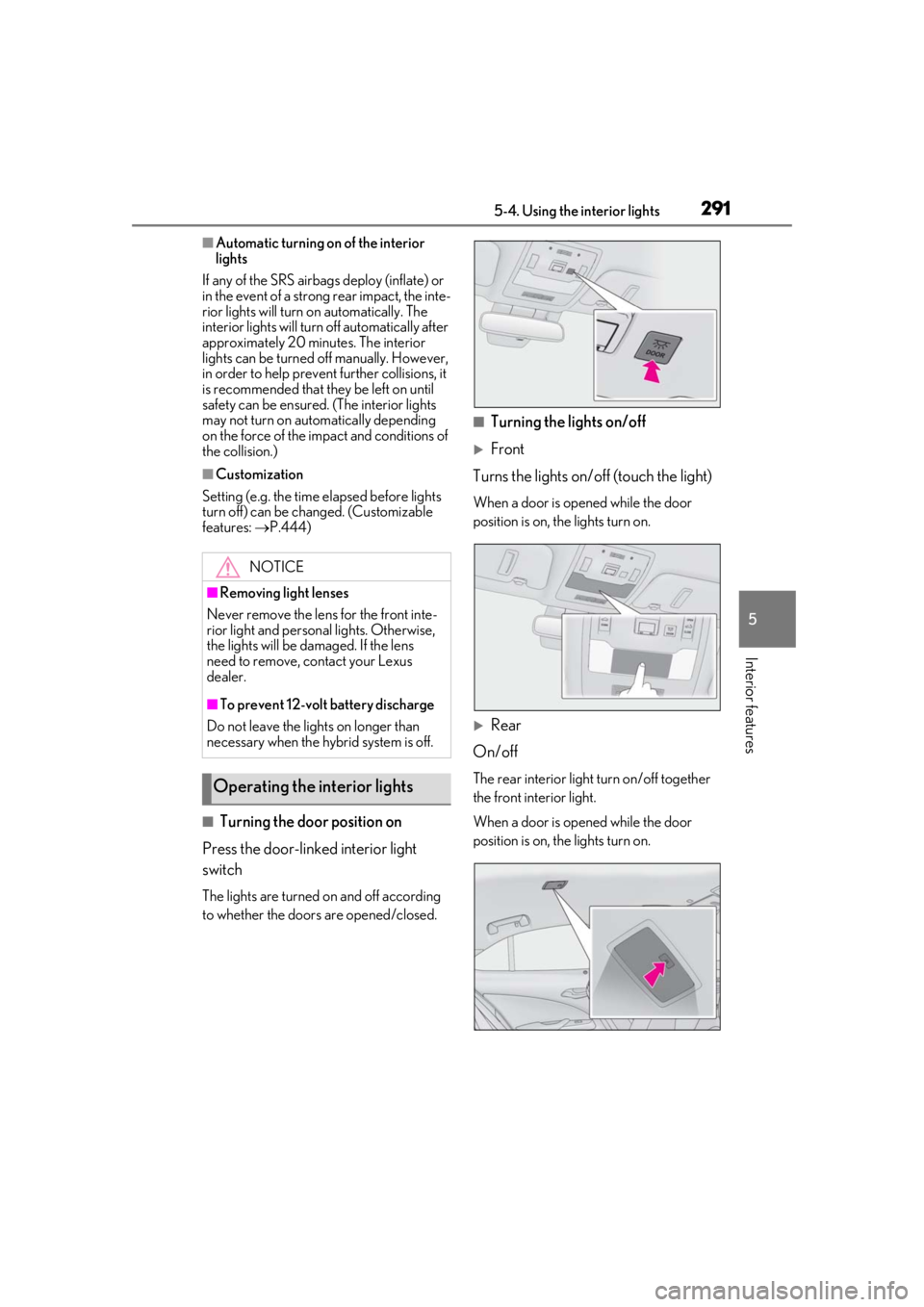
■Turning the door position on
Press the door-linked interior light
switch
The lights are turned on and off according
to whether the doors are opened/closed.
■Turning the lights on/off
Front
Turns the lights on/off (touch the light)
When a door is opened while the door
position is on, the lights turn on.
Rear
On/off
The rear interior light turn on/off together
the front interior light.
When a door is opened while the door
position is on, the lights turn on.
NOTICE
■Removing light lenses
Never remove the lens for the front inte-
rior light and personal lights. Otherwise,
the lights will be damaged. If the lens
need to remove, contact your Lexus
dealer.
■To prevent 12-volt battery discharge
Do not leave the lights on longer than
necessary when the hy brid system is off.
Operating the interior lights
Page 292 of 476
2925-4. Using the interior lights
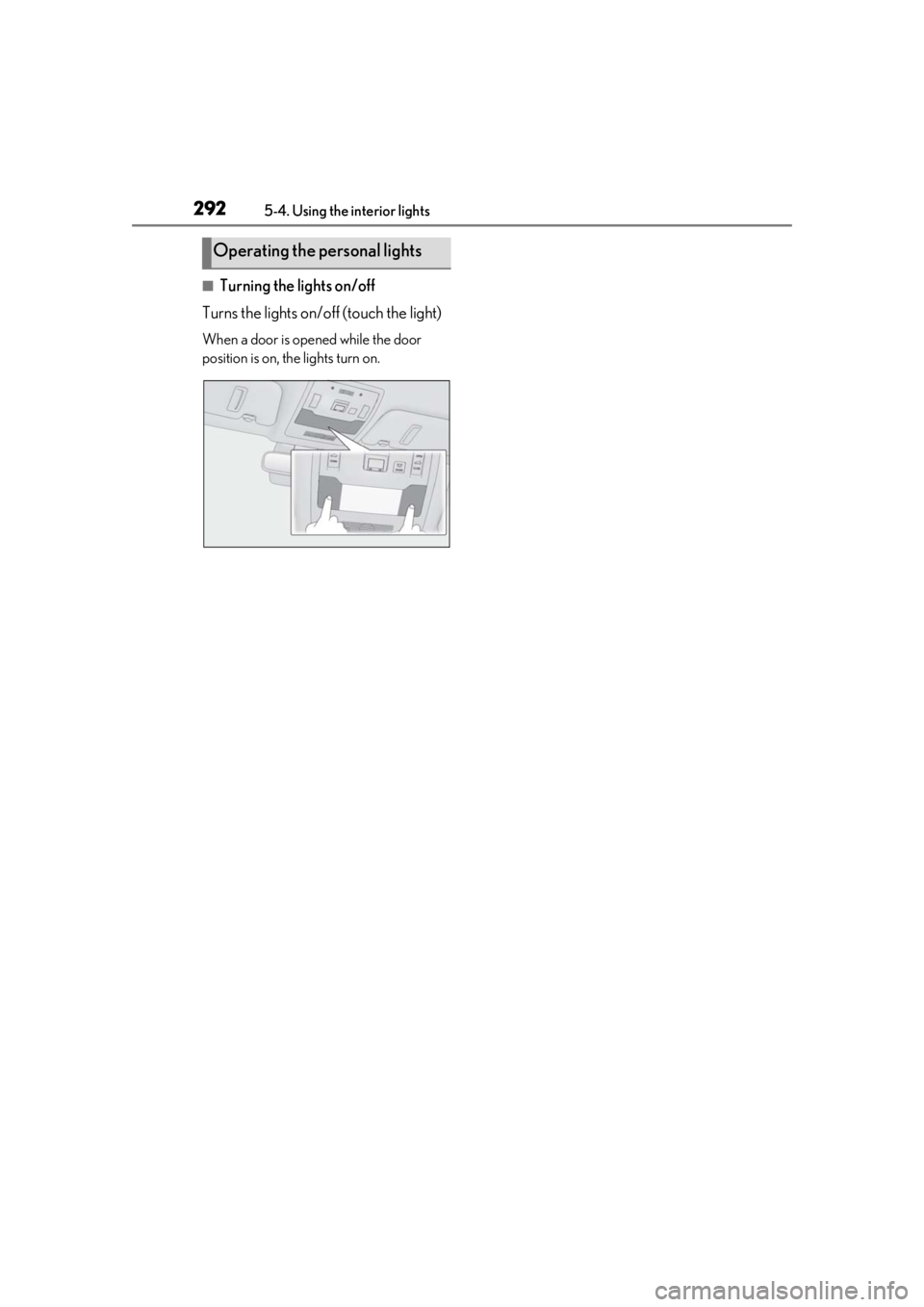
■Turning the lights on/off
Turns the lights on/off (touch the light)
When a door is opened while the door
position is on, the lights turn on.
Operating the personal lights
Page 294 of 476
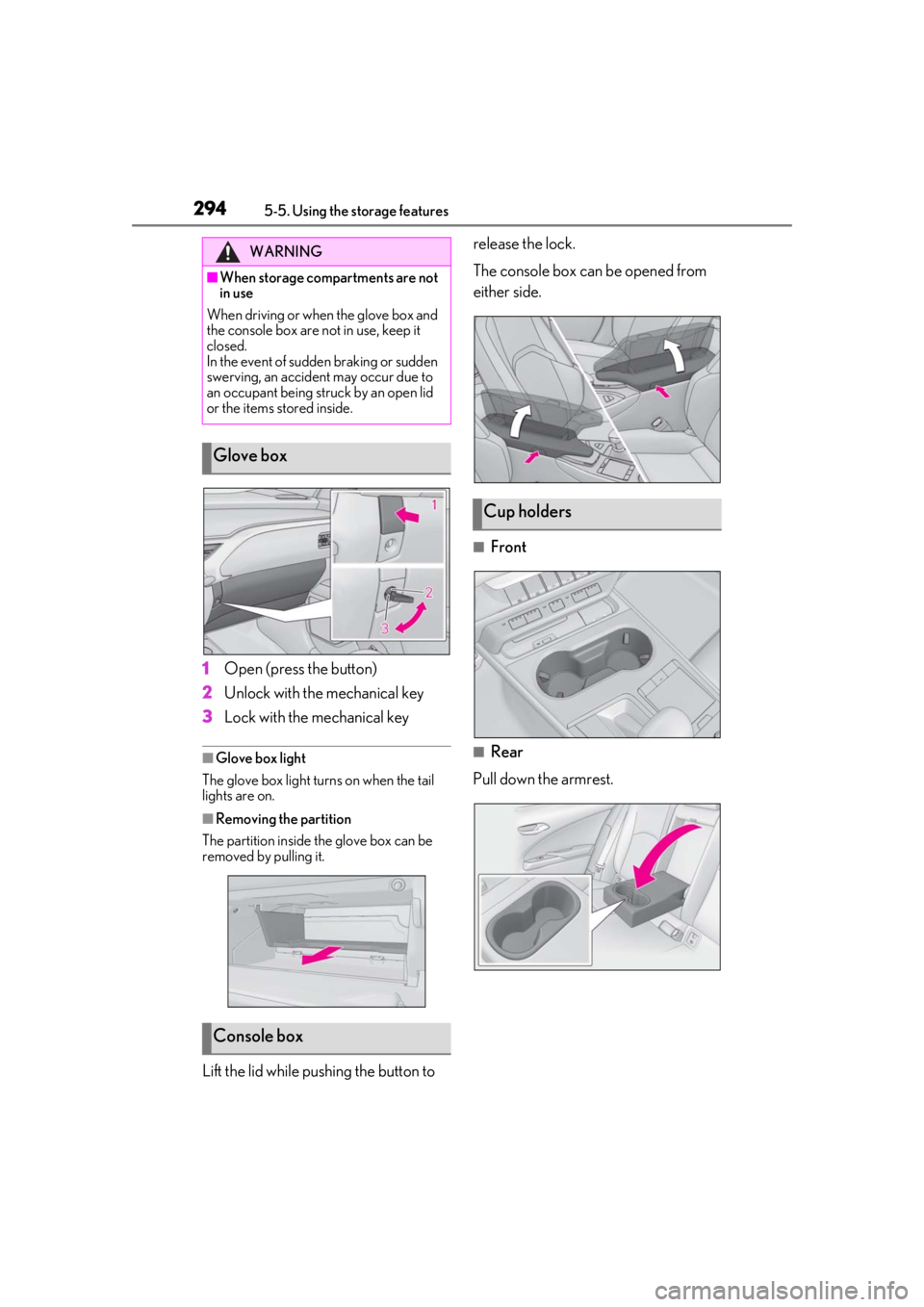
2945-5. Using the storage features
1Open (press the button)
2
Unlock with the mechanical key
3
Lock with the mechanical key
■Glove box light
The glove box light turns on when the tail
lights are on.
■Removing the partition
The partition inside the glove box can be
removed by pulling it.
Lift the lid while pushing the button to release the lock.
The console box can be opened from
either side.
■Front
■Rear
Pull down the armrest.
WARNING
■When storage compartments are not
in use
When driving or when the glove box and
the console box are not in use, keep it
closed.
In the event of sudden braking or sudden
swerving, an accident may occur due to
an occupant being struck by an open lid
or the items stored inside.
Glove box
Console box
Cup holders
Page 296 of 476
2965-5. Using the storage features
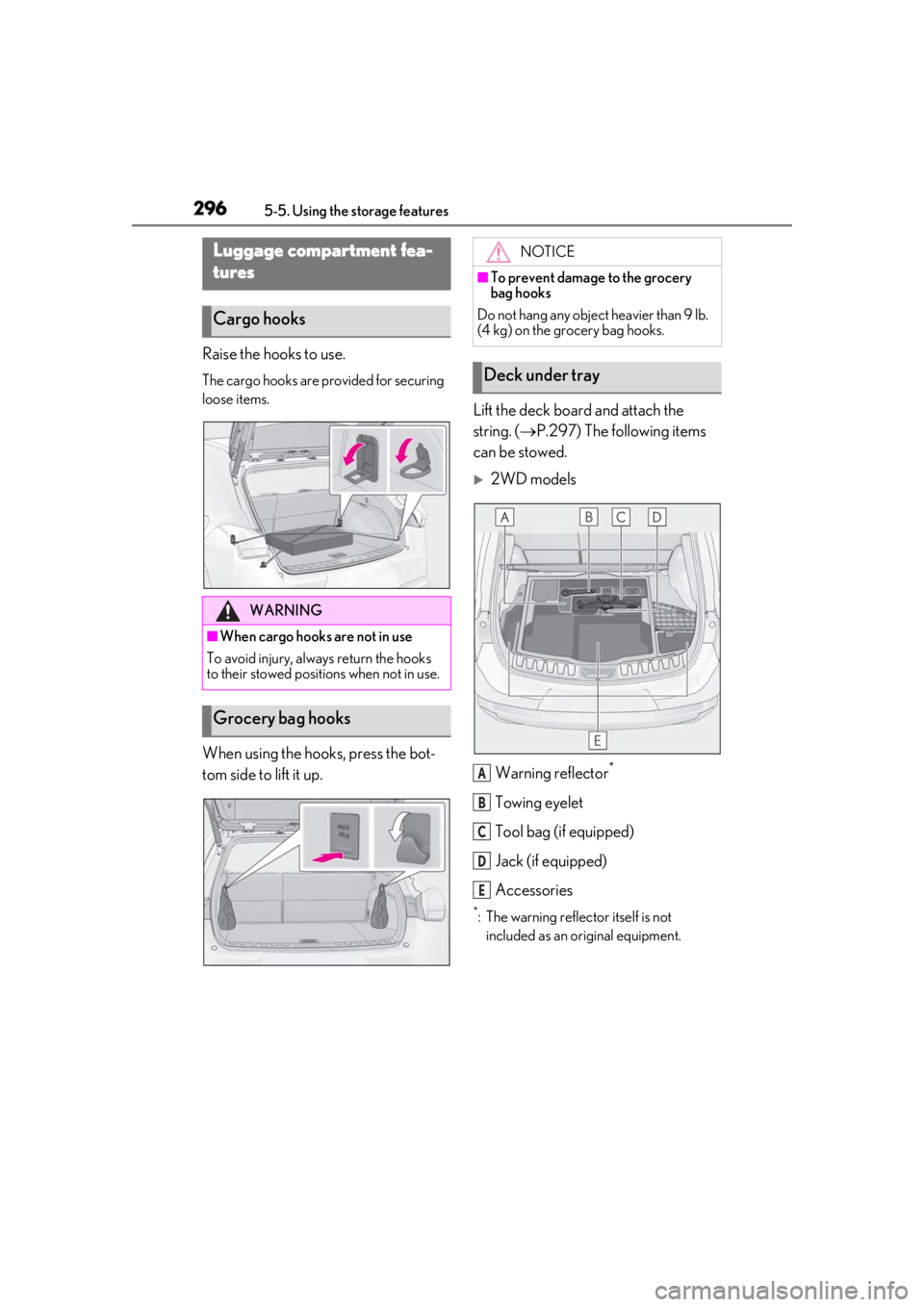
Raise the hooks to use.
The cargo hooks are provided for securing
loose items.
When using the hooks, press the bot-
tom side to lift it up.Lift the deck board and attach the
string. (
P.297) The following items
can be stowed.
2WD models
Warning reflector
*
Towing eyelet
Tool bag (if equipped)
Jack (if equipped)
Accessories
*: The warning reflec tor itself is not
included as an original equipment.
Luggage compartment fea-
tures
Cargo hooks
WARNING
■When cargo hooks are not in use
To avoid injury, always return the hooks
to their stowed positions when not in use.
Grocery bag hooks
NOTICE
■To prevent damage to the grocery
bag hooks
Do not hang any object heavier than 9 lb.
(4 kg) on the grocery bag hooks.
Deck under tray
A
B
C
D
E
Page 298 of 476
2985-5. Using the storage features
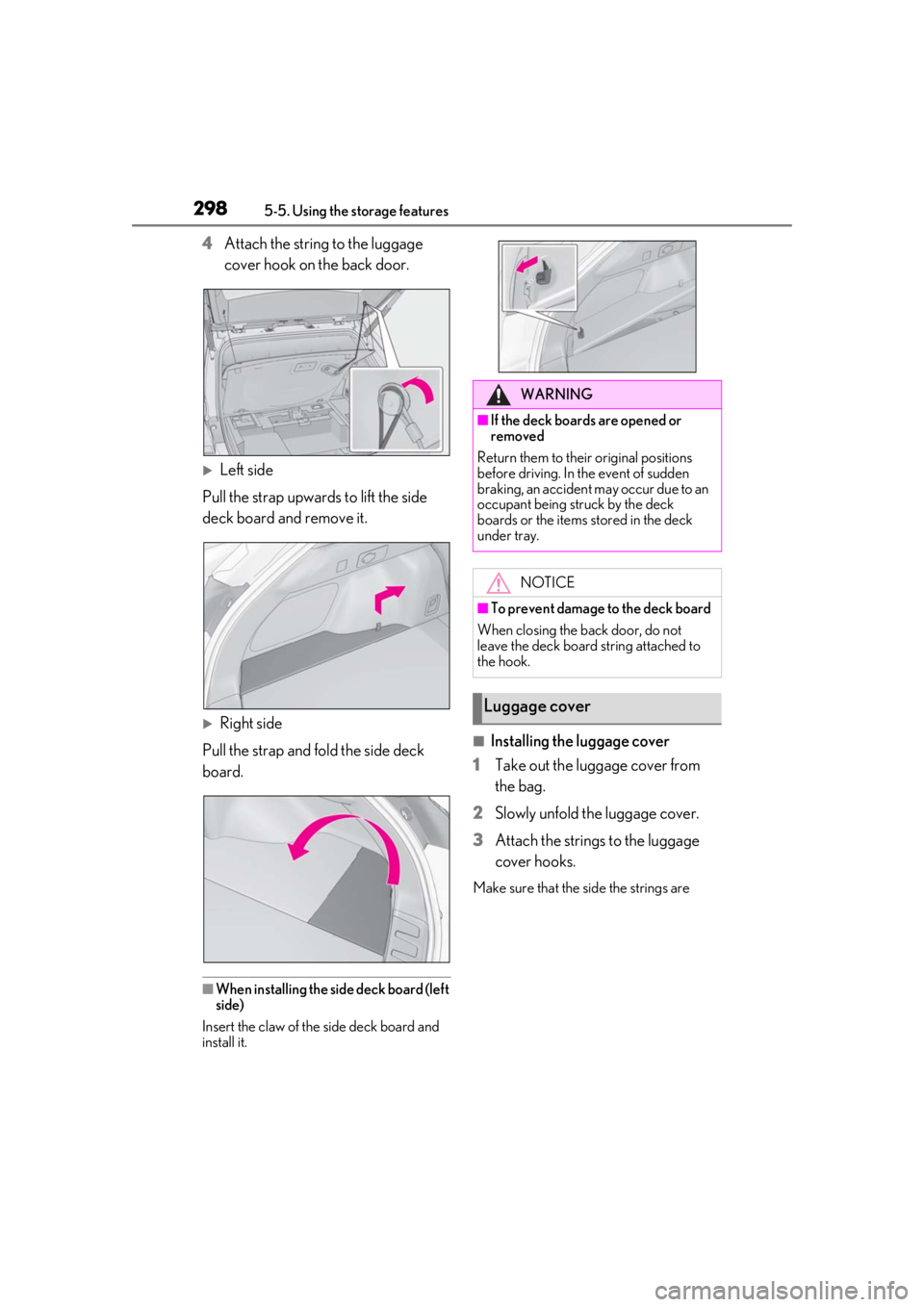
4Attach the string to the luggage
cover hook on the back door.
Left side
Pull the strap upwards to lift the side
deck board and remove it.
Right side
Pull the strap and fold the side deck
board.
■When installing the side deck board (left
side)
Insert the claw of the side deck board and
install it.
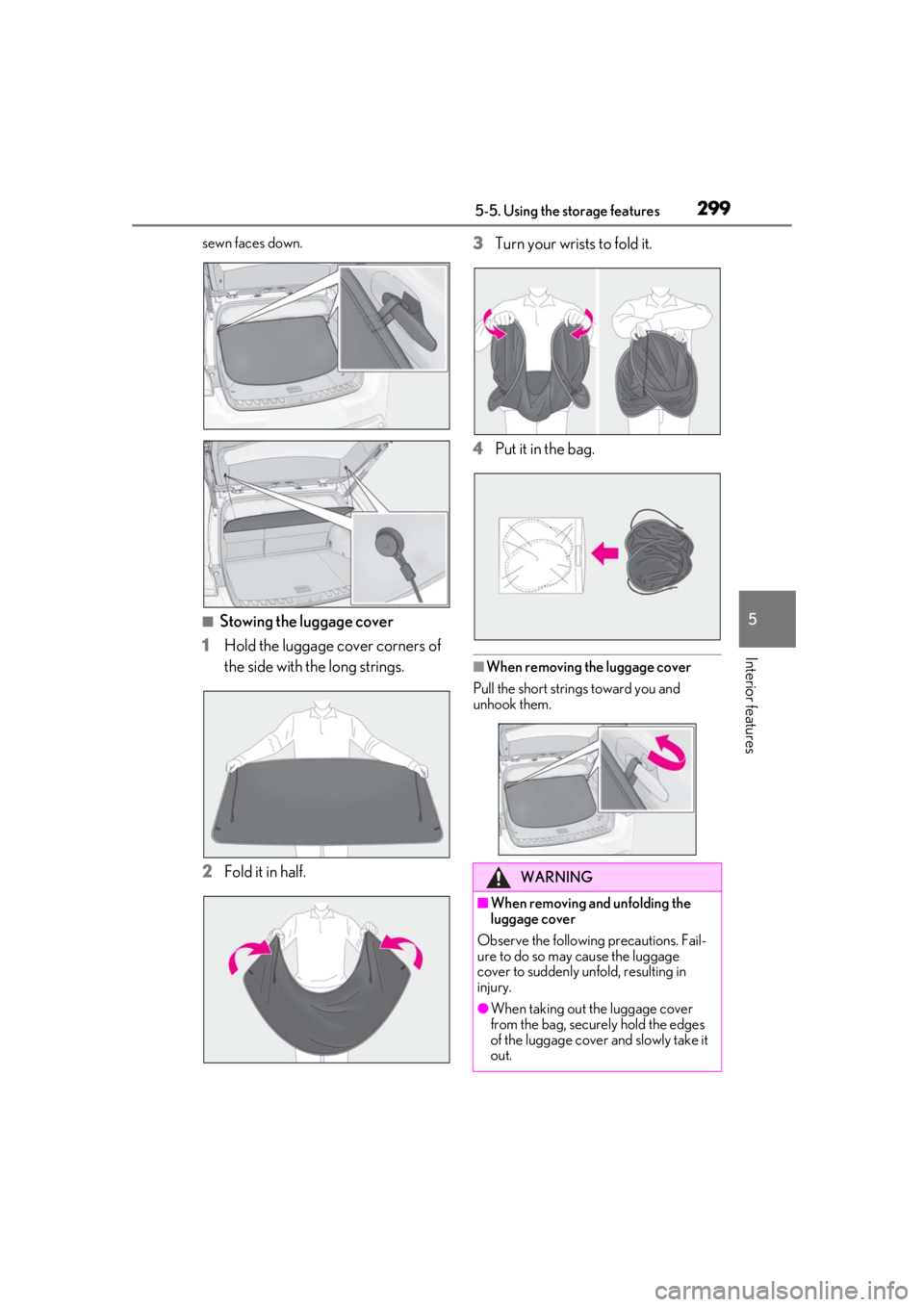
■Installing the luggage cover
1
Take out the luggage cover from
the bag.
2
Slowly unfold the luggage cover.
3
Attach the strings to the luggage
cover hooks.
Make sure that the side the strings are
WARNING
■If the deck boards are opened or
removed
Return them to their original positions
before driving. In the event of sudden
braking, an accident may occur due to an
occupant being struck by the deck
boards or the items stored in the deck
under tray.
NOTICE
■To prevent damage to the deck board
When closing the back door, do not
leave the deck board string attached to
the hook.
Luggage cover
Page 299 of 476
2995-5. Using the storage features
5
Interior features
sewn faces down.
■Stowing the luggage cover
1
Hold the luggage cover corners of
the side with the long strings.
2
Fold it in half. 3
Turn your wrists
to fold it.
4
Put it in the bag.
■When removing the luggage cover
Pull the short strings toward you and
unhook them.
WARNING
■When removing and unfolding the
luggage cover
Observe the following precautions. Fail-
ure to do so may cause the luggage
cover to suddenly unfold, resulting in
injury.
●When taking out the luggage cover
from the bag, securely hold the edges
of the luggage cover and slowly take it
out.
Page 301 of 476
3015-6. Using the other interior features
5
Interior features
5-6.Using the other interior features
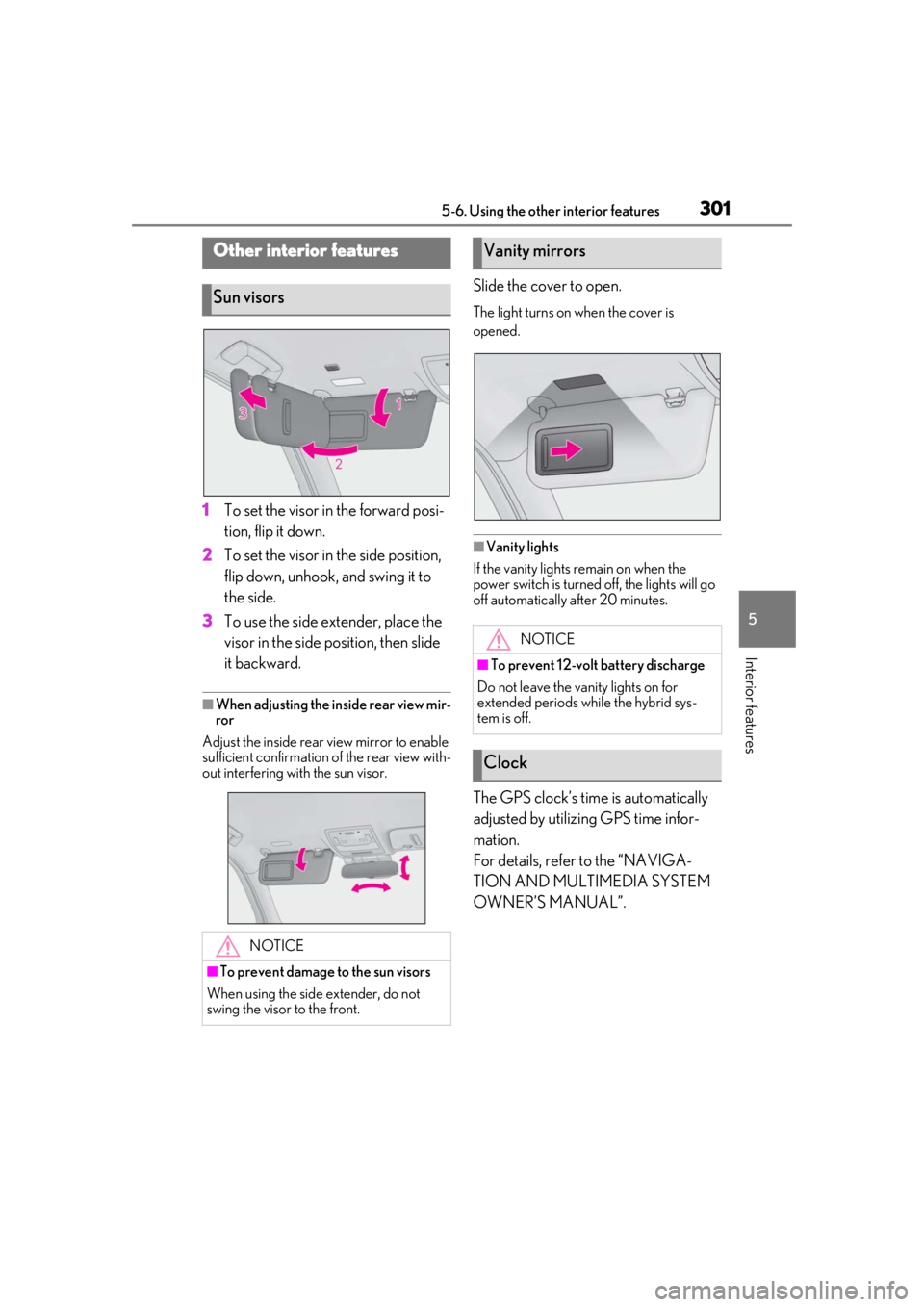
1To set the visor in the forward posi-
tion, flip it down.
2
To set the visor in the side position,
flip down, unhook, and swing it to
the side.
3
To use the side extender, place the
visor in the side position, then slide
it backward.
■When adjusting the inside rear view mir-
ror
Adjust the inside rear view mirror to enable
sufficient confirmation of the rear view with-
out interfering with the sun visor.
Slide the cover to open.
The light turns on when the cover is
opened.
■Vanity lights
If the vanity lights remain on when the
power switch is turned off, the lights will go
off automatically after 20 minutes.
The GPS clock’s time is automatically
adjusted by utilizing GPS time infor-
mation.
For details, refer to the “NAVIGA-
TION AND MULTIMEDIA SYSTEM
OWNER’S MANUAL”.
Other interior features
Sun visors
NOTICE
■To prevent damage to the sun visors
When using the side extender, do not
swing the visor to the front.
Vanity mirrors
NOTICE
■To prevent 12-volt battery discharge
Do not leave the vanity lights on for
extended periods while the hybrid sys-
tem is off.
Clock
Page 302 of 476
3025-6. Using the other interior features
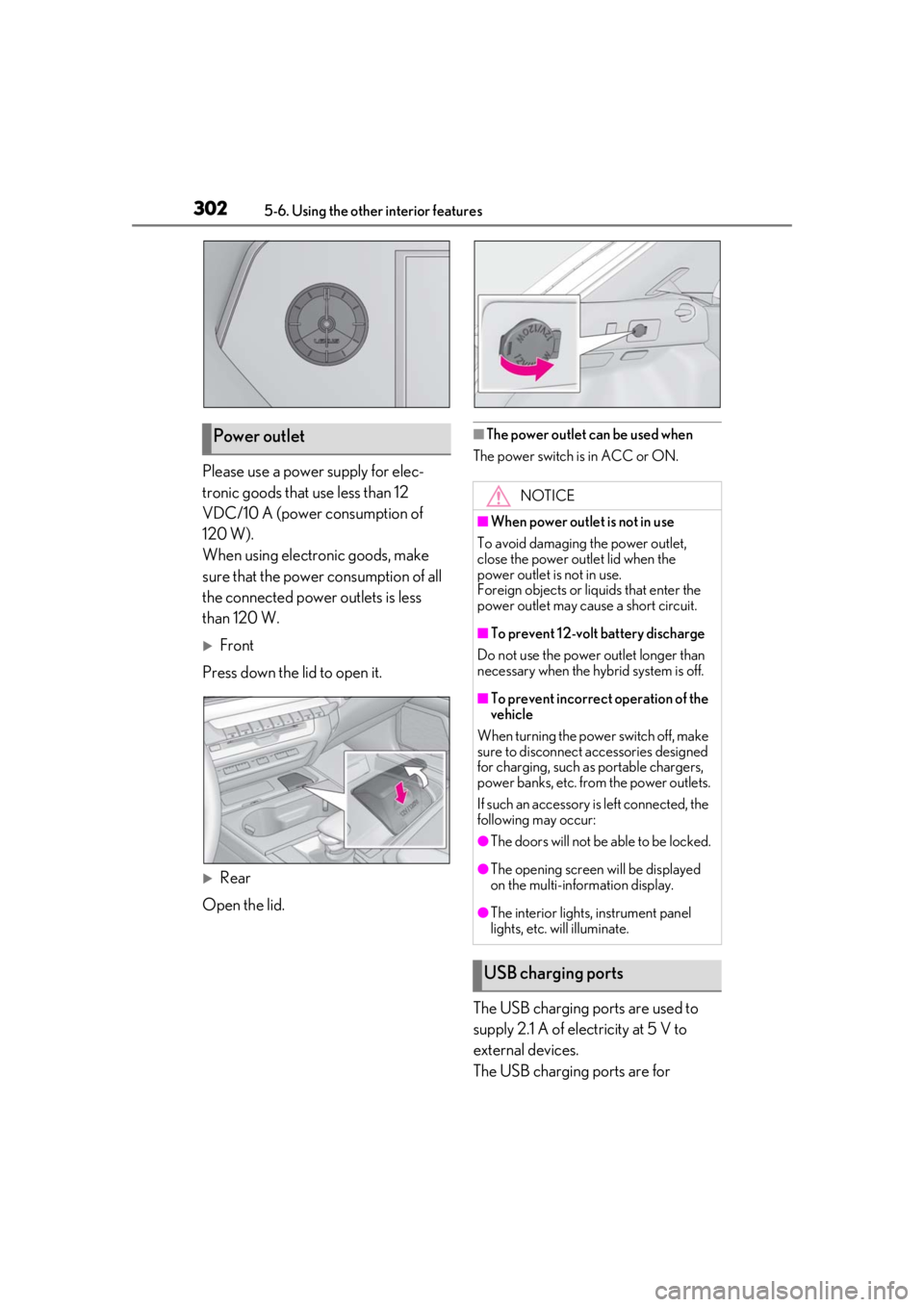
Please use a power supply for elec-
tronic goods that use less than 12
VDC/10 A (power consumption of
120 W).
When using electronic goods, make
sure that the power consumption of all
the connected power outlets is less
than 120 W.
Front
Press down the lid to open it.
Rear
Open the lid.
■The power outlet can be used when
The power switch is in ACC or ON.
The USB charging ports are used to
supply 2.1 A of electricity at 5 V to
external devices.
The USB charging ports are for
Power outlet
NOTICE
■When power outlet is not in use
To avoid damaging the power outlet,
close the power outlet lid when the
power outlet is not in use.
Foreign objects or li quids that enter the
power outlet may cause a short circuit.
■To prevent 12-volt battery discharge
Do not use the power outlet longer than
necessary when the hy brid system is off.
■To prevent incorrect operation of the
vehicle
When turning the powe r switch off, make
sure to disconnect accessories designed
for charging, such as portable chargers,
power banks, etc. from the power outlets.
If such an accessory is left connected, the
following may occur:
●The doors will not be able to be locked.
●The opening screen will be displayed
on the multi-information display.
●The interior lights, instrument panel
lights, etc. will illuminate.
USB charging ports
Page 303 of 476
3035-6. Using the other interior features
5
Interior features
charging only. They are not designed
for data transfer or other purposes.
Depending on the external device, it
may not charge properly. Refer to the
manual included with the device
before using a USB charging port.
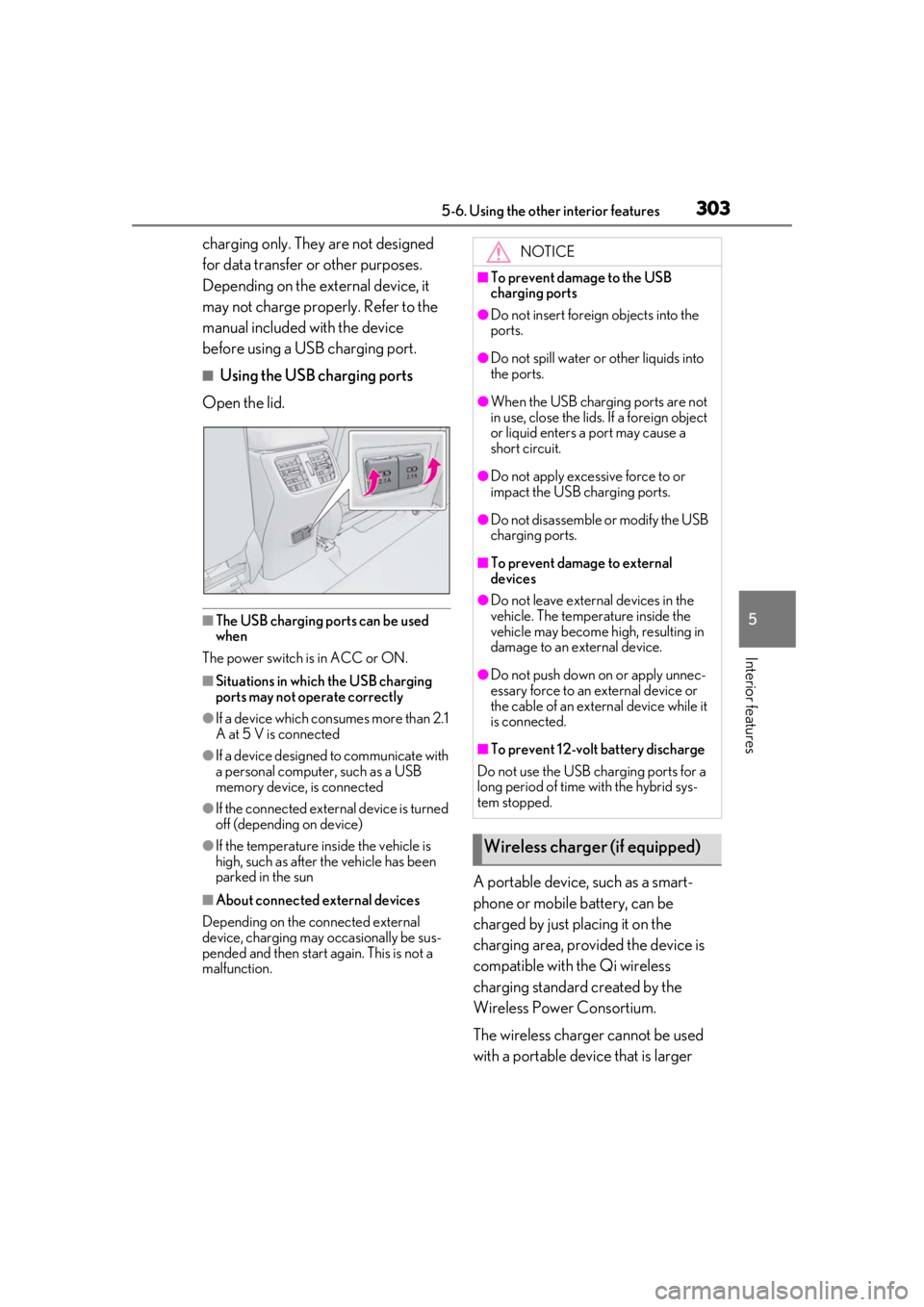
■Using the USB charging ports
Open the lid.
■The USB charging ports can be used
when
The power switch is in ACC or ON.
■Situations in which the USB charging
ports may not operate correctly
●If a device which consumes more than 2.1
A at 5 V is connected
●If a device designed to communicate with
a personal computer, such as a USB
memory device, is connected
●If the connected extern al device is turned
off (depending on device)
●If the temperature inside the vehicle is
high, such as after the vehicle has been
parked in the sun
■About connected external devices
Depending on the connected external
device, charging may occasionally be sus-
pended and then start again. This is not a
malfunction.
A portable device, such as a smart-
phone or mobile battery, can be
charged by just placing it on the
charging area, provided the device is
compatible with the Qi wireless
charging standard created by the
Wireless Power Consortium.
The wireless charger cannot be used
with a portable device that is larger
NOTICE
■To prevent damage to the USB
charging ports
●Do not insert foreign objects into the
ports.
●Do not spill water or other liquids into
the ports.
●When the USB charging ports are not
in use, close the lids. If a foreign object
or liquid enters a port may cause a
short circuit.
●Do not apply excessive force to or
impact the USB charging ports.
●Do not disassemble or modify the USB
charging ports.
■To prevent damage to external
devices
●Do not leave external devices in the
vehicle. The temperature inside the
vehicle may become high, resulting in
damage to an external device.
●Do not push down on or apply unnec-
essary force to an external device or
the cable of an external device while it
is connected.
■To prevent 12-volt battery discharge
Do not use the USB charging ports for a
long period of time with the hybrid sys-
tem stopped.
Wireless charger (if equipped)
Page 304 of 476
3045-6. Using the other interior features
than the charging area. Additionally,
depending on the portable device, the
wireless charger may not operate
properly. Refer to the operation man-
ual of the portable device.
■The “Qi” symbol
The “Qi” symbol is a trademark of the
Wireless Power Consortium.
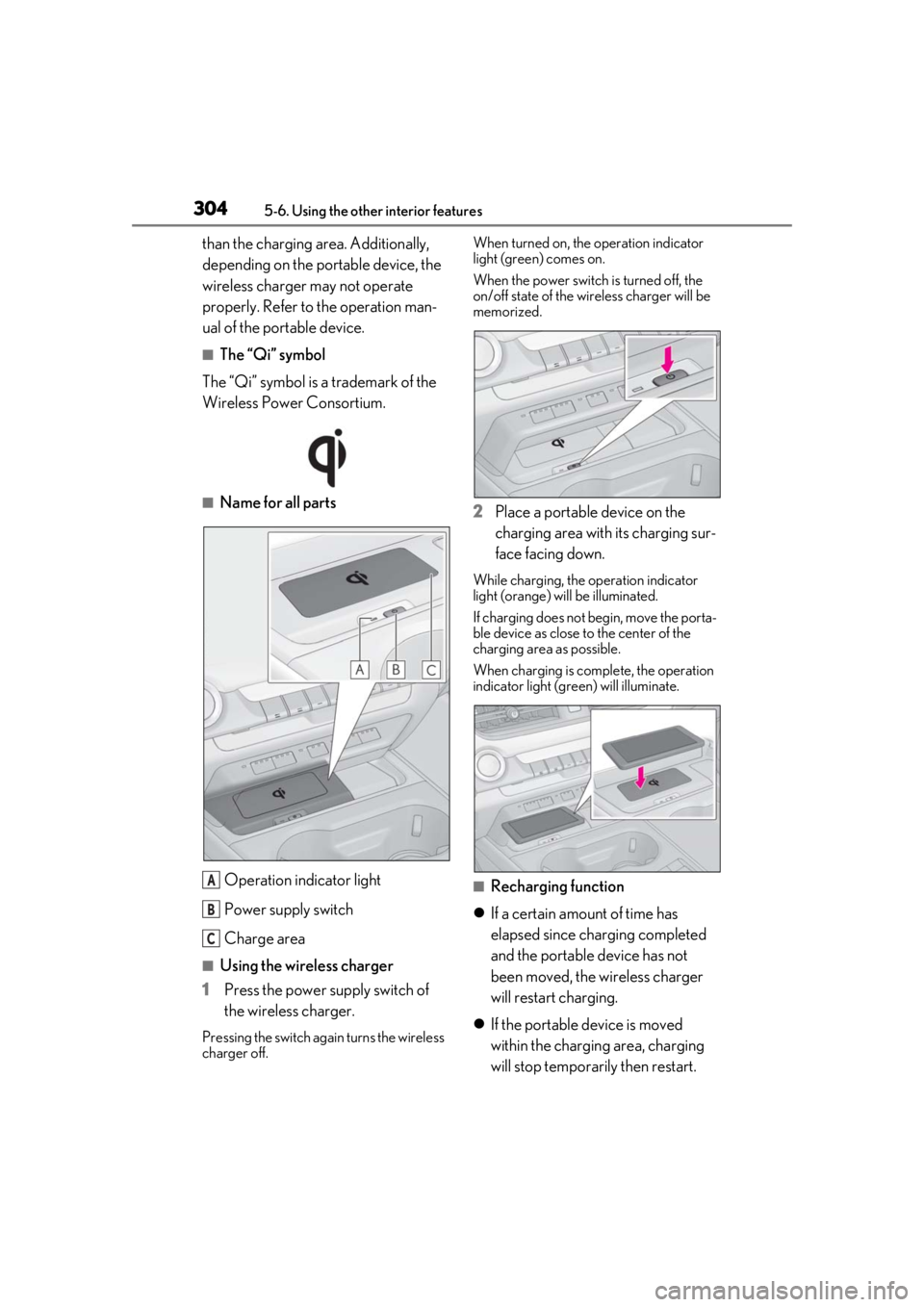
■Name for all parts
Operation indicator light
Power supply switch
Charge area
■Using the wireless charger
1 Press the power supply switch of
the wireless charger.
Pressing the switch ag ain turns the wireless
charger off. When turned on, the operation indicator
light (green) comes on.
When the power switch is turned off, the
on/off state of the wi
reless charger will be
memorized.
2 Place a portable device on the
charging area with its charging sur-
face facing down.
While charging, the operation indicator
light (orange) will be illuminated.
If charging does not begin, move the porta-
ble device as close to the center of the
charging area as possible.
When charging is complete, the operation
indicator light (green) will illuminate.
■Recharging function
If a certain amount of time has
elapsed since charging completed
and the portable device has not
been moved, the wireless charger
will restart charging.
If the portable device is moved
within the charging area, charging
will stop temporarily then restart.A
B
C