turn LEXUS UX250H 2019 Owners Manual
[x] Cancel search | Manufacturer: LEXUS, Model Year: 2019, Model line: UX250H, Model: LEXUS UX250H 2019Pages: 476, PDF Size: 10.51 MB
Page 347 of 476
3476-3. Do-it-yourself maintenance
6
Maintenance and care
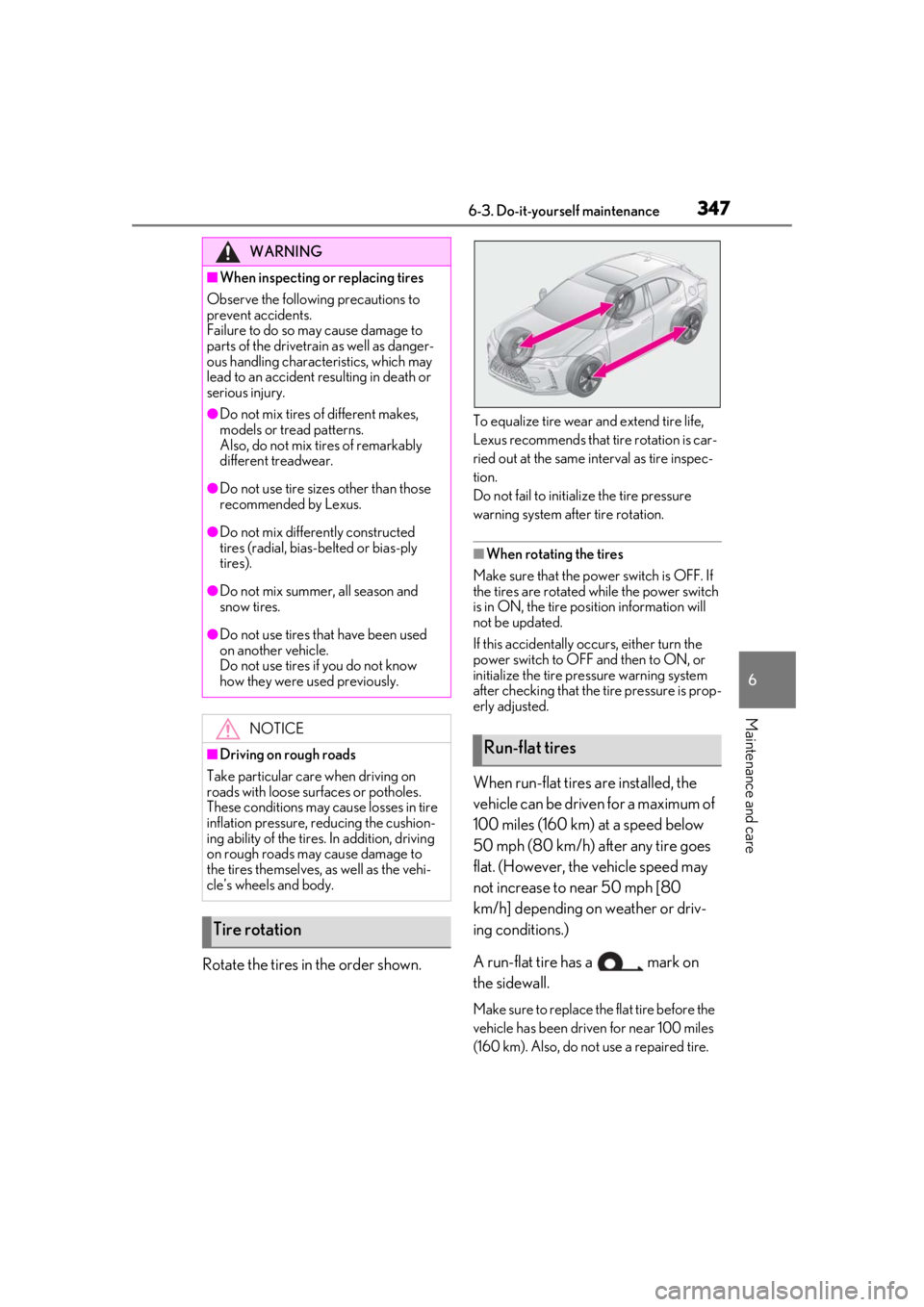
Rotate the tires in the order shown.
To equalize tire wear and extend tire life,
Lexus recommends that tire rotation is car-
ried out at the same interval as tire inspec-
tion.
Do not fail to initialize the tire pressure
warning system after tire rotation.
■When rotating the tires
Make sure that the powe r switch is OFF. If
the tires are rotated while the power switch
is in ON, the tire position information will
not be updated.
If this accidentally occurs, either turn the
power switch to OFF and then to ON, or
initialize the tire pressure warning system
after checking that the tire pressure is prop-
erly adjusted.
When run-flat tires are installed, the
vehicle can be driven for a maximum of
100 miles (160 km) at a speed below
50 mph (80 km/h) after any tire goes
flat. (However, the vehicle speed may
not increase to near 50 mph [80
km/h] depending on weather or driv-
ing conditions.)
A run-flat tire has a mark on
the sidewall.
Make sure to replace the flat tire before the
vehicle has been driven for near 100 miles
(160 km). Also, do not use a repaired tire.
WARNING
■When inspecting or replacing tires
Observe the following precautions to
prevent accidents.
Failure to do so may cause damage to
parts of the drivetrain as well as danger-
ous handling characteristics, which may
lead to an accident resulting in death or
serious injury.
●Do not mix tires of different makes,
models or tread patterns.
Also, do not mix tires of remarkably
different treadwear.
●Do not use tire sizes other than those
recommended by Lexus.
●Do not mix differently constructed
tires (radial, bias-b elted or bias-ply
tires).
●Do not mix summer, all season and
snow tires.
●Do not use tires that have been used
on another vehicle.
Do not use tires if you do not know
how they were used previously.
NOTICE
■Driving on rough roads
Take particular care when driving on
roads with loose surfaces or potholes.
These conditions may cause losses in tire
inflation pressure, reducing the cushion-
ing ability of the tires. In addition, driving
on rough roads may cause damage to
the tires themselves, as well as the vehi-
cle’s wheels and body.
Tire rotation
Run-flat tires
Page 348 of 476
3486-3. Do-it-yourself maintenance
■Run-flat tires
●The run-flat tires are for only this vehicle.
Do not use the tires on other vehicles.
●Do not mix run-flat tires and normal tires.
●If non-genuine Lexus wheels are used, it
may be impossible to sufficiently demon-
strate the performance of run-flat tires.
Your vehicle is equipped with a tire
pressure warning system that uses tire
pressure warning valves and transmit-
ters to detect low tire inflation pressure
before serious problems arise.
If the tire pressure drops below a
predetermined level, the driver is
warned by a screen display and a
warning light. ( P.387, 395)
The tire pressure detected by the
tire pressure warning system can be
displayed on the multi-information
display. ( P.87)
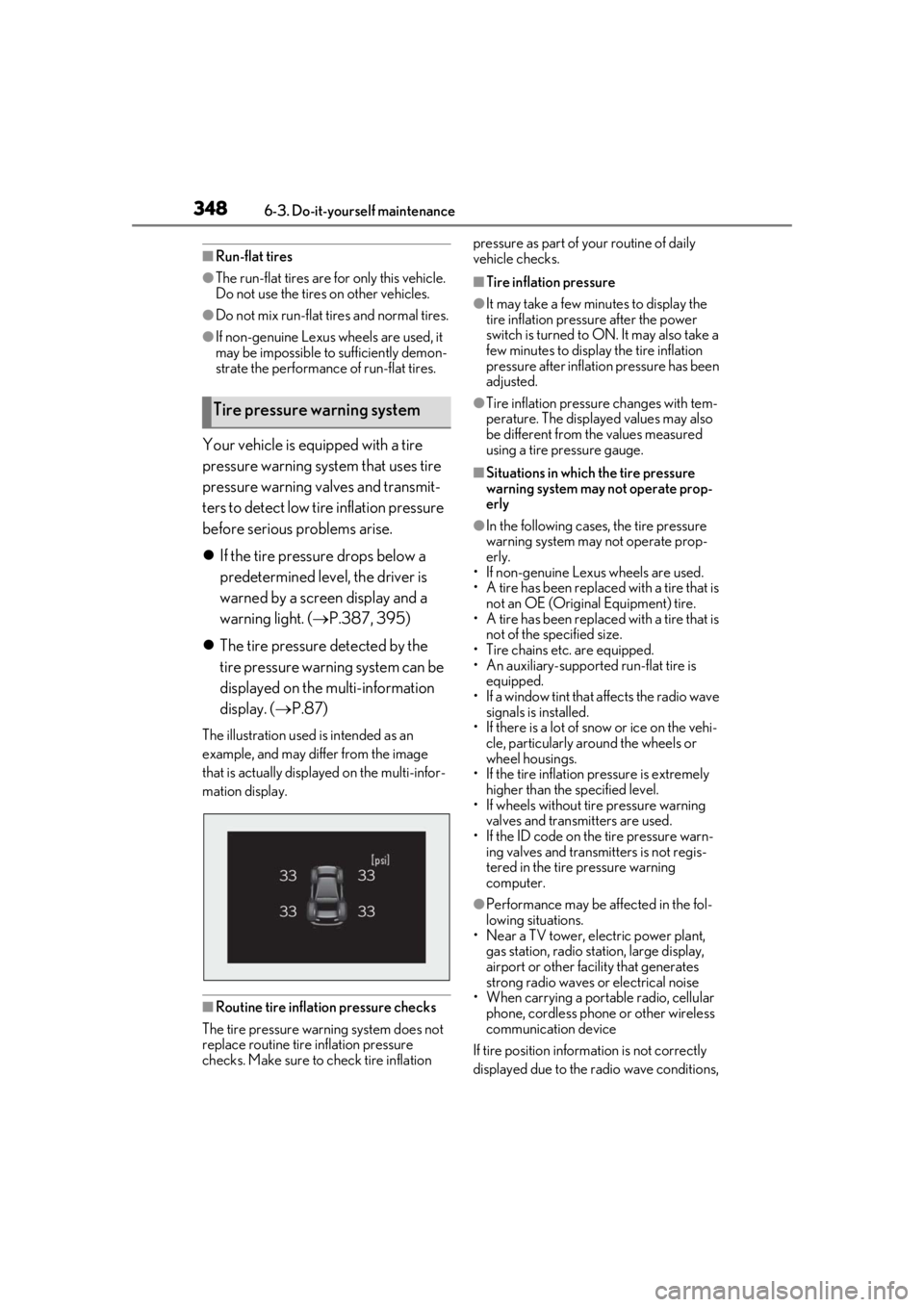
The illustration used is intended as an
example, and may differ from the image
that is actually displayed on the multi-infor-
mation display.
■Routine tire inflation pressure checks
The tire pressure warning system does not
replace routine tire inflation pressure
checks. Make sure to check tire inflation pressure as part of your routine of daily
vehicle checks.
■Tire inflation pressure
●It may take a few minutes to display the
tire inflation pressu
re after the power
switch is turned to ON. It may also take a
few minutes to display the tire inflation
pressure after inflatio n pressure has been
adjusted.
●Tire inflation pressure changes with tem-
perature. The displaye d values may also
be different from the values measured
using a tire pressure gauge.
■Situations in which the tire pressure
warning system may not operate prop-
erly
●In the following cases, the tire pressure
warning system may not operate prop-
erly.
• If non-genuine Lexus wheels are used.
• A tire has been replaced with a tire that is
not an OE (Original Equipment) tire.
• A tire has been replaced with a tire that is
not of the specified size.
• Tire chains etc. are equipped.
• An auxiliary-supported run-flat tire is equipped.
• If a window tint that affects the radio wave signals is installed.
• If there is a lot of snow or ice on the vehi- cle, particularly around the wheels or
wheel housings.
• If the tire inflation pressure is extremely higher than the specified level.
• If wheels without tire pressure warning
valves and transmitters are used.
• If the ID code on the tire pressure warn- ing valves and transmitters is not regis-
tered in the tire pressure warning
computer.
●Performance may be af fected in the fol-
lowing situations.
• Near a TV tower, electric power plant,
gas station, radio stat ion, large display,
airport or other fac ility that generates
strong radio waves or electrical noise
• When carrying a portable radio, cellular
phone, cordless phone or other wireless
communication device
If tire position information is not correctly
displayed due to the radio wave conditions,
Tire pressure warning system
Page 352 of 476
3526-3. Do-it-yourself maintenance
ization can be completed by driving for a
long time. However, if initialization does not
complete after driving for 1 hour or more,
park the vehicle in a safe place for approxi-
mately 20 minutes and then drive the vehi-
cle again.
■When initializing
●Initialization is performed while driving at
a vehicle speed of approximately 25 mph
(40 km/h) or more.
●Make sure to carry out initialization after
adjusting the tire inflation pressure. Also,
make sure the tires are cold before carry-
ing out initialization or tire inflation pres-
sure adjustment.
●The tire pressure warning system can be
initialized by yourse lf, but depending on
the driving conditions and driving envi-
ronment, initialization may take some
time to complete.
■The initialization operation
●If you have accidenta lly turned the power
switch off during initialization, it is not
necessary to manually restart the initial-
ization again, as initialization will restart
automatically the next time the power
switch is turned to ON.
●If you accidentally perform initialization
when initialization is not necessary, adjust
the tire inflation pres sure to the specified
level when the tires are cold, and conduct
initialization again.
●While the position of each tire is being
determined and the inflation pressures
are not being displayed on the multi-
information display, if the inflation pres-
sure of a tire drops, the tire pressure
warning light will come on.
■If the tire pressure warning system is not
initialized properly
●In the following situations, initialization
may take longer than usual to be com-
pleted or may not be possible. Normally,
initialization completes within approxi-
mately 30 minutes.
• Vehicle is not driven at approximately 25 mph (40 km/h) or more
• Vehicle is driven on unpaved roads
• Vehicle is driven near other vehicles and system cannot recognize tire pressure
warning valve and transmitters of your
vehicle over those of other vehicles
If initialization does no t complete after driv-
ing for 1 hour or more, park the vehicle in a
safe place for approximately 20 minutes
and then drive the vehicle again.
●If the vehicle is reversed during initializa-
tion, the data up to that point is reset, so
perform the initiali zation procedure
again from the beginning.
●In the following situations, initialization
will not be started or was not completed
properly and the system will not operate
properly. Perform the initialization proce-
dure again.
• If, when attempting to start initialization, the tire pressure warning light does not
blink 3 times.
• If, when the vehicle has been driven for about 20 minutes after performing ini-
tialization, the tire pressure warning light
blinks for approximately 1 minute and
then illuminates.
If initialization canno t be completed after
performing the above procedure, contact
your Lexus dealer.
Every tire pressure warning valve and
transmitter has a unique ID code.
When replacing a tire pressure warn-
ing valve and transmitter, it is necessary
to register the ID code.
WARNING
■When initializing the tire pressure
warning system
Do not initialize tire inflation pressure
without first adjusting the tire inflation
pressure to the spec ified level. Other-
wise, the tire pressure warning light may
not come on even if the tire inflation pres-
sure is low, or it may come on when the
tire inflation pressure is actually normal.
Registering ID codes
Page 353 of 476
3536-3. Do-it-yourself maintenance
6
Maintenance and care
When registering the ID codes, per-
form the following procedure.
1Park the vehicle in a safe place, wait
for approximately 20 minutes, and
then start the hybrid system.
( P.162)
2 Press or of the meter con-
trol switches and select .
3 Press or of the meter con-
trol switches and select “Vehicle
Settings”, then press “OK”.
4 Press or of the meter con-
trol switches an d select “TPWS”,
then press “OK”.
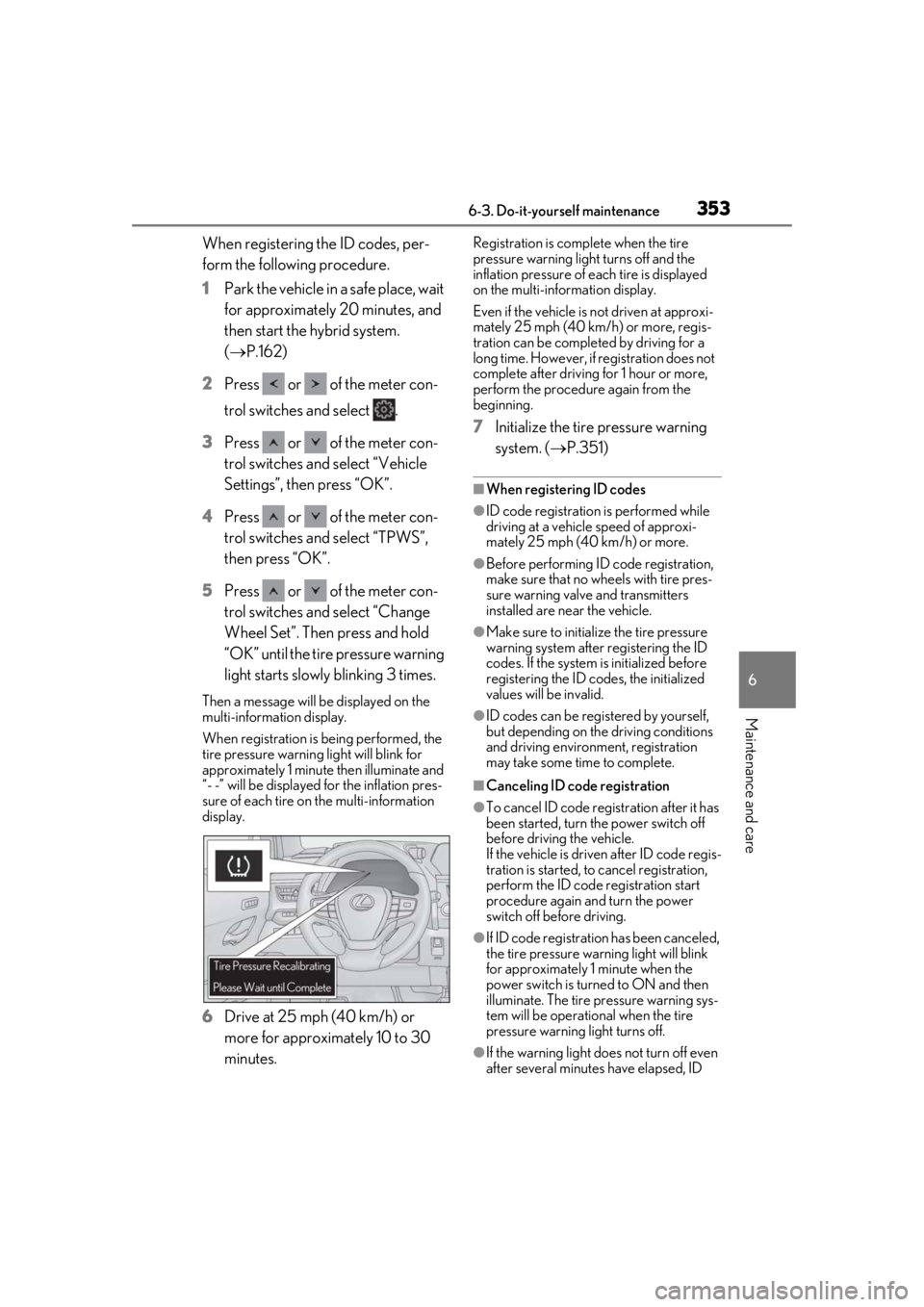
5 Press or of the meter con-
trol switches and select “Change
Wheel Set”. Then press and hold
“OK” until the tire pressure warning
light starts slowly blinking 3 times.
Then a message will be displayed on the
multi-information display.
When registration is being performed, the
tire pressure warning light will blink for
approximately 1 minute then illuminate and
“- -” will be displayed for the inflation pres-
sure of each tire on the multi-information
display.
6Drive at 25 mph (40 km/h) or
more for approximately 10 to 30
minutes.
Registration is complete when the tire
pressure warning light turns off and the
inflation pressure of ea ch tire is displayed
on the multi-information display.
Even if the vehicle is not driven at approxi-
mately 25 mph (40 km/h) or more, regis-
tration can be completed by driving for a
long time. However, if registration does not
complete after driving for 1 hour or more,
perform the procedure again from the
beginning.
7 Initialize the tire pressure warning
system. ( P.351)
■When registering ID codes
●ID code registration is performed while
driving at a vehicle speed of approxi-
mately 25 mph (40 km/h) or more.
●Before performing ID code registration,
make sure that no wheels with tire pres-
sure warning valve and transmitters
installed are near the vehicle.
●Make sure to initializ e the tire pressure
warning system after registering the ID
codes. If the system is initialized before
registering the ID codes, the initialized
values will be invalid.
●ID codes can be registered by yourself,
but depending on the driving conditions
and driving environment, registration
may take some time to complete.
■Canceling ID code registration
●To cancel ID code regi stration after it has
been started, turn the power switch off
before driving the vehicle.
If the vehicle is driven after ID code regis-
tration is started, to cancel registration,
perform the ID code registration start
procedure again and turn the power
switch off before driving.
●If ID code registration has been canceled,
the tire pressure warning light will blink
for approximately 1 minute when the
power switch is turned to ON and then
illuminate. The tire pressure warning sys-
tem will be operational when the tire
pressure warning light turns off.
●If the warning light does not turn off even
after several minutes have elapsed, ID
Page 354 of 476

3546-3. Do-it-yourself maintenance
code registration may not have been can-
celed correctly. To cancel registration,
perform the ID code registration start
procedure again and then turn the power
switch off before driving.
■If ID codes are not registered properly
●In the following situations, ID code regis-
tration may take longer than usual to be
completed or may not be possible. Nor-
mally, registration completes within
approximately 30 minutes.
• Vehicle is not parked for approximately
20 minutes or more before driving
• Vehicle is not driven at approximately 25 mph (40 km/h) or more
• Vehicle is driven on unpaved roads
• Vehicle is driven near other vehicles and system cannot recognize tire pressure
warning valves and tr ansmitters of your
vehicle over those of other vehicles
• Wheel with tire pressure warning valve
and transmitter installed is inside or near
the vehicle
If registration does not complete after driv-
ing for 1 hour or more, perform the ID code
registration procedure again from the
beginning.
●If the vehicle is reve rsed during registra-
tion, the data up to that point is reset, so
perform the registrati on procedure again
from the beginning.
●In the following situations, ID code regis-
tration will not be started or was not com-
pleted properly and the system will not
operate properly. Perform the ID code
registration procedure again.
• If, when attempting to start ID code regis- tration, the tire pressure warning light
does not blink slowly 3 times.
• If, when the vehicle has been driven for about 20 minutes after performing ID
code registration, the tire pressure warn-
ing light blinks for approximately 1 minute
and then illuminates.
●If ID code registration cannot be com-
pleted after performing the above proce-
dure, contact your Lexus dealer.
Page 357 of 476
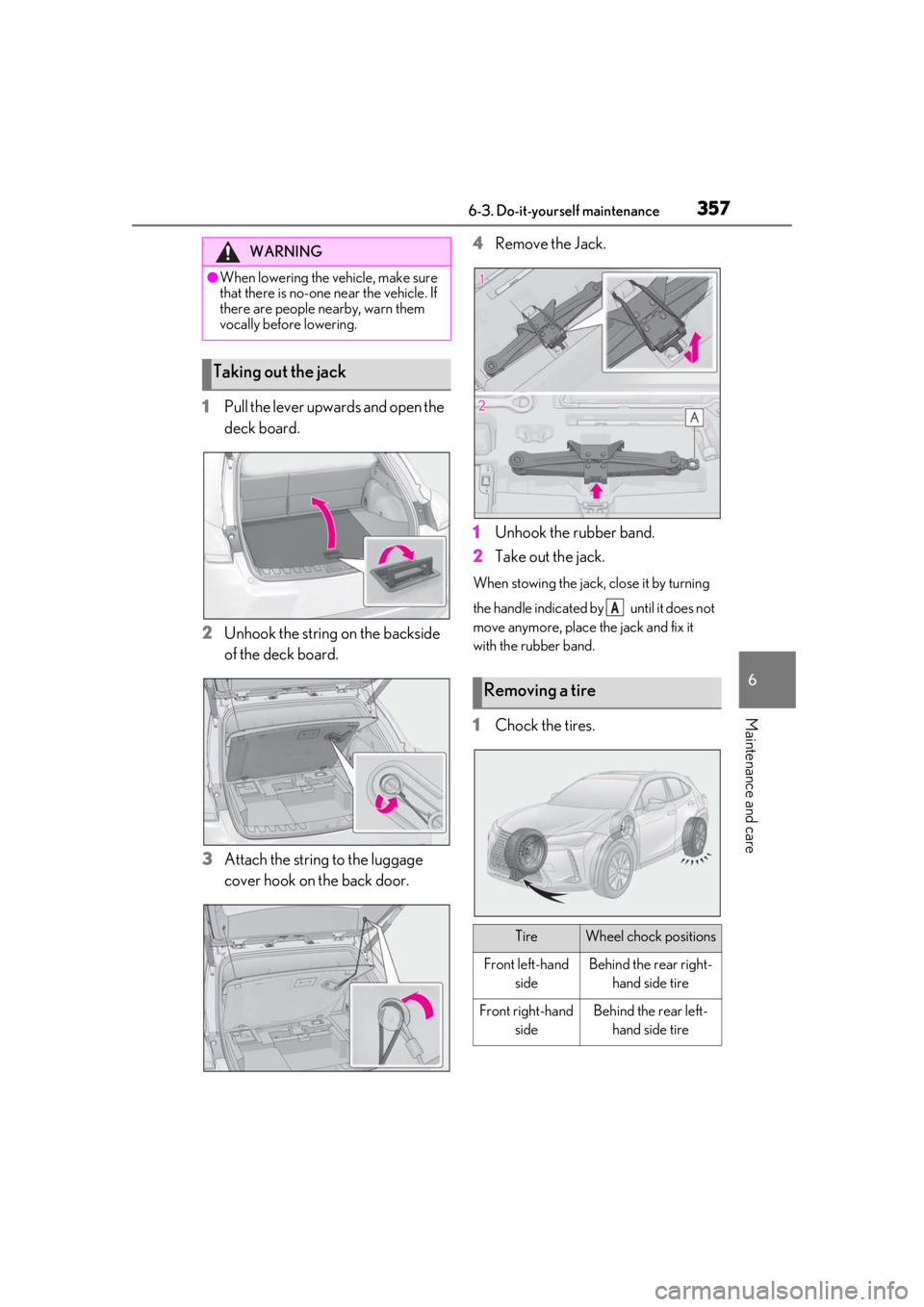
3576-3. Do-it-yourself maintenance
6
Maintenance and care
1Pull the lever upwards and open the
deck board.
2
Unhook the string on the backside
of the deck board.
3
Attach the string to the luggage
cover hook on the back door. 4
Remove the Jack.
1
Unhook the rubber band.
2
Take out the jack.
When stowing the jack, close it by turning
the handle indicated by until it does not
move anymore, place the jack and fix it
with the rubber band.
1Chock the tires.
WARNING
●When lowering the vehicle, make sure
that there is no-one near the vehicle. If
there are people nearby, warn them
vocally before lowering.
Taking out the jack
Removing a tire
TireWheel chock positions
Front left-hand sideBehind the rear right-hand side tire
Front right-hand sideBehind the rear left-hand side tire
A
Page 358 of 476
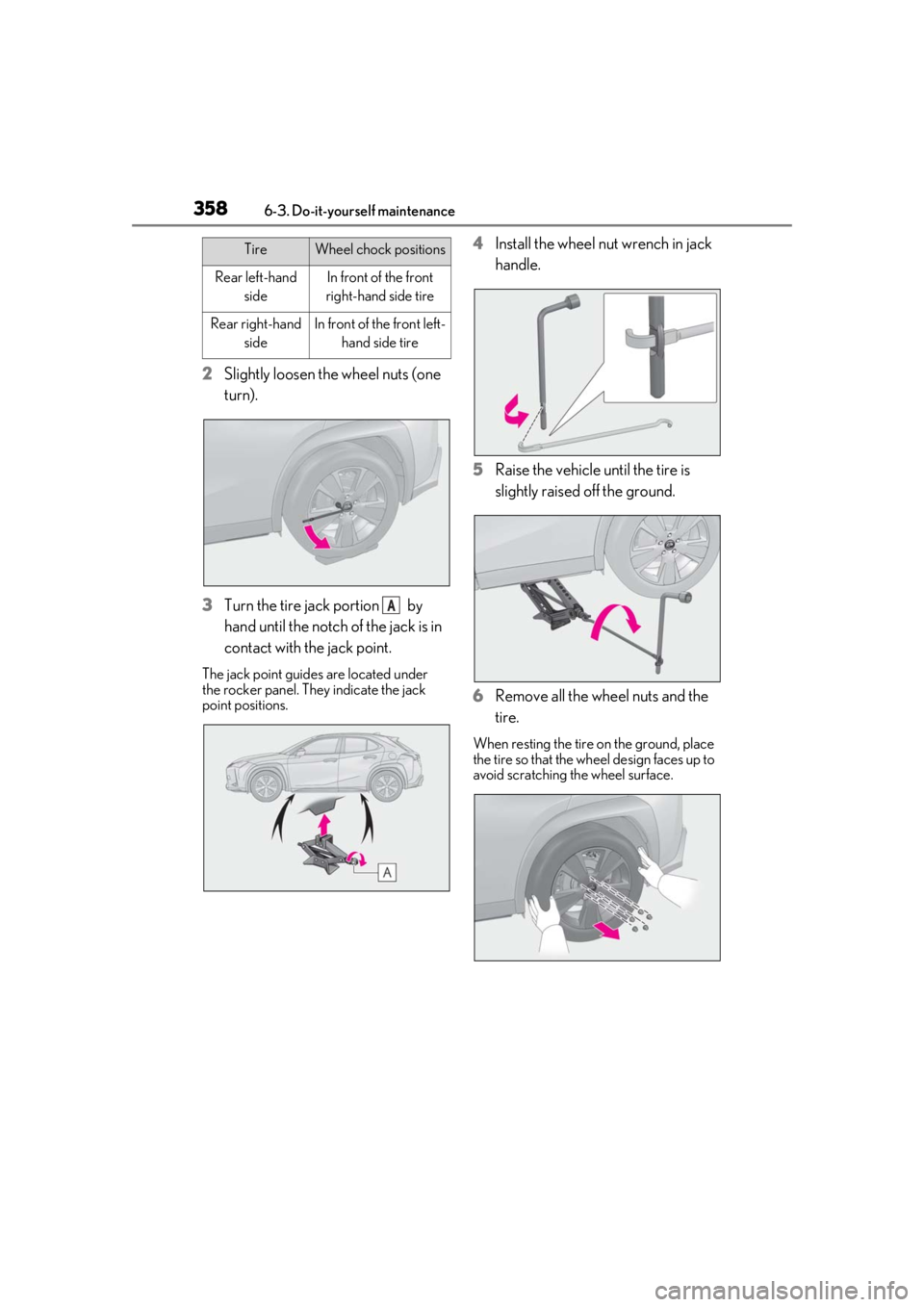
3586-3. Do-it-yourself maintenance
2Slightly loosen the wheel nuts (one
turn).
3 Turn the tire jack portion by
hand until the notch of the jack is in
contact with the jack point.
The jack point guides are located under
the rocker panel. They indicate the jack
point positions.
4Install the wheel nut wrench in jack
handle.
5 Raise the vehicle until the tire is
slightly raised off the ground.
6 Remove all the wheel nuts and the
tire.
When resting the tire on the ground, place
the tire so that the wheel design faces up to
avoid scratching the wheel surface.
Rear left-hand
sideIn front of the front
right-hand side tire
Rear right-hand sideIn front of the front left-hand side tire
TireWheel chock positions
A
Page 359 of 476
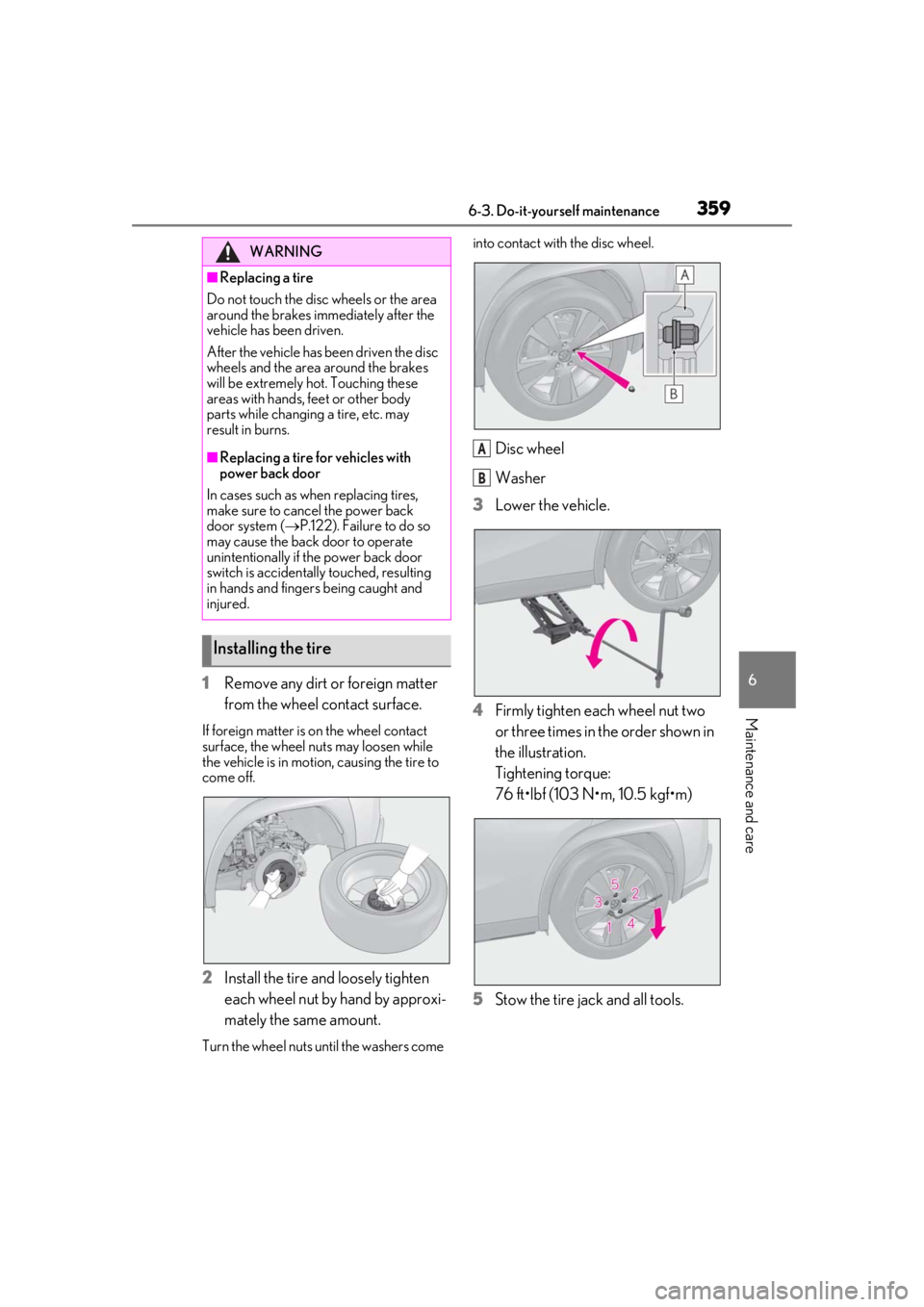
3596-3. Do-it-yourself maintenance
6
Maintenance and care
1Remove any dirt or foreign matter
from the wheel contact surface.
If foreign matter is on the wheel contact
surface, the wheel nuts may loosen while
the vehicle is in motion, causing the tire to
come off.
2Install the tire and loosely tighten
each wheel nut by hand by approxi-
mately the same amount.
Turn the wheel nuts until the washers come into contact with the disc wheel.
Disc wheel
Washer
3
Lower the vehicle.
4
Firmly tighten each wheel nut two
or three times in the order shown in
the illustration.
Tightening torque:
76 ft•lbf (103 N•m, 10.5 kgf•m)
5
Stow the tire jack and all tools.
WARNING
■Replacing a tire
Do not touch the disc wheels or the area
around the brakes immediately after the
vehicle has been driven.
After the vehicle has been driven the disc
wheels and the area around the brakes
will be extremely hot. Touching these
areas with hands, feet or other body
parts while changing a tire, etc. may
result in burns.
■Replacing a tire for vehicles with
power back door
In cases such as when replacing tires,
make sure to cancel the power back
door system ( P.122). Failure to do so
may cause the back door to operate
unintentionally if the power back door
switch is accidentally touched, resulting
in hands and fingers being caught and
injured.
Installing the tire
A
B
Page 364 of 476
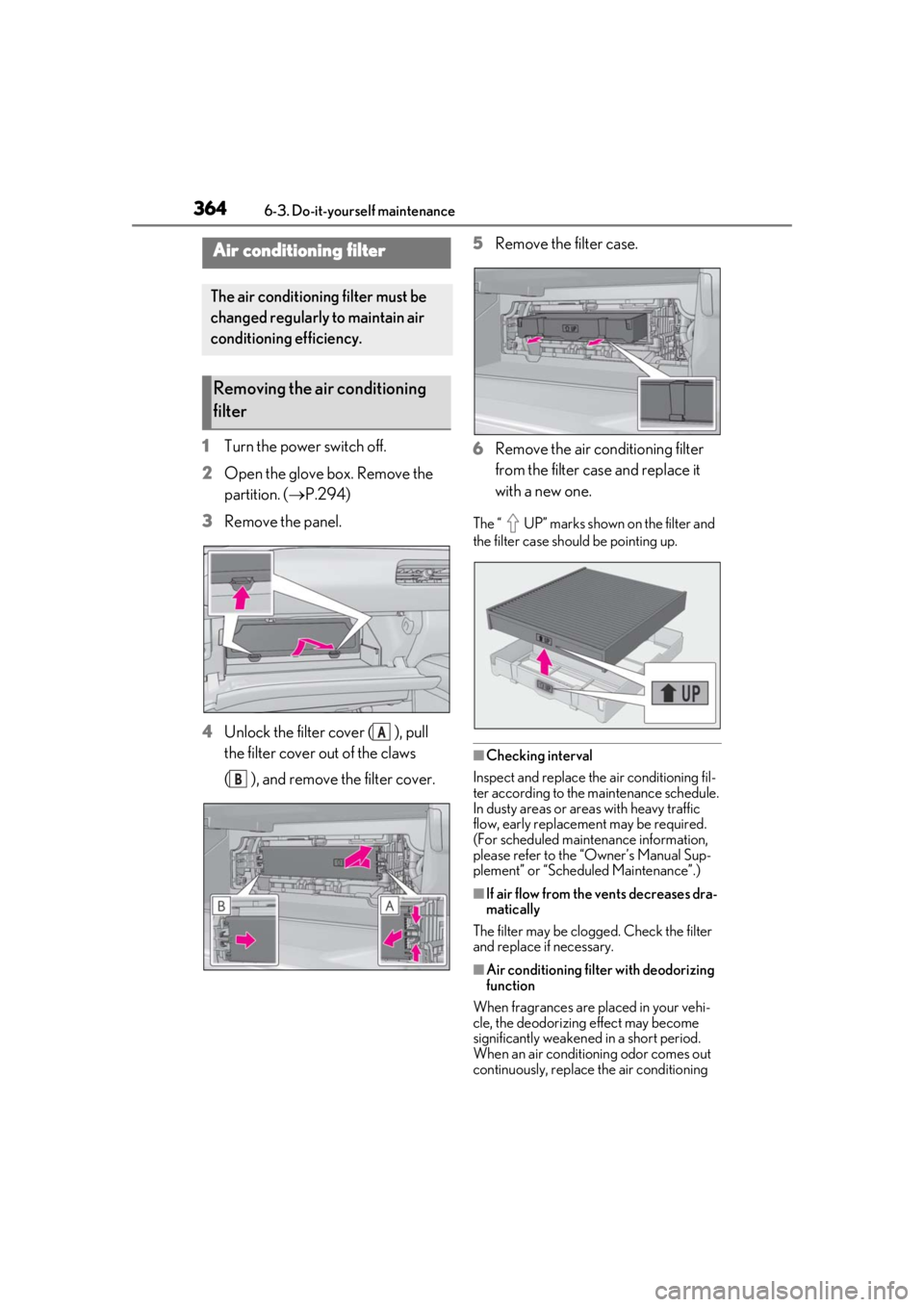
3646-3. Do-it-yourself maintenance
1Turn the power switch off.
2 Open the glove box. Remove the
partition. ( P.294)
3 Remove the panel.
4 Unlock the filter cover ( ), pull
the filter cover out of the claws
( ), and remove the filter cover. 5
Remove the filter case.
6 Remove the air conditioning filter
from the filter case and replace it
with a new one.
The “ UP” marks shown on the filter and
the filter case should be pointing up.
■Checking interval
Inspect and replace the air conditioning fil-
ter according to the maintenance schedule.
In dusty areas or areas with heavy traffic
flow, early replacement may be required.
(For scheduled maintenance information,
please refer to the “Owner’s Manual Sup-
plement” or “Scheduled Maintenance”.)
■If air flow from the vents decreases dra-
matically
The filter may be clogged. Check the filter
and replace if necessary.
■Air conditioning filt er with deodorizing
function
When fragrances are placed in your vehi-
cle, the deodorizing effect may become
significantly weakened in a short period.
When an air conditioning odor comes out
continuously, replace the air conditioning
Air conditioning filter
The air conditioning filter must be
changed regularly to maintain air
conditioning efficiency.
Removing the air conditioning
filter
A
B
Page 366 of 476
3666-3. Do-it-yourself maintenance
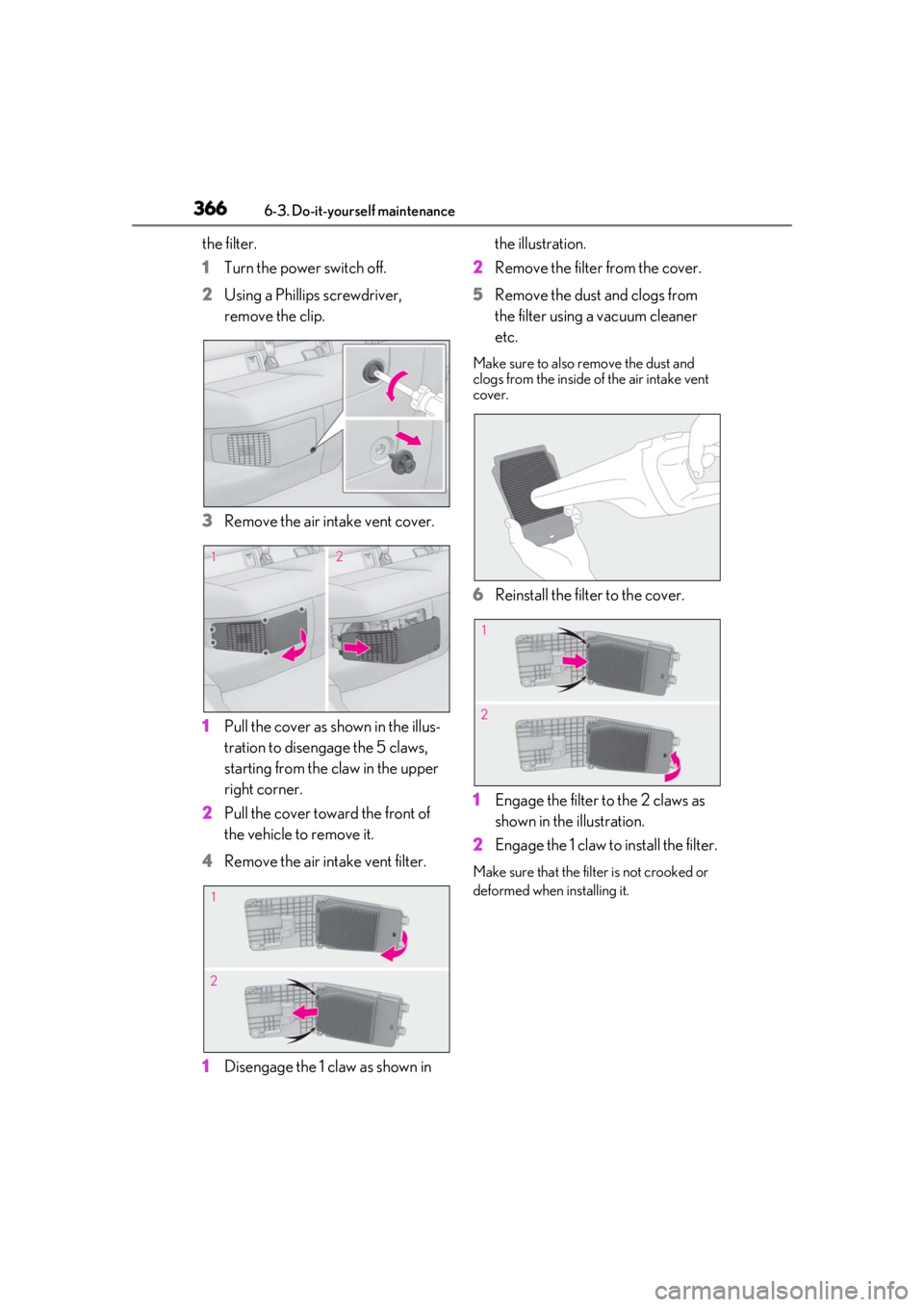
the filter.
1Turn the power switch off.
2 Using a Phillips screwdriver,
remove the clip.
3 Remove the air intake vent cover.
1 Pull the cover as shown in the illus-
tration to disengage the 5 claws,
starting from the claw in the upper
right corner.
2 Pull the cover toward the front of
the vehicle to remove it.
4 Remove the air intake vent filter.
1 Disengage the 1 claw as shown in the illustration.
2 Remove the filter from the cover.
5 Remove the dust and clogs from
the filter using a vacuum cleaner
etc.
Make sure to also remove the dust and
clogs from the inside of the air intake vent
cover.
6Reinstall the filter to the cover.
1 Engage the filter to the 2 claws as
shown in the illustration.
2 Engage the 1 claw to install the filter.
Make sure that the filt er is not crooked or
deformed when installing it.