open LEXUS UX250H 2019 User Guide
[x] Cancel search | Manufacturer: LEXUS, Model Year: 2019, Model line: UX250H, Model: LEXUS UX250H 2019Pages: 476, PDF Size: 10.51 MB
Page 43 of 476
431-1. For safe use
1
For safety and security
Exhaust gas precautions
Harmful substances to the human
body are contained in exhaust
gases if inhaled.
WARNING
Exhaust gases contain harmful carbon
monoxide (CO), which is colorless and
odorless. Observe the following precau-
tions.
Failure to do so may cause exhaust gases
enter the vehicle and may lead to an
accident caused by light-headedness, or
may lead to death or a serious health
hazard.
■Important points while driving
●Keep the back door closed.
●If you smell exhaust gases in the vehi-
cle even when the back door is closed,
open the windows and have the vehi-
cle inspected at your Lexus dealer as
soon as possible.
■When parking
●If the vehicle is in a poorly ventilated
area or a closed area, such as a
garage, stop the hybrid system.
●Do not leave the vehicle with the
hybrid system on for a long time. If
such a situation cannot be avoided,
park the vehicle in an open space and
ensure that exhaust fumes do not enter
the vehicle interior.
●Do not leave the hybrid system operat-
ing in an area with snow build-up, or
where it is snowing. If snowbanks build
up around the vehicle while the hybrid
system is operating, exhaust gases
may collect and enter the vehicle.
■Exhaust pipe
The exhaust system needs to be checked
periodically. If there is a hole or crack
caused by corrosion, damage to a joint
or abnormal exhaust noise, be sure to
have the vehicle inspected and repaired
by your Lexus dealer.
Page 44 of 476
441-2. Child safety
1-2.Child safety
Points to remember: P.44
Child restraint system: P.46
When using a child restraint system on
a passenger seat: P.47
When using a child restraint system on
a rear seat: P.48
Child restraint system installation
method
• Fixed with a seat belt: P.48
• Fixed with a child restraint LATCH anchor: P.52
• Using an anchor bracket (for top tether strap): P.54
The laws of all 50 states of the U.S.A.
as well as Canada now require the use
of child restraint systems.
Riding with children
Observe the following precautions
when children are in the vehicle.
Use a child restraint system appro-
priate for the child , until the child
becomes large enough to properly
wear the vehicle’s seat belt.
It is recommended that children
sit in the rear seats to avoid acci-
dental contact with the shift lever,
wiper switch, etc.
Use the rear door child-protector
lock or the window lock switch to
avoid children opening the door
while driving or operating the
power window accidentally.
( P.111, 146)
Do not let small children operate
equipment which may catch or
pinch body parts, such as the
power window, hood, back door,
seats etc.
WARNING
■When children are in the vehicle
Never leave children unattended in the
vehicle, and never allow children to have
or use the key.
Children may be able to start the vehicle
or shift the vehicle into neutral. There is
also a danger that children may injure
themselves by playing with the windows,
the moon roof (if eq uipped) or other fea-
tures of the vehicle. In addition, heat
build-up or extremely cold temperatures
inside the vehicle can be fatal to children.
Child restraint systems
Before installing a child restraint
system in the vehicle, there are pre-
cautions that need to be observed,
different types of child restraint sys-
tems, as well as installation meth-
ods, etc., written in this manual.
Use a child restraint system when
riding with a small child that cannot
properly use a seat belt. For the
child’s safety, install the child restraint
system to a rear seat. Be sure to fol-
low the installation method that is in
the operation manual enclosed with
the restraint system.
Table of contents
Points to remember
Page 64 of 476

641-4. Hybrid system
■Sounds and vibrations specific to a
hybrid vehicle
There may be no engine sound or vibration
even though the vehicle is able to move with
the “READY” indicator is illuminated. For
safety, apply the parking brake and make
sure to shift the shift lever to P when parked.
The following sounds or vibrations may
occur when the hybrid system is operating
and are not a malfunction:
●Motor sounds may be heard from the
engine compartment.
●Sounds may be heard from the hybrid
battery (traction battery) behind the rear
seats when the hybrid system starts or
stops.
●Relay operating sounds such as a snap or
soft clank will be emitted from the hybrid
battery (traction battery), behind the rear
seats, when the hybrid system is started
or stopped.
●Sounds from the hybrid system may be
heard when the back door is open.
●Sounds may be heard from the hybrid
transmission when the gasoline engine
starts or stops, wh en driving at low
speeds, or during idling.
●Engine sounds may be heard when
accelerating sharply.
●Sounds may be heard due to regenera-
tive braking when the brake pedal is
depressed or as the accelerator pedal is
released.
●Vibration may be felt when the gasoline
engine starts or stops.
●Cooling fan sounds may be heard from
the air intake vent under the right side of
the rear seat.
■Maintenance, repair, recycling, and dis-
posal
Contact your Lexus dealer regarding main-
tenance, repair, recycling and disposal. Do
not dispose of the vehicle yourself.
■Customization
Settings (e.g. on/off operation of the EV
indicator) can be changed.
(Customizable features: P.435)
When driving with the gasoline engine
stopped, a sound, which changes in
accordance with the driving speed, will
be played in order to warn people
nearby of the vehicle’s approach. This
sound may be heard inside the vehicle.
The sound will stop when the vehicle
speed exceeds approximately 15 mph
(25 km/h).
■Vehicle proximity notification system
In the following cases, the vehicle proximity
notification system may be difficult for sur-
rounding people to hear.
●In very noisy areas
●In the wind or the rain
Also, as the vehicle proximity notification
system is installed on the front of the vehicle,
it may be more difficult to hear from the rear
of the vehicle compared to the front.
Vehicle proximity notification
system
Page 66 of 476
661-4. Hybrid system
*: AWD models only
■Running out of fuel
When the vehicle has run out of fuel and the
hybrid system cannot be started, refuel the
vehicle with at least enough gasoline to
make the low fuel level warning light
( P.390) go off. If th ere is only a small
amount of fuel, the hybrid system may not
be able to start. (The standard amount of
fuel is about 1.8 gal. [7.0 L, 1.5 Imp.gal.],
when the vehicle is on a level surface. This
value may vary when the vehicle is on a
slope. Add extra fuel when the vehicle is
inclined.)
■Electromagnetic waves
●High voltage parts and cables on hybrid
vehicles incorporate electromagnetic
shielding, and ther efore emit approxi-
mately the same amount of electromag-
netic waves as conventional gasoline
powered vehicles or home electronic
appliances.
●Your vehicle may cause sound interfer-
ence in some third party-produced radio
parts.
■Hybrid battery (traction battery)
The hybrid battery (traction battery) has a
limited service life. The lifespan of the
hybrid battery (traction battery) can
change in accordance with driving style and
driving conditions.
WARNING
■High voltage precautions
This vehicle has high voltage DC and AC
systems as well as a 12-volt system. DC
and AC high voltage is very dangerous
and can cause severe burns and electric
shock that may result in death or serious
injury.
●Never touch, disassemble, remove or
replace the high voltage parts, cables
or their connectors.
●The hybrid system will become hot
after starting as the system uses high
voltage. Be careful of both the high
voltage and the high temperature, and
always obey the warning labels
attached to the vehicle.
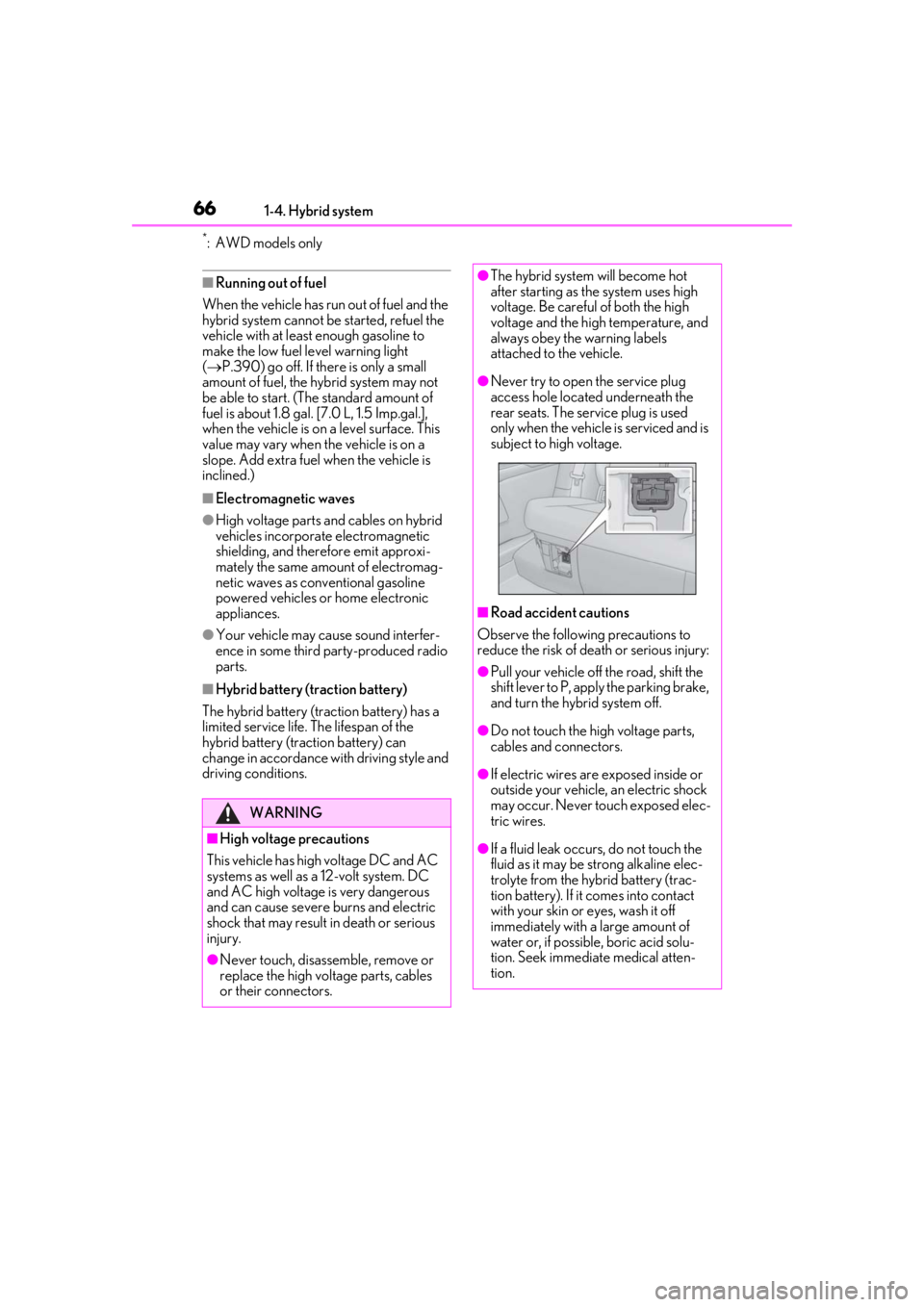
●Never try to open the service plug
access hole located underneath the
rear seats. The service plug is used
only when the vehicle is serviced and is
subject to high voltage.
■Road accident cautions
Observe the following precautions to
reduce the risk of death or serious injury:
●Pull your vehicle off the road, shift the
shift lever to P, apply the parking brake,
and turn the hybrid system off.
●Do not touch the high voltage parts,
cables and connectors.
●If electric wires are exposed inside or
outside your vehicle, an electric shock
may occur. Never touch exposed elec-
tric wires.
●If a fluid leak occurs, do not touch the
fluid as it may be st rong alkaline elec-
trolyte from the hybrid battery (trac-
tion battery). If it comes into contact
with your skin or eyes, wash it off
immediately with a large amount of
water or, if possible, boric acid solu-
tion. Seek immediate medical atten-
tion.
Page 71 of 476
711-5. Theft deterrent system
1
For safety and security
■Items to check before locking the
vehicle
To prevent unexpected triggering of
the alarm and vehicle theft, make sure
of the following:
Nobody is in the vehicle.
The windows and moon roof (if
equipped) are closed before the
alarm is set.
No valuables or other personal
items are left in the vehicle.
■Setting
Close the doors and hood, and lock all
the doors. The system will be set auto-
matically after 30 seconds.
The security indicator changes from being
on to flashing when the system is set.
■Canceling or stopping
Do one of the following to deactivate
or stop the alarms:
Unlock the doors.
Turn the power switch to ACC or
ON, or start the hybrid system. (The
alarm will be deactivated or stopped
after a few seconds.)
■System maintenance
The vehicle has a maintenance-free type
alarm system.
■Triggering of the alarm
The alarm may be triggered in the following
situations:
(Stopping the alarm deactivates the alarm
system.)
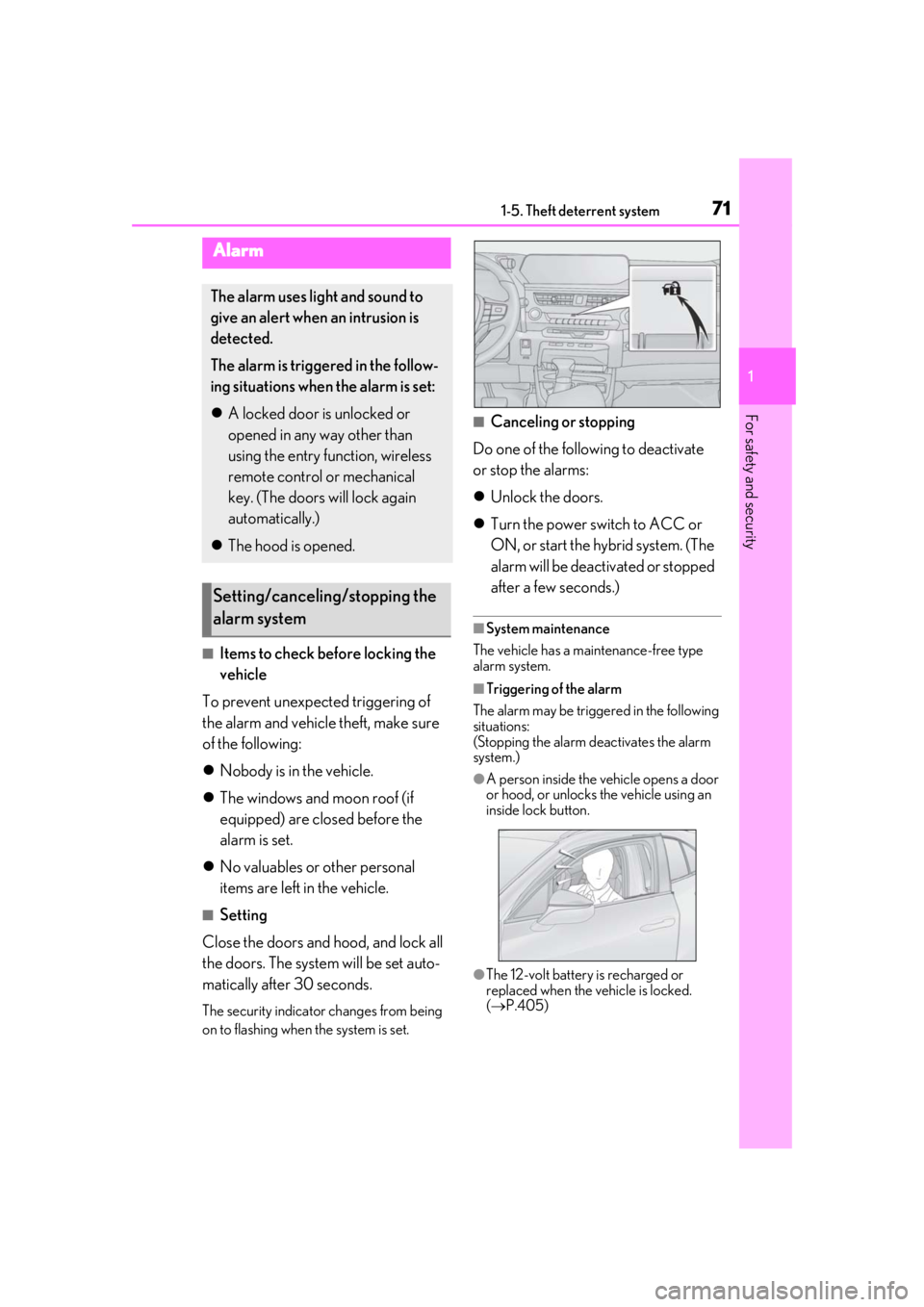
●A person inside the vehicle opens a door
or hood, or unlocks the vehicle using an
inside lock button.
●The 12-volt battery is recharged or
replaced when the vehicle is locked.
( P.405)
Alarm
The alarm uses light and sound to
give an alert when an intrusion is
detected.
The alarm is triggered in the follow-
ing situations when the alarm is set:
A locked door is unlocked or
opened in any way other than
using the entry function, wireless
remote control or mechanical
key. (The doors will lock again
automatically.)
The hood is opened.
Setting/canceling/stopping the
alarm system
Page 88 of 476
882-1. Instrument cluster
■Opening image display
When the power switch is in ACC or ON,
the opening image is di splayed on the multi-
information display.
While the opening image is being dis-
played, the meter display cannot be
changed even if the drive mode is changed.
When the opening image is finished, the
meter display for the currently selected
mode will be displayed.
■Liquid crystal display
Small spots or light spots may appear on the
display. This phenomenon is characteristic
of liquid crystal displays, and there is no
problem continuing to use the display.
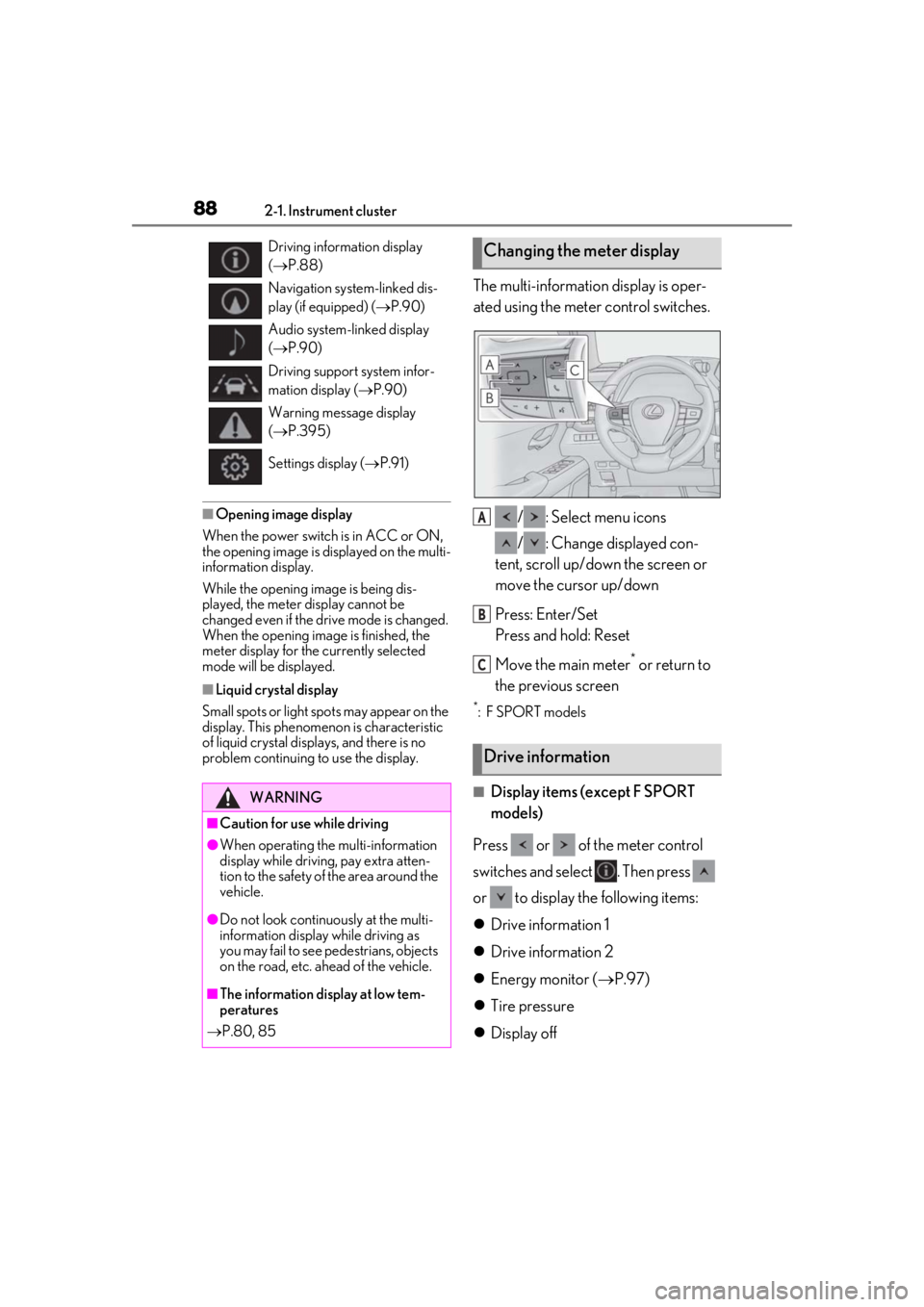
The multi-information display is oper-
ated using the meter control switches.
/ : Select menu icons
/ : Change displayed con-
tent, scroll up/down the screen or
move the cursor up/down
Press: Enter/Set
Press and hold: Reset
Move the main meter
* or return to
the previous screen
*: F SPORT models
■Display items (except F SPORT
models)
Press or of the meter control
switches and select . Then press
or to display the following items:
Drive information 1
Drive information 2
Energy monitor ( P.97)
Tire pressure
Display off
Driving information display
( P.88)
Navigation system-linked dis-
play (if equipped) ( P.90)
Audio system-linked display
( P.90)
Driving support system infor-
mation display ( P.90)
Warning message display
( P.395)
Settings display ( P.91)
WARNING
■Caution for use while driving
●When operating the multi-information
display while driving, pay extra atten-
tion to the safety of the area around the
vehicle.
●Do not look continuously at the multi-
information display while driving as
you may fail to see pedestrians, objects
on the road, etc. ahead of the vehicle.
■The information display at low tem-
peratures
P.80, 85
Changing the meter display
Drive information
A
B
C
Page 92 of 476
922-1. Instrument cluster
Displays suggestions to the driver in
the following situations. To select a
response to a displayed suggestion,
use the meter control switches.
■Suggestion to enable the power
back door
If the power back door system is dis-
abled on of the multi-information
display ( P.87) and the power back
door switch on the instrument panel is
operated, a suggestion message will be
displayed asking if you wish to enable
the power back door system. To enable
the power back door system, select
“Yes”.
After enabling the power back door
system, press the power back door
switch again to open or close the
power back door.
■Suggestion to turn on the head-
lights
If the headlight switch is in other than
or position, and the vehicle
speed is 3 mph (5 km/h) or higher for
a certain amount of time when the sur-
roundings are dark, a suggestion mes-
sage will be displayed.
■Suggestion to turn off the head-
lights
If the headlights are left on for a certain
amount of time with the headlight
switch in or position after the
power switch has been turned off, a
suggestion message will be displayed
asking if you wish to turn the headlights off.
To turn the headlight
s off, select “Yes”.
If a front door is opened after the power
switch is turned off, this suggestion mes-
sage will not be displayed.
■Customization
Some functions can be customized.
( P.435)
Suggestion function
Page 93 of 476
932-1. Instrument cluster
2
Vehicle status information and indicators
*:If equipped
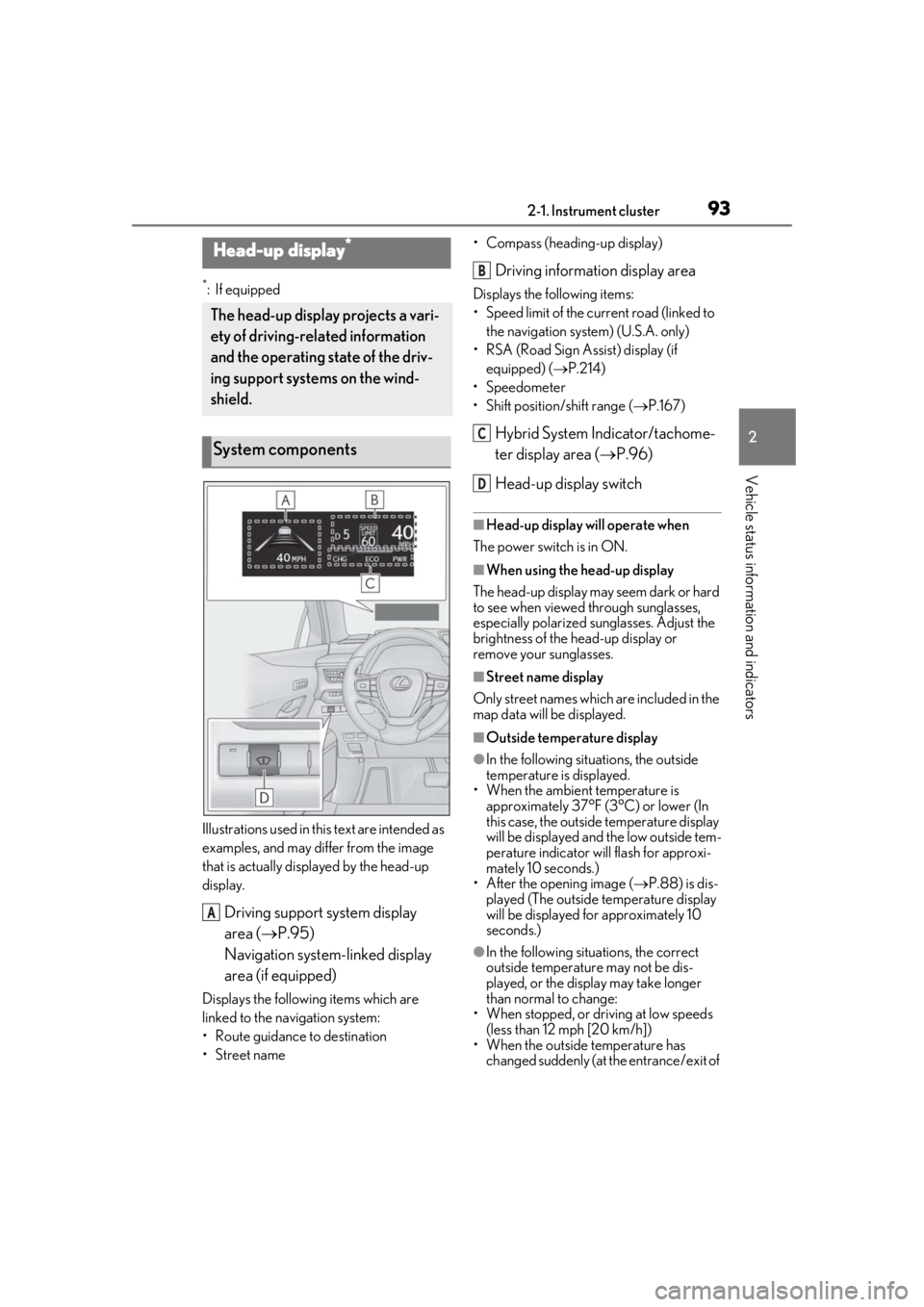
Illustrations used in this text are intended as
examples, and may differ from the image
that is actually disp layed by the head-up
display.
Driving support system display
area ( P.95)
Navigation system-linked display
area (if equipped)
Displays the following items which are
linked to the navigation system:
• Route guidance to destination
•Street name • Compass (heading-up display)
Driving information display area
Displays the following items:
• Speed limit of the current road (linked to
the navigation system) (U.S.A. only)
• RSA (Road Sign Assist) display (if equipped) ( P.214)
• Speedometer
• Shift position/shift range ( P.167)
Hybrid System Indicator/tachome-
ter display area ( P.96)
Head-up display switch
■Head-up display will operate when
The power switch is in ON.
■When using the head-up display
The head-up display may seem dark or hard
to see when viewed through sunglasses,
especially polarized su nglasses. Adjust the
brightness of the head-up display or
remove your sunglasses.
■Street name display
Only street names which are included in the
map data will be displayed.
■Outside temperature display
●In the following situations, the outside
temperature is displayed.
• When the ambient temperature is
approximately 37°F (3°C) or lower (In
this case, the outside temperature display
will be displayed and the low outside tem-
perature indicator will flash for approxi-
mately 10 seconds.)
• After the opening image ( P.88) is dis-
played (The outside temperature display
will be displayed for approximately 10
seconds.)
●In the following situations, the correct
outside temperature may not be dis-
played, or the display may take longer
than normal to change:
• When stopped, or driving at low speeds (less than 12 mph [20 km/h])
• When the outside temperature has changed suddenly (at the entrance/exit of
Head-up display*
The head-up display projects a vari-
ety of driving-related information
and the operating state of the driv-
ing support systems on the wind-
shield.
System components
A
B
C
D
Page 103 of 476
103
3
3
Before driving
Before driving
3-1. Key informationKeys ................................................. 104
3-2. Opening, closing and locking the doors
Side doors ..................................... 108
Back door ....................................... 112
Smart access system with push- button start ................................. 124
3-3. Adjusting the seats Front seats ...................................... 131
Rear seats ...................................... 132
Driving position memory ........ 133
Head restraints............................ 136
3-4. Adjusting the steering wheel and mirrors
Steering wheel............................. 139
Inside rear view mirror............. 140
Outside rear view mirrors ...... 142
3-5. Opening, closing the windows and moon roof
Power windows........................... 145
Moon roof ..................................... 147
Page 105 of 476
1053-1. Key information
3
Before driving
You can replace the battery by yourself
( P.368). However, as there is a danger
that the electronic key may be damaged, it
is recommended that replacement be car-
ried out by your Lexus dealer.
●To avoid serious deterioration, do not
leave the electronic key within 3 ft. (1 m)
of the following electr ical appliances that
produce a magnetic field:
• TVs
• Personal computers
• Cellular phones, cordless phones and battery chargers
• Recharging cellular phones or cordless phones
• Table lamps
• Induction cookers
■Replacing the battery
P.368
■Confirmation of the registered key
number
The number of keys already registered to
the vehicle can be confirmed. Ask your
Lexus dealer for details.
■If “A New Key has been Registered
Contact Your Dealer for Details” is
shown on the multi-information display
This message will be displayed each time
the driver’s door is opened when the doors
are unlocked from the outside for approxi-
mately 10 days after a new electronic key
has been registered. If this message is dis-
played but you have not had a new elec-
tronic key registered, ask your Lexus dealer
to check if an unknown electronic key
(other than those in your possession) has
been registered.
NOTICE
■To prevent key damage
●Do not drop the keys, subject them to
strong shocks or bend them.
●Do not expose the keys to high tem-
peratures for long periods of time.
●Do not get the keys wet or wash them
in an ultrasonic washer, etc.
●Do not attach metallic or magnetic
materials to the keys or place the keys
close to such materials.
●Do not disassemble the keys.
●Do not attach a sticker or anything else
to the surface of the electronic key.
●Do not place the keys near objects that
produce magnetic fields, such as TVs,
audio systems and induction cookers,
or medical electrical equipment, such
as low-frequency therapy equipment.
■Carrying the electronic key on your
person
Carry the electronic key 3.9 in. (10 cm)
or more away from electric appliances
that are turned on. Radio waves emitted
from electric applianc es within 3.9 in. (10
cm) of the electronic key may interfere
with the key, causing the key to not func-
tion properly.
■In case of a smart access system with
push-button start malfunction or
other key-related problems
P.403
■When an electronic key is lost
P.402
■Handling the card key
●If the battery or card key terminals get
wet, the battery may corrode and the
card key may stop working.
If the key is dropped into water, or if
drinking water, etc., is spilled on the
key, immediately remove the battery
cover and wipe the battery and termi-
nals. (To remove the battery cover,
lightly grasp and pull it.) If the battery is
corroded, have your Lexus dealer
replace the battery.
●Do not crush the battery cover or use
a screwdriver to remove the battery
cover.
Forcibly removing the battery cover
may bend or damage the key.