turn signal LEXUS UX250H 2019 User Guide
[x] Cancel search | Manufacturer: LEXUS, Model Year: 2019, Model line: UX250H, Model: LEXUS UX250H 2019Pages: 476, PDF Size: 10.51 MB
Page 208 of 476
2084-5. Using the driving support systems
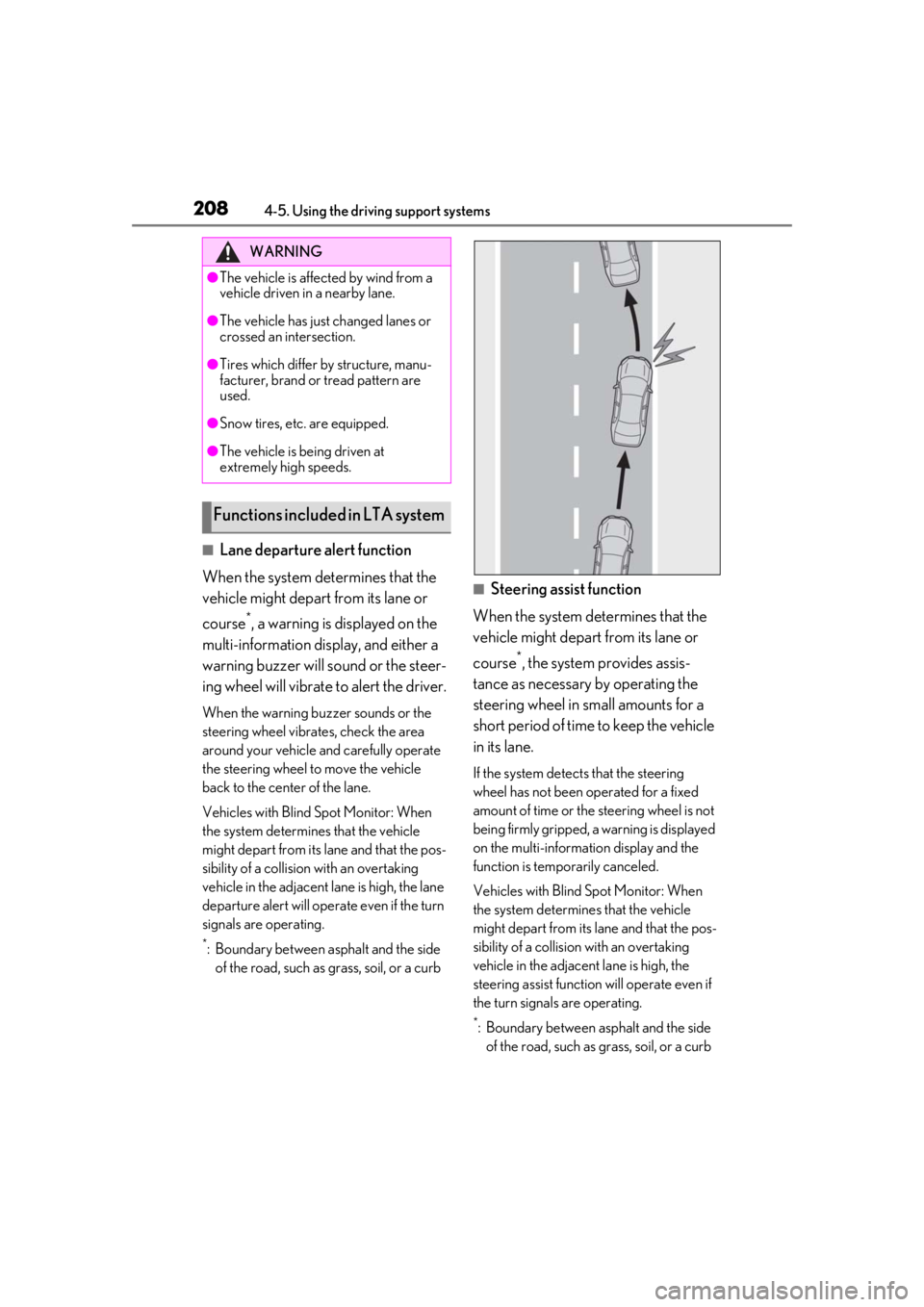
■Lane departure alert function
When the system determines that the
vehicle might depart from its lane or
course
*, a warning is displayed on the
multi-information display, and either a
warning buzzer will sound or the steer-
ing wheel will vibrate to alert the driver.
When the warning buzzer sounds or the
steering wheel vibrates, check the area
around your vehicle and carefully operate
the steering wheel to move the vehicle
back to the center of the lane.
Vehicles with Blind Spot Monitor: When
the system determines that the vehicle
might depart from its lane and that the pos-
sibility of a collision with an overtaking
vehicle in the adjacent lane is high, the lane
departure alert will operate even if the turn
signals are operating.
*: Boundary between asphalt and the side of the road, such as grass, soil, or a curb
■Steering assist function
When the system determines that the
vehicle might depart from its lane or
course
*, the system provides assis-
tance as necessary by operating the
steering wheel in small amounts for a
short period of time to keep the vehicle
in its lane.
If the system detects that the steering
wheel has not been operated for a fixed
amount of time or the steering wheel is not
being firmly gripped, a warning is displayed
on the multi-informat ion display and the
function is temporarily canceled.
Vehicles with Blind Spot Monitor: When
the system determines that the vehicle
might depart from its lane and that the pos-
sibility of a collision with an overtaking
vehicle in the adjacent lane is high, the
steering assist function will operate even if
the turn signals are operating.
*: Boundary between asphalt and the side of the road, such as grass, soil, or a curb
WARNING
●The vehicle is affected by wind from a
vehicle driven in a nearby lane.
●The vehicle has just changed lanes or
crossed an intersection.
●Tires which differ by structure, manu-
facturer, brand or tread pattern are
used.
●Snow tires, etc. are equipped.
●The vehicle is being driven at
extremely high speeds.
Functions included in LTA system
Page 211 of 476
2114-5. Using the driving support systems
4
Driving
play is switched to the driving support sys-
tem information display.
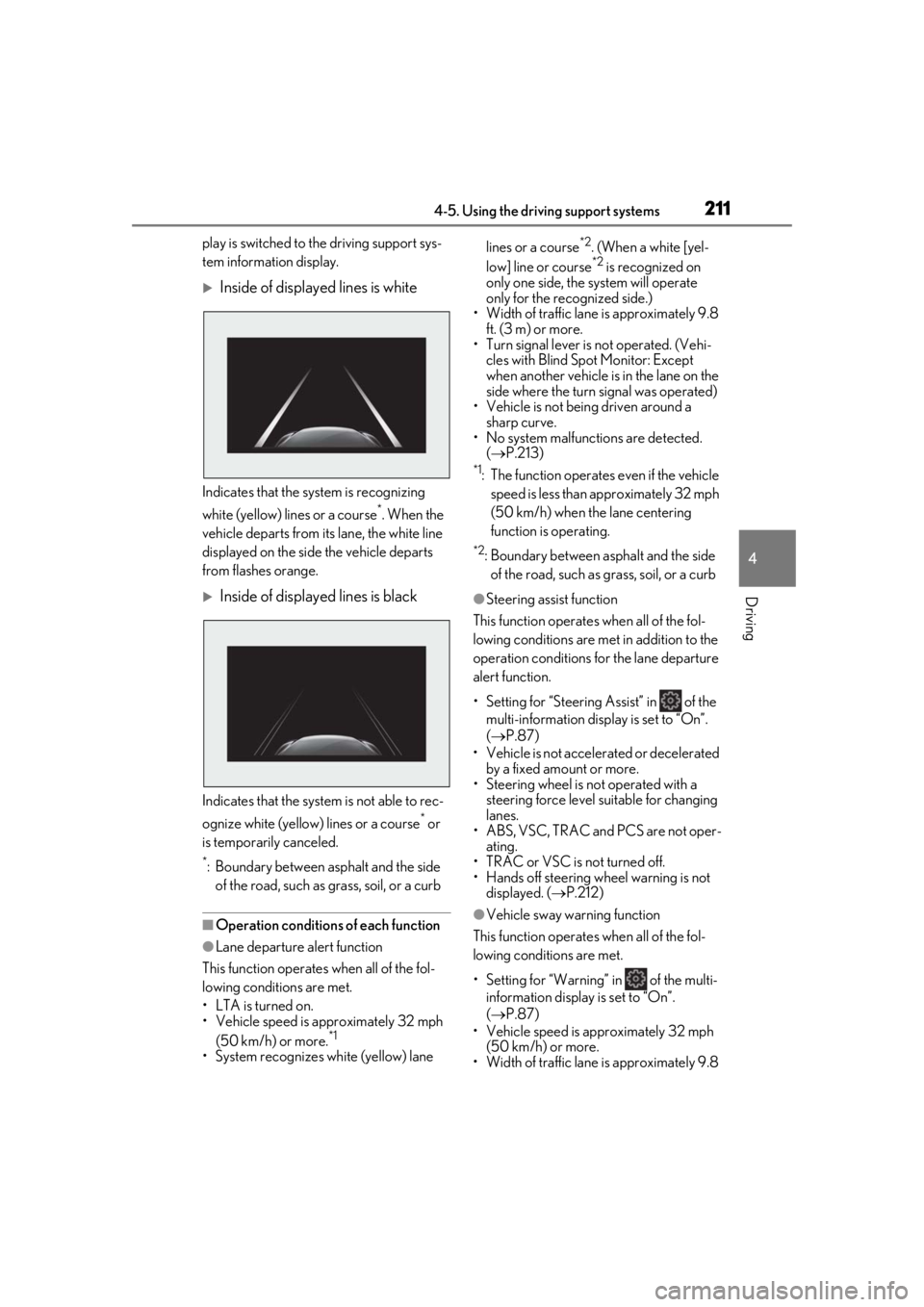
Inside of displayed lines is white
Indicates that the system is recognizing
white (yellow) lines or a course
*. When the
vehicle departs from it s lane, the white line
displayed on the side the vehicle departs
from flashes orange.
Inside of displayed lines is black
Indicates that the system is not able to rec-
ognize white (yellow) lines or a course
* or
is temporarily canceled.
*: Boundary between asphalt and the side of the road, such as grass, soil, or a curb
■Operation conditions of each function
●Lane departure alert function
This function operates when all of the fol-
lowing conditions are met.
• LTA is turned on.
• Vehicle speed is approximately 32 mph (50 km/h) or more.
*1
•System recognizes wh ite (yellow) lane lines or a course
*2. (When a white [yel-
low] line or course*2 is recognized on
only one side, the system will operate
only for the recognized side.)
• Width of traffic lane is approximately 9.8
ft. (3 m) or more.
• Turn signal lever is not operated. (Vehi- cles with Blind Spot Monitor: Except
when another vehicle is in the lane on the
side where the turn signal was operated)
• Vehicle is not being driven around a
sharp curve.
• No system malfunctions are detected. ( P.213)
*1: The function operates even if the vehicle
speed is less than ap proximately 32 mph
(50 km/h) when the lane centering
function is operating.
*2: Boundary between asphalt and the side of the road, such as grass, soil, or a curb
●Steering assist function
This function operates when all of the fol-
lowing conditions are met in addition to the
operation conditions for the lane departure
alert function.
• Setting for “Steering Assist” in of the multi-information display is set to “On”.
( P.87)
• Vehicle is not acceler ated or decelerated
by a fixed amount or more.
• Steering wheel is not operated with a steering force level su itable for changing
lanes.
• ABS, VSC, TRAC and PCS are not oper- ating.
• TRAC or VSC is not turned off.
• Hands off steering wheel warning is not displayed. ( P.212)
●Vehicle sway warning function
This function operates when all of the fol-
lowing conditions are met.
• Setting for “Warning” in of the multi- information display is set to “On”.
( P.87)
• Vehicle speed is ap proximately 32 mph
(50 km/h) or more.
• Width of traffic lane is approximately 9.8
Page 212 of 476

2124-5. Using the driving support systems
ft. (3 m) or more.
• No system malfunctions are detected. ( P.213)
●Lane centering function
This function operates when all of the fol-
lowing conditions are met.
• LTA is turned on.
• Setting for “Steering Assist” and “Lane
Center” in of th e multi-information
display are set to “On”. ( P.87)
• This function recognizes white (yellow) lane lines or the position of a preceding
vehicle (except when the preceding vehi-
cle is small, such as a motorcycle).
• The dynamic radar cruise control with full-speed range is operating in vehicle-
to-vehicle distance control mode.
• Width of traffic lane is approximately 10 to 13 ft. (3 to 4 m).
• Turn signal lever is not operated.
• Vehicle is not being driven around a
sharp curve.
• No system malfunctions are detected.
( P.213)
• Vehicle does not acc elerate or deceler-
ate by a fixed amount or more.
• Steering wheel is not operated with a steering force level su itable for changing
lanes.
• ABS, VSC, TRAC and PCS are not oper- ating.
• TRAC or VSC is not turned off.
• Hands off steering wheel warning is not
displayed. ( P.212)
• The vehicle is being driven in the center
of a lane.
• Steering assist function is not operating.
■Temporary cancelation of functions
●When operation conditions are no longer
met, a function may be temporarily can-
celed. However, when the operation con-
ditions are met again, operation of the
function is automa tically restored.
( P.211)
●If the operation conditions ( P.211) are
no longer met while the lane centering
function is operating, the steering wheel
may vibrate and the buzzer may sound to
indicate that the function has been tem-
porarily canceled. However, if the “Steer-
ing wheel vibration” customization setting is set to “On”, the system will notify
the driver by vibrating the steering wheel
instead of sounding the buzzer.
■Steering assist function/lane centering
function
●Depending on the vehicle speed, lane
departure situation, road conditions, etc.,
the driver may not feel the function is
operating or the function may not oper-
ate at all.
●The steering control of the function is
overridden by the driver’s steering wheel
operation.
●Do not attempt to test the operation of
the steering assist function.
■Lane departure alert function
●The warning buzzer may be difficult to
hear due to external noise, audio play-
back, etc. Also, it may be difficult to feel
steering wheel vibrations due to the road
conditions, etc.
●If the edge of the course* is not clear or
straight, the lane departure alert function
may not operate.
●Vehicles with Blind Spot Monitor: It may
not be possible for the system to deter-
mine if there is a danger of a collision with
a vehicle in an adjacent lane.
●Do not attempt to test the operation of
the lane departure alert function.
*: Boundary between asphalt and the side
of the road, such as grass, soil, or a curb
■Hands off steering wheel warning
In the following situations, a warning mes-
sage urging the driver to hold the steering
wheel and the symbol sh own in the illustra-
tion are displayed on the multi-information
display to warn the driver. The warning
stops when the system determines that the
driver holds the steering wheel. Always
keep your hands on the steering wheel
when using this system , regardless of warn-
ings.
Page 219 of 476
2194-5. Using the driving support systems
4
Driving
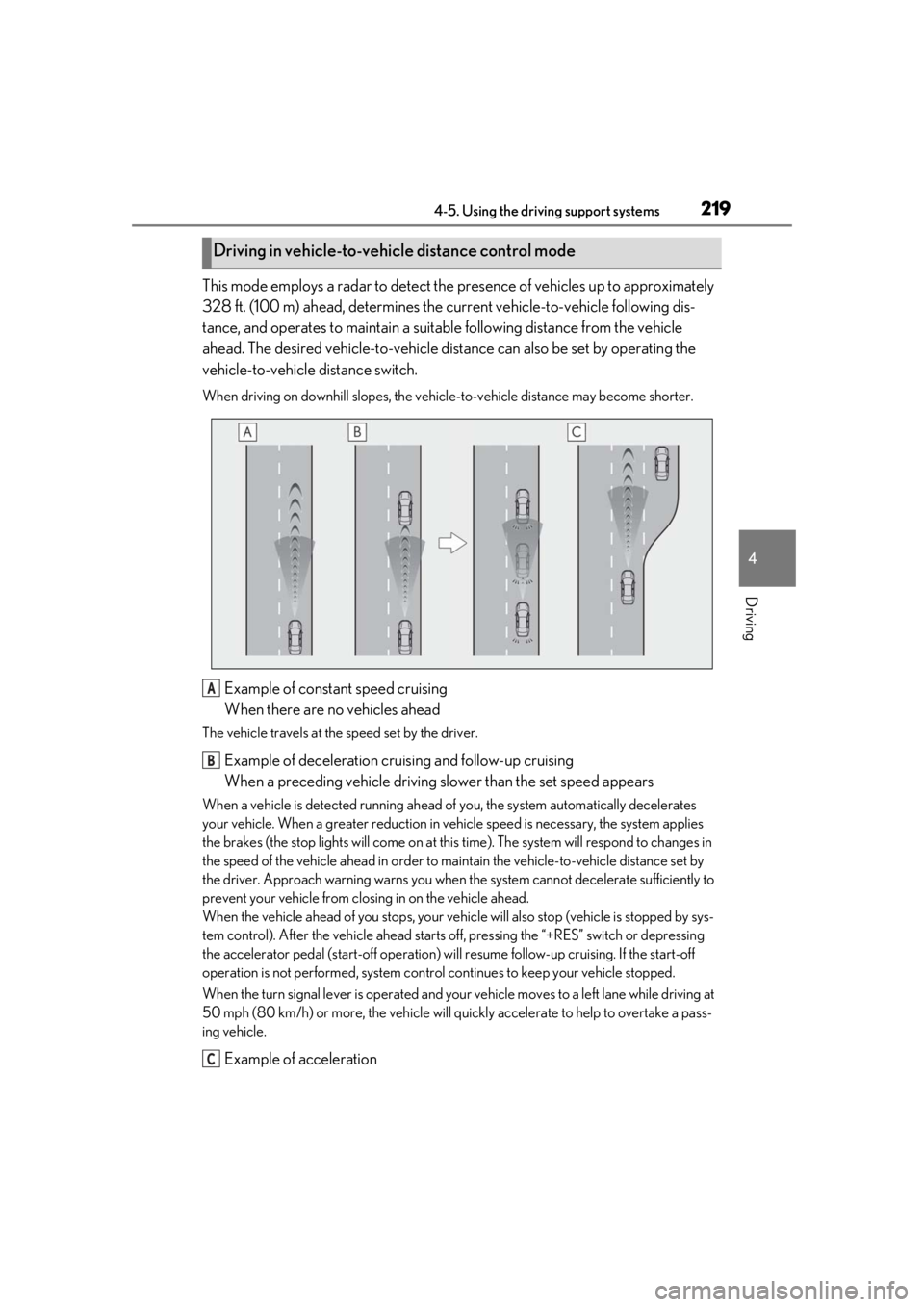
This mode employs a radar to detect the presence of vehicles up to approximately
328 ft. (100 m) ahead, determines the cu rrent vehicle-to-vehicle following dis-
tance, and operates to maintain a suitab le following distance from the vehicle
ahead. The desired vehicle-to-vehicle distance can also be set by operating the
vehicle-to-vehicle distance switch.
When driving on downhill slopes, the vehicl e-to-vehicle distance may become shorter.
Example of constant speed cruising
When there are no vehicles ahead
The vehicle travels at the speed set by the driver.
Example of deceleration cruising and follow-up cruising
When a preceding vehicle driving slower than the set speed appears
When a vehicle is detected running ahead of you, the system automatically decelerates
your vehicle. When a greater reduction in vehicle speed is necessary, the system applies
the brakes (the stop lights will come on at this time). The sy stem will respond to changes in
the speed of the vehicle ahead in order to maintain the vehicle-to-vehicle distance set by
the driver. Approach warning warns you when th e system cannot decelerate sufficiently to
prevent your vehicle from closing in on the vehicle ahead.
When the vehicle ahead of you stops, your vehi cle will also stop (vehicle is stopped by sys-
tem control). After the vehicle ahead starts off, pressing the “+RES” switch or depressing
the accelerator pedal (start-off operation) will resume follow-up cruising. If the start-off
operation is not performed, system contro l continues to keep your vehicle stopped.
When the turn signal lever is operated and your vehicle moves to a left lane while driving at
50 mph (80 km/h) or more, the vehicle will quickly accelerate to help to overtake a pass-
ing vehicle.
Example of acceleration
Driving in vehicle-to-vehicle distance control mode
A
B
C
Page 226 of 476
2264-5. Using the driving support systems
*: If equipped
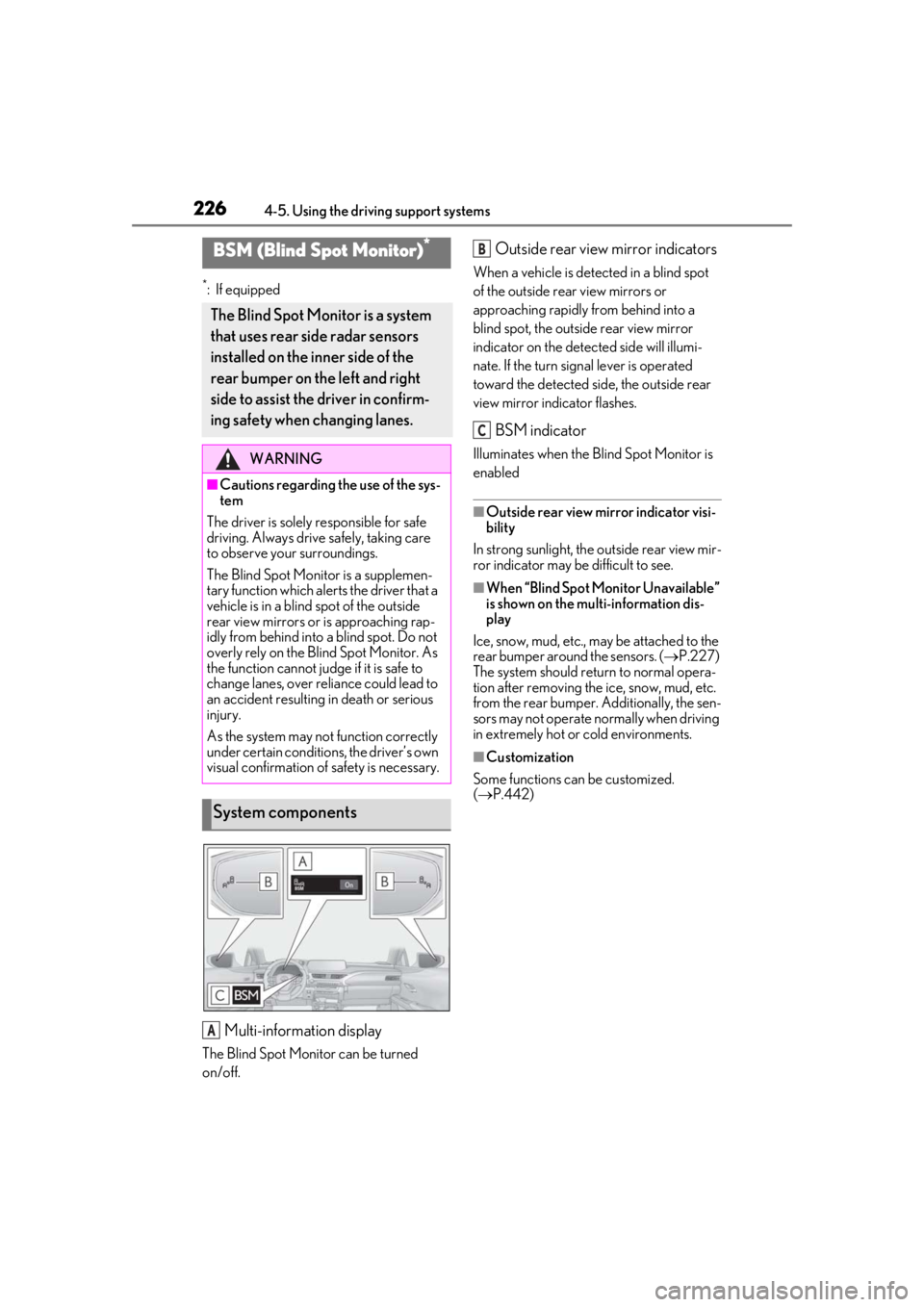
Multi-information display
The Blind Spot Monitor can be turned
on/off.
Outside rear view mirror indicators
When a vehicle is detected in a blind spot
of the outside rear view mirrors or
approaching rapidly from behind into a
blind spot, the outside rear view mirror
indicator on the detected side will illumi-
nate. If the turn signal lever is operated
toward the detected side, the outside rear
view mirror indicator flashes.
BSM indicator
Illuminates when the Blind Spot Monitor is
enabled
■Outside rear view mirror indicator visi-
bility
In strong sunlight, the outside rear view mir-
ror indicator may be difficult to see.
■When “Blind Spot Monitor Unavailable”
is shown on the multi-information dis-
play
Ice, snow, mud, etc., may be attached to the
rear bumper around the sensors. (P.227)
The system should return to normal opera-
tion after removing the ice, snow, mud, etc.
from the rear bumper. Additionally, the sen-
sors may not operate normally when driving
in extremely hot or cold environments.
■Customization
Some functions can be customized.
( P.442)
BSM (Blind Spot Monitor)*
The Blind Spot Monitor is a system
that uses rear side radar sensors
installed on the inner side of the
rear bumper on the left and right
side to assist the driver in confirm-
ing safety when changing lanes.
WARNING
■Cautions regarding the use of the sys-
tem
The driver is solely responsible for safe
driving. Always driv e safely, taking care
to observe your surroundings.
The Blind Spot Monitor is a supplemen-
tary function which alerts the driver that a
vehicle is in a blind spot of the outside
rear view mirrors or is approaching rap-
idly from behind into a blind spot. Do not
overly rely on the Blind Spot Monitor. As
the function cannot judge if it is safe to
change lanes, over reliance could lead to
an accident resulting in death or serious
injury.
As the system may not function correctly
under certain conditions, the driver’s own
visual confirmation of safety is necessary.
System components
A
B
C
Page 316 of 476
3165-6. Using the other interior features
Press the appropriate HomeLink®
button. The HomeLink
® indicator light
should turn on.
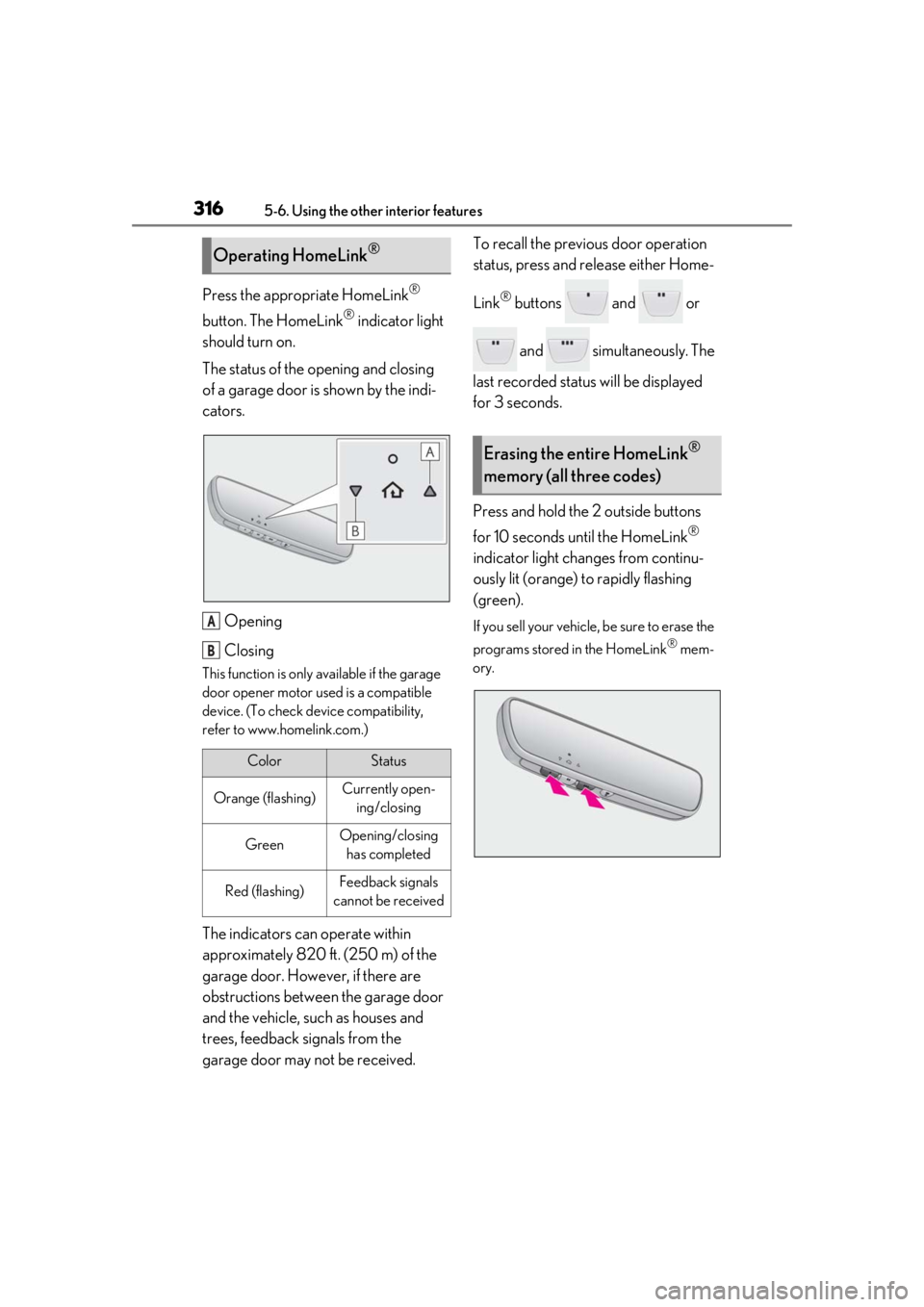
The status of the opening and closing
of a garage door is shown by the indi-
cators.
Opening
Closing
This function is only available if the garage
door opener motor used is a compatible
device. (To check device compatibility,
refer to www.homelink.com.)
The indicators can operate within
approximately 820 ft. (250 m) of the
garage door. However, if there are
obstructions between the garage door
and the vehicle, such as houses and
trees, feedback signals from the
garage door may not be received. To recall the previous door operation
status, press and release either Home-
Link
® buttons and or
and simultaneously. The
last recorded status will be displayed
for 3 seconds.
Press and hold the 2 outside buttons
for 10 seconds until the HomeLink
®
indicator light changes from continu-
ously lit (orange) to rapidly flashing
(green).
If you sell your vehicle, be sure to erase the
programs stored in the HomeLink
® mem-
ory.
Operating HomeLink®
ColorStatus
Orange (flashing)Currently open- ing/closing
GreenOpening/closing has completed
Red (flashing)Feedback signals
cannot be received
A
B
Erasing the entire HomeLink®
memory (all three codes)
Page 348 of 476
3486-3. Do-it-yourself maintenance
■Run-flat tires
●The run-flat tires are for only this vehicle.
Do not use the tires on other vehicles.
●Do not mix run-flat tires and normal tires.
●If non-genuine Lexus wheels are used, it
may be impossible to sufficiently demon-
strate the performance of run-flat tires.
Your vehicle is equipped with a tire
pressure warning system that uses tire
pressure warning valves and transmit-
ters to detect low tire inflation pressure
before serious problems arise.
If the tire pressure drops below a
predetermined level, the driver is
warned by a screen display and a
warning light. ( P.387, 395)
The tire pressure detected by the
tire pressure warning system can be
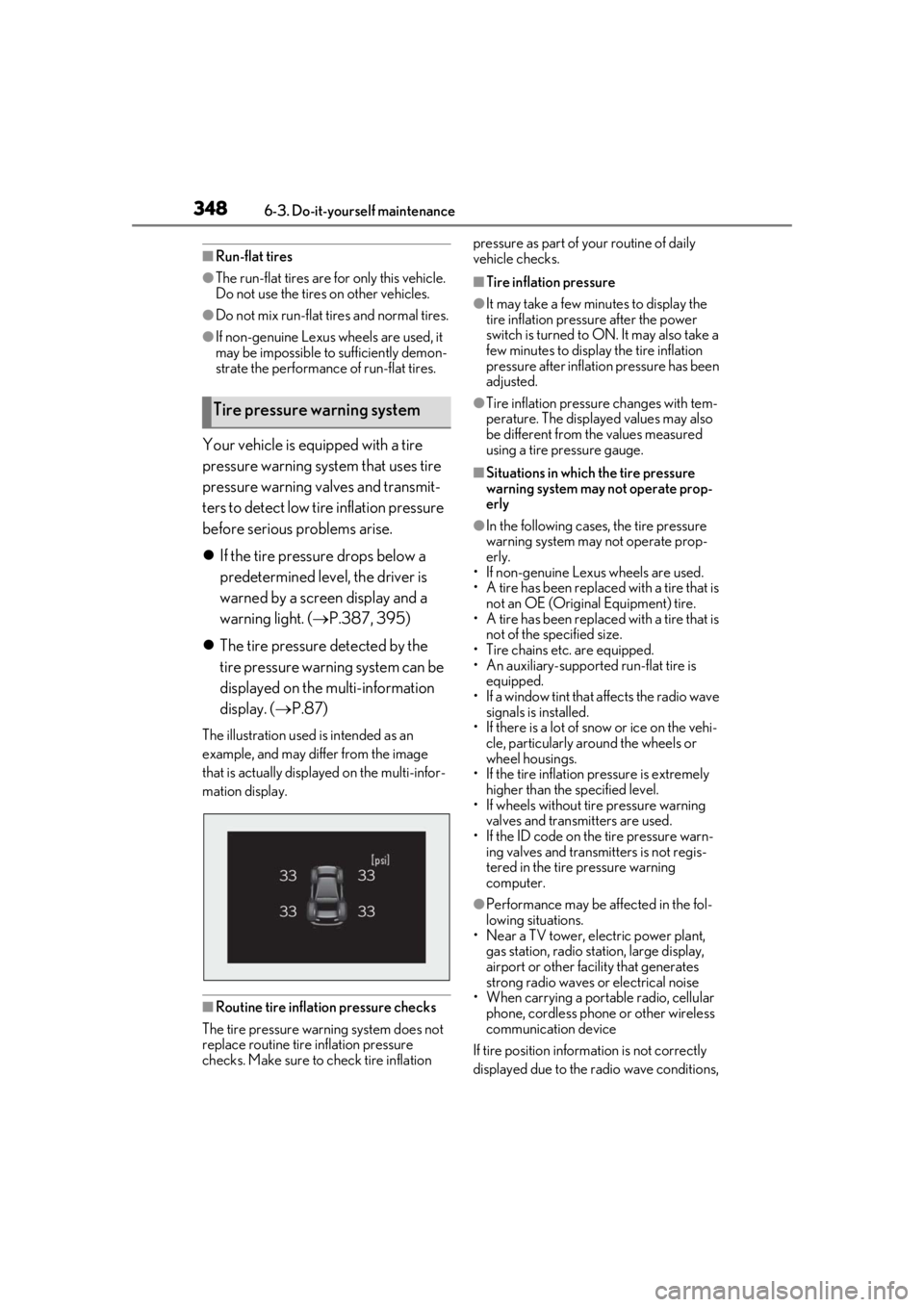
displayed on the multi-information
display. ( P.87)
The illustration used is intended as an
example, and may differ from the image
that is actually displayed on the multi-infor-
mation display.
■Routine tire inflation pressure checks
The tire pressure warning system does not
replace routine tire inflation pressure
checks. Make sure to check tire inflation pressure as part of your routine of daily
vehicle checks.
■Tire inflation pressure
●It may take a few minutes to display the
tire inflation pressu
re after the power
switch is turned to ON. It may also take a
few minutes to display the tire inflation
pressure after inflatio n pressure has been
adjusted.
●Tire inflation pressure changes with tem-
perature. The displaye d values may also
be different from the values measured
using a tire pressure gauge.
■Situations in which the tire pressure
warning system may not operate prop-
erly
●In the following cases, the tire pressure
warning system may not operate prop-
erly.
• If non-genuine Lexus wheels are used.
• A tire has been replaced with a tire that is
not an OE (Original Equipment) tire.
• A tire has been replaced with a tire that is
not of the specified size.
• Tire chains etc. are equipped.
• An auxiliary-supported run-flat tire is equipped.
• If a window tint that affects the radio wave signals is installed.
• If there is a lot of snow or ice on the vehi- cle, particularly around the wheels or
wheel housings.
• If the tire inflation pressure is extremely higher than the specified level.
• If wheels without tire pressure warning
valves and transmitters are used.
• If the ID code on the tire pressure warn- ing valves and transmitters is not regis-
tered in the tire pressure warning
computer.
●Performance may be af fected in the fol-
lowing situations.
• Near a TV tower, electric power plant,
gas station, radio stat ion, large display,
airport or other fac ility that generates
strong radio waves or electrical noise
• When carrying a portable radio, cellular
phone, cordless phone or other wireless
communication device
If tire position information is not correctly
displayed due to the radio wave conditions,
Tire pressure warning system
Page 374 of 476
3746-3. Do-it-yourself maintenance
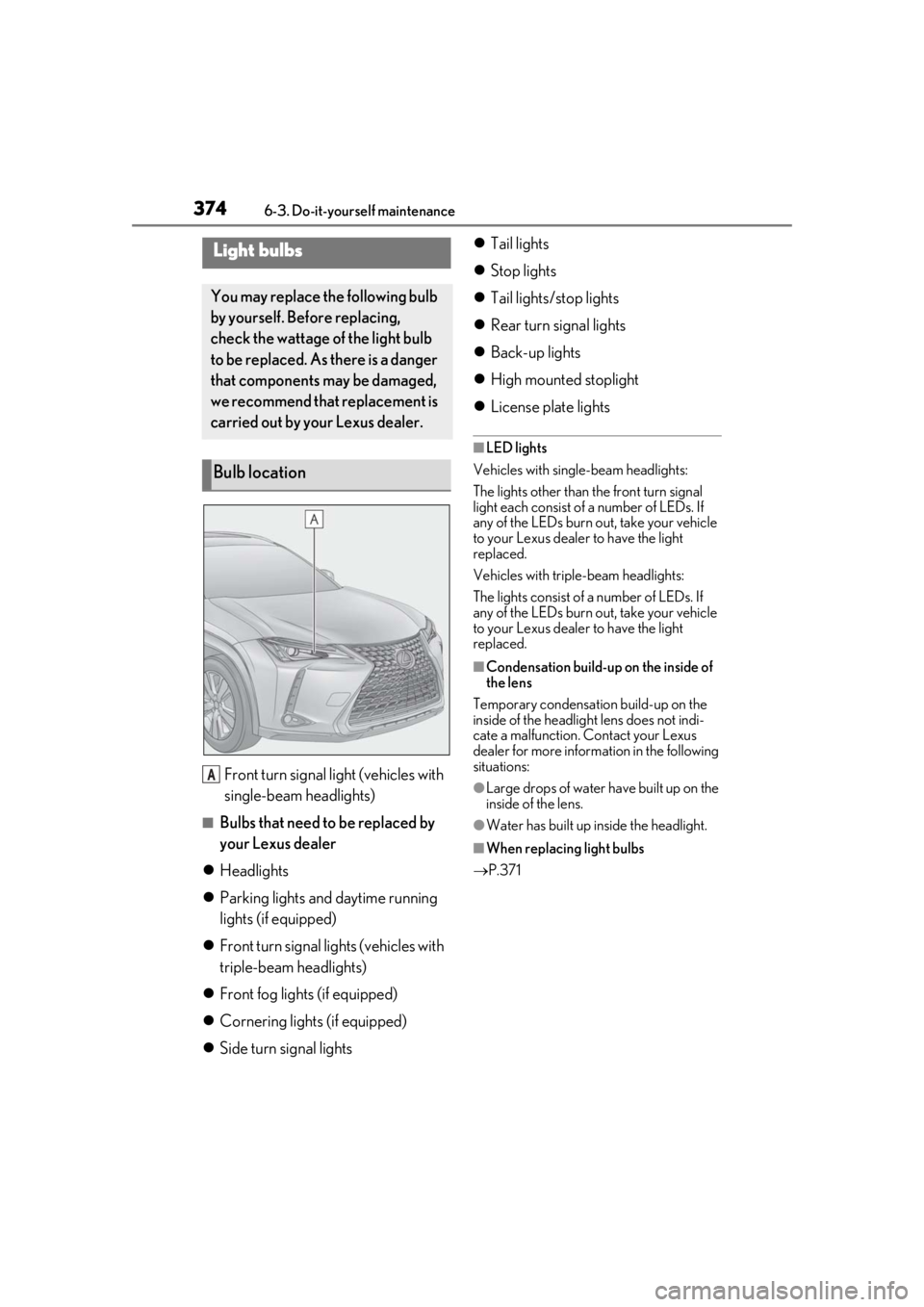
Front turn signal light (vehicles with
single-beam headlights)
■Bulbs that need to be replaced by
your Lexus dealer
Headlights
Parking lights and daytime running
lights (if equipped)
Front turn signal lights (vehicles with
triple-beam headlights)
Front fog lights (if equipped)
Cornering lights (if equipped)
Side turn signal lights
Tail lights
Stop lights
Tail lights/stop lights
Rear turn signal lights
Back-up lights
High mounted stoplight
License plate lights
■LED lights
Vehicles with single-beam headlights:
The lights other than the front turn signal
light each consist of a number of LEDs. If
any of the LEDs burn out, take your vehicle
to your Lexus dealer to have the light
replaced.
Vehicles with triple-beam headlights:
The lights consist of a number of LEDs. If
any of the LEDs burn out, take your vehicle
to your Lexus dealer to have the light
replaced.
■Condensation build-up on the inside of
the lens
Temporary condensation build-up on the
inside of the headlight lens does not indi-
cate a malfunction. Contact your Lexus
dealer for more information in the following
situations:
●Large drops of water have built up on the
inside of the lens.
●Water has built up inside the headlight.
■When replacing light bulbs
P.371
Light bulbs
You may replace the following bulb
by yourself. Before replacing,
check the wattage of the light bulb
to be replaced. As there is a danger
that components may be damaged,
we recommend that replacement is
carried out by your Lexus dealer.
Bulb location
A
Page 375 of 476
3756-3. Do-it-yourself maintenance
6
Maintenance and care
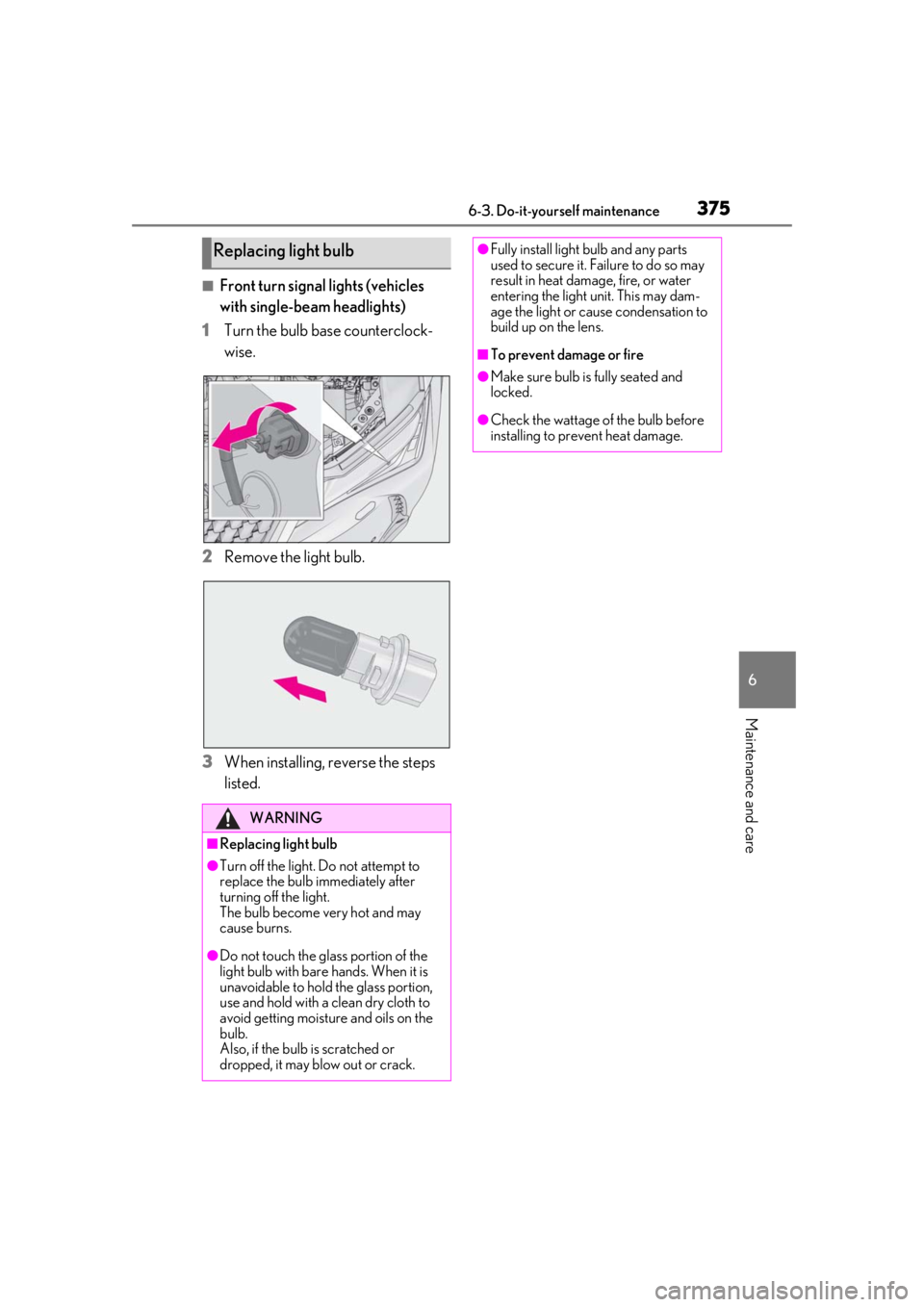
■Front turn signal lights (vehicles
with single-beam headlights)
1
Turn the bulb base counterclock-
wise.
2
Remove the light bulb.
3
When installing, reverse the steps
listed.
Replacing light bulb
WARNING
■Replacing light bulb
●Turn off the light. Do not attempt to
replace the bulb immediately after
turning off the light.
The bulb become very hot and may
cause burns.
●Do not touch the glass portion of the
light bulb with bare hands. When it is
unavoidable to hold the glass portion,
use and hold with a clean dry cloth to
avoid getting moisture and oils on the
bulb.
Also, if the bulb is scratched or
dropped, it may blow out or crack.
●Fully install light bulb and any parts
used to secure it. Failure to do so may
result in heat damage, fire, or water
entering the light unit. This may dam-
age the light or cause condensation to
build up on the lens.
■To prevent damage or fire
●Make sure bulb is fully seated and
locked.
●Check the wattage of the bulb before
installing to prevent heat damage.
Page 378 of 476
3787-1. Essential information
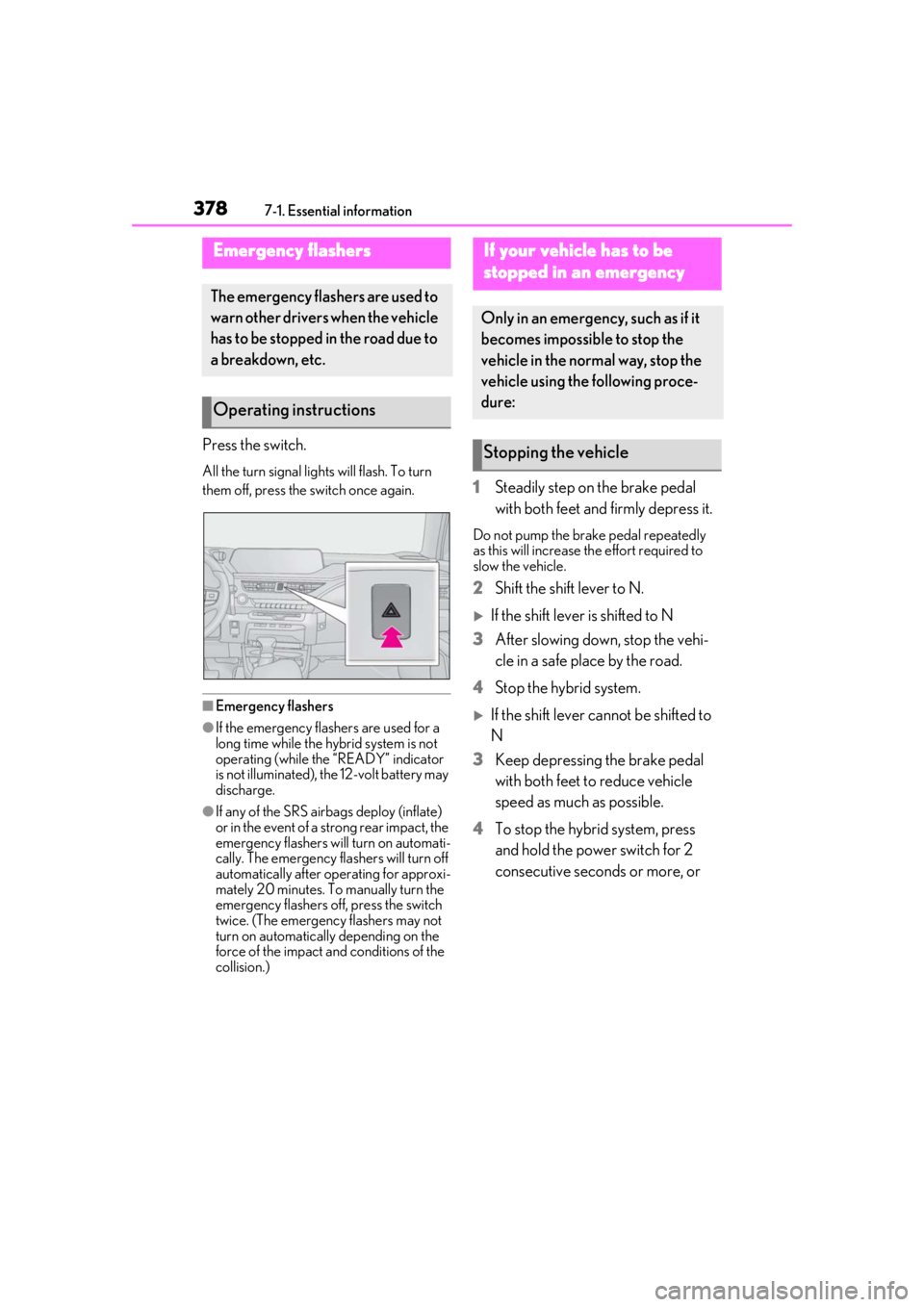
7-1.Essential information
Press the switch.
All the turn signal lights will flash. To turn
them off, press the switch once again.
■Emergency flashers
●If the emergency flashers are used for a
long time while the hybrid system is not
operating (while the “READY” indicator
is not illuminated), the 12-volt battery may
discharge.
●If any of the SRS airbags deploy (inflate)
or in the event of a strong rear impact, the
emergency flashers will turn on automati-
cally. The emergency flashers will turn off
automatically after operating for approxi-
mately 20 minutes. To manually turn the
emergency flashers off, press the switch
twice. (The emergency flashers may not
turn on automatically depending on the
force of the impact and conditions of the
collision.)
1 Steadily step on the brake pedal
with both feet and firmly depress it.
Do not pump the brake pedal repeatedly
as this will increase the effort required to
slow the vehicle.
2Shift the shift lever to N.
If the shift lever is shifted to N
3 After slowing down, stop the vehi-
cle in a safe place by the road.
4 Stop the hybrid system.
If the shift lever cannot be shifted to
N
3 Keep depressing the brake pedal
with both feet to reduce vehicle
speed as much as possible.
4 To stop the hybrid system, press
and hold the power switch for 2
consecutive seconds or more, or
Emergency flashers
The emergency flashers are used to
warn other drivers when the vehicle
has to be stopped in the road due to
a breakdown, etc.
Operating instructions
If your vehicle has to be
stopped in an emergency
Only in an emergency, such as if it
becomes impossible to stop the
vehicle in the normal way, stop the
vehicle using the following proce-
dure:
Stopping the vehicle