air conditioning LEXUS UX250H 2019 Owners Manual
[x] Cancel search | Manufacturer: LEXUS, Model Year: 2019, Model line: UX250H, Model: LEXUS UX250H 2019Pages: 476, PDF Size: 10.51 MB
Page 3 of 476

3TABLE OF CONTENTS
1
2
3
4
5
6
7
8
9
4-1. Before drivingDriving the vehicle ........................ 152
Cargo and luggage ...................... 157
Vehicle load limits ......................... 160
Trailer towing .................................. 160
Dinghy towing ................................. 161
4-2. Driving procedures Power (ignition) switch ............... 162
EV drive mode ............................... 165
Hybrid transmission ..................... 167
Turn signal lever.............................. 171
Parking brake ................................. 172
Brake Hold....................................... 175
ASC (Active Sound Control) .. 176
4-3. Operating the lights and wipers Headlight switch ............................ 177
Automatic High Beam ................ 180
Fog light switch .............................. 183
Windshield wipers and washer 184
Rear window wiper and washer ............................................................ 188
4-4. Refueling Opening the fuel tank cap......... 190
4-5. Using the driving support systems Lexus Safety System+2.0 .......... 192
PCS (Pre-Collision System)..... 198
LTA (Lane Tracing Assist)........ 205
RSA (Road Sign Assist) .............. 214
Dynamic radar crui se control with
full-speed range.......................... 216
BSM (Blind Spot Monitor) ....... 226
PKSA (Parking Support Alert) 231Intuitive parking assist .................
232
RCTA (Rear Cross Traffic Alert) function.......................................... 239
PKSB (Parking Support Brake) 243
Parking Support Brake function (static objects) ............................. 247
Parking Support Brake function (rear-crossing vehicles) .......... 252
Driving mode select switch ..... 255
Driving assist systems ................ 256
4-6. Driving tips Hybrid vehicle driving tips ......... 261
Winter driving tips ....................... 263
Utility vehicle precautions........ 266
5-1. Remote Touch Remote Touch............................... 270
5-2. Lexus Climate Concierge Lexus Climate Concierge......... 274
5-3. Using the air conditioning system and defogger
Automatic air conditioning system.......................................................... 276
Heated steering wheel/seat heat- ers/seat ventilators................... 286
5-4. Using the interior lights Interior lights list ........................... 290
5-5. Using the storage features List of storage features .............. 293
Luggage
compartment features
.......................................................... 296
5-6. Using the other interior features Other interior features ............... 301
Garage door opener .................... 311
4Driving
5Interior features
Page 4 of 476

4TABLE OF CONTENTS
Compass...........................................317
6-1. Maintenance and care Cleaning and protecting the vehi-cle exterior ................................... 322
Cleaning and protecting the vehi- cle interior .................................... 325
6-2. Maintenance Maintenance requirements ..... 328
General maintenance ................ 329
Emission inspection and mainte- nance (I/M) programs ............. 331
6-3. Do-it-yourself maintenance Do-it-yourself service precautions........................................................... 333
Hood.................................................. 335
Positioning a floor jack............... 336
Engine compartment.................. 337
12-volt battery................................ 342
Tires ................................................... 345
Replacing the tire ......................... 355
Tire inflation pressure .................. 361
Wheels.............................................. 363
Air conditioning filter..................364
Cleaning the hybrid battery (trac- tion battery) air intake vent and fil-
ter..................................................... 365
Electronic key battery ................ 368
Checking and replacing fuses 370
Headlight aim................................. 372
Light bulbs ....................................... 3747-1. Essential information
Emergency flashers .................... 378
If your vehicle has to be stopped in an emergency ............................ 378
If the vehicle is trapped in rising water .............................................. 379
7-2. Steps to take in an emergency If your vehicle needs to be towed........................................................... 381
If you think something is wrong .......................................................... 385
If a warning light turns on or a warn- ing buzzer sounds..................... 386
If a warning messa ge is displayed
.......................................................... 395
If you have a flat tire .................... 399
If the hybrid syst em will not start
.......................................................... 400
If you lose your keys.................... 402
If the fuel filler door cannot be opened .......................................... 402
If the electronic key does not oper- ate properly ................................. 403
If the 12-volt battery is discharged .......................................................... 405
If your vehicle overheats ............ 410
If the vehicle becomes stuck ..... 413
8-1. Specifications Maintenance data (fuel, oil level, etc.) .................................................. 416
Fuel information............................ 423
Tire inform
ation ............................ 425
6Maintenance and care
7When trouble arises
8Vehicle specifications
Page 16 of 476

16Pictorial index
When the warning messages are displayed..........................................................P.395
Parking brake switch ............................................................................................. P.172
Applying/releasing ............................................................................................................ P.172
Precautions against winter season ................... ......................................................... P.264
Warning buzzer/message................................................................................ P.387, 395
Turn signal lever ....................................................................................................... P.171
Headlight switch...................................................................................................... P.177
Headlights/parking lights/tail lights/license plate lights/
daytime running lights ....................................................................................................... P. 177
Automatic High Beam ..................................................................................................... P.180
Fog lights
*1............................................................................................................................ P.1 83
Windshield wiper and washer switch ................................................................P.184
Rear window wiper and washer switch ........................................................... P.188
Usage.......................................................................................................................... ..P.184, 188
Adding washer fluid .......................................................................................................... P. 341
Headlight cleaners
*1......................................................................................................... P.184
Warning messages ..........................................................................................................P.395
Emergency flasher switch ...................................................................................P.378
Hood lock release lever ...................................................................................... P.335
Tilt and telescopic steering control switch
*1................................................... P.139
Adjustment ..................................................................................................................... ...... P.139
Driving position memory
*1............................................................................................. P.133
Tilt and telescopic steeri ng lock release lever
*1............................................ P.139
Adjustment ..................................................................................................................... ...... P.139
Air conditioning system ....................................................................................... P.276
Usage.......................................................................................................................... ........... P.276
Rear window defogger....................................................................................................P.277
Audio system
*2
*1
: If equipped
*2: Refer to “NAVIGATION AND MULTIMEDIA SYSTEM OWNER’S MANUAL”.
E
F
G
H
I
J
K
L
M
Page 65 of 476
651-4. Hybrid system
1
For safety and security
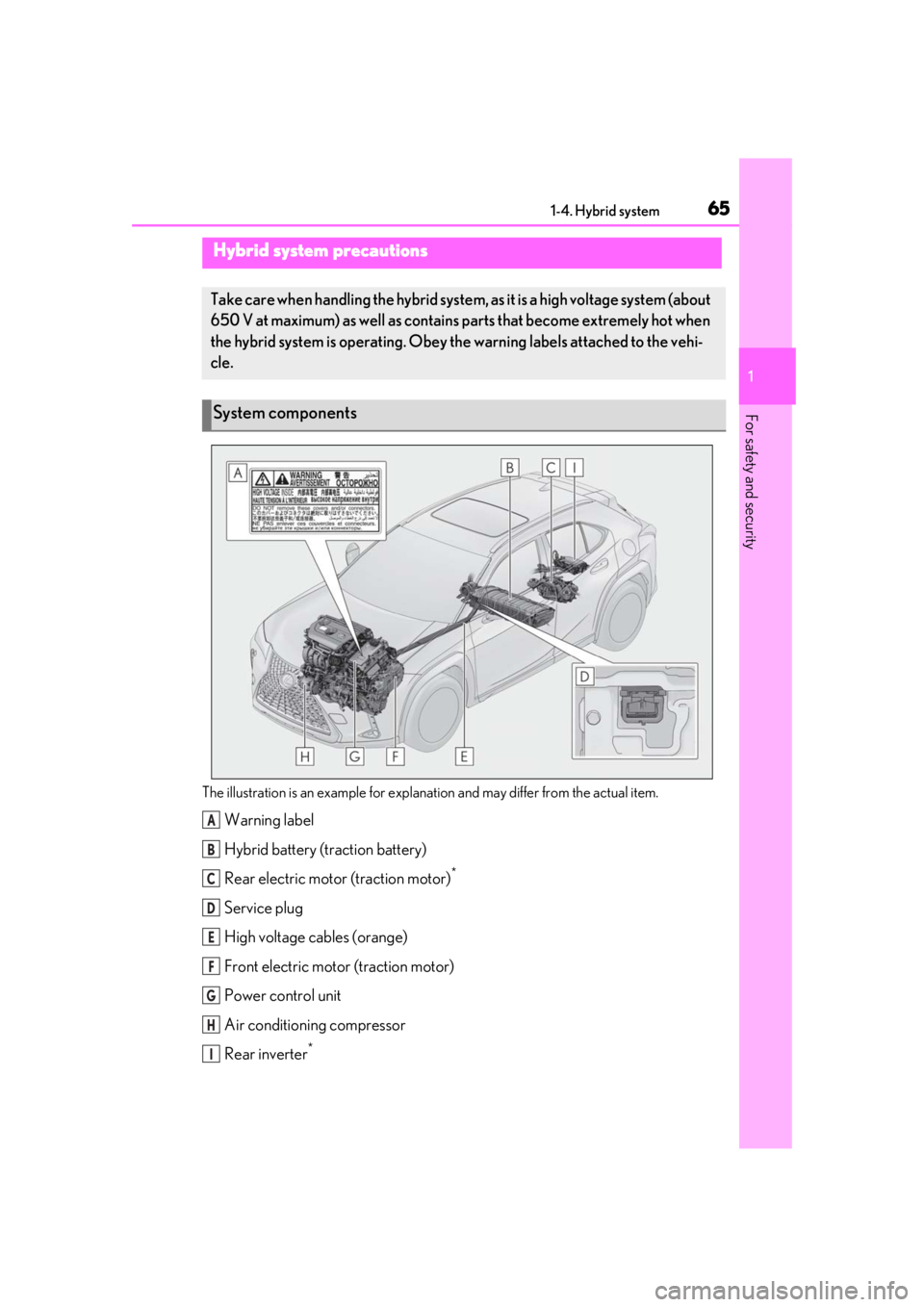
The illustration is an example for explanation and may differ from the actual item.
Warning label
Hybrid battery (traction battery)
Rear electric motor (traction motor)
*
Service plug
High voltage cables (orange)
Front electric motor (traction motor)
Power control unit
Air conditioning compressor
Rear inverter
*
Hybrid system precautions
Take care when handling the hybrid system, as it is a high voltage system (about
650 V at maximum) as well as contains parts that become extremely hot when
the hybrid system is operating. Obey th e warning labels attached to the vehi-
cle.
System components
A
B
C
D
E
F
G
H
I
Page 197 of 476
1974-5. Using the driving support systems
4
Driving
●In the following situations, if the situation has changed (or the vehicle has been driven for
some time) and the normal operating conditions are detected, the message will disappear
and the system will become operational.
If the message does not disappea r, contact your Lexus dealer.
When the temperature around the radar sensor is outside of the operational range, such as
when the vehicle is in the sun or in an extremely cold environment
When the front camera cannot detect objects in fr ont of the vehicle, such as when driving in
the dark, snow, or fog, or when bright lights are shining into the front camera
When the temperature around the front
camera is outside of the operational range,
such as when the vehicle is in the sun or in an
extremely cold environment
If the front camera is hot, such as after the
vehicle had been parked in the sun, use the
air conditioning system to decrease the tem-
perature around the front camera.
If a sunshade was used when the vehicle was
parked, depending on its type, the sunlight
reflected from the surface of the sunshade
may cause the temperature of the front cam-
era to become excessively high.
If the front camera is cold, such after the
vehicle is parked in an extremely cold envi-
ronment, use the air conditioning system to
increase the temperature around the front
camera.
The area in front of the front camera is
obstructed, such as when the hood is open
or a sticker is attached to the part of the
windshield in front of the front camera.
Close the hood, remove the sticker, etc. to
clear the obstruction.
SituationActions
Page 235 of 476

2354-5. Using the driving support systems
4
Driving
●The following situations may occur
during use.
• Depending on the shape of the object
and other factors, the detection distance
may shorten, or detection may be impos-
sible.
• There will be a short delay between object detection and display. Even at low
speeds, there is a possibility that the
object will come within the sensor’s
detection areas before the display is
shown and the warning beep sounds.
• It might be difficult to hear the buzzer due to the volume of the audio system or air
flow noise of the air conditioning system.
■Conditions under which the function
may not function correctly
Certain vehicle conditions and the sur-
rounding environment may affect the ability
of a sensor to correctly detect objects. Par-
ticular instances where this may occur are
listed below.
●There is dirt, snow or ice on a sensor.
(Cleaning the sensors will resolve this
problem.)
●A sensor is frozen. (Thawing the area will
resolve this problem.)
In especially cold weather, if a sensor is
frozen the sensor display may be dis-
played abnormally, or objects, such as a
wall, may not be detected.
●A sensor is covered in any way.
●When a sensor or the area around a sen-
sor is extremely hot or cold.
●On an extremely bumpy road, on an incline, on gravel, or on grass.
●The vicinity of the vehicle is noisy due to
vehicle horns, motorcycle engines, air
brakes of large vehicles, or other loud
noises producing ultrasonic waves.
●There is another vehicle equipped with
parking assist sensors in the vicinity.
●A sensor is coated with a sheet of spray
or heavy rain.
●If a sensor is hit by a large amount of
water, such as when driving on a flooded
road.
●If the vehicle is significantly tilted.
●The vehicle is approaching a tall or
curved curb.
●If objects draw too close to the sensor.
■Objects which may not be properly
detected
The shape of the object may prevent the
sensor from detectin g it. Pay particular
attention to the following objects:
●Wires, fences, ropes, etc.
●Cotton, snow and other materials that
absorb sound waves
●Sharply-angled objects
●Low objects
●Tall objects with upper sections project-
ing outwards in the direction of your vehi-
cle
People may not be de tected if they are
wearing certain types of clothing.
■Certification
Page 255 of 476
2554-5. Using the driving support systems
4
Driving
• When backing out of a shallow angle parking spot
• When backing up on a slope with a sharp change in grade
• When a vehicle turns into the detection area
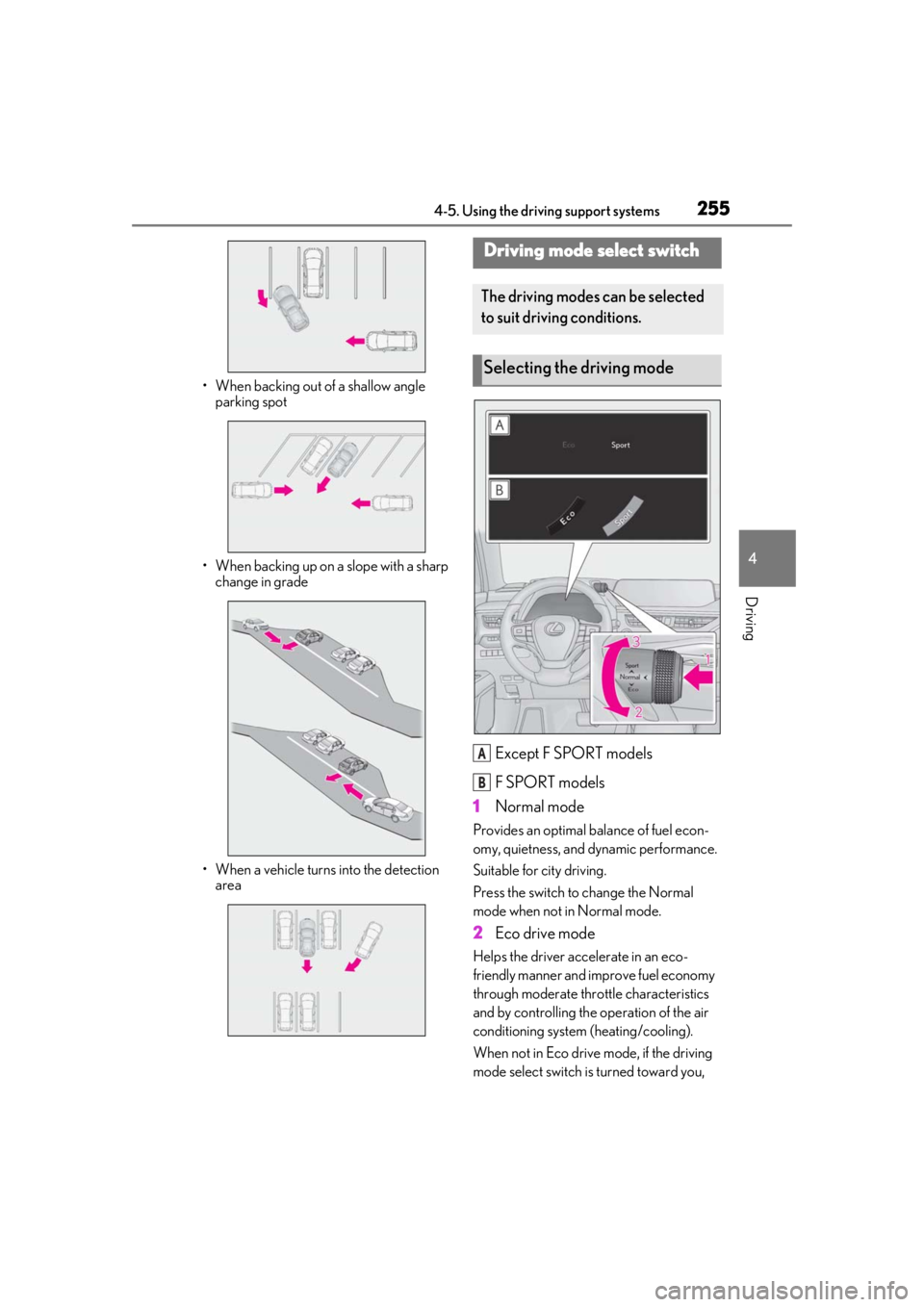
Except F SPORT models
F SPORT models
1 Normal mode
Provides an optimal ba lance of fuel econ-
omy, quietness, and dynamic performance.
Suitable for city driving.
Press the switch to change the Normal
mode when not in Normal mode.
2 Eco drive mode
Helps the driver acce lerate in an eco-
friendly manner and improve fuel economy
through moderate thro ttle characteristics
and by controlling the operation of the air
conditioning system (heating/cooling).
When not in Eco drive mode, if the driving
mode select switch is turned toward you,
Driving mode select switch
The driving modes can be selected
to suit driving conditions.
Selecting the driving mode
A
B
Page 256 of 476

2564-5. Using the driving support systems
the “Eco” indicator comes on.
3Sport mode
Assists acceleration response by con-
trolling the hybrid system and steering.
Suitable for when precise handling is desir-
able, for example when driving on moun-
tain roads.
When not in Sport mode, if the driving
mode select switch is turned backward, the
“Sport” indicator comes on and the Hybrid
System Indicator changes to the tachome-
ter. ( P.78, 82)
■Operation of the air conditioning sys-
tem in Eco drive mode
Eco drive mode controls the heating/cool-
ing operations and fan speed of the air con-
ditioning system to enhance fuel efficiency.
To improve air condit ioning performance,
perform the following operations:
●Turn off eco air conditioning mode
( P.278)
●Adjust the fan speed ( P.276, 279)
●Turn off Eco drive mode
■Automatic deactivation of Sport mode
If the power switch is turned off after driving
in Sport mode, the driving mode will be
changed to Normal mode.
■Driving mode pop-up display (vehicles
with 10.3-inch display model)
When the driving mode is changed, the
selected driving mode will be temporarily
displayed on the side display. ( P.273)
■ECB (Electronically Controlled
Brake System)
The electronically controlled system
generates braking force correspond-
ing to the brake operation
■ABS (Anti-lock Brake System)
Helps to prevent wheel lock when the
brakes are applied suddenly, or if the
brakes are applied while driving on a
slippery road surface
■Brake assist
Generates an increased level of brak-
ing force after the brake pedal is
depressed when the system detects a
panic stop situation
■VSC (Vehicle Stability Control)
Helps the driver to control skidding
when swerving sudden ly or turning on
slippery road surfaces
■Enhanced VSC (Enhanced Vehi-
cle Stability Control)
Provides cooperative control of the
ABS, TRAC, VSC and EPS.
Driving assist systems
To keep driving safety and perfor-
mance, the following systems oper-
ate automatically in response to
various driving situations. Be aware,
however, that these systems are
supplementary and should not be
relied upon too heavily when oper-
ating the vehicle.
Summary of the driving assist
systems
Page 261 of 476
2614-6. Driving tips
4
Driving
4-6.Driving tips
When using Eco drive mode, the
torque corresponding to the accelera-
tor pedal depression amount can be
generated more smoothly than it is in
normal conditions. In addition, the
operation of the air conditioning sys-
tem (heating/cooling) will be mini-
mized, improving the fuel economy.
( P.255)
The Eco-friendly driving is possible by
keeping the indicate of Hybrid System
Indicator within Eco area. ( P.79, 84)
Shift the shift lever to D when stopped
at a traffic light, or driving in heavy traf-
fic, etc. Shift the shift lever to P when
parking. When using the N, there is no
positive effect on fuel consumption. In
the N, the gasoline engine operates
but electricity cannot be generated.
Also, when using the air conditioning
system, etc., the hybrid battery (trac-
tion battery) power is consumed.
Drive your vehicle smoothly. Avoid
abrupt acceleration and decelera-
tion. Gradual acceleration and
deceleration will make more effec-
tive use of the electric motor (trac-
tion motor) without having to use
gasoline engine power.
Avoid repeated acceleration.
Repeated acceleration consumes
hybrid battery (traction battery)
power, resulting in poor fuel con-
sumption. Battery power can be
restored by driving with the acceler-
ator pedal slightly released.
Make sure to operate the brakes gently
and in a timely manner. A greater
amount of electrical energy can be
regenerated when slowing down.
Repeated acceleration and decelera-
tion, as well as long waits at traffic
lights, will lead to bad fuel economy.
Check traffic reports before leaving
and avoid delays as much as possible.
When driving in a traffic jam, gently
release the brake pedal to allow the
vehicle to move forward slightly while
avoiding overuse of the accelerator
pedal. Doing so can help control
excessive gasoline consumption.
Hybrid vehicle driving tips
For economical and ecological
driving, pay attention to the follow-
ing points:
Using Eco drive mode
Use of Hybrid System Indicator
Shift lever operation
Accelerator pedal/brake pedal
operation
When braking
Delays
Page 262 of 476

2624-6. Driving tips
Control and maintain the vehicle at a
constant speed. Before stopping at a
toll booth or similar, allow plenty of
time to release the accelerator and
gently apply the brakes. A greater
amount of electrical energy can be
regenerated when slowing down.
Use the air conditioning only when
necessary. Doing so can help reduce
excessive gasoline consumption.
In summer: When the ambient tem-
perature is high, use the recirculated
air mode. Doing so will help to reduce
the burden on the air conditioning sys-
tem and reduce fuel consumption as
well.
In winter: Because the gasoline engine
will not automatically cut out until it and
the interior of the vehicle are warm, it
will consume fuel. Also, fuel consump-
tion can be improved by avoiding over-
use of the heater.
Make sure to check the tire inflation
pressure frequently. Improper tire infla-
tion pressure can cause poor fuel
economy.
Also, as snow tires can cause large
amounts of friction, their use on dry
roads can lead to poor fuel economy.
Use tires that are appropriate for the
season. Carrying heavy luggage will lead to
poor fuel economy. Avoid carrying
unnecessary luggage.
Installing a large
roof rack will also cause poor fuel
economy.
Since the gasoline engine starts up and
cuts out automatically when cold,
warming up the engine is unnecessary.
Moreover, frequently driving short dis-
tances will cause the engine to repeat-
edly warm up, which can lead to excess
fuel consumption.
Highway driving
Air conditioning
Checking tire inflation pressure
Luggage
Warming up before driving