power LEXUS UX250H 2019 Owner's Manual
[x] Cancel search | Manufacturer: LEXUS, Model Year: 2019, Model line: UX250H, Model: LEXUS UX250H 2019Pages: 476, PDF Size: 10.51 MB
Page 88 of 476
882-1. Instrument cluster
■Opening image display
When the power switch is in ACC or ON,
the opening image is di splayed on the multi-
information display.
While the opening image is being dis-
played, the meter display cannot be
changed even if the drive mode is changed.
When the opening image is finished, the
meter display for the currently selected
mode will be displayed.
■Liquid crystal display
Small spots or light spots may appear on the
display. This phenomenon is characteristic
of liquid crystal displays, and there is no
problem continuing to use the display.
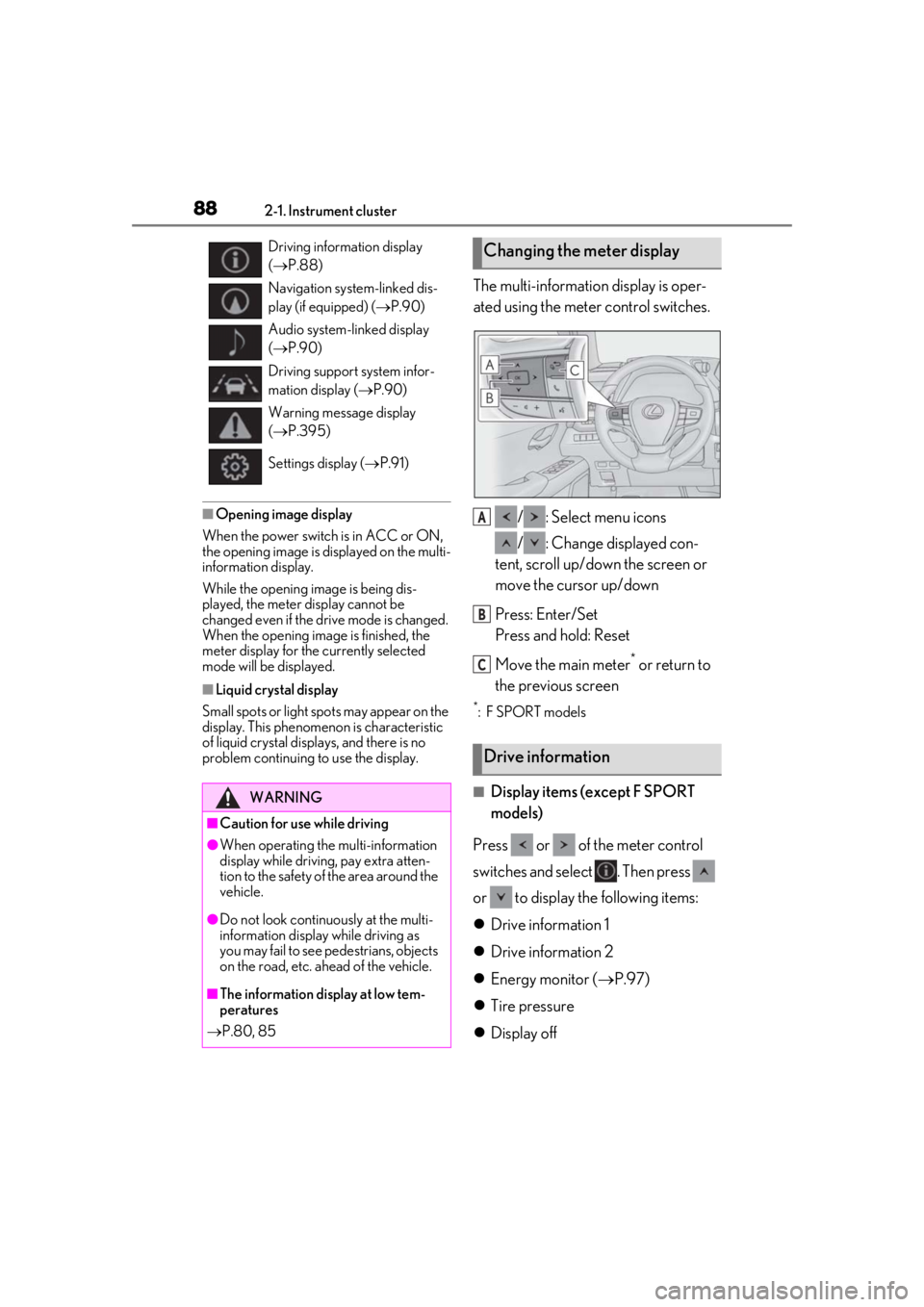
The multi-information display is oper-
ated using the meter control switches.
/ : Select menu icons
/ : Change displayed con-
tent, scroll up/down the screen or
move the cursor up/down
Press: Enter/Set
Press and hold: Reset
Move the main meter
* or return to
the previous screen
*: F SPORT models
■Display items (except F SPORT
models)
Press or of the meter control
switches and select . Then press
or to display the following items:
Drive information 1
Drive information 2
Energy monitor ( P.97)
Tire pressure
Display off
Driving information display
( P.88)
Navigation system-linked dis-
play (if equipped) ( P.90)
Audio system-linked display
( P.90)
Driving support system infor-
mation display ( P.90)
Warning message display
( P.395)
Settings display ( P.91)
WARNING
■Caution for use while driving
●When operating the multi-information
display while driving, pay extra atten-
tion to the safety of the area around the
vehicle.
●Do not look continuously at the multi-
information display while driving as
you may fail to see pedestrians, objects
on the road, etc. ahead of the vehicle.
■The information display at low tem-
peratures
P.80, 85
Changing the meter display
Drive information
A
B
C
Page 89 of 476
892-1. Instrument cluster
2
Vehicle status information and indicators
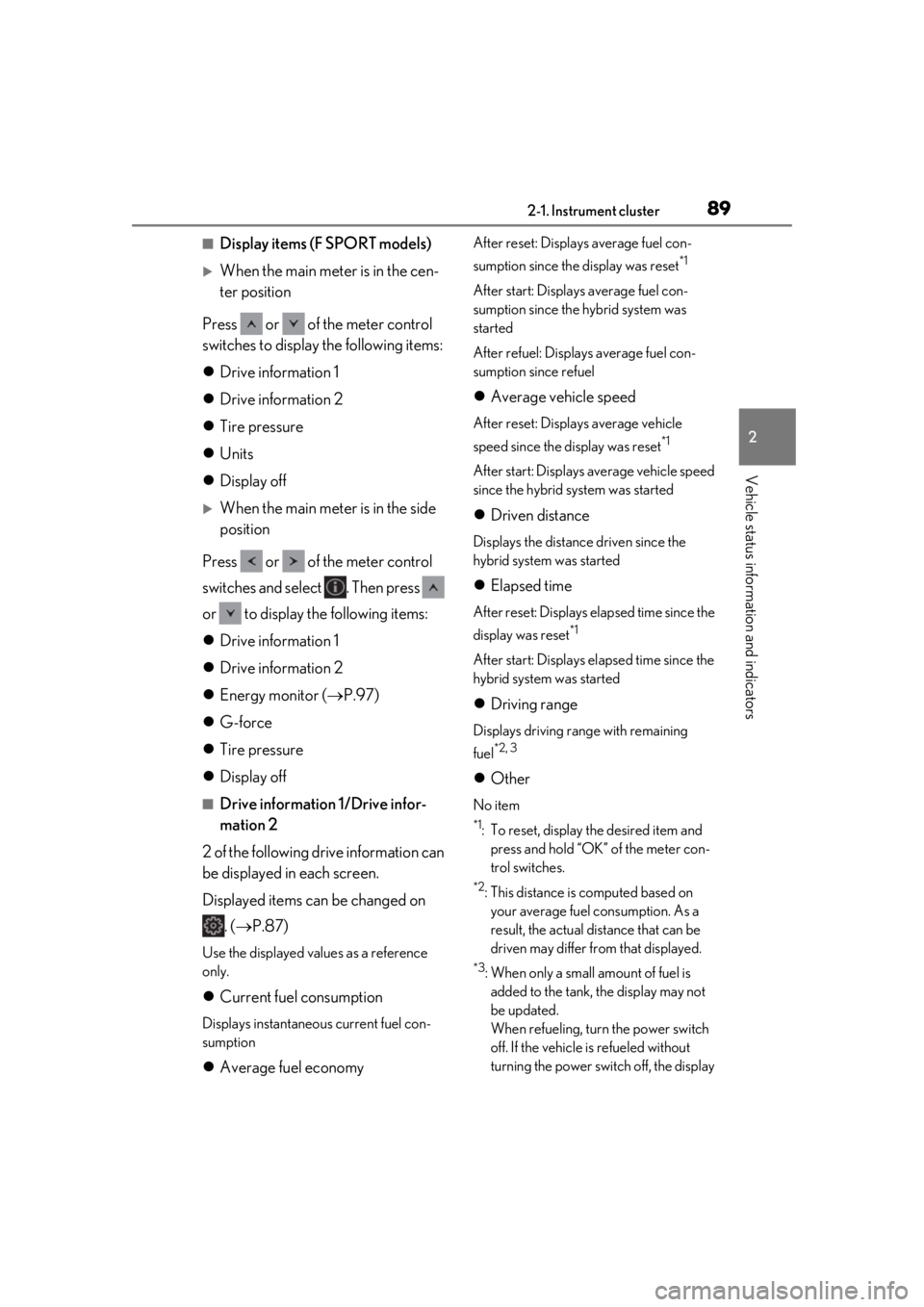
■Display items (F SPORT models)
When the main meter is in the cen-
ter position
Press or of the meter control
switches to display the following items:
Drive information 1
Drive information 2
Tire pressure
Units
Display off
When the main meter is in the side
position
Press or of the meter control
switches and select . Then press
or to display the following items:
Drive information 1
Drive information 2
Energy monitor ( P.97)
G-force
Tire pressure
Display off
■Drive information 1/Drive infor-
mation 2
2 of the following drive information can
be displayed in each screen.
Displayed items can be changed on . ( P.87)
Use the displayed values as a reference
only.
Current fuel consumption
Displays instantaneous current fuel con-
sumption
Average fuel economy
After reset: Displays average fuel con-
sumption since the display was reset
*1
After start: Displays average fuel con-
sumption since the hybrid system was
started
After refuel: Displays average fuel con-
sumption since refuel
Average vehicle speed
After reset: Displays average vehicle
speed since the display was reset
*1
After start: Displays average vehicle speed
since the hybrid system was started
Driven distance
Displays the distance driven since the
hybrid system was started
Elapsed time
After reset: Displays elapsed time since the
display was reset
*1
After start: Displays elapsed time since the
hybrid system was started
Driving range
Displays driving range with remaining
fuel
*2, 3
Other
No item
*1: To reset, display the desired item and
press and hold “OK” of the meter con-
trol switches.
*2: This distance is computed based on your average fuel consumption. As a
result, the actual distance that can be
driven may differ from that displayed.
*3: When only a small amount of fuel is added to the tank, the display may not
be updated.
When refueling, turn the power switch
off. If the vehicle is refueled without
turning the power switch off, the display
Page 92 of 476
922-1. Instrument cluster
Displays suggestions to the driver in
the following situations. To select a
response to a displayed suggestion,
use the meter control switches.
■Suggestion to enable the power
back door
If the power back door system is dis-
abled on of the multi-information
display ( P.87) and the power back
door switch on the instrument panel is
operated, a suggestion message will be
displayed asking if you wish to enable
the power back door system. To enable
the power back door system, select
“Yes”.
After enabling the power back door
system, press the power back door
switch again to open or close the
power back door.
■Suggestion to turn on the head-
lights
If the headlight switch is in other than
or position, and the vehicle
speed is 3 mph (5 km/h) or higher for
a certain amount of time when the sur-
roundings are dark, a suggestion mes-
sage will be displayed.
■Suggestion to turn off the head-
lights
If the headlights are left on for a certain
amount of time with the headlight
switch in or position after the
power switch has been turned off, a
suggestion message will be displayed
asking if you wish to turn the headlights off.
To turn the headlight
s off, select “Yes”.
If a front door is opened after the power
switch is turned off, this suggestion mes-
sage will not be displayed.
■Customization
Some functions can be customized.
( P.435)
Suggestion function
Page 93 of 476
932-1. Instrument cluster
2
Vehicle status information and indicators
*:If equipped
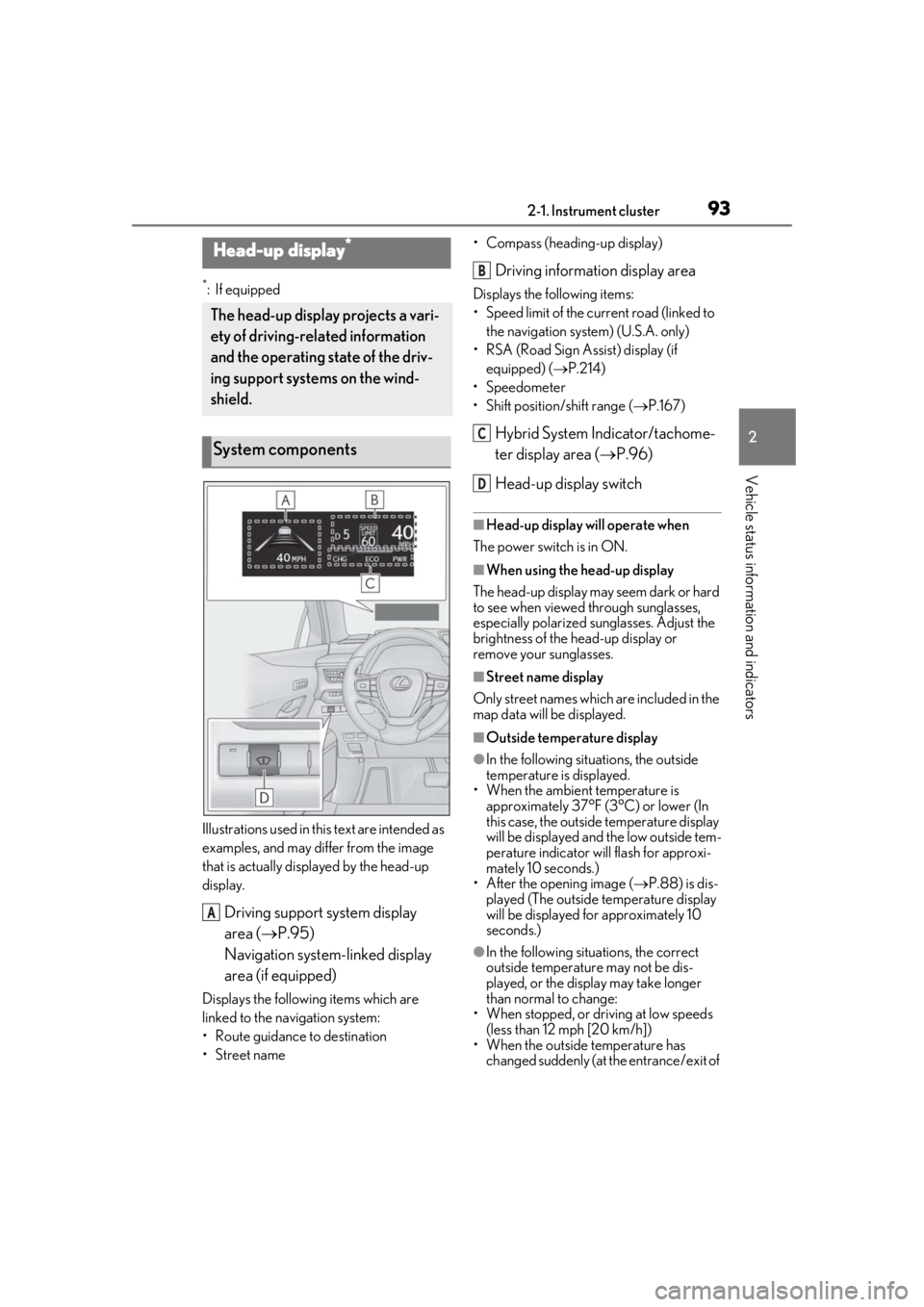
Illustrations used in this text are intended as
examples, and may differ from the image
that is actually disp layed by the head-up
display.
Driving support system display
area ( P.95)
Navigation system-linked display
area (if equipped)
Displays the following items which are
linked to the navigation system:
• Route guidance to destination
•Street name • Compass (heading-up display)
Driving information display area
Displays the following items:
• Speed limit of the current road (linked to
the navigation system) (U.S.A. only)
• RSA (Road Sign Assist) display (if equipped) ( P.214)
• Speedometer
• Shift position/shift range ( P.167)
Hybrid System Indicator/tachome-
ter display area ( P.96)
Head-up display switch
■Head-up display will operate when
The power switch is in ON.
■When using the head-up display
The head-up display may seem dark or hard
to see when viewed through sunglasses,
especially polarized su nglasses. Adjust the
brightness of the head-up display or
remove your sunglasses.
■Street name display
Only street names which are included in the
map data will be displayed.
■Outside temperature display
●In the following situations, the outside
temperature is displayed.
• When the ambient temperature is
approximately 37°F (3°C) or lower (In
this case, the outside temperature display
will be displayed and the low outside tem-
perature indicator will flash for approxi-
mately 10 seconds.)
• After the opening image ( P.88) is dis-
played (The outside temperature display
will be displayed for approximately 10
seconds.)
●In the following situations, the correct
outside temperature may not be dis-
played, or the display may take longer
than normal to change:
• When stopped, or driving at low speeds (less than 12 mph [20 km/h])
• When the outside temperature has changed suddenly (at the entrance/exit of
Head-up display*
The head-up display projects a vari-
ety of driving-related information
and the operating state of the driv-
ing support systems on the wind-
shield.
System components
A
B
C
D
Page 95 of 476
952-1. Instrument cluster
2
Vehicle status information and indicators
Display angle
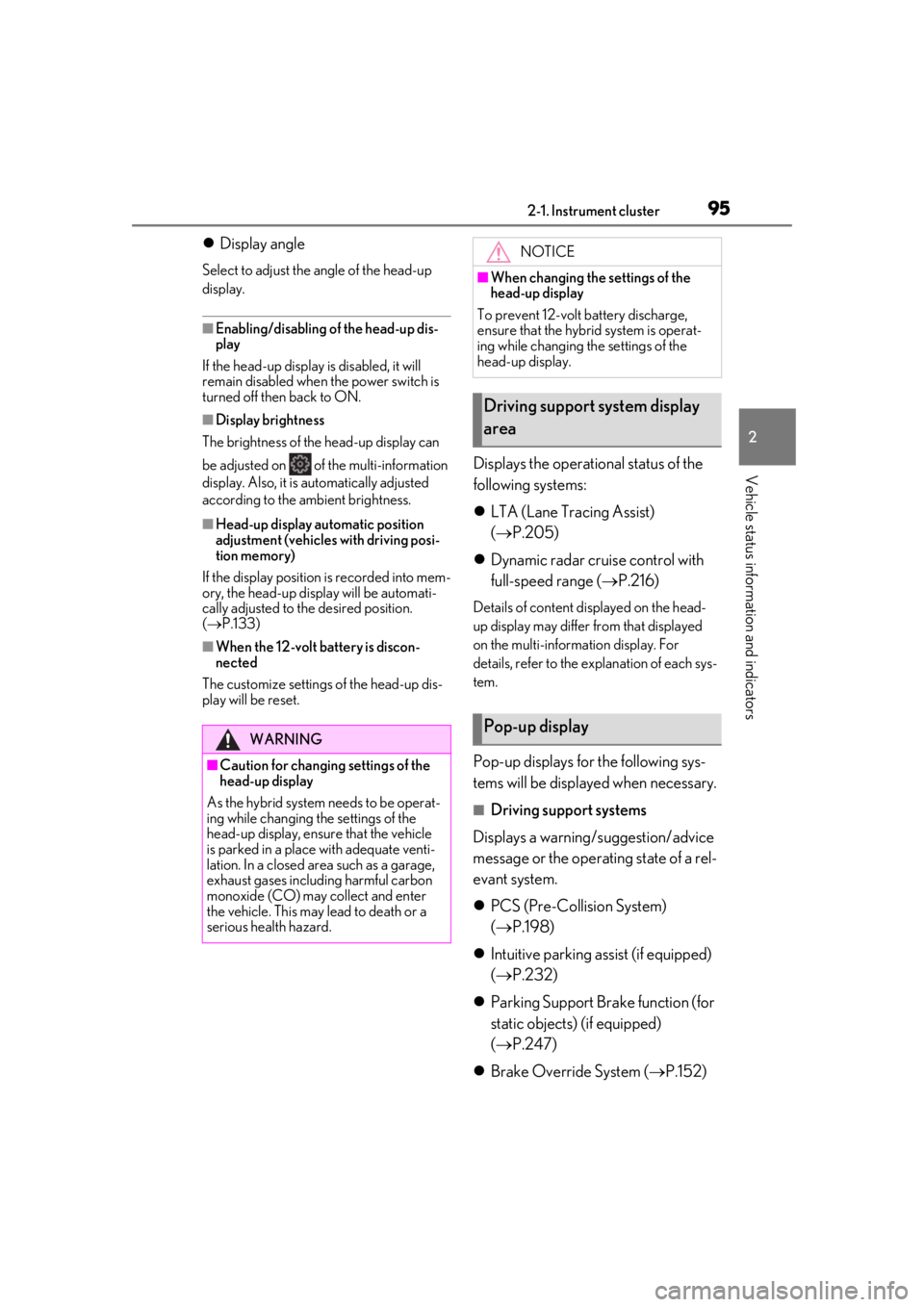
Select to adjust the angle of the head-up
display.
■Enabling/disabling of the head-up dis-
play
If the head-up display is disabled, it will
remain disabled when the power switch is
turned off then back to ON.
■Display brightness
The brightness of the head-up display can
be adjusted on of the multi-information
display. Also, it is automatically adjusted
according to the ambient brightness.
■Head-up display automatic position
adjustment (vehicles with driving posi-
tion memory)
If the display position is recorded into mem-
ory, the head-up display will be automati-
cally adjusted to the desired position.
( P.133)
■When the 12-volt battery is discon-
nected
The customize settings of the head-up dis-
play will be reset.
Displays the operational status of the
following systems:
LTA (Lane Tracing Assist)
( P.205)
Dynamic radar cruise control with
full-speed range ( P.216)
Details of content displayed on the head-
up display may differ from that displayed
on the multi-inform ation display. For
details, refer to the explanation of each sys-
tem.
Pop-up displays for the following sys-
tems will be displayed when necessary.
■Driving support systems
Displays a warning/suggestion/advice
message or the operating state of a rel-
evant system.
PCS (Pre-Collision System)
( P.198)
Intuitive parking assist (if equipped)
( P.232)
Parking Support Brake function (for
static objects) (if equipped)
( P.247)
Brake Override System ( P.152)
WARNING
■Caution for changing settings of the
head-up display
As the hybrid system needs to be operat-
ing while changing th e settings of the
head-up display, ensure that the vehicle
is parked in a place with adequate venti-
lation. In a closed area such as a garage,
exhaust gases including harmful carbon
monoxide (CO) may collect and enter
the vehicle. This may lead to death or a
serious health hazard.
NOTICE
■When changing the settings of the
head-up display
To prevent 12-volt battery discharge,
ensure that the hybrid system is operat-
ing while changing th e settings of the
head-up display.
Driving support system display
area
Pop-up display
Page 96 of 476
962-1. Instrument cluster
Drive-Start Control ( P.153)
Details of content di splayed on the head-
up display may differ from that displayed
on the multi-information display. For
details, refer to the explanation of each sys-
tem.
■/ icons
These icons are linked to the multi-
information display
: Master warning icon
Displayed when a warning message is dis-
played on the multi-information display.
( P.395)
: Information icon
Displayed when a suggestion pop-up dis-
play ( P.92) or advice pop-up display is
displayed on the multi-information display.
■Warning message
Some warning messages are displayed
when necessary, according to certain
conditions.
Details of content di splayed on the head-
up display may differ from that displayed
on the multi-information display.
■Audio system operation status
Displayed when an audio remote con-
trol switch on the steering wheel is
operated.
■Hands-free system status
Displayed when the hands-free system
is operated.
■When a pop-up display is displayed
When a pop-up display is displayed, a cur-
rent display may no longer be displayed. In
this case, the display will return after the
pop-up display disappears.
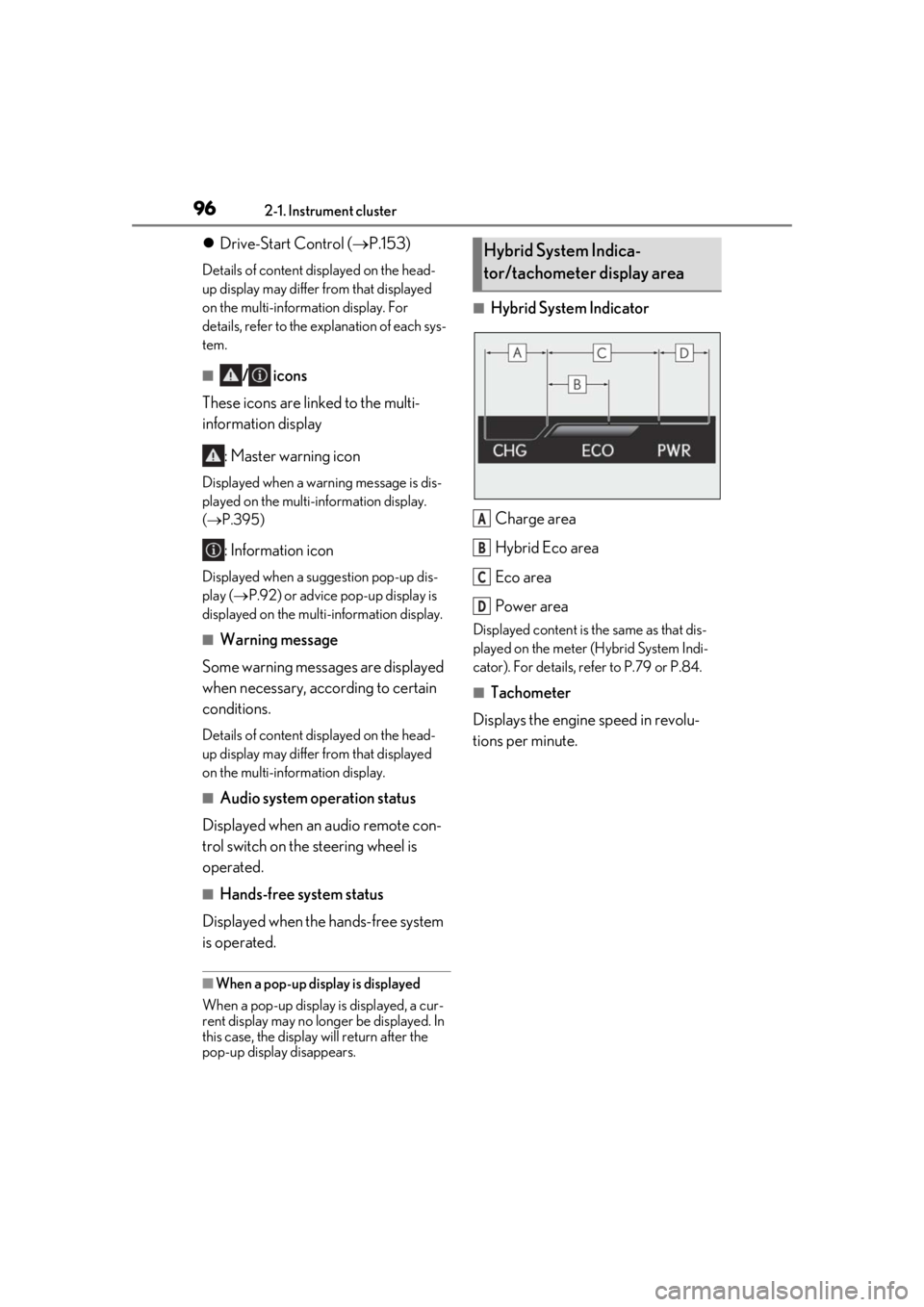
■Hybrid System Indicator
Charge area
Hybrid Eco area
Eco area
Power area
Displayed content is th e same as that dis-
played on the meter (Hybrid System Indi-
cator). For details, refe r to P.79 or P.84.
■Tachometer
Displays the engine speed in revolu-
tions per minute.
Hybrid System Indica-
tor/tachometer display area
A
B
C
D
Page 98 of 476
982-1. Instrument cluster
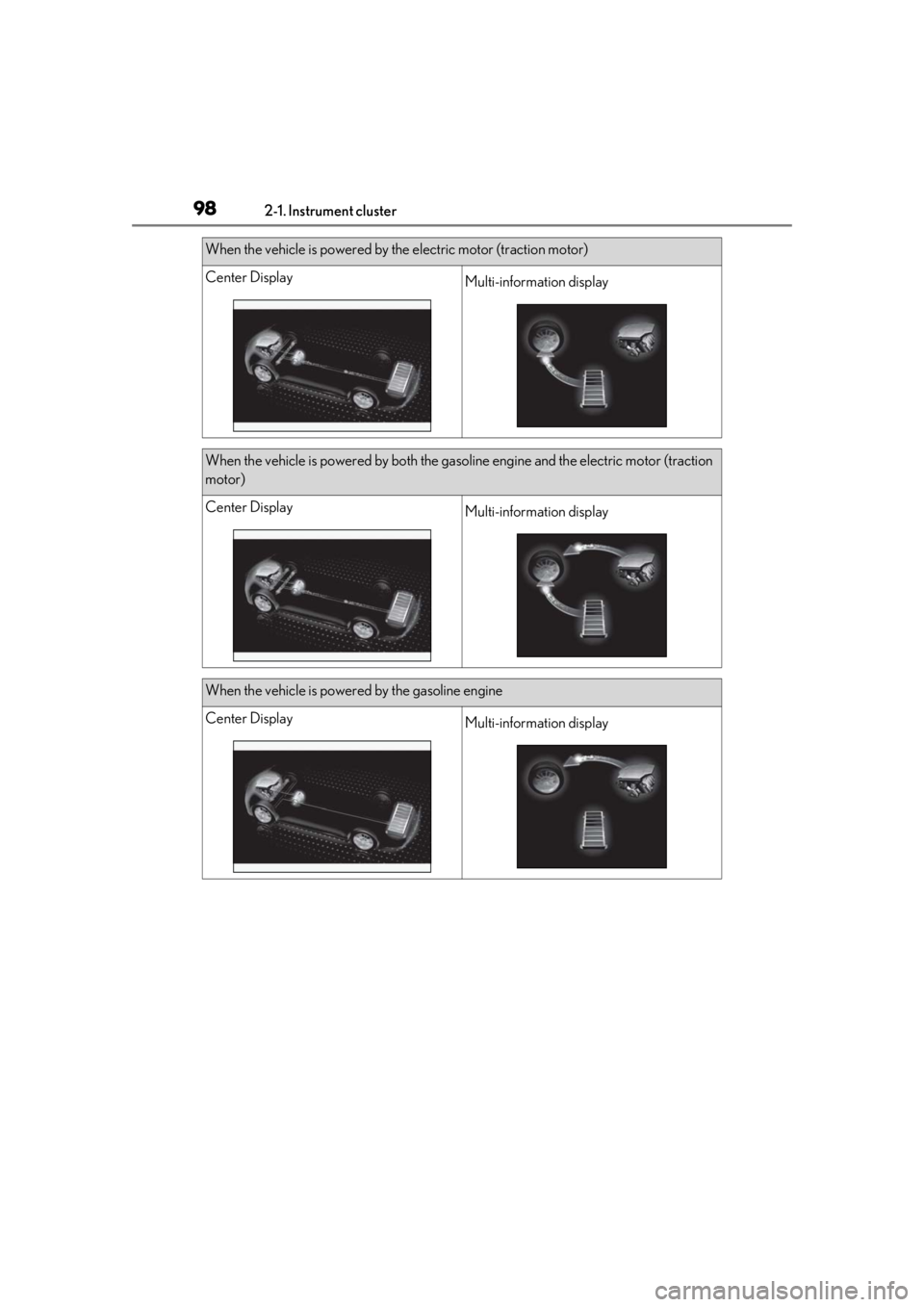
When the vehicle is powered by the electric motor (traction motor)
Center DisplayMulti-information display
When the vehicle is powered by both the gasoline engine and the electric motor (traction
motor)
Center DisplayMulti-information display
When the vehicle is powered by the gasoline engine
Center DisplayMulti-information display
Page 100 of 476
1002-1. Instrument cluster
High
Multi-information displayLow
High
These images are examples only, and may
vary slightly from actual conditions.
Press the “MENU” button on the
Remote Touch, and then select on
the screen.
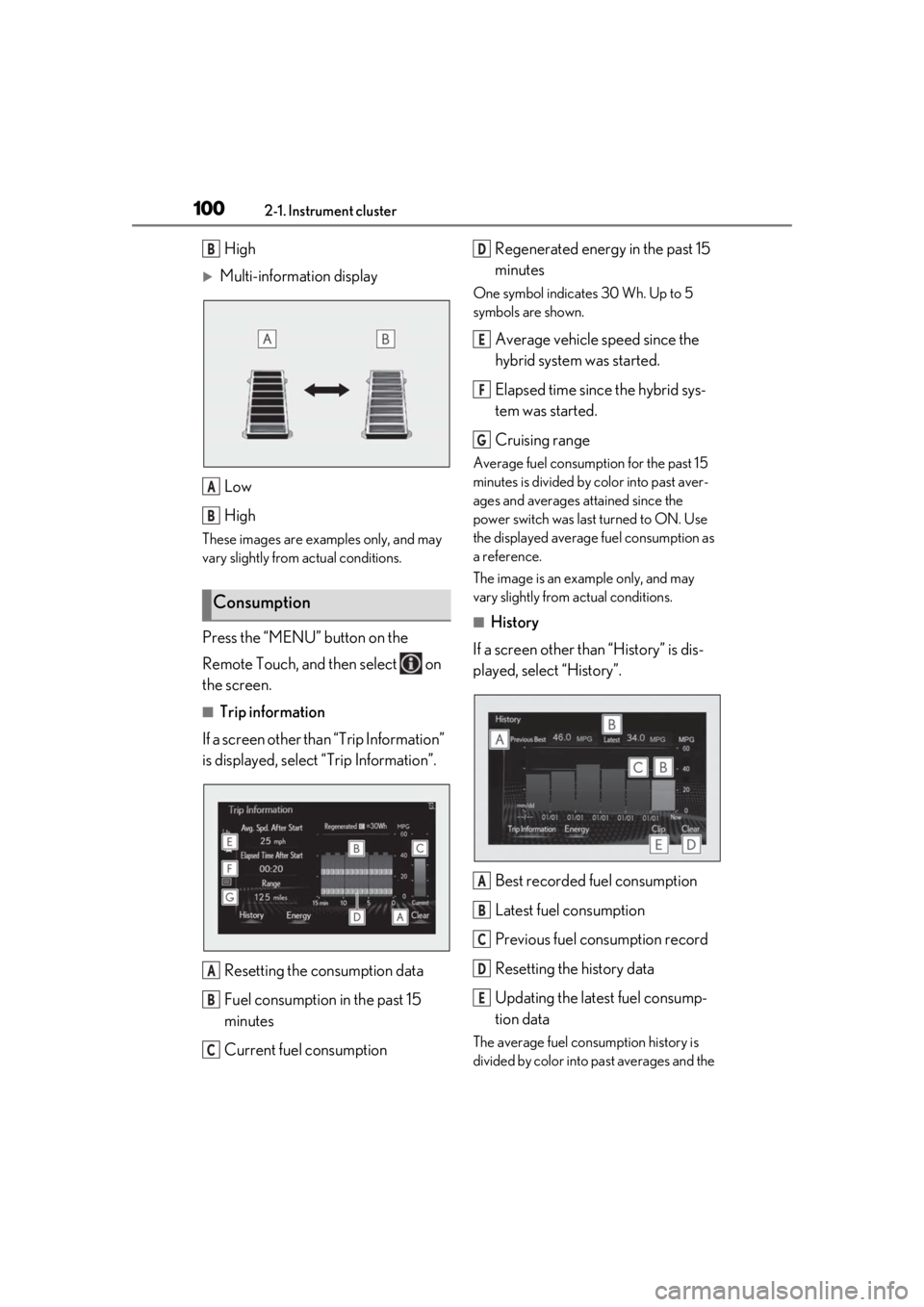
■Trip information
If a screen other than “Trip Information”
is displayed, select “Trip Information”.
Resetting the consumption data
Fuel consumption in the past 15
minutes
Current fuel consumption Regenerated energy in the past 15
minutes
One symbol indicates 30 Wh. Up to 5
symbols are shown.
Average vehicle speed since the
hybrid system was started.
Elapsed time since the hybrid sys-
tem was started.
Cruising range
Average fuel consumption for the past 15
minutes is divided by color into past aver-
ages and averages attained since the
power switch was last turned to ON. Use
the displayed average fuel consumption as
a reference.
The image is an example only, and may
vary slightly from actual conditions.
■History
If a screen other than “History” is dis-
played, select “History”.
Best recorded fuel consumption
Latest fuel consumption
Previous fuel consumption record
Resetting the history data
Updating the latest fuel consump-
tion data
The average fuel consumption history is
divided by color into past averages and the
Consumption
B
A
B
A
B
C
D
E
F
G
A
B
C
D
E
Page 103 of 476
103
3
3
Before driving
Before driving
3-1. Key informationKeys ................................................. 104
3-2. Opening, closing and locking the doors
Side doors ..................................... 108
Back door ....................................... 112
Smart access system with push- button start ................................. 124
3-3. Adjusting the seats Front seats ...................................... 131
Rear seats ...................................... 132
Driving position memory ........ 133
Head restraints............................ 136
3-4. Adjusting the steering wheel and mirrors
Steering wheel............................. 139
Inside rear view mirror............. 140
Outside rear view mirrors ...... 142
3-5. Opening, closing the windows and moon roof
Power windows........................... 145
Moon roof ..................................... 147
Page 106 of 476
1063-1. Key information
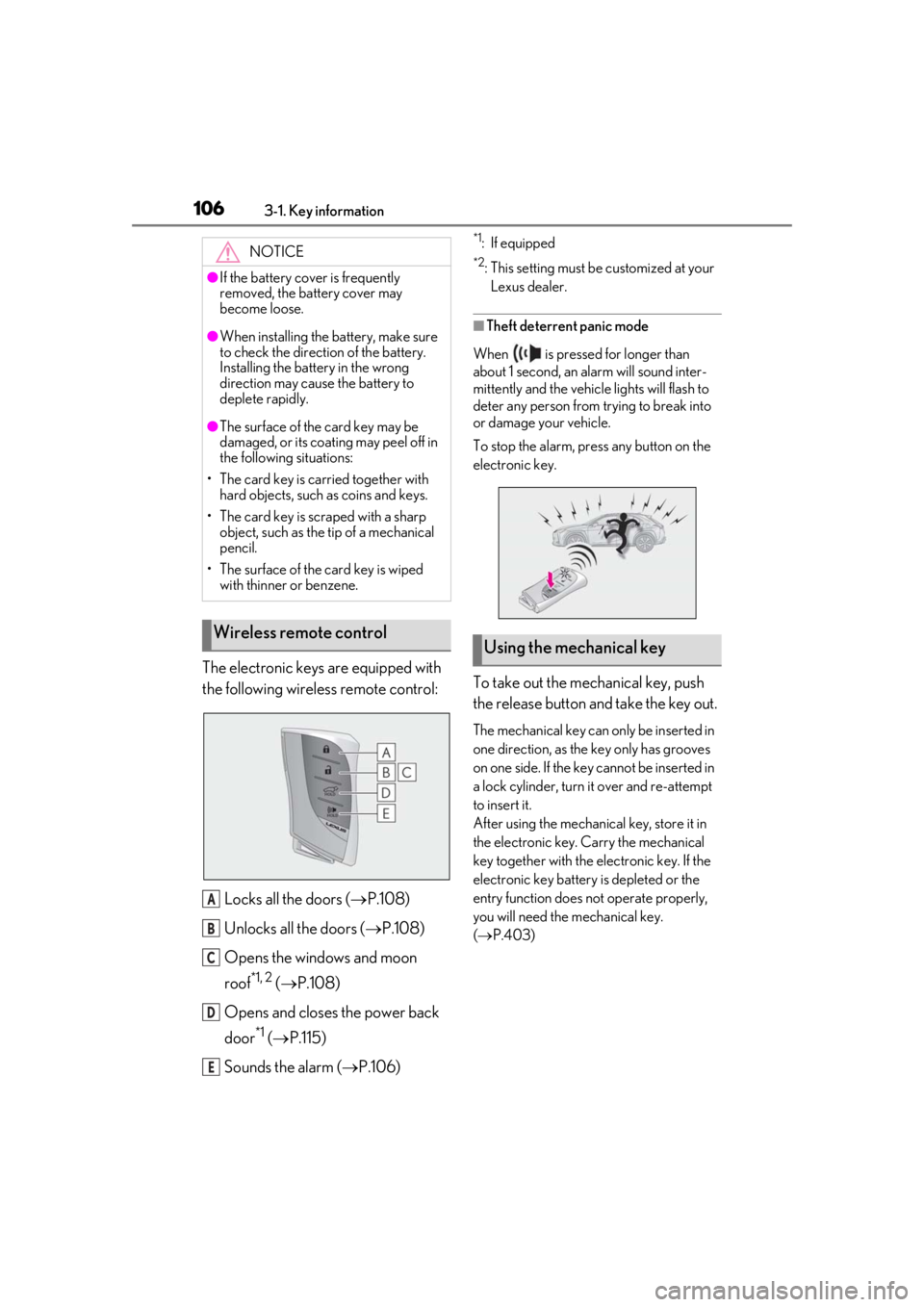
The electronic keys are equipped with
the following wireless remote control:Locks all the doors ( P.108)
Unlocks all the doors ( P.108)
Opens the windows and moon
roof
*1, 2 ( P.108)
Opens and closes the power back
door
*1 ( P.115)
Sounds the alarm ( P.106)
*1: If equipped
*2: This setting must be customized at your
Lexus dealer.
■Theft deterrent panic mode
When is pressed for longer than
about 1 second, an alarm will sound inter-
mittently and the vehicle lights will flash to
deter any person from trying to break into
or damage your vehicle.
To stop the alarm, press any button on the
electronic key.
To take out the mechanical key, push
the release button and take the key out.
The mechanical key can only be inserted in
one direction, as the key only has grooves
on one side. If the key cannot be inserted in
a lock cylinder, turn it over and re-attempt
to insert it.
After using the mechanical key, store it in
the electronic key. Carry the mechanical
key together with the electronic key. If the
electronic key battery is depleted or the
entry function does not operate properly,
you will need the mechanical key.
( P.403)
NOTICE
●If the battery cover is frequently
removed, the battery cover may
become loose.
●When installing the ba
ttery, make sure
to check the direction of the battery.
Installing the battery in the wrong
direction may cause the battery to
deplete rapidly.
●The surface of the card key may be
damaged, or its coating may peel off in
the following situations:
• The card key is carried together with hard objects, such as coins and keys.
• The card key is scraped with a sharp object, such as the tip of a mechanical
pencil.
• The surface of the card key is wiped with thinner or benzene.
Wireless remote control
A
B
C
D
E
Using the mechanical key