headlights LEXUS UX250H 2019 Owners Manual
[x] Cancel search | Manufacturer: LEXUS, Model Year: 2019, Model line: UX250H, Model: LEXUS UX250H 2019Pages: 476, PDF Size: 10.51 MB
Page 12 of 476
12Pictorial index
Pictorial index
■Exterior
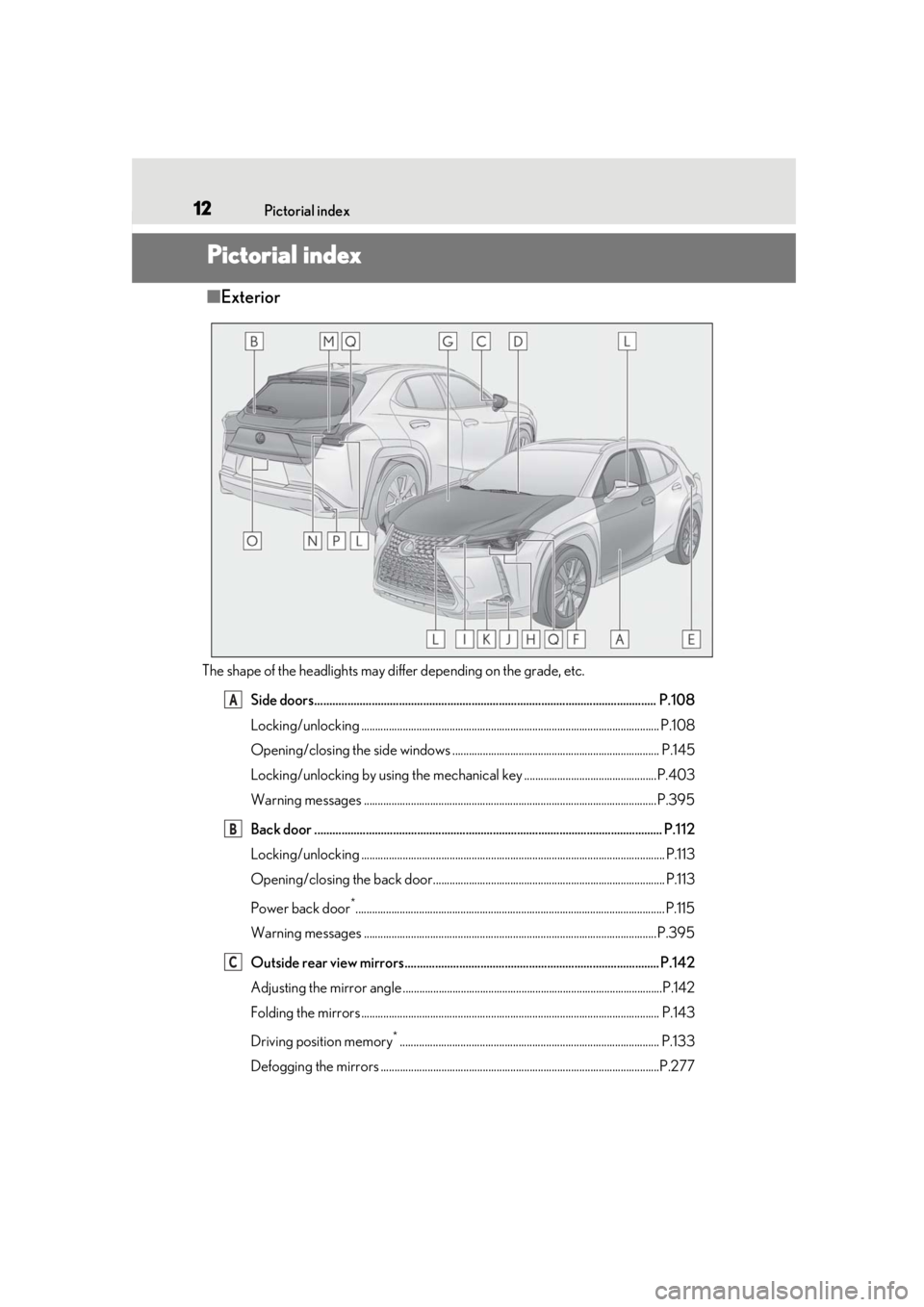
The shape of the headlights may differ depending on the grade, etc.
Side doors................................................................................................................. P.108
Locking/unlocking ............................................................................................................ P. 108
Opening/closing the side windows ........................................................................... P.145
Locking/unlocking by using th e mechanical key ................................................P.403
Warning messages ..........................................................................................................P.395
Back door ................................................................................................................... P.1 12
Locking/unlocking .............................................................................................................. P.113
Opening/closing the back door.................................................................................... P.113
Power back door
*................................................................................................................ P.115
Warning messages ..........................................................................................................P.395
Outside rear view mirrors.................................................................................... P.142
Adjusting the mirror angle ..............................................................................................P.142
Folding the mirrors ............................................................................................................ P.143
Driving position memory
*.............................................................................................. P.133
Defogging the mirrors .....................................................................................................P.277
A
B
C
Page 13 of 476
13Pictorial index
Windshield wipers ..................................................................................................P.184
Precautions against winter season ............................................................................ P.263
To prevent freezing (windshield wiper de-icer)
*.................................................. P.281
Precautions against car wash (r ain-sensing windshield wipers)
*................. P.323
Fuel filler door ..........................................................................................................P.190
Refueling method .............................................................................................................. P .190
Fuel type/fuel tank capacity ......... ..................................................................................P.417
Tires.......................................................................................................................... ..P.345
Tire size/inflation pressure ........................................................................................... P.422
Winter tires/tire chain .................................................................................................... P.26 3
Checking/rotation/tire pressure warning system.............................................. P.345
Coping with flat tires........................................................................................................ P .399
Hood ......................................................................................................................... P. 335
Opening ........................................................................................................................ .......P.335
Engine oil ..................................................................................................................... .......... P.418
Coping with overheat ...................................................................................................... P.410
Warning messages ..........................................................................................................P.395
Headlights ................................................................................................................. P.17 7
Parking lights/daytime running lights............................................................... P.177
Fog lights
*..................................................................................................................P.183
Cornering lights
*..................................................................................................... P.179
Turn signal lights ....................................................................................................... P.171
Tail lights/stop lights............................................................................................... P.177
Stop lights
License plate lights ................................................................................................. P.177
Back-up lights
Shifting the shift lever to R ...............................................................................................P.1 67
Light bulbs of the exterior lights for driving
(Replacing method: P.374, Watts: P.422)
D
E
F
G
H
I
J
K
L
M
N
O
P
Page 16 of 476
16Pictorial index
When the warning messages are displayed..........................................................P.395
Parking brake switch ............................................................................................. P.172
Applying/releasing ............................................................................................................ P.172
Precautions against winter season ................... ......................................................... P.264
Warning buzzer/message................................................................................ P.387, 395
Turn signal lever ....................................................................................................... P.171
Headlight switch...................................................................................................... P.177
Headlights/parking lights/tail lights/license plate lights/
daytime running lights ....................................................................................................... P. 177
Automatic High Beam ..................................................................................................... P.180
Fog lights
*1............................................................................................................................ P.1 83
Windshield wiper and washer switch ................................................................P.184
Rear window wiper and washer switch ........................................................... P.188
Usage.......................................................................................................................... ..P.184, 188
Adding washer fluid .......................................................................................................... P. 341
Headlight cleaners
*1......................................................................................................... P.184
Warning messages ..........................................................................................................P.395
Emergency flasher switch ...................................................................................P.378
Hood lock release lever ...................................................................................... P.335
Tilt and telescopic steering control switch
*1................................................... P.139
Adjustment ..................................................................................................................... ...... P.139
Driving position memory
*1............................................................................................. P.133
Tilt and telescopic steeri ng lock release lever
*1............................................ P.139
Adjustment ..................................................................................................................... ...... P.139
Air conditioning system ....................................................................................... P.276
Usage.......................................................................................................................... ........... P.276
Rear window defogger....................................................................................................P.277
Audio system
*2
*1
: If equipped
*2: Refer to “NAVIGATION AND MULTIMEDIA SYSTEM OWNER’S MANUAL”.
E
F
G
H
I
J
K
L
M
Page 92 of 476
922-1. Instrument cluster
Displays suggestions to the driver in
the following situations. To select a
response to a displayed suggestion,
use the meter control switches.
■Suggestion to enable the power
back door
If the power back door system is dis-
abled on of the multi-information
display ( P.87) and the power back
door switch on the instrument panel is
operated, a suggestion message will be
displayed asking if you wish to enable
the power back door system. To enable
the power back door system, select
“Yes”.
After enabling the power back door
system, press the power back door
switch again to open or close the
power back door.
■Suggestion to turn on the head-
lights
If the headlight switch is in other than
or position, and the vehicle
speed is 3 mph (5 km/h) or higher for
a certain amount of time when the sur-
roundings are dark, a suggestion mes-
sage will be displayed.
■Suggestion to turn off the head-
lights
If the headlights are left on for a certain
amount of time with the headlight
switch in or position after the
power switch has been turned off, a
suggestion message will be displayed
asking if you wish to turn the headlights off.
To turn the headlight
s off, select “Yes”.
If a front door is opened after the power
switch is turned off, this suggestion mes-
sage will not be displayed.
■Customization
Some functions can be customized.
( P.435)
Suggestion function
Page 140 of 476
1403-4. Adjusting the steering wheel and mirrors
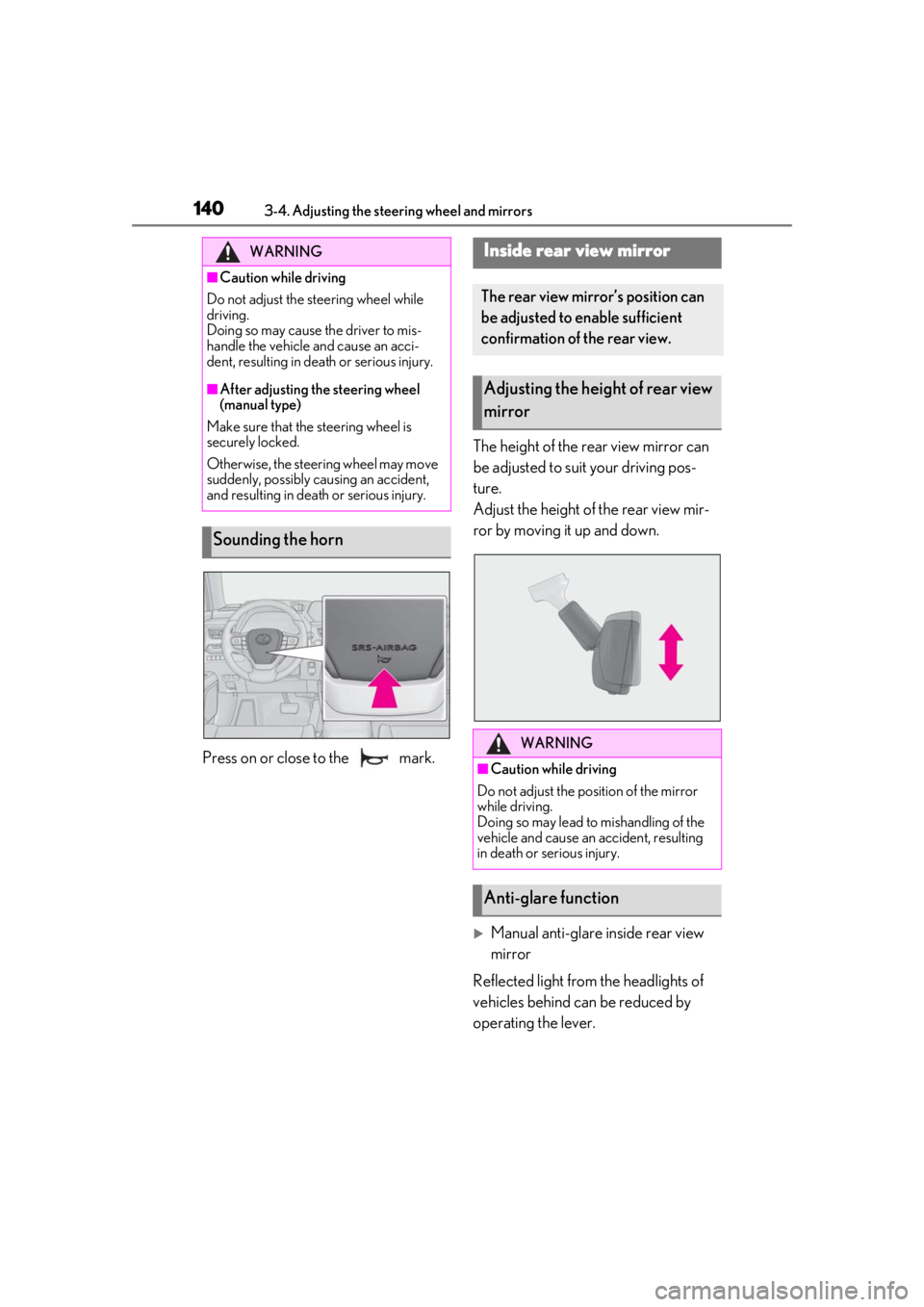
Press on or close to the mark.The height of the rear view mirror can
be adjusted to suit your driving pos-
ture.
Adjust the height of the rear view mir-
ror by moving it up and down.
Manual anti-glare inside rear view
mirror
Reflected light from the headlights of
vehicles behind can be reduced by
operating the lever.
WARNING
■Caution while driving
Do not adjust the steering wheel while
driving.
Doing so may cause the driver to mis-
handle the vehicle and cause an acci-
dent, resulting in death or serious injury.
■After adjusting the steering wheel
(manual type)
Make sure that the steering wheel is
securely locked.
Otherwise, the steering wheel may move
suddenly, possibly causing an accident,
and resulting in death or serious injury.
Sounding the horn
Inside rear view mirror
The rear view mirror’s position can
be adjusted to enable sufficient
confirmation of the rear view.
Adjusting the heig ht of rear view
mirror
WARNING
■Caution while driving
Do not adjust the position of the mirror
while driving.
Doing so may lead to mishandling of the
vehicle and cause an accident, resulting
in death or serious injury.
Anti-glare function
Page 141 of 476
1413-4. Adjusting the steering wheel and mirrors
3
Before driving
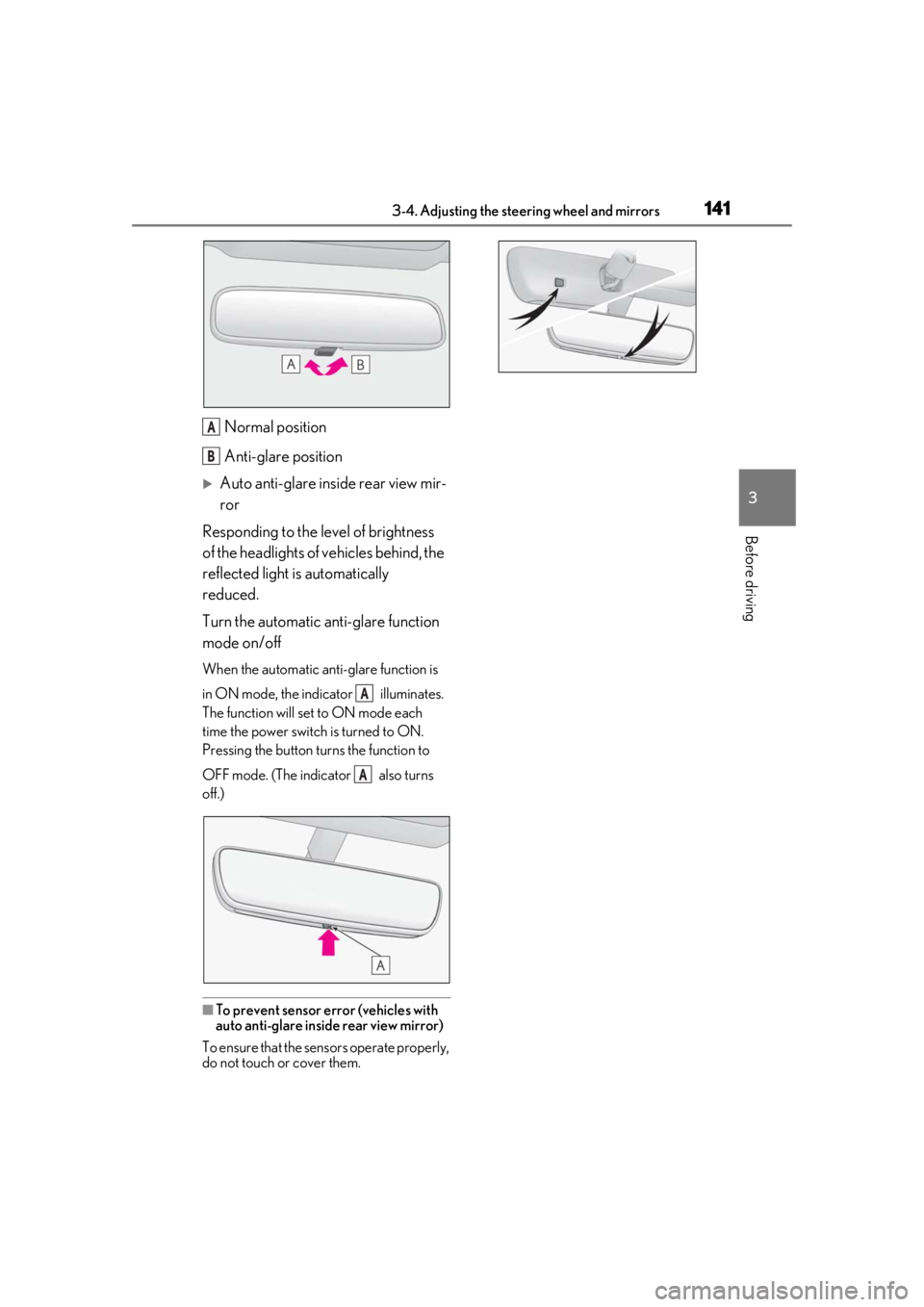
Normal position
Anti-glare position
Auto anti-glare inside rear view mir-
ror
Responding to the level of brightness
of the headlights of vehicles behind, the
reflected light is automatically
reduced.
Turn the automatic anti-glare function
mode on/off
When the automatic anti-glare function is
in ON mode, the indicator illuminates.
The function will set to ON mode each
time the power switch is turned to ON.
Pressing the button turns the function to
OFF mode. (The indicator also turns
off.)
■To prevent sensor error (vehicles with
auto anti-glare inside rear view mirror)
To ensure that the sensors operate properly,
do not touch or cover them.
A
B
A
A
Page 177 of 476
1774-3. Operating the lights and wipers
4
Driving
4-3.Operating the lights and wipers
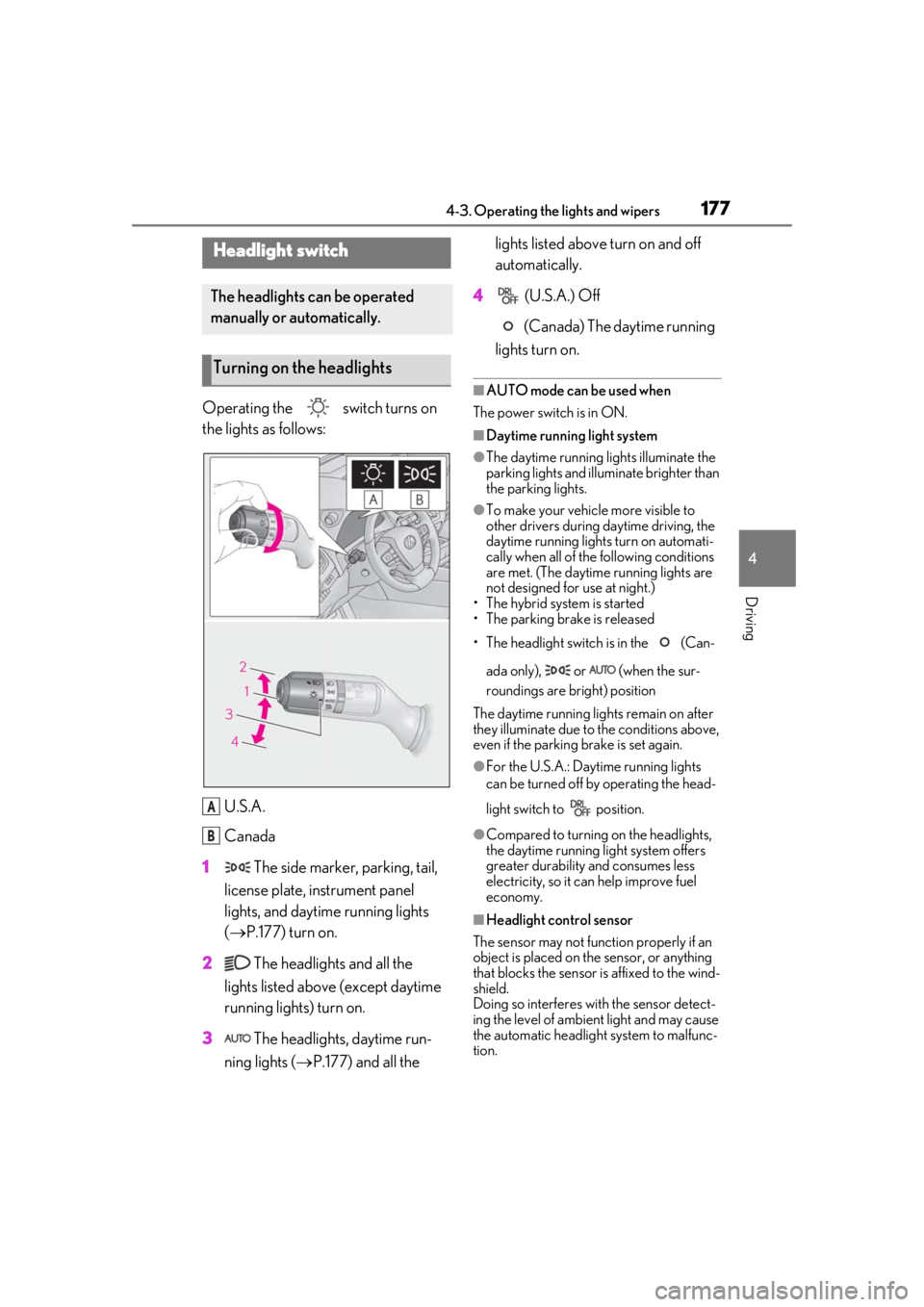
Operating the switch turns on
the lights as follows:U.S.A.
Canada
1 The side marker, parking, tail,
license plate, instrument panel
lights, and daytime running lights
( P.177) turn on.
2 The headlights and all the
lights listed above (except daytime
running lights) turn on.
3 The headlights, daytime run-
ning lights ( P.177) and all the lights listed above turn on and off
automatically.
4 (U.S.A.) Off
(Canada) The daytime running
lights turn on.
■AUTO mode can be used when
The power switch is in ON.
■Daytime running light system
●The daytime running lights illuminate the
parking lights and illuminate brighter than
the parking lights.
●To make your vehicle more visible to
other drivers during daytime driving, the
daytime running lights turn on automati-
cally when all of the following conditions
are met. (The daytime running lights are
not designed for use at night.)
• The hybrid system is started
• The parking brake is released
• The headlight switch is in the (Can-
ada only), or (when the sur-
roundings are bright) position
The daytime running lights remain on after
they illuminate due to the conditions above,
even if the parking brake is set again.
●For the U.S.A.: Daytime running lights
can be turned off by operating the head-
light switch to position.
●Compared to turning on the headlights,
the daytime running light system offers
greater durability and consumes less
electricity, so it can help improve fuel
economy.
■Headlight control sensor
The sensor may not function properly if an
object is placed on the sensor, or anything
that blocks the sensor is affixed to the wind-
shield.
Doing so interferes with the sensor detect-
ing the level of ambien t light and may cause
the automatic headlight system to malfunc-
tion.
Headlight switch
The headlights can be operated
manually or automatically.
Turning on the headlights
A
B
Page 178 of 476
1784-3. Operating the lights and wipers
■Automatic light off system
●When the headlights come on: The head-
lights and tail lights turn off 30 seconds
after a driver’s door is opened and closed
if the power switch is turned to ACC or
OFF. (The lights turn off immediately if on the key is pressed after all the
doors are locked.)
●When only the tail lights come on: The tail
lights turn off automatically if the power
switch is turned to ACC or OFF. and the
driver’s door is opened.
To turn the lights on again, turn the power
switch to ON, or turn the light switch off
once and then back to or .
■Automatic headlight leveling system (if
equipped)
The level of the headlights is automatically
adjusted according to the number of pas-
sengers and the loading condition of the
vehicle to ensure that the headlights do not
interfere with other road users.
■Windshield wiper linked headlight illu-
mination
When driving during daytime with the
headlight switch turned to position, if
the windshield wipers are used, the head-
lights will turn on auto matically after several
seconds to help enha nce the visibility of
your vehicle.
■12-volt battery-saving function
In order to prevent the 12-volt battery of the
vehicle from discharging, if the headlights
and/or tail lights are on when the power
switch is turned off the 12-volt battery sav-
ing function will operate and automatically
turn off all the lights after approximately 20 minutes. When the power switch is turned
to ON, the 12-volt battery-saving function
will be disabled.
When any of the following are performed,
the 12-volt battery-saving function is can-
celed once and then reactivated. All the
lights will turn off automatically 20 minutes
after the 12-volt battery-saving function has
been reactivated:
●When the headlight switch is operated
●When a door is opened or closed
■Welcome light illumination control
The parking and tail lights automatically
turn on at night when the doors are
unlocked using the entry function or wire-
less remote control if the light switch is in
the position.
■Customization
Settings (e.g. light sensor sensitivity) can be
changed. (Customizable features:
P.440)
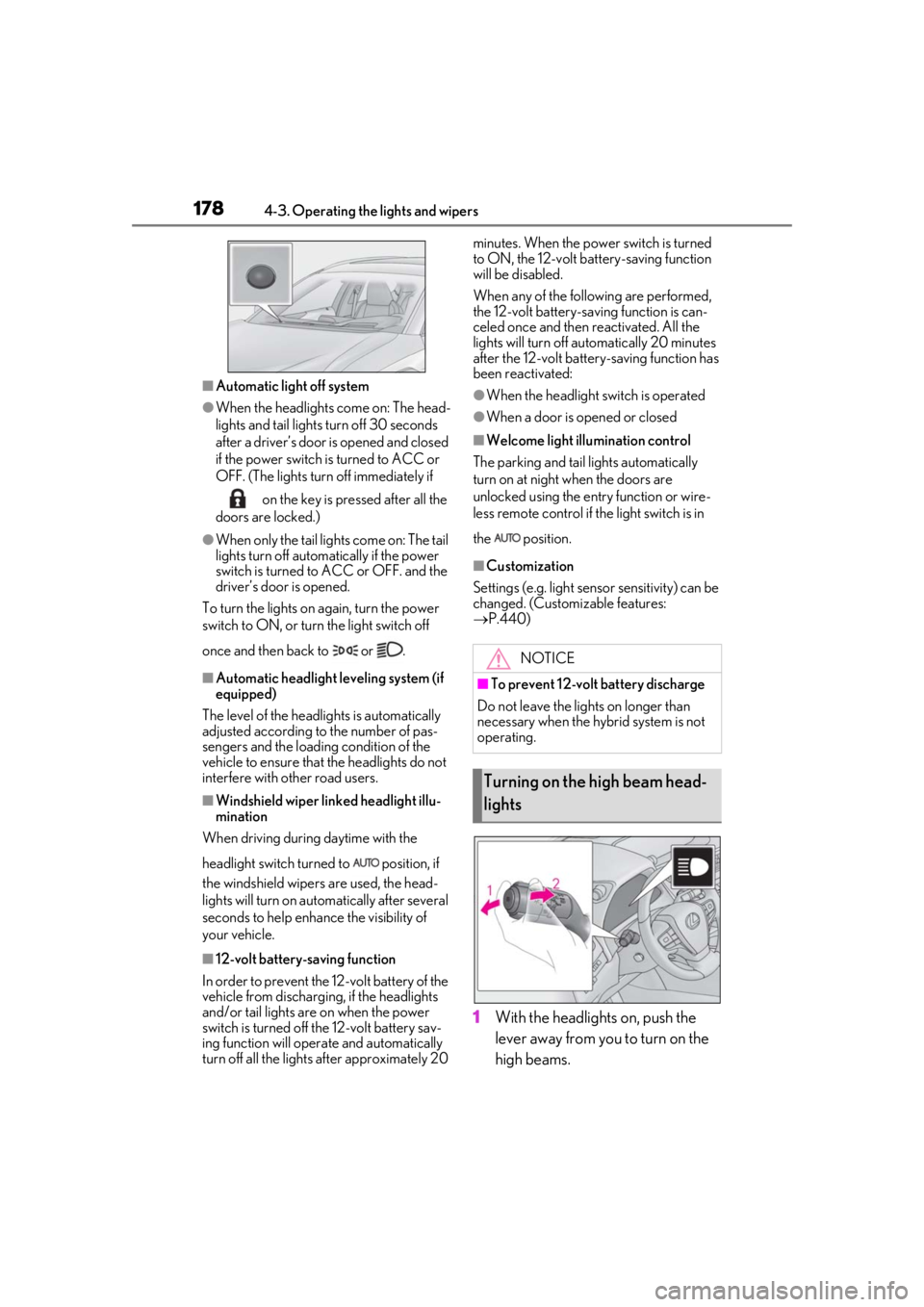
1With the headlights on, push the
lever away from you to turn on the
high beams.
NOTICE
■To prevent 12-volt battery discharge
Do not leave the lights on longer than
necessary when the hybrid system is not
operating.
Turning on the high beam head-
lights
Page 179 of 476
1794-3. Operating the lights and wipers
4
Driving
Pull the lever toward you to the center
position to turn the high beams off.
2Pull the lever toward you and
release it to flash the high beams
once.
You can flash the high beams with the
headlights on or off.
AFS (Adaptive Front-lighting System)
secures excellent visibility at intersec-
tions and on curves by automatically
adjusting the direction of the light axis
of the headlights according to vehicle
speed and the degree of the tire’s angle
as controlled by steering input.
AFS operates at speed s of approximately
6 mph (10 km/h) or higher.
■Customization
Some functions can be customized.
( P.440)
When any of the following conditions is
met, while the headlights (low beam)
are on, the cornering lights will addi-
tionally turn on and light up the direc-
tion of movement for the vehicle. This is
to ensure excellent visibility when
either driving at intersections or park-
ing at night.
The steering wheel is operated
The turn signal lever is operated
The shift lever is in R (both left and
right side cornering lights)
■Cornering light control
●The lights illuminate when the vehicle
speed is approximately 19 mph (30
km/h) or less. However, the lights turn off
when the vehicle speed increases to
approximately 22 mph (35 km/h) or
more.
●After the lights remain illuminated for 30
minutes, they automatically turn off.
AFS (Adaptive Front-lighting
System) (if equipped)
Cornering lights (if equipped)
Page 180 of 476
1804-3. Operating the lights and wipers
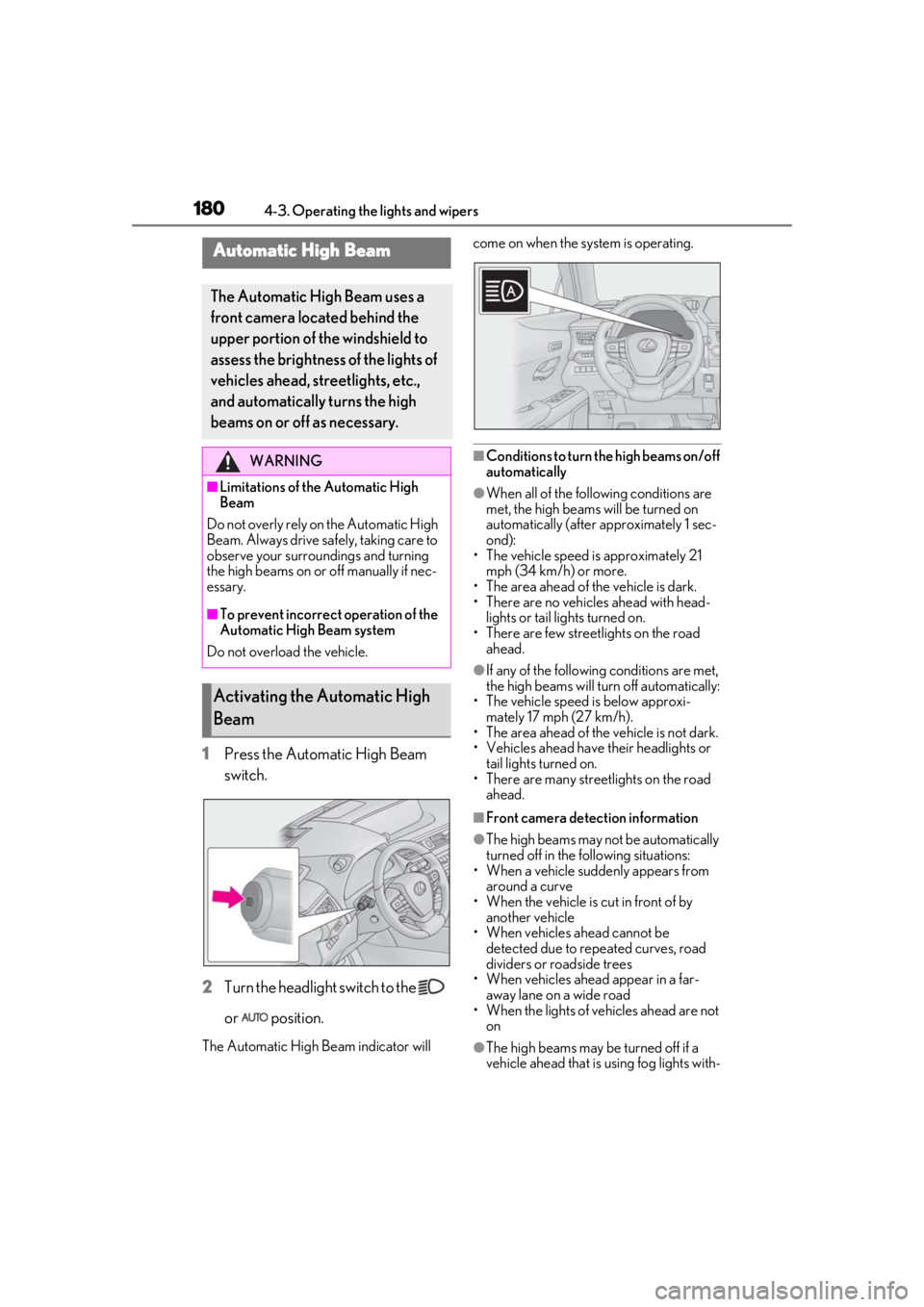
1Press the Automatic High Beam
switch.
2
Turn the headlight switch to the
or position.
The Automatic High Beam indicator will come on when the system is operating.
■Conditions to turn the high beams on/off
automatically
●When all of the follo
wing conditions are
met, the high beams will be turned on
automatically (after approximately 1 sec-
ond):
• The vehicle speed is approximately 21 mph (34 km/h) or more.
• The area ahead of the vehicle is dark.
• There are no vehicles ahead with head- lights or tail lights turned on.
• There are few streetlights on the road ahead.
●If any of the following conditions are met,
the high beams will turn off automatically:
• The vehicle speed is below approxi-
mately 17 mph (27 km/h).
• The area ahead of the vehicle is not dark.
• Vehicles ahead have their headlights or
tail lights turned on.
• There are many streetlights on the road ahead.
■Front camera detection information
●The high beams may not be automatically
turned off in the following situations:
• When a vehicle suddenly appears from around a curve
• When the vehicle is cut in front of by
another vehicle
• When vehicles ahead cannot be detected due to repeated curves, road
dividers or roadside trees
• When vehicles ahead appear in a far- away lane on a wide road
• When the lights of vehicles ahead are not
on
●The high beams may be turned off if a
vehicle ahead that is using fog lights with-
Automatic High Beam
The Automatic High Beam uses a
front camera located behind the
upper portion of the windshield to
assess the brightness of the lights of
vehicles ahead, streetlights, etc.,
and automatically turns the high
beams on or off as necessary.
WARNING
■Limitations of the Automatic High
Beam
Do not overly rely on the Automatic High
Beam. Always drive sa fely, taking care to
observe your surroundings and turning
the high beams on or off manually if nec-
essary.
■To prevent incorrect operation of the
Automatic High Beam system
Do not overload the vehicle.
Activating the Automatic High
Beam