lug LINCOLN AVIATOR 2003 User Guide
[x] Cancel search | Manufacturer: LINCOLN, Model Year: 2003, Model line: AVIATOR, Model: LINCOLN AVIATOR 2003Pages: 288, PDF Size: 3.32 MB
Page 217 of 288
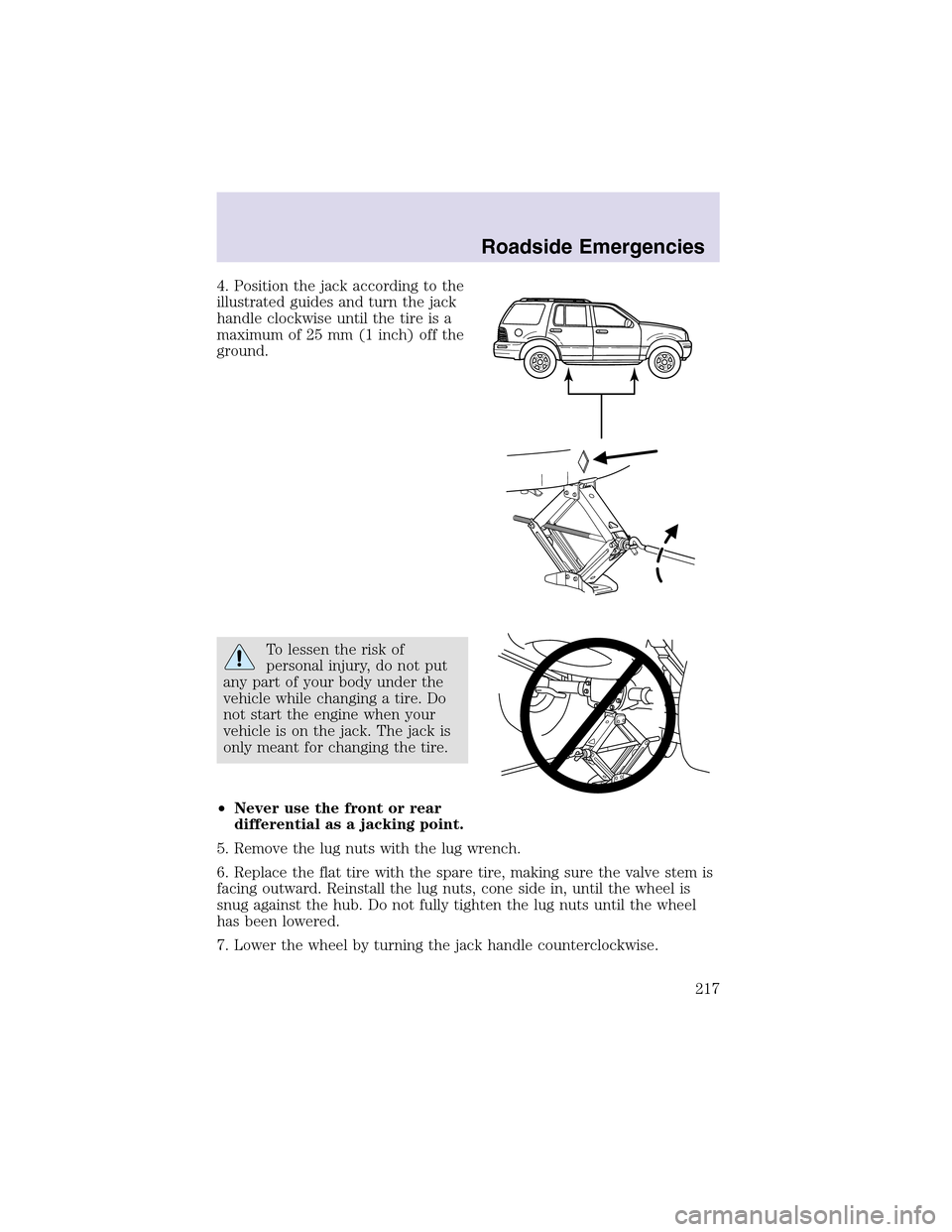
4. Position the jack according to the
illustrated guides and turn the jack
handle clockwise until the tire is a
maximum of 25 mm (1 inch) off the
ground.
To lessen the risk of
personal injury, do not put
any part of your body under the
vehicle while changing a tire. Do
not start the engine when your
vehicle is on the jack. The jack is
only meant for changing the tire.
•Never use the front or rear
differential as a jacking point.
5. Remove the lug nuts with the lug wrench.
6. Replace the flat tire with the spare tire, making sure the valve stem is
facing outward. Reinstall the lug nuts, cone side in, until the wheel is
snug against the hub. Do not fully tighten the lug nuts until the wheel
has been lowered.
7. Lower the wheel by turning the jack handle counterclockwise.
Roadside Emergencies
217
Page 218 of 288
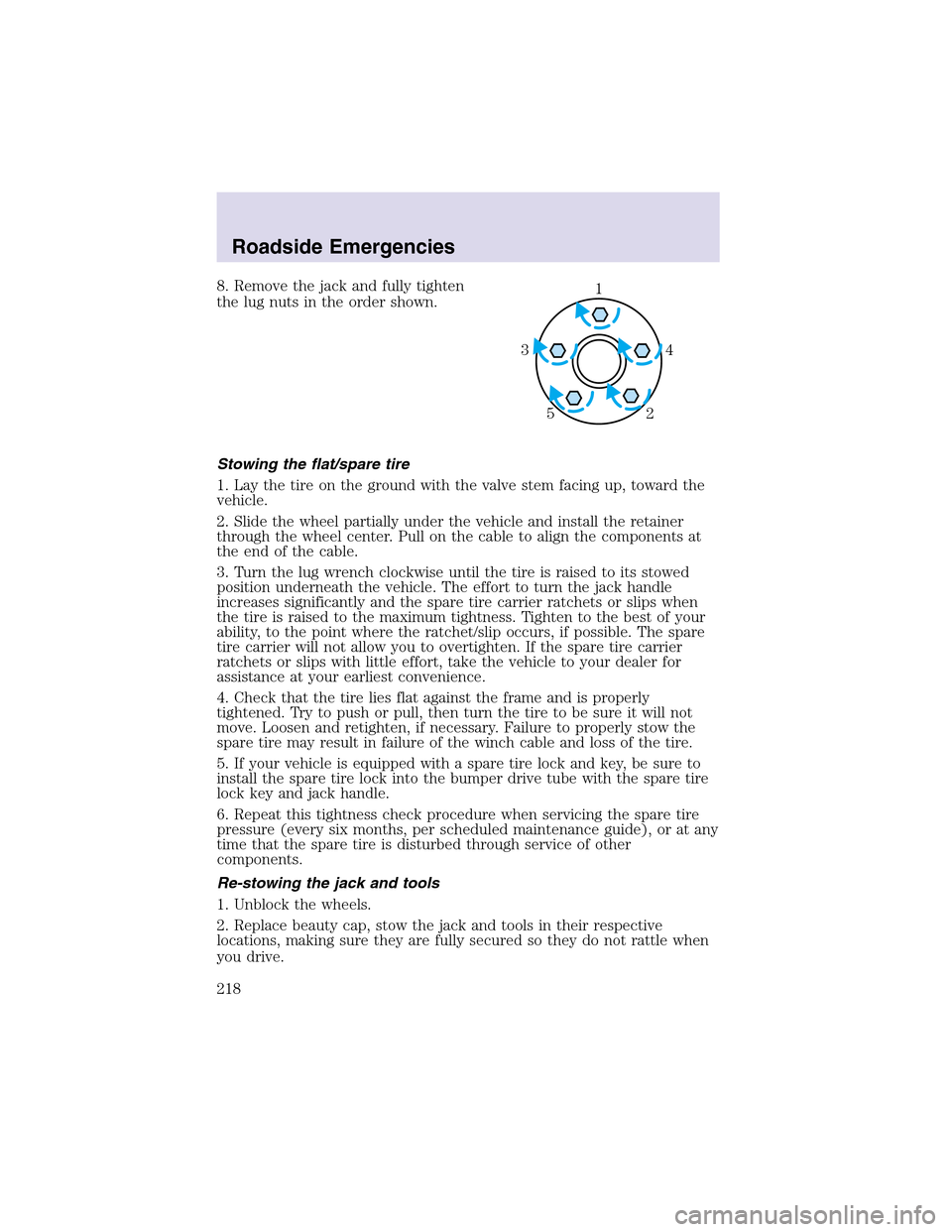
8. Remove the jack and fully tighten
the lug nuts in the order shown.
Stowing the flat/spare tire
1. Lay the tire on the ground with the valve stem facing up, toward the
vehicle.
2. Slide the wheel partially under the vehicle and install the retainer
through the wheel center. Pull on the cable to align the components at
the end of the cable.
3. Turn the lug wrench clockwise until the tire is raised to its stowed
position underneath the vehicle. The effort to turn the jack handle
increases significantly and the spare tire carrier ratchets or slips when
the tire is raised to the maximum tightness. Tighten to the best of your
ability, to the point where the ratchet/slip occurs, if possible. The spare
tire carrier will not allow you to overtighten. If the spare tire carrier
ratchets or slips with little effort, take the vehicle to your dealer for
assistance at your earliest convenience.
4. Check that the tire lies flat against the frame and is properly
tightened. Try to push or pull, then turn the tire to be sure it will not
move. Loosen and retighten, if necessary. Failure to properly stow the
spare tire may result in failure of the winch cable and loss of the tire.
5. If your vehicle is equipped with a spare tire lock and key, be sure to
install the spare tire lock into the bumper drive tube with the spare tire
lock key and jack handle.
6. Repeat this tightness check procedure when servicing the spare tire
pressure (every six months, per scheduled maintenance guide), or at any
time that the spare tire is disturbed through service of other
components.
Re-stowing the jack and tools
1. Unblock the wheels.
2. Replace beauty cap, stow the jack and tools in their respective
locations, making sure they are fully secured so they do not rattle when
you drive.1
4 3
2 5
Roadside Emergencies
218
Page 262 of 288
•Warming upa vehicle on cold mornings is not required and may
reduce fuel economy.
•Resting your foot on the brake pedal while driving may reduce fuel
economy.
•Combine errands and minimize stop-and-go driving.
Maintenance
•Keep tires properly inflated and use only recommended size.
•Operating a vehicle with the wheels out of alignment will reduce fuel
economy.
•Use recommended engine oil. Refer toLubricant specificationsin
this chapter.
•Perform all regularly scheduled maintenance items. Follow the
recommended maintenance schedule and owner maintenance checks
found in your vehicle scheduled maintenance guide.
Conditions
•Heavily loading a vehicle or towing a trailer may reduce fuel economy
at any speed.
•Carrying unnecessary weight may reduce fuel economy (approximately
0.4 km/L [1 mpg] is lost for every 180 kg [400 lb] of weight carried).
•Adding certain accessories to your vehicle (for example bug
deflectors, rollbars/light bars, running boards, ski/luggage racks) may
reduce fuel economy.
•Using fuel blended with alcohol may lower fuel economy.
•Fuel economy may decrease with lower temperatures during the first
12–16 km (8–10 miles) of driving.
•Driving on flat terrain offers improved fuel economy as compared to
driving on hilly terrain.
•Transmissions give their best fuel economy when operated in the top
cruise gear and with steady pressure on the gas pedal.
•Close windows for high speed driving.
EPA window sticker
Every new vehicle should have the EPA window sticker. Contact your
dealer if the window sticker is not supplied with your vehicle. The EPA
window sticker should be your guide for the fuel economy comparisons
with other vehicles.
Maintenance and Specifications
262
Page 270 of 288
•Drive cautiously. If you hear the chains rub or bang against your
vehicle, stopand re-tighten the chains. If this does not work, remove
the chains to prevent damage to your vehicle.
•If possible, avoid fully loading your vehicle.
•Remove the tire chains when they are no longer needed. Do not use
tire chains on dry roads.
•The suspension insulation and bumpers will help prevent vehicle
damage. Do not remove these components from your vehicle when
using snow tires and chains.
•Do not exceed 48 km/h (30 mph) with tire chains on your vehicle.
MOTORCRAFTPARTNUMBERS
Component 4.6L DOHC V8 engine
Engine air filter element FA-1695
Fuel filter FG-1068
Battery BXT-65-650
Oil filter FL-820-S
PCV valve EV-261
Spark plugs* AWSF-32EM
* Refer to Vehicle Emissions Control Information (VECI) decal for spark
plug gap information.
REFILL CAPACITIES
Fluid Ford Part
NameApplication Capacity
Brake fluid Motorcraft High
Performance
DOT 3 Motor
Vehicle Brake
FluidAll Fill to max line
on reservoir
Engine oil
(including filter
change)Motorcraft SAE
5W-20 Premium
Synthetic Blend
Motor Oil4.6L 5.7L
(6.0 quarts)
Maintenance and Specifications
270
Page 279 of 288
Rear park assist
Remote start system
Seat back organizer
Tire step
Video entertainment system
Travel equipment
Ash cup
Automatic headlampsystem with DRL
Canoe carrier
Daytime running lights (DRL)
First aid kit
Highway safety kit
Interior mirror, electrochromic with compass (with and without
temperature display)
Kayak carrier
Luggage basket
Luggage box carrier
Moon roof deflector
Raised cross-bars (for luggage rack rails)
Remote start systems
Removable roof rack
Running boards
Ski/snowboard carrier
Soft luggage cover
Trailer hitch (Class II)
Trailer hitch bars and balls
Trailer hitch receiver cover
Trailer hitch wiring adaptor
Protection and appearance equipment
All weather floor mats
Air bag anti-theft locks
Accessories
279
Page 280 of 288
Cargo liners, interior
Carpet floor mats
Door edge guards
Flat splash guards
Fog lamps
Front end covers (full and sport)
Front hood deflectors
Locking gas cap
Molded splash guards
Secure start — emergency battery start
Side window air deflectors
Universal floor mats
For maximum vehicle performance, keep the following information in
mind when adding accessories or equipment to your vehicle:
•When adding accessories, equipment, passengers and luggage to your
vehicle, do not exceed the total weight capacity of the vehicle or of
the front or rear axle (GVWR or GAWR as indicated on the Safety
compliance certification label). Consult your dealer for specific weight
information.
•The Federal Communications Commission (FCC) and Canadian Radio
Telecommunications Commission (CRTC) regulate the use of mobile
communications systems - such as two-way radios, telephones and
theft alarms - that are equipped with radio transmitters. Any such
equipment installed in your vehicle should comply with FCC or CRTC
regulations and should be installed only by a qualified service
technician.
•Mobile communications systems may harm the operation of your
vehicle, particularly if they are not properly designed for automotive
use or are not properly installed. When operated, such systems may
cause the engine to stumble or stall or cause the transmission to be
damaged or operate improperly. In addition, such systems may be
damaged or their performance may be affected by operating your
vehicle. (Citizens band [CB] transceivers, garage door openers and
other transmitters with outputs of five watts or less will not ordinarily
affect your vehicle’s operation.)
•Ford cannot assume responsibility for any adverse effects or damage
that may result from the use of such equipment.
Accessories
280
Page 286 of 288
replacing the batteries ...........106
Roadside assistance ..................200
Roof rack ...................................101
S
Safety belts (see Safety
restraints) ............14, 133–136, 138
Safety Canopy ...........................148
Safety defects, reporting ..........235
Safety restraints ................133–138
belt minder .............................139
cleaning the safety belts ........143
extension assembly ................142
for adults .........................134–136
for children .............................151
warning light and
chime ...........................12, 14, 138
Safety seats for children ..........154
Seat belts (see
Safety restraints) ......................133
Seats ..........................................121
child safety seats ....................154
climate control ........................125
easy access/easyout feature ..124
memory seat ...................105, 124
SecuriLock passive
anti-theft system ...............114–116
Servicing your vehicle ..............242
Snowplowing .................................7
Spark plugs,
specifications .....................270, 275
Special notice
ambulance conversions ..............7
utility-type vehicles ....................7
Specification chart,
lubricants ...........................273, 275Speed control ..............................76
Speedometer ...............................16
Starting your vehicle ........164–166
jumpstarting ..........................219
Steering wheel
controls ................................76, 80
T
Tachometer .................................17
Tires ...........................211, 266–267
changing ..........................211, 215
checking the pressure ............267
replacing ..........................215, 268
rotating ....................................268
snow tires and chains ............269
spare tire .........................212–214
tire grades ...............................267
treadwear ................................266
Towing .......................................193
recreational towing .................199
trailer towing ..........................193
wrecker ....................................224
Traction control ........................170
active light ................................13
Transmission .............................174
fluid, checking and adding
(automatic) .............................265
fluid, refill capacities ..............270
lubricant specifications ..273, 275
Tripodometer .............................17
Trunk .........................................105
Turn signal ............................13, 55
V
Vehicle dimensions ...................275
Index
286