change time LINCOLN AVIATOR 2020 User Guide
[x] Cancel search | Manufacturer: LINCOLN, Model Year: 2020, Model line: AVIATOR, Model: LINCOLN AVIATOR 2020Pages: 609, PDF Size: 5.4 MB
Page 198 of 609
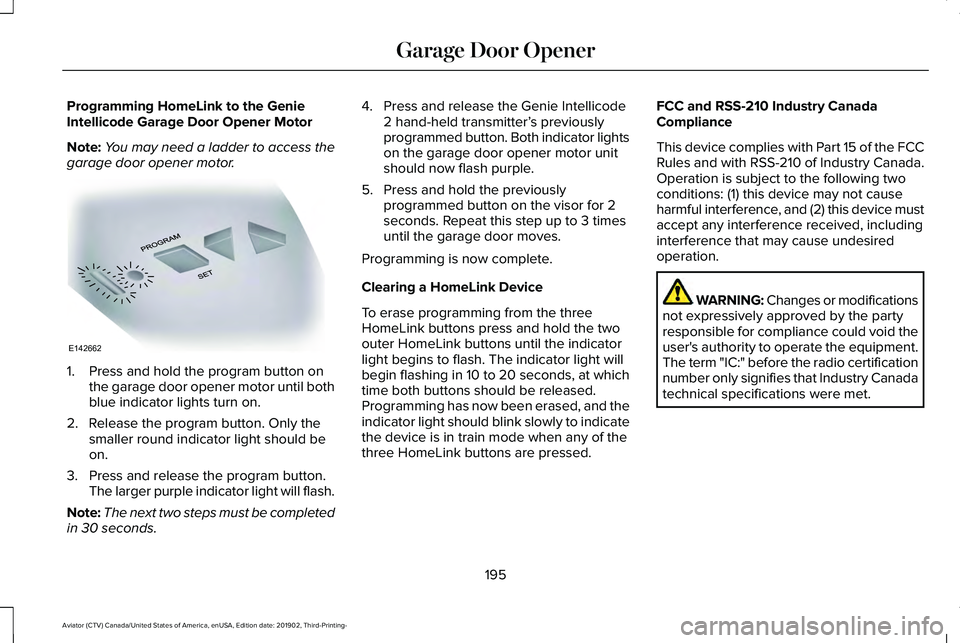
Programming HomeLink to the Genie
Intellicode Garage Door Opener Motor
Note:
You may need a ladder to access the
garage door opener motor. 1. Press and hold the program button on
the garage door opener motor until both
blue indicator lights turn on.
2. Release the program button. Only the smaller round indicator light should be
on.
3. Press and release the program button. The larger purple indicator light will flash.
Note: The next two steps must be completed
in 30 seconds. 4. Press and release the Genie Intellicode
2 hand-held transmitter’ s previously
programmed button. Both indicator lights
on the garage door opener motor unit
should now flash purple.
5. Press and hold the previously programmed button on the visor for 2
seconds. Repeat this step up to 3 times
until the garage door moves.
Programming is now complete.
Clearing a HomeLink Device
To erase programming from the three
HomeLink buttons press and hold the two
outer HomeLink buttons until the indicator
light begins to flash. The indicator light will
begin flashing in 10 to 20 seconds, at which
time both buttons should be released.
Programming has now been erased, and the
indicator light should blink slowly to indicate
the device is in train mode when any of the
three HomeLink buttons are pressed. FCC and RSS-210 Industry Canada
Compliance
This device complies with Part 15 of the FCC
Rules and with RSS-210 of Industry Canada.
Operation is subject to the following two
conditions: (1) this device may not cause
harmful interference, and (2) this device must
accept any interference received, including
interference that may cause undesired
operation.
WARNING: Changes or modifications
not expressively approved by the party
responsible for compliance could void the
user's authority to operate the equipment.
The term "IC:" before the radio certification
number only signifies that Industry Canada
technical specifications were met.
195
Aviator (CTV) Canada/United States of America, enUSA, Edition date: 201902, Third-Printing- Garage Door OpenerE142662
Page 212 of 609
•
You are not in 4H or 4L.
• You have not selected Manual shift
mode.
• Hill descent control is not active.
• You have not selected Tow haul, Excite,
Deep, or Slow Climb.
Note: When in Excite mode, Start/Stop can
be enabled by pressing the Auto-Start-Stop
button. The green Auto-Start-Stop
indicator light on the instrument
cluster will illuminate to indicate
when the automatic engine stop occurs. If the instrument cluster is
equipped with a grey
Auto-Start-Stop indicator light, it
illuminates when automatic engine stop is
not available due to one of the above noted
conditions not being met. Automatic Engine Restart
Any of the following conditions will result in
an automatic restart of the engine:
•
You have removed your foot from the
brake pedal.
• You press the accelerator pedal.
• You press the accelerator and the brake
pedal at the same time.
• The driver safety belt becomes
unfastened or the driver door is ajar.
• Your vehicle is moving.
• The interior compartment does not meet
customer comfort when air conditioning
or heat is on.
• Fogging of the windows could occur and
the air conditioning is on.
• The battery is not within optimal
operating conditions.
• You have exceeded the maximum engine
off time.
• When you press the Auto-Start-Stop
button with the engine automatically
stopped. •
The front defroster is turned to the Max
setting.
• When you shift into park (P), the engine
will restart.
Any of the following conditions may result in
an automatic restart of the engine:
• You have increased the blower fan speed
or changed the climate control
temperature.
• You have an electrical accessory turned
on or plugged in.
Note: You may notice that the climate seat
fan fluctuates during an automatic restart.
Disabling Auto-Start-Stop Press the button on the instrument
panel to access the
Auto-Start-Stop feature on the
touchscreen. Use the touchscreen to
deactivate the feature.
Deactivating the feature lasts only 1 key
cycle. Use the touchscreen to restore
Auto-Start-Stop function.
209
Aviator (CTV) Canada/United States of America, enUSA, Edition date: 201902, Third-Printing- Unique Driving Characteristics E146361 E287975
Page 224 of 609
The scheduled maintenance items listed in
scheduled maintenance information are
essential to the life and performance of your
vehicle and to its emissions system.
If you use anything other than Ford,
Motorcraft or Ford-authorized parts for
maintenance replacements or for service of
components affecting emission control, such
non-Ford parts should be equivalent to
genuine Ford Motor Company parts in
performance and durability.
Illumination of the service engine soon
indicator, charging system warning light or
the temperature warning light, fluid leaks,
strange odors, smoke or loss of engine
power could indicate that the emission
control system is not working properly.
An improperly operating or damaged exhaust
system may allow exhaust to enter the
vehicle. Have a damaged or improperly
operating exhaust system inspected and
repaired immediately.
Do not make any unauthorized changes to
your vehicle or engine. By law, vehicle
owners and anyone who manufactures,
repairs, services, sells, leases, trades
vehicles, or supervises a fleet of vehicles are
not permitted to intentionally remove an
emission control device or prevent it from
working. Information about your vehicle
’s
emission system is on the Vehicle Emission
Control Information Decal located on or near
the engine. This decal also lists engine
displacement.
Please consult your warranty information for
complete details.
On-Board Diagnostics (OBD-II)
Your vehicle has a computer known as the
on-board diagnostics system (OBD-II) that
monitors the engine ’s emission control
system. The system protects the environment
by making sure that your vehicle continues
to meet government emission standards. The
OBD-II system also assists a service
technician in properly servicing your vehicle. When the service engine soon
indicator illuminates, the OBD-II
system has detected a malfunction.
Temporary malfunctions may cause the
service engine soon indicator to illuminate.
Examples are:
1. Your vehicle has run out of fuel—the engine may misfire or run poorly.
2. Poor fuel quality or water in the fuel—the
engine may misfire or run poorly.
3. The fuel fill inlet may not have closed properly. See Refueling (page 214).
4. Driving through deep water—the electrical system may be wet.
You can correct these temporary
malfunctions by filling the fuel tank with good
quality fuel, properly closing the fuel fill inlet
or letting the electrical system dry out. After
three driving cycles without these or any
other temporary malfunctions present, the
service engine soon indicator should stay off
the next time you start the engine. A driving
cycle consists of a cold engine startup
followed by mixed city and highway driving.
No additional vehicle service is required.
221
Aviator (CTV) Canada/United States of America, enUSA, Edition date: 201902, Third-Printing- Engine Emission Control
Page 228 of 609
1. Bring your vehicle to a complete stop.
2. Shift into neutral (N).
3. Press neutral (N) again within five
seconds after shifting to neutral (N).
Note: The Stay in Neutral mode confirmation
message appears in the information display
when your vehicle has entered Stay in
Neutral mode and the neutral (N) button on
the transmission selector slowly blinks.
To exit Stay in Neutral mode, press park (P)
at any time, or apply the brakes when the
engine is running, to shift into a different
driving position.
Note: You can select the (P) position with or
without brakes applied when the engine is
OFF.
SelectShift Automatic ™ Transmission
Your vehicle has a SelectShift Automatic
transmission. The SelectShift Automatic
transmission gives you the ability to change
gears up or down, without a clutch, as
preferred. To prevent the engine from running at too
low an RPM, which could cause it to stall,
SelectShift still makes some downshifts if it
determines that you have not downshifted
in time. Although SelectShift makes some
downshifts for you, it still allows you to
downshift at any time if the SelectShift
determines that damage to the engine from
over-revving cannot occur.
Note:
Engine damage could occur if you
maintain excessive engine revving without
shifting.
Note: Vehicles have either steering wheel
controls or gearshift lever controls.
SelectShift could upshift if the engine is
approaching the RPM limit. It can also be
upshifted manually by pressing the (+) button.
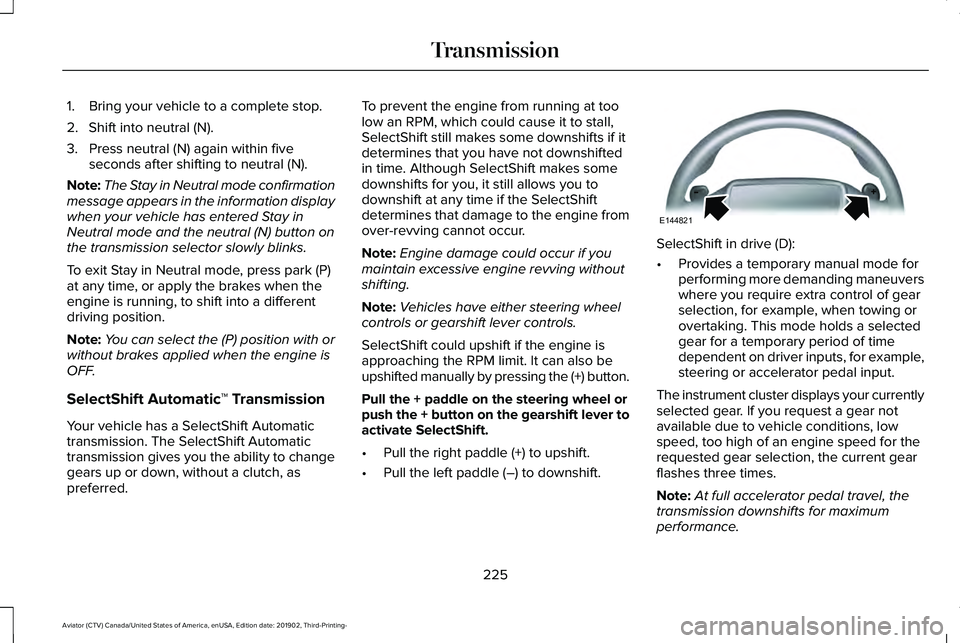
Pull the + paddle on the steering wheel or
push the + button on the gearshift lever to
activate SelectShift.
• Pull the right paddle (+) to upshift.
• Pull the left paddle (–) to downshift. SelectShift in drive (D):
•
Provides a temporary manual mode for
performing more demanding maneuvers
where you require extra control of gear
selection, for example, when towing or
overtaking. This mode holds a selected
gear for a temporary period of time
dependent on driver inputs, for example,
steering or accelerator pedal input.
The instrument cluster displays your currently
selected gear. If you request a gear not
available due to vehicle conditions, low
speed, too high of an engine speed for the
requested gear selection, the current gear
flashes three times.
Note: At full accelerator pedal travel, the
transmission downshifts for maximum
performance.
225
Aviator (CTV) Canada/United States of America, enUSA, Edition date: 201902, Third-Printing- TransmissionE144821
Page 232 of 609
Operating ALL-Wheel drive (AWD)
Vehicles with Mismatched Tires
WARNING: Only use replacement
tires and wheels that are the same size,
load index, speed rating and type (such as
P-metric versus LT-metric or all-season
versus all-terrain) as those originally
provided by Ford. The recommended tire
and wheel size may be found on either the
Safety Compliance Certification Label
(affixed to either the door hinge pillar,
door-latch post, or the door edge that
meets the door-latch post, next to the
driver's seating position), or the Tire Label
which is located on the B-Pillar or edge of
the driver's door. If this information is not
found on these labels, then you should
contact your authorized dealer as soon as
possible. Use of any tire or wheel not
recommended by Ford can affect the
safety and performance of your vehicle,
which could result in an increased risk of
loss of vehicle control, vehicle rollover,
personal injury and death. Major dissimilar tire sizes between the front
and rear axles (for example, 17 inch low
profile tires on the front axle and 22 inch high
profile tires on the rear axle) could cause the
AWD system to stop functioning and default
to rear-wheel drive or damage the AWD
system.
For optimum AWD Performance, it is
recommended to follow the tire rotation
maintenance schedule. To avoid potential
AWD malfunction or AWD system damage,
it is recommended to replace all four tires
rather than mixing significantly worn tires
with new tires. For example, using 3 worn
tread tires and 1 new tread tire all of the same
original tire size/brand, can be tolerated by
the AWD system as long as the worn tires
still have usable tread depth.
How Your Vehicle Differs from Other
Vehicles
Truck and utility vehicles can differ from
some other vehicles. Your vehicle could be
higher to allow it to travel over rough terrain
without getting hung up or damaging
underbody components. The differences that make your vehicle so
versatile also make it handle differently than
an ordinary passenger car.
Maintain steering wheel control at all times,
especially in rough terrain. Since sudden
changes in terrain can result in abrupt
steering wheel motion, make sure you grip
the steering wheel from the outside. Do not
grip the spokes.
Drive cautiously to avoid vehicle damage
from concealed objects such as rocks and
stumps.
You should either know the terrain or
examine maps of the area before driving.
Map out your route before driving in the area.
To maintain steering and braking control of
your vehicle, you must have all four wheels
on the ground and they must be rolling, not
sliding or spinning.
229
Aviator (CTV) Canada/United States of America, enUSA, Edition date: 201902, Third-Printing- All-Wheel Drive
(If Equipped)
Page 249 of 609
PRINCIPLE OF OPERATION
WARNING: Vehicle modifications
involving braking system, aftermarket roof
racks, suspension, steering system, tire
construction and wheel and tire size may
change the handling characteristics of your
vehicle and may adversely affect the
performance of the electronic stability
control system. In addition, installing any
stereo loudspeakers may interfere with
and adversely affect the electronic stability
control system. Install any aftermarket
stereo loudspeaker as far as possible from
the front center console, the tunnel, and
the front seats in order to minimize the risk
of interfering with the electronic stability
control sensors. Reducing the
effectiveness of the electronic stability
control system could lead to an increased
risk of loss of vehicle control, vehicle
rollover, personal injury and death. WARNING:
Remember that even
advanced technology cannot defy the laws
of physics. It’ s always possible to lose
control of a vehicle due to inappropriate
driver input for the conditions. Aggressive
driving on any road condition can cause
you to lose control of your vehicle
increasing the risk of personal injury or
property damage. Activation of the
electronic stability control system is an
indication that at least some of the tires
have exceeded their ability to grip the
road; this could reduce the operator’ s
ability to control the vehicle potentially
resulting in a loss of vehicle control, vehicle
rollover, personal injury and death. If your
electronic stability control system activates,
SLOW DOWN.
The system automatically turns on each time
you switch the ignition on.
If a driving condition activates either the
stability control or the traction control system
you may experience the following conditions: •
The stability and traction control light
flashes.
• Your vehicle slows down.
• Reduced engine power.
• A vibration in the brake pedal.
• The brake pedal is stiffer than usual.
• If the driving condition is severe and your
foot is not on the brake, the brake pedal
may move as the systems applies higher
brake forces.
The stability control system has several
features built into it to help you maintain
control of your vehicle:
Electronic Stability Control
The system enhances your vehicle ’s ability
to prevent skids or lateral slides by applying
brakes to one or more of the wheels
individually and, if necessary, reducing
engine power.
246
Aviator (CTV) Canada/United States of America, enUSA, Edition date: 201902, Third-Printing- Stability Control
Page 250 of 609
Roll Stability Control
The system enhances your vehicle
’s ability
to prevent rollovers by detecting your
vehicle ’s roll motion and the rate at which it
changes by applying the brakes to one or
more wheels individually.
Curve Control
The system enhances your vehicle ’s ability
to follow the road when cornering severely
or avoiding objects in the roadway. Curve
Control operates by reducing engine power
and, if necessary, applying brakes to one or
more of the wheels individually.
Traction Control
The system enhances your vehicle ’s ability
to maintain traction of the wheels by
detecting and controlling wheel spin. See
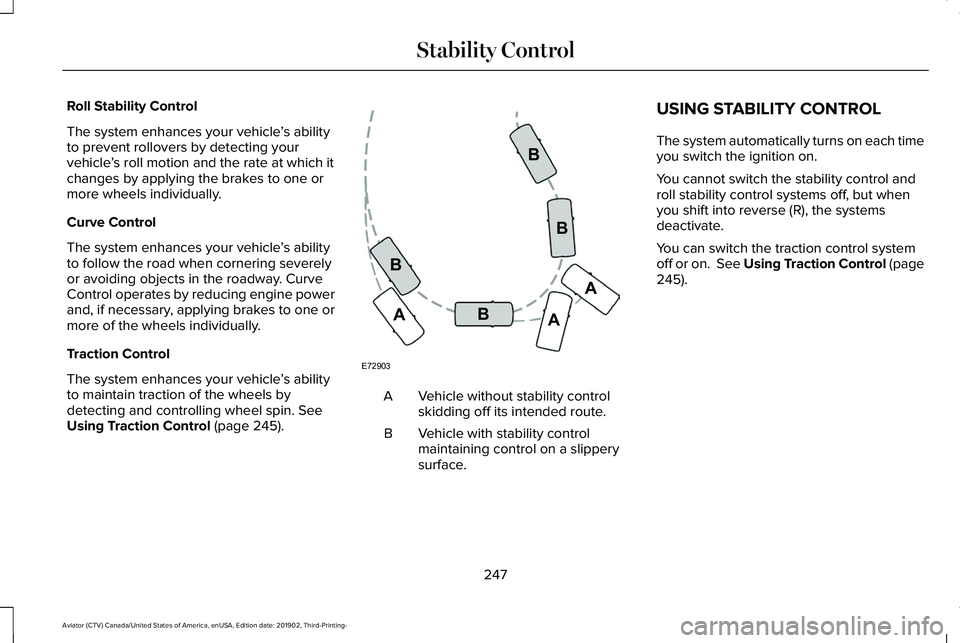
Using Traction Control (page 245). Vehicle without stability control
skidding off its intended route.
A
Vehicle with stability control
maintaining control on a slippery
surface.
B USING STABILITY CONTROL
The system automatically turns on each time
you switch the ignition on.
You cannot switch the stability control and
roll stability control systems off, but when
you shift into reverse (R), the systems
deactivate.
You can switch the traction control system
off or on.
See Using Traction Control (page
245).
247
Aviator (CTV) Canada/United States of America, enUSA, Edition date: 201902, Third-Printing- Stability ControlE72903A
AA
B
BB
B
Page 272 of 609
HOW DOES ADAPTIVE CRUISE
CONTROL WITH STOP AND GO
WORK
Adaptive cruise control with stop and go
uses radar and camera sensors to adjust the
speed of your vehicle to maintain a set gap
from the vehicle in front of you in the same
lane while following it to a complete stop.
You can also engage the system to follow a
vehicle in front of you and adjust set speed
while stopped.
WHAT IS INTELLIGENT ADAPTIVE
CRUISE CONTROL
Intelligent adaptive cruise control combines
speed sign recognition with adaptive cruise
control to adjust the cruise set speed to the
speed limit detected by the speed sign
recognition system. For example, if the speed
sign recognition system detects a 50 mph
(80 km/h) speed limit, the cruise set speed
is updated to 50 mph (80 km/h).
Note: The adaptive cruise control gap setting
operates normally. ADAPTIVE CRUISE CONTROL
PRECAUTIONS - VEHICLES WITH:
ADAPTIVE CRUISE CONTROL
WITH LANE CENTERING
Adaptive cruise control precautions apply to
lane centering unless stated otherwise or
contradicted by a lane centering precaution.
See
Adaptive Cruise Control Precautions
(page 269). WARNING:
Do not use the system
when towing a trailer. Failure to follow this
instruction could result in the loss of
control of your vehicle, personal injury or
death. WARNING: Do not use the system if
any changes or modifications to the
steering wheel have been made. Any
changes or modifications to the steering
wheel could affect the functionality or
performance of the system. Failure to
follow this instruction could result in the
loss of control of your vehicle, personal
injury or death.
ADAPTIVE CRUISE CONTROL
PRECAUTIONS - VEHICLES WITH:
ADAPTIVE CRUISE CONTROL
WITH STOP AND GO WARNING:
You are responsible for
controlling your vehicle at all times. The
system is designed to be an aid and does
not relieve you of your responsibility to
drive with due care and attention. Failure
to follow this instruction could result in the
loss of control of your vehicle, personal
injury or death.
269
Aviator (CTV) Canada/United States of America, enUSA, Edition date: 201902, Third-Printing- Adaptive Cruise Control
(If Equipped)
Page 290 of 609
Red: Indicates that the system is providing
or has just provided a lane keeping alert
warning.
The system can be temporarily suppressed
at any time by the following:
•
Quick braking.
• Fast acceleration. •
Using the direction indicator.
• Evasive steering maneuver.
• Driving too close to the lane markings.
Troubleshooting Why is the feature not available (line markings are gray) when I can s\
ee the lane markings on the road?
Your vehicle speed is outside the operational range of the feature.
The sun is shining directly into the camera lens.
A quick intentional lane change has occurred.
Your vehicle stays too close to the lane markings.
Driving at high speeds in curves.
The last Alert warning or Aid intervention occurred a short time ago.
Ambiguous lane markings, for example in construction zones.
Rapid transition from light to dark, or from dark to light.
Sudden offset in lane markings.
ABS or AdvanceTrac ™ is active.
There is a camera blockage due to dirt, grime, fog, frost or water on the windshield.
287
Aviator (CTV) Canada/United States of America, enUSA, Edition date: 201902, Third-Printing- Driving Aids
Page 303 of 609
Adaptive Learning
The electronic power steering system
adaptive learning improves overall handling
and steering on roads with irregularities. It
communicates with the brake system to help
operate advanced stability control and
accident avoidance systems. When you
install a new battery or disconnect the
battery, you need to drive your vehicle a
short distance so it can relearn and reactivate
all systems.
Adaptive Steering
The adaptive steering system continually
changes the steering ratio with changes to
the vehicle speed, optimizing the steering
response in all conditions.
The adaptive steering system is designed
with a locking device. When the lock
engages, your vehicle returns to a fixed
steering ratio. Your vehicle may make a
sound when you start or switch off your
vehicle as the lock engages or disengages.
If your vehicle loses electrical power or
detects a fault when you are driving, the lock
engages and you are able to continue
steering. During this time, the steering wheel
may not be straight even when driving
straight ahead. You may need to use a
different steering wheel angle to properly
drive your vehicle. Extreme operating
conditions may cause the lock to engage.
This strategy prevents overheating and
permanent damage to the adaptive steering
system. Typical steering and driving
maneuvers allow the system to cool and
operate as normal.
Note:
The adaptive steering system has
diagnostic checks that continuously monitor
the system. If the system detects a fault, a
message displays in the information display.
If a red warning message displays, stop your
vehicle as soon as it is safe to do so. The
message may clear if the fault is no longer
present. If an adaptive steering system
warning message appears each time you
start your vehicle, have the system checked
as soon as possible. PRE-COLLISION ASSIST (IF EQUIPPED) WARNING:
You are responsible for
controlling your vehicle at all times. The
system is designed to be an aid and does
not relieve you of your responsibility to
drive with due care and attention. Failure
to follow this instruction could result in the
loss of control of your vehicle, personal
injury or death. WARNING:
The system does not
detect vehicles that are driving in a
different direction, cyclists or animals.
Apply the brakes when necessary. Failure
to follow this instruction could result in the
loss of control of your vehicle, personal
injury or death. WARNING:
The system does not
operate during hard acceleration or
steering. Failure to take care may lead to
a crash or personal injury.
300
Aviator (CTV) Canada/United States of America, enUSA, Edition date: 201902, Third-Printing- Driving Aids