child lock LINCOLN AVIATOR 2020 User Guide
[x] Cancel search | Manufacturer: LINCOLN, Model Year: 2020, Model line: AVIATOR, Model: LINCOLN AVIATOR 2020Pages: 609, PDF Size: 5.4 MB
Page 68 of 609
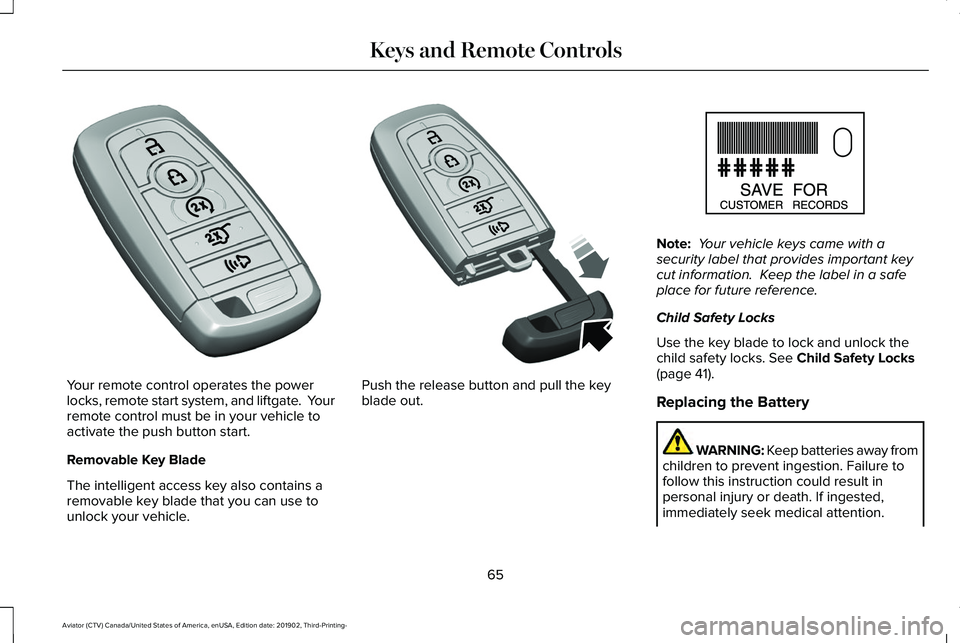
Your remote control operates the power
locks, remote start system, and liftgate. Your
remote control must be in your vehicle to
activate the push button start.
Removable Key Blade
The intelligent access key also contains a
removable key blade that you can use to
unlock your vehicle. Push the release button and pull the key
blade out. Note:
Your vehicle keys came with a
security label that provides important key
cut information. Keep the label in a safe
place for future reference.
Child Safety Locks
Use the key blade to lock and unlock the
child safety locks. See Child Safety Locks
(page 41).
Replacing the Battery WARNING: Keep batteries away from
children to prevent ingestion. Failure to
follow this instruction could result in
personal injury or death. If ingested,
immediately seek medical attention.
65
Aviator (CTV) Canada/United States of America, enUSA, Edition date: 201902, Third-Printing- Keys and Remote ControlsE305198 E305199 E151795
Page 120 of 609
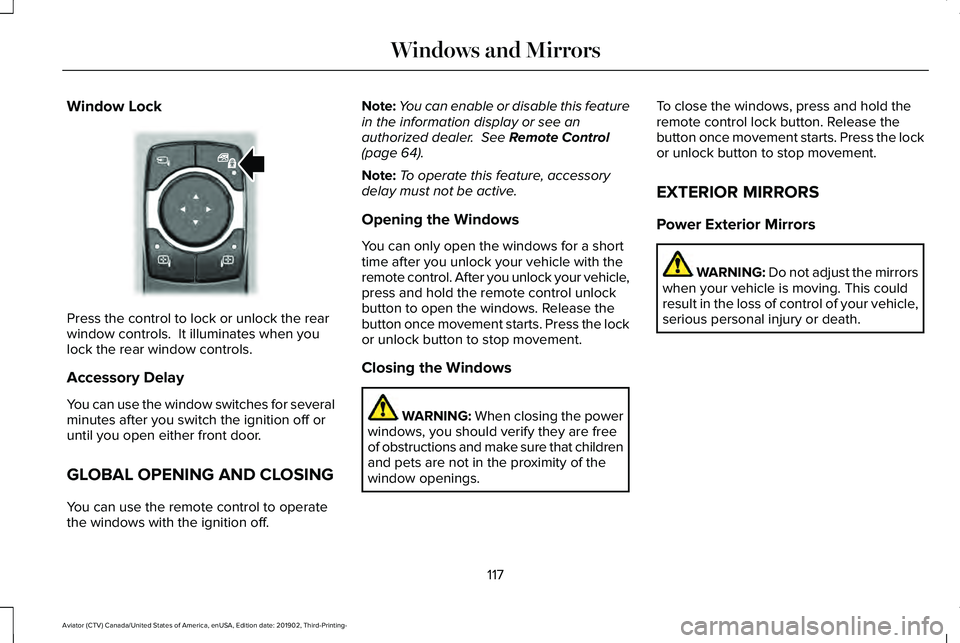
Window Lock
Press the control to lock or unlock the rear
window controls. It illuminates when you
lock the rear window controls.
Accessory Delay
You can use the window switches for several
minutes after you switch the ignition off or
until you open either front door.
GLOBAL OPENING AND CLOSING
You can use the remote control to operate
the windows with the ignition off. Note:
You can enable or disable this feature
in the information display or see an
authorized dealer. See Remote Control
(page 64).
Note: To operate this feature, accessory
delay must not be active.
Opening the Windows
You can only open the windows for a short
time after you unlock your vehicle with the
remote control. After you unlock your vehicle,
press and hold the remote control unlock
button to open the windows. Release the
button once movement starts. Press the lock
or unlock button to stop movement.
Closing the Windows WARNING:
When closing the power
windows, you should verify they are free
of obstructions and make sure that children
and pets are not in the proximity of the
window openings. To close the windows, press and hold the
remote control lock button. Release the
button once movement starts. Press the lock
or unlock button to stop movement.
EXTERIOR MIRRORS
Power Exterior Mirrors
WARNING: Do not adjust the mirrors
when your vehicle is moving. This could
result in the loss of control of your vehicle,
serious personal injury or death.
117
Aviator (CTV) Canada/United States of America, enUSA, Edition date: 201902, Third-Printing- Windows and MirrorsE295318
Page 144 of 609
Doors and Locks
Action
Message
The driver door is not completely closed.
Driver Door Ajar
The passenger door is not completely closed.
Passenger Door Ajar
The rear left-hand door is not completely closed.
Rear Left Door Ajar
The rear right-hand door is not completely closed.
Rear Right Door Ajar
The liftgate is not completely closed.
Liftgate Ajar
The hood is not completely closed.
Hood Ajar
The system has disabled the door switches.
Switches Inhibited Security Mode
Displays when the door lock is turned on and you attempt to open the doo\
r.
Doors Locked Unlock Before Opening
Indicates a driver door fault that requires manually opening the door by\
the override lever.Contact an authorized dealer.
Driver Door Fault Use Inside Override
Lever In Map Pocket
Indicates a fault with the electronic door system. Contact an authorized\
dealer.
Door Fault Service Required
There is a system malfunction with the child locks. Contact an authorize\
d dealer as soon as possible.
Child Lock Malfunction Service Required
141
Aviator (CTV) Canada/United States of America, enUSA, Edition date: 201902, Third-Printing- Information Displays
Page 145 of 609

Action
Message
Indicates that the rear seat interior door release switches and power wi\
ndows are switched off,preventing rear seat occupants from opening the doors or windows.
Child Lock ON
Indicates that the rear seat interior door release switches and power wi\
ndows are switched on.
Child Lock OFF
The factory keypad code displays in the information display after the system resets t\
he keypad.See Passive Anti-Theft System (page 94).
Factory Keypad Code {X X X X X}
Driver Alert Action
Message
Stop and rest as soon as it is safe to do so.
Driver Alert Warning Rest Now
Take a rest soon.
Driver Alert Warning Rest Suggested
Fuel Action
Message
An early reminder of a low fuel condition.
Fuel Level Low
The fuel fill inlet valve may not be properly closed.
Check Fuel Fill Inlet
142
Aviator (CTV) Canada/United States of America, enUSA, Edition date: 201902, Third-Printing- Information Displays
Page 597 of 609
Changing the Front Wiper Blades -
Vehicles Without: Heated Wiper
Blades...........................................................375
Installing the Front Wiper Blades ..................376
Removing the Front Wiper Blades.................376
Changing the Rear Wiper Blades.............377
Changing the Vehicle Wi-Fi Hotspot Name or Password................................................443
Checking MyKey System Status.................75 MyKey Distance.....................................................75
Number of Admin Keys.......................................76
Number of MyKeys...............................................76
Checking the Wiper Blades.......................375
Child Restraint and Seatbelt Maintenance..................................................49
Child Restraint Positioning
...........................39
Child Safety......................................................24
General Information.............................................24
Child Safety Locks...........................................41
Cleaning Leather Seats..............................383
Cleaning Products
........................................378
Materials................................................................378
Cleaning the Engine
.....................................381
Cleaning the Exterior...................................379 Cleaning the Headlamps..................................379
Exterior Chrome Parts.......................................380
Exterior Plastic Parts..........................................380
Stripes or Graphics............................................380 Underbody...........................................................380
Under Hood.........................................................380
Cleaning the Instrument Panel and Instrument Cluster Lens...........................382
Cleaning the Interior
....................................382
Mirrors...................................................................382
Cleaning the Wheels
...................................384
Cleaning the Windows and Wiper Blades............................................................381
Clearing All MyKeys.......................................75
Climate............................................................482 Accessing Rear Climate Controls..................485
Accessing the Climate Control Menu...........
482
Directing the Airflow..........................................482
Rear Climate Control Lock Indicator.............485
Setting the Blower Motor Speed....................483
Setting the Temperature...................................483
Switching Auto Mode On and Off..................483
Switching Dual Zone Mode On and Off.......483
Switching Maximum Air Conditioning On and Off......................................................................484
Switching Maximum Defrost On and Off......................................................................484
Switching Rear Auto Mode On and Off........485
Switching Recirculated Air On and Off.........484
Switching the Air Conditioning On and Off......................................................................483 Switching the Climate Controlled Seats On
and Off..............................................................483
Switching the Climate Control On and Off......................................................................483
Switching the Heated Exterior Mirrors On and Off......................................................................484
Switching the Heated Rear Window On and Off......................................................................484
Switching the Heated Seats On and Off......484
Switching the Heated Steering Wheel On and Off......................................................................484
Switching the Heated Windshield On and Off......................................................................484
Switching the Rear Climate Controlled Seats On and Off.......................................................485
Switching the Rear Heated Seats On and Off......................................................................485
Switching the Rear Ventilated Seats On and Off......................................................................485
Switching the Ventilated Seats On and Off......................................................................485
Climate Control
..............................................160
Climate Controlled Seats............................186
Ventilated Seats...................................................187
Cold Weather Precautions.........................324
Connected Vehicle
......................................439
Connecting the Vehicle to a Mobile
Network............................................................439
594
Aviator (CTV) Canada/United States of America, enUSA, Edition date: 201902, Third-Printing- Index
Page 598 of 609
Connected Vehicle Limitations.................439
Connected Vehicle Requirements...........439
Connected Vehicle –
Troubleshooting.........................................440
Connecting the Vehicle to a Mobile Network........................................................439
Connecting Lincoln Way to the Modem.......439
Enabling and Disabling the Modem..............439
What Is the Modem............................................439
Connecting the Vehicle to a Wi-Fi Network........................................................439
Coolant Check See: Engine Coolant Check.............................364
Crash Sensors and Airbag Indicator.........60
Creating a MyKey............................................74 Programming and Changing Configurable
Settings...............................................................75
Creating a Vehicle Wi-Fi Hotspot.............443 Connecting a Device to the Wi-Fi
Hotspot.............................................................443
Finding the Wi-Fi Hotspot Name and Password..........................................................443
Cross Traffic Alert.........................................293 Cross Traffic Alert Behavior When Trailer is
Attached ...........................................................296
Cross Traffic Alert Indicator.............................297
Cross Traffic Alert Information Messages.........................................................297 Cross Traffic Alert System Limitations..........296
Cross Traffic Alert System Sensors...............296
Switching the System On and Off..................296
Using Cross Traffic Alert...................................293
Cruise Control
...............................................267
Cruise Control Indicators...........................268
Cruise Control - Vehicles With: Adaptive Cruise Control With Lane Centering.......99
Cruise Control - Vehicles With: Cruise Control..........................................................100
Customer Assistance
...................................333
D
Data Recording
................................................12
Comfort, Convenience and Entertainment
Data.......................................................................14
Event Data...............................................................13
Service Data............................................................12
Services That Third Parties Provide..................14
Services That We Provide....................................14
Vehicles With a Modem.......................................15
Vehicles With an Emergency Call System.......16
Vehicles With SYNC..............................................15
Daytime Running Lamps - Vehicles With: Configurable Daytime Running
Lamps............................................................108 Daytime Running Lamps - Vehicles With:
Daytime Running Lamps (DRL)...............108
Declaration of Conformity..........................589
Declaration of Conformity - Vehicles With: SYNC 3.........................................................590
Radio Frequency Statement...........................590
Digital Radio
...................................................448
HD Radio Reception and Station
Troubleshooting.............................................449
Direction Indicators
.........................................111
Indicating a Lane Change...................................111
Doors and Locks
.............................................78
Drive Mode Control.....................................306 Drive Modes........................................................306
Drive Modes
..................................................306
Conserve..............................................................306
Deep Conditions................................................306
Deep Sand...........................................................307
Excite.....................................................................307
Normal...................................................................307
Slippery.................................................................307
Driver Alert
.....................................................282
PRINCIPLE OF OPERATION............................282
USING DRIVER ALERT......................................283
Driver and Passenger Airbags....................53 Children and Airbags...........................................54
Proper Driver and Front Passenger Seating
Adjustment.........................................................54
595
Aviator (CTV) Canada/United States of America, enUSA, Edition date: 201902, Third-Printing- Index
Page 601 of 609
Headrest
See: Head Restraints...........................................171
Head Restraints...............................................171
Adjusting the Head Restraint............................171
Tilting Head Restraints ......................................173
Head Up Display
...........................................156
Configuring The Head Up Display..................156
Head Up Display Overview..............................158
Maintaining Your Head Up Display.................159
Heated Exterior Mirrors
...............................167
Heated Rear Window...................................167
Heated Seats..................................................185 Front Seats............................................................185
Second Row Heated Seats...............................186
Heated Steering Wheel................................101
Heating See: Climate Control..........................................160
Hill Descent Control....................................248
Hill Descent Control Indicator...................249
Hill Start Assist..............................................238 Switching the System On and Off..................239
Using Hill Start Assist........................................238
Hints on Controlling the Interior Climate..........................................................163
Defogging the Side Windows in Cold Weather.............................................................164
General Hints........................................................163
Quickly Cooling the Interior..............................164 Quickly Heating the Interior.............................164
Recommended Settings for Cooling..............
164
Recommended Settings for Heating..............164
Hints on Driving With Anti-Lock Brakes..........................................................236
Hood Lock See: Opening and Closing the Hood............358
Horn...................................................................101
How Does Adaptive Cruise Control With Stop and Go Work.....................................269
How Does the Rear Occupant Alert System Work
...............................................................189
I
In California (U.S. Only)...............................334
Information Display Control.........................101
Information Displays.....................................130 General Information............................................130
Information Messages..................................134 Active Park............................................................134
Adaptive Cruise Control....................................135
Adaptive Headlamps..........................................135
Adaptive Steering................................................136
AdvanceTrac ™ and Traction Control................136
Alarm.......................................................................137
Automatic Engine Shutdown............................137
AWD........................................................................\
138 Battery and Charging System..........................139
Blind Spot Information and Cross Traffic Alert
System...............................................................140
Doors and Locks...................................................141
Driver Alert............................................................142
Fuel........................................................................\
.142
Hill Descent Control............................................143
Hill Start Assist.....................................................143
Keys and Intelligent Access..............................
144
Lane Keeping System........................................145
Maintenance.........................................................145
MyKey.....................................................................147
Park Aid..................................................................148
Park Brake.............................................................149
Power Steering....................................................150
Pre-Collision Assist..............................................151
Remote Start..........................................................151
Seats........................................................................\
151
Starting System ...................................................152
Tire Pressure Monitoring System....................152
Trailer
......................................................................153
Transmission.........................................................154
Installing Child Restraints.............................26 Child Seats.............................................................26
Using Lap and Shoulder Belts...........................26
Using Lower Anchors and Tethers for
CHildren (LATCH).............................................30
Using Tether Straps..............................................32
598
Aviator (CTV) Canada/United States of America, enUSA, Edition date: 201902, Third-Printing- Index