keyless LINCOLN AVIATOR 2020 User Guide
[x] Cancel search | Manufacturer: LINCOLN, Model Year: 2020, Model line: AVIATOR, Model: LINCOLN AVIATOR 2020Pages: 609, PDF Size: 5.4 MB
Page 98 of 609
ANTI-THEFT ALARM
The active anti-theft system is designed to
warn you in the event of unauthorized
vehicle entry and is also designed to help
prevent unwanted towing of your vehicle.
You can choose what is monitored by arming
the system in different ways. See
Information Displays (page 130).
The direction indicators flash and the horn
sounds if the system triggers while the alarm
is armed.
Take all remote controls to an authorized
dealer if there is any potential alarm problem
with your vehicle.
Using the System
You can select two levels of alarm security.
You can change the level of security when
the ignition is switched off through the
information display with the two options
below: Perimeter Sensing (If Equipped)
Perimeter sensing monitors the following:
•
Doors.
• Hood.
• Liftgate.
All Sensors (If Equipped)
All sensors monitors the following:
• Doors.
• Hood.
• Liftgate.
• Movement inside your vehicle.
• Change in vehicle inclination, for
example, unwanted towing.
Note: Do not choose all sensors monitor
mode when the vehicle is in transport or if
movement within the vehicle is likely to
occur. Note:
For correct operation of the interior
motion detection system, make sure you
close all the windows prior to arming the
system. This helps prevent accidental alarm
activation due to external influences.
Additionally, the interior motion sensing
system does not arm if any door is ajar.
Arming the Alarm
The alarm is ready to arm when there is not
a key in the ignition. Lock your vehicle using
the remote control or keyless entry keypad.
You can also lock your vehicle using the lock
sensor on the exterior door handle if your
vehicle is equipped with intelligent access.
See
Locking and Unlocking (page 78).
The direction indicators flash once after you
lock your vehicle. This indicates the alarm is
in the pre-armed mode. It fully arms after 20
seconds.
95
Aviator (CTV) Canada/United States of America, enUSA, Edition date: 201902, Third-Printing- Security
Page 99 of 609
Disarming the Alarm
Disarm the alarm by any of the following
actions:
•
Press the power door unlock button
within the 20-second pre-armed mode.
• Unlock the doors with the remote control
or keyless entry keypad. If equipped with
intelligent access, you can use the unlock
sensor on the exterior door handle. See
Locking and Unlocking (page 78).
• Switch the ignition on or start your
vehicle.
• Use a key in the driver door lock cylinder
to unlock your vehicle, then switch the
ignition on within 12 seconds.
Note: Pressing the panic button on the
remote control stops the horn and direction
indicators, but does not disarm the system.
96
Aviator (CTV) Canada/United States of America, enUSA, Edition date: 201902, Third-Printing- Security
Page 132 of 609
Service Engine Soon
It illuminates when you switch the
ignition on prior to engine start to
check the bulb and to indicate
whether your vehicle is ready for Inspection
and Maintenance (I/M) testing.
Normally, it illuminates until the engine is
cranked and automatically turns off if no
system errors are present. However, if after
15 seconds it flashes eight times, this
indicates that your vehicle is not ready for
Inspection and Maintenance (I/M) testing.
See Catalytic Converter (page 220).
If it illuminates when the engine is running
this indicates a system error. The On Board
Diagnostics system has detected an error in
the vehicle emission control system.
If it flashes, engine misfire may be occurring.
Continuing to drive your vehicle may cause
reduced power or the engine to stop. Failure
to respond to the warning lamp may cause
component damage not covered by the
vehicle Warranty. Have your vehicle
checked as soon as possible. Stability Control It flashes when the system is
active. If it remains illuminated or
does not illuminate when you
switch the ignition on, this indicates a system
error. During a system error the system
switches off. Have the system checked by
an authorized dealer immediately.
See
Using Stability Control (page 247).
Stability Control Off Illuminates when you switch the
system off. It goes out when you
switch the system back on or when
you switch the ignition off.
See Using
Stability Control (page 247).
Tow Haul Indicator
(If Equipped) Illuminates when the system turns
tow haul on.AUDIBLE WARNINGS AND
INDICATORS
Keyless Warning Alert
The horn will sound twice when you exit your
vehicle with the intelligent access key and
your vehicle is in RUN, indicating your vehicle
is still on.
Headlamps On Warning Chime
Sounds when you have left the headlamps
or parking lamps on and open the driver door
with the vehicle off.
Parking Brake On Warning Chime
Sounds when you have left the parking brake
on and drive your vehicle. If the warning
chime remains on after you have released
the parking brake, have the system checked
by your authorized dealer immediately.
129
Aviator (CTV) Canada/United States of America, enUSA, Edition date: 201902, Third-Printing- Instrument Cluster E138639 E130458 E246592
Page 147 of 609
Keys and Intelligent Access
Action
Message
A reminder to press the brake while starting your vehicle.
To START Press Brake
The key is not detected by the system. See Keyless Starting (page 202).
No Key Detected
The Start Stop button is pressed to shut off the engine and an Intelligent Access k\
ey is notdetected inside your vehicle.
Restart Now or Key is Needed
Your vehicle is in the accessory ignition state.
Full Accessory Power Active
There is a problem with your vehicle’s starting system. See an authorized dealer for service.
Starting System Fault
During spare key programming, an intelligent access key is programmed to the system.
Key Program Successful
During spare key programming, the maximum number of keys have been programmed.
Max Number of Keys Learned
Displayed during spare key programming, when an intelligent access key has failed to beprogrammed.
Key Program Failure
Displayed during spare key programming when not enough keys have been programmed.
Not Enough Keys Learned
Displays when the key battery is low. Change the battery as soon as possible.
Key Battery Low Replace Soon
Displays when the vehicle is switched off.
Vehicle Switched Off
144
Aviator (CTV) Canada/United States of America, enUSA, Edition date: 201902, Third-Printing- Information Displays
Page 188 of 609
To return the third-row seat backrest to the
original position, press the corresponding
control again.
If the seats are inoperable, do the following:
1.
Make sure that the engine is running and
the tailgate is open.
2. Make sure that there are no objects on the seats that would prevent them from
folding completely.
3. Press and hold button B for one minute until both seats completely fold and
unfold.
4. Press button A and button C to confirm each seat is operational.
Note: During this procedure, the seat may
appear to be fully unfolded. Continue holding
the switch for a few seconds.
If the power rear seat disables after 10
minutes, you can enable the seat by:
• Opening any door.
• Pressing the unlock button on the key
fob. •
Pressing any keyless entry keypad
button.
• Switching the ignition on.
HEATED SEATS
Front Seats WARNING: Use caution when using
the heated seat if you are unable to feel
pain to your skin because of advanced
age, chronic illness, diabetes, spinal cord
injury, medication, alcohol use, exhaustion
or other physical conditions. The heated
seat could cause burns even at low
temperatures, especially if used for long
periods of time. Failure to follow this
instruction could result in personal injury. WARNING:
Do not poke sharp
objects into the seat cushion or seat
backrest. This could damage the heated
seat element and cause it to overheat.
Failure to follow this instruction could result
in personal injury. WARNING:
Do not place anything on
the seat that blocks the heat, for example
a seat cover or a cushion. This could cause
the seat to overheat. Failure to follow this
instruction could result in personal injury.
Do not do the following:
• Place heavy objects on the seat.
• Operate the heated seat if water or any
other liquid spills on the seat. Allow the
seat to dry thoroughly.
Note: The engine must be running to use
this feature. 185
Aviator (CTV) Canada/United States of America, enUSA, Edition date: 201902, Third-Printing- SeatsE146322
Page 205 of 609
GENERAL INFORMATION
WARNING: Extended idling at high
engine speeds can produce very high
temperatures in the engine and exhaust
system, creating the risk of fire or other
damage. WARNING:
Do not park, idle or drive
your vehicle on dry grass or other dry
ground cover. The emission system heats
up the engine compartment and exhaust
system, creating the risk of fire. WARNING:
Do not start the engine
in a closed garage or in other enclosed
areas. Exhaust fumes can be toxic. Always
open the garage door before you start the
engine. WARNING: Exhaust leaks may result
in entry of harmful and potentially lethal
fumes into the passenger compartment. If
you smell exhaust fumes inside your
vehicle, have your vehicle inspected
immediately. Do not drive if you smell
exhaust fumes.
If you disconnect the battery, your vehicle
may exhibit some unusual driving
characteristics for approximately 5 mi (8 km)
after you reconnect it. This is because the
engine management system must realign
itself with the engine. You can disregard any
unusual driving characteristics during this
period.
The powertrain control system meets all
Canadian interference-causing equipment
standard requirements regulating the
impulse electrical field or radio noise.
When you start the engine, avoid pressing
the accelerator pedal before and during
operation. Only use the accelerator pedal
when you have difficulty starting the engine. KEYLESS STARTING
Note:
The system may not function if the
intelligent access key is close to metal
objects or electronic devices, for example
keys or a cell phone.
Note: A valid intelligent access key must be
located inside your vehicle to switch the
ignition on and start your vehicle.
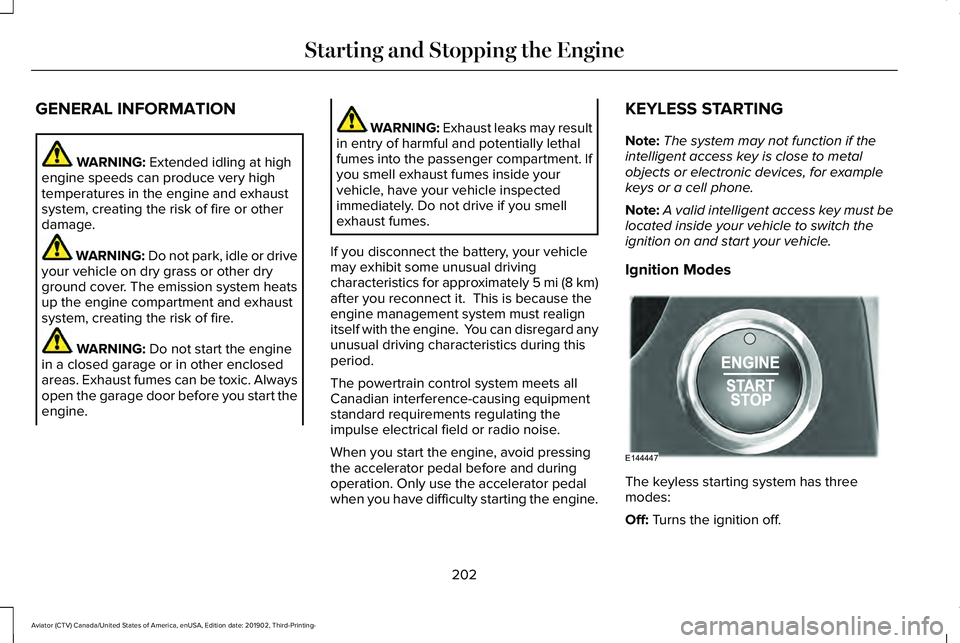
Ignition Modes The keyless starting system has three
modes:
Off:
Turns the ignition off.
202
Aviator (CTV) Canada/United States of America, enUSA, Edition date: 201902, Third-Printing- Starting and Stopping the EngineE144447
Page 595 of 609
Air Filter
See: Changing the Engine Air Filter..............363
Air Suspension...............................................314 Switching the systems on or off......................314
Using Cargo Loading..........................................314
Using Easy Entry..................................................314
Using the Service Mode....................................314
Alarm See: Anti-Theft Alarm..........................................95
All-Wheel Drive.............................................228
Ambient Lighting............................................112 Adjusting the Brightness....................................113
Changing the Color..............................................113
Switching Ambient Lighting Off........................113
Switching Ambient Lighting On........................113
Anti-Theft Alarm..............................................95 Arming the Alarm..................................................95
Disarming the Alarm............................................96
Using the System..................................................95
Appendices....................................................554
Apps................................................................495 SiriusXM Traffic and Travel Link.....................496
Using Apps on an Android Device................496
Using Apps on an iOS Device........................495
Using Mobile Navigation on an Android
Device...............................................................496
At a Glance........................................................21 Audible Warnings and Indicators..............129
Headlamps On Warning Chime.......................
129
Keyless Warning Alert........................................129
Parking Brake On Warning Chime..................129
Audio Control
..................................................99
You can operate the following functions with
the control:.........................................................99
Audio System
................................................445
General Information...........................................445
Audio Unit
......................................................446
Accessing the Source Menu............................447
Adjusting the Volume........................................446
Changing Radio Stations..................................446
Locking the Rear Audio Controls....................447
Playing or Pausing Media.................................447
Rear Audio Control Lock Message................448
Rear Passenger Audio Controls......................447
Selecting a Preset..............................................447
Selecting the Audio Modes..............................447
Switching Repeat Mode On and Off..............447
Switching Shuffle Mode On and Off..............447
Switching the Audio Control On and
Off......................................................................448
Switching the Audio Unit On and Off............447
Switching the Display On and Off..................447
Using Seek, Fast Forward and Reverse.......447
Auto Hold
.......................................................239
Auto Hold Indicator............................................240 Switching Auto Hold On and Off....................239
Using Auto Hold.................................................239
Autolamps
.......................................................107
Windshield Wiper Activated Headlamps.......107
Automatic Climate Control
.........................160
Accessing Rear Climate Controls...................160
Accessing the Air Distribution Controls........160
Accessing the Climate Control Menu............160
Setting the Blower Motor Speed....................160
Setting the Temperature.....................................161
Switching Auto Mode On and Off....................161
Switching Maximum Air Conditioning On and Off.......................................................................163
Switching Maximum Defrost On and Off.......163
Switching Recirculated Air On and Off..........163
Switching the Air Conditioning On and Off.......................................................................162
Switching the Climate Control On and Off.......................................................................162
Automatic High Beam Control
....................114
Automatic High Beam Control Indicators.......................................................115
Automatic Transmission
.............................223
Automatic Return to Park.................................224
If Your Vehicle Gets Stuck in Mud or
Snow.................................................................227
Manual Park Release (MPR).............................226
SelectShift Automatic ™ Transmission............225
592
Aviator (CTV) Canada/United States of America, enUSA, Edition date: 201902, Third-Printing- Index
Page 602 of 609
Installing the Vehicle Identification
Card...............................................................438
Instrument Cluster.........................................123
Instrument Lighting Dimmer.......................107
Instrument Panel..............................................21
Interior Air Quality.........................................169
Interior Lamps.................................................112 Front Interior Lamp..............................................112
Rear Interior Lamps..............................................112
Interior Mirror..................................................119 Auto-Dimming Mirror...........................................119
Introduction.........................................................9
J
Jump Starting the Vehicle
..........................329
Connecting the Jumper Cables......................330
Jump Starting........................................................331
Locating the Jump Starting Connection
Points................................................................330
Preparing Your Vehicle.....................................329
Removing the Jumper Cables..........................331
K
Keyless Entry...................................................86 SECURICODE™ Keyless Entry Keypad.............86 Keyless Starting
............................................202
Ignition Modes....................................................202
Keys and Remote Controls...........................64
L
Lane Keeping System.................................283 Switching the System On and Off..................284
Liftgate...............................................................89
Lighting Control.............................................106 Flashing High Beam Headlamps.....................107
Lighting Control Selections..............................106
Switching High Beam Headlamps On and
Off.......................................................................106
Lighting............................................................106 General Information............................................106
Lincoln Automotive Financial Services......16
Lincoln Protect...............................................519 Lincoln Protect (CANADA ONLY)...................520
Lincoln Protect Extended Service Plans (U.S.
Only)...................................................................519
Load Carriers See: Roof Racks and Load Carriers...............309
Load Carrying................................................308
Load Limit
........................................................310
Special Loading Instructions for Owners of
Pick-up Trucks and Utility-type
Vehicles.............................................................314 Vehicle Loading - with and without a
Trailer.................................................................310
Locating the Cabin Air Filter.......................169
Locking and Unlocking..................................78 Activating Intelligent Access..............................
78
Autolock..................................................................83
Battery Saver..........................................................84
Closing the Luggage Compartment................85
Door Lock Indicator..............................................78
Door Lock Switch Inhibitor.................................78
Emergency Locking...............................................81
Illuminated Entry...................................................84
Illuminated Exit......................................................84
Locking and Unlocking the Doors from Inside....................................................................81
Locking the Doors from the Luggage Compartment.....................................................81
Opening the Luggage Compartment..............84
Remote Control.....................................................80
Smart Unlocks for Intelligent Access Keys.....................................................................83
Unlatching the Driver Door with the Key Blade...................................................................82
Luggage Covers...........................................308
Lug Nuts See: Changing a Road Wheel...........................411
599
Aviator (CTV) Canada/United States of America, enUSA, Edition date: 201902, Third-Printing- Index