vin LINCOLN AVIATOR 2020 User Guide
[x] Cancel search | Manufacturer: LINCOLN, Model Year: 2020, Model line: AVIATOR, Model: LINCOLN AVIATOR 2020Pages: 609, PDF Size: 5.4 MB
Page 40 of 609
BOOSTER SEATS
WARNING: Do not put the shoulder
section of the seatbelt or allow the child to
put the shoulder section of the seatbelt
under their arm or behind their back.
Failure to follow this instruction could
reduce the effectiveness of the seatbelt
and increase the risk of injury or death in
a crash.
Use a belt-positioning booster seat for
children who have outgrown or no longer
properly fit in a child safety restraint
(generally children who are less than
57 in
(1.45 m) tall, are greater than age 4 and less
than age 12, and between 40 lb (18 kg) and
80 lb (36 kg) and upward to 100 lb (45 kg) if
recommended by your child restraint
manufacturer). Many state and provincial
laws require that children use approved
booster seats until they reach age eight, a
height of
57 in (1.45 m) tall, or 80 lb (36 kg).
Booster seats should be used until you can
answer YES to ALL of these questions when
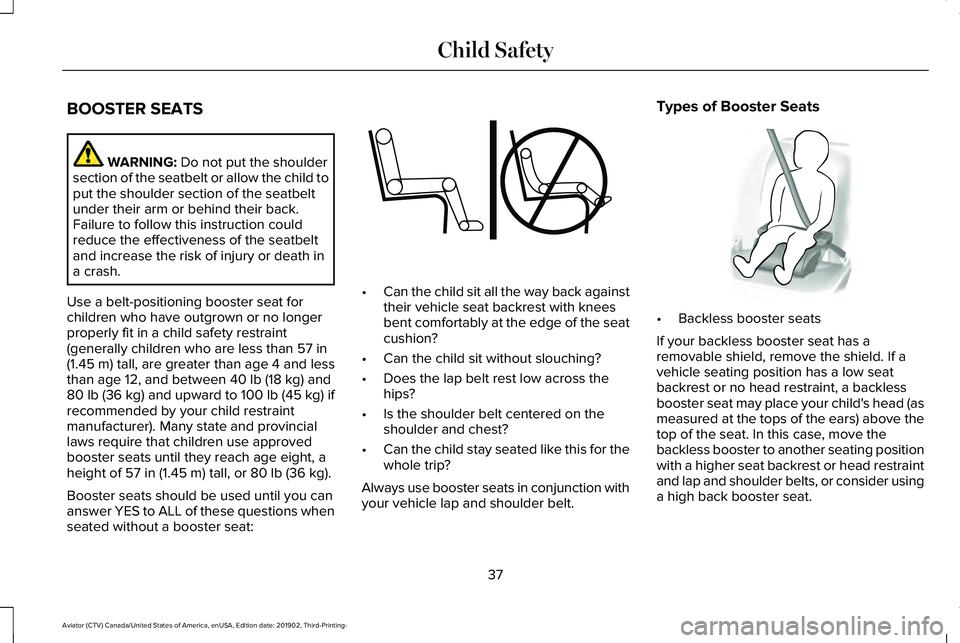
seated without a booster seat: •
Can the child sit all the way back against
their vehicle seat backrest with knees
bent comfortably at the edge of the seat
cushion?
• Can the child sit without slouching?
• Does the lap belt rest low across the
hips?
• Is the shoulder belt centered on the
shoulder and chest?
• Can the child stay seated like this for the
whole trip?
Always use booster seats in conjunction with
your vehicle lap and shoulder belt. Types of Booster Seats
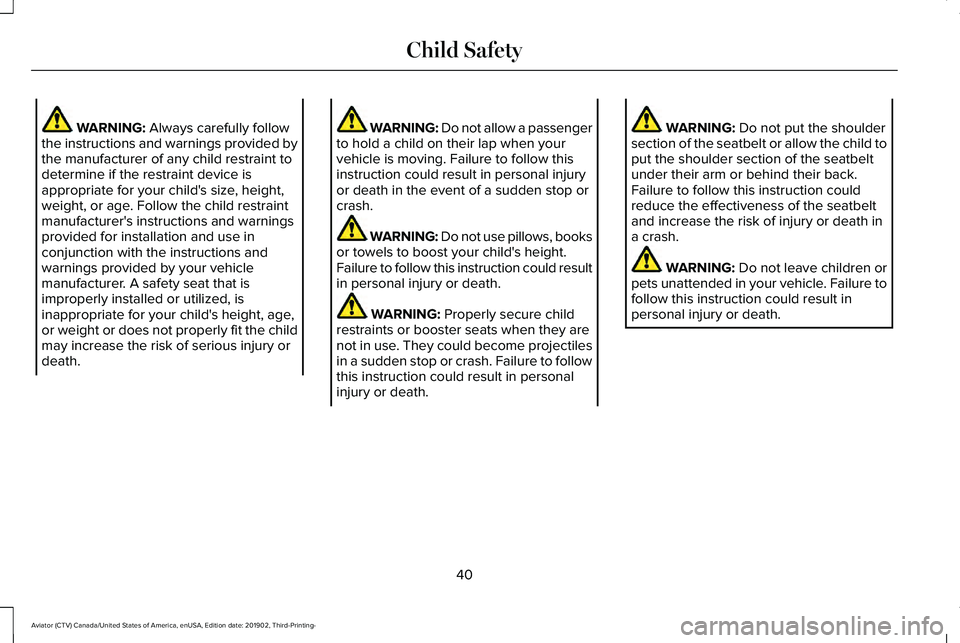
•
Backless booster seats
If your backless booster seat has a
removable shield, remove the shield. If a
vehicle seating position has a low seat
backrest or no head restraint, a backless
booster seat may place your child's head (as
measured at the tops of the ears) above the
top of the seat. In this case, move the
backless booster to another seating position
with a higher seat backrest or head restraint
and lap and shoulder belts, or consider using
a high back booster seat.
37
Aviator (CTV) Canada/United States of America, enUSA, Edition date: 201902, Third-Printing- Child SafetyE142595 E68924
Page 43 of 609
WARNING: Always carefully follow
the instructions and warnings provided by
the manufacturer of any child restraint to
determine if the restraint device is
appropriate for your child's size, height,
weight, or age. Follow the child restraint
manufacturer's instructions and warnings
provided for installation and use in
conjunction with the instructions and
warnings provided by your vehicle
manufacturer. A safety seat that is
improperly installed or utilized, is
inappropriate for your child's height, age,
or weight or does not properly fit the child
may increase the risk of serious injury or
death. WARNING: Do not allow a passenger
to hold a child on their lap when your
vehicle is moving. Failure to follow this
instruction could result in personal injury
or death in the event of a sudden stop or
crash. WARNING: Do not use pillows, books
or towels to boost your child's height.
Failure to follow this instruction could result
in personal injury or death. WARNING:
Properly secure child
restraints or booster seats when they are
not in use. They could become projectiles
in a sudden stop or crash. Failure to follow
this instruction could result in personal
injury or death. WARNING:
Do not put the shoulder
section of the seatbelt or allow the child to
put the shoulder section of the seatbelt
under their arm or behind their back.
Failure to follow this instruction could
reduce the effectiveness of the seatbelt
and increase the risk of injury or death in
a crash. WARNING:
Do not leave children or
pets unattended in your vehicle. Failure to
follow this instruction could result in
personal injury or death.
40
Aviator (CTV) Canada/United States of America, enUSA, Edition date: 201902, Third-Printing- Child Safety
Page 46 of 609
PRINCIPLE OF OPERATION
WARNING: Always drive and ride
with your seatback upright and the lap belt
snug and low across the hips. WARNING:
Children must always be
properly restrained. WARNING: Do not allow a passenger
to hold a child on their lap when your
vehicle is moving. Failure to follow this
instruction could result in personal injury
or death in the event of a sudden stop or
crash. WARNING:
All occupants of your
vehicle, including the driver, should always
properly wear their seatbelts, even when
an airbag supplemental restraint system is
provided. Failure to properly wear your
seatbelt could seriously increase the risk
of injury or death. WARNING: It is extremely dangerous
to ride in a cargo area, inside or outside of
a vehicle. In a crash, people riding in these
areas are more likely to be seriously
injured or killed. Do not allow people to
ride in any area of your vehicle that is not
equipped with seats and seatbelts. Make
sure everyone in your vehicle is in a seat
and properly using a seatbelt. Failure to
follow this warning could result in serious
personal injury or death. WARNING:
In a rollover crash, an
unbelted person is significantly more likely
to die than a person wearing a seatbelt. WARNING:
Each seating position in
your vehicle has a specific seatbelt
assembly made up of one buckle and one
tongue designed to be used as a pair. Use
the shoulder belt on the outside shoulder
only. Never wear the shoulder belt under
the arm. Never use a single seatbelt for
more than one person. WARNING:
Even with advanced
restraints systems, properly restrain
children 12 and under in a rear seating
position. Failure to follow this could
seriously increase the risk of injury or
death. WARNING:
Seatbelts and seats may
be hot in a vehicle that is in the sunshine.
The hot seatbelts or seats may burn a small
child. Check seat covers and buckles
before you place a child anywhere near
them.
All seating positions in your vehicle have lap
and shoulder seatbelts. All occupants of the
vehicle should always properly wear their
seatbelts, even when an airbag supplemental
restraint system is provided.
The seatbelt system consists of:
• Lap and shoulder seatbelts.
• Shoulder seatbelt with automatic locking
mode, (except driver seatbelt).
• Height adjuster at the front outermost
seating positions.
43
Aviator (CTV) Canada/United States of America, enUSA, Edition date: 201902, Third-Printing- Seatbelts
Page 51 of 609
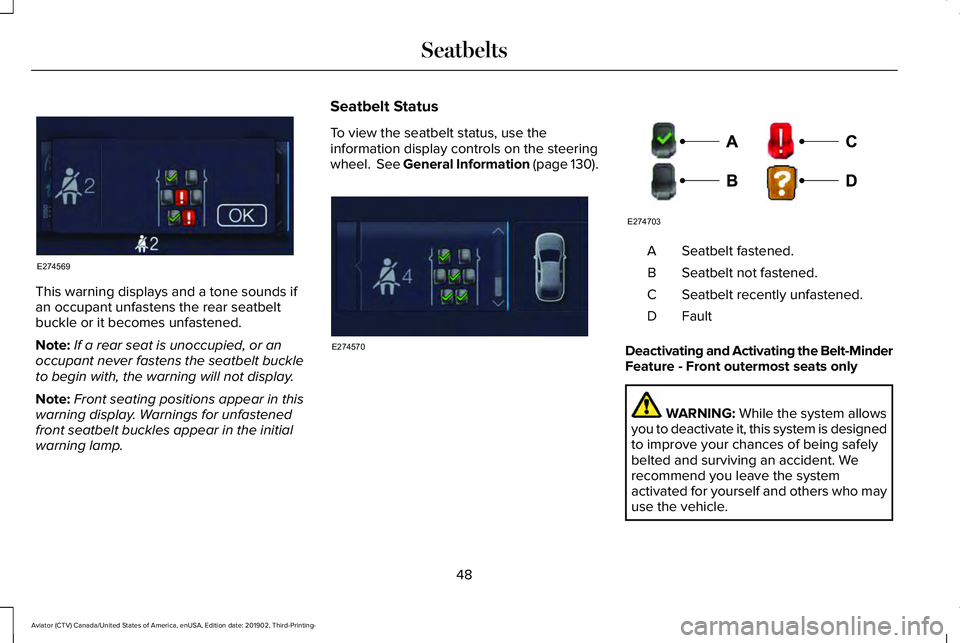
This warning displays and a tone sounds if
an occupant unfastens the rear seatbelt
buckle or it becomes unfastened.
Note:
If a rear seat is unoccupied, or an
occupant never fastens the seatbelt buckle
to begin with, the warning will not display.
Note: Front seating positions appear in this
warning display. Warnings for unfastened
front seatbelt buckles appear in the initial
warning lamp. Seatbelt Status
To view the seatbelt status, use the
information display controls on the steering
wheel. See General Information (page 130). Seatbelt fastened.
A
Seatbelt not fastened.
B
Seatbelt recently unfastened.
C
FaultD
Deactivating and Activating the Belt-Minder
Feature - Front outermost seats only WARNING: While the system allows
you to deactivate it, this system is designed
to improve your chances of being safely
belted and surviving an accident. We
recommend you leave the system
activated for yourself and others who may
use the vehicle.
48
Aviator (CTV) Canada/United States of America, enUSA, Edition date: 201902, Third-Printing- SeatbeltsE274569 E274570 E274703
Page 53 of 609
SEATBELT EXTENSIONS
WARNING: Persons who fit into the
vehicle's seatbelt should not use an
extension. Unnecessary use could result
in serious personal injury in the event of a
crash. WARNING:
Only use extensions
provided free of charge by our dealers.
The dealer will provide an extension
designed specifically for this vehicle, model
year and seating position. The use of an
extension intended for another vehicle,
model year or seating position may not
offer you the full protection of your
vehicle's seatbelt restraint system. WARNING:
Never use seatbelt
extensions to install child restraints. WARNING:
Do not use a seatbelt
extension with an inflatable seatbelt. WARNING:
Do not use extensions
to change the way the seatbelt fits across
the torso, over the lap or to make the
seatbelt buckle easier to reach.
If, because of body size or driving position,
it is not possible to properly fasten the
seatbelt over your lap and shoulder, an
extension that is compatible with the
seatbelts is available free of charge from our
dealers. Only use our seatbelt extensions
made by the original equipment seatbelt
manufacturer with our seatbelts. Ask your
authorized dealer if your extension is
compatible with your vehicle restraint system.
50
Aviator (CTV) Canada/United States of America, enUSA, Edition date: 201902, Third-Printing- Seatbelts
Page 65 of 609
WHAT IS 911 ASSIST
911 Assist is a SYNC system feature that can
call for help if you are in an accident. If a
crash deploys an airbag, excluding knee
airbags and rear inflatable seatbelts [if
equipped], or activates the fuel pump
shut-off, your SYNC-equipped vehicle may
be able to contact emergency services by
dialing 911 through a paired and connected
Bluetooth enabled phone. You can learn
more about the 911 Assist feature, by visiting:
Website
www.owner.lincoln.com
www.syncmyride.ca
www.syncmaroute.ca
Not all crashes will deploy an airbag or
activate the fuel pump shut-off, the triggers
for 911 Assist. If a connected cell phone
sustains damage or loses its connection to
SYNC during a crash, SYNC will search for
and try to connect to a previously paired cell
phone. SYNC will then attempt to call the
emergency services. Before making the call:
•
SYNC provides a short window of time,
about 10 seconds, to cancel the call. If
you fail to cancel the call, SYNC attempts
to dial 911.
• SYNC says the following, or a similar
message: SYNC will attempt to call 911,
to cancel the call, press Cancel on your
screen or press and hold the phone
button on your steering wheel.
If you do not cancel the call, and SYNC
makes a successful call, a pre-recorded
message plays for the 911 operator, and then
the occupant(s) in your vehicle is able to talk
with the operator. Be prepared to
immediately provide your name, phone
number and location, because not all 911
systems are capable of receiving this
information electronically.
During an emergency call, the system
transmits vehicle data to the emergency
service. See Data Recording (page 12). EMERGENCY CALL
REQUIREMENTS WARNING: Do not wait for 911 Assist
to make an emergency call if you can do
it yourself. Dial emergency services
immediately to avoid delayed response
time which could increase the risk of
serious injury or death after a crash. If you
do not hear 911 Assist within five seconds
of the crash, the system or phone may be
damaged or non-functional. WARNING: Always place your phone
in a secure location in your vehicle so it
does not become a projectile or get
damaged in a crash. Failure to do so may
cause serious injury to someone or
damage the phone which could prevent
911 Assist from working properly. WARNING: Unless the 911 Assist
setting is set on before a crash, the system
will not dial for help which could delay
response time, potentially increasing the
risk of serious injury or death after a crash.
62
Aviator (CTV) Canada/United States of America, enUSA, Edition date: 201902, Third-Printing- 911 Assist
Page 67 of 609
GENERAL INFORMATION ON
RADIO FREQUENCIES
This device complies with Part 15 of the FCC
Rules and with Industry Canada
license-exempt RSS standard(s). Operation
is subject to the following two conditions: (1)
This device may not cause harmful
interference, and (2) This device must accept
any interference received, including
interference that may cause undesired
operation.
WARNING: Changes or modifications
not expressively approved by the party
responsible for compliance could void the
user's authority to operate the equipment.
The term "IC:" before the radio certification
number only signifies that Industry Canada
technical specifications were met.
The typical operating range for your
transmitter is approximately 33 ft (10 m).
Vehicles with the remote start feature will
have a greater range. One of the following could cause a decrease
in operating range:
•
Weather conditions.
• Nearby radio towers.
• Structures around the vehicle.
• Other vehicles parked next to your
vehicle.
The radio frequency used by your remote
control can also be used by other radio
transmitters, for example amateur radios,
medical equipment, wireless headphones,
wireless remote controls, cell phones, battery
chargers and alarm systems. If the
frequencies are jammed, you will not be able
to use your remote control. You can lock and
unlock the doors with the key.
Note: Make sure to lock your vehicle before
leaving it unattended.
Note: If you are in range, the remote control
will operate if you press any button
unintentionally.
Note: The remote control contains sensitive
electrical components. Exposure to moisture
or impact may cause permanent damage. Intelligent Access
(If Equipped)
The system uses a radio frequency signal to
communicate with your vehicle and authorize
your vehicle to unlock when one of the
following conditions are met:
• You activate the front exterior door
handle switch.
• You press the luggage compartment
button.
• You press a button on the transmitter.
If excessive radio frequency interference is
present in the area or if the transmitter
battery is low, you may need to mechanically
unlock your door. You can use the
mechanical key blade in your intelligent
access key to open the driver door in this
situation.
See Remote Control (page 64).
REMOTE CONTROL
Intelligent Access Key
Note: You may not be able to shift out of
park (P) unless the intelligent access key is
inside your vehicle.
64
Aviator (CTV) Canada/United States of America, enUSA, Edition date: 201902, Third-Printing- Keys and Remote Controls
Page 70 of 609
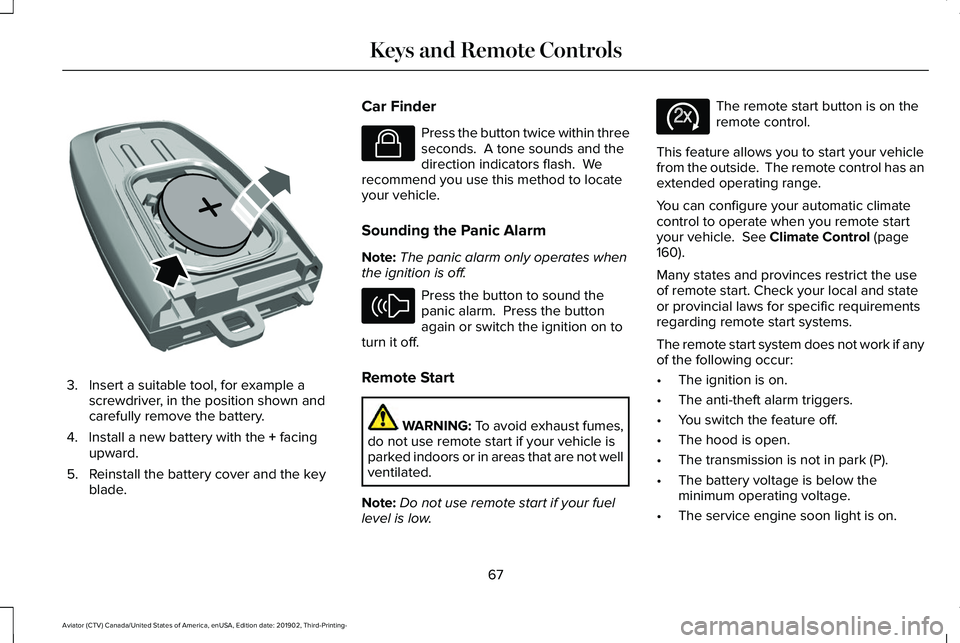
3. Insert a suitable tool, for example a
screwdriver, in the position shown and
carefully remove the battery.
4. Install a new battery with the + facing
upward.
5. Reinstall the battery cover and the key blade. Car Finder Press the button twice within three
seconds. A tone sounds and the
direction indicators flash. We
recommend you use this method to locate
your vehicle.
Sounding the Panic Alarm
Note: The panic alarm only operates when
the ignition is off. Press the button to sound the
panic alarm. Press the button
again or switch the ignition on to
turn it off.
Remote Start WARNING: To avoid exhaust fumes,
do not use remote start if your vehicle is
parked indoors or in areas that are not well
ventilated.
Note: Do not use remote start if your fuel
level is low. The remote start button is on the
remote control.
This feature allows you to start your vehicle
from the outside. The remote control has an
extended operating range.
You can configure your automatic climate
control to operate when you remote start
your vehicle.
See Climate Control (page
160).
Many states and provinces restrict the use
of remote start. Check your local and state
or provincial laws for specific requirements
regarding remote start systems.
The remote start system does not work if any
of the following occur:
• The ignition is on.
• The anti-theft alarm triggers.
• You switch the feature off.
• The hood is open.
• The transmission is not in park (P).
• The battery voltage is below the
minimum operating voltage.
• The service engine soon light is on.
67
Aviator (CTV) Canada/United States of America, enUSA, Edition date: 201902, Third-Printing- Keys and Remote ControlsE218402 E138623 E138624 E138625
Page 71 of 609
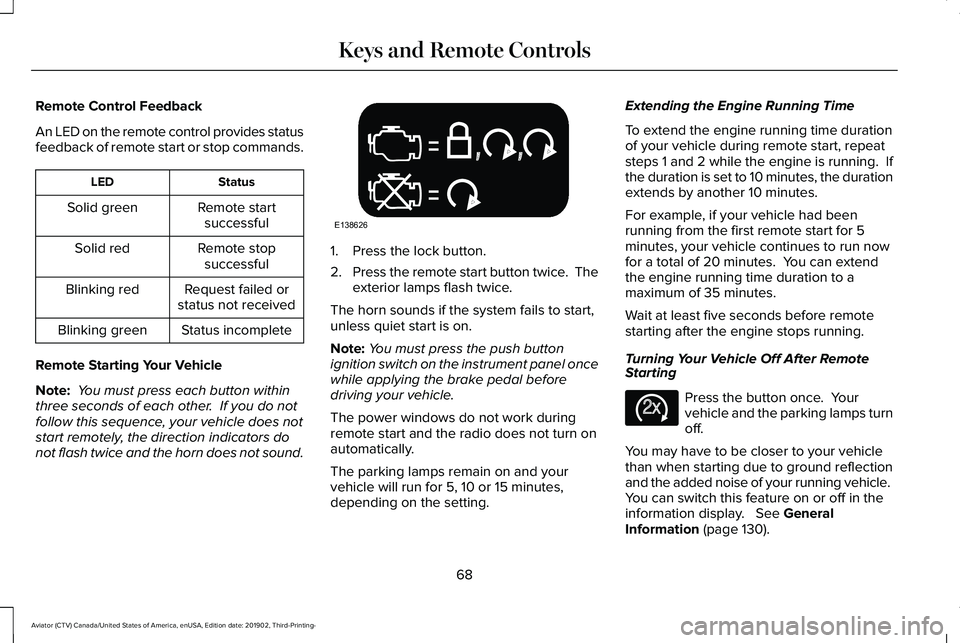
Remote Control Feedback
An LED on the remote control provides status
feedback of remote start or stop commands.
Status
LED
Remote startsuccessful
Solid green
Remote stopsuccessful
Solid red
Request failed or
status not received
Blinking red
Status incomplete
Blinking green
Remote Starting Your Vehicle
Note: You must press each button within
three seconds of each other. If you do not
follow this sequence, your vehicle does not
start remotely, the direction indicators do
not flash twice and the horn does not sound. 1. Press the lock button.
2.
Press the remote start button twice. The
exterior lamps flash twice.
The horn sounds if the system fails to start,
unless quiet start is on.
Note: You must press the push button
ignition switch on the instrument panel once
while applying the brake pedal before
driving your vehicle.
The power windows do not work during
remote start and the radio does not turn on
automatically.
The parking lamps remain on and your
vehicle will run for 5, 10 or 15 minutes,
depending on the setting. Extending the Engine Running Time
To extend the engine running time duration
of your vehicle during remote start, repeat
steps 1 and 2 while the engine is running. If
the duration is set to 10 minutes, the duration
extends by another 10 minutes.
For example, if your vehicle had been
running from the first remote start for 5
minutes, your vehicle continues to run now
for a total of 20 minutes. You can extend
the engine running time duration to a
maximum of 35 minutes.
Wait at least five seconds before remote
starting after the engine stops running.
Turning Your Vehicle Off After Remote
Starting
Press the button once. Your
vehicle and the parking lamps turn
off.
You may have to be closer to your vehicle
than when starting due to ground reflection
and the added noise of your running vehicle.
You can switch this feature on or off in the
information display. See General
Information (page 130).
68
Aviator (CTV) Canada/United States of America, enUSA, Edition date: 201902, Third-Printing- Keys and Remote ControlsE138626 E138625
Page 76 of 609
PRINCIPLE OF OPERATION
MyKey allows you to program keys with
restricted driving modes to promote good
driving habits. You can program the
restrictions to all keys except one. Any keys
that you did not program are administrator
keys or admin keys.
You can use admin keys to:
•
Create a MyKey with certain vehicle
restrictions.
• Program certain MyKey settings.
• Clear all MyKey restrictions.
After you program a MyKey, you can view
the following information through the
information display:
• The total number of admin keys and
MyKeys for your vehicle.
• The total distance a MyKey driver
traveled with your vehicle.
Note: Every MyKey receives the same
restrictions and settings. You cannot
program them individually. Note:
For vehicles equipped with a
push-button start switch: When both a MyKey
and an admin key are present when you
start your vehicle, the system recognizes the
admin key only.
Standard Settings
Not every vehicle includes the features listed
below. If your vehicle has this equipment,
then you cannot change the following
settings when using a MyKey:
• Seatbelt reminder or Belt-Minder™. MyKey
mutes the audio system until drivers, and
in some instances, passengers, fasten
their seatbelts. Note: If your vehicle
includes an AM/FM radio or a very basic
audio system, then the radio may not
mute.
• Earlier low-fuel warning. The low-fuel
warning activates earlier for MyKey
drivers, giving them more time to refuel. •
Certain driver alerts, stability systems or
parking aids turn on automatically when
you use the MyKey system. For example,
Blind Spot Information System (BLIS),
cross traffic alert, lane departure warning
or forward collision warning. Note: MyKey
drivers may be able to turn the lane
departure warning feature off, but this
feature turns back on automatically with
every new key cycle.
• Restricted touchscreen operation in some
markets. For example, MyKey may
prevent manual navigation destination
input while the vehicle is in any gear
other than park (P) or when the vehicle
reaches a certain rate of speed.
• Satellite radio adult content restrictions,
if this feature is available in your market.
Optional Settings
You can configure certain vehicle feature
settings when you first create a MyKey. You
can also change the settings afterward with
an admin key.
73
Aviator (CTV) Canada/United States of America, enUSA, Edition date: 201902, Third-Printing- MyKey™