vin LINCOLN AVIATOR 2020 Owners Manual
[x] Cancel search | Manufacturer: LINCOLN, Model Year: 2020, Model line: AVIATOR, Model: LINCOLN AVIATOR 2020Pages: 609, PDF Size: 5.4 MB
Page 7 of 609
Garage Door Opener
Universal Garage Door Opener
................191
Auxiliary Power Points
Auxiliary Power Points ................................
197
Wireless Accessory Charger .....................
198
Storage Compartments
Center Console ............................................
201
Overhead Console ......................................
201
Starting and Stopping the Engine
General Information ...................................
202
Keyless Starting ...........................................
202
Starting a Gasoline Engine .......................
203
Engine Block Heater ..................................
206
Unique Driving Characteristics
Auto-Start-Stop ............................................
208
Fuel and Refueling
Safety Precautions ........................................
211Fuel Quality
...................................................
212
Fuel Filler Funnel Location ........................
212
Running Out of Fuel ....................................
213
Refueling ........................................................
214
Fuel Consumption ........................................
217
Engine Emission Control
Emission Law .................................................
219
Catalytic Converter .....................................
220
Transmission
Automatic Transmission ............................
223
All-Wheel Drive
Using All-Wheel Drive ................................
228
Brakes
General Information ....................................
235
Hints on Driving With Anti-Lock Brakes ......................................................................
236
Electric Parking Brake ................................
236
Hill Start Assist .............................................
238
Auto Hold ......................................................
239Reverse Braking Assist
What Is Reverse Braking Assist
................
241
Reverse Braking Assist Precautions .......
241
Switching Reverse Braking Assist On and Off ...............................................................
242
Overriding Reverse Braking Assist .........
242
Reverse Braking Assist Indicators ..........
242
Reverse Braking Assist – Troubleshooting ......................................................................
243
Traction Control
Principle of Operation ................................
245
Using Traction Control ...............................
245
Stability Control
Principle of Operation ................................
246
Using Stability Control ................................
247
Hill Descent Control
What Is Hill Descent Control ....................
248
Switching Hill Descent Control On and Off ......................................................................
248
Setting the Hill Descent Speed ...............
248
4
Aviator (CTV) Canada/United States of America, enUSA, Edition date: 201902, Third-Printing- Table of Contents
Page 8 of 609
Hill Descent Control Indicator ..................249
Parking Aids
Principle of Operation ................................
250
Rear Parking Aid .........................................
250
Front Parking Aid ........................................
252
Side Sensing System .................................
254
Active Park Assist .......................................
256
Rear View Camera .......................................
261
360 Degree Camera ..................................
264
Cruise Control
What Is Cruise Control ...............................
267
Switching Cruise Control On and Off ......
267
Setting the Cruise Control Speed ...........
267
Canceling the Set Speed ..........................
268
Resuming the Set Speed ..........................
268
Cruise Control Indicators ..........................
268
Adaptive Cruise Control
How Does Adaptive Cruise Control With Stop and Go Work ..................................
269What Is Intelligent Adaptive Cruise Control
......................................................................
269
Adaptive Cruise Control Precautions - Vehicles With: Adaptive Cruise Control
With Lane Centering ..............................
269
Adaptive Cruise Control Precautions - Vehicles With: Adaptive Cruise Control
With Stop and Go ...................................
269
Adaptive Cruise Control Limitations - Vehicles With: Adaptive Cruise Control
With Lane Centering ..............................
270
Adaptive Cruise Control Limitations - Vehicles With: Adaptive Cruise Control
With Stop and Go .....................................
271
Switching Adaptive Cruise Control On and Off ...............................................................
273
Setting the Adaptive Cruise Control Speed ......................................................................
274
Setting the Adaptive Cruise Control Gap ......................................................................
275
Canceling the Set Speed ..........................
276
Resuming the Set Speed ..........................
276
Overriding the Set Speed .........................
276
Adaptive Cruise Control Indicators - Vehicles With: Adaptive Cruise Control
With Lane Centering ..............................
276Adaptive Cruise Control Indicators -
Vehicles With: Adaptive Cruise Control
With Stop and Go ....................................
277
Adaptive Cruise Control Indicators - Vehicles With: Intelligent Adaptive
Cruise Control ..........................................
277
Switching From Adaptive Cruise Control to Cruise Control .....................................
277
Switching Intelligent Mode On and Off ......................................................................
278
Adjusting the Set Speed Tolerance ........
278
Adaptive Cruise Control – Troubleshooting ......................................................................
279
Driving Aids
Driver Alert ....................................................
282
Lane Keeping System ................................
283
Blind Spot Information System ................
289
Cross Traffic Alert ........................................
293
Speed Sign Recognition ...........................
298
Steering .........................................................
299
Pre-Collision Assist .....................................
300
Drive Mode Control
What Is Drive Mode Control .....................
306
5
Aviator (CTV) Canada/United States of America, enUSA, Edition date: 201902, Third-Printing- Table of Contents
Page 9 of 609
Selecting a Drive Mode
.............................306
Drive Modes .................................................
306
Load Carrying
Rear Under Floor Storage .........................
308
Luggage Covers ..........................................
308
Roof Racks and Load Carriers .................
309
Load Limit .......................................................
310
Air Suspension ..............................................
314
Towing
Towing a Trailer .............................................
316
Trailer Sway Control .....................................
317
Recommended Towing Weights ...............
317
Essential Towing Checks ...........................
319
Towing the Vehicle on Four Wheels .......
321
Driving Hints
Reduced Engine Performance .................
323
Economical Driving .....................................
323
Cold Weather Precautions ........................
324
Breaking-In ....................................................
324
Driving Through Water ..............................
324Floor Mats
.....................................................
325
Roadside Emergencies
Roadside Assistance ..................................
327
Hazard Flashers ...........................................
328
Fuel Shutoff ..................................................
328
Jump Starting the Vehicle .........................
329
Post-Crash Alert System .............................
331
Transporting the Vehicle ...........................
332
Customer Assistance
Getting the Services You Need ...............
333
In California (U.S. Only) ..............................
334
The Better Business Bureau (BBB) Auto Line Program (U.S. Only) .......................
335
Utilizing the Mediation/Arbitration Program (Canada Only) ..........................................
336
Getting Assistance Outside the U.S. and Canada .......................................................
337
Ordering Additional Owner's Literature ......................................................................
339
Reporting Safety Defects (U.S. Only) ......
340
Reporting Safety Defects (Canada Only) ......................................................................
340 Fuses
Fuse Specification Chart
...........................
342
Changing a Fuse .........................................
355
Maintenance
General Information ....................................
358
Opening and Closing the Hood ..............
358
Under Hood Overview ..............................
360
Engine Oil Dipstick ......................................
361
Engine Oil Check .........................................
361
Oil Change Indicator Reset ......................
362
Changing the Engine Air Filter ................
363
Engine Coolant Check ...............................
364
Automatic Transmission Fluid Check ......
369
Brake Fluid Check ......................................
369
Power Steering Fluid Check .....................
370
Changing the 12V Battery ..........................
371
Adjusting the Headlamps ..........................
373
Washer Fluid Check ....................................
375
Fuel Filter .......................................................
375
Checking the Wiper Blades ......................
375
6
Aviator (CTV) Canada/United States of America, enUSA, Edition date: 201902, Third-Printing- Table of Contents
Page 12 of 609
ABOUT THIS MANUAL
Thank you for choosing Lincoln. We
recommend that you take some time to get
to know your vehicle by reading this manual.
The more that you know about it, the greater
the safety and pleasure you will get from
driving it.
WARNING: Driving while distracted
can result in loss of vehicle control, crash
and injury. We strongly recommend that
you use extreme caution when using any
device that may take your focus off the
road. Your primary responsibility is the safe
operation of your vehicle. We recommend
against the use of any hand-held device
while driving and encourage the use of
voice-operated systems when possible.
Make sure you are aware of all applicable
local laws that may affect the use of
electronic devices while driving. Note:
This manual describes product
features and options available throughout
the range of available models, sometimes
even before they are generally available. It
may describe options not fitted to the vehicle
you have purchased.
Note: Some of the illustrations in this manual
may show features as used in different
models, so may appear different to you on
your vehicle.
Note: Always use and operate your vehicle
in line with all applicable laws and
regulations.
Note: Pass on this manual when selling your
vehicle. It is an integral part of your vehicle.
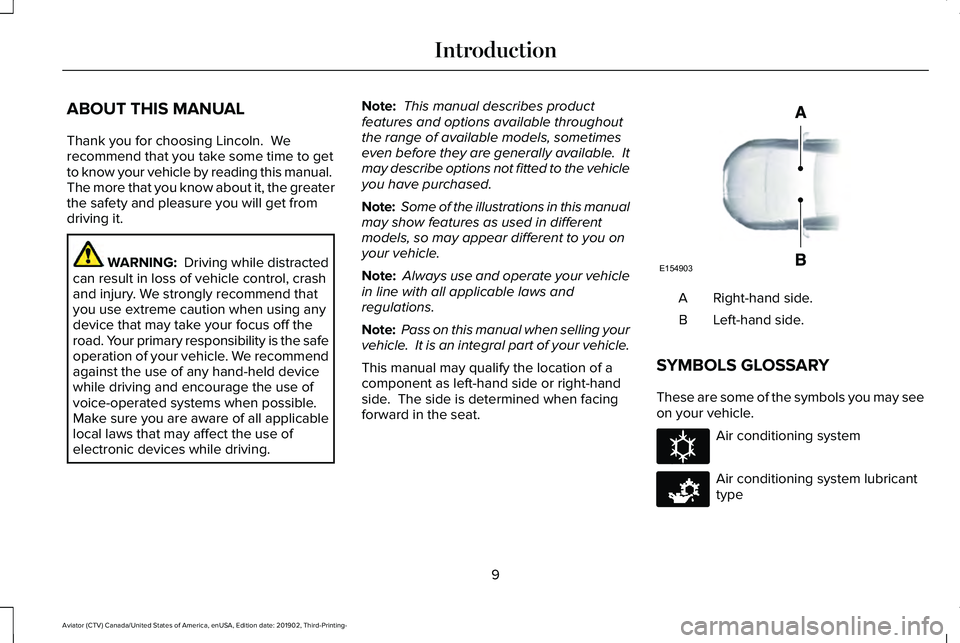
This manual may qualify the location of a
component as left-hand side or right-hand
side. The side is determined when facing
forward in the seat. Right-hand side.
A
Left-hand side.
B
SYMBOLS GLOSSARY
These are some of the symbols you may see
on your vehicle. Air conditioning system
Air conditioning system lubricant
type
9
Aviator (CTV) Canada/United States of America, enUSA, Edition date: 201902, Third-Printing- IntroductionE154903 E162384 E231157
Page 15 of 609
Windshield wash and wipe
DATA RECORDING WARNING: Do not connect wireless
plug-in devices to the data link connector.
Unauthorized third parties could gain
access to vehicle data and impair the
performance of safety related systems.
Only allow repair facilities that follow our
service and repair instructions to connect
their equipment to the data link connector.
We respect your privacy and are committed
to protecting it. The information contained
in this publication was correct at the time of
going to print but as technology rapidly
changes, we recommend that you visit the
regional Lincoln website for the latest
information. Your vehicle has electronic control units that
have data recording functionality and the
ability to permanently or temporarily store
data. This data could include information on
the condition and status of your vehicle,
vehicle maintenance requirements, events
and malfunctions. The types of data that can
be recorded are described in this section.
Some of the data recorded is stored in event
logs or error logs.
Note:
Error logs are reset following a service
or repair.
Note: We may provide information in
response to requests from law enforcement,
other government authorities and third
parties acting with lawful authority or through
a legal process. Such information could be
used by them in legal proceedings.
Data recorded includes, for example:
• Operating states of system components,
for example, fuel level, tire pressure and
battery charge level.
• Vehicle and component status, for
example, wheel speed, deceleration,
lateral acceleration and seatbelt status. •
Events or errors in essential systems, for
example, headlamps and brakes.
• System responses to driving situations,
for example, airbag deployment and
stability control.
• Environmental conditions, for example,
temperature.
Some of this data, when used in combination
with other information, for example, an
accident report, damage to a vehicle or
eyewitness statements, could be associated
with a specific person.
Service Data
Service data recorders in your vehicle are
capable of collecting and storing diagnostic
information about your vehicle. This
potentially includes information about the
performance or status of various systems
and modules in the vehicle, such as engine,
throttle, steering or brake systems. In order
to properly diagnose and service your
vehicle, Lincoln Motor Company (Lincoln of
Canada in Canada), and service and repair
facilities may access or share among them
vehicle diagnostic information received
12
Aviator (CTV) Canada/United States of America, enUSA, Edition date: 201902, Third-Printing- Introduction
Page 17 of 609
Note:
Event data recorder data is recorded
by your vehicle only if a non-trivial crash
situation occurs; no data is recorded by the
event data recorder under normal driving
conditions and no personal data or
information (e.g., name, gender, age, and
crash location) is recorded. However, other
parties, such as law enforcement, could
combine the event data recorder data with
the type of personally identifying data
routinely acquired during a crash
investigation.
To read data recorded by an event data
recorder, special equipment is required, and
access to the vehicle or the event data
recorder is needed. In addition to the vehicle
manufacturer, other parties, such as law
enforcement, that have such special
equipment, can read the information if they
have access to the vehicle or the event data
recorder. Comfort, Convenience and
Entertainment Data
Your vehicle has electronic control units that
have the ability to store data based on your
personalized settings. The data is stored
locally in the vehicle or on devices that you
connect to it, for example, a USB drive or
digital music player. You can delete some of
this data and also choose whether to share
it through the services to which you
subscribe. See Settings (page 498).
Comfort and Convenience Data
Data recorded includes, for example:
• Seat and steering wheel position.
• Climate control settings.
• Radio presets.
Entertainment Data
Data recorded includes, for example:
• Music, videos or album art.
• Contacts and corresponding address
book entries.
• Navigation destinations. Services That We Provide
If you use our services, we collect and use
data, for example, account information,
vehicle location and driving characteristics,
that could identify you. We transmit this data
through a dedicated, protected connection.
We only collect and use data to enable your
use of our services to which you have
subscribed, with your consent or where
permitted by law. For additional information,
see the terms and conditions of the services
to which you have subscribed.
Services That Third Parties Provide
We recommend that you review the terms
and conditions and data privacy information
for any services to which you subscribe. We
take no responsibility for services that third
parties provide.
14
Aviator (CTV) Canada/United States of America, enUSA, Edition date: 201902, Third-Printing- Introduction
Page 19 of 609
System data cannot be accessed without
special equipment and access to your
vehicle's module.
For additional information about our privacy
policy, refer to your local Lincoln website.
Note:
To find out if your vehicle has a
connectivity technology, visit
www .ConnectedLincoln. com .
Vehicles With an Emergency Call
System
When the emergency call system is active,
it may disclose to emergency services that
your vehicle has been in a crash involving
the deployment of an airbag or activation of
the fuel pump shut-off. Certain versions or
updates to the emergency call system may
also be capable of electronically or verbally
disclosing to emergency services operators
your vehicle location or other details about
your vehicle or crash to assist emergency
services operators to provide the most
appropriate emergency services. If you do
not want to disclose this information, do not
activate the emergency call system. Note:
You cannot deactivate emergency call
systems that are required by law.
PERCHLORATE
Certain components in your vehicle such as
airbag modules, seatbelt pretensioners and
remote control batteries may contain
perchlorate material. Special handling may
apply for service or vehicle end of life
disposal.
For more information visit: Web Address
www.dtsc.ca.gov/hazard- ouswaste/perchlorate
LINCOLN AUTOMOTIVE
FINANCIAL SERVICES
Lincoln Automotive Financial Services offers
a full range of financing and lease plans to
help you acquire your vehicle. We are
dedicated to providing answers, information
and a truly extraordinary experience. Use the options below to contact us with
questions about your account or financing
and we will respond promptly: Web Address
www.credit.lincoln.com
Phone: 1-888-498-8801
Mail: Lincoln Automotive Financial Services
P.O. Box 542000
Omaha, NE 68154-8000
16
Aviator (CTV) Canada/United States of America, enUSA, Edition date: 201902, Third-Printing- Introduction
Page 21 of 609
WARNING: NEVER use a rearward
facing child restraint on a seat protected
by an ACTIVE AIRBAG in front of it, DEATH
or SERIOUS INJURY to the CHILD can
occur.
On Board Diagnostics Data Link
Connector WARNING: Do not connect wireless
plug-in devices to the data link connector.
Unauthorized third parties could gain
access to vehicle data and impair the
performance of safety related systems.
Only allow repair facilities that follow our
service and repair instructions to connect
their equipment to the data link connector.
Your vehicle has an OBD Data Link
Connector (DLC) that is used in conjunction
with a diagnostic scan tool for vehicle
diagnostics, repairs and reprogramming
services. Installing an aftermarket device that
uses the DLC during normal driving for
purposes such as remote insurance company monitoring, transmission of vehicle data to
other devices or entities, or altering the
performance of the vehicle, may cause
interference with or even damage to vehicle
systems. We do not recommend or endorse
the use of unapproved aftermarket plug-in
devices. The vehicle Warranty will not cover
damage caused by an aftermarket plug-in
device.
Notice to Owners of Pickup Trucks and
Utility Type Vehicles
WARNING:
Utility vehicles have a
significantly higher rollover rate than other
types of vehicles.
Before you drive your vehicle, please read
this Owner’ s Guide carefully. Your vehicle is
not a passenger car. As with other vehicles
of this type, failure to operate this vehicle
correctly may result in loss of vehicle control,
vehicle rollover, personal injury or death.
Using Your Vehicle With a Snowplow
Do not use this vehicle for snowplowing. Your vehicle does not have a snowplowing
package.
Using Your Vehicle as an Ambulance
Do not use this vehicle as an ambulance.
Your vehicle does not have the Ambulance
Preparation Package.
MOBILE COMMUNICATIONS
EQUIPMENT
WARNING: Driving while distracted
can result in loss of vehicle control, crash
and injury. We strongly recommend that
you use extreme caution when using any
device that may take your focus off the
road. Your primary responsibility is the safe
operation of your vehicle. We recommend
against the use of any hand-held device
while driving and encourage the use of
voice-operated systems when possible.
Make sure you are aware of all applicable
local laws that may affect the use of
electronic devices while driving.
18
Aviator (CTV) Canada/United States of America, enUSA, Edition date: 201902, Third-Printing- Introduction
Page 28 of 609
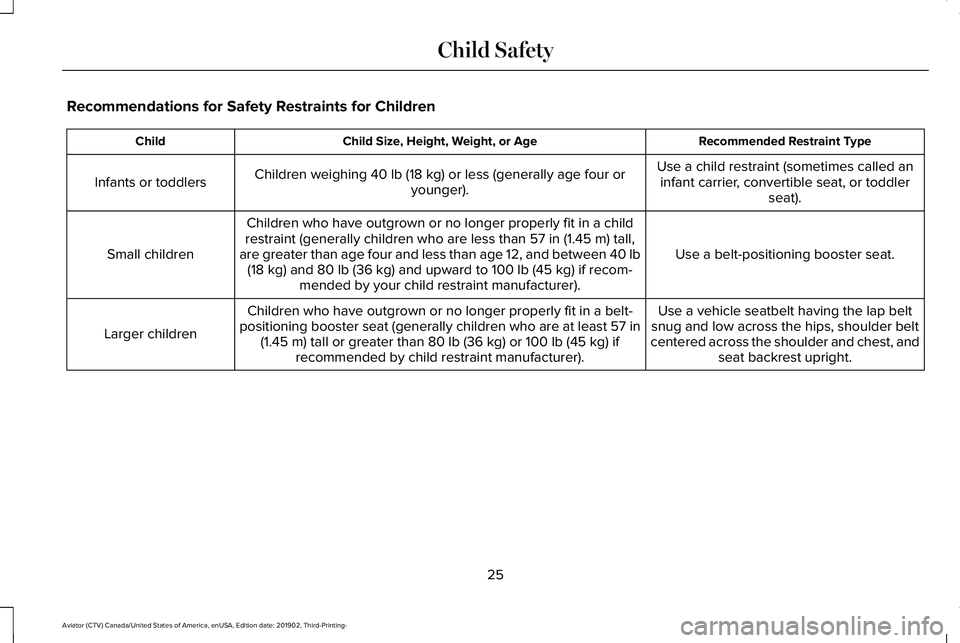
Recommendations for Safety Restraints for Children
Recommended Restraint Type
Child Size, Height, Weight, or Age
Child
Use a child restraint (sometimes called aninfant carrier, convertible seat, or toddler seat).
Children weighing 40 lb (18 kg) or less (generally age four or
younger).
Infants or toddlers
Use a belt-positioning booster seat.
Children who have outgrown or no longer properly fit in a child
restraint (generally children who are less than
57 in (1.45 m) tall,
are greater than age four and less than age 12, and between 40 lb (18 kg)
and 80 lb (36 kg) and upward to 100 lb (45 kg) if recom-
mended by your child restraint manufacturer).
Small children
Use a vehicle seatbelt having the lap belt
snug and low across the hips, shoulder belt
centered across the shoulder and chest, and seat backrest upright.
Children who have outgrown or no longer properly fit in a belt-
positioning booster seat (generally children who are at least 57 in (1.45 m)
tall or greater than 80 lb (36 kg) or 100 lb (45 kg) if
recommended by child restraint manufacturer).
Larger children
25
Aviator (CTV) Canada/United States of America, enUSA, Edition date: 201902, Third-Printing- Child Safety
Page 29 of 609
•
You are required by law to properly use
child restraints for infants and toddlers in
the United States, Canada and Mexico.
• Many states and provinces require that
small children use approved booster
seats until they reach age eight, a height
of 57 in (1.45 m) tall, or 80 lb (36 kg).
Check your local and state or provincial
laws for specific requirements about the
safety of children in your vehicle.
• When possible, properly restrain children
12 years of age and under in a rear
seating position of your vehicle. Accident
statistics suggest that children are safer
when properly restrained in the rear
seating positions than in a front seating
position.
See Front Passenger Sensing
System (page 55).
• When installing a rear facing child
restraint, adjust the vehicle seats to avoid
interference between the child restraint
and the vehicle seat in front of the child
restraint. INSTALLING CHILD RESTRAINTS
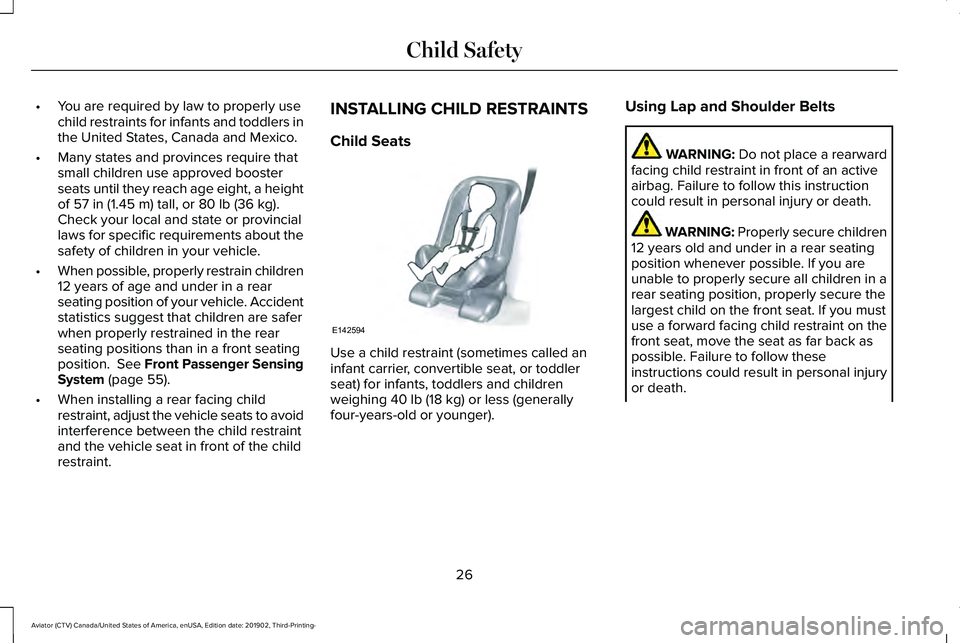
Child Seats
Use a child restraint (sometimes called an
infant carrier, convertible seat, or toddler
seat) for infants, toddlers and children
weighing
40 lb (18 kg) or less (generally
four-years-old or younger). Using Lap and Shoulder Belts WARNING:
Do not place a rearward
facing child restraint in front of an active
airbag. Failure to follow this instruction
could result in personal injury or death. WARNING:
Properly secure children
12 years old and under in a rear seating
position whenever possible. If you are
unable to properly secure all children in a
rear seating position, properly secure the
largest child on the front seat. If you must
use a forward facing child restraint on the
front seat, move the seat as far back as
possible. Failure to follow these
instructions could result in personal injury
or death.
26
Aviator (CTV) Canada/United States of America, enUSA, Edition date: 201902, Third-Printing- Child SafetyE142594