warning LINCOLN AVIATOR 2020 Owners Manual
[x] Cancel search | Manufacturer: LINCOLN, Model Year: 2020, Model line: AVIATOR, Model: LINCOLN AVIATOR 2020Pages: 609, PDF Size: 5.4 MB
Page 528 of 609
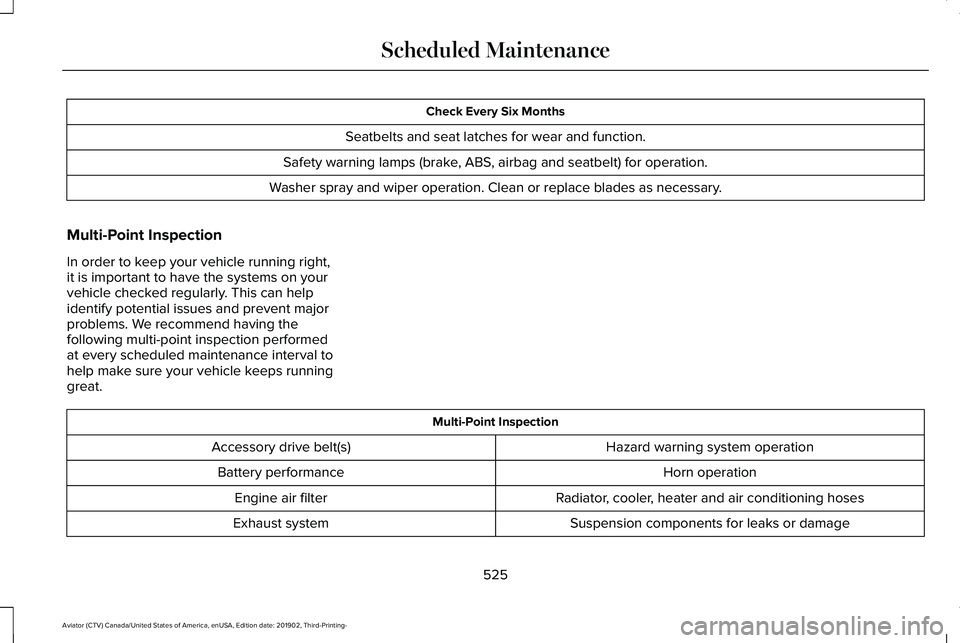
Check Every Six Months
Seatbelts and seat latches for wear and function.
Safety warning lamps (brake, ABS, airbag and seatbelt) for operation.
Washer spray and wiper operation. Clean or replace blades as necessary.
Multi-Point Inspection
In order to keep your vehicle running right,
it is important to have the systems on your
vehicle checked regularly. This can help
identify potential issues and prevent major
problems. We recommend having the
following multi-point inspection performed
at every scheduled maintenance interval to
help make sure your vehicle keeps running
great. Multi-Point Inspection
Hazard warning system operation
Accessory drive belt(s)
Horn operation
Battery performance
Radiator, cooler, heater and air conditioning hoses
Engine air filter
Suspension components for leaks or damage
Exhaust system
525
Aviator (CTV) Canada/United States of America, enUSA, Edition date: 201902, Third-Printing- Scheduled Maintenance
Page 557 of 609
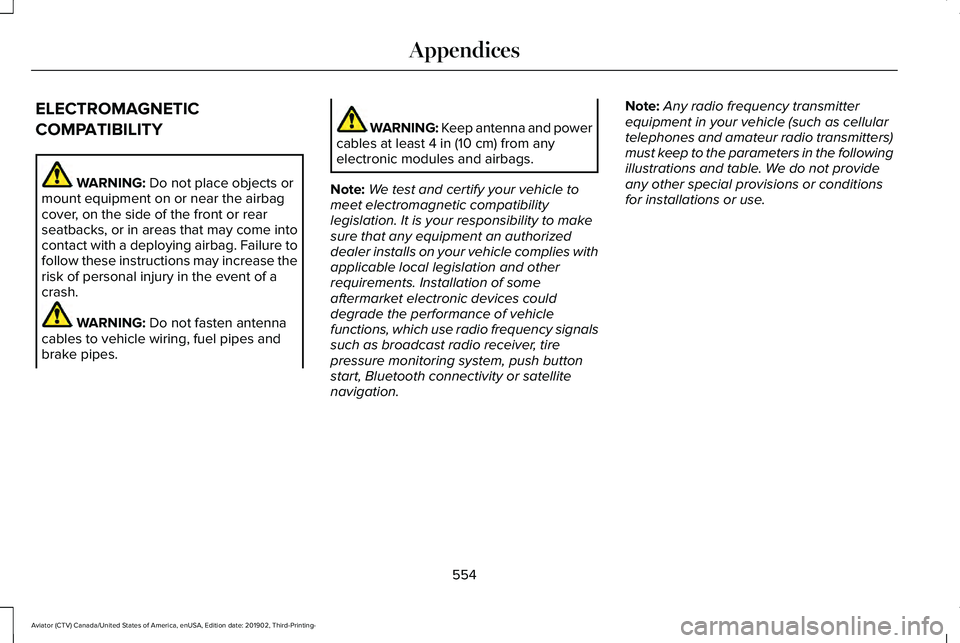
ELECTROMAGNETIC
COMPATIBILITY
WARNING: Do not place objects or
mount equipment on or near the airbag
cover, on the side of the front or rear
seatbacks, or in areas that may come into
contact with a deploying airbag. Failure to
follow these instructions may increase the
risk of personal injury in the event of a
crash. WARNING:
Do not fasten antenna
cables to vehicle wiring, fuel pipes and
brake pipes. WARNING: Keep antenna and power
cables at least
4 in (10 cm) from any
electronic modules and airbags.
Note: We test and certify your vehicle to
meet electromagnetic compatibility
legislation. It is your responsibility to make
sure that any equipment an authorized
dealer installs on your vehicle complies with
applicable local legislation and other
requirements. Installation of some
aftermarket electronic devices could
degrade the performance of vehicle
functions, which use radio frequency signals
such as broadcast radio receiver, tire
pressure monitoring system, push button
start, Bluetooth connectivity or satellite
navigation. Note:
Any radio frequency transmitter
equipment in your vehicle (such as cellular
telephones and amateur radio transmitters)
must keep to the parameters in the following
illustrations and table. We do not provide
any other special provisions or conditions
for installations or use.
554
Aviator (CTV) Canada/United States of America, enUSA, Edition date: 201902, Third-Printing- Appendices
Page 578 of 609
communication with any positioning devices
or any mobile or wireless-connected
electronic or computer devices, including
without limitation cellular phones, palmtop
and handheld computers, pagers, and
personal digital assistants or PDAs.
Warning. The Data may contain inaccurate
or incomplete information due to the
passage of time, changing circumstances,
sources used and the nature of collecting
comprehensive geographic data, any of
which may lead to incorrect results.
No Warranty.
This Data is provided to you
“as is, ” and you agree to use it at your own
risk. Telenav and its licensors (and their
licensors and suppliers) make no guarantees,
representations or warranties of any kind,
express or implied, arising by law or
otherwise, including but not limited to,
content, quality, accuracy, completeness,
effectiveness, reliability, fitness for a
particular purpose, usefulness, use or results
to be obtained from this Data, or that the
Data or server will be uninterrupted or
error-free. Disclaimer of Warranty: TELENAV AND ITS
LICENSORS (INCLUDING THEIR LICENSORS
AND SUPPLIERS) DISCLAIM ANY
WARRANTIES, EXPRESS OR IMPLIED, OF
QUALITY, PERFORMANCE,
MERCHANTABILITY, FITNESS FOR A
PARTICULAR PURPOSE OR
NON-INFRINGEMENT. Some States,
Territories and Countries do not allow certain
warranty exclusions, so to that extent the
above exclusion may not apply to you.
Disclaimer of Liability:
TELENAV AND ITS
LICENSORS (INCLUDING THEIR LICENSORS
AND SUPPLIERS) SHALL NOT BE LIABLE TO
YOU: IN RESPECT OF ANY CLAIM, DEMAND
OR ACTION, IRRESPECTIVE OF THE
NATURE OF THE CAUSE OF THE CLAIM,
DEMAND OR ACTION ALLEGING ANY LOSS,
INJURY OR DAMAGES, DIRECT OR
INDIRECT, WHICH MAY RESULT FROM THE
USE OR POSSESSION OF THE
INFORMATION; OR FOR ANY LOSS OF
PROFIT, REVENUE, CONTRACTS OR
SAVINGS, OR ANY OTHER DIRECT,
INDIRECT, INCIDENTAL, SPECIAL OR
CONSEQUENTIAL DAMAGES ARISING OUT
OF YOUR USE OF OR INABILITY TO USE THIS INFORMATION, ANY DEFECT IN THE
INFORMATION, OR THE BREACH OF THESE
TERMS OR CONDITIONS, WHETHER IN AN
ACTION IN CONTRACT OR TORT OR BASED
ON A WARRANTY, EVEN IF TELENAV OR
ITS LICENSORS HAVE BEEN ADVISED OF
THE POSSIBILITY OF SUCH DAMAGES.
Some States, Territories and Countries do
not allow certain liability exclusions or
damages limitations, so to that extent the
above may not apply to you.
Export Control. You shall not export from
anywhere any part of the Data or any direct
product thereof except in compliance with,
and with all licenses and approvals required
under, applicable export laws, rules and
regulations, including but not limited to the
laws, rules and regulations administered by
the Office of Foreign Assets Control of the
U.S. Department of Commerce and the
Bureau of Industry and Security of the U.S.
Department of Commerce. To the extent that
any such export laws, rules or regulations
prohibit HERE from complying with any of its
obligations hereunder to deliver or distribute
Data, such failure shall be excused and shall
not constitute a breach of this Agreement.
575
Aviator (CTV) Canada/United States of America, enUSA, Edition date: 201902, Third-Printing- Appendices
Page 590 of 609
Gracenote uses a unique identifier to track
queries for statistical purposes. The purpose
of a randomly assigned numeric identifier is
to allow Gracenote to count queries without
knowing anything about who you are. For
more information, see the web page at
www.gracenote.com for the Gracenote
Privacy Policy.
THE GRACENOTE SOFTWARE, EACH ITEM
OF GRACENOTE DATA AND THE
GRACENOTE CONTENT ARE LICENSED TO
YOU "AS IS". NEITHER GRACENOTE MAKES
ANY REPRESENTATIONS OR WARRANTIES,
EXPRESS OR IMPLIED, REGARDING THE
ACCURACY OF ANY GRACENOTE DATA
FROM THE GRACENOTE SERVERS OR
GRACENOTE CONTENT. GRACENOTE
COLLECTIVELY AND SEPARATELY RESERVE
THE RIGHT TO DELETE DATA AND/OR
CONTENT FROM THE COMPANIES'
RESPECTIVE SERVERS OR, IN THE CASE OF
GRACENOTE, CHANGE DATA CATEGORIES
FOR ANY CAUSE THAT GRACENOTE
DEEMS SUFFICIENT. NO WARRANTY IS
MADE THAT EITHER GRACENOTE
CONTENT OR THE GRACENOTE SOFTWARE
OR GRACENOTE SERVERS ARE
ERROR-FREE OR THAT THE FUNCTIONING
OF THE GRACENOTE SOFTWARE OR
GRACENOTE SERVERS WILL BE
UNINTERRUPTED. GRACENOTE IS NOT
OBLIGATED TO PROVIDE YOU WITH ANY
ENHANCED OR ADDITIONAL DATA TYPES
THAT GRACENOTE MAY CHOOSE TO
PROVIDE IN THE FUTURE AND IS FREE TO
DISCONTINUE ITS ONLINE SERVICES AT
ANY TIME. GRACENOTE DISCLAIM ALL
WARRANTIES EXPRESS OR IMPLIED,
INCLUDING, BUT NOT LIMITED TO, IMPLIED
WARRANTIES OF MERCHANTABILITY,
FITNESS FOR A PARTICULAR PURPOSE,
TITLE, AND NON-INFRINGEMENT. NEITHER
GRACENOTE WARRANTS THE RESULTS
THAT WILL BE OBTAINED BY YOUR USE
OF THE GRACENOTE SOFTWARE OR ANY
GRACENOTE SERVER. IN NO CASE WILL
GRACENOTE BE LIABLE FOR ANY
CONSEQUENTIAL OR INCIDENTAL
DAMAGES OR FOR ANY LOST PROFITS OR
LOST REVENUES FOR ANY REASON
WHATSOEVER. © Gracenote 2007.
Radio Frequency Statement
FCC ID: ACJ-SYNCG3-L
IC: 216B-SYNCG3-L
This device complies with Part 15 of the FCC
Rules and with RSS-210 of Industry Canada.
Operation is subject to the following two
conditions:
(1) This device may not cause harmful
interference, and
(2)
this device must accept any interference
received, including interference that may
cause undesired operation. WARNING: Changes or modifications
not expressively approved by the party
responsible for compliance could void the
user's authority to operate the equipment.
The term "IC:" before the radio certification
number only signifies that Industry Canada
technical specifications were met.
The antenna used for this transmitter must
not be co-located or operating in conjunction
with any other antenna or transmitter.
587
Aviator (CTV) Canada/United States of America, enUSA, Edition date: 201902, Third-Printing- Appendices
Page 593 of 609
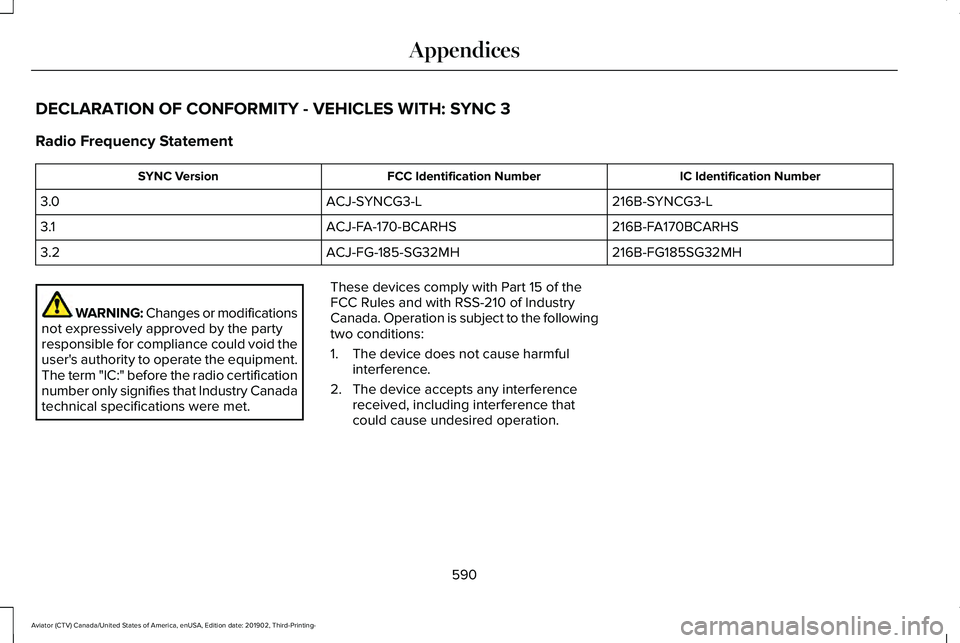
DECLARATION OF CONFORMITY - VEHICLES WITH: SYNC 3
Radio Frequency Statement
IC Identification Number
FCC Identification Number
SYNC Version
216B-SYNCG3-L
ACJ-SYNCG3-L
3.0
216B-FA170BCARHS
ACJ-FA-170-BCARHS
3.1
216B-FG185SG32MH
ACJ-FG-185-SG32MH
3.2 WARNING: Changes or modifications
not expressively approved by the party
responsible for compliance could void the
user's authority to operate the equipment.
The term "IC:" before the radio certification
number only signifies that Industry Canada
technical specifications were met. These devices comply with Part 15 of the
FCC Rules and with RSS-210 of Industry
Canada. Operation is subject to the following
two conditions:
1. The device does not cause harmful
interference.
2. The device accepts any interference received, including interference that
could cause undesired operation.
590
Aviator (CTV) Canada/United States of America, enUSA, Edition date: 201902, Third-Printing- Appendices
Page 594 of 609
3
360 Degree Camera...................................264
Front Camera......................................................265
Side Camera........................................................266
Using the System...............................................265
9
911 Assist...........................................................62
A
A/C See: Climate Control..........................................160
About This Manual
............................................9
ABS See: Brakes..........................................................235
ABS driving hints See: Hints on Driving With Anti-Lock
Brakes...............................................................236
Accessories.....................................................517
Accessories See: Replacement Parts Recommendation......17
Active Park Assist
.........................................256
Using Active Park Assist...................................257 Adaptive Cruise Control.............................269
Adaptive Cruise Control –
Troubleshooting.............................................279
Adaptive Cruise Control Indicators - Vehicles With: Adaptive Cruise Control
With Lane Centering
.................................276
Adaptive Cruise Control Indicators - Vehicles With: Adaptive Cruise Control
With Stop and Go.......................................277
Adaptive Cruise Control Indicators - Vehicles With: Intelligent Adaptive Cruise
Control..........................................................277
System Warnings................................................277
Adaptive Cruise Control Limitations - Vehicles With: Adaptive Cruise Control
With Lane Centering.................................270
Adaptive Cruise Control Limitations - Vehicles With: Adaptive Cruise Control
With Stop and Go........................................271
Sensor Limitations...............................................271
Adaptive Cruise Control Precautions - Vehicles With: Adaptive Cruise Control
With Lane Centering.................................269
Adaptive Cruise Control Precautions - Vehicles With: Adaptive Cruise Control
With Stop and Go......................................269
Hilly Condition Usage.......................................270
When Following a Vehicle...............................270 Adaptive Cruise Control –
Troubleshooting.........................................279
Adaptive Cruise Control – Information Messages.........................................................279
Adaptive Headlamps...................................109 About Adaptive Headlamps.............................109
Camera Detects Lane Markings.......................110
Camera Detects Traffic Signs.............................111
Steering Around a Curve...................................
110
Switching Adaptive Headlamps On or Off........................................................................\
.111
Adjusting the Headlamps...........................373 Vertical Aim Adjustment....................................373
Adjusting the Set Speed Tolerance.........278
Adjusting the Steering Wheel - Vehicles With: Manual Adjustable Steering
Column
............................................................97
Adjusting the Steering Wheel - Vehicles With: Power Adjustable Steering
Column
............................................................97
End of Travel Position..........................................98
Memory Feature....................................................98
AFS See: Adaptive Headlamps................................109
Airbag Disposal
................................................61
Air Conditioning See: Climate Control..........................................160
591
Aviator (CTV) Canada/United States of America, enUSA, Edition date: 201902, Third-Printing- Index
Page 595 of 609
Air Filter
See: Changing the Engine Air Filter..............363
Air Suspension...............................................314 Switching the systems on or off......................314
Using Cargo Loading..........................................314
Using Easy Entry..................................................314
Using the Service Mode....................................314
Alarm See: Anti-Theft Alarm..........................................95
All-Wheel Drive.............................................228
Ambient Lighting............................................112 Adjusting the Brightness....................................113
Changing the Color..............................................113
Switching Ambient Lighting Off........................113
Switching Ambient Lighting On........................113
Anti-Theft Alarm..............................................95 Arming the Alarm..................................................95
Disarming the Alarm............................................96
Using the System..................................................95
Appendices....................................................554
Apps................................................................495 SiriusXM Traffic and Travel Link.....................496
Using Apps on an Android Device................496
Using Apps on an iOS Device........................495
Using Mobile Navigation on an Android
Device...............................................................496
At a Glance........................................................21 Audible Warnings and Indicators..............129
Headlamps On Warning Chime.......................
129
Keyless Warning Alert........................................129
Parking Brake On Warning Chime..................129
Audio Control
..................................................99
You can operate the following functions with
the control:.........................................................99
Audio System
................................................445
General Information...........................................445
Audio Unit
......................................................446
Accessing the Source Menu............................447
Adjusting the Volume........................................446
Changing Radio Stations..................................446
Locking the Rear Audio Controls....................447
Playing or Pausing Media.................................447
Rear Audio Control Lock Message................448
Rear Passenger Audio Controls......................447
Selecting a Preset..............................................447
Selecting the Audio Modes..............................447
Switching Repeat Mode On and Off..............447
Switching Shuffle Mode On and Off..............447
Switching the Audio Control On and
Off......................................................................448
Switching the Audio Unit On and Off............447
Switching the Display On and Off..................447
Using Seek, Fast Forward and Reverse.......447
Auto Hold
.......................................................239
Auto Hold Indicator............................................240 Switching Auto Hold On and Off....................239
Using Auto Hold.................................................239
Autolamps
.......................................................107
Windshield Wiper Activated Headlamps.......107
Automatic Climate Control
.........................160
Accessing Rear Climate Controls...................160
Accessing the Air Distribution Controls........160
Accessing the Climate Control Menu............160
Setting the Blower Motor Speed....................160
Setting the Temperature.....................................161
Switching Auto Mode On and Off....................161
Switching Maximum Air Conditioning On and Off.......................................................................163
Switching Maximum Defrost On and Off.......163
Switching Recirculated Air On and Off..........163
Switching the Air Conditioning On and Off.......................................................................162
Switching the Climate Control On and Off.......................................................................162
Automatic High Beam Control
....................114
Automatic High Beam Control Indicators.......................................................115
Automatic Transmission
.............................223
Automatic Return to Park.................................224
If Your Vehicle Gets Stuck in Mud or
Snow.................................................................227
Manual Park Release (MPR).............................226
SelectShift Automatic ™ Transmission............225
592
Aviator (CTV) Canada/United States of America, enUSA, Edition date: 201902, Third-Printing- Index
Page 604 of 609
Power Door Locks
See: Locking and Unlocking..............................78
Power Liftgate.................................................89
Hands-Free Feature.............................................92
Obstacle Detection...............................................91
Opening and Closing the Liftgate....................89
Setting the Liftgate Open Height......................91
Stopping the Liftgate Movement.......................91
Switching the Power Liftgate On or Off..........92
Power Seats
....................................................174
10-Way and 12-Way Seat Controls...................174
30-Way Seat Controls.........................................175
Adjusting the Multi-Contour Front Seats With Active Motion ..................................................178
Power Steering Fluid Check......................370
Power Windows
..............................................116
Accessory Delay...................................................117
Bounce-Back.........................................................116
One-Touch Down.................................................116
One-Touch Up.......................................................116
Window Lock.........................................................117
Pre-Collision Assist
......................................300
Adjusting the Pre-Collision Assist
Settings.............................................................303
Blocked Sensors.................................................304
Distance Indication and Alert..........................
302
Evasive Steering Assist.....................................303
Using the Pre-Collision Assist System...........301 Programming Your Phone
............................70
Protecting the Environment.........................20
Puncture See: Changing a Road Wheel...........................411
R
Rear Occupant Alert System Audible Warnings.......................................................190
Rear Occupant Alert System Indicators......................................................190
Rear Occupant Alert System Limitations....................................................189
Rear Occupant Alert System Precautions..................................................189
Rear Occupant Alert System......................189
Rear Parking Aid
...........................................250
Object Distance Indicator................................252
Rear Passenger Climate Controls - Vehicles With: Quadruple Zone
Automatic Temperature Control.............164
Directing Air to the Overhead and Rear Footwell Air Vents..........................................165
Rear Climate Control Lock Message..............165
Rear Passenger Climate Control Screen.......164
Selecting a Row...................................................165
Setting the Rear Blower Motor Speed...........
165
Setting the Rear Temperature..........................165 Switching Rear Auto Mode On and Off.........165
Switching the Rear Climate Control On and
Off.......................................................................165
Rear Passenger Climate Controls - Vehicles With: Triple Zone Automatic
Temperature Control
.................................165
Directing Air to the Rear Console Air
Vents..................................................................166
Directing Air to the Rear Footwell Air Vents..................................................................166
Rear Climate Control Lock Indicator..............
166
Setting the Rear Blower Motor Speed...........166
Setting the Rear Temperature..........................166
Switching Rear Auto Mode On........................166
Switching the Rear Climate Control On and Off.......................................................................167
Switching the Rear Heated Seats On and Off.......................................................................167
Switching the Rear Ventilated Seats On and Off.......................................................................167
Rear Seats........................................................181 Adjusting the Second Row Outermost Seats
Backrest............................................................182
Adjusting the Second Row Seats for Easy Entry...................................................................182
Adjusting the Third Row Power Seats...........184
Folding the Second Row Outermost Seats Flat......................................................................182
601
Aviator (CTV) Canada/United States of America, enUSA, Edition date: 201902, Third-Printing- Index
Page 605 of 609
Rear Under Floor Storage..........................308
Cargo Management System............................308
Rear View Camera........................................261 Camera Guidelines............................................262
Manual Zoom......................................................263
Object Distance Indicator................................263
Rear Camera Delay............................................264
Rear Camera On Demand................................263
Using the Rear View Camera System............261
Rear View Camera See: Rear View Camera.....................................
261
Rear Window Wiper and Washers............104 Rear Window Washer.........................................105
Rear Window Wiper............................................104
Rear Wiper Blades See: Changing the Rear Wiper Blades..........377
Recommended Towing Weights................317
Reduced Engine Performance..................323
Refueling
..........................................................214
Refueling System Overview.............................214
Refueling System Warning................................216
Refueling Your Vehicle.......................................215
Remote Control
...............................................64
Car Finder...............................................................67
Intelligent Access Key.........................................64
Remote Start...........................................................67
Replacing the Battery..........................................65
Sounding the Panic Alarm..................................67 Remote Start
...................................................167
Automatic Settings..............................................168
Heated and Cooled Features..........................168
Last Settings.........................................................168
Repairing Minor Paint Damage.................384
Replacement Parts Recommendation
........17
Collision Repairs.....................................................17
Scheduled Maintenance and Mechanical
Repairs..................................................................17
Warranty on Replacement Parts.........................17
Replacing a Lost Key or Remote Control............................................................69
Replacing the Cabin Air Filter
....................169
Reporting Safety Defects (Canada Only)..............................................................340
Reporting Safety Defects (U.S. Only)......340
Resuming the Set Speed
...........................268
Resuming the Set Speed from a Complete
Stop...................................................................276
Reverse Braking Assist Indicators
...........242
Reverse Braking Assist Precautions........241
Reverse Braking Assist
................................241
Reverse Braking Assist –
Troubleshooting.............................................243
Reverse Braking Assist – Troubleshooting.........................................243
Reverse Braking Assist – Frequently Asked Questions.........................................................244 Reverse Braking Assist – Information
Messages.........................................................243
Roadside Assistance...................................327 Vehicles Sold in Canada: Getting Roadside
Assistance.......................................................328
Vehicles sold in the United States: Getting Roadside Assistance.....................................327
Vehicles Sold in the United States: Using Roadside Assistance.....................................327
Roadside Emergencies
...............................327
Roof Racks and Load Carriers..................309 Maximum Recommended Load
Amounts...........................................................309
Running-In See: Breaking-In.................................................324
Running Out of Fuel.....................................213 Adding Fuel From a Portable Fuel
Container..........................................................213
Filling a Portable Fuel Container.....................213
S
Safety Canopy™...............................................58
Safety Precautions.........................................211
Satellite Radio
................................................451
Satellite Radio Electronic Serial Number
(ESN)..................................................................452
Satellite Radio Reception Factors...................
451
602
Aviator (CTV) Canada/United States of America, enUSA, Edition date: 201902, Third-Printing- Index
Page 606 of 609
SiriusXM Satellite Radio Service....................452
Troubleshooting..................................................453
Scheduled Maintenance Record..............533
Scheduled Maintenance............................522
Seatbelt Extensions.......................................50
Seatbelt Height Adjustment.........................46
Seatbelt Reminder
..........................................47
Seatbelt Status......................................................48
Seatbelts...........................................................43 Principle of Operation..........................................43
Seatbelt Warning Lamp and Indicator Chime..............................................................46
Conditions of operation.......................................47
Seats.................................................................170
Security..............................................................94
Selecting a Drive Mode..............................306
Settings
...........................................................498
911 Assist...............................................................498
Ambient Lighting................................................499
Audio.....................................................................498
Automatic Updates............................................498
Bluetooth..............................................................498
Charge Settings..................................................498
Clock......................................................................498
Display...................................................................498
Driver Assist.........................................................498
General.................................................................498
Lincoln Way..........................................................498 Message Center.................................................499
Mobile Apps.........................................................498
Multi Contour Seats...........................................499
Navigation............................................................498
Personal Profiles.................................................499
Phone....................................................................498
Seats......................................................................499
Sound....................................................................498
Valet Mode...........................................................499
Vehicle..................................................................\
.498
Voice Control.......................................................498
Setting the Adaptive Cruise Control Gap................................................................275
Following a Vehicle............................................275
Setting the Adaptive Cruise Control Speed............................................................274
Manually Changing the Set Speed................274
Setting the Adaptive Cruise Speed from a Complete Stop................................................274
Setting the Cruise Control Speed............267 Changing the Set Speed..................................267
Setting the Hill Descent Speed................248
Side Airbags
.....................................................57
Side Sensing System..................................254
Object Distance Indicator................................255
Sitting in the Correct Position....................170
Snow Chains See: Using Snow Chains..................................402 Soft Closing Door...........................................86
Spare Wheel
See: Changing a Road Wheel...........................411
Special Notices.................................................17 New Vehicle Limited Warranty...........................
17
Notice to Owners of Pickup Trucks and Utility Type Vehicles.....................................................18
On Board Diagnostics Data Link Connector...........................................................18
Special Instructions...............................................17
Using Your Vehicle as an Ambulance..............18
Using Your Vehicle With a Snowplow..............18
Special Operating Conditions Scheduled Maintenance...............................................530
Exceptions............................................................532
Speed Control See: Cruise Control............................................267
Speed Sign Recognition.............................298 Principle of Operation.......................................298
Using Traffic Sign Recognition........................298
Stability Control
............................................246
Principle of Operation.......................................246
Starting a Gasoline Engine
........................203
Automatic Engine Shutdown..........................205
Guarding Against Exhaust Fumes.................206
Important Ventilating Information..................206
Phone as a Key Backup Starting
Passcode.........................................................204
603
Aviator (CTV) Canada/United States of America, enUSA, Edition date: 201902, Third-Printing- Index