battery LINCOLN AVIATOR 2020 Owner's Guide
[x] Cancel search | Manufacturer: LINCOLN, Model Year: 2020, Model line: AVIATOR, Model: LINCOLN AVIATOR 2020Pages: 609, PDF Size: 5.4 MB
Page 212 of 609
•
You are not in 4H or 4L.
• You have not selected Manual shift
mode.
• Hill descent control is not active.
• You have not selected Tow haul, Excite,
Deep, or Slow Climb.
Note: When in Excite mode, Start/Stop can
be enabled by pressing the Auto-Start-Stop
button. The green Auto-Start-Stop
indicator light on the instrument
cluster will illuminate to indicate
when the automatic engine stop occurs. If the instrument cluster is
equipped with a grey
Auto-Start-Stop indicator light, it
illuminates when automatic engine stop is
not available due to one of the above noted
conditions not being met. Automatic Engine Restart
Any of the following conditions will result in
an automatic restart of the engine:
•
You have removed your foot from the
brake pedal.
• You press the accelerator pedal.
• You press the accelerator and the brake
pedal at the same time.
• The driver safety belt becomes
unfastened or the driver door is ajar.
• Your vehicle is moving.
• The interior compartment does not meet
customer comfort when air conditioning
or heat is on.
• Fogging of the windows could occur and
the air conditioning is on.
• The battery is not within optimal
operating conditions.
• You have exceeded the maximum engine
off time.
• When you press the Auto-Start-Stop
button with the engine automatically
stopped. •
The front defroster is turned to the Max
setting.
• When you shift into park (P), the engine
will restart.
Any of the following conditions may result in
an automatic restart of the engine:
• You have increased the blower fan speed
or changed the climate control
temperature.
• You have an electrical accessory turned
on or plugged in.
Note: You may notice that the climate seat
fan fluctuates during an automatic restart.
Disabling Auto-Start-Stop Press the button on the instrument
panel to access the
Auto-Start-Stop feature on the
touchscreen. Use the touchscreen to
deactivate the feature.
Deactivating the feature lasts only 1 key
cycle. Use the touchscreen to restore
Auto-Start-Stop function.
209
Aviator (CTV) Canada/United States of America, enUSA, Edition date: 201902, Third-Printing- Unique Driving Characteristics E146361 E287975
Page 225 of 609
If the service engine soon indicator remains
on, have your vehicle serviced at the first
available opportunity. Although some
malfunctions detected by the OBD-II may not
have symptoms that are apparent, continued
driving with the service engine soon indicator
on can result in increased emissions, lower
fuel economy, reduced engine and
transmission smoothness and lead to more
costly repairs.
Readiness for Inspection and
Maintenance (I/M) Testing
Some state and provincial and local
governments may have
Inspection/Maintenance (I/M) programs to
inspect the emission control equipment on
your vehicle. Failure to pass this inspection
could prevent you from getting a vehicle
registration.
If the service engine soon indicator
is on or the bulb does not work,
your vehicle may need service.
See On-Board Diagnostics. Your vehicle may not pass the I/M test if the
service engine soon indicator is on or not
working properly (bulb is burned out), or if
the OBD-II system has determined that some
of the emission control systems have not
been properly checked. In this case, the
vehicle is not ready for I/M testing.
If the vehicle
’s engine or transmission has
just been serviced, or the battery has
recently run down or been replaced, the
OBD-II system may indicate that the vehicle
is not ready for I/M testing. To determine if
the vehicle is ready for I/M testing, turn the
ignition key to the on position for 15 seconds
without cranking the engine. If the service
engine soon indicator blinks eight times, it
means that the vehicle is not ready for I/M
testing; if the service engine soon indicator
stays on solid, it means that your vehicle is
ready for I/M testing.
The OBD-II system checks the emission
control system during normal driving. A
complete check may take several days.
If the vehicle is not ready for I/M testing, you
can perform the following driving cycle
consisting of mixed city and highway driving: 1. 15 minutes of steady driving on an
expressway or highway followed by 20
minutes of stop-and-go driving with at
least four 30-second idle periods.
2. Allow your vehicle to sit for at least eight
hours with the ignition off. Then, start the
vehicle and complete the above driving
cycle. The vehicle must warm up to its
normal operating temperature. Once
started, do not turn off the vehicle until
the above driving cycle is complete.
If the vehicle is still not ready for I/M testing,
you need to repeat the above driving cycle.
222
Aviator (CTV) Canada/United States of America, enUSA, Edition date: 201902, Third-Printing- Engine Emission Control
Page 227 of 609
Reverse (R)
With the transmission selector in reverse (R),
your vehicle moves backward. Always come
to a complete stop before shifting into and
out of reverse (R).
Neutral (N)
With the transmission selector in neutral (N),
you can start your vehicle and it is free to
roll. Hold the brake pedal down when in this
position.
Drive (D)
Drive (D) is the normal driving position for
the best fuel economy and smoothness. Shift
the transmission selector to drive (D) to allow
your vehicle to move forward and shift
through the forward gears.
The transmission shifts to the appropriate
gear for optimum performance based on
ambient temperature, road slope, vehicle
load and your input.
Automatic Return to Park
Note:
This feature does not operate when
your vehicle is in Stay in Neutral mode or
neutral tow.
The transmission returns to park (P) if any of
the following occur:
• You switch the ignition off.
• You do not have your seatbelt fastened
and you open the driver door.
• The driver door is open and you unfasten
your seatbelt.
If you switch the ignition off when your
vehicle is moving, your vehicle shifts into
neutral (N) until it slows down enough to shift
into park (P).
Note: This feature does not work properly if
the door ajar switch is malfunctioning. If your
door ajar indicator does not illuminate when
you open or close the driver door, or the
Transmission not in Park message still
displays in the information display when the
shifter has already selected (R), (N) or (D) and
the driver door remains closed, see your
authorized dealer. Stay in Neutral Mode
Note:
Stay in Neutral mode is a temporary
vehicle state that works with the engine in
a running or OFF state. Once in this mode,
maintain sufficient battery voltage, or your
vehicle returns to park (P) if left active for an
extended period of time when the engine is
off.
Failure to follow this instruction could result
in vehicle damage not covered by the vehicle
warranty.
Note: When entering an automatic car wash,
always enter the Stay in Neutral mode. Stay
in Neutral mode must be enabled if you are
exiting the vehicle before the car wash.
Extended usage of Stay in Neutral mode
could result in a battery voltage reduction to
a level where the vehicle no longer starts.
Do not tow your vehicle in this mode.
With the transmission selector in Stay in
Neutral mode, you can start your vehicle and
it is free to roll.
To enter Stay in Neutral mode, do the
following:
224
Aviator (CTV) Canada/United States of America, enUSA, Edition date: 201902, Third-Printing- Transmission
Page 229 of 609
Manual Park Release (MPR)
WARNING: When doing this
procedure, you need to take the
transmission out of park (P) which means
your vehicle can roll freely. To avoid
unwanted vehicle movement, always fully
apply the parking brake prior to doing this
procedure. Use wheels chocks if
appropriate. WARNING:
If the parking brake is
fully released, but the brake warning lamp
remains illuminated, the brakes may not
be working properly. Have your vehicle
checked as soon as possible. WARNING: Do not drive your vehicle
until you verify that the stoplamps are
working.
Use the manual park release to move your
transmission from the park (P) position in the
event of an electrical malfunction or
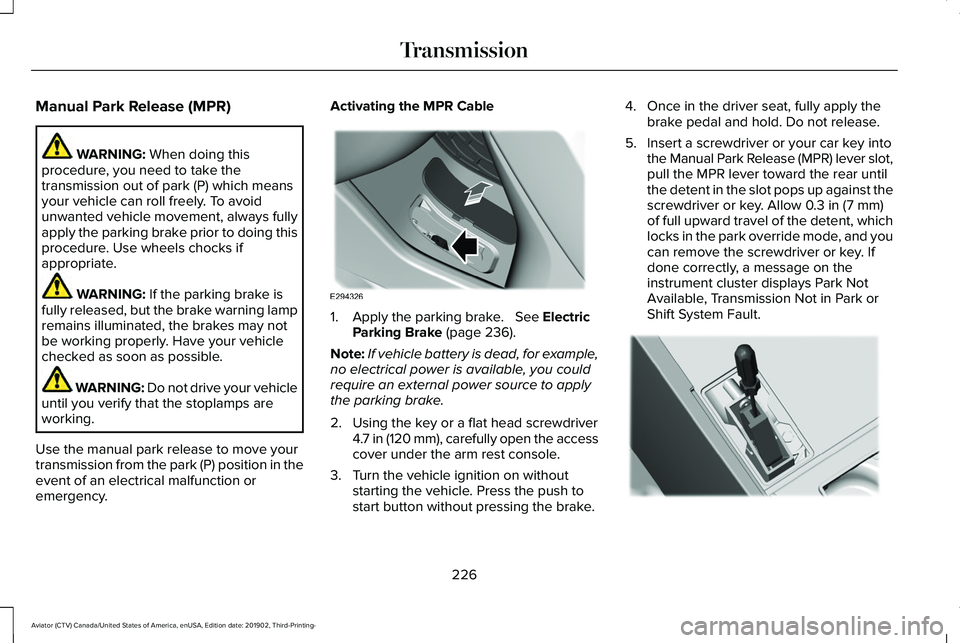
emergency. Activating the MPR Cable
1. Apply the parking brake.
See Electric
Parking Brake (page 236).
Note: If vehicle battery is dead, for example,
no electrical power is available, you could
require an external power source to apply
the parking brake.
2. Using the key or a flat head screwdriver 4.7 in (120 mm), carefully open the access
cover under the arm rest console.
3. Turn the vehicle ignition on without starting the vehicle. Press the push to
start button without pressing the brake. 4. Once in the driver seat, fully apply the
brake pedal and hold. Do not release.
5. Insert a screwdriver or your car key into the Manual Park Release (MPR) lever slot,
pull the MPR lever toward the rear until
the detent in the slot pops up against the
screwdriver or key. Allow
0.3 in (7 mm)
of full upward travel of the detent, which
locks in the park override mode, and you
can remove the screwdriver or key. If
done correctly, a message on the
instrument cluster displays Park Not
Available, Transmission Not in Park or
Shift System Fault. 226
Aviator (CTV) Canada/United States of America, enUSA, Edition date: 201902, Third-Printing- TransmissionE294326 E297270
Page 230 of 609
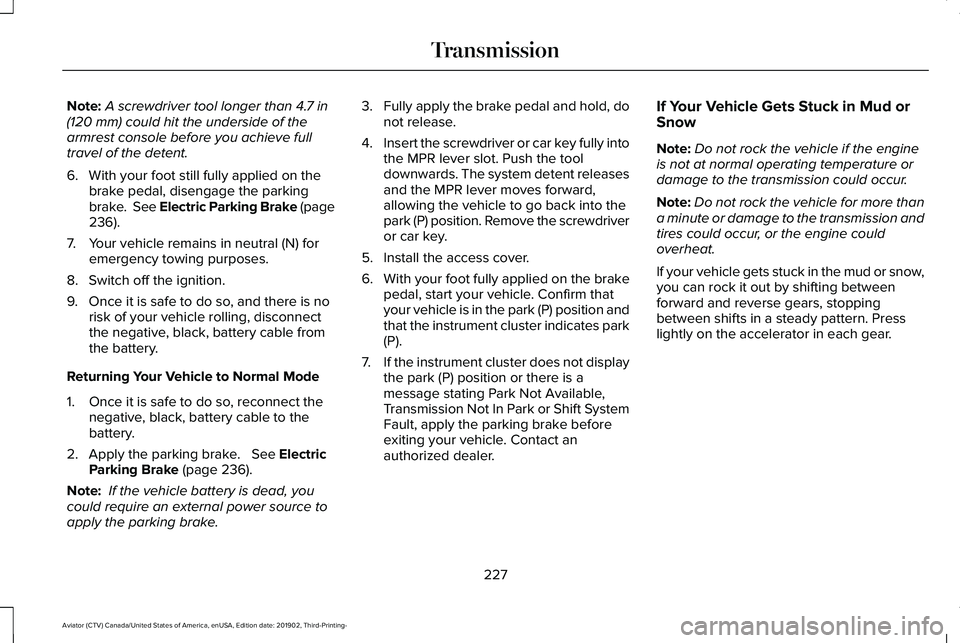
Note:
A screwdriver tool longer than 4.7 in
(120 mm) could hit the underside of the
armrest console before you achieve full
travel of the detent.
6. With your foot still fully applied on the brake pedal, disengage the parking
brake. See Electric Parking Brake (page
236
).
7. Your vehicle remains in neutral (N) for emergency towing purposes.
8. Switch off the ignition.
9. Once it is safe to do so, and there is no risk of your vehicle rolling, disconnect
the negative, black, battery cable from
the battery.
Returning Your Vehicle to Normal Mode
1. Once it is safe to do so, reconnect the negative, black, battery cable to the
battery.
2. Apply the parking brake.
See Electric
Parking Brake (page 236).
Note: If the vehicle battery is dead, you
could require an external power source to
apply the parking brake. 3.
Fully apply the brake pedal and hold, do
not release.
4. Insert the screwdriver or car key fully into
the MPR lever slot. Push the tool
downwards. The system detent releases
and the MPR lever moves forward,
allowing the vehicle to go back into the
park (P) position. Remove the screwdriver
or car key.
5. Install the access cover.
6. With your foot fully applied on the brake
pedal, start your vehicle. Confirm that
your vehicle is in the park (P) position and
that the instrument cluster indicates park
(P).
7. If the instrument cluster does not display
the park (P) position or there is a
message stating Park Not Available,
Transmission Not In Park or Shift System
Fault, apply the parking brake before
exiting your vehicle. Contact an
authorized dealer. If Your Vehicle Gets Stuck in Mud or
Snow
Note:
Do not rock the vehicle if the engine
is not at normal operating temperature or
damage to the transmission could occur.
Note: Do not rock the vehicle for more than
a minute or damage to the transmission and
tires could occur, or the engine could
overheat.
If your vehicle gets stuck in the mud or snow,
you can rock it out by shifting between
forward and reverse gears, stopping
between shifts in a steady pattern. Press
lightly on the accelerator in each gear.
227
Aviator (CTV) Canada/United States of America, enUSA, Edition date: 201902, Third-Printing- Transmission
Page 239 of 609
This lamp also illuminates
momentarily when you switch the
ignition on to confirm the lamp is
functional. If it does not illuminate
when you switch the ignition on,
or begins to flash at any time, have
the system checked by an authorized dealer.
If the brake warning lamp illuminates with
the parking brake released, have the system
checked immediately.
HINTS ON DRIVING WITH ANTI-
LOCK BRAKES
The anti-lock braking system does not
eliminate the risks when:
• You drive too closely to the vehicle in
front of you.
• Your vehicle is hydroplaning.
• You take corners too fast.
• The road surface is poor. Note:
If the system activates, the brake
pedal may pulse and may travel further.
Maintain pressure on the brake pedal. You
may also hear a noise from the system. This
is normal.
ELECTRIC PARKING BRAKE WARNING: Always fully apply the
parking brake and make sure you shift into
park (P). Failure to follow this instruction
could result in personal injury or death. WARNING:
If you drive extended
distances with the parking brake applied,
you could cause damage to the brake
system. WARNING:
The electric parking
brake does not operate if the vehicle
battery is running out of charge. Your vehicle has an electric parking brake.
You operate it with a switch instead of a
lever. The switch is on the center console or
to the left-hand side of the steering wheel,
on the lower part of the instrument panel.
Note:
The electric parking brake makes
noises during operation. This is normal.
Applying the Electric Parking Brake Pull the switch upward.
The red warning lamp flashes
during operation and illuminates
when the parking brake is applied.
Note:
It remains illuminated for a short
period of time after you switch the ignition
off.
If it continues to flash or does not illuminate,
the system has malfunctioned. Have your
vehicle checked as soon as possible.
Note: You can apply the electric parking
brake when the ignition is off.
236
Aviator (CTV) Canada/United States of America, enUSA, Edition date: 201902, Third-Printing- BrakesE270480 E267156 E270480
Page 241 of 609
Releasing the Electric Parking Brake if
the Vehicle Battery is Running Out of
Charge
Connect a booster battery to the vehicle
battery to release the electric parking brake
if the vehicle battery is running out of charge.
See Jump Starting the Vehicle (page 329).
HILL START ASSIST WARNING:
The system does not
replace the parking brake. When you leave
your vehicle, always apply the parking
brake. WARNING: You must remain in your
vehicle when the system turns on. At all
times, you are responsible for controlling
your vehicle, supervising the system and
intervening, if required. Failure to take care
may result in the loss of control of your
vehicle, serious personal injury or death. WARNING:
The system will turn off
if a malfunction is apparent or if you rev
the engine excessively. Failure to take care
may result in the loss of control of your
vehicle, serious personal injury or death.
The system makes it easier to pull away
when your vehicle is on a slope without the
need to use the parking brake.
When the system is active, your vehicle
remains stationary on the slope for two to
three seconds after you release the brake
pedal. This allows time to move your foot
from the brake to the accelerator pedal. The
system releases the brakes automatically
once the engine has developed sufficient
torque to prevent your vehicle from rolling
down the slope. This is an advantage when
pulling away on a slope, for example from a
car park ramp, traffic lights or when reversing
uphill into a parking space.
The system activates on any slope that
causes your vehicle to roll.
Note: There is no warning light to indicate
the system is either on or off. Using Hill Start Assist
1. Press the brake pedal to bring your
vehicle to a complete standstill. Keep the
brake pedal pressed and shift into first
gear when facing uphill or reverse (R)
when facing downhill.
2. If the sensors detect that your vehicle is on a slope, the system activates
automatically.
3. When you remove your foot from the brake pedal, your vehicle remains on the
slope without rolling away for about two
to three seconds. This hold time
automatically extends if you are in the
process of driving off.
4. Drive off in the normal manner. The system releases the brakes automatically.
Note: When you remove your foot from the
brake pedal and press the pedal again when
the system is active, you will experience
significantly reduced brake pedal travel. This
is normal.
238
Aviator (CTV) Canada/United States of America, enUSA, Edition date: 201902, Third-Printing- Brakes
Page 247 of 609
Reverse Braking Assist – Frequently
Asked Questions
Note:
If the frequently asked questions and
answers that are shown in the following
chart do not assist you in returning the
system to available, contact an authorized
dealer to have the system checked for
proper operation.
Why is the system off ?
Make sure you switch the system on.
See Switching Reverse Braking Assist
On and Off (page 242).
Why is the system unavailable? Make sure that the liftgate and all doors
are closed.
Why is the system unavailable? Make sure the cross traffic alert system
is on. See Cross Traffic Alert (page 293).
Why is the system unavailable? Make sure the rear parking aid system
is on. See Rear Parking Aid (page 250). Why is the system unavailable?
Make sure traction control is on.
See
Using Traction Control (page 245).
Why is the system unavailable? The vehicle has sustained a rear end
impact. Contact an authorized dealer to
have the sensors checked for proper
coverage and operation.
Why is the system unavailable? An ABS, traction control or stability
control event may have occurred. The
system resumes operation when the
event is complete.
Why is the system unavailable? Make sure the rear view camera and
360 degree camera are not dirty or
obstructed. If it is dirty, clean the
camera.
See Rear View Camera (page
261). See 360 Degree Camera (page
264). If the message still appears after
cleaning the camera, wait a short time
and the message should clear. If the
message does not clear, contact an
authorized dealer. Why is the system unavailable?
Make sure the sensors are not blocked
or faulted. See Cross Traffic Alert (page
293). See Rear Parking Aid (page 250).
Why is the system unavailable? You recently had your vehicle serviced,
or the battery disconnected. Drive your
vehicle a short distance to resume
system operation.
Why does the system turn off when I
connect a trailer? The system does not function when you
connect a trailer. Operation resumes
when you disconnect the trailer.
244
Aviator (CTV) Canada/United States of America, enUSA, Edition date: 201902, Third-Printing- Reverse Braking Assist
(If Equipped)
Page 262 of 609
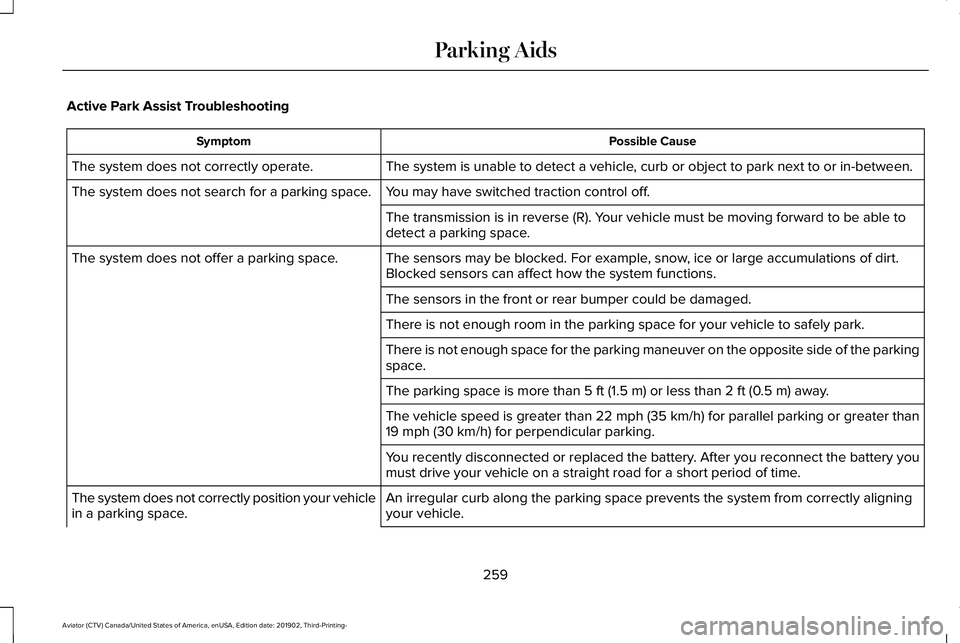
Active Park Assist Troubleshooting
Possible Cause
Symptom
The system is unable to detect a vehicle, curb or object to park next to or in-between.
The system does not correctly operate.
You may have switched traction control off.
The system does not search for a parking space.
The transmission is in reverse (R). Your vehicle must be moving forward to be able to
detect a parking space.
The sensors may be blocked. For example, snow, ice or large accumulations of dirt.
Blocked sensors can affect how the system functions.
The system does not offer a parking space.
The sensors in the front or rear bumper could be damaged.
There is not enough room in the parking space for your vehicle to safely\
park.
There is not enough space for the parking maneuver on the opposite side \
of the parking
space.
The parking space is more than 5 ft (1.5 m) or less than 2 ft (0.5 m) away.
The vehicle speed is greater than 22 mph (35 km/h) for parallel parkin\
g or greater than
19 mph (30 km/h)
for perpendicular parking.
You recently disconnected or replaced the battery. After you reconnect the battery you
must drive your vehicle on a straight road for a short period of time.
An irregular curb along the parking space prevents the system from corre\
ctly aligning
your vehicle.
The system does not correctly position your vehicle
in a parking space.
259
Aviator (CTV) Canada/United States of America, enUSA, Edition date: 201902, Third-Printing- Parking Aids
Page 303 of 609
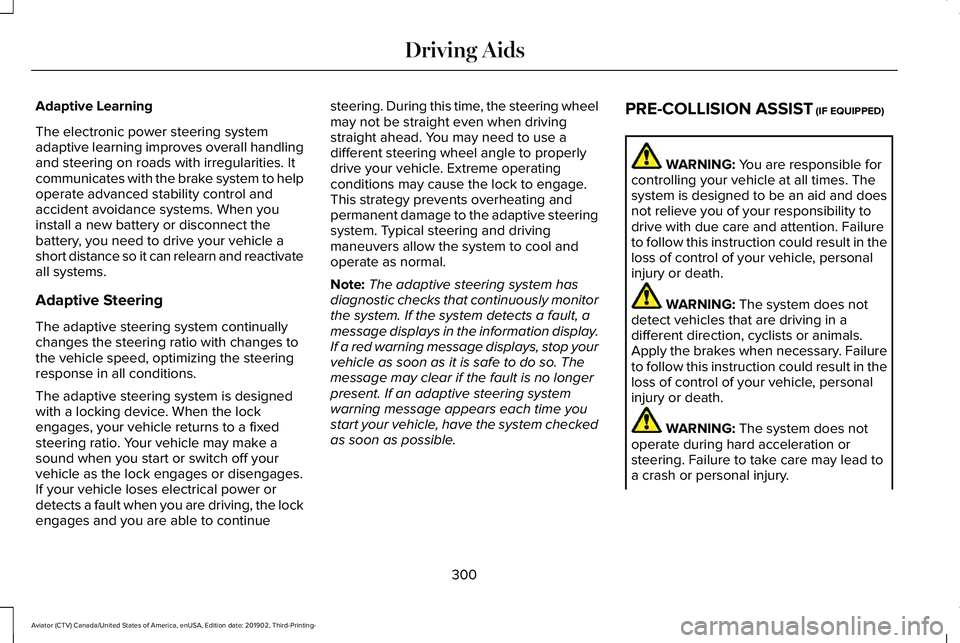
Adaptive Learning
The electronic power steering system
adaptive learning improves overall handling
and steering on roads with irregularities. It
communicates with the brake system to help
operate advanced stability control and
accident avoidance systems. When you
install a new battery or disconnect the
battery, you need to drive your vehicle a
short distance so it can relearn and reactivate
all systems.
Adaptive Steering
The adaptive steering system continually
changes the steering ratio with changes to
the vehicle speed, optimizing the steering
response in all conditions.
The adaptive steering system is designed
with a locking device. When the lock
engages, your vehicle returns to a fixed
steering ratio. Your vehicle may make a
sound when you start or switch off your
vehicle as the lock engages or disengages.
If your vehicle loses electrical power or
detects a fault when you are driving, the lock
engages and you are able to continue
steering. During this time, the steering wheel
may not be straight even when driving
straight ahead. You may need to use a
different steering wheel angle to properly
drive your vehicle. Extreme operating
conditions may cause the lock to engage.
This strategy prevents overheating and
permanent damage to the adaptive steering
system. Typical steering and driving
maneuvers allow the system to cool and
operate as normal.
Note:
The adaptive steering system has
diagnostic checks that continuously monitor
the system. If the system detects a fault, a
message displays in the information display.
If a red warning message displays, stop your
vehicle as soon as it is safe to do so. The
message may clear if the fault is no longer
present. If an adaptive steering system
warning message appears each time you
start your vehicle, have the system checked
as soon as possible. PRE-COLLISION ASSIST (IF EQUIPPED) WARNING:
You are responsible for
controlling your vehicle at all times. The
system is designed to be an aid and does
not relieve you of your responsibility to
drive with due care and attention. Failure
to follow this instruction could result in the
loss of control of your vehicle, personal
injury or death. WARNING:
The system does not
detect vehicles that are driving in a
different direction, cyclists or animals.
Apply the brakes when necessary. Failure
to follow this instruction could result in the
loss of control of your vehicle, personal
injury or death. WARNING:
The system does not
operate during hard acceleration or
steering. Failure to take care may lead to
a crash or personal injury.
300
Aviator (CTV) Canada/United States of America, enUSA, Edition date: 201902, Third-Printing- Driving Aids