phone LINCOLN AVIATOR 2020 Workshop Manual
[x] Cancel search | Manufacturer: LINCOLN, Model Year: 2020, Model line: AVIATOR, Model: LINCOLN AVIATOR 2020Pages: 609, PDF Size: 5.4 MB
Page 507 of 609
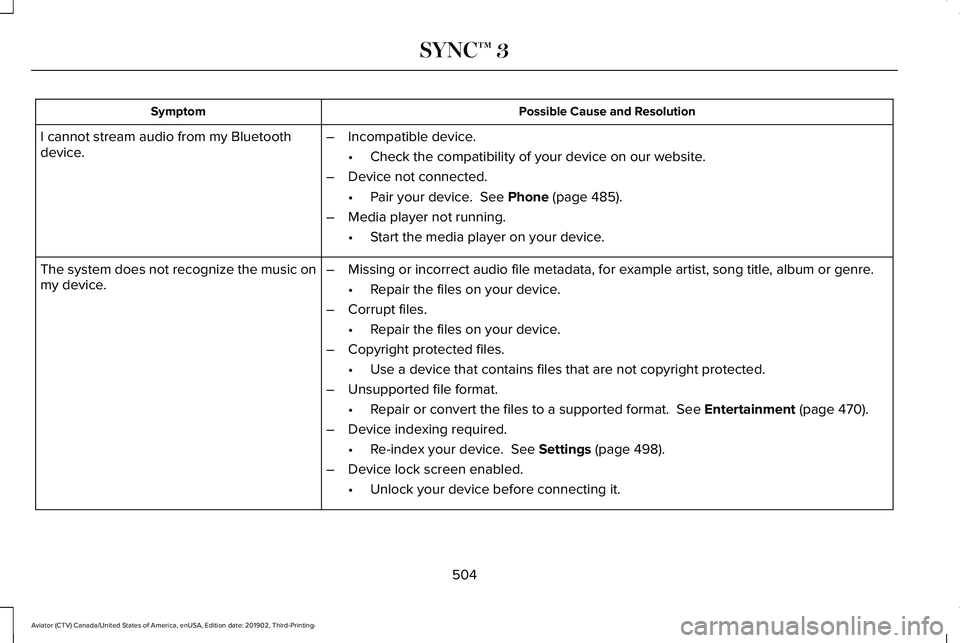
Possible Cause and Resolution
Symptom
I cannot stream audio from my Bluetooth
device. –
Incompatible device.
•Check the compatibility of your device on our website.
– Device not connected.
•Pair your device. See Phone (page 485).
– Media player not running.
•Start the media player on your device.
The system does not recognize the music on
my device. –
Missing or incorrect audio file metadata, for example artist, song title\
, album or genre.
•Repair the files on your device.
– Corrupt files.
•Repair the files on your device.
– Copyright protected files.
•Use a device that contains files that are not copyright protected.
– Unsupported file format.
•Repair or convert the files to a supported format.
See Entertainment (page 470).
– Device indexing required.
•Re-index your device.
See Settings (page 498).
– Device lock screen enabled.
•Unlock your device before connecting it.
504
Aviator (CTV) Canada/United States of America, enUSA, Edition date: 201902, Third-Printing- SYNC™ 3
Page 509 of 609
Phone
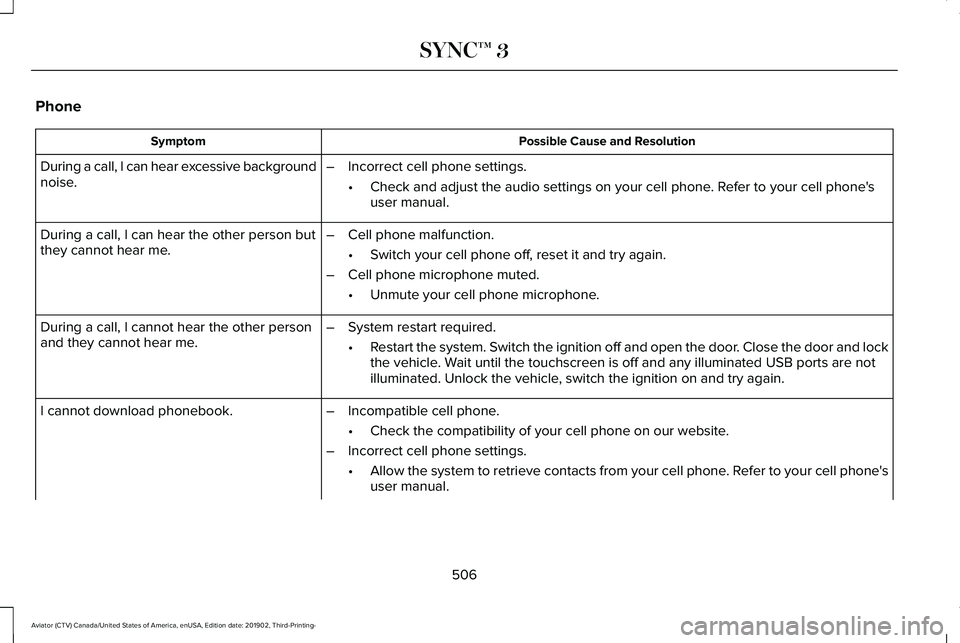
Possible Cause and Resolution
Symptom
During a call, I can hear excessive background
noise. –
Incorrect cell phone settings.
•Check and adjust the audio settings on your cell phone. Refer to your cell phone's
user manual.
– Cell phone malfunction.
•Switch your cell phone off, reset it and try again.
– Cell phone microphone muted.
•Unmute your cell phone microphone.
During a call, I can hear the other person but
they cannot hear me.
During a call, I cannot hear the other person
and they cannot hear me.
–
System restart required.
•Restart the system. Switch the ignition off and open the door. Close the door and lock
the vehicle. Wait until the touchscreen is off and any illuminated USB ports are not
illuminated. Unlock the vehicle, switch the ignition on and try again.
I cannot download phonebook. –Incompatible cell phone.
•Check the compatibility of your cell phone on our website.
– Incorrect cell phone settings.
•Allow the system to retrieve contacts from your cell phone. Refer to your cell phone's
user manual.
506
Aviator (CTV) Canada/United States of America, enUSA, Edition date: 201902, Third-Printing- SYNC™ 3
Page 510 of 609
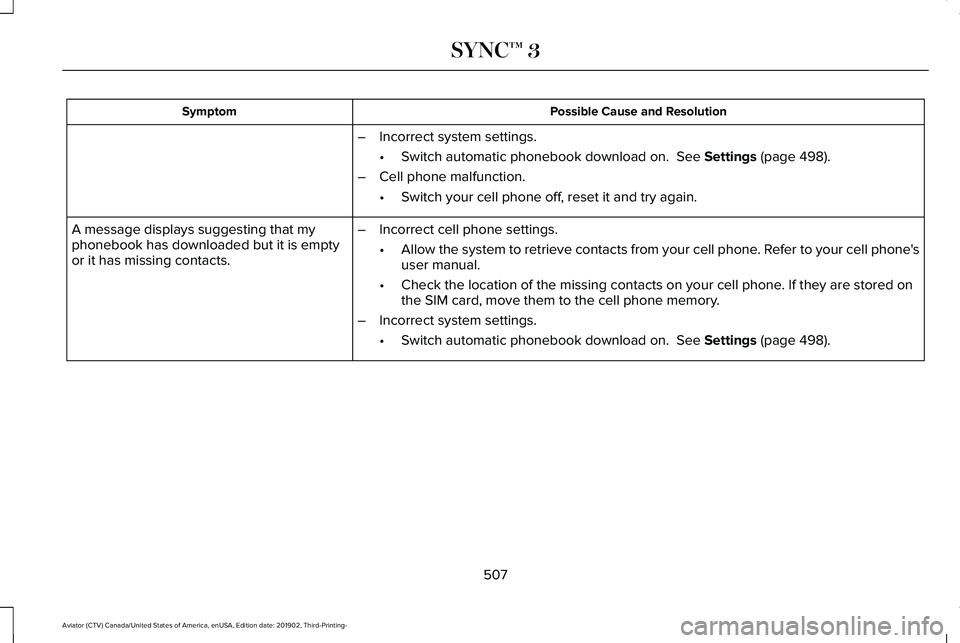
Possible Cause and Resolution
Symptom
–Incorrect system settings.
•Switch automatic phonebook download on. See Settings (page 498).
– Cell phone malfunction.
•Switch your cell phone off, reset it and try again.
– Incorrect cell phone settings.
•Allow the system to retrieve contacts from your cell phone. Refer to your cell phone's
user manual.
• Check the location of the missing contacts on your cell phone. If they are stored on
the SIM card, move them to the cell phone memory.
– Incorrect system settings.
•Switch automatic phonebook download on.
See Settings (page 498).
A message displays suggesting that my
phonebook has downloaded but it is empty
or it has missing contacts.
507
Aviator (CTV) Canada/United States of America, enUSA, Edition date: 201902, Third-Printing- SYNC™ 3
Page 511 of 609
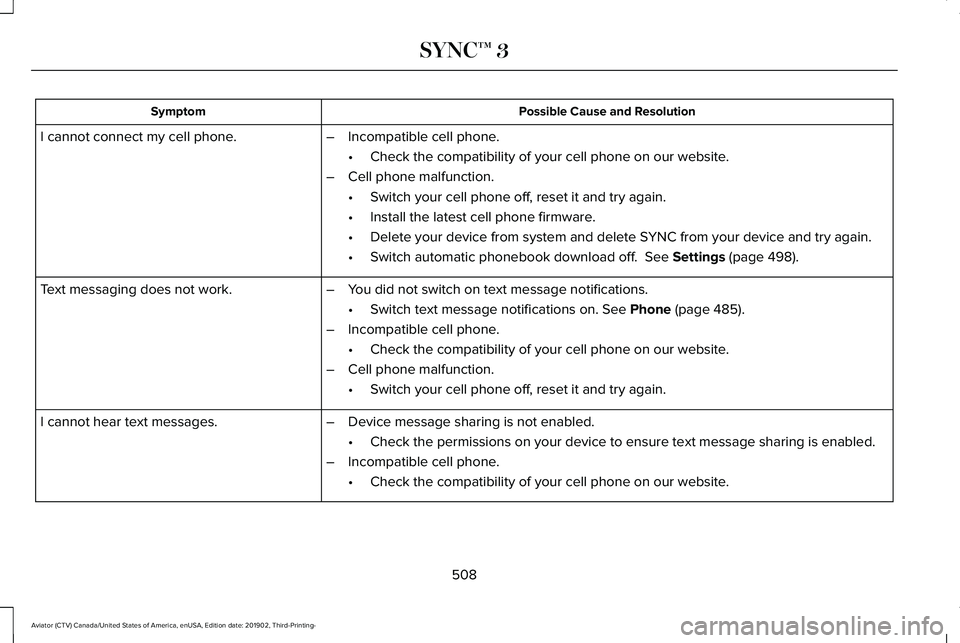
Possible Cause and Resolution
Symptom
–Incompatible cell phone.
•Check the compatibility of your cell phone on our website.
– Cell phone malfunction.
•Switch your cell phone off, reset it and try again.
• Install the latest cell phone firmware.
• Delete your device from system and delete SYNC from your device and try again.
• Switch automatic phonebook download off. See Settings (page 498).
I cannot connect my cell phone.
Text messaging does not work.
–You did not switch on text message notifications.
•Switch text message notifications on.
See Phone (page 485).
– Incompatible cell phone.
•Check the compatibility of your cell phone on our website.
– Cell phone malfunction.
•Switch your cell phone off, reset it and try again.
– Device message sharing is not enabled.
•Check the permissions on your device to ensure text message sharing is e\
nabled.
– Incompatible cell phone.
•Check the compatibility of your cell phone on our website.
I cannot hear text messages.
508
Aviator (CTV) Canada/United States of America, enUSA, Edition date: 201902, Third-Printing- SYNC™ 3
Page 516 of 609

Possible Cause and Resolution
Symptom
If your vehicle is in a garage and you have the garage door closed, open\
the garage
door.
•
I cannot see a network in the list of available
networks that I expect to see. –
Hidden network.
•Make the network visible and try again.
I cannot see SYNC when I search for Wi-Fi
networks on my cell phone or other device. –
System limitation.
•SYNC does not provide a Wi-Fi hotspot at this time.
– Weak network signal
•Move your vehicle closer to the Wi-Fi hotspot or to a place where the ne\
twork signal
is not obstructed.
– Wi-Fi hotspot in high demand or has a slow Internet connection.
•Use a more reliable Wi-Fi hotspot.
Software downloads take too long.
–No software update available.
– Wi-Fi network requires a subscription or acceptance of terms and conditi\
ons.
•Test the connection using another device. If the network requires a subscription or
acceptance of terms and conditions, contact the network service provider\
.
The system seems to connect to a Wi-Fi
network and the signal strength is excellent
but the software does not update.
513
Aviator (CTV) Canada/United States of America, enUSA, Edition date: 201902, Third-Printing- SYNC™ 3
Page 520 of 609
For a complete listing of the accessories that
are available for your vehicle, please contact
your authorized dealer or visit the online
store website:
Web Address (United States)
www.Accessories.Lincoln.com Web Address (Canada)
www.LincolnCanada.com
We will repair or replace any properly
authorized dealer-installed Lincoln Original
Accessory found to be defective in
factory-supplied materials or workmanship
during the warranty period, as well as any
component damaged by the defective
accessories.
We will warrant your Lincoln Original
Accessory through the warranty that provides
the greatest benefit:
• 24 months, unlimited mileage.
• The remainder of your new vehicle
limited warranty. *Lincoln Licensed Accessory. The accessory
manufacturer designs, develops and
therefore warrants Lincoln Licensed
Accessories, and does not design or test
these accessories to Lincoln Motor Company
engineering requirements. Contact an
authorized Lincoln dealer for the accessory
manufacturer's limited warranty details and
request a copy of the Lincoln Licensed
Accessories product limited warranty from
the accessory manufacturer.
For maximum vehicle performance, keep the
following information in mind when adding
accessories or equipment to your vehicle:
•
When adding accessories, equipment,
passengers and luggage to your vehicle,
do not exceed the total weight capacity
of the vehicle or of the front or rear axle
(GVWR or GAWR as indicated on the
Safety Compliance Certification label).
Ask an authorized dealer for specific
weight information.
• The Federal Communications
Commission (FCC) and Canadian Radio
Telecommunications Commission (CRTC)
regulate the use of mobile
communications systems that have radio
transmitters, for example two-way radios,
telephones and theft alarms. Any such
equipment installed in your vehicle
should comply with Federal
Communications Commission (FCC) and
Canadian Radio Telecommunications
Commission (CRTC) regulations and
should only be installed by an authorized
dealer.
517
Aviator (CTV) Canada/United States of America, enUSA, Edition date: 201902, Third-Printing- Accessories
Page 557 of 609
ELECTROMAGNETIC
COMPATIBILITY
WARNING: Do not place objects or
mount equipment on or near the airbag
cover, on the side of the front or rear
seatbacks, or in areas that may come into
contact with a deploying airbag. Failure to
follow these instructions may increase the
risk of personal injury in the event of a
crash. WARNING:
Do not fasten antenna
cables to vehicle wiring, fuel pipes and
brake pipes. WARNING: Keep antenna and power
cables at least
4 in (10 cm) from any
electronic modules and airbags.
Note: We test and certify your vehicle to
meet electromagnetic compatibility
legislation. It is your responsibility to make
sure that any equipment an authorized
dealer installs on your vehicle complies with
applicable local legislation and other
requirements. Installation of some
aftermarket electronic devices could
degrade the performance of vehicle
functions, which use radio frequency signals
such as broadcast radio receiver, tire
pressure monitoring system, push button
start, Bluetooth connectivity or satellite
navigation. Note:
Any radio frequency transmitter
equipment in your vehicle (such as cellular
telephones and amateur radio transmitters)
must keep to the parameters in the following
illustrations and table. We do not provide
any other special provisions or conditions
for installations or use.
554
Aviator (CTV) Canada/United States of America, enUSA, Edition date: 201902, Third-Printing- Appendices
Page 578 of 609
communication with any positioning devices
or any mobile or wireless-connected
electronic or computer devices, including
without limitation cellular phones, palmtop
and handheld computers, pagers, and
personal digital assistants or PDAs.
Warning. The Data may contain inaccurate
or incomplete information due to the
passage of time, changing circumstances,
sources used and the nature of collecting
comprehensive geographic data, any of
which may lead to incorrect results.
No Warranty.
This Data is provided to you
“as is, ” and you agree to use it at your own
risk. Telenav and its licensors (and their
licensors and suppliers) make no guarantees,
representations or warranties of any kind,
express or implied, arising by law or
otherwise, including but not limited to,
content, quality, accuracy, completeness,
effectiveness, reliability, fitness for a
particular purpose, usefulness, use or results
to be obtained from this Data, or that the
Data or server will be uninterrupted or
error-free. Disclaimer of Warranty: TELENAV AND ITS
LICENSORS (INCLUDING THEIR LICENSORS
AND SUPPLIERS) DISCLAIM ANY
WARRANTIES, EXPRESS OR IMPLIED, OF
QUALITY, PERFORMANCE,
MERCHANTABILITY, FITNESS FOR A
PARTICULAR PURPOSE OR
NON-INFRINGEMENT. Some States,
Territories and Countries do not allow certain
warranty exclusions, so to that extent the
above exclusion may not apply to you.
Disclaimer of Liability:
TELENAV AND ITS
LICENSORS (INCLUDING THEIR LICENSORS
AND SUPPLIERS) SHALL NOT BE LIABLE TO
YOU: IN RESPECT OF ANY CLAIM, DEMAND
OR ACTION, IRRESPECTIVE OF THE
NATURE OF THE CAUSE OF THE CLAIM,
DEMAND OR ACTION ALLEGING ANY LOSS,
INJURY OR DAMAGES, DIRECT OR
INDIRECT, WHICH MAY RESULT FROM THE
USE OR POSSESSION OF THE
INFORMATION; OR FOR ANY LOSS OF
PROFIT, REVENUE, CONTRACTS OR
SAVINGS, OR ANY OTHER DIRECT,
INDIRECT, INCIDENTAL, SPECIAL OR
CONSEQUENTIAL DAMAGES ARISING OUT
OF YOUR USE OF OR INABILITY TO USE THIS INFORMATION, ANY DEFECT IN THE
INFORMATION, OR THE BREACH OF THESE
TERMS OR CONDITIONS, WHETHER IN AN
ACTION IN CONTRACT OR TORT OR BASED
ON A WARRANTY, EVEN IF TELENAV OR
ITS LICENSORS HAVE BEEN ADVISED OF
THE POSSIBILITY OF SUCH DAMAGES.
Some States, Territories and Countries do
not allow certain liability exclusions or
damages limitations, so to that extent the
above may not apply to you.
Export Control. You shall not export from
anywhere any part of the Data or any direct
product thereof except in compliance with,
and with all licenses and approvals required
under, applicable export laws, rules and
regulations, including but not limited to the
laws, rules and regulations administered by
the Office of Foreign Assets Control of the
U.S. Department of Commerce and the
Bureau of Industry and Security of the U.S.
Department of Commerce. To the extent that
any such export laws, rules or regulations
prohibit HERE from complying with any of its
obligations hereunder to deliver or distribute
Data, such failure shall be excused and shall
not constitute a breach of this Agreement.
575
Aviator (CTV) Canada/United States of America, enUSA, Edition date: 201902, Third-Printing- Appendices
Page 587 of 609
it, and (ii) save it, provided that you do not
remove any copyright notices that appear
and do not modify the Data in any way. You
agree not to otherwise reproduce, copy,
modify, decompile, disassemble or reverse
engineer any portion of this Data, and may
not transfer or distribute it in any form, for
any purpose, except to the extent permitted
by mandatory laws.
Restrictions
Except where you have been specifically
licensed to do so by NAV2 , and without
limiting the preceding paragraph, you may
not (a) use this Data with any products,
systems, or applications installed or
otherwise connected to or in communication
with vehicles, capable of vehicle navigation,
positioning, dispatch, real time route
guidance, fleet management or similar
applications; or (b) with or in communication
with any positioning devices or any mobile
or wireless-connected electronic or computer
devices, including without limitation cellular
phones, palmtop and handheld computers,
pagers, and personal digital assistants or
PDAs. You agree to cease using this Data if
you fail to comply with these terms and
conditions.
Limited Warranty
NAV2 warrants that (a) the Data will perform
substantially in accordance with the
accompanying written materials for a period
of ninety (90) days from the date of receipt,
and (b) any support services provided by
NAV2 shall be substantially as described in
applicable written materials provided to you
by NAV2, and NAV2’
s support engineers will
make commercially reasonable efforts to
solve any problem issues.
rigCustomer Remedies
NAV2 and its suppliers ’ entire liability and
your exclusive remedy shall be, at NAV2’ s
sole discretion, either (a) return of the price
paid, if any, or (b) repair or replacement of
the Data that do not meet NAV2’ s Limited
Warranty and that are returned to NAV2 with
a copy of your receipt. This Limited Warranty is void if failure of the Data has resulted from
accident, abuse, or misapplication. Any
replacement Data will be warranted for the
remainder of the original warranty period or
thirty (30) days, whichever is longer. Neither
these remedies nor any product support
services offered by NAV2 are available
without proof of purchase from an authorized
international source.
No Other Warranty:
EXCEPT FOR THE LMITED WARRANTY SET
FORTH ABOVE AND TO THE EXTENT
PERMITTED BY APPLICABLE LAW, NAV2
AND ITS LICENSORS (INCLUDING THEIR
LICENSORS AND SUPPLIERS) DISCLAIM
ANY WARRANTIES, EXPRESS OR IMPLIED,
OF QUALITY, PERFORMANCE,
MERCHANTABILITY, FITNESS FOR A
PARTICULAR PURPOSE, OWNERSHIP OR
NON-INFRINGEMENT. Certain warranty
exclusions may not be permitted under
applicable law, so to that extent the above
exclusion may not apply to you.
584
Aviator (CTV) Canada/United States of America, enUSA, Edition date: 201902, Third-Printing- Appendices
Page 603 of 609
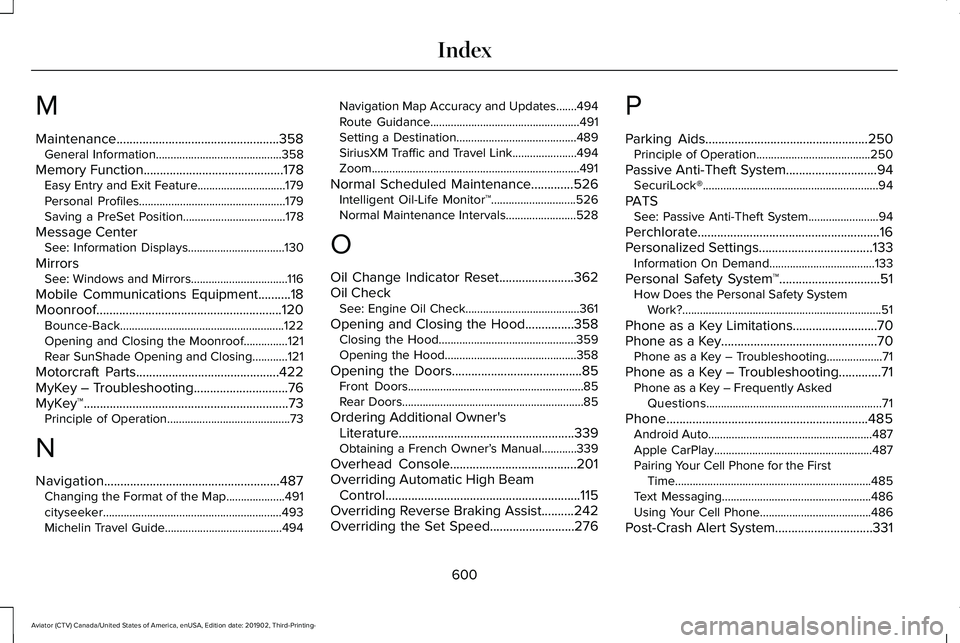
M
Maintenance..................................................358
General Information...........................................358
Memory Function...........................................178 Easy Entry and Exit Feature..............................179
Personal Profiles..................................................179
Saving a PreSet Position...................................178
Message Center See: Information Displays.................................130
Mirrors See: Windows and Mirrors.................................116
Mobile Communications Equipment..........18
Moonroof.........................................................120 Bounce-Back........................................................122
Opening and Closing the Moonroof...............121
Rear SunShade Opening and Closing............
121
Motorcraft Parts............................................422
MyKey – Troubleshooting.............................76
MyKey™...............................................................73 Principle of Operation..........................................73
N
Navigation......................................................487 Changing the Format of the Map....................491
cityseeker.............................................................493
Michelin Travel Guide........................................494 Navigation Map Accuracy and Updates.......494
Route Guidance...................................................491
Setting a Destination.........................................489
SiriusXM Traffic and Travel Link......................494
Zoom.......................................................................491
Normal Scheduled Maintenance.............526 Intelligent Oil-Life Monitor™.............................526
Normal Maintenance Intervals........................528
O
Oil Change Indicator Reset
.......................362
Oil Check See: Engine Oil Check.......................................361
Opening and Closing the Hood...............358 Closing the Hood...............................................359
Opening the Hood.............................................358
Opening the Doors
........................................85
Front Doors............................................................85
Rear Doors..............................................................85
Ordering Additional Owner's Literature......................................................339
Obtaining a French Owner’ s Manual............339
Overhead Console.......................................201
Overriding Automatic High Beam Control............................................................115
Overriding Reverse Braking Assist
..........242
Overriding the Set Speed..........................276 P
Parking Aids
..................................................250
Principle of Operation.......................................250
Passive Anti-Theft System............................94 SecuriLock®............................................................94
PATS See: Passive Anti-Theft System........................94
Perchlorate........................................................16
Personalized Settings...................................133 Information On Demand....................................133
Personal Safety System ™
...............................51
How Does the Personal Safety System
Work?....................................................................51
Phone as a Key Limitations..........................70
Phone as a Key
................................................70
Phone as a Key – Troubleshooting...................71
Phone as a Key – Troubleshooting.............71 Phone as a Key – Frequently Asked
Questions............................................................71
Phone..............................................................485 Android Auto........................................................487
Apple CarPlay......................................................487
Pairing Your Cell Phone for the First
Time...................................................................485
Text Messaging...................................................486
Using Your Cell Phone......................................
486
Post-Crash Alert System
..............................331
600
Aviator (CTV) Canada/United States of America, enUSA, Edition date: 201902, Third-Printing- Index