trailer LINCOLN AVIATOR 2020 Owners Manual
[x] Cancel search | Manufacturer: LINCOLN, Model Year: 2020, Model line: AVIATOR, Model: LINCOLN AVIATOR 2020Pages: 609, PDF Size: 5.4 MB
Page 9 of 609
Selecting a Drive Mode
.............................306
Drive Modes .................................................
306
Load Carrying
Rear Under Floor Storage .........................
308
Luggage Covers ..........................................
308
Roof Racks and Load Carriers .................
309
Load Limit .......................................................
310
Air Suspension ..............................................
314
Towing
Towing a Trailer .............................................
316
Trailer Sway Control .....................................
317
Recommended Towing Weights ...............
317
Essential Towing Checks ...........................
319
Towing the Vehicle on Four Wheels .......
321
Driving Hints
Reduced Engine Performance .................
323
Economical Driving .....................................
323
Cold Weather Precautions ........................
324
Breaking-In ....................................................
324
Driving Through Water ..............................
324Floor Mats
.....................................................
325
Roadside Emergencies
Roadside Assistance ..................................
327
Hazard Flashers ...........................................
328
Fuel Shutoff ..................................................
328
Jump Starting the Vehicle .........................
329
Post-Crash Alert System .............................
331
Transporting the Vehicle ...........................
332
Customer Assistance
Getting the Services You Need ...............
333
In California (U.S. Only) ..............................
334
The Better Business Bureau (BBB) Auto Line Program (U.S. Only) .......................
335
Utilizing the Mediation/Arbitration Program (Canada Only) ..........................................
336
Getting Assistance Outside the U.S. and Canada .......................................................
337
Ordering Additional Owner's Literature ......................................................................
339
Reporting Safety Defects (U.S. Only) ......
340
Reporting Safety Defects (Canada Only) ......................................................................
340 Fuses
Fuse Specification Chart
...........................
342
Changing a Fuse .........................................
355
Maintenance
General Information ....................................
358
Opening and Closing the Hood ..............
358
Under Hood Overview ..............................
360
Engine Oil Dipstick ......................................
361
Engine Oil Check .........................................
361
Oil Change Indicator Reset ......................
362
Changing the Engine Air Filter ................
363
Engine Coolant Check ...............................
364
Automatic Transmission Fluid Check ......
369
Brake Fluid Check ......................................
369
Power Steering Fluid Check .....................
370
Changing the 12V Battery ..........................
371
Adjusting the Headlamps ..........................
373
Washer Fluid Check ....................................
375
Fuel Filter .......................................................
375
Checking the Wiper Blades ......................
375
6
Aviator (CTV) Canada/United States of America, enUSA, Edition date: 201902, Third-Printing- Table of Contents
Page 95 of 609
Switching the Power Liftgate On or Off
You can switch the power liftgate on or off
through the vehicle settings on your
touchscreen.
When switched off, the liftgate only unlatches
and will not power open or close.
Hands-Free Feature (If Equipped)
Make sure you have the passive key within
3 ft (1 m)
of the liftgate.
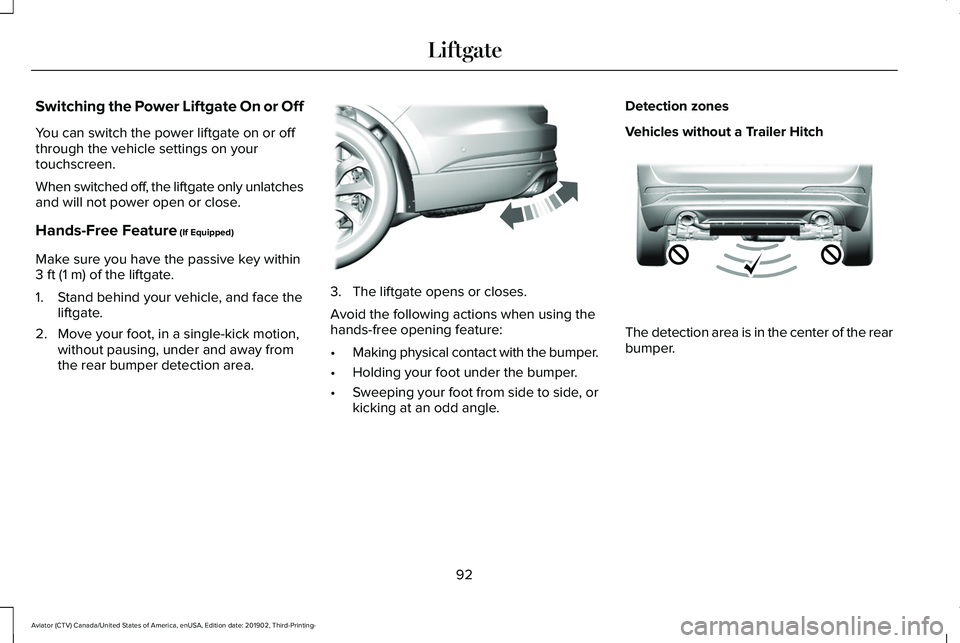
1. Stand behind your vehicle, and face the liftgate.
2. Move your foot, in a single-kick motion, without pausing, under and away from
the rear bumper detection area. 3. The liftgate opens or closes.
Avoid the following actions when using the
hands-free opening feature:
•
Making physical contact with the bumper.
• Holding your foot under the bumper.
• Sweeping your foot from side to side, or
kicking at an odd angle. Detection zones
Vehicles without a Trailer Hitch
The detection area is in the center of the rear
bumper.
92
Aviator (CTV) Canada/United States of America, enUSA, Edition date: 201902, Third-Printing- LiftgateE300799 E310717
Page 96 of 609
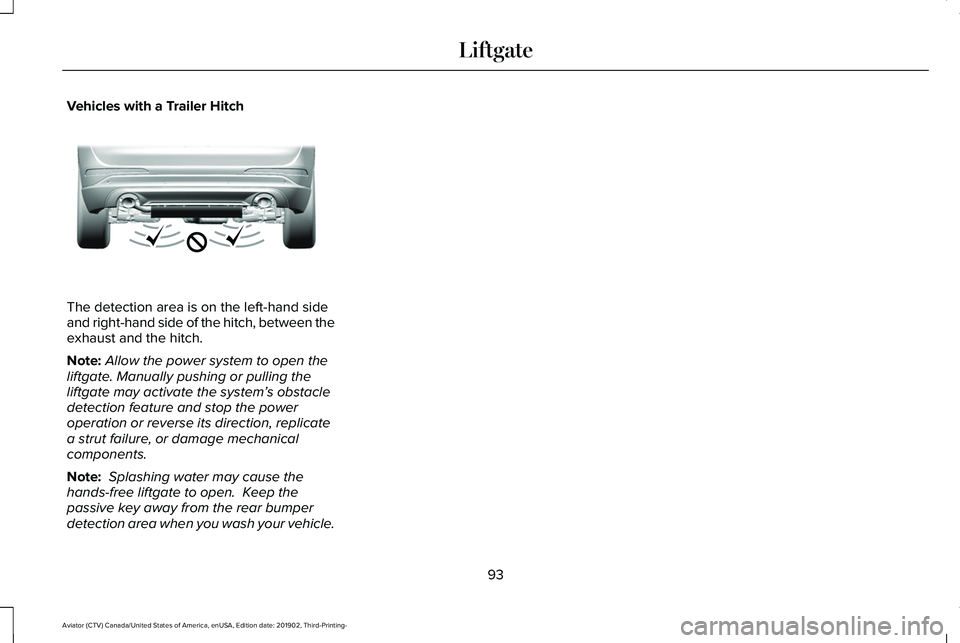
Vehicles with a Trailer Hitch
The detection area is on the left-hand side
and right-hand side of the hitch, between the
exhaust and the hitch.
Note:
Allow the power system to open the
liftgate. Manually pushing or pulling the
liftgate may activate the system’ s obstacle
detection feature and stop the power
operation or reverse its direction, replicate
a strut failure, or damage mechanical
components.
Note: Splashing water may cause the
hands-free liftgate to open. Keep the
passive key away from the rear bumper
detection area when you wash your vehicle.
93
Aviator (CTV) Canada/United States of America, enUSA, Edition date: 201902, Third-Printing- LiftgateE310718
Page 136 of 609

Note: On Demand information appears on the right-hand side of the instrument c\
luster in single gauge view and in the center of the instrumen")
PERSONALIZED SETTINGS
Information On Demand (If Equipped)
Note: On Demand information appears on the right-hand side of the instrument c\
luster in single gauge view and in the center of the instrument
cluster in dual gauge view when you switch on certain drive modes. Calm Screen
Trip 1
Trip 2
Fuel Economy
Auto StartStop Seatbelts
Tire Pressure
Power Distribution
Trailer Light Check Off Road
Eco Coach
133
Aviator (CTV) Canada/United States of America, enUSA, Edition date: 201902, Third-Printing- Information Displays
Page 143 of 609

Blind Spot Information and Cross Traffic Alert System
Action
Message
A system error has occurred. Contact an authorized dealer as soon as pos\
sible.
Blind Spot System Fault
The system sensors are blocked. See Blind Spot Information System (page 289).
Blind Spot Not Available Sensor Blocked
See Manual
The system detects a vehicle and automatically applied the brakes.
Cross Traffic Alert Applying Brakes
The blind spot information system and cross traffic alert system sensors\
are blocked. See CrossTraffic Alert
(page 293).
Cross Traffic Not Available Sensor Blocked
See Manual
A system error has occurred. Contact an authorized dealer as soon as pos\
sible.
Cross Traffic System Fault
The system automatically turns off and displays this message when you co\
nnect a trailer to thevehicle that does not have a trailer blind spot system or when you switc\
h the trailer blind spot system off through the information display.
See Cross Traffic Alert (page 293).
Cross Traffic Alert Deactivated Trailer
Attached
The system automatically turns off and displays this message when you co\
nnect a trailer to thevehicle that does not have a trailer blind spot system or when you switc\
h the trailer blind spot system off through the information display.
See Blind Spot Information System (page 289).
Blind Spot Alert Deactivated Trailer
Attached
140
Aviator (CTV) Canada/United States of America, enUSA, Edition date: 201902, Third-Printing- Information Displays
Page 156 of 609

Trailer
Action
Message
A correct trailer connection is sensed during a given ignition cycle.
Trailer Connected
A trailer connection becomes disconnected, either intentionally or unint\
entionally,and has been sensed during a given ignition cycle.
Trailer Disconnected
The trailer sway control has detected trailer sway.
Trailer Sway Reduce Speed
There are certain faults in your vehicle wiring and trailer wiring or br\
ake system.See Towing a Trailer (page 316).
Trailer Wiring Fault
There is a fault with your trailer turn lamp. Check your lamp.
Trailer Left Turn Lamps Fault Check Lamps
There is a fault with your trailer turn lamp. Check your lamp.
Trailer Right Turn Lamps Fault Check Lamps
There is a fault with your trailer battery.
See Towing a Trailer (page 316).
Trailer Battery Not Charging See Manual
There is a fault with your vehicle trailer lighting module.
See Towing a Trailer
(page 316).
Trailer Lighting Module Fault See Manual
153
Aviator (CTV) Canada/United States of America, enUSA, Edition date: 201902, Third-Printing- Information Displays
Page 211 of 609
AUTO-START-STOP
The system helps reduce fuel consumption
by automatically stopping and restarting the
engine when your vehicle has stopped. The
engine restarts automatically when you
release the brake pedal.
In some situations, your vehicle may restart
automatically, for example:
•
To maintain interior comfort.
• To recharge the battery.
Note: Power assist steering turns off when
the engine is off.
Note: If your vehicle is flex fuel capable,
Auto-Start-Stop will be inhibited for a short
time after a refuel event while the system is
verifying the fuel type being used. WARNING: Apply the parking brake,
shift into park (P), switch the ignition off
and remove the key before you leave your
vehicle. Failure to follow this instruction
could result in personal injury or death. WARNING: Apply the parking brake,
shift into park (P), switch the ignition off
and remove the key before you open the
hood or have any service or repair work
completed. If you do not switch the ignition
off, the engine could restart at any time.
Failure to follow this instruction could result
in personal injury or death. WARNING: The system may require
the engine to automatically restart when
the auto-start-stop indicator illuminates
green or flashes amber. Failure to follow
this instruction could result in personal
injury.
The Auto-Start-Stop system status is
available at a glance within the information
display.
See Information Displays (page
130).
Enabling Auto-Start-Stop
The system automatically enables every time
you start your vehicle if: •
Your vehicle exceeds an initial speed of
3 mph (5 km/h)
after you have initially
started your vehicle.
• You have stopped your vehicle.
• Your foot is on the brake pedal.
• The driver door is closed.
• The interior compartment has cooled or
warmed to an acceptable level.
• The front windshield defroster is off.
• You have not turned the steering wheel
rapidly or you do not have it at a sharp
angle.
• The vehicle is not on a steep road grade.
• The battery is within optimal operating
conditions (battery state of charge and
temperature in range).
• The engine coolant is near operating
temperature.
• Elevation is below about
12,000 ft
(3,650 m).
• Ambient temperature is moderate.
• The trailer is not connected.
• If you select Normal, Conserve, or
Slippery.
208
Aviator (CTV) Canada/United States of America, enUSA, Edition date: 201902, Third-Printing- Unique Driving Characteristics
Page 215 of 609
FUEL QUALITY
Choosing the Right Fuel
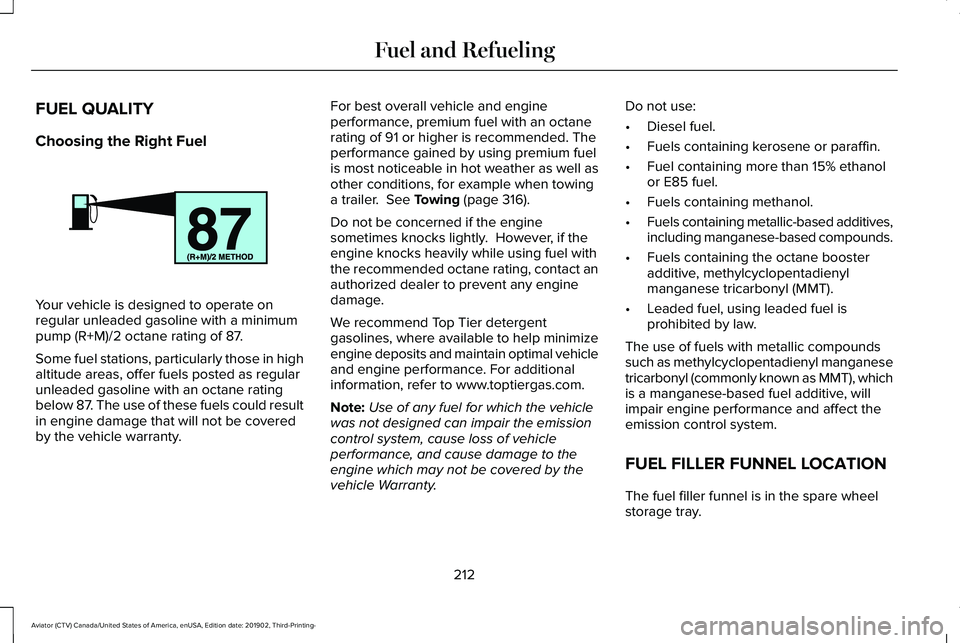
Your vehicle is designed to operate on
regular unleaded gasoline with a minimum
pump (R+M)/2 octane rating of 87.
Some fuel stations, particularly those in high
altitude areas, offer fuels posted as regular
unleaded gasoline with an octane rating
below 87. The use of these fuels could result
in engine damage that will not be covered
by the vehicle warranty. For best overall vehicle and engine
performance, premium fuel with an octane
rating of 91 or higher is recommended. The
performance gained by using premium fuel
is most noticeable in hot weather as well as
other conditions, for example when towing
a trailer. See Towing (page 316).
Do not be concerned if the engine
sometimes knocks lightly. However, if the
engine knocks heavily while using fuel with
the recommended octane rating, contact an
authorized dealer to prevent any engine
damage.
We recommend Top Tier detergent
gasolines, where available to help minimize
engine deposits and maintain optimal vehicle
and engine performance. For additional
information, refer to www.toptiergas.com.
Note: Use of any fuel for which the vehicle
was not designed can impair the emission
control system, cause loss of vehicle
performance, and cause damage to the
engine which may not be covered by the
vehicle Warranty. Do not use:
•
Diesel fuel.
• Fuels containing kerosene or paraffin.
• Fuel containing more than 15% ethanol
or E85 fuel.
• Fuels containing methanol.
• Fuels containing metallic-based additives,
including manganese-based compounds.
• Fuels containing the octane booster
additive, methylcyclopentadienyl
manganese tricarbonyl (MMT).
• Leaded fuel, using leaded fuel is
prohibited by law.
The use of fuels with metallic compounds
such as methylcyclopentadienyl manganese
tricarbonyl (commonly known as MMT), which
is a manganese-based fuel additive, will
impair engine performance and affect the
emission control system.
FUEL FILLER FUNNEL LOCATION
The fuel filler funnel is in the spare wheel
storage tray.
212
Aviator (CTV) Canada/United States of America, enUSA, Edition date: 201902, Third-Printing- Fuel and RefuelingE161513
Page 240 of 609
Note:
The electric parking brake could
automatically apply when you shift into park
(P). See Transmission (page 223).
Applying the Electric Parking Brake in an
Emergency
Note: Do not apply the electric parking brake
when your vehicle is moving, except in an
emergency. If you repeatedly use the electric
parking brake to slow or stop your vehicle,
you could cause damage to the brake
system.
You can use the electric parking brake to
slow or stop your vehicle in an emergency. Pull the switch upward and hold it.
The red warning lamp illuminates,
a tone sounds and the stoplamps
turn on.
The electric parking brake continues to slow
your vehicle down unless you release the
switch. Manually Releasing the Electric Parking
Brake
Switch the ignition on.
Press and hold the brake pedal.
Push the switch downward.
The red warning lamp turns off.
If it remains illuminated or flashes, the system
has malfunctioned. Have your vehicle
checked as soon as possible.
Pulling Away on a Hill When Towing a
Trailer
Press and hold the brake pedal.
Pull the switch upward and hold it.
Shift into gear. Press the accelerator pedal until engine has
developed sufficient torque to prevent your
vehicle from rolling down the hill. Release the switch and pull away
in a normal manner.
Automatically Releasing the Electric
Parking Brake
Close the driver door.
Shift into gear.
Press the accelerator pedal and pull away in
a normal manner. The red warning lamp turns off.
If it remains illuminated or flashes, the electric
parking brake has not released. Manually
release the parking brake.
237
Aviator (CTV) Canada/United States of America, enUSA, Edition date: 201902, Third-Printing- BrakesE267156 E270480 E267156 E270480 E267156 E267156 E270480
Page 245 of 609
Note:
Certain add-on devices around the
bumper or fascia may create false alerts. For
example, large trailer hitches, bicycle or
surfboard racks, license plate brackets,
bumper covers or any other device that may
block the normal detection zone of the
system. Remove the add-on device to
prevent false alerts.
Note: The system does not react to small or
moving objects, particularly those close to
the ground.
Note: The system does not operate during
hard acceleration or steering.
Note: If your vehicle sustains damage to the
bumper or fascia leaving it misaligned or
bent, the sensing zone may be altered
causing inaccurate measurement of
obstacles or false alerts. Note:
Vehicle loading and suspension
changes can impact the angle of the sensors
and may change the normal detection zone
of the system resulting in inaccurate
measurement of obstacles or false alerts.
Note: When you connect a trailer, the system
may detect the trailer and provide an alert
or the system turns off. If the system does
not turn off, switch the system off manually
after you connect the trailer.
Note: You may experience reduced system
performance on road surfaces that limit
deceleration. For example, roads with ice,
loose gravel, mud or sand.
SWITCHING REVERSE BRAKING
ASSIST ON AND OFF
You can switch the system on or off through
the touchscreen. See Settings (page 498). Note:
The system is unavailable when rear
parking aid or cross traffic alert is off.
OVERRIDING REVERSE BRAKING
ASSIST
There could be instances when unexpected
or unwanted braking occurs. Firmly pressing
the accelerator pedal or switching the feature
off overrides the system.
REVERSE BRAKING ASSIST
INDICATORS
If the system determines that a collision with
an obstacle may occur, full braking may
apply. Bring your vehicle to a stop a safe
distance away from the obstacle. A message and warning indicator
appear when the system applies
the brakes.
242
Aviator (CTV) Canada/United States of America, enUSA, Edition date: 201902, Third-Printing- Reverse Braking Assist
(If Equipped)E293490