Wiper LINCOLN AVIATOR 2020 Owners Manual
[x] Cancel search | Manufacturer: LINCOLN, Model Year: 2020, Model line: AVIATOR, Model: LINCOLN AVIATOR 2020Pages: 609, PDF Size: 5.4 MB
Page 5 of 609
Phone as a Key – Troubleshooting
............71
MyKey™
Principle of Operation ...................................
73
Creating a MyKey ...........................................
74
Clearing All MyKeys ......................................
75
Checking MyKey System Status ................
75
Using MyKey With Remote Start Systems ........................................................................\
.
76
MyKey – Troubleshooting ............................
76
Doors and Locks
Locking and Unlocking .................................
78
Opening the Doors .......................................
85
Emergency Door Release ...........................
86
Soft Closing Door ..........................................
86
Keyless Entry ..................................................
86
Liftgate
Power Liftgate ................................................
89
Security
Passive Anti-Theft System ...........................
94Anti-Theft Alarm
.............................................
95
Steering Wheel
Adjusting the Steering Wheel - Vehicles With: Manual Adjustable Steering
Column .........................................................
97
Adjusting the Steering Wheel - Vehicles With: Power Adjustable Steering Column
........................................................................\
.
97
Audio Control .................................................
99
Voice Control ..................................................
99
Cruise Control - Vehicles With: Adaptive Cruise Control With Lane Centering
........................................................................\
99
Cruise Control - Vehicles With: Cruise Control ........................................................
100
Information Display Control .......................
101
Heated Steering Wheel ...............................
101
Horn ..................................................................
101
Wipers and Washers
Windshield Wipers - Vehicles Without: Heated Wiper Blades .............................
102
Windshield Wipers - Vehicles With: Heated Wiper Blades .............................................
103Autowipers
.....................................................
103
Windshield Washers ....................................
104
Rear Window Wiper and Washers ...........
104
Lighting
General Information ....................................
106
Lighting Control ............................................
106
Autolamps ......................................................
107
Instrument Lighting Dimmer ......................
107
Headlamp Exit Delay ...................................
108
Daytime Running Lamps - Vehicles With: Configurable Daytime Running Lamps
.......................................................................
108
Daytime Running Lamps - Vehicles With: Daytime Running Lamps (DRL) .............
108
Front Fog Lamps ..........................................
108
Adaptive Headlamps ..................................
109
Direction Indicators .......................................
111
Welcome Lighting ..........................................
111
Interior Lamps ................................................
112
Ambient Lighting ...........................................
112
2
Aviator (CTV) Canada/United States of America, enUSA, Edition date: 201902, Third-Printing- Table of Contents
Page 9 of 609
Selecting a Drive Mode
.............................306
Drive Modes .................................................
306
Load Carrying
Rear Under Floor Storage .........................
308
Luggage Covers ..........................................
308
Roof Racks and Load Carriers .................
309
Load Limit .......................................................
310
Air Suspension ..............................................
314
Towing
Towing a Trailer .............................................
316
Trailer Sway Control .....................................
317
Recommended Towing Weights ...............
317
Essential Towing Checks ...........................
319
Towing the Vehicle on Four Wheels .......
321
Driving Hints
Reduced Engine Performance .................
323
Economical Driving .....................................
323
Cold Weather Precautions ........................
324
Breaking-In ....................................................
324
Driving Through Water ..............................
324Floor Mats
.....................................................
325
Roadside Emergencies
Roadside Assistance ..................................
327
Hazard Flashers ...........................................
328
Fuel Shutoff ..................................................
328
Jump Starting the Vehicle .........................
329
Post-Crash Alert System .............................
331
Transporting the Vehicle ...........................
332
Customer Assistance
Getting the Services You Need ...............
333
In California (U.S. Only) ..............................
334
The Better Business Bureau (BBB) Auto Line Program (U.S. Only) .......................
335
Utilizing the Mediation/Arbitration Program (Canada Only) ..........................................
336
Getting Assistance Outside the U.S. and Canada .......................................................
337
Ordering Additional Owner's Literature ......................................................................
339
Reporting Safety Defects (U.S. Only) ......
340
Reporting Safety Defects (Canada Only) ......................................................................
340 Fuses
Fuse Specification Chart
...........................
342
Changing a Fuse .........................................
355
Maintenance
General Information ....................................
358
Opening and Closing the Hood ..............
358
Under Hood Overview ..............................
360
Engine Oil Dipstick ......................................
361
Engine Oil Check .........................................
361
Oil Change Indicator Reset ......................
362
Changing the Engine Air Filter ................
363
Engine Coolant Check ...............................
364
Automatic Transmission Fluid Check ......
369
Brake Fluid Check ......................................
369
Power Steering Fluid Check .....................
370
Changing the 12V Battery ..........................
371
Adjusting the Headlamps ..........................
373
Washer Fluid Check ....................................
375
Fuel Filter .......................................................
375
Checking the Wiper Blades ......................
375
6
Aviator (CTV) Canada/United States of America, enUSA, Edition date: 201902, Third-Printing- Table of Contents
Page 10 of 609
Changing the Front Wiper Blades -
Vehicles Without: Heated Wiper Blades
......................................................................375
Changing the Front Wiper Blades - Vehicles With: Heated Wiper Blades
......................................................................
376
Changing the Rear Wiper Blades ............
377
Changing a Bulb ..........................................
377
Vehicle Care
General Information ....................................
378
Cleaning Products .......................................
378
Cleaning the Exterior ..................................
379
Waxing ...........................................................
380
Cleaning the Engine ....................................
381
Cleaning the Windows and Wiper Blades .......................................................................
381
Cleaning the Interior ...................................
382
Cleaning the Instrument Panel and Instrument Cluster Lens ........................
382
Cleaning Leather Seats .............................
383
Repairing Minor Paint Damage ................
384
Cleaning the Wheels ..................................
384
Vehicle Storage ...........................................
384Wheels and Tires
General Information
....................................
387
Tire Care ........................................................
389
Using Summer Tires ....................................
401
Using Snow Chains ....................................
402
Tire Pressure Monitoring System ...........
405
Changing a Road Wheel .............................
411
Technical Specifications .............................
419
Capacities and Specifications
Engine Specifications ..................................
421
Motorcraft Parts ...........................................
422
Vehicle Identification Number .................
424
Vehicle Certification Label ........................
424
Transmission Code Designation .............
425
Capacities and Specifications ..................
426
Bulb Specification Chart ............................
437
Vehicle Identification
Installing the Vehicle Identification Card ......................................................................
438 Connected Vehicle
Connected Vehicle Requirements
..........
439
Connected Vehicle Limitations ................
439
Connecting the Vehicle to a Mobile Network .....................................................
439
Connecting the Vehicle to a Wi-Fi Network ......................................................................
439
Connected Vehicle – Troubleshooting ......................................................................
440
Vehicle Wi-Fi Hotspot
Creating a Vehicle Wi-Fi Hotspot ............
443
Changing the Vehicle Wi-Fi Hotspot Name or Password ..............................................
443
Audio System
General Information ....................................
445
Audio Unit .....................................................
446
Digital Radio .................................................
448
Satellite Radio ...............................................
451
USB Port ........................................................
454
SYNC™ 3
General Information ...................................
456
7
Aviator (CTV) Canada/United States of America, enUSA, Edition date: 201902, Third-Printing- Table of Contents
Page 25 of 609
Air vents.
A
Direction indicator. See Direction Indicators (page 111).
B
Voice control.
See Using Voice Recognition (page 458).
C
Audio control.
See Audio Control (page 99).
D
Information display.
See General Information (page 130).
E
Information display control.
See Information Display Control (page 101).
F
Wiper lever.
See Windshield Wipers (page 102).
G
Ignition switch.
See Keyless Starting (page 202).
H
Information and Entertainment display.
I
Camera button.
See Rear View Camera (page 261). See 360 Degree Camera (page 264).
J
Park aid button.
See Rear Parking Aid (page 250). See Front Parking Aid (page 252). See Active Park Assist (page 256).
K
Driver assistance button. See Auto-Start-Stop (page 208). See Using Traction Control (page 245). See Auto Hold (page 239). See
Settings
(page 498).
L
Audio unit.
See Audio Unit (page 446).
M
Climate control.
See Automatic Climate Control (page 160).
N
Hazard flasher switch.
See Hazard Flashers (page 328).
O
Transmission selector.
See Automatic Transmission (page 223).
P
Cruise control.
See Cruise Control (page 99).
Q
Horn.
See Horn (page 101).
R
Steering wheel adjustment.
See Adjusting the Steering Wheel (page 97).
S
22
Aviator (CTV) Canada/United States of America, enUSA, Edition date: 201902, Third-Printing- At a Glance
Page 105 of 609
WINDSHIELD WIPERS - VEHICLES
WITHOUT: HEATED WIPER
BLADES
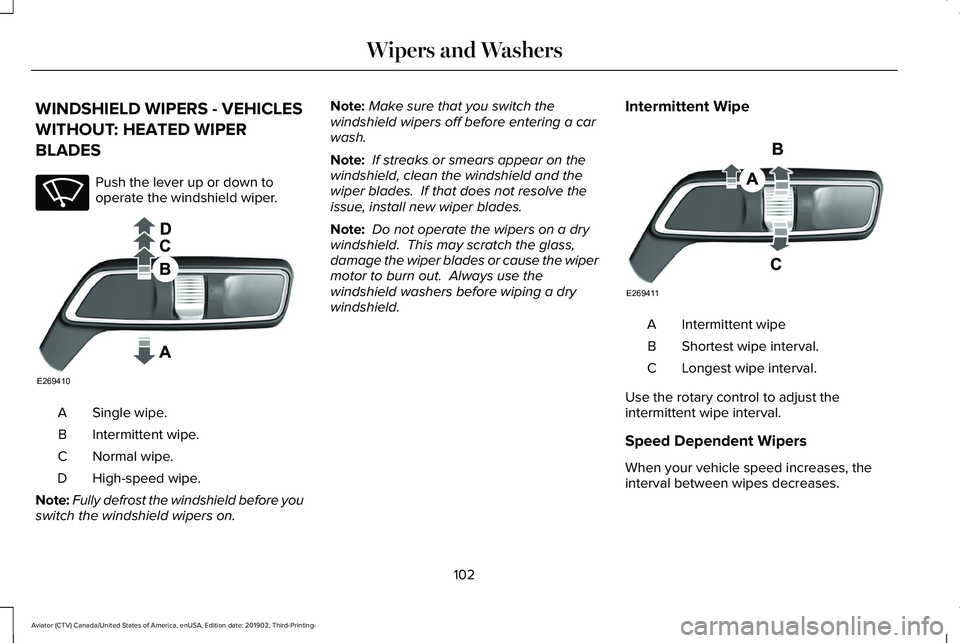
Push the lever up or down to
operate the windshield wiper.
Single wipe.
A
Intermittent wipe.
B
Normal wipe.
C
High-speed wipe.
D
Note: Fully defrost the windshield before you
switch the windshield wipers on. Note:
Make sure that you switch the
windshield wipers off before entering a car
wash.
Note: If streaks or smears appear on the
windshield, clean the windshield and the
wiper blades. If that does not resolve the
issue, install new wiper blades.
Note: Do not operate the wipers on a dry
windshield. This may scratch the glass,
damage the wiper blades or cause the wiper
motor to burn out. Always use the
windshield washers before wiping a dry
windshield. Intermittent Wipe Intermittent wipe
A
Shortest wipe interval.
B
Longest wipe interval.
C
Use the rotary control to adjust the
intermittent wipe interval.
Speed Dependent Wipers
When your vehicle speed increases, the
interval between wipes decreases.
102
Aviator (CTV) Canada/United States of America, enUSA, Edition date: 201902, Third-Printing- Wipers and WashersE270969 E269410 E269411
Page 106 of 609
WINDSHIELD WIPERS - VEHICLES
WITH: HEATED WIPER BLADES
Heated Wiper Blade
The heated wiper blades turn on in low
temperature when the windshield wipers are
active or defrost is on. See Automatic
Climate Control (page 160).
Note: In below freezing temperatures, the
heated wiper blades turn on when the wipers
are inactive.
AUTOWIPERS
Wet or winter driving conditions with ice,
snow or salty road mist can cause
inconsistent and unexpected wiping or
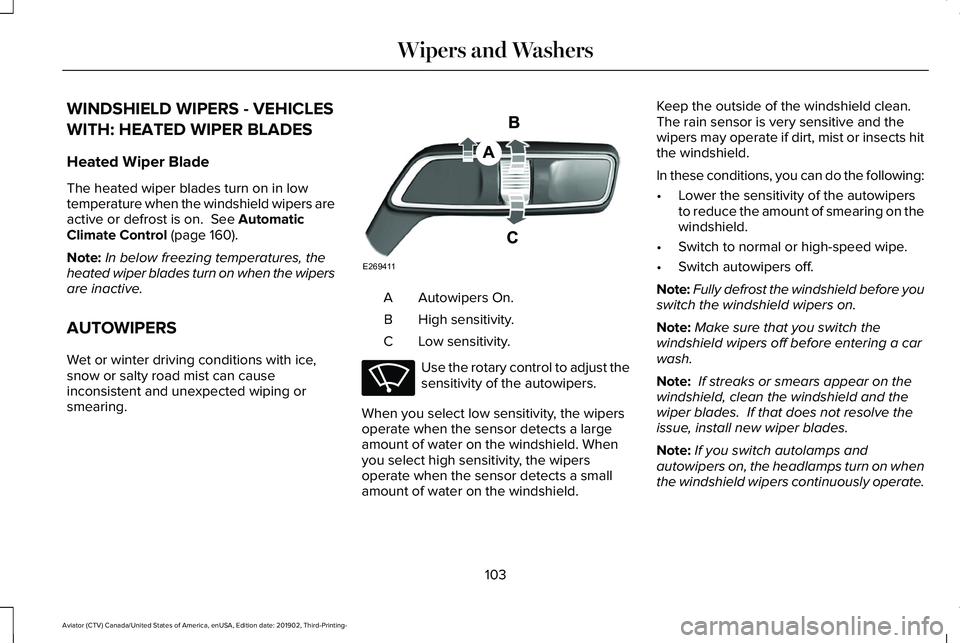
smearing. Autowipers On.
A
High sensitivity.
B
Low sensitivity.
C Use the rotary control to adjust the
sensitivity of the autowipers.
When you select low sensitivity, the wipers
operate when the sensor detects a large
amount of water on the windshield. When
you select high sensitivity, the wipers
operate when the sensor detects a small
amount of water on the windshield. Keep the outside of the windshield clean.
The rain sensor is very sensitive and the
wipers may operate if dirt, mist or insects hit
the windshield.
In these conditions, you can do the following:
•
Lower the sensitivity of the autowipers
to reduce the amount of smearing on the
windshield.
• Switch to normal or high-speed wipe.
• Switch autowipers off.
Note: Fully defrost the windshield before you
switch the windshield wipers on.
Note: Make sure that you switch the
windshield wipers off before entering a car
wash.
Note: If streaks or smears appear on the
windshield, clean the windshield and the
wiper blades. If that does not resolve the
issue, install new wiper blades.
Note: If you switch autolamps and
autowipers on, the headlamps turn on when
the windshield wipers continuously operate.
103
Aviator (CTV) Canada/United States of America, enUSA, Edition date: 201902, Third-Printing- Wipers and WashersE269411 E270969
Page 107 of 609
Autowipers Settings
This setting defaults to on and remains on
until you switch it off in the touchscreen.
When you switch off autowipers, the wipers
operate in intermittent mode.
Low Temperature Wipe Inhibit
The rain sensing feature will not operate
immediately after starting your vehicle when
it is in park (P) and the outside temperature
is below 32°F (0°C). You can switch on the
wipers by adjusting the rain sensor sensitivity
or adjusting the wiper speed.
This prevents damage to the wiper blades
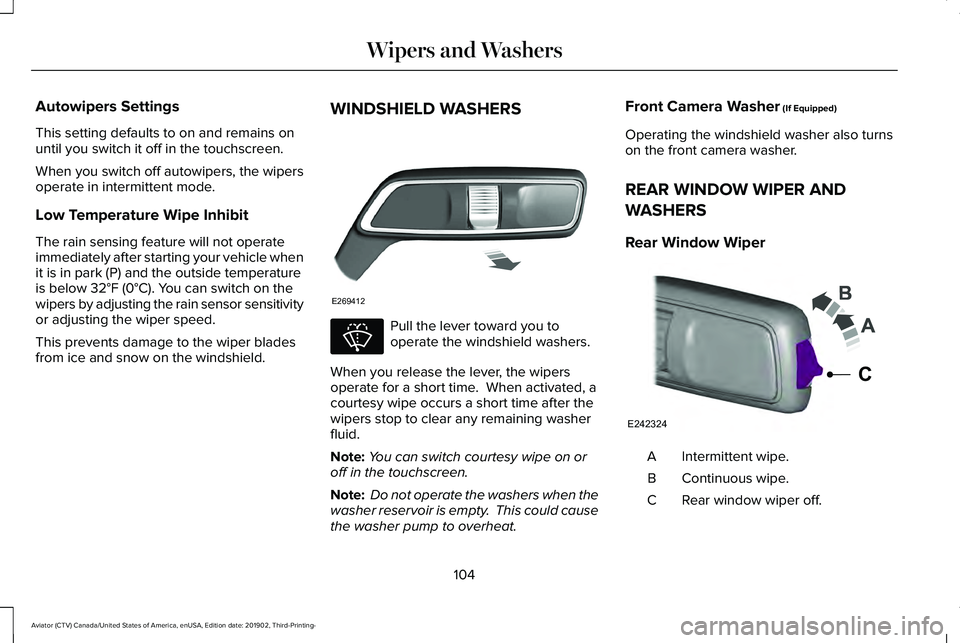
from ice and snow on the windshield. WINDSHIELD WASHERS Pull the lever toward you to
operate the windshield washers.
When you release the lever, the wipers
operate for a short time. When activated, a
courtesy wipe occurs a short time after the
wipers stop to clear any remaining washer
fluid.
Note: You can switch courtesy wipe on or
off in the touchscreen.
Note: Do not operate the washers when the
washer reservoir is empty. This could cause
the washer pump to overheat. Front Camera Washer
(If Equipped)
Operating the windshield washer also turns
on the front camera washer.
REAR WINDOW WIPER AND
WASHERS
Rear Window Wiper Intermittent wipe.
A
Continuous wipe.
B
Rear window wiper off.
C
104
Aviator (CTV) Canada/United States of America, enUSA, Edition date: 201902, Third-Printing- Wipers and WashersE269412 E270967 E242324
C
Page 108 of 609
Depending on your vehicle, when you switch
on the front wipers and move the gearshift
lever to reverse (R), the rear intermittent wipe
may turn on.
Note:
Make sure you switch the rear window
wiper off before entering a car wash.
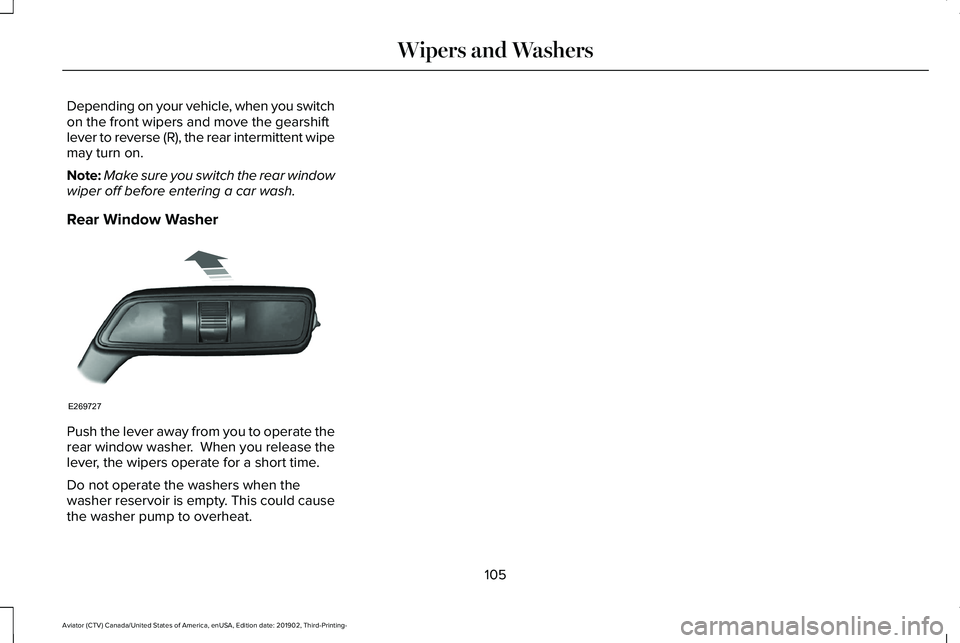
Rear Window Washer Push the lever away from you to operate the
rear window washer. When you release the
lever, the wipers operate for a short time.
Do not operate the washers when the
washer reservoir is empty. This could cause
the washer pump to overheat.
105
Aviator (CTV) Canada/United States of America, enUSA, Edition date: 201902, Third-Printing- Wipers and WashersE269727
Page 110 of 609
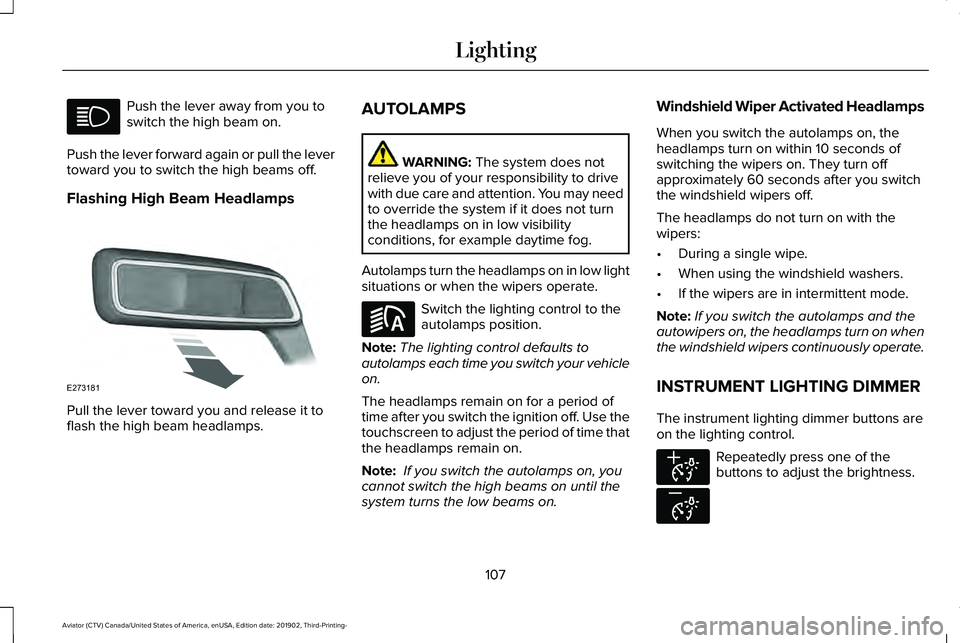
Push the lever away from you to
switch the high beam on.
Push the lever forward again or pull the lever
toward you to switch the high beams off.
Flashing High Beam Headlamps Pull the lever toward you and release it to
flash the high beam headlamps. AUTOLAMPS WARNING: The system does not
relieve you of your responsibility to drive
with due care and attention. You may need
to override the system if it does not turn
the headlamps on in low visibility
conditions, for example daytime fog.
Autolamps turn the headlamps on in low light
situations or when the wipers operate. Switch the lighting control to the
autolamps position.
Note: The lighting control defaults to
autolamps each time you switch your vehicle
on.
The headlamps remain on for a period of
time after you switch the ignition off. Use the
touchscreen to adjust the period of time that
the headlamps remain on.
Note: If you switch the autolamps on, you
cannot switch the high beams on until the
system turns the low beams on. Windshield Wiper Activated Headlamps
When you switch the autolamps on, the
headlamps turn on within 10 seconds of
switching the wipers on. They turn off
approximately 60 seconds after you switch
the windshield wipers off.
The headlamps do not turn on with the
wipers:
•
During a single wipe.
• When using the windshield washers.
• If the wipers are in intermittent mode.
Note: If you switch the autolamps and the
autowipers on, the headlamps turn on when
the windshield wipers continuously operate.
INSTRUMENT LIGHTING DIMMER
The instrument lighting dimmer buttons are
on the lighting control. Repeatedly press one of the
buttons to adjust the brightness.
107
Aviator (CTV) Canada/United States of America, enUSA, Edition date: 201902, Third-Printing- Lighting E273181 E281240 E291299 E296433
Page 113 of 609
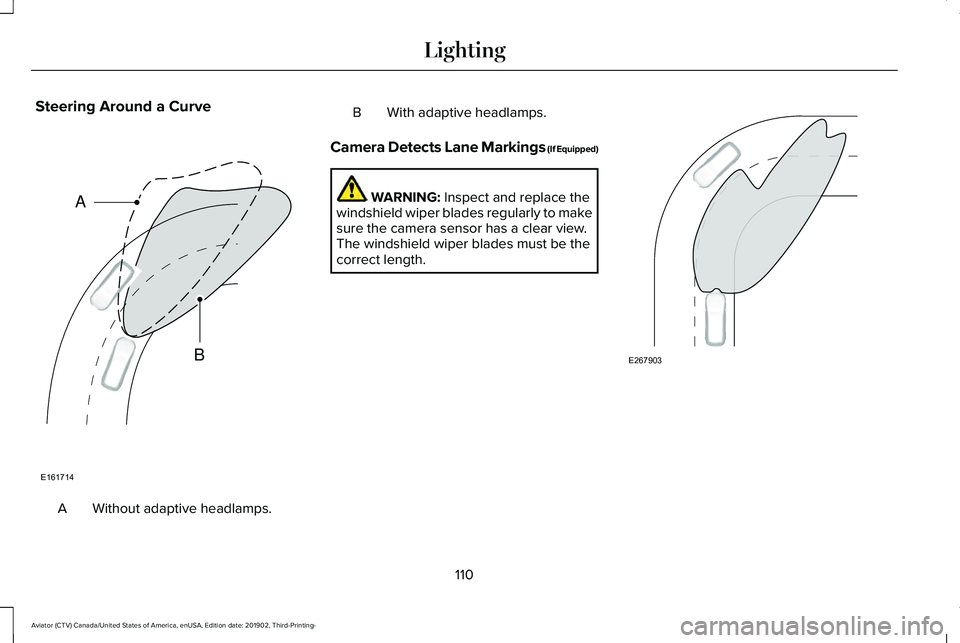
Steering Around a Curve
Without adaptive headlamps.
A B With adaptive headlamps.
Camera Detects Lane Markings (If Equipped) WARNING: Inspect and replace the
windshield wiper blades regularly to make
sure the camera sensor has a clear view.
The windshield wiper blades must be the
correct length. 110
Aviator (CTV) Canada/United States of America, enUSA, Edition date: 201902, Third-Printing- LightingE161714
B
A E267903