Wiper LINCOLN AVIATOR 2020 User Guide
[x] Cancel search | Manufacturer: LINCOLN, Model Year: 2020, Model line: AVIATOR, Model: LINCOLN AVIATOR 2020Pages: 609, PDF Size: 5.4 MB
Page 162 of 609
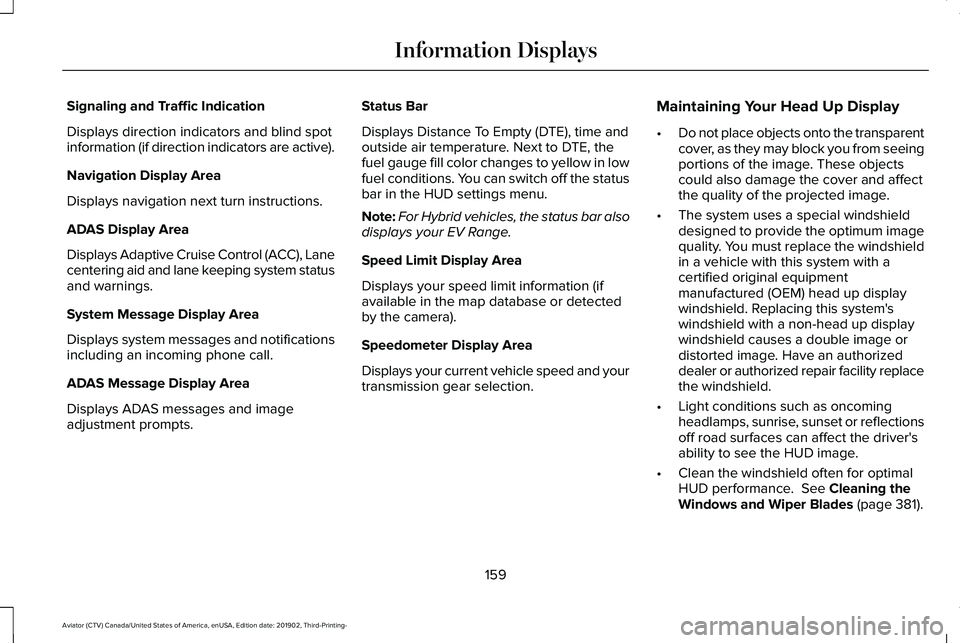
Signaling and Traffic Indication
Displays direction indicators and blind spot
information (if direction indicators are active).
Navigation Display Area
Displays navigation next turn instructions.
ADAS Display Area
Displays Adaptive Cruise Control (ACC), Lane
centering aid and lane keeping system status
and warnings.
System Message Display Area
Displays system messages and notifications
including an incoming phone call.
ADAS Message Display Area
Displays ADAS messages and image
adjustment prompts.
Status Bar
Displays Distance To Empty (DTE), time and
outside air temperature. Next to DTE, the
fuel gauge fill color changes to yellow in low
fuel conditions. You can switch off the status
bar in the HUD settings menu.
Note:
For Hybrid vehicles, the status bar also
displays your EV Range.
Speed Limit Display Area
Displays your speed limit information (if
available in the map database or detected
by the camera).
Speedometer Display Area
Displays your current vehicle speed and your
transmission gear selection. Maintaining Your Head Up Display
•
Do not place objects onto the transparent
cover, as they may block you from seeing
portions of the image. These objects
could also damage the cover and affect
the quality of the projected image.
• The system uses a special windshield
designed to provide the optimum image
quality. You must replace the windshield
in a vehicle with this system with a
certified original equipment
manufactured (OEM) head up display
windshield. Replacing this system's
windshield with a non-head up display
windshield causes a double image or
distorted image. Have an authorized
dealer or authorized repair facility replace
the windshield.
• Light conditions such as oncoming
headlamps, sunrise, sunset or reflections
off road surfaces can affect the driver's
ability to see the HUD image.
• Clean the windshield often for optimal
HUD performance. See Cleaning the
Windows and Wiper Blades (page 381).
159
Aviator (CTV) Canada/United States of America, enUSA, Edition date: 201902, Third-Printing- Information Displays
Page 171 of 609
•
Heated mirrors.
• Heated rear window.
• Windshield wiper de-icer.
Note: For dual zone climate controlled seats,
the passenger seat setting defaults to match
the driver seat during remote start.
Automatic Settings
If Auto is on, the system sets the interior
temperature to 72°F (22°C) and heats or
cools the vehicle interior as required to
achieve comfort.
Note: In cold weather, the heated rear
window and heated mirrors turn on.
Last Settings
If
Last Settings is on, the system uses the
settings last selected before you turned off
the vehicle.
Heated and Cooled Features
In
Auto mode, certain heated features may
switch on during cold weather, and cooled
features during hot weather.
168
Aviator (CTV) Canada/United States of America, enUSA, Edition date: 201902, Third-Printing- Climate Control
Page 265 of 609
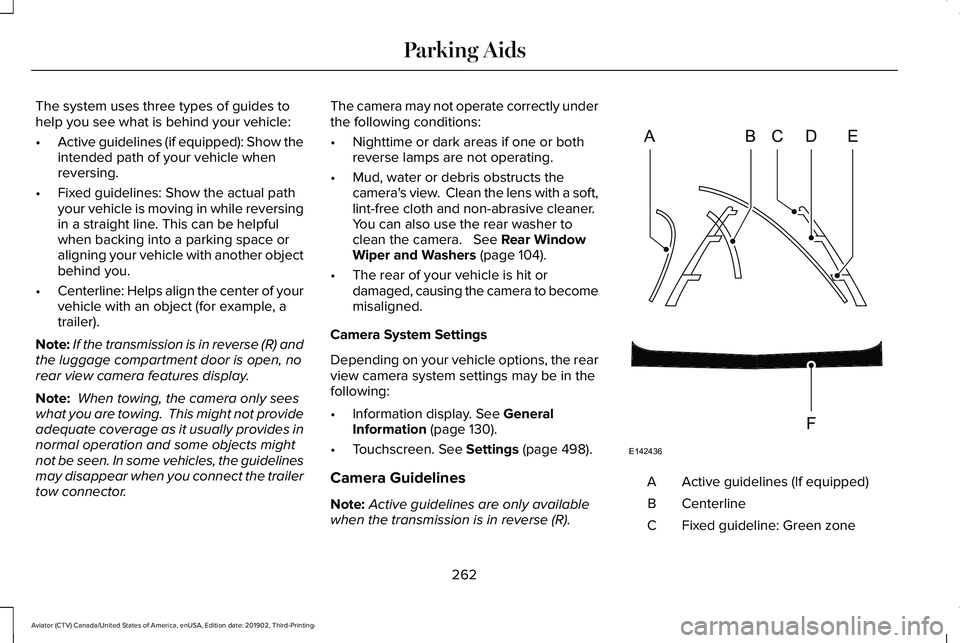
The system uses three types of guides to
help you see what is behind your vehicle:
•
Active guidelines (if equipped): Show the
intended path of your vehicle when
reversing.
• Fixed guidelines: Show the actual path
your vehicle is moving in while reversing
in a straight line. This can be helpful
when backing into a parking space or
aligning your vehicle with another object
behind you.
• Centerline: Helps align the center of your
vehicle with an object (for example, a
trailer).
Note: If the transmission is in reverse (R) and
the luggage compartment door is open, no
rear view camera features display.
Note: When towing, the camera only sees
what you are towing. This might not provide
adequate coverage as it usually provides in
normal operation and some objects might
not be seen. In some vehicles, the guidelines
may disappear when you connect the trailer
tow connector. The camera may not operate correctly under
the following conditions:
•
Nighttime or dark areas if one or both
reverse lamps are not operating.
• Mud, water or debris obstructs the
camera's view. Clean the lens with a soft,
lint-free cloth and non-abrasive cleaner.
You can also use the rear washer to
clean the camera. See Rear Window
Wiper and Washers (page 104).
• The rear of your vehicle is hit or
damaged, causing the camera to become
misaligned.
Camera System Settings
Depending on your vehicle options, the rear
view camera system settings may be in the
following:
• Information display.
See General
Information (page 130).
• Touchscreen.
See Settings (page 498).
Camera Guidelines
Note: Active guidelines are only available
when the transmission is in reverse (R). Active guidelines (If equipped)
A
Centerline
B
Fixed guideline: Green zone
C
262
Aviator (CTV) Canada/United States of America, enUSA, Edition date: 201902, Third-Printing- Parking AidsABCD
F
E
E142436
Page 350 of 609
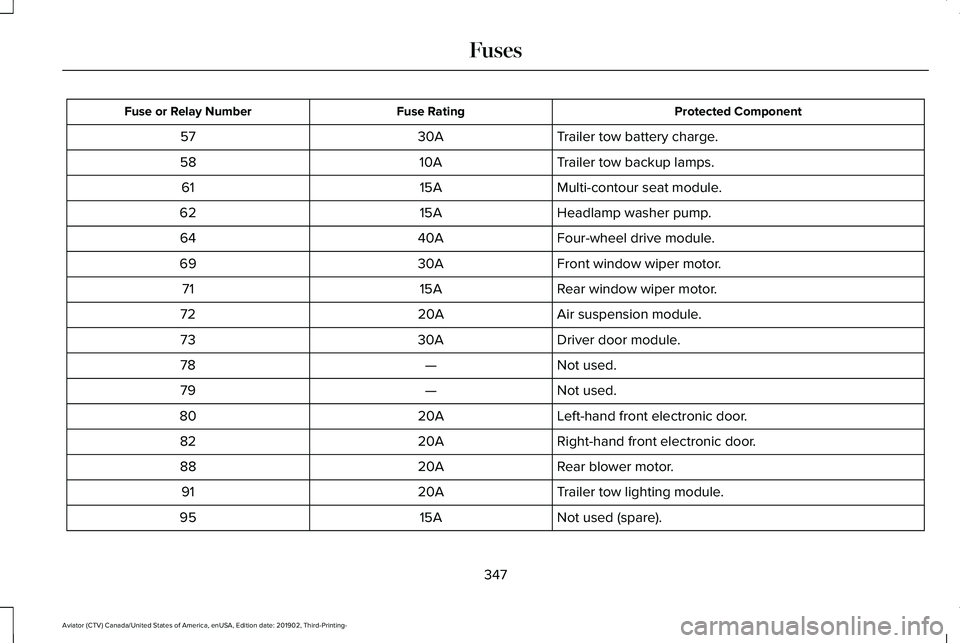
Protected Component
Fuse Rating
Fuse or Relay Number
Trailer tow battery charge.
30A
57
Trailer tow backup lamps.
10A
58
Multi-contour seat module.
15A
61
Headlamp washer pump.
15A
62
Four-wheel drive module.
40A
64
Front window wiper motor.
30A
69
Rear window wiper motor.
15A
71
Air suspension module.
20A
72
Driver door module.
30A
73
Not used.
—
78
Not used.
—
79
Left-hand front electronic door.
20A
80
Right-hand front electronic door.
20A
82
Rear blower motor.
20A
88
Trailer tow lighting module.
20A
91
Not used (spare).
15A
95
347
Aviator (CTV) Canada/United States of America, enUSA, Edition date: 201902, Third-Printing- Fuses
Page 352 of 609
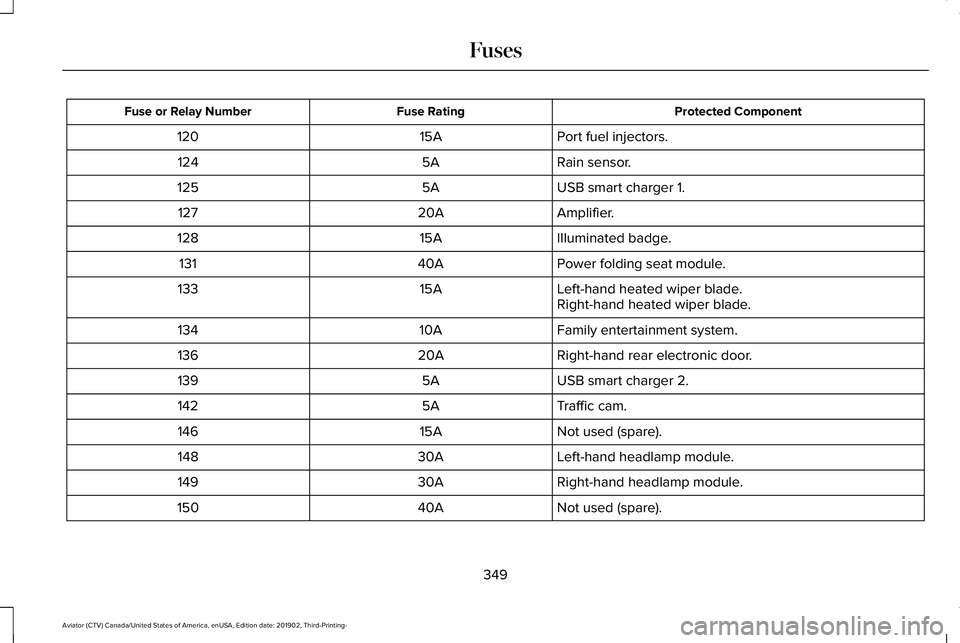
Protected Component
Fuse Rating
Fuse or Relay Number
Port fuel injectors.
15A
120
Rain sensor.
5A
124
USB smart charger 1.
5A
125
Amplifier.
20A
127
Illuminated badge.
15A
128
Power folding seat module.
40A
131
Left-hand heated wiper blade.
15A
133
Right-hand heated wiper blade.
Family entertainment system.
10A
134
Right-hand rear electronic door.
20A
136
USB smart charger 2.
5A
139
Traffic cam.
5A
142
Not used (spare).
15A
146
Left-hand headlamp module.
30A
148
Right-hand headlamp module.
30A
149
Not used (spare).
40A
150
349
Aviator (CTV) Canada/United States of America, enUSA, Edition date: 201902, Third-Printing- Fuses
Page 378 of 609
5. Use a suitable tool, for example a
screwdriver or socket wrench, to turn the
adjuster clockwise or counterclockwise
to adjust the vertical aim of the
headlamp. The horizontal edge of the
brighter light should touch the horizontal
reference line.
6. Close the hood and switch off the lamps.
WASHER FLUID CHECK WARNING: If you operate your
vehicle in temperatures below 41.0°F (5°C),
use washer fluid with antifreeze protection.
Failure to use washer fluid with antifreeze
protection in cold weather could result in
impaired windshield vision and increase
the risk of injury or accident.
Note: The front and rear washer systems
are supplied from the same reservoir.
Add fluid to fill the reservoir if the level is low.
Only use a washer fluid that meets our
specifications.
See Capacities and
Specifications (page 421). State or local regulations on volatile organic
compounds may restrict the use of methanol,
a common windshield washer antifreeze
additive. Washer fluids containing
non-methanol antifreeze agents should be
used only if they provide cold weather
protection without damaging the vehicle
’s
paint finish, wiper blades or washer system.
FUEL FILTER
Your vehicle is equipped with a lifetime fuel
filter that is integrated with the fuel tank.
Regular maintenance or replacement is not
needed.
CHECKING THE WIPER BLADES Run the tip of your fingers over the edge of
the blade to check for roughness.
Clean the wiper blades with washer fluid or
water applied with a soft sponge or cloth.
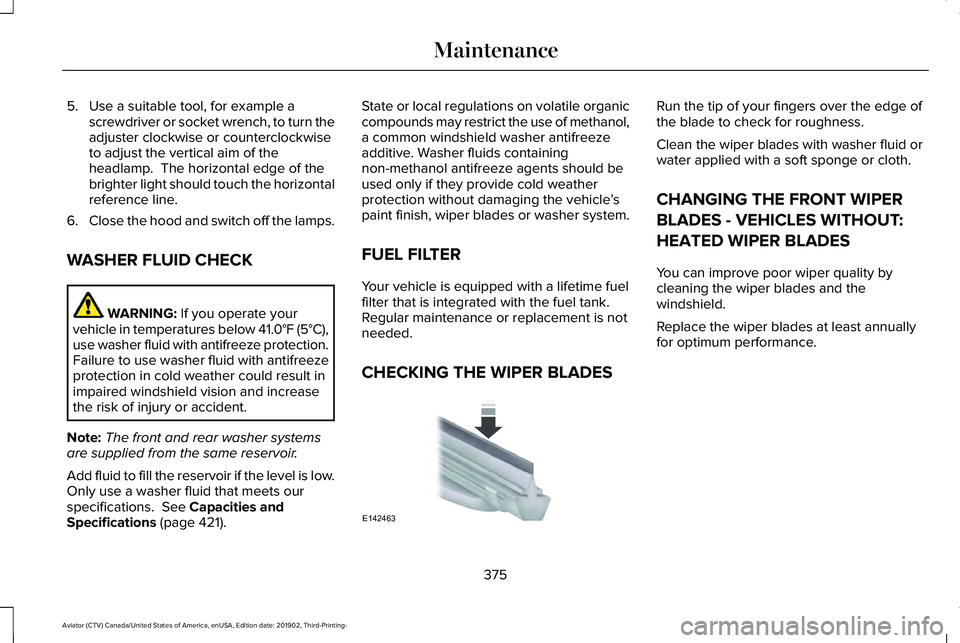
CHANGING THE FRONT WIPER
BLADES - VEHICLES WITHOUT:
HEATED WIPER BLADES
You can improve poor wiper quality by
cleaning the wiper blades and the
windshield.
Replace the wiper blades at least annually
for optimum performance.
375
Aviator (CTV) Canada/United States of America, enUSA, Edition date: 201902, Third-Printing- MaintenanceE142463
Page 379 of 609
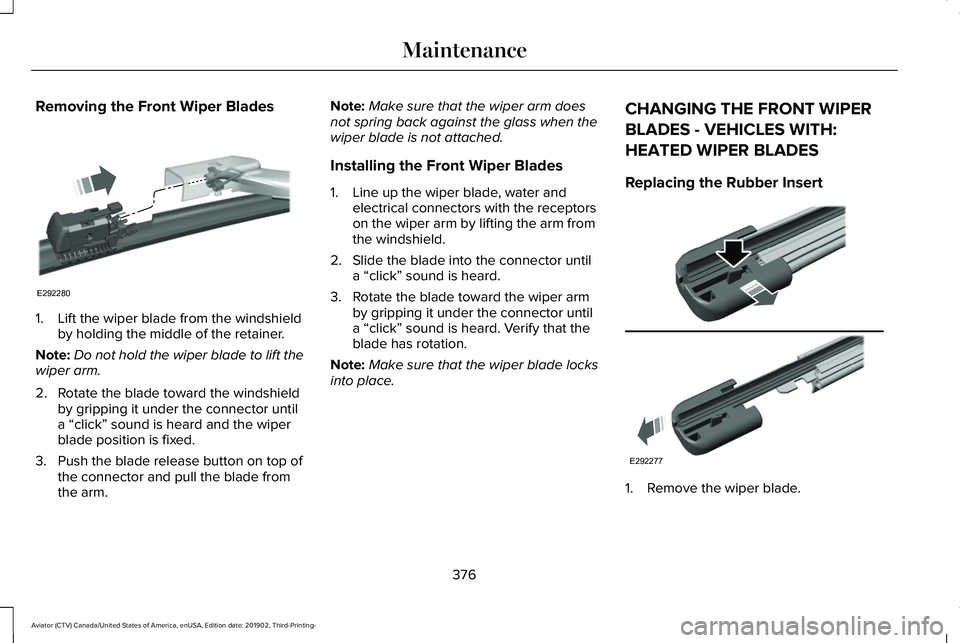
Removing the Front Wiper Blades
1. Lift the wiper blade from the windshield
by holding the middle of the retainer.
Note: Do not hold the wiper blade to lift the
wiper arm.
2. Rotate the blade toward the windshield by gripping it under the connector until
a “click” sound is heard and the wiper
blade position is fixed.
3. Push the blade release button on top of the connector and pull the blade from
the arm. Note:
Make sure that the wiper arm does
not spring back against the glass when the
wiper blade is not attached.
Installing the Front Wiper Blades
1. Line up the wiper blade, water and electrical connectors with the receptors
on the wiper arm by lifting the arm from
the windshield.
2. Slide the blade into the connector until a “click” sound is heard.
3. Rotate the blade toward the wiper arm by gripping it under the connector until
a “click” sound is heard. Verify that the
blade has rotation.
Note: Make sure that the wiper blade locks
into place. CHANGING THE FRONT WIPER
BLADES - VEHICLES WITH:
HEATED WIPER BLADES
Replacing the Rubber Insert
1. Remove the wiper blade.
376
Aviator (CTV) Canada/United States of America, enUSA, Edition date: 201902, Third-Printing- MaintenanceE292280 E292277
Page 380 of 609
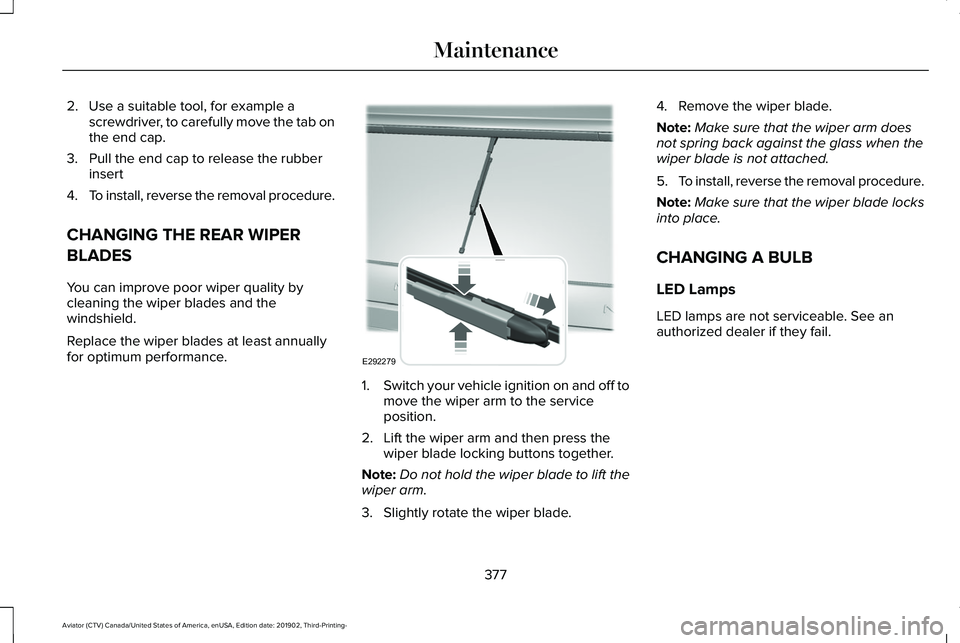
2. Use a suitable tool, for example a
screwdriver, to carefully move the tab on
the end cap.
3. Pull the end cap to release the rubber insert
4. To install, reverse the removal procedure.
CHANGING THE REAR WIPER
BLADES
You can improve poor wiper quality by
cleaning the wiper blades and the
windshield.
Replace the wiper blades at least annually
for optimum performance. 1.
Switch your vehicle ignition on and off to
move the wiper arm to the service
position.
2. Lift the wiper arm and then press the wiper blade locking buttons together.
Note: Do not hold the wiper blade to lift the
wiper arm.
3. Slightly rotate the wiper blade. 4. Remove the wiper blade.
Note:
Make sure that the wiper arm does
not spring back against the glass when the
wiper blade is not attached.
5. To install, reverse the removal procedure.
Note: Make sure that the wiper blade locks
into place.
CHANGING A BULB
LED Lamps
LED lamps are not serviceable. See an
authorized dealer if they fail.
377
Aviator (CTV) Canada/United States of America, enUSA, Edition date: 201902, Third-Printing- MaintenanceE292279
Page 384 of 609
•
Do not allow wax to come in contact with
any non-body (low-gloss black) colored
trim. The wax will discolor or stain the
parts over time.
•Roof racks.
• Bumpers.
• Grained door handles.
• Side moldings.
• Mirror housings.
• Windshield cowl area.
• Do not apply wax to glass areas.
• After waxing, your car's paint should feel
smooth, and be free of streaks and
smudges.
CLEANING THE ENGINE
Engines are more efficient when they are
clean because grease and dirt buildup keep
the engine warmer than normal. When washing:
•
Take care when using a power washer
to clean the engine. The high-pressure
fluid could penetrate the sealed parts
and cause damage.
• Do not spray a hot engine with cold water
to avoid cracking the engine block or
other engine components.
• Spray Motorcraft Engine Shampoo and
Degreaser on all parts that require
cleaning and pressure rinse clean. In
Canada, use Motorcraft Engine Shampoo.
Note: If your vehicle has an engine cover
remove the cover before application of
Motorcraft Engine Shampoo and Degreaser.
Immediately rinse away any over spray.
• Never wash or rinse the engine while it
is hot or running; water in the running
engine may cause internal damage.
• Never wash or rinse any ignition coil,
spark plug wire or spark plug well, or the
area in and around these locations.
• Cover the battery, power distribution box,
and air filter assembly to prevent water
damage when cleaning the engine. CLEANING THE WINDOWS AND
WIPER BLADES
Car wash chemicals and environmental
fallout can result in windshield and wiper
blade contamination. Dirty windshield and
wipers will result in poor windshield wiper
operation. Keep the windshield and wiper
blades clean to maintain windshield wiper
performance.
To clean the windshield and wiper blades:
•
Clean the windshield with a non-abrasive
glass cleaner. When cleaning the interior
of the windshield, avoid getting any glass
cleaner on the instrument panel or door
panels. Wipe any glass cleaner off these
surfaces immediately.
• For windshields contaminated with tree
sap, chemicals, wax or bugs, clean the
entire windshield using steel wool (no
greater than 0000 grade) in a circular
motion and rinse with water.
• Clean the wiper blades with isopropyl
rubbing alcohol or windshield washer
concentrate.
381
Aviator (CTV) Canada/United States of America, enUSA, Edition date: 201902, Third-Printing- Vehicle Care
Page 389 of 609
Miscellaneous
•
Make sure all linkages, cables, levers and
pins under your vehicle are covered with
grease to prevent rust.
• Move vehicles at least 25 ft (7.5 m) every
15 days to lubricate working parts and
prevent corrosion.
Removing Vehicle From Storage
When your vehicle is ready to come out of
storage, do the following:
• Wash your vehicle to remove any dirt or
grease film build-up on window surfaces.
• Check windshield wipers for any
deterioration.
• Check under the hood for any foreign
material that may have collected during
storage such as mice or squirrel nests.
• Check the exhaust for any foreign
material that may have collected during
storage.
• Check tire pressures and set tire inflation
per the Tire Label. •
Check brake pedal operation. Drive your
vehicle 15 ft (4.5 m) back and forth to
remove rust build-up.
• Check fluid levels (including coolant, oil
and gas) to make sure there are no leaks,
and fluids are at recommended levels.
• If you remove the battery, clean the
battery cable ends and check for
damage.
Contact an authorized dealer if you have any
concerns or issues.
386
Aviator (CTV) Canada/United States of America, enUSA, Edition date: 201902, Third-Printing- Vehicle Care