Fold LINCOLN AVIATOR 2021 User Guide
[x] Cancel search | Manufacturer: LINCOLN, Model Year: 2021, Model line: AVIATOR, Model: LINCOLN AVIATOR 2021Pages: 667, PDF Size: 7.01 MB
Page 195 of 667
Adjusting the Third Row Power Seats
WARNING: Do not fold a seat if it is
occupied. Failure to follow this instruction
could result in personal injury. WARNING:
Do not place cargo or
any objects behind the seatback before
returning it to the original position. WARNING: Do not drive your vehicle
with a seat that is unlatched or in the
folded position. Failure to follow this
instruction could result in personal injury
or death in the event of a sudden stop or
crash.
Note: The power rear seat functions disable
10 minutes after you switch the ignition off.
The transmission must be in park (P) and the
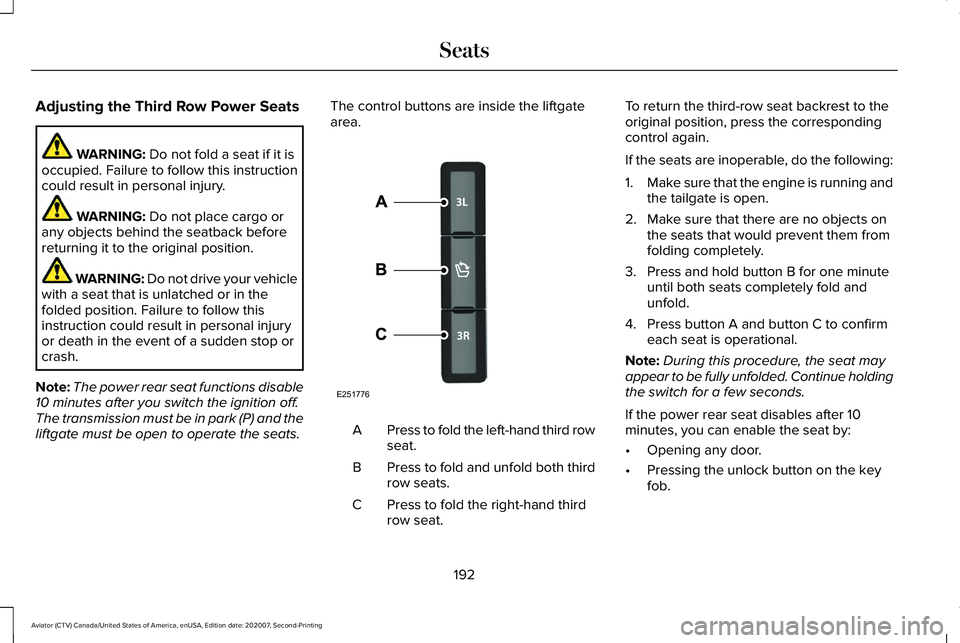
liftgate must be open to operate the seats. The control buttons are inside the liftgate
area.
Press to fold the left-hand third row
seat.
A
Press to fold and unfold both third
row seats.
B
Press to fold the right-hand third
row seat.
C To return the third-row seat backrest to the
original position, press the corresponding
control again.
If the seats are inoperable, do the following:
1.
Make sure that the engine is running and
the tailgate is open.
2. Make sure that there are no objects on the seats that would prevent them from
folding completely.
3. Press and hold button B for one minute until both seats completely fold and
unfold.
4. Press button A and button C to confirm each seat is operational.
Note: During this procedure, the seat may
appear to be fully unfolded. Continue holding
the switch for a few seconds.
If the power rear seat disables after 10
minutes, you can enable the seat by:
• Opening any door.
• Pressing the unlock button on the key
fob.
192
Aviator (CTV) Canada/United States of America, enUSA, Edition date: 202007, Second-Printing SeatsE251776
Page 333 of 667
Deep Sand (If Equipped)
For crossing deep soft and dry sand.
Note: Using deep sand mode on dry hard
surfaces could produce some vibration,
driveline bind up, and potential excessive
tire wear. This mode is for slippery and loose
surfaces.
Excite
For sporty on-road driving. This mode
increases throttle response, provides a more
dynamic powertrain sound and steering feel,
along with a more sporty shifting experience.
If your vehicle has continuously controlled
damping suspension it adjusts to a stiffer
suspension setting, with an emphasis on
handling and control. The transmission also
holds gears longer, helping your vehicle
accelerate faster when shifting gears.
If your vehicle has air suspension, it lowers
approximately
0.6 in (15 mm) to improve
aerodynamics. Normal
For everyday driving. This mode is a perfect
balance of excitement, comfort and
convenience. This is the default mode after
each ignition cycle.
Preserve EV
Your vehicle runs the engine as needed to
save electric driving range for later use in
another drive mode. For example, you first
drive at high speeds on open roads where
engine operation is appropriate. Later, you
drive at low speeds in an urban area where
electric only is most efficient.
See Plug-In
Hybrid Vehicle Operation (page 222).
Pure EV
This mode provides an electric only driving
experience. Your vehicle could accelerate
more slowly, and the top speed could
reduce. For more power, you can temporarily
enable your engine at any time by using one
of the following methods: •
Press and hold the folder button on the
steering wheel when viewing the pure
EV information screen. Your vehicle
enables the engine as needed, and
returns to pure EV after several seconds,
or when the vehicle no longer needs the
engine.
• Press the accelerator pedal fully. A
pop-up message appears. Press OK on
the steering wheel to activate as needed.
Your vehicle could enable the engine if
system conditions require it. An engine
enabled message displays if this occurs. See
Information Messages
(page 140).
Your engine could enable if the climate
control is in a defrost mode and the outside
temperature is cold. If the vehicle does not
need defrost, select a different climate
control mode to permit pure EV.
Your vehicle changes from pure EV mode to
normal mode when the vehicle electric range
is zero.
Note: When in pure EV mode, your vehicle
stays in this mode if there is all electric
driving range available and the system does
not fault.
330
Aviator (CTV) Canada/United States of America, enUSA, Edition date: 202007, Second-Printing Drive Mode Control
Page 340 of 667
6.
If your vehicle will be towing a trailer,
load from your trailer will be
transferred to your vehicle. Consult
this manual to determine how this
reduces the available cargo and
luggage load capacity of your
vehicle.
Helpful examples for calculating the
available amount of cargo and
luggage load capacity
Suppose your vehicle has a 1400-pound
(635-kilogram) cargo and luggage
capacity. You decide to go golfing. Is
there enough load capacity to carry you,
four of your friends and all the golf bags?
You and four friends average 220
pounds (99 kilograms) each and the golf
bags weigh approximately 30 pounds
(13.5 kilograms) each. The calculation
would be: 1400 - (5 x 220) - (5 x 30) =
1400 - 1100 - 150 = 150 pounds. Yes, you have enough load capacity in your
vehicle to transport four friends and your
golf bags. In metric units, the calculation
would be: 635 kilograms - (5 x 99
kilograms) - (5 x 13.5 kilograms) = 635 -
495 - 67.5 = 72.5 kilograms.
Suppose your vehicle has a 1400-pound
(635-kilogram) cargo and luggage
capacity. You and one of your friends
decide to pick up cement from the local
home improvement store to finish that
patio you have been planning for the
past two years. Measuring the inside of
the vehicle with the rear seat folded
down, you have room for twelve
100-pound (45-kilogram) bags of
cement. Do you have enough load
capacity to transport the cement to your
home? If you and your friend each weigh
220 pounds (99 kilograms), the
calculation would be: 1400 - (2 x 220) -
(12 x 100) = 1400 - 440 - 1200 = - 240
pounds. No, you do not have enough
cargo capacity to carry that much
weight. In metric units, the calculation
would be: 635 kilograms - (2 x 99
kilograms) - (12 x 45 kilograms) = 635 -198 - 540 = -103 kilograms. You will need
to reduce the load weight by at least
240 pounds (104 kilograms). If you
remove three 100-pound (45-kilogram)
cement bags, then the load calculation
would be:1400 - (2 x 220) - (9 x 100) =
1400 - 440 - 900 = 60 pounds. Now you
have the load capacity to transport the
cement and your friend home. In metric
units, the calculation would be: 635
kilograms - (2 x 99 kilograms) - (9 x 45
kilograms) = 635 - 198 - 405 = 32
kilograms.
The above calculations also assume that
the loads are positioned in your vehicle
in a manner that does not overload the
front or the rear gross axle weight rating
specified for your vehicle on the Safety
Compliance Certification label.
337
Aviator (CTV) Canada/United States of America, enUSA, Edition date: 202007, Second-Printing Load Carrying
Page 378 of 667
Protected Component
Fuse Rating
Fuse or Relay Number
Air suspension compressor.
50A
114
Amplifier.
20A
115
Not used (spare).
5A
116
Second row heated seats.
30A
118
Port fuel injectors.
15A
120
Rain sensor.
5A
124
USB smart charger 1.
5A
125
Amplifier.
20A
127
Illuminated badge.
15A
128
Power folding seat module.
40A
131
Left-hand heated wiper blade.
15A
133
Right-hand heated wiper blade.
Family entertainment system.
10A
134
Right-hand rear electronic door.
20A
136
USB smart charger 2.
5A
139
Traffic cam.
5A
142
375
Aviator (CTV) Canada/United States of America, enUSA, Edition date: 202007, Second-Printing Fuses
Page 441 of 667
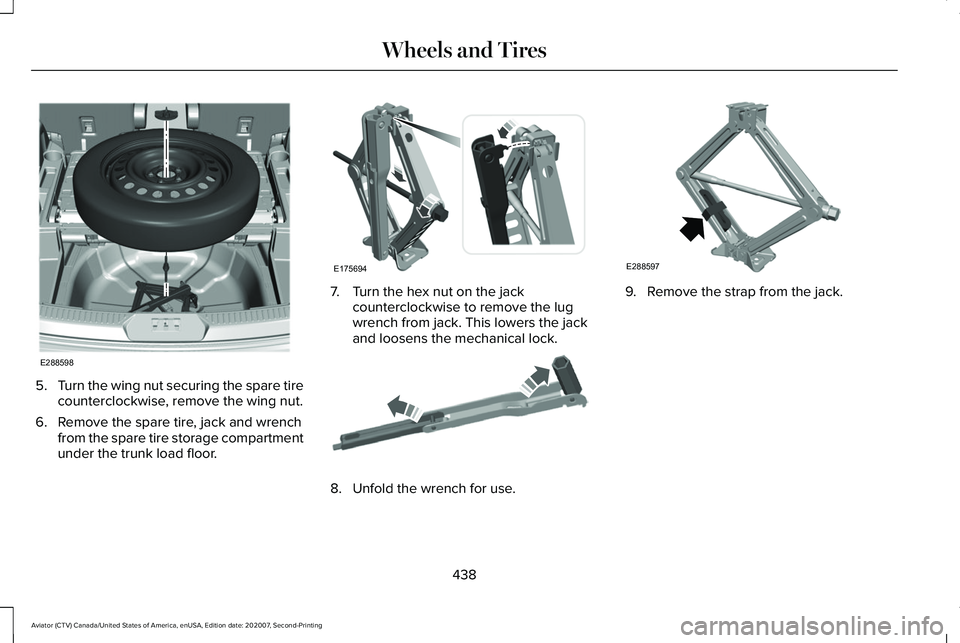
5.
Turn the wing nut securing the spare tire
counterclockwise, remove the wing nut.
6. Remove the spare tire, jack and wrench from the spare tire storage compartment
under the trunk load floor. 7. Turn the hex nut on the jack
counterclockwise to remove the lug
wrench from jack. This lowers the jack
and loosens the mechanical lock. 8. Unfold the wrench for use. 9. Remove the strap from the jack.
438
Aviator (CTV) Canada/United States of America, enUSA, Edition date: 202007, Second-Printing Wheels and TiresE288598 E175694 E181744 E288597
Page 443 of 667
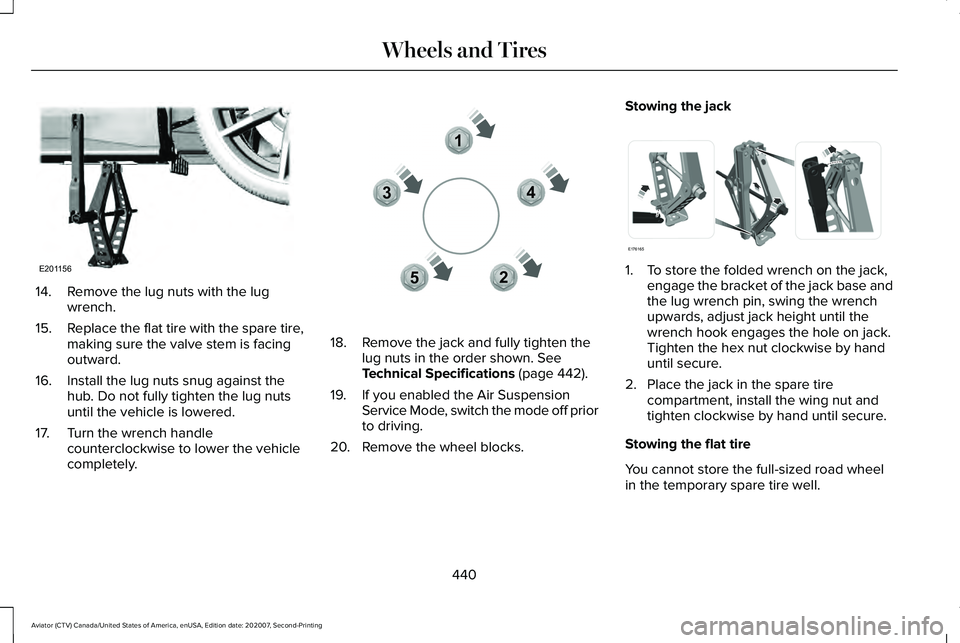
14. Remove the lug nuts with the lug
wrench.
15. Replace the flat tire with the spare tire,
making sure the valve stem is facing
outward.
16. Install the lug nuts snug against the hub. Do not fully tighten the lug nuts
until the vehicle is lowered.
17. Turn the wrench handle counterclockwise to lower the vehicle
completely. 18. Remove the jack and fully tighten the
lug nuts in the order shown. See
Technical Specifications (page 442).
19. If you enabled the Air Suspension Service Mode, switch the mode off prior
to driving.
20. Remove the wheel blocks. Stowing the jack
1. To store the folded wrench on the jack,
engage the bracket of the jack base and
the lug wrench pin, swing the wrench
upwards, adjust jack height until the
wrench hook engages the hole on jack.
Tighten the hex nut clockwise by hand
until secure.
2. Place the jack in the spare tire compartment, install the wing nut and
tighten clockwise by hand until secure.
Stowing the flat tire
You cannot store the full-sized road wheel
in the temporary spare tire well.
440
Aviator (CTV) Canada/United States of America, enUSA, Edition date: 202007, Second-Printing Wheels and TiresE201156 12
3
4
5E306781 E176165
Page 518 of 667
Website
http://hdradio.com/stations/feedback
HD Radio Technology manufactured under
license from iBiquity Digital Corporation and
foreign patents. HD Radio and the HD and
HD Radio logos are proprietary trademarks
of DTS. The vehicle manufacturer and DTS
are not responsible for the content sent using
HD Radio technology. Content may be
changed, added or deleted at any time at
the station owner's discretion. CD (If Equipped)
Once you select this option, the system
returns you to the main audio screen.
The current audio information appears on
the screen.
The following buttons are also available: Function
Button
You can use the browse button to select a track.
Browse
Select this button and a small number one displays to indicate the track\
is set to repeat.
Repeat
For MP3 CDs, this button allows you to toggle through repeat off, repeat one track (a small number
one displays), and repeat current folder (a small folder displays).
Select the shuffle symbol to have the audio on the disk play in random o\
rder.
Shuffle
515
Aviator (CTV) Canada/United States of America, enUSA, Edition date: 202007, Second-Printing SYNC™ 3
Page 520 of 667
Function
Button
If available, displays the list of tracks in the Now Playing playlist.
Browse
This option, which is available under browse, allows you to play all
tracks or to filter the available media into one of the below categories\
.
New Search
Play All
Playlists
Artist
Albums
Songs
Genres
Podcasts
Audio books
Composers
This button allows you to choose a specific letter to view within the
category you are browsing.
A-Z Jump
If available, this allows you to browse the folders and files on your
USB device.
Explore Device
517
Aviator (CTV) Canada/United States of America, enUSA, Edition date: 202007, Second-Printing SYNC™ 3
Page 550 of 667
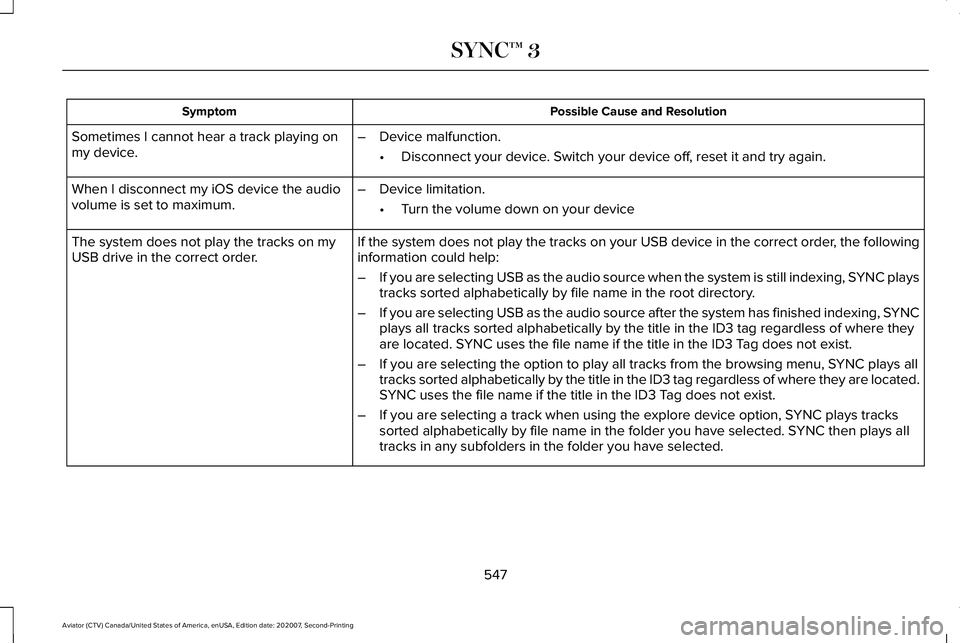
Possible Cause and Resolution
Symptom
Sometimes I cannot hear a track playing on
my device. –
Device malfunction.
•Disconnect your device. Switch your device off, reset it and try again.
When I disconnect my iOS device the audio
volume is set to maximum. –
Device limitation.
•Turn the volume down on your device
If the system does not play the tracks on your USB device in the correct\
order, the following
information could help:
The system does not play the tracks on my
USB drive in the correct order.
–If you are selecting USB as the audio source when the system is still in\
dexing, SYNC plays
tracks sorted alphabetically by file name in the root directory.
– If you are selecting USB as the audio source after the system has finish\
ed indexing, SYNC
plays all tracks sorted alphabetically by the title in the ID3 tag regar\
dless of where they
are located. SYNC uses the file name if the title in the ID3 Tag does not exist.
– If you are selecting the option to play all tracks from the browsing men\
u, SYNC plays all
tracks sorted alphabetically by the title in the ID3 tag regardless of w\
here they are located.
SYNC uses the file name if the title in the ID3 Tag does not exist.
– If you are selecting a track when using the explore device option, SYNC plays tracks
sorted alphabetically by file name in the folder you have selected. SYNC then plays all
tracks in any subfolders in the folder you have selected.
547
Aviator (CTV) Canada/United States of America, enUSA, Edition date: 202007, Second-Printing SYNC™ 3
Page 656 of 667
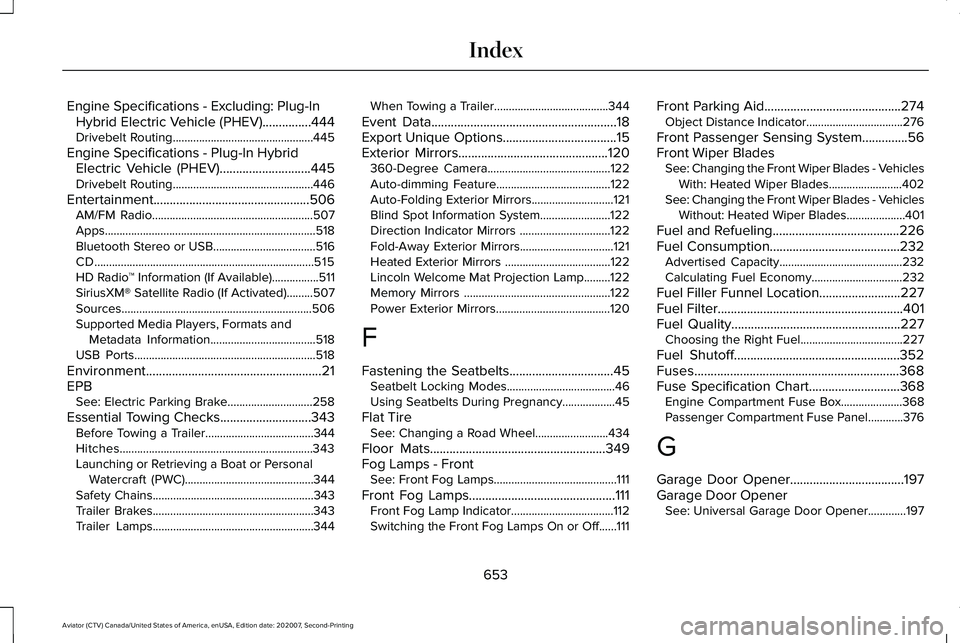
Engine Specifications - Excluding: Plug-In
Hybrid Electric Vehicle (PHEV)...............444
Drivebelt Routing................................................445
Engine Specifications - Plug-In Hybrid Electric Vehicle (PHEV)............................445
Drivebelt Routing................................................446
Entertainment................................................506 AM/FM Radio.......................................................507
Apps........................................................................\
518
Bluetooth Stereo or USB...................................516
CD........................................................................\
...515
HD Radio ™ Information (If Available)................511
SiriusXM® Satellite Radio (If Activated).........507
Sources.................................................................506
Supported Media Players, Formats and Metadata Information....................................518
USB Ports..............................................................518
Environment......................................................21
EPB See: Electric Parking Brake.............................
258
Essential Towing Checks............................343 Before Towing a Trailer.....................................
344
Hitches..................................................................343
Launching or Retrieving a Boat or Personal Watercraft (PWC)............................................344
Safety Chains.......................................................343
Trailer Brakes.......................................................343
Trailer Lamps.......................................................344 When Towing a Trailer.......................................344
Event Data
.........................................................18
Export Unique Options...................................15
Exterior Mirrors..............................................120 360-Degree Camera..........................................122
Auto-dimming Feature.......................................122
Auto-Folding Exterior Mirrors............................121
Blind Spot Information System........................122
Direction Indicator Mirrors ...............................122
Fold-Away Exterior Mirrors................................121
Heated Exterior Mirrors ....................................122
Lincoln Welcome Mat Projection Lamp.........122
Memory Mirrors ..................................................122
Power Exterior Mirrors.......................................120
F
Fastening the Seatbelts
................................45
Seatbelt Locking Modes.....................................46
Using Seatbelts During Pregnancy..................45
Flat Tire See: Changing a Road Wheel.........................434
Floor Mats......................................................349
Fog Lamps - Front See: Front Fog Lamps..........................................111
Front Fog Lamps.............................................111 Front Fog Lamp Indicator...................................112
Switching the Front Fog Lamps On or Off......111 Front Parking Aid..........................................274
Object Distance Indicator.................................276
Front Passenger Sensing System..............56
Front Wiper Blades See: Changing the Front Wiper Blades - Vehicles
With: Heated Wiper Blades.........................402
See: Changing the Front Wiper Blades - Vehicles Without: Heated Wiper Blades....................401
Fuel and Refueling.......................................226
Fuel Consumption
........................................232
Advertised Capacity..........................................232
Calculating Fuel Economy...............................
232
Fuel Filler Funnel Location.........................227
Fuel Filter
.........................................................401
Fuel Quality....................................................227 Choosing the Right Fuel...................................227
Fuel Shutoff...................................................352
Fuses...............................................................368
Fuse Specification Chart............................368 Engine Compartment Fuse Box.....................368
Passenger Compartment Fuse Panel............
376
G
Garage Door Opener...................................197
Garage Door Opener See: Universal Garage Door Opener.............197
653
Aviator (CTV) Canada/United States of America, enUSA, Edition date: 202007, Second-Printing Index