air conditioning LINCOLN AVIATOR 2021 User Guide
[x] Cancel search | Manufacturer: LINCOLN, Model Year: 2021, Model line: AVIATOR, Model: LINCOLN AVIATOR 2021Pages: 667, PDF Size: 7.01 MB
Page 398 of 667
You may notice a reduction in vehicle speed
caused by reduced engine power in order
to manage the engine coolant temperature.
Your vehicle may enter this mode if certain
high-temperature and high-load conditions
take place. The amount of speed reduction
depends on vehicle loading, grade and
ambient temperature. If this occurs, there is
no need to stop your vehicle. You can
continue to drive.
The air conditioning may automatically turn
on and off during severe operating
conditions to protect the engine from
overheating. When the coolant temperature
decreases to the normal operating
temperature, the air conditioning turns on.
If the coolant temperature gauge moves fully
into the red zone, or if the coolant
temperature warning or service engine soon
messages appear in your information display,
do the following:
1.
Stop your vehicle as soon as it is safe to
do so. Fully apply the parking brake, shift
into park (P) or neutral (N). 2. Leave the engine running until the
coolant temperature gauge needle
returns to the normal position. If the
temperature does not drop after several
minutes, follow the remaining steps.
3. Switch the engine off and wait for it to cool. Check the coolant level.
4. If the coolant level is at or below the minimum mark, add prediluted coolant
immediately.
5. If the coolant level is normal, restart the engine and continue.
AUTOMATIC TRANSMISSION
FLUID CHECK
If required, have an authorized dealer check
and change the transmission fluid at the
correct service interval. See Scheduled
Maintenance (page 564).
The automatic transmission does not have
a transmission fluid dipstick. Refer to your scheduled maintenance
information for scheduled intervals for fluid
checks and changes. Your transmission does
not consume fluid. However, if the
transmission slips, shifts slowly or if you
notice a sign of leaking fluid, contact an
authorized dealer.
Do not use supplemental transmission fluid
additives, treatments or cleaning agents. The
use of these materials may affect
transmission operation and result in damage
to internal transmission components.
BRAKE FLUID CHECK
WARNING: Do not use any fluid other
than the recommended brake fluid as this
will reduce brake efficiency. Use of
incorrect fluid could result in the loss of
vehicle control, serious personal injury or
death.
395
Aviator (CTV) Canada/United States of America, enUSA, Edition date: 202007, Second-Printing Maintenance
Page 454 of 667
Air Conditioning System
WARNING: The air conditioning
refrigerant system contains refrigerant under high pressure. Only qualified
personnel should service the air
conditioning refrigerant system. Opening
the air conditioning refrigerant system can
cause personal injury.
Capacities Refrigerant Oil
Refrigerant
Variant
5.92 fl oz (175 ml)
35 oz (0.99 kg)
All.
Materials Specification
Name
WSS-M17B21-A
R-1234yf Refrigerant(U.S.)
R-1234yf Refrigerant / Frigorigène R-1234yf(Canada)
YN-33-A(U.S.)
HS7Z-19B519-BA(Canada)
WSS-M2C300-A2
Motorcraft® R-1234yf Refrigerant PAG Oil(U.S.)
Motorcraft® R-1234yf Refrigerant PAG Oil / Huile PAG pour frigorigène R-1234yf
Motorcraft®(Canada)
YN-35(U.S. & Canada)
451
Aviator (CTV) Canada/United States of America, enUSA, Edition date: 202007, Second-Printing Capacities and Specifications
Page 465 of 667
Materials
Specification
Name
WSS-M14P19-A
Motorcraft® Premium Windshield Wash Concentrate with Bitterant(U.S.)
Motorcraft® Premium Quality Windshield Washer Fluid / Liquide lave-glace de haute
qualité Motorcraft®(Canada)
ZC-32-B2(U.S.)
CXC-37-A/B/D/F(Canada)
CAPACITIES AND SPECIFICATIONS
- PLUG-IN HYBRID ELECTRIC
VEHICLE (PHEV)
Use oil and fluid that meets the defined
specification and viscosity grade. If you do not use oil and fluid that meets the
defined specification and viscosity grade, it
could result in:
•
Component damage that your vehicle
warranty does not cover.
• Longer engine cranking periods.
• Increased emission levels.
• Reduced engine performance.
• Reduced fuel economy.
• Reduced brake performance. Air Conditioning System WARNING: The air conditioning
refrigerant system contains refrigerant
under high pressure. Only qualified
personnel should service the air
conditioning refrigerant system. Opening
the air conditioning refrigerant system can
cause personal injury.
Capacities Refrigerant Oil
Refrigerant
Variant
6.93 fl oz (205 ml)
35 oz (0.99 kg)
All.
462
Aviator (CTV) Canada/United States of America, enUSA, Edition date: 202007, Second-Printing Capacities and Specifications
Page 522 of 667
Touch the button to direct airflow
to the instrument panel air vents.
Touch the button to direct airflow
to the footwell air vents.
You can direct air through any combination
of these air vents.
Setting the Blower Motor Speed Touch up or down to increase or
decrease the volume of air that
circulates in your vehicle.
Setting the Temperature
Touch up or down on the left-hand
temperature control to set the left-hand
temperature.
Note: This control also adjusts the right-hand
side temperature when you switch off dual
zone mode.
Touch up or down on the right-hand
temperature control to set the right-hand
temperature. Switching Auto Mode On and Off Touch the button to switch on
automatic operation, then set the
temperature.
The system adjusts the blower motor speed,
air distribution, air conditioning operation,
and outside or recirculated air to reach and
maintain the temperature you have set.
Switching the Air Conditioning On and
Off A pop-up appears on the screen
to display the air conditioning
options.
MAX A/C: Touch the button to activate and
maximize cooling. The driver and passenger
temperatures are set to LO, recirculated air
flows through the instrument panel vents, air
conditioning automatically turns on and the
fan automatically adjusts to the highest
speed.
A/C: Touch to switch the air conditioning on
or off. Use A/C with recirculated air to
improve cooling performance and efficiency. Note:
In certain conditions, such as
maximum defrost, the air conditioning
compressor may continue to operate even
though you switch off the air conditioning.
Switching the Climate Control On and
Off Touch the button.
Switching the Climate Controlled Seats
On and Off Touch the button to cycle through
the various climate controlled seat
settings.
Switching Dual Zone Mode On and Off Touch the button to switch on
temperature control for the
right-hand side of the vehicle.
519
Aviator (CTV) Canada/United States of America, enUSA, Edition date: 202007, Second-Printing SYNC™ 3E244097 E265282 E265280
Page 523 of 667
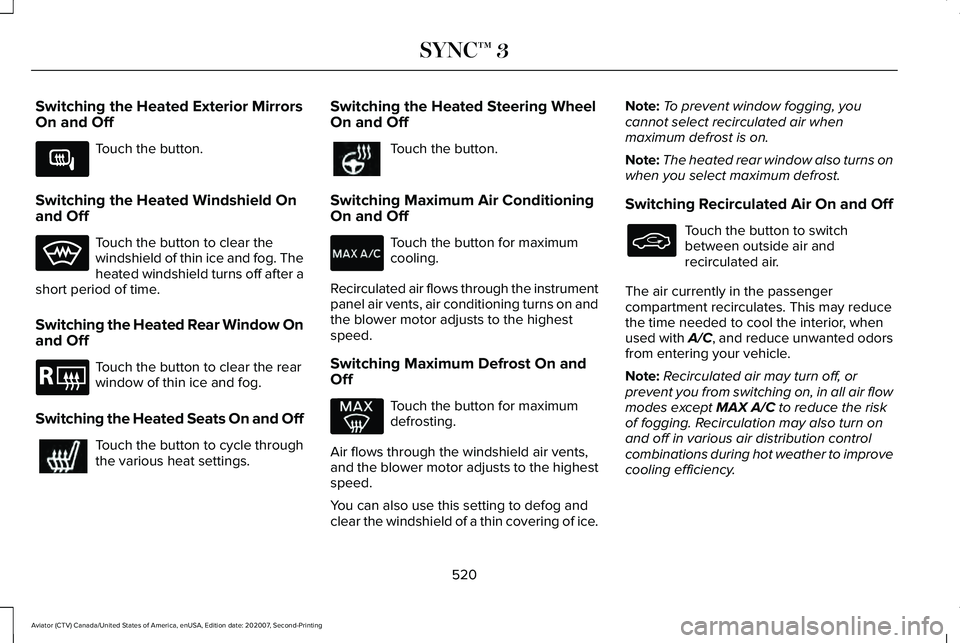
Switching the Heated Exterior Mirrors
On and Off
Touch the button.
Switching the Heated Windshield On
and Off Touch the button to clear the
windshield of thin ice and fog. The
heated windshield turns off after a
short period of time.
Switching the Heated Rear Window On
and Off Touch the button to clear the rear
window of thin ice and fog.
Switching the Heated Seats On and Off Touch the button to cycle through
the various heat settings. Switching the Heated Steering Wheel
On and Off Touch the button.
Switching Maximum Air Conditioning
On and Off Touch the button for maximum
cooling.
Recirculated air flows through the instrument
panel air vents, air conditioning turns on and
the blower motor adjusts to the highest
speed.
Switching Maximum Defrost On and
Off Touch the button for maximum
defrosting.
Air flows through the windshield air vents,
and the blower motor adjusts to the highest
speed.
You can also use this setting to defog and
clear the windshield of a thin covering of ice. Note:
To prevent window fogging, you
cannot select recirculated air when
maximum defrost is on.
Note: The heated rear window also turns on
when you select maximum defrost.
Switching Recirculated Air On and Off Touch the button to switch
between outside air and
recirculated air.
The air currently in the passenger
compartment recirculates. This may reduce
the time needed to cool the interior, when
used with A/C, and reduce unwanted odors
from entering your vehicle.
Note: Recirculated air may turn off, or
prevent you from switching on, in all air flow
modes except MAX A/C to reduce the risk
of fogging. Recirculation may also turn on
and off in various air distribution control
combinations during hot weather to improve
cooling efficiency.
520
Aviator (CTV) Canada/United States of America, enUSA, Edition date: 202007, Second-Printing SYNC™ 3E266189 E184884
Page 570 of 667
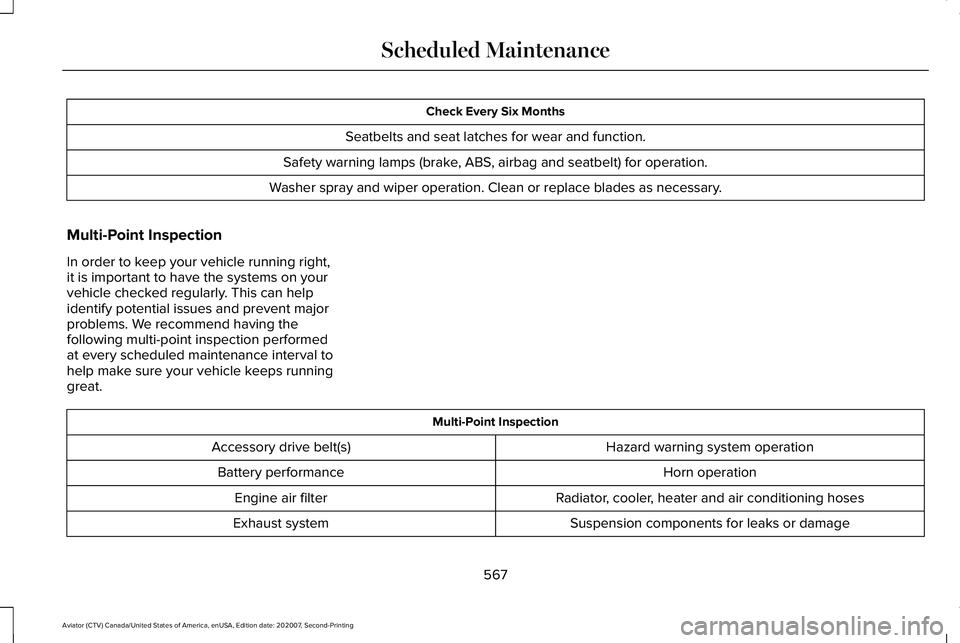
Check Every Six Months
Seatbelts and seat latches for wear and function.
Safety warning lamps (brake, ABS, airbag and seatbelt) for operation.
Washer spray and wiper operation. Clean or replace blades as necessary.
Multi-Point Inspection
In order to keep your vehicle running right,
it is important to have the systems on your
vehicle checked regularly. This can help
identify potential issues and prevent major
problems. We recommend having the
following multi-point inspection performed
at every scheduled maintenance interval to
help make sure your vehicle keeps running
great. Multi-Point Inspection
Hazard warning system operation
Accessory drive belt(s)
Horn operation
Battery performance
Radiator, cooler, heater and air conditioning hoses
Engine air filter
Suspension components for leaks or damage
Exhaust system
567
Aviator (CTV) Canada/United States of America, enUSA, Edition date: 202007, Second-Printing Scheduled Maintenance
Page 650 of 667
3
360 Degree Camera...................................286
Front Camera.......................................................287
Side Camera........................................................288
Using the System...............................................287
9
911 Assist...........................................................64
A
A/C See: Climate Control..........................................168
About This Manual............................................9
ABS See: Brakes..........................................................257
ABS driving hints See: Hints on Driving With Anti-Lock
Brakes...............................................................258
Accessories...................................................559
Accessories See: Replacement Parts Recommendation.....12
Active Park Assist.........................................278 Using Active Park Assist...................................279 Adaptive Cruise Control..............................291
Adaptive Cruise Control –
Troubleshooting.............................................302
Adaptive Cruise Control Indicators - Vehicles With: Adaptive Cruise Control
With Lane Centering.................................298
Adaptive Cruise Control Indicators - Vehicles With: Adaptive Cruise Control
With Stop and Go......................................299
Adaptive Cruise Control Indicators - Vehicles With: Intelligent Adaptive Cruise
Control.........................................................299
System Warnings................................................299
Adaptive Cruise Control Limitations - Vehicles With: Adaptive Cruise Control
With Lane Centering.................................293
Adaptive Cruise Control Limitations - Vehicles With: Adaptive Cruise Control
With Stop and Go......................................293
Sensor Limitations..............................................293
Adaptive Cruise Control Precautions - Vehicles With: Adaptive Cruise Control
With Lane Centering..................................291
Adaptive Cruise Control Precautions - Vehicles With: Adaptive Cruise Control
With Stop and Go......................................292
Hilly Condition Usage.......................................293
When Following a Vehicle...............................292 Adaptive Cruise Control –
Troubleshooting.........................................
302
Adaptive Cruise Control – Information
Messages .........................................................302
Adaptive Headlamps
.....................................112
About Adaptive Headlamps..............................112
Camera Detects Lane Markings.......................113
Camera Detects Traffic Signs............................114
Steering Around a Curve....................................
113
Switching Adaptive Headlamps On or Off........................................................................\
114
Adjusting the Headlamps
..........................399
Vertical Aim Adjustment...................................399
Adjusting the Set Speed Tolerance..........301
Adjusting the Steering Wheel - Vehicles With: Manual Adjustable Steering
Column..........................................................100
Adjusting the Steering Wheel - Vehicles With: Power Adjustable Steering
Column..........................................................100
End of Travel Position.........................................101
Memory Feature...................................................101
AFS See: Adaptive Headlamps.................................112
Airbag Disposal...............................................62
Air Conditioning See: Climate Control..........................................168
647
Aviator (CTV) Canada/United States of America, enUSA, Edition date: 202007, Second-Printing Index
Page 651 of 667
Air Filter
See: Changing the Engine Air Filter..............389
Air Suspension..............................................338 Switching the systems on or off.....................338
Using Cargo Loading.........................................338
Using Easy Entry.................................................338
Using the Service Mode...................................338
Alarm See: Anti-Theft Alarm...........................................98
All-Wheel Drive
.............................................250
Ambient Lighting............................................115
Adjusting the Brightness....................................116
Changing the Color.............................................116
Switching Ambient Lighting Off........................116
Switching Ambient Lighting On........................116
Anti-Theft Alarm
..............................................98
Arming the Alarm..................................................98
Disarming the Alarm............................................99
Using the System..................................................98
Appendices...................................................609
Apps.................................................................537 SiriusXM Traffic and Travel Link.....................539
Using Apps on an Android Device................
538
Using Apps on an iOS Device........................538
Using Mobile Navigation on an Android Device...............................................................538
At a Glance.......................................................22 Audible Warnings and Indicators
..............133
Headlamps On Warning Chime.......................133
Keyless Warning Alert........................................133
Parking Brake On Warning Chime..................133
Audio Control
.................................................102
You can operate the following functions with
the control:.......................................................102
Audio System
.................................................481
General Information............................................481
Audio Unit......................................................482 Accessing the Source Menu...........................483
Adjusting the Volume........................................
482
Changing Radio Stations..................................482
Locking the Rear Audio Controls...................483
Playing or Pausing Media.................................483
Rear Audio Control Lock Message................484
Rear Passenger Audio Controls.....................
483
Selecting a Preset..............................................483
Selecting the Audio Modes.............................483
Switching Repeat Mode On and Off ..............483
Switching Shuffle Mode On and Off..............483
Switching the Audio Control On and Off......................................................................484
Switching the Audio Unit On and Off............
483
Switching the Display On and Off..................483
Using Seek, Fast Forward and Reverse.......483
Auto Air Refresh Hints..................................177
Auto Air Refresh Indicators.........................176 Auto Hold
........................................................261
Auto Hold Indicator.............................................261
Switching Auto Hold On and Off.....................261
Using Auto Hold..................................................261
Autolamps........................................................110 Windshield Wiper Activated Headlamps.......110
Automatic Climate Control.........................168 Accessing Rear Climate Controls...................
168
Accessing the Air Distribution Controls........168
Accessing the Climate Control Menu............168
Setting the Blower Motor Speed.....................168
Setting the Temperature...................................169
Switching Auto Mode On and Off...................169
Switching Maximum Air Conditioning On and Off........................................................................\
171
Switching Maximum Defrost On and Off........171
Switching Recirculated Air On and Off...........171
Switching the Air Conditioning On and Off.......................................................................170
Switching the Climate Control On and Off.......................................................................170
Automatic High Beam Control....................117
Automatic High Beam Control Indicators.......................................................118
Automatic Transmission
.............................245
Automatic Return to Park.................................246
If Your Vehicle Gets Stuck in Mud or
Snow.................................................................249
648
Aviator (CTV) Canada/United States of America, enUSA, Edition date: 202007, Second-Printing Index
Page 652 of 667
Manual Park Release ........................................248
SelectShift Automatic ™ Transmission............247
Stay in Neutral Mode.........................................246
Understanding Your Transmission Selector Positions...........................................................245
Automatic Transmission Fluid Check...........................................................395
Auto-Start-Stop - Excluding: Plug-In Hybrid Electric Vehicle (PHEV).............................218
Disabling Auto-Start-Stop..................................219
Enabling Auto-Start-Stop...................................218
Autowipers......................................................106 Autowipers Settings............................................107
Low Temperature Wipe Inhibit.........................
107
Auxiliary Power Points
................................203
110 Volt AC Power Point...................................203
12 Volt DC Power Point.....................................203
USB Port and Power Point Locations............
203
AWD See: All-Wheel Drive.........................................250
B
Battery See: Changing the 12V Battery.......................397
Blind Spot Information System..................312 Blind Spot Information System with Trailer
Tow.....................................................................313 Switching the System On and Off...................316
System Errors.......................................................315
Using the Blind Spot Information
System...............................................................312
BLIS See: Blind Spot Information System...............
312
Body Styling Kits............................................412
Bonnet Lock See: Opening and Closing the Hood............384
Booster Seats..................................................38 Types of Booster Seats.......................................38
Brake Fluid Check
........................................395
Brake Fluid Service Interval.............................396
Brakes
.............................................................257
General Information...........................................257
Breaking-In.....................................................348
Bulb Specification Chart.............................473
C
Canceling the Set Speed...........................290
Capacities and Specifications
...................444
Capacities and Specifications - Excluding: Plug-In Hybrid Electric Vehicle
(PHEV)..........................................................450
Air Conditioning System....................................
451
Alternative Engine Oil for Extremely Cold Climates...........................................................455 Automatic Transmission...................................452
Engine Coolant...................................................453
Engine Oil.............................................................454
Front Axle.............................................................459
Fuel Tank..............................................................456
Grease...................................................................456
Hydraulic Brake System....................................457
Locks.....................................................................458
Rear Axle..............................................................460
Transfer Case......................................................458
Washer Reservoir................................................461
Capacities and Specifications - Plug-In Hybrid Electric Vehicle (PHEV)...............462
Air Conditioning System...................................462
Alternative Engine Oil for Extremely Cold Climates...........................................................466
Automatic Transmission....................................463
Engine Coolant...................................................464
Engine Oil.............................................................465
Front Axle.............................................................470
Fuel Tank..............................................................468
Grease...................................................................468
Hydraulic Brake System...................................468
Locks.....................................................................469
Rear Axle................................................................471
Transfer Case.......................................................470
Washer Reservoir................................................472
649
Aviator (CTV) Canada/United States of America, enUSA, Edition date: 202007, Second-Printing Index
Page 653 of 667
Car Wash
See: Cleaning the Exterior...............................405
Catalytic Converter......................................235
On-Board Diagnostics (OBD-II).......................236
Readiness for Inspection and Maintenance (I/M) Testing......................................................237
Changing a Bulb...........................................403 LED Lamps...........................................................403
Changing a Fuse...........................................381 Fuses......................................................................381
Changing a Road Wheel.............................434 Dissimilar Spare Wheel and Tire Assembly
Information.......................................................435
Tire Change Procedure....................................436
Changing the 12V Battery..........................397 Battery Management System..........................398
Remove and Reinstall the Battery..................399
Changing the Engine Air Filter.................389
Changing the Front Wiper Blades - Vehicles With: Heated Wiper
Blades
...........................................................402
Replacing the Rubber Insert............................402
Changing the Front Wiper Blades - Vehicles Without: Heated Wiper
Blades............................................................401
Installing the Front Wiper Blades ..................402
Removing the Front Wiper Blades.................402
Changing the Rear Wiper Blades.............403 Changing the Vehicle Wi-Fi Hotspot Name
or Password................................................479
Charging the High Voltage Battery - Plug-In Hybrid Electric Vehicle (PHEV)...............238
IMPORTANT SAFETY INSTRUCTIONS.........238
Checking MyKey System Status.................78 MyKey Distance.....................................................78
Number of Admin Keys.......................................79
Number of MyKeys...............................................79
Checking the Interior Air Quality...............175 Particulate Matter Pollution Information........176
Checking the Wiper Blades........................401
Child Restraint and Seatbelt Maintenance.................................................50
Child Restraint Positioning
...........................40
Child Safety......................................................25 General Information.............................................25
Child Safety Locks..........................................42
Cleaning Leather Seats..............................409
Cleaning Products
........................................404
Materials...............................................................404
Cleaning the Engine....................................407
Cleaning the Exterior..................................405 Cleaning the Exterior Lamps...........................405
Cleaning the Exterior Precautions.................405
Exterior Chrome Parts.......................................406
Exterior Plastic Parts..........................................406
Stripes or Graphics............................................406 Underbody...........................................................406
Under Hood.........................................................406
Cleaning the Instrument Panel and Instrument Cluster Lens...........................408
Cleaning the Interior
....................................408
Mirrors...................................................................408
Cleaning the Wheels
....................................410
Cleaning the Windows and Wiper Blades...........................................................407
Clearing All MyKeys
.......................................78
Climate.............................................................518 Accessing Rear Climate Controls...................
521
Accessing the Climate Control Menu............518
Directing the Airflow...........................................518
Rear Climate Control Lock Indicator..............521
Setting the Blower Motor Speed....................519
Setting the Temperature...................................519
Switching Auto Mode On and Off...................
519
Switching Dual Zone Mode On and Off........519
Switching Maximum Air Conditioning On and Off......................................................................520
Switching Maximum Defrost On and Off......................................................................520
Switching Rear Auto Mode On and Off.........521
Switching Recirculated Air On and Off.........520
Switching the Air Conditioning On and Off.......................................................................519
650
Aviator (CTV) Canada/United States of America, enUSA, Edition date: 202007, Second-Printing Index