open hood LINCOLN AVIATOR 2021 User Guide
[x] Cancel search | Manufacturer: LINCOLN, Model Year: 2021, Model line: AVIATOR, Model: LINCOLN AVIATOR 2021Pages: 667, PDF Size: 7.01 MB
Page 388 of 667
Note:
This action releases the hood latch.
3. Fully pull the hood release lever for a second time.
Note: This action fully releases the hood.
4. Open the hood.
Note: There is no secondary lever under the
hood. Closing the Hood WARNING: Make sure that you fully
latch the hood before driving. Failure to
follow this instruction could result in
personal injury or death. 1. For vehicles with a prop rod, fully stow
the prop rod prior to lowering the hood.
2. Lower the hood and make sure it fully latches.
385
Aviator (CTV) Canada/United States of America, enUSA, Edition date: 202007, Second-Printing Maintenance
Page 390 of 667
Brake fluid reservoir. See Brake Fluid Check (page 395).
D
Engine compartment fuse box.
See Fuses (page 368).
E
Engine coolant reservoir.
See Engine Coolant Check (page 390).
F
Air filter assembly.
See Changing the Engine Air Filter (page 389).
G
Washer fluid reservoir.
See Washer Fluid Check (page 401).
H
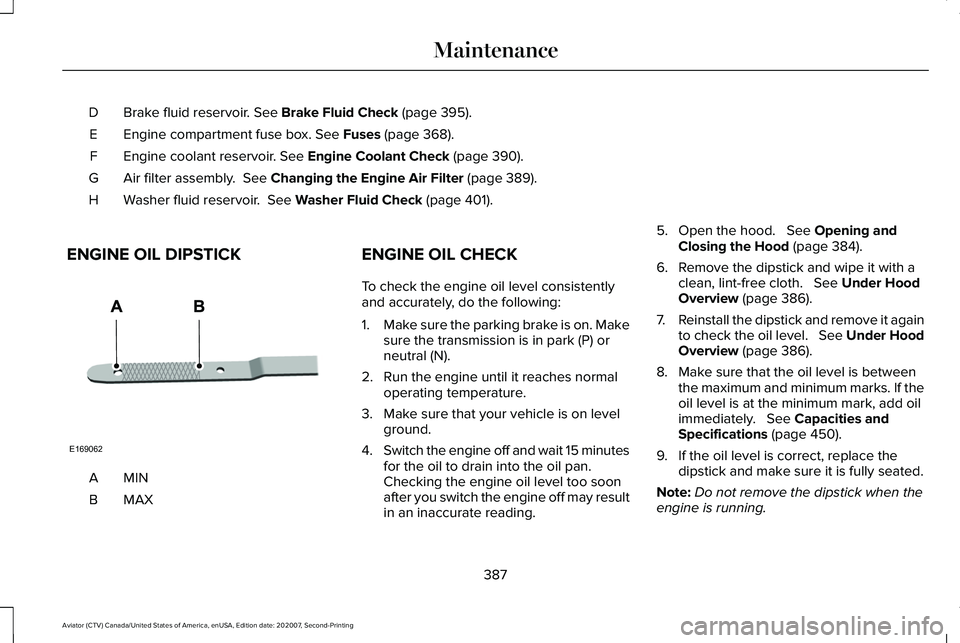
ENGINE OIL DIPSTICK MINA
MAXB ENGINE OIL CHECK
To check the engine oil level consistently
and accurately, do the following:
1.
Make sure the parking brake is on. Make
sure the transmission is in park (P) or
neutral (N).
2. Run the engine until it reaches normal operating temperature.
3. Make sure that your vehicle is on level ground.
4. Switch the engine off and wait 15 minutes
for the oil to drain into the oil pan.
Checking the engine oil level too soon
after you switch the engine off may result
in an inaccurate reading. 5. Open the hood.
See Opening and
Closing the Hood (page 384).
6. Remove the dipstick and wipe it with a clean, lint-free cloth.
See Under Hood
Overview (page 386).
7. Reinstall the dipstick and remove it again
to check the oil level. See Under Hood
Overview
(page 386).
8. Make sure that the oil level is between the maximum and minimum marks. If the
oil level is at the minimum mark, add oil
immediately.
See Capacities and
Specifications (page 450).
9. If the oil level is correct, replace the dipstick and make sure it is fully seated.
Note: Do not remove the dipstick when the
engine is running.
387
Aviator (CTV) Canada/United States of America, enUSA, Edition date: 202007, Second-Printing MaintenanceE169062
Page 391 of 667
Note:
If the oil level is between the
maximum and minimum marks, the oil level
is acceptable. Do not add oil.
Note: The oil consumption of new engines
reaches its normal level after approximately
3,000 mi (5,000 km).
Adding Engine Oil WARNING:
Do not remove the filler
cap when the engine is running.
Do not use supplemental engine oil additives
because they are unnecessary and could
lead to engine damage that may not be
covered by the vehicle Warranty. Only use oils certified for gasoline engines
by the American Petroleum Institute (API).
An oil with this trademark symbol conforms
to the current engine and emission system
protection standards and fuel economy
requirements of the International Lubricants
Specification Advisory Committee (ILSAC).
To top up the engine oil level do the
following:
1. Clean the area surrounding the engine
oil filler cap before you remove it.
2. Remove the engine oil filler cap.
See
Under Hood Overview (page 386). Turn
it counterclockwise and remove it. 3. Add engine oil that meets our
specifications.
See Capacities and
Specifications (page 450). You may have
to use a funnel to pour the engine oil into
the opening.
4. Recheck the oil level.
5. If the oil level is correct, replace the dipstick and make sure it is fully seated.
6. Replace the engine oil filler cap. Turn it clockwise until you feel a strong
resistance.
Note: Do not add oil further than the
maximum mark. Oil levels above the
maximum mark may cause engine damage.
Note: Make sure you install the oil filler cap
correctly.
Note: Soak up any spillage with an
absorbent cloth immediately.
OIL CHANGE INDICATOR RESET
Use the information display controls on the
steering wheel to reset the oil change
indicator.
388
Aviator (CTV) Canada/United States of America, enUSA, Edition date: 202007, Second-Printing MaintenanceE142732
Page 403 of 667
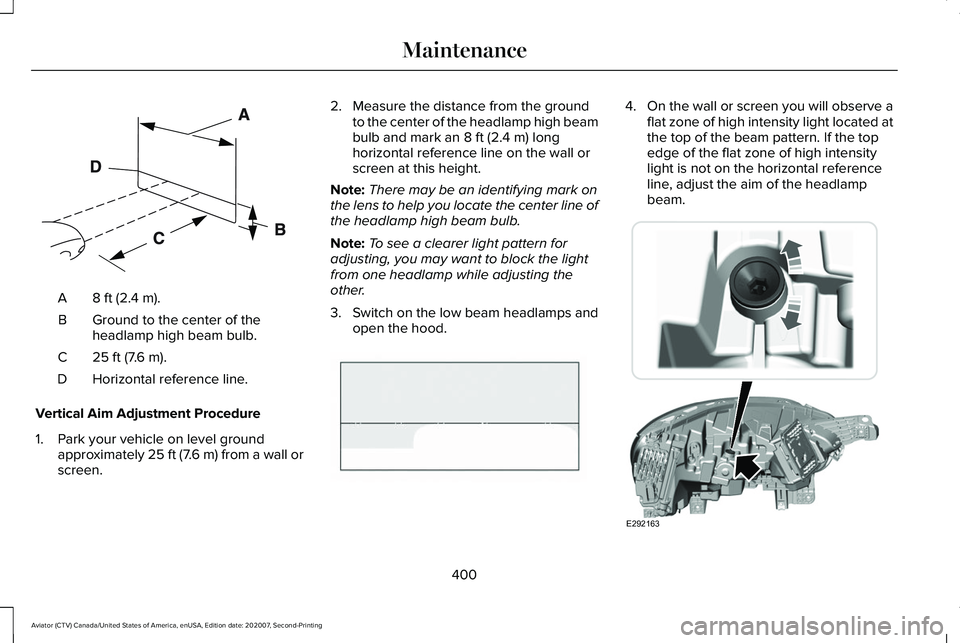
8 ft (2.4 m).
A
Ground to the center of the
headlamp high beam bulb.
B
25 ft (7.6 m).
C
Horizontal reference line.
D
Vertical Aim Adjustment Procedure
1. Park your vehicle on level ground approximately 25 ft (7.6 m) from a wall or
screen. 2. Measure the distance from the ground
to the center of the headlamp high beam
bulb and mark an
8 ft (2.4 m) long
horizontal reference line on the wall or
screen at this height.
Note: There may be an identifying mark on
the lens to help you locate the center line of
the headlamp high beam bulb.
Note: To see a clearer light pattern for
adjusting, you may want to block the light
from one headlamp while adjusting the
other.
3. Switch on the low beam headlamps and
open the hood. 4.
On the wall or screen you will observe a
flat zone of high intensity light located at
the top of the beam pattern. If the top
edge of the flat zone of high intensity
light is not on the horizontal reference
line, adjust the aim of the headlamp
beam. 400
Aviator (CTV) Canada/United States of America, enUSA, Edition date: 202007, Second-Printing MaintenanceE142592 E142465 E292163
Page 415 of 667
Plugging in Your HYBRID
We recommend the following options for
your plug-in vehicle (PHEV) :
•
Leave your vehicle plugged in. The 12
volt battery maintains power if left
plugged in. However, this periodically
uses electricity from the household
outlet.
• Connect a battery charger to your 12 volt
battery and leave it on a continuous, slow
charge.
• Disconnect the 12 volt battery. If your 12
volt battery is located in the luggage
compartment, do not fully shut the
luggage compartment after
disconnecting the 12 volt battery. Only
leave the luggage compartment open if
your vehicle is stored in a locked
location.
Brakes
• Make sure the brakes and parking brake
release fully. Tires
•
Maintain recommended air pressure.
Miscellaneous
• Make sure all linkages, cables, levers and
pins under your vehicle are covered with
grease to prevent rust.
• Move vehicles at least 25 ft (7.5 m) every
15 days to lubricate working parts and
prevent corrosion.
Removing Vehicle From Storage
When your vehicle is ready to come out of
storage, do the following:
• Wash your vehicle to remove any dirt or
grease film build-up on window surfaces.
• Check windshield wipers for any
deterioration.
• Check under the hood for any foreign
material that may have collected during
storage such as mice or squirrel nests.
• Check the exhaust for any foreign
material that may have collected during
storage. •
Check tire pressures and set tire inflation
per the Tire Label.
• Check brake pedal operation. Drive your
vehicle 15 ft (4.5 m) back and forth to
remove rust build-up.
• Check fluid levels (including coolant, oil
and gas) to make sure there are no leaks,
and fluids are at recommended levels.
• If you remove the battery, clean the
battery cable ends and check for
damage.
Contact an authorized dealer if you have any
concerns or issues.
BODY STYLING KITS
(IF EQUIPPED)
The distance between the underside of your
vehicle and the ground is less than that of
other models. Drive with extreme care to
avoid damage to your vehicle.
412
Aviator (CTV) Canada/United States of America, enUSA, Edition date: 202007, Second-Printing Vehicle Care
Page 652 of 667
Manual Park Release ........................................248
SelectShift Automatic ™ Transmission............247
Stay in Neutral Mode.........................................246
Understanding Your Transmission Selector Positions...........................................................245
Automatic Transmission Fluid Check...........................................................395
Auto-Start-Stop - Excluding: Plug-In Hybrid Electric Vehicle (PHEV).............................218
Disabling Auto-Start-Stop..................................219
Enabling Auto-Start-Stop...................................218
Autowipers......................................................106 Autowipers Settings............................................107
Low Temperature Wipe Inhibit.........................
107
Auxiliary Power Points
................................203
110 Volt AC Power Point...................................203
12 Volt DC Power Point.....................................203
USB Port and Power Point Locations............
203
AWD See: All-Wheel Drive.........................................250
B
Battery See: Changing the 12V Battery.......................397
Blind Spot Information System..................312 Blind Spot Information System with Trailer
Tow.....................................................................313 Switching the System On and Off...................316
System Errors.......................................................315
Using the Blind Spot Information
System...............................................................312
BLIS See: Blind Spot Information System...............
312
Body Styling Kits............................................412
Bonnet Lock See: Opening and Closing the Hood............384
Booster Seats..................................................38 Types of Booster Seats.......................................38
Brake Fluid Check
........................................395
Brake Fluid Service Interval.............................396
Brakes
.............................................................257
General Information...........................................257
Breaking-In.....................................................348
Bulb Specification Chart.............................473
C
Canceling the Set Speed...........................290
Capacities and Specifications
...................444
Capacities and Specifications - Excluding: Plug-In Hybrid Electric Vehicle
(PHEV)..........................................................450
Air Conditioning System....................................
451
Alternative Engine Oil for Extremely Cold Climates...........................................................455 Automatic Transmission...................................452
Engine Coolant...................................................453
Engine Oil.............................................................454
Front Axle.............................................................459
Fuel Tank..............................................................456
Grease...................................................................456
Hydraulic Brake System....................................457
Locks.....................................................................458
Rear Axle..............................................................460
Transfer Case......................................................458
Washer Reservoir................................................461
Capacities and Specifications - Plug-In Hybrid Electric Vehicle (PHEV)...............462
Air Conditioning System...................................462
Alternative Engine Oil for Extremely Cold Climates...........................................................466
Automatic Transmission....................................463
Engine Coolant...................................................464
Engine Oil.............................................................465
Front Axle.............................................................470
Fuel Tank..............................................................468
Grease...................................................................468
Hydraulic Brake System...................................468
Locks.....................................................................469
Rear Axle................................................................471
Transfer Case.......................................................470
Washer Reservoir................................................472
649
Aviator (CTV) Canada/United States of America, enUSA, Edition date: 202007, Second-Printing Index
Page 657 of 667
Gauges.............................................................126
Battery Gauge......................................................127
Engine Coolant Temperature Gauge.............128
Fuel Gauge............................................................127
Information On Demand....................................127
Low Fuel Reminder.............................................127
Status Bar..............................................................127
Vehicle Driving Range........................................128
Gearbox See: Transmission..............................................245
General Information on Radio Frequencies..................................................66
Intelligent Access.................................................66
General Maintenance Information...........564 Multi-Point Inspection........................................567
Owner Checks and Services...........................565
Protecting Your Investment.............................564
Why Maintain Your Vehicle?............................564
Why Maintain Your Vehicle at Your Dealership?......................................................564
Getting Assistance Outside the U.S. and Canada.........................................................363
Getting the Services You Need................359 Away From Home..............................................359
Global Opening and Closing ......................
120
Closing the Windows.........................................120
Opening the Windows.......................................120 H
Hazard Flashers
............................................352
Headlamp Adjusting See: Adjusting the Headlamps.......................
399
Headlamp Exit Delay......................................111
Headrest See: Head Restraints..........................................179
Head Restraints
..............................................179
Adjusting the Head Restraints.........................179
Head Up Display...........................................164 Configuring The Head Up Display..................164
Head Up Display Overview..............................165
Maintaining Your Head Up Display.................167
Heated Exterior Mirrors................................173
Heated Rear Window...................................173
Heated Seats..................................................193 Automatic Climate Controlled Seats..............193
Front Seats............................................................193
Second Row Heated Seats...............................
193
Heated Steering Wheel...............................104
Heating See: Climate Control..........................................168
High Voltage Battery
...................................238
General Information...........................................238
Hill Descent Control....................................270
Hill Descent Control Indicator
....................271 Hill Start Assist
..............................................260
Switching the System On and Off.................260
Using Hill Start Assist........................................260
Hints on Controlling the Interior Climate
............................................................171
Defogging the Side Windows in Cold
Weather.............................................................172
General Hints.........................................................171
Quickly Cooling the Interior..............................172
Quickly Heating the Interior..............................172
Recommended Settings for Cooling..............172
Recommended Settings for Heating..............
172
Hints on Driving With Anti-Lock Brakes..........................................................258
Hood Lock See: Opening and Closing the Hood............384
Horn..................................................................104
How Does Adaptive Cruise Control With Stop and Go Work......................................291
How Does Auto Air Refresh Work.............175
How Does the Rear Occupant Alert System Work...............................................................195
Hybrid Vehicle Frequently Asked Questions....................................................224
Hybrid Vehicle Operation
..........................220
Battery....................................................................221
Braking...................................................................221
Driving...................................................................220
654
Aviator (CTV) Canada/United States of America, enUSA, Edition date: 202007, Second-Printing Index
Page 660 of 667
Setting a Destination.........................................525
SiriusXM Traffic and Travel Link.....................530
Zoom......................................................................527
Network Connectivity..................................475
Connecting the Vehicle to a Mobile
Network............................................................475
Network Connectivity – Troubleshooting.........................................476
Normal Scheduled Maintenance
.............568
Intelligent Oil-Life Monitor™.............................568
Normal Maintenance Intervals........................570
O
Oil Change Indicator Reset........................388
Oil Check See: Engine Oil Check......................................387
Opening and Closing the Hood...............384 Closing the Hood...............................................385
Opening the Hood.............................................384
Opening the Doors........................................88 Front Doors............................................................88
Rear Doors..............................................................88
Ordering Additional Owner's Literature.....................................................365
Obtaining a French Owner’ s Manual............365
Overhead Console.......................................207 Overriding Automatic High Beam
Control
............................................................118
Overriding Reverse Braking Assist..........264
Overriding the Set Speed..........................298
P
Parking Aids
...................................................272
Principle of Operation.......................................272
Passive Anti-Theft System............................97 SecuriLock®............................................................97
PATS See: Passive Anti-Theft System........................97
Pedestrian Alert System...............................63
Pedestrian Protection....................................63
Perchlorate........................................................12
Personalized Settings..................................138 Information On Demand....................................138
Personal Safety System ™
..............................52
How Does the Personal Safety System
Work?...................................................................52
Phone as a Key Limitations
..........................72
Phone as a Key................................................72 Phone as a Key – Troubleshooting..................74
Phone as a Key – Troubleshooting
............74
Phone as a Key – Frequently Asked
Questions...........................................................74 Phone
...............................................................521
Android Auto.......................................................523
Apple CarPlay.....................................................523
Pairing Your Cell Phone for the First
Time...................................................................521
Text Messaging...................................................522
Using Your Cell Phone......................................522
Plug-In Hybrid Vehicle Operation............222 Low Engine Use..................................................223
Post-Crash Alert System.............................357
Power Door Locks See: Locking and Unlocking...............................81
Power Liftgate.................................................92 Hands-Free Feature.............................................95
Obstacle Detection..............................................94
Opening and Closing the Liftgate....................92
Setting the Liftgate Open Height.....................94
Stopping the Liftgate Movement......................94
Switching the Power Liftgate On or Off..........95
Power Seats.....................................................181 10-Way and 12-Way Seat Controls....................181
30-Way Seat Controls........................................183
Adjusting the Multi-Contour Front Seats With
Active Motion ..................................................186
Power Steering Fluid Check
......................396
Power Windows..............................................119
Accessory Delay..................................................120
Bounce-Back.........................................................119
657
Aviator (CTV) Canada/United States of America, enUSA, Edition date: 202007, Second-Printing Index
Page 665 of 667
Tires
See: Wheels and Tires.......................................413
Towing a Trailer.............................................340
Load Placement..................................................340
Towing the Vehicle on Four Wheels........345 Emergency Towing............................................345
Recreational Towing - All-Wheel and
Four-Wheel Drive Vehicles..........................
346
Recreational Towing - Front-Wheel Drive Vehicles............................................................345
Recreational Towing - Rear-Wheel Drive Vehicles............................................................345
Towing.............................................................340
Traction Control
............................................267
Principle of Operation.......................................267
Trailer Sway Control
......................................341
Transmission..................................................245
Transporting the Vehicle.............................357
U
Under Hood Overview
................................386
Unique Driving Characteristics..................218
Universal Garage Door Opener................197 HomeLink Wireless Control System...............197
USB Port
.........................................................490
Locating the USB Ports......................................491 Using All-Wheel Drive.................................250
Driving in Special Conditions With All-Wheel
Drive (AWD).....................................................252
How Your Vehicle Differs from Other Vehicles.............................................................251
Operating ALL-Wheel drive (AWD) Vehicles with Mismatched Tires..................................251
Operating All-Wheel Drive (AWD) Vehicles With Spare Tires............................................250
Using MyKey With Remote Start Systems..........................................................79
Using Snow Chains
......................................428
Using Stability Control................................269
Using Summer Tires....................................427
Using the Backup Start Passcode..............73 System Lockout.....................................................74
Using the Valet Mode....................................73
Using Traction Control................................267 Switching the System Off.................................267
System Indicator Lights and Messages........267
Using the Information Display Controls........267
Using Voice Recognition............................494 Apps.......................................................................503
Automatic Blower Motor Speed
Reduction.........................................................505
Climate..................................................................498
Entertainment......................................................496
General.................................................................495 Navigation.............................................................501
Phone....................................................................499
SiriusXM Traffic and Travel Link.....................504
Voice Settings.....................................................504
Utilizing the Mediation/Arbitration Program (Canada Only).............................................362
V
Vehicle Care
..................................................404
General Information...........................................404
Vehicle Identification Number
..................450
Vehicle Identification...................................474
Vehicle Storage.............................................410 Body........................................................................\
.411
Brakes....................................................................412
Cooling system.....................................................411
Disconnecting Your 12 Volt Battery.................411
Engine.....................................................................411
Fuel system............................................................411
General..................................................................410
Miscellaneous......................................................412
Plugging in Your HYBRID..................................412
Removing Vehicle From Storage
.....................412
Tires........................................................................\
412
Vehicle Wi-Fi Hotspot..................................479
Ventilated Seats
.............................................194
Automatic Climate Controlled Seats..............194
662
Aviator (CTV) Canada/United States of America, enUSA, Edition date: 202007, Second-Printing Index