wheel LINCOLN AVIATOR 2021 Owner's Manual
[x] Cancel search | Manufacturer: LINCOLN, Model Year: 2021, Model line: AVIATOR, Model: LINCOLN AVIATOR 2021Pages: 667, PDF Size: 7.01 MB
Page 177 of 667
Note:
Do not clean the mirror housing or
glass with harsh abrasives, fuel or other
petroleum-based cleaning products. The
vehicle warranty may not cover damage
caused to the mirror housing or glass.
REMOTE START
The climate control system adjusts the
interior temperature during remote start.
You can switch this feature on or off and
adjust the settings using the touchscreen.
See Settings (page 540).
You cannot adjust the climate control setting
during remote start operation. Switch the
ignition on to make adjustments.
Based on your remote start settings, the
following vehicle-dependent features may
or may not remain on after remote starting
your vehicle:
• Climate controlled seats.
• Heated steering wheel.
• Heated mirrors. •
Heated rear window.
• Windshield wiper de-icer.
Note: For dual zone climate controlled seats,
the passenger seat setting defaults to match
the driver seat during remote start.
Automatic Settings
If
Auto is on, the system sets the interior
temperature to 72°F (22°C) and heats or
cools the vehicle interior as required to
achieve comfort.
Note: In cold weather, the heated rear
window and heated mirrors turn on.
Last Settings
If
Last Settings is on, the system uses the
settings last selected before you turned off
the vehicle.
Heated and Cooled Features
In
Auto mode, certain heated features may
switch on during cold weather, and cooled
features during hot weather.
174
Aviator (CTV) Canada/United States of America, enUSA, Edition date: 202007, Second-Printing Climate Control
Page 181 of 667
SITTING IN THE CORRECT
POSITION
WARNING: Sitting improperly, out of
position or with the seatback reclined too
far can take weight off the seat cushion
and affect the decision of the passenger
sensing system, resulting in serious injury
or death in the event of a crash. Always sit
upright against your seat back, with your
feet on the floor. WARNING: Do not recline the seat
backrest too far as this can cause the
occupant to slide under the seatbelt,
resulting in personal injury in the event of
a crash. WARNING:
Do not place objects
higher than the top of the seat backrest.
Failure to follow this instruction could result
in personal injury or death in the event of
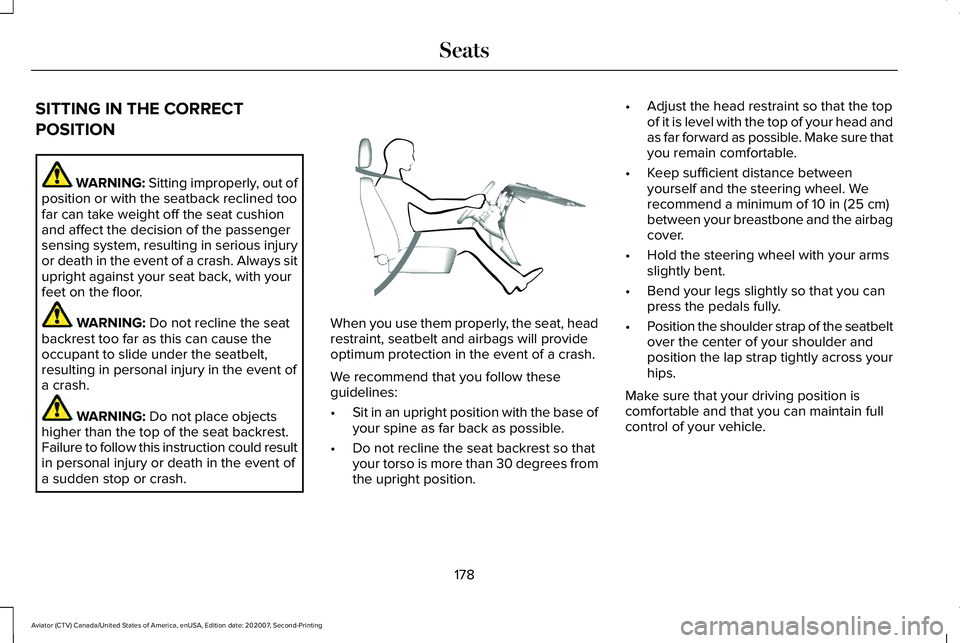
a sudden stop or crash. When you use them properly, the seat, head
restraint, seatbelt and airbags will provide
optimum protection in the event of a crash.
We recommend that you follow these
guidelines:
•
Sit in an upright position with the base of
your spine as far back as possible.
• Do not recline the seat backrest so that
your torso is more than 30 degrees from
the upright position. •
Adjust the head restraint so that the top
of it is level with the top of your head and
as far forward as possible. Make sure that
you remain comfortable.
• Keep sufficient distance between
yourself and the steering wheel. We
recommend a minimum of
10 in (25 cm)
between your breastbone and the airbag
cover.
• Hold the steering wheel with your arms
slightly bent.
• Bend your legs slightly so that you can
press the pedals fully.
• Position the shoulder strap of the seatbelt
over the center of your shoulder and
position the lap strap tightly across your
hips.
Make sure that your driving position is
comfortable and that you can maintain full
control of your vehicle.
178
Aviator (CTV) Canada/United States of America, enUSA, Edition date: 202007, Second-Printing SeatsE68595
Page 221 of 667
AUTO-START-STOP - EXCLUDING:
PLUG-IN HYBRID ELECTRIC
VEHICLE (PHEV)
The system helps reduce fuel consumption
by automatically stopping and restarting the
engine when your vehicle has stopped. The
engine restarts automatically when you
release the brake pedal.
In some situations, your vehicle may restart
automatically, for example:
•
To maintain interior comfort.
• To recharge the battery.
Note: Power assist steering turns off when
the engine is off.
Note: If your vehicle is flex fuel capable,
Auto-Start-Stop will be inhibited for a short
time after a refuel event while the system is
verifying the fuel type being used. WARNING: Apply the parking brake,
shift into park (P), switch the ignition off
and remove the key before you leave your
vehicle. Failure to follow this instruction
could result in personal injury or death. WARNING: Apply the parking brake,
shift into park (P), switch the ignition off
and remove the key before you open the
hood or have any service or repair work
completed. If you do not switch the ignition
off, the engine could restart at any time.
Failure to follow this instruction could result
in personal injury or death. WARNING: The system may require
the engine to automatically restart when
the auto-start-stop indicator illuminates
green or flashes amber. Failure to follow
this instruction could result in personal
injury.
The Auto-Start-Stop system status is
available at a glance within the information
display.
See Information Displays (page
134). Enabling Auto-Start-Stop
The system automatically enables every time
you start your vehicle if:
•
Your vehicle exceeds an initial speed of
3 mph (5 km/h)
after you have initially
started your vehicle.
• You have stopped your vehicle.
• Your foot is on the brake pedal.
• The driver door is closed.
• The interior compartment has cooled or
warmed to an acceptable level.
• The front windshield defroster is off.
• You have not turned the steering wheel
rapidly or you do not have it at a sharp
angle.
• The vehicle is not on a steep road grade.
• The battery is within optimal operating
conditions (battery state of charge and
temperature in range).
• The engine coolant is near operating
temperature.
• Elevation is below about
12,000 ft
(3,650 m).
• Ambient temperature is moderate.
218
Aviator (CTV) Canada/United States of America, enUSA, Edition date: 202007, Second-Printing Unique Driving Characteristics
Page 230 of 667
FUEL QUALITY
Choosing the Right Fuel
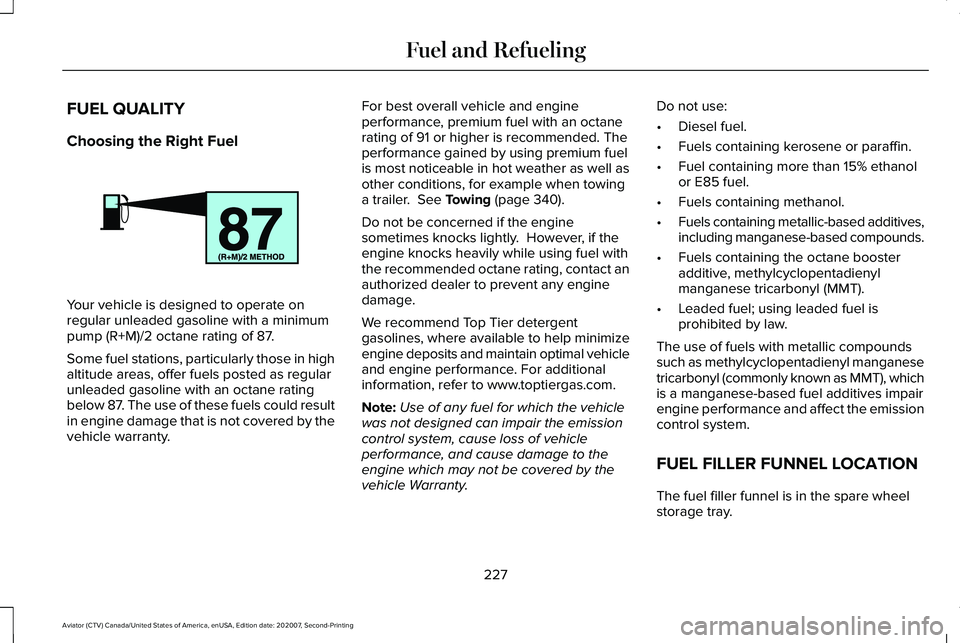
Your vehicle is designed to operate on
regular unleaded gasoline with a minimum
pump (R+M)/2 octane rating of 87.
Some fuel stations, particularly those in high
altitude areas, offer fuels posted as regular
unleaded gasoline with an octane rating
below 87. The use of these fuels could result
in engine damage that is not covered by the
vehicle warranty. For best overall vehicle and engine
performance, premium fuel with an octane
rating of 91 or higher is recommended. The
performance gained by using premium fuel
is most noticeable in hot weather as well as
other conditions, for example when towing
a trailer. See Towing (page 340).
Do not be concerned if the engine
sometimes knocks lightly. However, if the
engine knocks heavily while using fuel with
the recommended octane rating, contact an
authorized dealer to prevent any engine
damage.
We recommend Top Tier detergent
gasolines, where available to help minimize
engine deposits and maintain optimal vehicle
and engine performance. For additional
information, refer to www.toptiergas.com.
Note: Use of any fuel for which the vehicle
was not designed can impair the emission
control system, cause loss of vehicle
performance, and cause damage to the
engine which may not be covered by the
vehicle Warranty. Do not use:
•
Diesel fuel.
• Fuels containing kerosene or paraffin.
• Fuel containing more than 15% ethanol
or E85 fuel.
• Fuels containing methanol.
• Fuels containing metallic-based additives,
including manganese-based compounds.
• Fuels containing the octane booster
additive, methylcyclopentadienyl
manganese tricarbonyl (MMT).
• Leaded fuel; using leaded fuel is
prohibited by law.
The use of fuels with metallic compounds
such as methylcyclopentadienyl manganese
tricarbonyl (commonly known as MMT), which
is a manganese-based fuel additives impair
engine performance and affect the emission
control system.
FUEL FILLER FUNNEL LOCATION
The fuel filler funnel is in the spare wheel
storage tray.
227
Aviator (CTV) Canada/United States of America, enUSA, Edition date: 202007, Second-Printing Fuel and RefuelingE161513
Page 235 of 667
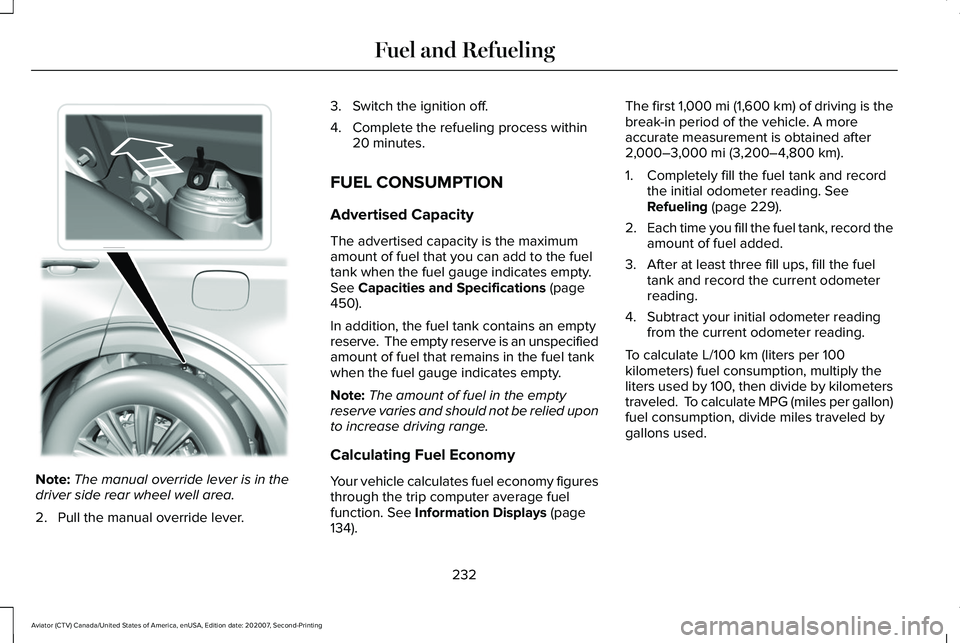
Note:
The manual override lever is in the
driver side rear wheel well area.
2. Pull the manual override lever. 3. Switch the ignition off.
4. Complete the refueling process within
20 minutes.
FUEL CONSUMPTION
Advertised Capacity
The advertised capacity is the maximum
amount of fuel that you can add to the fuel
tank when the fuel gauge indicates empty.
See Capacities and Specifications (page
450).
In addition, the fuel tank contains an empty
reserve. The empty reserve is an unspecified
amount of fuel that remains in the fuel tank
when the fuel gauge indicates empty.
Note: The amount of fuel in the empty
reserve varies and should not be relied upon
to increase driving range.
Calculating Fuel Economy
Your vehicle calculates fuel economy figures
through the trip computer average fuel
function.
See Information Displays (page
134). The first 1,000 mi (1,600 km) of driving is the
break-in period of the vehicle. A more
accurate measurement is obtained after
2,000–3,000 mi (3,200–4,800 km)
.
1. Completely fill the fuel tank and record the initial odometer reading.
See
Refueling (page 229).
2. Each time you fill the fuel tank, record the
amount of fuel added.
3. After at least three fill ups, fill the fuel tank and record the current odometer
reading.
4. Subtract your initial odometer reading from the current odometer reading.
To calculate L/100 km (liters per 100
kilometers) fuel consumption, multiply the
liters used by 100, then divide by kilometers
traveled. To calculate MPG (miles per gallon)
fuel consumption, divide miles traveled by
gallons used.
232
Aviator (CTV) Canada/United States of America, enUSA, Edition date: 202007, Second-Printing Fuel and RefuelingE297793
Page 243 of 667
•
Do not use this product if the flexible
power cord or electric vehicle cable has
broken insulation, or any other signs of
damage.
• Do not use this product if the enclosure
or the electric vehicle connector is
broken, cracked, open, or shows any
other indication of damage.
Note: Ground this product. If it malfunctions
or breaks down, grounding provides a path
of least resistance for electric current to
reduce the risk of electric shock. This product
comes with a cord having an equipment
grounding conductor and a grounding plug.
Make sure you plug it into an appropriate
outlet that is properly installed and grounded
in accordance with all local codes and
ordinances.
Charging Equipment
Your vehicle has a dual-voltage charging
cord in the luggage compartment.
Note: You need to plug the dual-voltage
charging cord into a dedicated outlet. Note:
Firmly fit the AC wall plug into the AC
outlet. If the connection feels loose, worn or
the AC outlet is damaged, please have a
qualified electrician replace the AC outlet.
Using a dual-voltage charging cord with a
worn outlet could cause burns, property
damage and increase the risk of electric
shock.
Note: Do not use the dual-voltage charging
cord with an extension cord, two-prong
adapter, surge protector, timer or other
adapter.
Note: If charging for your plug-in vehicle fails,
please call the Customer Relationship
Center, or click on Call for support or Live
Chat at our website.
CAUTION: TO REDUCE THE RISK OF FIRE-
Use a three-prong AC outlet that is properly
grounded, 15-20 amps or greater, and in
good condition. Use a dedicated line. You
cannot have other appliances connected to
the same circuit. If you do not use a
dedicated circuit, the circuit breaker could
trip or open. If you do not have a dedicated
circuit, contact a licensed professional
electrician for proper installation. Note:
Make sure the electrical source meets
the requirements for the high-voltage
batteries to charge.
Make sure that the dual-voltage charging
cord is completely unwrapped before
charging. Always plug the cord into the AC
outlet before connecting the charged coupler
into the charge port on your vehicle.
Note: If the power indicator light is off after
plugging in the dual-voltage charging cord
and you cannot determine a charge status,
use a different outlet.
Note: Store the dual-voltage charging cord
in a clean dry place between the
temperature of
-39.9–157.9°F (-40–70°C)
Note: For further information on the
dual-voltage charging cord , please refer to
the user manual provided with the
dual-voltage charging cord.
Charge Port
The charge port is between the front
left-hand side door and the front left-hand
wheel well. To open, press the center right
edge of the charge port door, and then
release.
240
Aviator (CTV) Canada/United States of America, enUSA, Edition date: 202007, Second-Printing High Voltage Battery
Page 248 of 667
AUTOMATIC TRANSMISSION
WARNING: Always fully apply the
parking brake and make sure you shift into
park (P). Failure to follow this instruction
could result in personal injury or death. WARNING:
Do not apply the brake
pedal and accelerator pedal
simultaneously. Applying both pedals
simultaneously for more than a few
seconds will limit engine performance,
which may result in difficulty maintaining
speed in traffic and could lead to serious
injury.
Note: You cannot shift out of park (P) unless
the intelligent access key is inside your
vehicle.
Understanding Your Transmission
Selector Positions
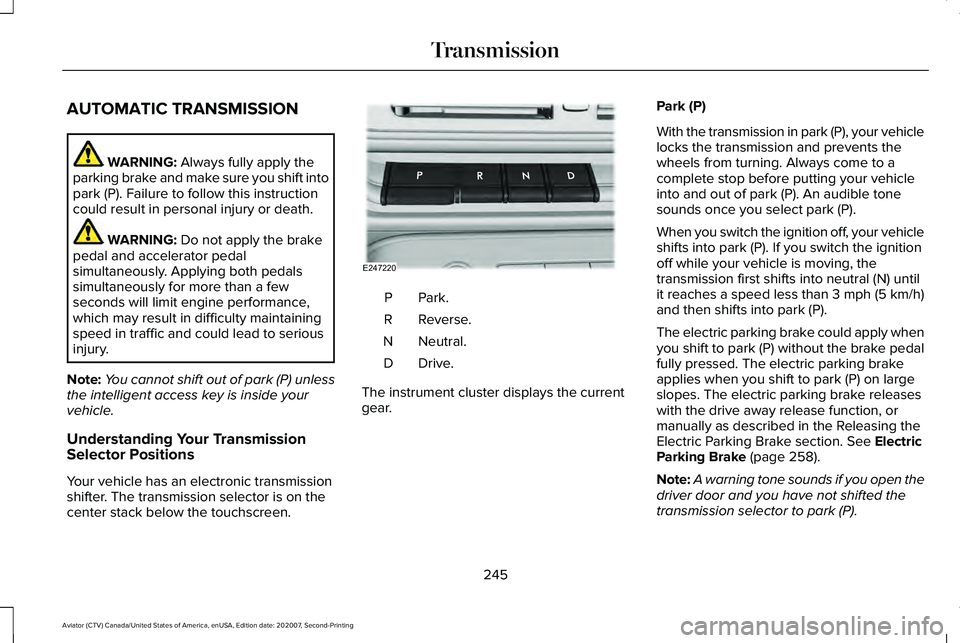
Your vehicle has an electronic transmission
shifter. The transmission selector is on the
center stack below the touchscreen. Park.P
Reverse.
R
Neutral.
N
Drive.D
The instrument cluster displays the current
gear. Park (P)
With the transmission in park (P), your vehicle
locks the transmission and prevents the
wheels from turning. Always come to a
complete stop before putting your vehicle
into and out of park (P). An audible tone
sounds once you select park (P).
When you switch the ignition off, your vehicle
shifts into park (P). If you switch the ignition
off while your vehicle is moving, the
transmission first shifts into neutral (N) until
it reaches a speed less than 3 mph (5 km/h)
and then shifts into park (P).
The electric parking brake could apply when
you shift to park (P) without the brake pedal
fully pressed. The electric parking brake
applies when you shift to park (P) on large
slopes. The electric parking brake releases
with the drive away release function, or
manually as described in the Releasing the
Electric Parking Brake section.
See Electric
Parking Brake (page 258).
Note: A warning tone sounds if you open the
driver door and you have not shifted the
transmission selector to park (P).
245
Aviator (CTV) Canada/United States of America, enUSA, Edition date: 202007, Second-Printing TransmissionE247220
Page 250 of 667
1. Bring your vehicle to a complete stop.
2. Shift into neutral (N).
3. Press neutral (N) again within five
seconds after shifting to neutral (N).
Note: The Stay in Neutral mode confirmation
message appears in the information display
when your vehicle has entered Stay in
Neutral mode and the neutral (N) button on
the transmission selector slowly blinks.
To exit Stay in Neutral mode, press park (P)
at any time, or apply the brakes when the
engine is running, to shift into a different
driving position.
Note: You can select the (P) position with or
without brakes applied when the engine is
OFF.
SelectShift Automatic ™ Transmission
Your vehicle has a SelectShift Automatic
transmission. The SelectShift Automatic
transmission gives you the ability to change
gears up or down, without a clutch, as
preferred. To prevent the engine from running at too
low an RPM, which could cause it to stall,
SelectShift still makes some downshifts if it
determines that you have not downshifted
in time. Although SelectShift makes some
downshifts for you, it still allows you to
downshift at any time if the SelectShift
determines that damage to the engine from
over-revving cannot occur.
Note:
Engine damage could occur if you
maintain excessive engine revving without
shifting.
Note: Vehicles have either steering wheel
controls or gearshift lever controls.
SelectShift could upshift if the engine is
approaching the RPM limit. It can also be
upshifted manually by pressing the (+) button.
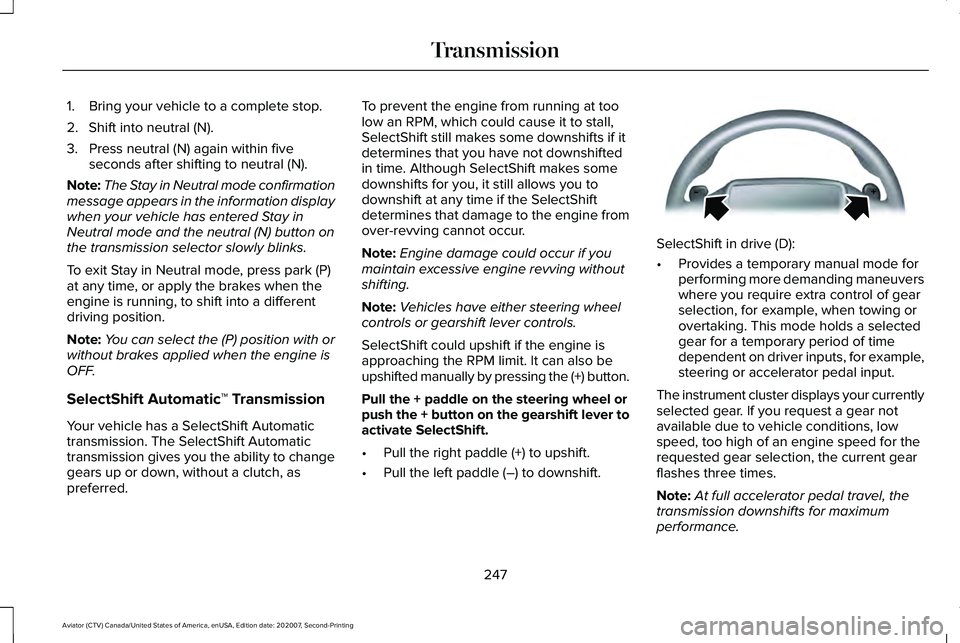
Pull the + paddle on the steering wheel or
push the + button on the gearshift lever to
activate SelectShift.
• Pull the right paddle (+) to upshift.
• Pull the left paddle (–) to downshift. SelectShift in drive (D):
•
Provides a temporary manual mode for
performing more demanding maneuvers
where you require extra control of gear
selection, for example, when towing or
overtaking. This mode holds a selected
gear for a temporary period of time
dependent on driver inputs, for example,
steering or accelerator pedal input.
The instrument cluster displays your currently
selected gear. If you request a gear not
available due to vehicle conditions, low
speed, too high of an engine speed for the
requested gear selection, the current gear
flashes three times.
Note: At full accelerator pedal travel, the
transmission downshifts for maximum
performance.
247
Aviator (CTV) Canada/United States of America, enUSA, Edition date: 202007, Second-Printing TransmissionE144821
Page 251 of 667
Manual Park Release
WARNING: When doing this
procedure, you need to take the
transmission out of park (P) which means
your vehicle can roll freely. To avoid
unwanted vehicle movement, always fully
apply the parking brake prior to doing this
procedure. Use wheels chocks if
appropriate. WARNING:
If the parking brake is
fully released, but the brake warning lamp
remains illuminated, the brakes may not
be working properly. Have your vehicle
checked as soon as possible. WARNING: Do not drive your vehicle
until you verify that the stoplamps are
working.
Use the manual park release to move your
transmission from the park (P) position in the
event of an electrical malfunction or
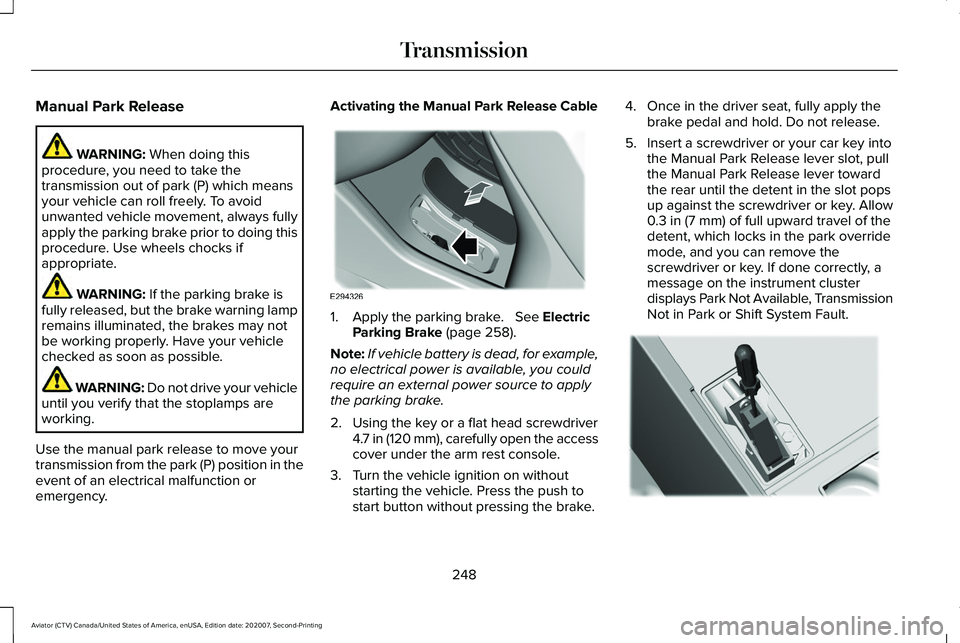
emergency. Activating the Manual Park Release Cable
1. Apply the parking brake.
See Electric
Parking Brake (page 258).
Note: If vehicle battery is dead, for example,
no electrical power is available, you could
require an external power source to apply
the parking brake.
2. Using the key or a flat head screwdriver 4.7 in (120 mm), carefully open the access
cover under the arm rest console.
3. Turn the vehicle ignition on without starting the vehicle. Press the push to
start button without pressing the brake. 4. Once in the driver seat, fully apply the
brake pedal and hold. Do not release.
5. Insert a screwdriver or your car key into the Manual Park Release lever slot, pull
the Manual Park Release lever toward
the rear until the detent in the slot pops
up against the screwdriver or key. Allow
0.3 in (7 mm)
of full upward travel of the
detent, which locks in the park override
mode, and you can remove the
screwdriver or key. If done correctly, a
message on the instrument cluster
displays Park Not Available, Transmission
Not in Park or Shift System Fault. 248
Aviator (CTV) Canada/United States of America, enUSA, Edition date: 202007, Second-Printing TransmissionE294326 E297270
Page 253 of 667
USING ALL-WHEEL DRIVE
WARNING: Vehicles with a higher
center of gravity (utility and four-wheel
drive vehicles) handle differently than
vehicles with a lower center of gravity
(passenger cars). Avoid sharp turns,
excessive speed and abrupt steering in
these vehicles. Failure to drive cautiously
increases the risk of losing control of your
vehicle, vehicle rollover, personal injury
and death.
The intelligent AWD system continuously
monitors vehicle conditions and adjusts the
power distribution between the front and
rear wheels. It combines transparent
all-surface operation with highly capable
all-wheel drive.
The AWD system is always active and
requires no driver input. It is capable of
handling all road conditions including street
and highway driving as well as off-road and
winter driving. You can optimize more AWD
control by selecting different drive modes.
See
Selecting a Drive Mode (page 329). Note:
A warning message displays in the
information display when an AWD system
fault is present. See Information Messages
(page 140). A AWD system fault causes the
AWD system to default to rear-wheel drive
only mode. When this warning message is
displayed, have your vehicle serviced at an
authorized dealer.
Note: A warning message displays in the
information display if the AWD system
overheats.
See Information Messages
(page 140). This condition could occur if the
vehicle is operated in extreme conditions
with excessive wheel slip, such as deep
sand. To resume normal AWD function as
soon as possible, stop the vehicle in a safe
location and stop the engine for at least 10
minutes. After the engine is restarted and
the AWD system is adequately cooled, the
warning message turns off and normal AWD
function returns. Operating All-Wheel Drive (AWD)
Vehicles With Spare Tires
Do not use a different size spare tire other
than the tire provided. If the mini-spare tire
is installed, the AWD system will disable and
enter rear-wheel drive only mode to protect
driveline components. Some limited AWD
traction could be provided if the mini-spare
is installed on one of the front wheels. If you
are in driving conditions where limited AWD
traction is needed while the mini-spare is
installed, it is recommended the mini-spare
be installed on the front axle.
If the mini-spare is installed, this condition is
indicated by a warning in the information
display.
The slip response system could activate if
the mini spare is installed on the front
wheels. If the mini spare was installed on the
rear wheels the slip response system will
fully disable. In situations where there is a
wintery mix or an off road situation, and you
need to use a mini spare, you must install
the mini spare in the front tire position and
move a full size tire to the rear tire position
for the slip response system to function.
250
Aviator (CTV) Canada/United States of America, enUSA, Edition date: 202007, Second-Printing All-Wheel Drive
(If Equipped)