lock LINCOLN AVIATOR 2021 Service Manual
[x] Cancel search | Manufacturer: LINCOLN, Model Year: 2021, Model line: AVIATOR, Model: LINCOLN AVIATOR 2021Pages: 667, PDF Size: 7.01 MB
Page 124 of 667
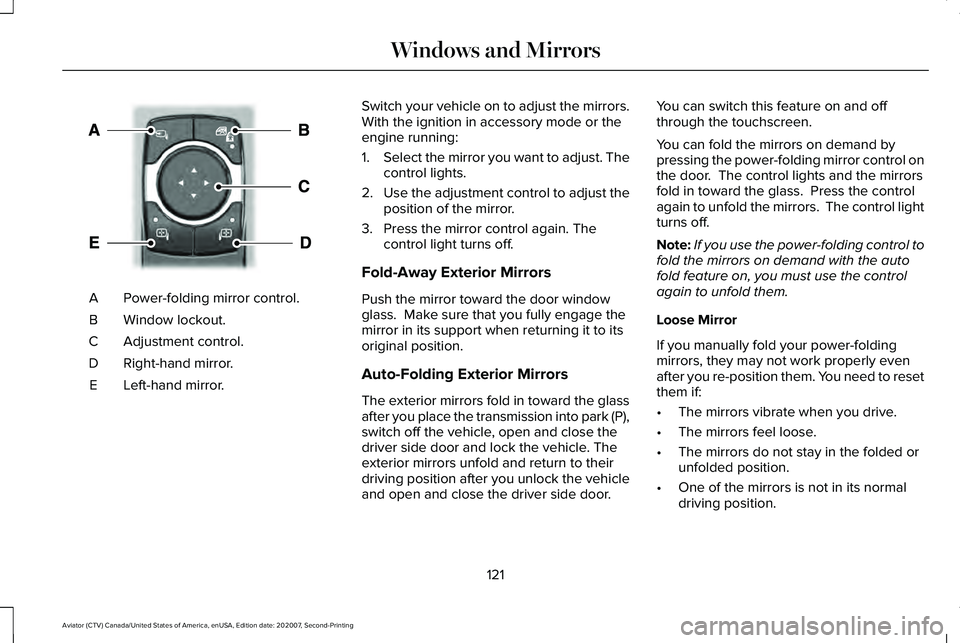
Power-folding mirror control.
A
Window lockout.
B
Adjustment control.
C
Right-hand mirror.
D
Left-hand mirror.
E Switch your vehicle on to adjust the mirrors.
With the ignition in accessory mode or the
engine running:
1.
Select the mirror you want to adjust. The
control lights.
2. Use the adjustment control to adjust the
position of the mirror.
3. Press the mirror control again. The control light turns off.
Fold-Away Exterior Mirrors
Push the mirror toward the door window
glass. Make sure that you fully engage the
mirror in its support when returning it to its
original position.
Auto-Folding Exterior Mirrors
The exterior mirrors fold in toward the glass
after you place the transmission into park (P),
switch off the vehicle, open and close the
driver side door and lock the vehicle. The
exterior mirrors unfold and return to their
driving position after you unlock the vehicle
and open and close the driver side door. You can switch this feature on and off
through the touchscreen.
You can fold the mirrors on demand by
pressing the power-folding mirror control on
the door. The control lights and the mirrors
fold in toward the glass. Press the control
again to unfold the mirrors. The control light
turns off.
Note:
If you use the power-folding control to
fold the mirrors on demand with the auto
fold feature on, you must use the control
again to unfold them.
Loose Mirror
If you manually fold your power-folding
mirrors, they may not work properly even
after you re-position them. You need to reset
them if:
• The mirrors vibrate when you drive.
• The mirrors feel loose.
• The mirrors do not stay in the folded or
unfolded position.
• One of the mirrors is not in its normal
driving position.
121
Aviator (CTV) Canada/United States of America, enUSA, Edition date: 202007, Second-Printing Windows and MirrorsE295322
Page 125 of 667
To reset the power-fold feature, use the
power-folding mirror control to fold and
unfold the mirrors. You may hear a loud noise
as you reset the power-folding mirrors. This
sound is normal. Repeat this process as
needed each time you manually fold the
mirrors.
Heated Exterior Mirrors
See Heated Exterior Mirrors (page 173).
Memory Mirrors
You can save and recall the mirror positions
through the memory function. See Memory
Function
(page 186).
Auto-dimming Feature
The driver exterior mirror dims when the
interior auto-dimming mirror turns on.
Direction Indicator Mirrors
When the vehicle is running, the
forward-facing portion of the appropriate
mirror housing blinks when you switch on
the direction indicator. Lincoln Welcome Mat Projection Lamp
The lamps on the bottom part of the exterior
mirror lower housing light when you use your
transmitter to unlock the doors or when you
open a door.
360-Degree Camera
(If Equipped)
See
360 Degree Camera (page 286).
Blind Spot Information System (If Equipped)
See
Blind Spot Information System (page
312).
INTERIOR MIRROR WARNING: Do not adjust the mirrors
when your vehicle is moving. This could
result in the loss of control of your vehicle,
serious personal injury or death.
Note: Do not clean the housing or glass of
any mirror with harsh abrasives, fuel or other
petroleum or ammonia-based cleaning
products. You can adjust the interior mirror to your
preference. Some mirrors also have a second
pivot point. This lets you move the mirror
head up or down and from side to side.
Auto-Dimming Mirror
Note:
Do not block the sensors on the front
and back of the mirror. A rear center
passenger or raised rear center head
restraint may also block light from reaching
the sensor.
The mirror dims to reduce the effect of bright
light from behind. It returns to normal when
the bright light from behind is no longer
present or if you shift into reverse (R).
122
Aviator (CTV) Canada/United States of America, enUSA, Edition date: 202007, Second-Printing Windows and Mirrors
Page 132 of 667
WARNING LAMPS AND
INDICATORS
The following warning lamps and indicators
alert you to a vehicle condition that may
become serious. Some lamps illuminate
when you start your vehicle to make sure
they work. If any lamps remain on after
starting your vehicle, refer to the respective
system warning lamp for further information.
Note:
Some warning indicators appear in
the information display and function the
same as a warning lamp, but do not display
when you start your vehicle.
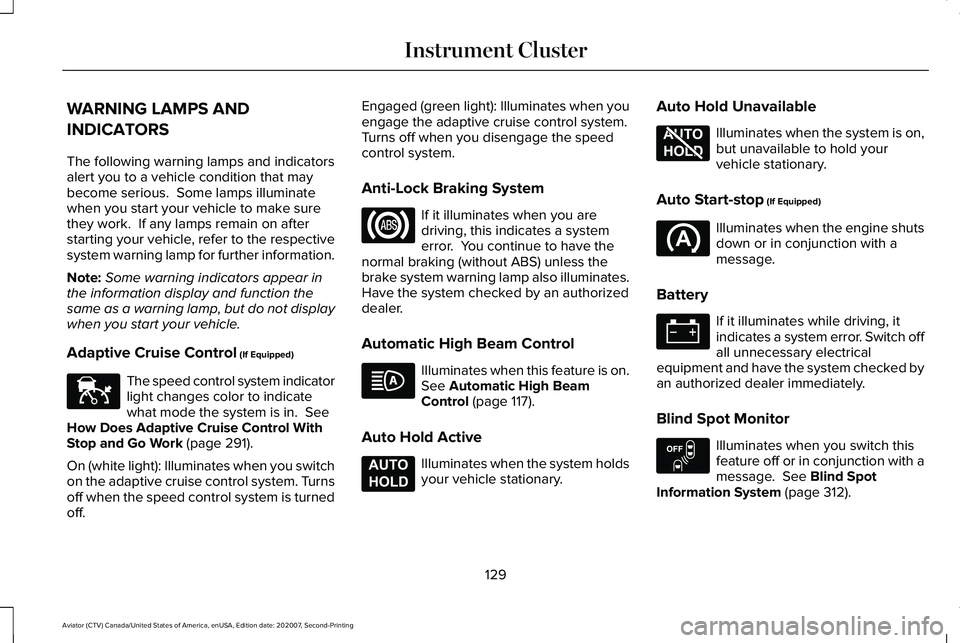
Adaptive Cruise Control (If Equipped) The speed control system indicator
light changes color to indicate
what mode the system is in.
See
How Does Adaptive Cruise Control With
Stop and Go Work
(page 291).
On (white light): Illuminates when you switch
on the adaptive cruise control system. Turns
off when the speed control system is turned
off. Engaged (green light): Illuminates when you
engage the adaptive cruise control system.
Turns off when you disengage the speed
control system.
Anti-Lock Braking System
If it illuminates when you are
driving, this indicates a system
error. You continue to have the
normal braking (without ABS) unless the
brake system warning lamp also illuminates.
Have the system checked by an authorized
dealer.
Automatic High Beam Control Illuminates when this feature is on.
See
Automatic High Beam
Control (page 117).
Auto Hold Active Illuminates when the system holds
your vehicle stationary.Auto Hold Unavailable Illuminates when the system is on,
but unavailable to hold your
vehicle stationary.
Auto Start-stop
(If Equipped) Illuminates when the engine shuts
down or in conjunction with a
message.
Battery If it illuminates while driving, it
indicates a system error. Switch off
all unnecessary electrical
equipment and have the system checked by
an authorized dealer immediately.
Blind Spot Monitor Illuminates when you switch this
feature off or in conjunction with a
message.
See Blind Spot
Information System (page 312).
129
Aviator (CTV) Canada/United States of America, enUSA, Edition date: 202007, Second-Printing Instrument ClusterE144524 E197933 E197934 E151262
Page 144 of 667
Adaptive Cruise Control
Action
Message
A radar concern is preventing the adaptive cruise from engaging. See How Does Adaptive
Cruise Control With Stop and Go Work (page 291).
Adaptive Cruise Malfunction
Front Sensor Not Aligned Conditions exist such that the adaptive cruise cannot function properly.
See How Does
Adaptive Cruise Control With Stop and Go Work (page 291).
Adaptive Cruise Not Available
The radar is blocked because of poor radar visibility due to inclement weather, ice, mud or
water in front of radar. You can typically clean the sensor to resolve. See How Does Adaptive Cruise Control With Stop and Go Work
(page 291).
Adaptive Cruise Not Available Sensor Blocked
See Manual
Displays when the system disables automatic braking.
Normal Cruise Active Adaptive Braking Off
Displays when the system reinstates adaptive cruise control to you.
Adaptive Cruise - Driver Resume Control
Displays when the vehicle speed is too slow to activate the adaptive cru\
ise.
Adaptive Cruise Speed Too Low to Activate
Adaptive Headlamps Action
Message
Displays when the system detects a concern. Have the system checked as soon as possible.
Check Headlamp System See Manual
141
Aviator (CTV) Canada/United States of America, enUSA, Edition date: 202007, Second-Printing Information Displays
Page 146 of 667

AWD
Action
Message
The all-wheel drive system temporarily turns off to protect itself from \
overheating.
AWD Temporarily Disabled
The all-wheel drive system is locking up the torque transfer clutch to h\
elp reduce clutchtemperature.
AWD Temporarily Locked
The all-wheel drive system temporarily turns off to protect itself from \
overheating or if youare using the temporary spare tire.
AWD OFF
The all-wheel drive system will resume normal function and clear this me\
ssage after drivinga short distance with the road tire re-installed or after the system coo\
ls.
AWD Restored
The all-wheel drive system is not operating properly. If the warning stays on or continues tocome on, have the system checked as soon as possible.
AWD Fault Service Required
Displays when the transfer case fluid requires service.
Change AWD Power Transfer Unit Lube
Displays when the transfer case fluid has been changed and reset to new.
AWD Power Transfer Unit Lube Set to New
143
Aviator (CTV) Canada/United States of America, enUSA, Edition date: 202007, Second-Printing Information Displays
Page 149 of 667
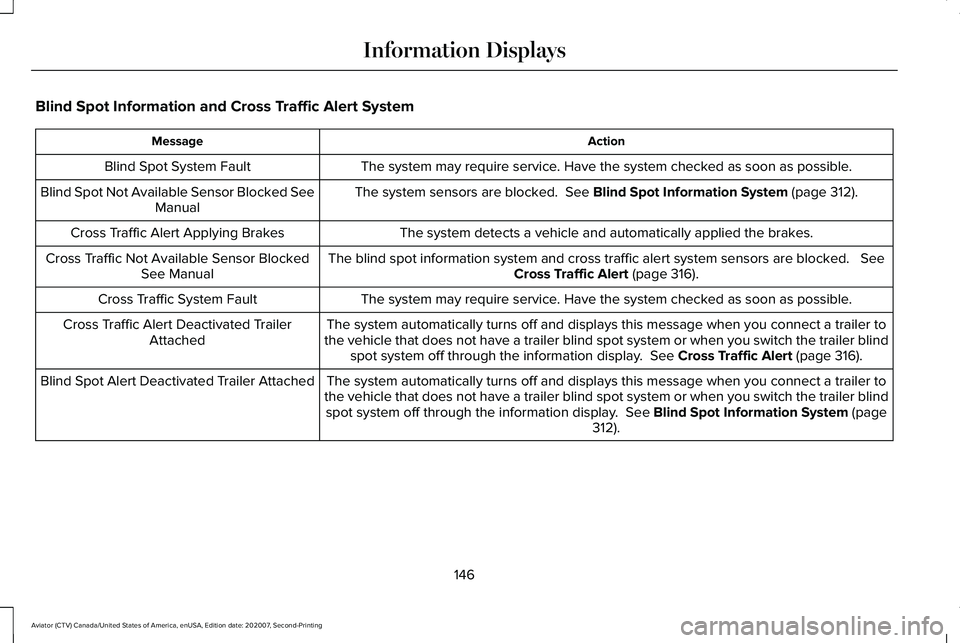
Blind Spot Information and Cross Traffic Alert System
Action
Message
The system may require service. Have the system checked as soon as possible.
Blind Spot System Fault
The system sensors are blocked. See Blind Spot Information System (page 312).
Blind Spot Not Available Sensor Blocked See
Manual
The system detects a vehicle and automatically applied the brakes.
Cross Traffic Alert Applying Brakes
The blind spot information system and cross traffic alert system sensors\
are blocked.
See
Cross Traffic Alert (page 316).
Cross Traffic Not Available Sensor Blocked
See Manual
The system may require service. Have the system checked as soon as possible.
Cross Traffic System Fault
The system automatically turns off and displays this message when you co\
nnect a trailer to
the vehicle that does not have a trailer blind spot system or when you s\
witch the trailer blind spot system off through the information display.
See Cross Traffic Alert (page 316).
Cross Traffic Alert Deactivated Trailer
Attached
The system automatically turns off and displays this message when you co\
nnect a trailer to
the vehicle that does not have a trailer blind spot system or when you s\
witch the trailer blind spot system off through the information display.
See Blind Spot Information System (page
312).
Blind Spot Alert Deactivated Trailer Attached
146
Aviator (CTV) Canada/United States of America, enUSA, Edition date: 202007, Second-Printing Information Displays
Page 150 of 667
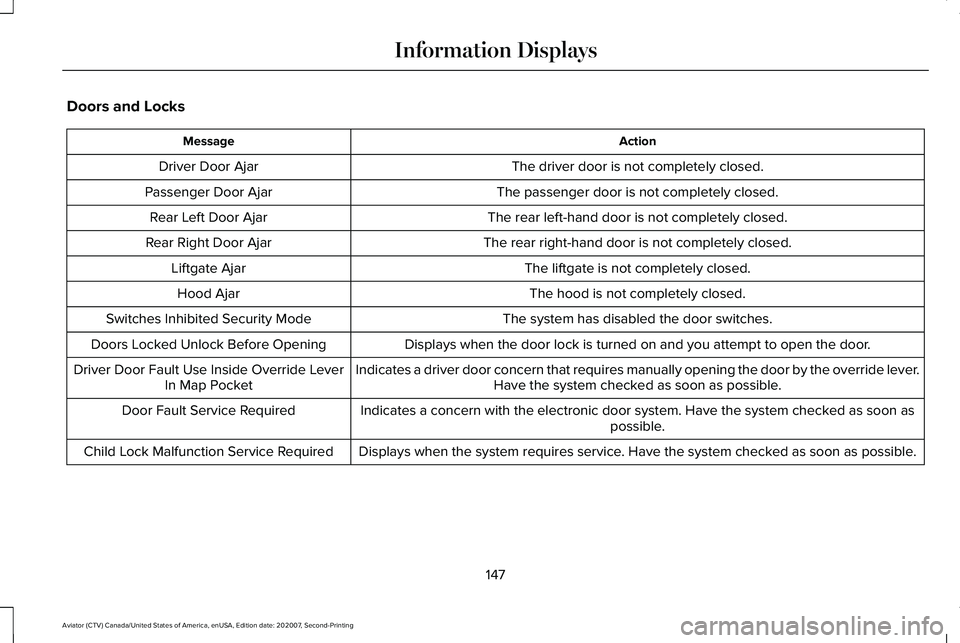
Doors and Locks
Action
Message
The driver door is not completely closed.
Driver Door Ajar
The passenger door is not completely closed.
Passenger Door Ajar
The rear left-hand door is not completely closed.
Rear Left Door Ajar
The rear right-hand door is not completely closed.
Rear Right Door Ajar
The liftgate is not completely closed.
Liftgate Ajar
The hood is not completely closed.
Hood Ajar
The system has disabled the door switches.
Switches Inhibited Security Mode
Displays when the door lock is turned on and you attempt to open the doo\
r.
Doors Locked Unlock Before Opening
Indicates a driver door concern that requires manually opening the door \
by the override lever.Have the system checked as soon as possible.
Driver Door Fault Use Inside Override Lever
In Map Pocket
Indicates a concern with the electronic door system. Have the system che\
cked as soon as possible.
Door Fault Service Required
Displays when the system requires service. Have the system checked as soon as possible.
Child Lock Malfunction Service Required
147
Aviator (CTV) Canada/United States of America, enUSA, Edition date: 202007, Second-Printing Information Displays
Page 151 of 667

Action
Message
Indicates that the rear seat interior door release switches and power wi\
ndows are switchedoff, preventing rear seat occupants from opening the doors or windows.
Child Lock ON
Indicates that the rear seat interior door release switches and power wi\
ndows are switchedon, allowing the rear seat occupants to open the doors and windows.
Child Lock OFF
The factory keypad code displays in the information display after the system resets t\
he keypad.See Passive Anti-Theft System (page 97).
Factory Keypad Code {X X X X X}
Driver Alert Action
Message
Stop and rest as soon as it is safe to do so.
Driver Alert Warning Rest Now
Take a rest soon.
Driver Alert Warning Rest Suggested
Fuel Action
Message
An early reminder of a low fuel condition.
Fuel Level Low
The fuel fill inlet valve may not be properly closed.
Check Fuel Fill Inlet
Wait for up to 15 seconds while the fuel system depressurizes.
Fuel Door Opening
148
Aviator (CTV) Canada/United States of America, enUSA, Edition date: 202007, Second-Printing Information Displays
Page 158 of 667
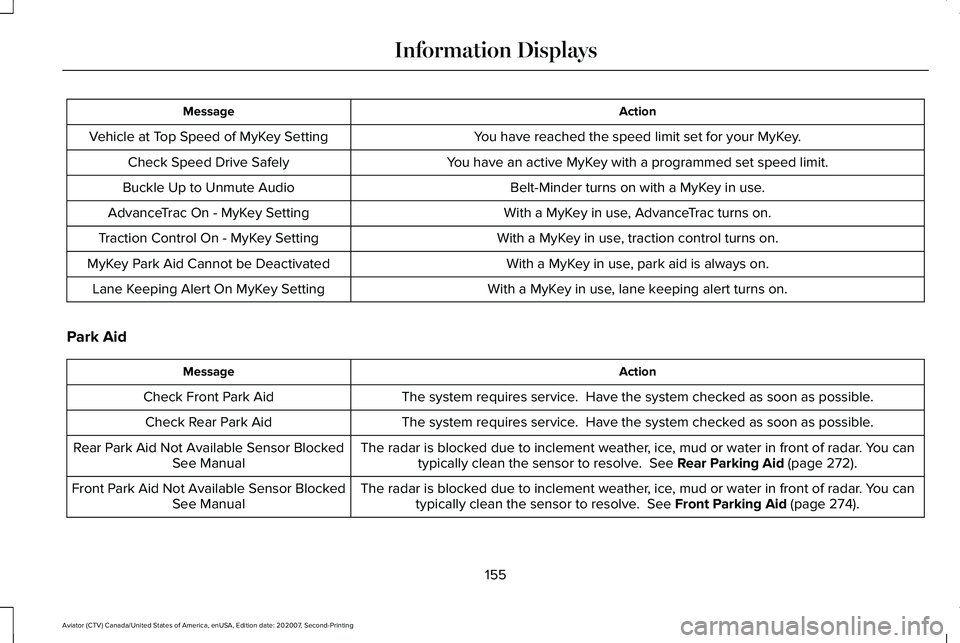
Action
Message
You have reached the speed limit set for your MyKey.
Vehicle at Top Speed of MyKey Setting
You have an active MyKey with a programmed set speed limit.
Check Speed Drive Safely
Belt-Minder turns on with a MyKey in use.
Buckle Up to Unmute Audio
With a MyKey in use, AdvanceTrac turns on.
AdvanceTrac On - MyKey Setting
With a MyKey in use, traction control turns on.
Traction Control On - MyKey Setting
With a MyKey in use, park aid is always on.
MyKey Park Aid Cannot be Deactivated
With a MyKey in use, lane keeping alert turns on.
Lane Keeping Alert On MyKey Setting
Park Aid Action
Message
The system requires service. Have the system checked as soon as possible.
Check Front Park Aid
The system requires service. Have the system checked as soon as possible.
Check Rear Park Aid
The radar is blocked due to inclement weather, ice, mud or water in front of radar. You cantypically clean the sensor to resolve. See Rear Parking Aid (page 272).
Rear Park Aid Not Available Sensor Blocked
See Manual
The radar is blocked due to inclement weather, ice, mud or water in front of radar. You cantypically clean the sensor to resolve.
See Front Parking Aid (page 274).
Front Park Aid Not Available Sensor Blocked
See Manual
155
Aviator (CTV) Canada/United States of America, enUSA, Edition date: 202007, Second-Printing Information Displays
Page 159 of 667
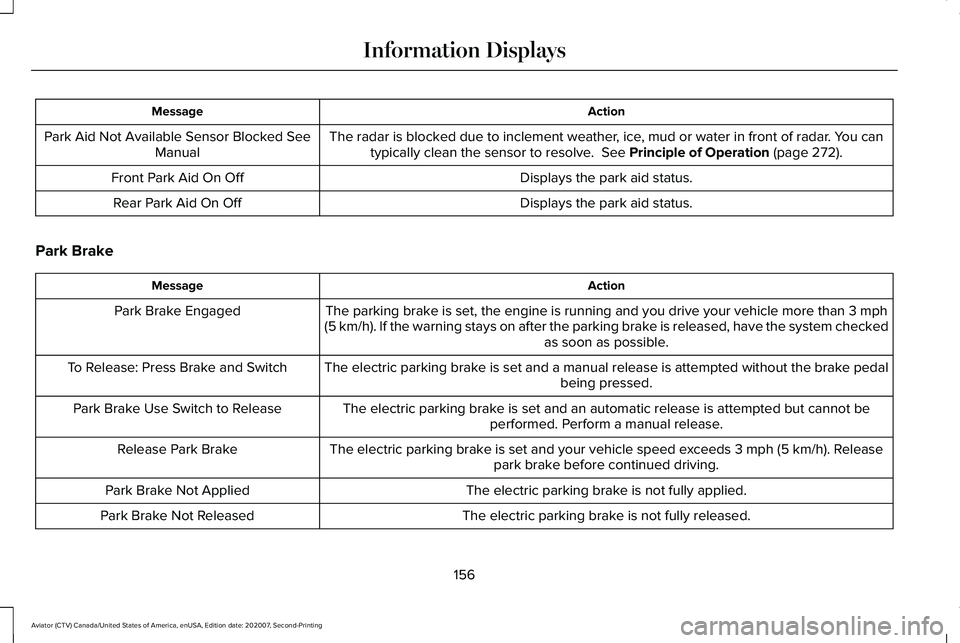
Action
Message
The radar is blocked due to inclement weather, ice, mud or water in front of radar. You cantypically clean the sensor to resolve. See Principle of Operation (page 272).
Park Aid Not Available Sensor Blocked See
Manual
Displays the park aid status.
Front Park Aid On Off
Displays the park aid status.
Rear Park Aid On Off
Park Brake Action
Message
The parking brake is set, the engine is running and you drive your vehicle more than
3 mph
(5 km/h). If the warning stays on after the parking brake is released, have the system checked as soon as possible.
Park Brake Engaged
The electric parking brake is set and a manual release is attempted without the brake pedal being pressed.
To Release: Press Brake and Switch
The electric parking brake is set and an automatic release is attempted but cannot beperformed. Perform a manual release.
Park Brake Use Switch to Release
The electric parking brake is set and your vehicle speed exceeds
3 mph (5 km/h). Release
park brake before continued driving.
Release Park Brake
The electric parking brake is not fully applied.
Park Brake Not Applied
The electric parking brake is not fully released.
Park Brake Not Released
156
Aviator (CTV) Canada/United States of America, enUSA, Edition date: 202007, Second-Printing Information Displays