steering LINCOLN AVIATOR 2021 Workshop Manual
[x] Cancel search | Manufacturer: LINCOLN, Model Year: 2021, Model line: AVIATOR, Model: LINCOLN AVIATOR 2021Pages: 667, PDF Size: 7.01 MB
Page 311 of 667
System Settings
The system has optional setting menus
available. The system stores the last known
selection for each of these settings. You do
not need to readjust your settings each time
you switch the system on.
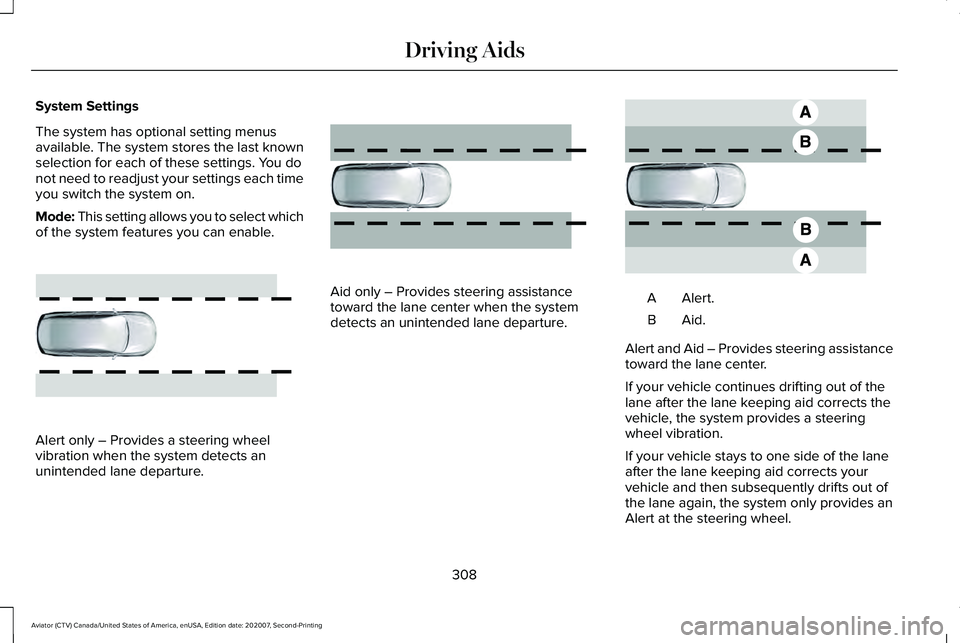
Mode: This setting allows you to select which
of the system features you can enable.
Alert only – Provides a steering wheel
vibration when the system detects an
unintended lane departure. Aid only – Provides steering assistance
toward the lane center when the system
detects an unintended lane departure.
Alert.A
Aid.B
Alert and Aid – Provides steering assistance
toward the lane center.
If your vehicle continues drifting out of the
lane after the lane keeping aid corrects the
vehicle, the system provides a steering
wheel vibration.
If your vehicle stays to one side of the lane
after the lane keeping aid corrects your
vehicle and then subsequently drifts out of
the lane again, the system only provides an
Alert at the steering wheel.
308
Aviator (CTV) Canada/United States of America, enUSA, Edition date: 202007, Second-Printing Driving AidsE165515 E165516 E165517
Page 312 of 667
Note:
The Alert and Aid diagrams illustrate
general zone coverage. They do not provide
exact zone parameters.
Intensity: This setting affects the intensity of
the steering wheel vibration used for the
Alert and Alert and Aid modes.
This setting
does not affect the Aid mode.
• Low.
• Normal.
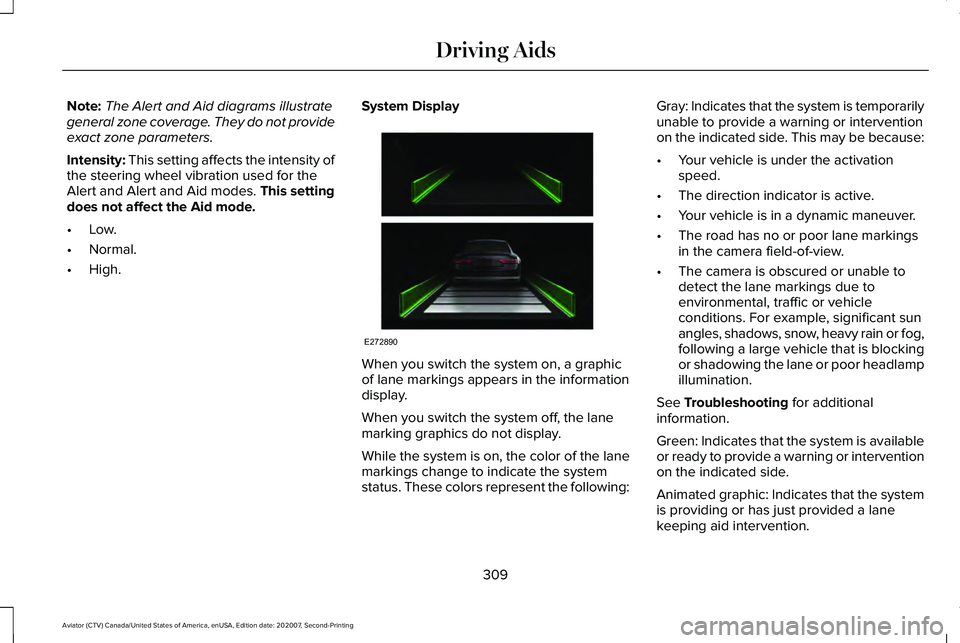
• High. System Display When you switch the system on, a graphic
of lane markings appears in the information
display.
When you switch the system off, the lane
marking graphics do not display.
While the system is on, the color of the lane
markings change to indicate the system
status. These colors represent the following:Gray: Indicates that the system is temporarily
unable to provide a warning or intervention
on the indicated side. This may be because:
•
Your vehicle is under the activation
speed.
• The direction indicator is active.
• Your vehicle is in a dynamic maneuver.
• The road has no or poor lane markings
in the camera field-of-view.
• The camera is obscured or unable to
detect the lane markings due to
environmental, traffic or vehicle
conditions. For example, significant sun
angles, shadows, snow, heavy rain or fog,
following a large vehicle that is blocking
or shadowing the lane or poor headlamp
illumination.
See
Troubleshooting for additional
information.
Green: Indicates that the system is available
or ready to provide a warning or intervention
on the indicated side.
Animated graphic: Indicates that the system
is providing or has just provided a lane
keeping aid intervention.
309
Aviator (CTV) Canada/United States of America, enUSA, Edition date: 202007, Second-Printing Driving AidsE272890
Page 313 of 667
Red: Indicates that the system is providing
or has just provided a lane keeping alert
warning.
The system can be temporarily suppressed
at any time by the following:
•
Quick braking.
• Fast acceleration. •
Using the direction indicator.
• Evasive steering maneuver.
• Driving too close to the lane markings.
Troubleshooting Why is the feature not available (line markings are gray) when I can s\
ee the lane markings on the road?
Your vehicle speed is outside the operational range of the feature.
The sun is shining directly into the camera lens.
A quick intentional lane change has occurred.
Your vehicle stays too close to the lane markings.
Driving at high speeds in curves.
The last Alert warning or Aid intervention occurred a short time ago.
Ambiguous lane markings, for example in construction zones.
Rapid transition from light to dark, or from dark to light.
Sudden offset in lane markings.
ABS or AdvanceTrac ™ is active.
There is a camera blockage due to dirt, grime, fog, frost or water on the windshield.
310
Aviator (CTV) Canada/United States of America, enUSA, Edition date: 202007, Second-Printing Driving Aids
Page 325 of 667
Note:
If your vehicle has a navigation
system, stored speed sign data could
influence the indicated speed limit value. To switch the system speed warning on or
off, adjust the speed warning settings use
the touchscreen:
1. Select Settings.2. Select
Driver Assistance.
3. Select
Tolerance.
4. Use
+ and - to set the tolerance.
Information Messages Action
Message
The traffic sign data provided by the navigation system is unavailable
due to weak or no signal. Wait for a short period of time for the signalto improve. If the message continues to appear, have your vehicle checked as soon as possible.
Traffic Sign Reduced Performance See Manual
STEERING
Electric Power Steering WARNING:
The electric power
steering system has diagnostic checks that
continuously monitor the system. If a fault
is detected, a message displays in the
information display. Stop your vehicle as
soon as it is safe to do so. Switch the ignition off. After at least 10 seconds,
switch the ignition on and watch the
information display for a steering system
warning message. If a steering system
warning message returns, have the system
checked as soon as possible.
WARNING: If the system detects an
error, you may not feel a difference in the
steering, however a serious condition may
exist. Have your vehicle checked as soon
as possible. Failure to do so may result in
loss of steering control. Your vehicle has an electric power steering
system. There is no fluid reservoir and
therefore requires no maintenance.
If your vehicle loses electrical power when
you are driving, electric power steering
assistance is lost. The steering system still
operates and you can manually steer your
vehicle. Manually steering your vehicle
requires more effort.
322
Aviator (CTV) Canada/United States of America, enUSA, Edition date: 202007, Second-Printing Driving Aids
Page 326 of 667
Extreme continuous steering could increase
the effort you need to steer your vehicle. This
increased effort prevents overheating and
permanent damage to the steering system.
You do not lose the ability to manually steer
your vehicle. Typical steering and driving
maneuvers allow the system to cool and
operate as normal.
Steering Tips
If the steering wanders or pulls, check for:
•
Correct tire pressures.
• Uneven tire wear.
• Loose or worn suspension components.
• Loose or worn steering components.
• Improper vehicle alignment.
Note: A high crown in the road or high
crosswinds could also make the steering
seem to wander or pull. Adaptive Learning
The electronic power steering system
adaptive learning improves overall handling
and steering on roads with irregularities. It
communicates with the brake system to help
operate advanced stability control and
accident avoidance systems. When you
install a new battery or disconnect the
battery, you need to drive your vehicle a
short distance so it can relearn and reactivate
all systems.
PRE-COLLISION ASSIST
WARNING: You are responsible for
controlling your vehicle at all times. The
system is designed to be an aid and does
not relieve you of your responsibility to
drive with due care and attention. Failure
to follow this instruction could result in the
loss of control of your vehicle, personal
injury or death. WARNING:
The system does not
detect vehicles that are driving in a
different direction, cyclists or animals.
Apply the brakes when necessary. Failure
to follow this instruction could result in the
loss of control of your vehicle, personal
injury or death. WARNING:
The system does not
operate during hard acceleration or
steering. Failure to take care may lead to
a crash or personal injury. WARNING:
The system may fail or
operate with reduced function during cold
and severe weather conditions. Snow, ice,
rain, spray and fog can adversely affect the
system. Keep the front camera and radar
free of snow and ice. Failure to take care
may result in the loss of control of your
vehicle, serious personal injury or death.
323
Aviator (CTV) Canada/United States of America, enUSA, Edition date: 202007, Second-Printing Driving Aids
Page 329 of 667
Evasive Steering Assist (If Equipped)
If your vehicle is rapidly approaching a
stationary vehicle or a vehicle traveling in
the same direction as your vehicle, the
system is designed to help you steer around
the vehicle.
The system only activates when all of the
following occur:
• The Pre-Collision Assist system detects
a vehicle ahead and starts to apply Active
Braking.
• You turn the steering wheel in an attempt
to steer around the vehicle.
After you turn the steering wheel, the system
applies additional steering torque to help
you steer around the vehicle. After you pass
the vehicle, the system applies steering
torque in the opposite direction to encourage
you to steer back into the lane. The system
deactivates after you fully pass the vehicle.
Note: The system does not automatically
steer around a vehicle. If you do not turn the
steering wheel, the system does not activate. Note:
The system does not activate if the
distance to the vehicle ahead is too small
and the system cannot avoid a crash.
Adjusting the Pre-Collision Assist
Settings
You can adjust the following settings by
using the information display controls.
See
General Information (page 134).
• You can change Alert and Distance Alert
sensitivity to one of three possible
settings.
• You can switch Distance Indication and
Alert on or off.
• If required, you can switch Active Braking
on or off.
• If required, you can switch Evasive
Steering Assist on or off.
Note: Active Braking and Evasive Steering
Assist automatically turn on every time you
switch the ignition on.
Note: If you switch Active Braking off,
Evasive Steering Assist turns off. Blocked Sensors
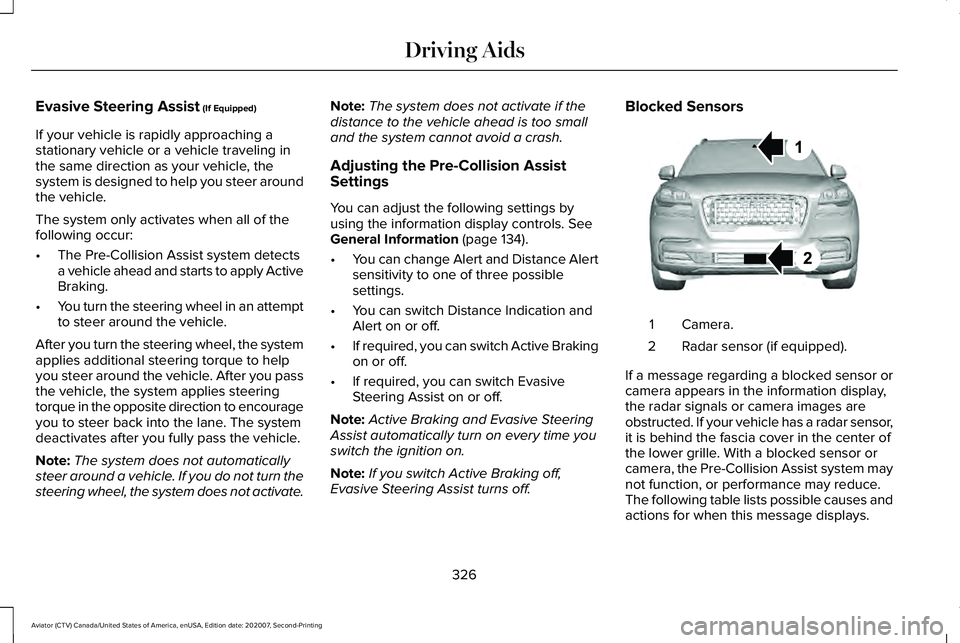
Camera.
1
Radar sensor (if equipped).
2
If a message regarding a blocked sensor or
camera appears in the information display,
the radar signals or camera images are
obstructed. If your vehicle has a radar sensor,
it is behind the fascia cover in the center of
the lower grille. With a blocked sensor or
camera, the Pre-Collision Assist system may
not function, or performance may reduce.
The following table lists possible causes and
actions for when this message displays.
326
Aviator (CTV) Canada/United States of America, enUSA, Edition date: 202007, Second-Printing Driving AidsE288869
Page 332 of 667
WHAT IS DRIVE MODE CONTROL
The system delivers a driving experience
through a suite of sophisticated electronic
vehicle systems. These systems optimize
steering, handling and powertrain response.
This provides a single location to control
multiple systems performance settings.
Changing the drive mode automatically
changes the functionality of the following
systems:
•
Electronically power-assisted steering
system adjusts steering effort and feel
based on the mode you select. See
Steering (page 322).
• Electronic stability control and traction
control maintains your vehicle control in
adverse conditions or high performance
driving. See Stability Control (page 268).
• Electronic throttle control enhances the
powertrain response to your driving
inputs.
• Transmission controls optimize with shift
schedules tuned to each mode.
• AWD settings become optimized and
tuned to each mode. The system automatically tailors your vehicle
configuration for each mode you select.
Note:
Not all settings, or modes, may be
available.
Note: The system has diagnostic checks that
continuously monitor the system for proper
operation. If a mode is unavailable due to a
system fault, the mode defaults to Normal.
SELECTING A DRIVE MODE
Note: Drive mode changes may not be
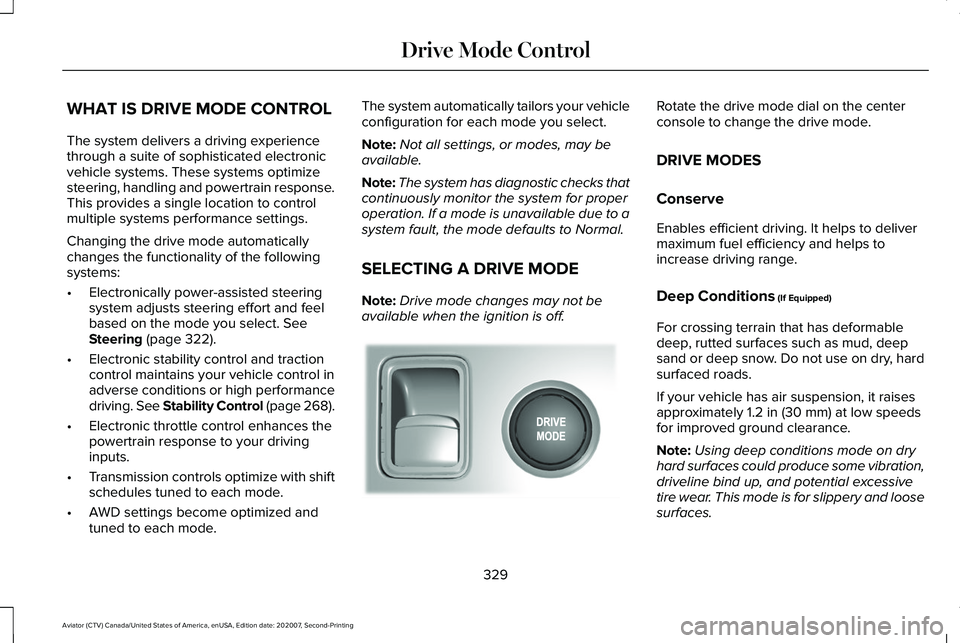
available when the ignition is off. Rotate the drive mode dial on the center
console to change the drive mode.
DRIVE MODES
Conserve
Enables efficient driving. It helps to deliver
maximum fuel efficiency and helps to
increase driving range.
Deep Conditions
(If Equipped)
For crossing terrain that has deformable
deep, rutted surfaces such as mud, deep
sand or deep snow. Do not use on dry, hard
surfaced roads.
If your vehicle has air suspension, it raises
approximately
1.2 in (30 mm) at low speeds
for improved ground clearance.
Note: Using deep conditions mode on dry
hard surfaces could produce some vibration,
driveline bind up, and potential excessive
tire wear. This mode is for slippery and loose
surfaces.
329
Aviator (CTV) Canada/United States of America, enUSA, Edition date: 202007, Second-Printing Drive Mode ControlE297680
Page 333 of 667
Deep Sand (If Equipped)
For crossing deep soft and dry sand.
Note: Using deep sand mode on dry hard
surfaces could produce some vibration,
driveline bind up, and potential excessive
tire wear. This mode is for slippery and loose
surfaces.
Excite
For sporty on-road driving. This mode
increases throttle response, provides a more
dynamic powertrain sound and steering feel,
along with a more sporty shifting experience.
If your vehicle has continuously controlled
damping suspension it adjusts to a stiffer
suspension setting, with an emphasis on
handling and control. The transmission also
holds gears longer, helping your vehicle
accelerate faster when shifting gears.
If your vehicle has air suspension, it lowers
approximately
0.6 in (15 mm) to improve
aerodynamics. Normal
For everyday driving. This mode is a perfect
balance of excitement, comfort and
convenience. This is the default mode after
each ignition cycle.
Preserve EV
Your vehicle runs the engine as needed to
save electric driving range for later use in
another drive mode. For example, you first
drive at high speeds on open roads where
engine operation is appropriate. Later, you
drive at low speeds in an urban area where
electric only is most efficient.
See Plug-In
Hybrid Vehicle Operation (page 222).
Pure EV
This mode provides an electric only driving
experience. Your vehicle could accelerate
more slowly, and the top speed could
reduce. For more power, you can temporarily
enable your engine at any time by using one
of the following methods: •
Press and hold the folder button on the
steering wheel when viewing the pure
EV information screen. Your vehicle
enables the engine as needed, and
returns to pure EV after several seconds,
or when the vehicle no longer needs the
engine.
• Press the accelerator pedal fully. A
pop-up message appears. Press OK on
the steering wheel to activate as needed.
Your vehicle could enable the engine if
system conditions require it. An engine
enabled message displays if this occurs. See
Information Messages
(page 140).
Your engine could enable if the climate
control is in a defrost mode and the outside
temperature is cold. If the vehicle does not
need defrost, select a different climate
control mode to permit pure EV.
Your vehicle changes from pure EV mode to
normal mode when the vehicle electric range
is zero.
Note: When in pure EV mode, your vehicle
stays in this mode if there is all electric
driving range available and the system does
not fault.
330
Aviator (CTV) Canada/United States of America, enUSA, Edition date: 202007, Second-Printing Drive Mode Control
Page 347 of 667
Trailer Lamps
WARNING: Never connect any trailer
lamp wiring to the vehicle's tail lamp wiring;
this may damage the electrical system
resulting in fire. Contact your authorized
dealer as soon as possible for assistance
in proper trailer tow wiring installation.
Additional electrical equipment may be
required.
Most towed vehicles require trailer lamps.
Make sure all running lights, brake lights,
direction indicators and hazard flashers are
working.
Before Towing a Trailer
Practice turning, stopping and backing up to
get the feel of your vehicle-trailer
combination before starting on a trip. When
turning, make wider turns so the trailer
wheels clear curbs and other obstacles. When Towing a Trailer
•
Do not drive faster than 70 mph
(113 km/h) during the first 500 mi
(800 km).
• Do not make full-throttle starts.
• Check your hitch, electrical connections
and trailer wheel lug nuts thoroughly after
you have traveled
50 mi (80 km).
• When stopped in congested or heavy
traffic during hot weather, place the
gearshift in park (P) to aid engine and
transmission cooling and to help A/C
performance.
• Turn off the speed control with heavy
loads or in hilly terrain. The speed control
may turn off automatically when you are
towing on long, steep grades.
• Shift to a lower gear when driving down
a long or steep hill. Do not apply the
brakes continuously, as they may
overheat and become less effective. •
If your transmission is equipped with a
Grade Assist or Tow/Haul feature, use
this feature when towing. This provides
engine braking and helps eliminate
excessive transmission shifting for
optimum fuel economy and transmission
cooling.
• Allow more distance for stopping with a
trailer attached. Anticipate stops and
brake gradually.
• Avoid parking on a grade. However, if
you must park on a grade:
1. Turn the steering wheel to point your vehicle tires away from traffic flow.
2. Set your vehicle parking brake.
3. Place the automatic transmission in park
(P).
4. Place wheel chocks in front and back of the trailer wheels. (Chocks not included
with vehicle.)
Launching or Retrieving a Boat or
Personal Watercraft (PWC)
Note: Disconnect the wiring to the trailer
before
backing the trailer into the water.
344
Aviator (CTV) Canada/United States of America, enUSA, Edition date: 202007, Second-Printing Towing
Page 348 of 667
Note:
Reconnect the wiring to the trailer
after removing the trailer from the water.
When backing down a ramp during boat
launching or retrieval:
• Do not allow the static water level to rise
above the bottom edge of the rear
bumper.
• Do not allow waves to break higher than
6 in (15 cm)
above the bottom edge of
the rear bumper.
Exceeding these limits may allow water to
enter vehicle components:
• Causing internal damage to the
components.
• Affecting driveability, emissions, and
reliability.
Replace the rear axle lubricant anytime the
rear axle has been submerged in water.
Water may have contaminated the rear axle
lubricant, which is not normally checked or
changed unless a leak is suspected or other
axle repair is required. TOWING THE VEHICLE ON FOUR
WHEELS
Emergency Towing WARNING:
If your vehicle has a
steering wheel lock make sure the ignition
is in the accessory or on position when
being towed.
If your vehicle becomes inoperable without
access to wheel dollies or a vehicle transport
trailer, it can be flat-towed with all wheels on
the ground, regardless of the powertrain and
transmission configuration, under the
following conditions:
• Your vehicle is facing forward for towing
in a forward direction.
• Refer to the Manual Park Release
procedure. See Automatic Transmission
(page 245). Failing to do so could result
in damage to the transmission.
• Maximum speed is
35 mph (56 km/h).
• Maximum distance is
50 mi (80 km). Note:
If you are unsure of the vehicle ’s
configuration, contact an authorized dealer.
Recreational Towing - Front-Wheel
Drive Vehicles
(If Equipped)
You cannot recreational tow your vehicle
with all wheels on the ground because
vehicle or transmission damage could occur.
Place the front wheels on a two-wheel tow
dolly. If you are using a tow dolly, follow the
instructions specified by the equipment
provider.
Recreational Towing - Rear-Wheel
Drive Vehicles
(If Equipped)
You cannot recreational tow your vehicle
with all wheels on the ground because
vehicle or transmission damage could occur.
We recommend towing your vehicle with all
four wheels off the ground, such as when
using a car-hauling trailer. Otherwise, you
cannot recreational tow your vehicle.
345
Aviator (CTV) Canada/United States of America, enUSA, Edition date: 202007, Second-Printing Towing