steering wheel LINCOLN AVIATOR 2021 Owners Manual
[x] Cancel search | Manufacturer: LINCOLN, Model Year: 2021, Model line: AVIATOR, Model: LINCOLN AVIATOR 2021Pages: 667, PDF Size: 7.01 MB
Page 5 of 667

Keys and Remote Controls
General Information on Radio Frequencies
........................................................................\
66
Remote Control ..............................................
67
Replacing a Lost Key or Remote Control ........................................................................\
..
71
Phone as a Key
What Is Phone As a Key ...............................
72
Phone as a Key Limitations .........................
72
Programming Your Phone ..........................
72
Using the Valet Mode ...................................
73
Using the Backup Start Passcode .............
73
Phone as a Key – Troubleshooting ...........
74
MyKey™
Principle of Operation ..................................
76
Creating a MyKey ...........................................
77
Clearing All MyKeys ......................................
78
Checking MyKey System Status ................
78
Using MyKey With Remote Start Systems ........................................................................\
.
79
MyKey – Troubleshooting ............................
79Doors and Locks
Locking and Unlocking
.................................
81
Opening the Doors .......................................
88
Emergency Door Release ...........................
89
Soft Closing Door ..........................................
89
Keyless Entry ..................................................
89
Liftgate
Power Liftgate ................................................
92
Security
Passive Anti-Theft System ...........................
97
Anti-Theft Alarm .............................................
98
Steering Wheel
Adjusting the Steering Wheel - Vehicles With: Manual Adjustable Steering
Column .......................................................
100
Adjusting the Steering Wheel - Vehicles With: Power Adjustable Steering Column
.......................................................................
100
Audio Control ................................................
102
Voice Control ................................................
102Cruise Control - Vehicles With: Adaptive
Cruise Control With Lane Centering
.......................................................................
102
Cruise Control - Vehicles With: Cruise Control ........................................................
103
Information Display Control .......................
104
Heated Steering Wheel ..............................
104
Horn .................................................................
104
Wipers and Washers
Windshield Wipers - Vehicles Without: Heated Wiper Blades .............................
105
Windshield Wipers - Vehicles With: Heated Wiper Blades ............................................
106
Autowipers .....................................................
106
Windshield Washers ....................................
107
Rear Window Wiper and Washers ...........
107
Lighting
General Information ....................................
109
Lighting Control ............................................
109
Autolamps .......................................................
110
Instrument Lighting Dimmer .......................
110
Headlamp Exit Delay .....................................
111
2
Aviator (CTV) Canada/United States of America, enUSA, Edition date: 202007, Second-Printing Table of Contents
Page 9 of 667
Resuming the Set Speed
..........................298
Overriding the Set Speed .........................
298
Adaptive Cruise Control Indicators - Vehicles With: Adaptive Cruise Control
With Lane Centering ..............................
298
Adaptive Cruise Control Indicators - Vehicles With: Adaptive Cruise Control
With Stop and Go ...................................
299
Adaptive Cruise Control Indicators - Vehicles With: Intelligent Adaptive
Cruise Control .........................................
299
Switching From Adaptive Cruise Control to Cruise Control .....................................
299
Switching Lane Centering On and Off ......................................................................
300
Switching Intelligent Mode On and Off .......................................................................
301
Adjusting the Set Speed Tolerance ........
301
Adaptive Cruise Control – Troubleshooting ......................................................................
302
Driving Aids
Driver Alert ....................................................
305
Lane Keeping System ................................
306
Blind Spot Information System .................
312Cross Traffic Alert
.........................................
316
Speed Sign Recognition .............................
321
Steering .........................................................
322
Pre-Collision Assist .....................................
323
Drive Mode Control
What Is Drive Mode Control .....................
329
Selecting a Drive Mode .............................
329
Drive Modes .................................................
329
Load Carrying
Rear Under Floor Storage .........................
332
Luggage Covers ..........................................
332
Roof Racks and Load Carriers .................
333
Load Limit ......................................................
334
Air Suspension .............................................
338
Towing
Towing a Trailer ............................................
340
Trailer Sway Control ....................................
341
Recommended Towing Weights ..............
341
Essential Towing Checks ...........................
343
Towing the Vehicle on Four Wheels ......
345Driving Hints
Reduced Engine Performance
.................
347
Economical Driving .....................................
347
Cold Weather Precautions ........................
348
Breaking-In ....................................................
348
Driving Through Water ...............................
348
Floor Mats .....................................................
349
Roadside Emergencies
Roadside Assistance ...................................
351
Hazard Flashers ..........................................
352
Fuel Shutoff ..................................................
352
Jump Starting the Vehicle .........................
353
Collision, Damage or Fire Event ..............
355
Post-Crash Alert System ............................
357
Transporting the Vehicle ...........................
357
Customer Assistance
Getting the Services You Need ...............
359
In California (U.S. Only) ..............................
360
The Better Business Bureau (BBB) Auto Line Program (U.S. Only) ........................
361
6
Aviator (CTV) Canada/United States of America, enUSA, Edition date: 202007, Second-Printing Table of Contents
Page 10 of 667
Utilizing the Mediation/Arbitration Program
(Canada Only) ..........................................362
Getting Assistance Outside the U.S. and Canada ......................................................
363
Ordering Additional Owner's Literature ......................................................................
365
Reporting Safety Defects (U.S. Only) ......
366
Reporting Safety Defects (Canada Only) ......................................................................
366
Fuses
Fuse Specification Chart ...........................
368
Changing a Fuse ..........................................
381
Maintenance
General Information ....................................
384
Opening and Closing the Hood ..............
384
Under Hood Overview ...............................
386
Engine Oil Dipstick ......................................
387
Engine Oil Check .........................................
387
Oil Change Indicator Reset ......................
388
Changing the Engine Air Filter ................
389
Engine Coolant Check ...............................
390
Automatic Transmission Fluid Check ......
395Brake Fluid Check
......................................
395
Power Steering Fluid Check ....................
396
Changing the 12V Battery .........................
397
Adjusting the Headlamps .........................
399
Washer Fluid Check ....................................
401
Fuel Filter .......................................................
401
Checking the Wiper Blades .......................
401
Changing the Front Wiper Blades - Vehicles Without: Heated Wiper Blades
.......................................................................
401
Changing the Front Wiper Blades - Vehicles With: Heated Wiper Blades
......................................................................
402
Changing the Rear Wiper Blades ...........
403
Changing a Bulb ..........................................
403
Vehicle Care
General Information ....................................
404
Cleaning Products ......................................
404
Cleaning the Exterior .................................
405
Waxing ...........................................................
406
Cleaning the Engine ...................................
407
Cleaning the Windows and Wiper Blades ......................................................................
407 Cleaning the Interior
..................................
408
Cleaning the Instrument Panel and Instrument Cluster Lens ........................
408
Cleaning Leather Seats .............................
409
Repairing Minor Paint Damage .................
410
Cleaning the Wheels ...................................
410
Vehicle Storage ............................................
410
Body Styling Kits ...........................................
412
Wheels and Tires
General Information .....................................
413
Tire Care .........................................................
415
Using Summer Tires ...................................
427
Using Snow Chains ....................................
428
Tire Pressure Monitoring System ...........
430
Changing a Road Wheel ............................
434
Technical Specifications ............................
442
Capacities and Specifications
Engine Specifications - Excluding: Plug-In Hybrid Electric Vehicle (PHEV) ............
444
Engine Specifications - Plug-In Hybrid Electric Vehicle (PHEV) ..........................
445
7
Aviator (CTV) Canada/United States of America, enUSA, Edition date: 202007, Second-Printing Table of Contents
Page 21 of 667
EVENT DATA
This vehicle is equipped with an event data
recorder. The main purpose of an event data
recorder is to record, in certain crash or near
crash-like situations, such as an airbag
deployment or hitting a road obstacle; this
data will assist in understanding how a
vehicle
’s systems performed. The event data
recorder is designed to record data related
to vehicle dynamics and safety systems for
a short period of time, typically 30 seconds
or less.
The event data recorder in this vehicle is
designed to record such data as:
• How various systems in your vehicle
were operating.
• Whether or not the driver and passenger
seatbelts were buckled/fastened.
• How far (if at all) the driver was
depressing the accelerator and/or the
brake pedal.
• How fast the vehicle was traveling.
• Where the driver was positioning the
steering wheel. This data can help provide a better
understanding of the circumstances in which
crashes and injuries occur.
Note:
Event data recorder data is recorded
by your vehicle only if a non-trivial crash
situation occurs; no data is recorded by the
event data recorder under normal driving
conditions and no personal data or
information (for example name, gender, age,
and crash location) is recorded. However,
parties, such as law enforcement, could
combine the event data recorder data with
the type of personally identifying data
routinely acquired during a crash
investigation.
To read data recorded by an event data
recorder, special equipment is required, and
access to the vehicle or the event data
recorder is needed. In addition to the vehicle
manufacturer, other parties, such as law
enforcement, that have such special
equipment, can read the information if they
have access to the vehicle or the event data
recorder. SETTINGS DATA
Your vehicle has electronic control units that
have the ability to store data based on your
personalized settings. The data is stored
locally in the vehicle or on devices that you
connect to it, for example, a USB drive or
digital music player. You can delete some of
this data and also choose whether to share
it through the services to which you
subscribe. See Settings (page 540).
Comfort and Convenience Data
Data recorded includes, for example:
• Seat and steering wheel position.
• Climate control settings.
• Radio presets.
Entertainment Data
Data recorded includes, for example:
• Music, videos or album art.
• Contacts and corresponding address
book entries.
• Navigation destinations.
18
Aviator (CTV) Canada/United States of America, enUSA, Edition date: 202007, Second-Printing Data Privacy
Page 26 of 667
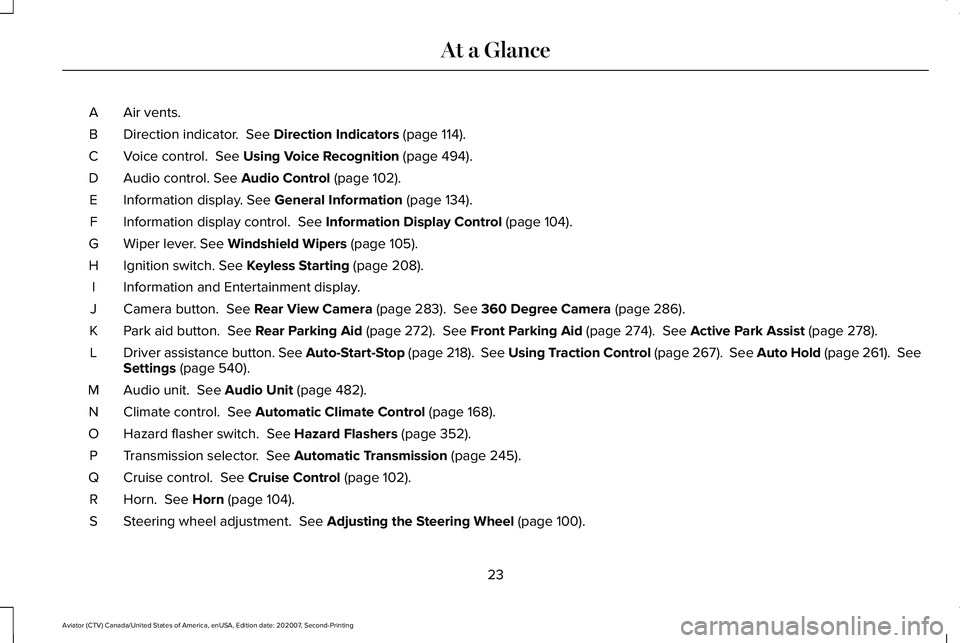
Air vents.
A
Direction indicator. See Direction Indicators (page 114).
B
Voice control.
See Using Voice Recognition (page 494).
C
Audio control.
See Audio Control (page 102).
D
Information display.
See General Information (page 134).
E
Information display control.
See Information Display Control (page 104).
F
Wiper lever.
See Windshield Wipers (page 105).
G
Ignition switch.
See Keyless Starting (page 208).
H
Information and Entertainment display.
I
Camera button.
See Rear View Camera (page 283). See 360 Degree Camera (page 286).
J
Park aid button.
See Rear Parking Aid (page 272). See Front Parking Aid (page 274). See Active Park Assist (page 278).
K
Driver assistance button. See Auto-Start-Stop (page 218). See Using Traction Control (page 267).
See Auto Hold (page 261). See
Settings (page 540).
L
Audio unit.
See Audio Unit (page 482).
M
Climate control.
See Automatic Climate Control (page 168).
N
Hazard flasher switch.
See Hazard Flashers (page 352).
O
Transmission selector.
See Automatic Transmission (page 245).
P
Cruise control.
See Cruise Control (page 102).
Q
Horn.
See Horn (page 104).
R
Steering wheel adjustment.
See Adjusting the Steering Wheel (page 100).
S
23
Aviator (CTV) Canada/United States of America, enUSA, Edition date: 202007, Second-Printing At a Glance
Page 52 of 667
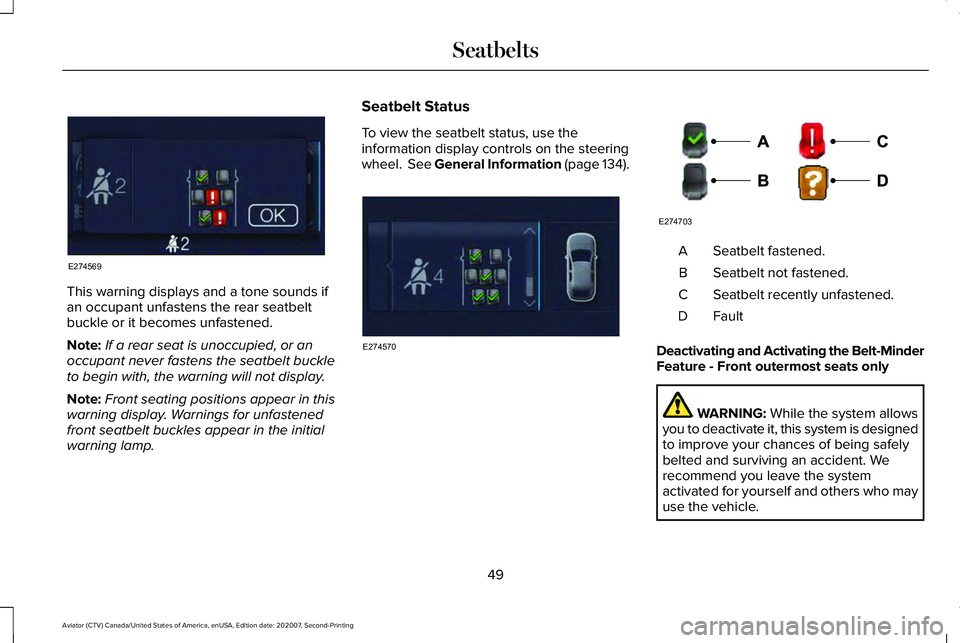
This warning displays and a tone sounds if
an occupant unfastens the rear seatbelt
buckle or it becomes unfastened.
Note:
If a rear seat is unoccupied, or an
occupant never fastens the seatbelt buckle
to begin with, the warning will not display.
Note: Front seating positions appear in this
warning display. Warnings for unfastened
front seatbelt buckles appear in the initial
warning lamp. Seatbelt Status
To view the seatbelt status, use the
information display controls on the steering
wheel. See General Information (page 134). Seatbelt fastened.
A
Seatbelt not fastened.
B
Seatbelt recently unfastened.
C
FaultD
Deactivating and Activating the Belt-Minder
Feature - Front outermost seats only WARNING:
While the system allows
you to deactivate it, this system is designed
to improve your chances of being safely
belted and surviving an accident. We
recommend you leave the system
activated for yourself and others who may
use the vehicle.
49
Aviator (CTV) Canada/United States of America, enUSA, Edition date: 202007, Second-Printing SeatbeltsE274569 E274570 E274703
Page 56 of 667
PRINCIPLE OF OPERATION
WARNING: Airbags do not inflate
slowly or gently, and the risk of injury from
a deploying airbag is the greatest close to
the trim covering the airbag module. WARNING:
All occupants of your
vehicle, including the driver, should always
properly wear their seatbelts, even when
an airbag supplemental restraint system is
provided. Failure to properly wear your
seatbelt could seriously increase the risk
of injury or death. WARNING:
Even with advanced
restraints systems, properly restrain
children 12 and under in a rear seating
position. Failure to follow this could
seriously increase the risk of injury or
death. WARNING:
Do not place your arms
on the airbag cover or through the steering
wheel. Failure to follow this instruction
could result in personal injury. WARNING:
Keep the areas in front
of the airbags free from obstruction. Do
not affix anything to or over the airbag
covers. Objects could become projectiles
during airbag deployment or in a sudden
stop. Failure to follow this instruction could
result in personal injury or death. WARNING: Airbags can kill or injure
a child in a child restraint. Never place a
rear-facing child restraint in front of an
active airbag. If you must use a
forward-facing child restraint in the front
seat, move the seat upon which the child
restraint is installed all the way back. WARNING: Do not attempt to service,
repair, or modify the supplementary
restraint system or associated components.
Failure to follow this instruction could result
in personal injury or death. WARNING:
Several airbag system
components get hot after inflation. To
reduce the risk of injury, do not touch them
after inflation. WARNING:
If a supplementary
restraint system component has deployed,
it will not function again. Have the system
and associated components inspected as
soon as possible. Failure to follow this
instruction could result in personal injury
or death.
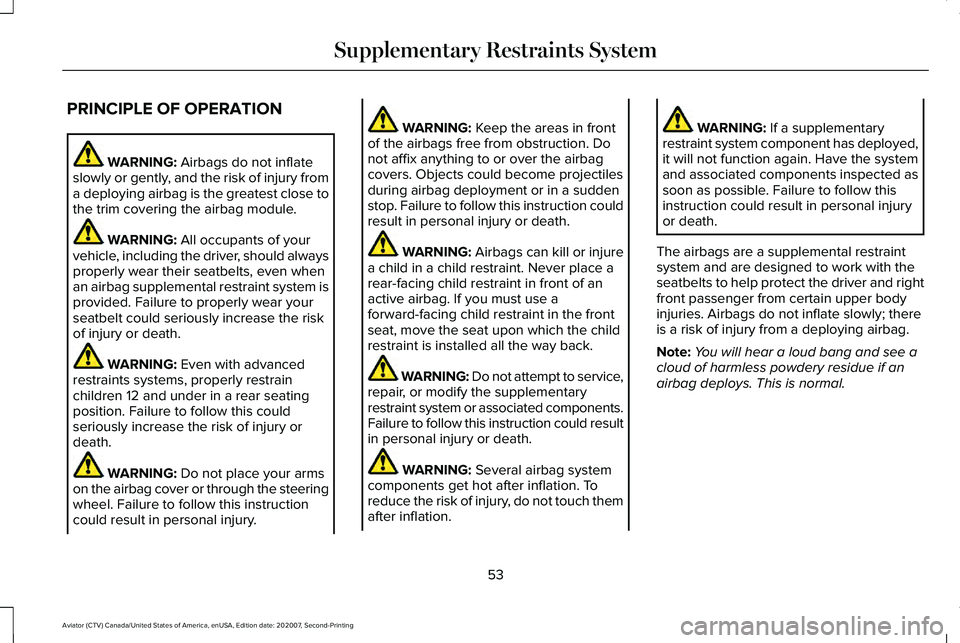
The airbags are a supplemental restraint
system and are designed to work with the
seatbelts to help protect the driver and right
front passenger from certain upper body
injuries. Airbags do not inflate slowly; there
is a risk of injury from a deploying airbag.
Note: You will hear a loud bang and see a
cloud of harmless powdery residue if an
airbag deploys. This is normal.
53
Aviator (CTV) Canada/United States of America, enUSA, Edition date: 202007, Second-Printing Supplementary Restraints System
Page 57 of 667
The airbags inflate and deflate rapidly upon
activation. After airbag deployment, it is
normal to notice a smoke-like, powdery
residue or smell the burnt propellant. This
may consist of cornstarch, talcum powder (to
lubricate the bag) or sodium compounds (for
example, baking soda) that result from the
combustion process that inflates the airbag.
Small amounts of sodium hydroxide may be
present which may irritate the skin and eyes,
but none of the residue is toxic.
While the system is designed to help reduce
serious injuries, contact with a deploying
airbag may also cause abrasions or swelling.
Temporary hearing loss is also a possibility
as a result of the noise associated with a
deploying airbag. Because airbags must
inflate rapidly and with considerable force,
there is the risk of death or serious injuries
such as fractures, facial and eye injuries or
internal injuries, particularly to occupants
who are not properly restrained or are
otherwise out of position at the time of airbag
deployment. Thus, it is extremely important
that occupants be properly restrained as far
away from the airbag module as possible
while maintaining vehicle control.
Routine maintenance of the airbags is not
required.
DRIVER AND PASSENGER
AIRBAGS
WARNING: Do not place your arms
on the airbag cover or through the steering
wheel. Failure to follow this instruction
could result in personal injury. WARNING:
Keep the areas in front
of the airbags free from obstruction. Do
not affix anything to or over the airbag
covers. Objects could become projectiles
during airbag deployment or in a sudden
stop. Failure to follow this instruction could
result in personal injury or death. WARNING: Airbags can kill or injure
a child in a child restraint. Never place a
rear-facing child restraint in front of an
active airbag. If you must use a
forward-facing child restraint in the front
seat, move the seat upon which the child
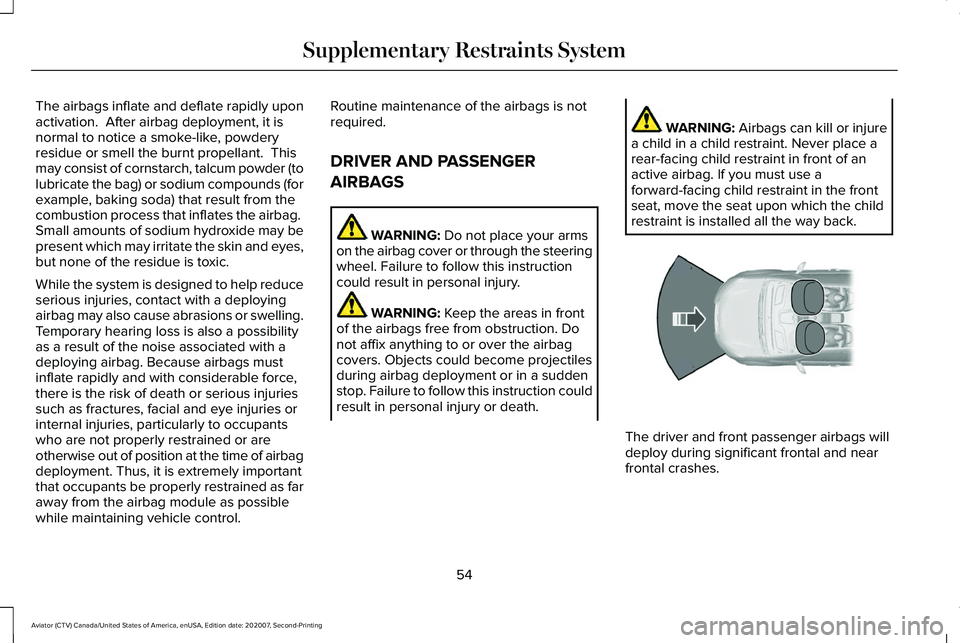
restraint is installed all the way back. The driver and front passenger airbags will
deploy during significant frontal and near
frontal crashes.
54
Aviator (CTV) Canada/United States of America, enUSA, Edition date: 202007, Second-Printing Supplementary Restraints System E151127
Page 67 of 667
WHAT IS 911 ASSIST
911 Assist is a SYNC system feature that can
call for help if you are in an accident. If a
crash deploys an airbag, excluding knee
airbags and rear inflatable seatbelts [if
equipped], or activates the fuel pump
shut-off, your SYNC-equipped vehicle may
be able to contact emergency services by
dialing 911 through a paired and connected
Bluetooth enabled phone. You can learn
more about the 911 Assist feature, by visiting:
Website
www.owner.lincoln.com
www.syncmyride.ca
www.syncmaroute.ca
Not all crashes will deploy an airbag or
activate the fuel pump shut-off, the triggers
for 911 Assist. If a connected cell phone
sustains damage or loses its connection to
SYNC during a crash, SYNC will search for
and try to connect to a previously paired cell
phone. SYNC will then attempt to call the
emergency services. Before making the call:
•
SYNC provides a short window of time,
about 10 seconds, to cancel the call. If
you fail to cancel the call, SYNC attempts
to dial 911.
• SYNC says the following, or a similar
message: SYNC will attempt to call 911,
to cancel the call, press Cancel on your
screen or press and hold the phone
button on your steering wheel.
If you do not cancel the call, and SYNC
makes a successful call, a pre-recorded
message plays for the 911 operator, and then
the occupant(s) in your vehicle is able to talk
with the operator. Be prepared to
immediately provide your name, phone
number and location, because not all 911
systems are capable of receiving this
information electronically.
During an emergency call, the system
transmits vehicle data to the emergency
service. See Data Privacy (page 16). EMERGENCY CALL
REQUIREMENTS WARNING: Do not wait for 911 Assist
to make an emergency call if you can do
it yourself. Dial emergency services
immediately to avoid delayed response
time which could increase the risk of
serious injury or death after a crash. If you
do not hear 911 Assist within five seconds
of the crash, the system or phone may be
damaged or non-functional. WARNING: Always place your phone
in a secure location in your vehicle so it
does not become a projectile or get
damaged in a crash. Failure to do so may
cause serious injury to someone or
damage the phone which could prevent
911 Assist from working properly. WARNING: Unless the 911 Assist
setting is set on before a crash, the system
will not dial for help which could delay
response time, potentially increasing the
risk of serious injury or death after a crash.
64
Aviator (CTV) Canada/United States of America, enUSA, Edition date: 202007, Second-Printing 911 Assist
Page 103 of 667
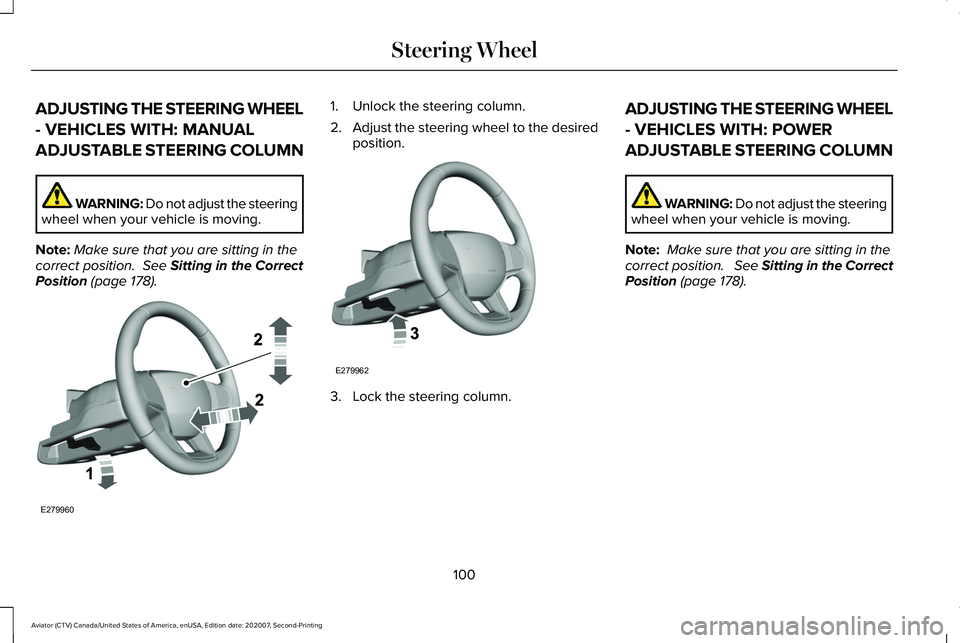
ADJUSTING THE STEERING WHEEL
- VEHICLES WITH: MANUAL
ADJUSTABLE STEERING COLUMN
WARNING: Do not adjust the steering
wheel when your vehicle is moving.
Note: Make sure that you are sitting in the
correct position. See Sitting in the Correct
Position (page 178). 1. Unlock the steering column.
2.
Adjust the steering wheel to the desired
position. 3. Lock the steering column.ADJUSTING THE STEERING WHEEL
- VEHICLES WITH: POWER
ADJUSTABLE STEERING COLUMN WARNING: Do not adjust the steering
wheel when your vehicle is moving.
Note: Make sure that you are sitting in the
correct position. See Sitting in the Correct
Position (page 178).
100
Aviator (CTV) Canada/United States of America, enUSA, Edition date: 202007, Second-Printing Steering WheelE279960 E279962