ABS LINCOLN AVIATOR 2023 User Guide
[x] Cancel search | Manufacturer: LINCOLN, Model Year: 2023, Model line: AVIATOR, Model: LINCOLN AVIATOR 2023Pages: 681, PDF Size: 9.33 MB
Page 291 of 681
The system detects large objects when you
shift into reverse (R) and any of the following
occur:
• Your vehicle is moving backward at low
speed.
• Your vehicle is stationary, but an object
is approaching the rear of your vehicle
at low speed.
• Your vehicle is moving backward at low
speed and an object is moving toward
your vehicle, for example another vehicle,
at low speed.
If your vehicle remains stationary for two
seconds, the audible warning turns off. If your
vehicle moves backward, the tone sounds
again.
Note:If the detected object is 12 in (30 cm)
or less from the rear bumper, the audible
warning does not turn off.Object Distance Indicator (If Equipped)
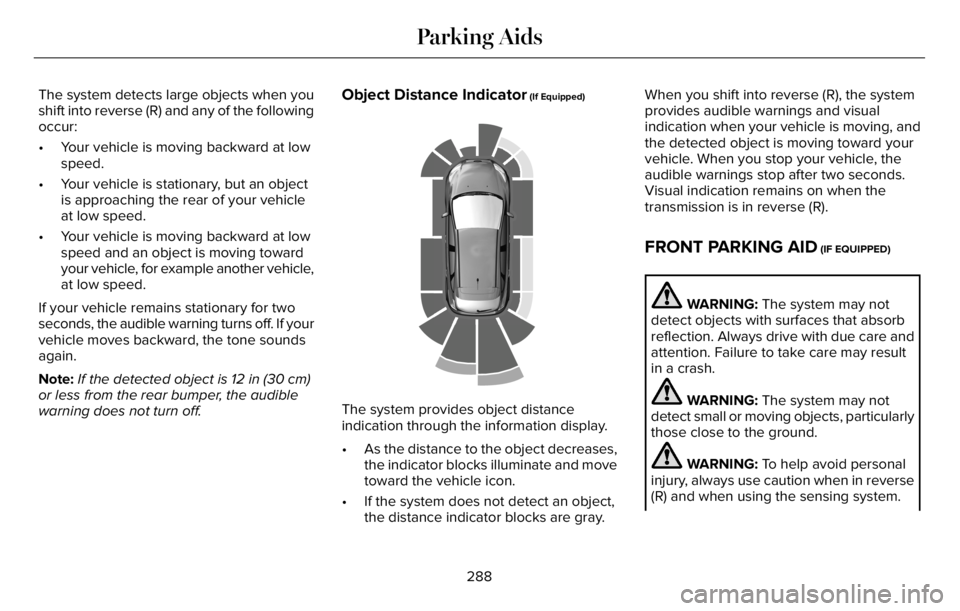
E190459
The system provides object distance
indication through the information display.
• As the distance to the object decreases,
the indicator blocks illuminate and move
toward the vehicle icon.
• If the system does not detect an object,
the distance indicator blocks are gray.When you shift into reverse (R), the system
provides audible warnings and visual
indication when your vehicle is moving, and
the detected object is moving toward your
vehicle. When you stop your vehicle, the
audible warnings stop after two seconds.
Visual indication remains on when the
transmission is in reverse (R).
FRONT PARKING AID (IF EQUIPPED)
WARNING: The system may not
detect objects with surfaces that absorb
reflection. Always drive with due care and
attention. Failure to take care may result
in a crash.
WARNING: The system may not
detect small or moving objects, particularly
those close to the ground.
WARNING: To help avoid personal
injury, always use caution when in reverse
(R) and when using the sensing system.
288
Parking Aids
Page 293 of 681
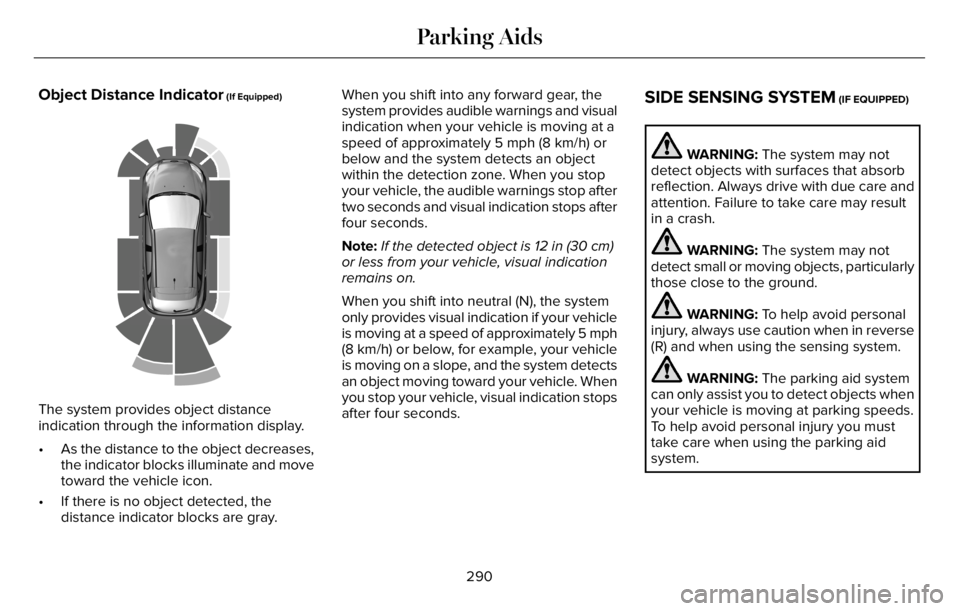
Object Distance Indicator (If Equipped)
E190459
The system provides object distance
indication through the information display.
• As the distance to the object decreases,
the indicator blocks illuminate and move
toward the vehicle icon.
• If there is no object detected, the
distance indicator blocks are gray.When you shift into any forward gear, the
system provides audible warnings and visual
indication when your vehicle is moving at a
speed of approximately 5 mph (8 km/h) or
below and the system detects an object
within the detection zone. When you stop
your vehicle, the audible warnings stop after
two seconds and visual indication stops after
four seconds.
Note:If the detected object is 12 in (30 cm)
or less from your vehicle, visual indication
remains on.
When you shift into neutral (N), the system
only provides visual indication if your vehicle
is moving at a speed of approximately 5 mph
(8 km/h) or below, for example, your vehicle
is moving on a slope, and the system detects
an object moving toward your vehicle. When
you stop your vehicle, visual indication stops
after four seconds.
SIDE SENSING SYSTEM (IF EQUIPPED)
WARNING: The system may not
detect objects with surfaces that absorb
reflection. Always drive with due care and
attention. Failure to take care may result
in a crash.
WARNING: The system may not
detect small or moving objects, particularly
those close to the ground.
WARNING: To help avoid personal
injury, always use caution when in reverse
(R) and when using the sensing system.
WARNING: The parking aid system
can only assist you to detect objects when
your vehicle is moving at parking speeds.
To help avoid personal injury you must
take care when using the parking aid
system.
290
Parking Aids
Page 327 of 681
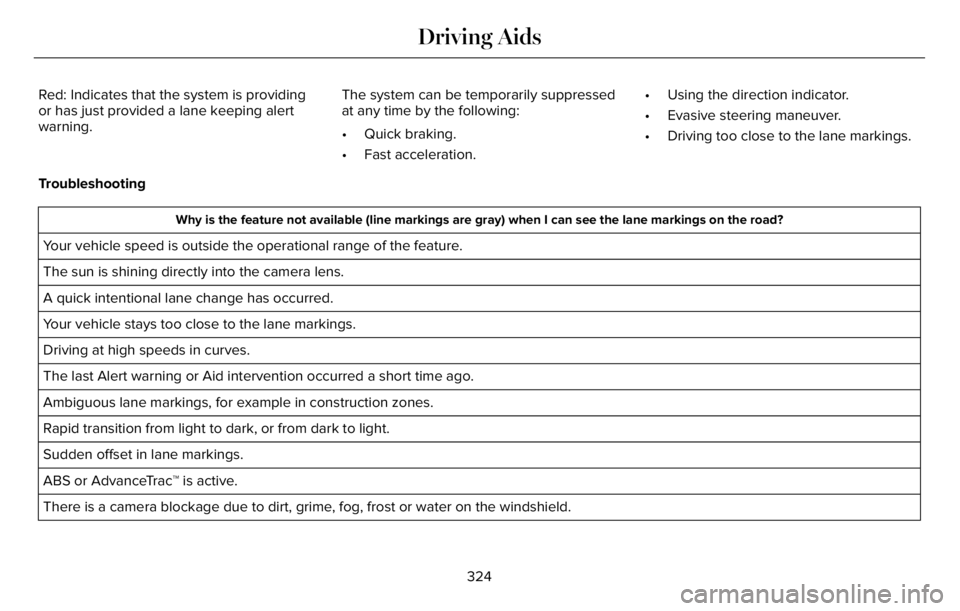
Red: Indicates that the system is providing
or has just provided a lane keeping alert
warning.The system can be temporarily suppressed
at any time by the following:
• Quick braking.
• Fast acceleration.• Using the direction indicator.
• Evasive steering maneuver.
• Driving too close to the lane markings.
Troubleshooting
Why is the feature not available (line markings are gray) when I can see the lane markings on the road?
Your vehicle speed is outside the operational range of the feature.
The sun is shining directly into the camera lens.
A quick intentional lane change has occurred.
Your vehicle stays too close to the lane markings.
Driving at high speeds in curves.
The last Alert warning or Aid intervention occurred a short time ago.
Ambiguous lane markings, for example in construction zones.
Rapid transition from light to dark, or from dark to light.
Sudden offset in lane markings.
ABS or AdvanceTrac™ is active.
There is a camera blockage due to dirt, grime, fog, frost or water on the windshield.
324
Driving Aids
Page 405 of 681
Do not use supplemental engine oil
additives. They could cause engine damage
that the vehicle warranty may not cover.
1. Clean the area surrounding the engine
oil filler cap before you remove it.
2. Remove the engine oil filler cap.
3. Add engine oil that meets our
specifications. See Capacities and
Specifications (page 465).
4. Reinstall the engine oil filler cap. Turn it
clockwise until you feel a strong
resistance.
Note: Do not add oil further than the
maximum mark. Oil levels above the
maximum mark may cause engine damage.
Note:Soak up any spillage with an
absorbent cloth immediately.
OIL CHANGE INDICATOR RESET
Use the information display controls on the
steering wheel to reset the oil change
indicator.From the main menu scroll to:
Action and description Message
Press the right arrow button,
then from this menu scroll to
the following message. Settings
Press the right arrow button,
then from this menu scroll to
the following message. Vehicle
Press the right arrow button,
then from this menu scroll to
the following message. Oil Life
Press and hold the OK button
until the instrument cluster
displays the following
message. Hold OK to
Reset
Reset Successful
When the oil change indicator
resets the instrument cluster
displays 100%.
Remaining Life
{00}%
Action and description Message
If the instrument cluster
displays one of the following
messages, repeat the
process.
Not Reset
Reset Cancelled
CHANGING THE ENGINE AIR
FILTER
WARNING: To reduce the risk of
vehicle damage and personal burn injuries,
do not start your engine with the air
cleaner removed and do not remove it
while the engine is running.
When changing the engine air filter, do not
allow debris or foreign material to enter the
air induction system. Engine components
are susceptible to damage not covered by
the vehicle Warranty.
402
Maintenance
Page 412 of 681
BRAKE FLUID CHECK
WARNING: Do not use any fluid other
than the recommended brake fluid as this
will reduce brake efficiency. Use of
incorrect fluid could result in the loss of
vehicle control, serious personal injury or
death.
WARNING: Only use brake fluid from
a sealed container. Contamination with dirt,
water, petroleum products or other
materials may result in brake system
damage or failure. Failure to adhere to this
warning could result in the loss of vehicle
control, serious personal injury or death.
WARNING: Do not allow the fluid to
touch your skin or eyes. If this happens,
rinse the affected areas immediately with
plenty of water and contact your physician.
WARNING: The brake system could
be affected if the brake fluid level is below
the MIN mark or above the MAX mark on
the brake fluid reservoir.
E170684
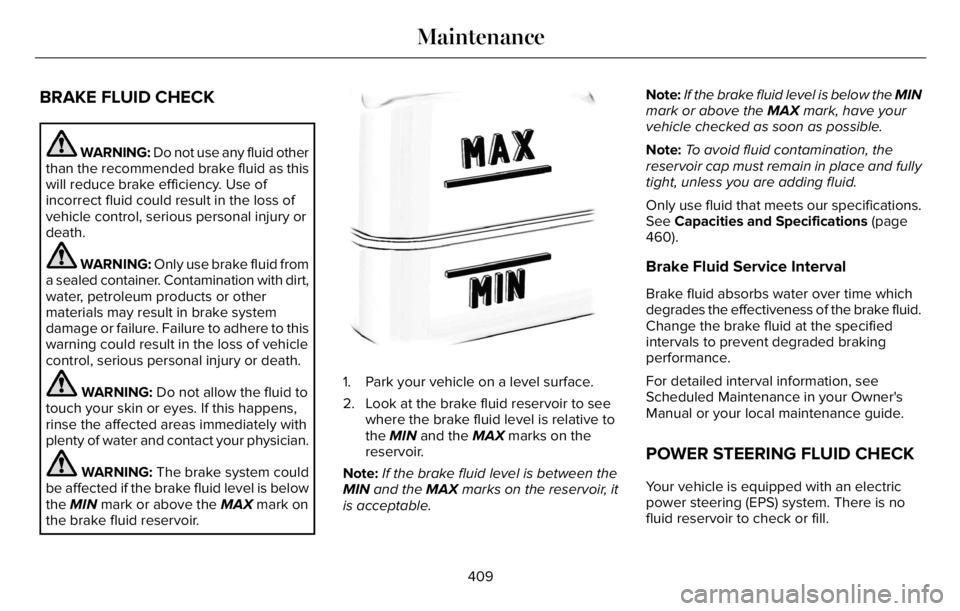
1. Park your vehicle on a level surface.
2. Look at the brake fluid reservoir to see
where the brake fluid level is relative to
the MIN and the MAX marks on the
reservoir.
Note:If the brake fluid level is between the
MIN and the MAX marks on the reservoir, it
is acceptable.Note:If the brake fluid level is below the MIN
mark or above the MAX mark, have your
vehicle checked as soon as possible.
Note:To avoid fluid contamination, the
reservoir cap must remain in place and fully
tight, unless you are adding fluid.
Only use fluid that meets our specifications.
See Capacities and Specifications (page
460).
Brake Fluid Service Interval
Brake fluid absorbs water over time which
degrades the effectiveness of the brake fluid.
Change the brake fluid at the specified
intervals to prevent degraded braking
performance.
For detailed interval information, see
Scheduled Maintenance in your Owner's
Manual or your local maintenance guide.
POWER STEERING FLUID CHECK
Your vehicle is equipped with an electric
power steering (EPS) system. There is no
fluid reservoir to check or fill.
409
Maintenance
Page 580 of 681
Transferable Coverage
If you sell your vehicle before your Lincoln
Protect extended service plan coverage
expires, you can transfer any remaining
coverage to the new owner. Which should
give you and your potential buyer a little
more peace of mind.
Less Cost to Properly Maintain Your Vehicle
The Lincoln Protect extended service plan
also offers a Premium Maintenance Plan that
covers all scheduled maintenance, and
selected wear items. The coverage is
prepaid, so you never have to worry about
the cost of your vehicle’s maintenance.
Covered maintenance includes:
• Windshield wiper blades.
• Spark plugs.
• Clutch disc - if equipped.
• Brake pads and linings.
• Shock absorbers and struts.
• Engine cooling hoses, clamps and
o-rings.• Engine belts.
• Diesel exhaust fluid replenishment - if
equipped.
Interest Free Finance Options
Just a 10% down payment will provide you
with an affordable, no interest, no fee
payment program allowing you all the
security and benefits Lincoln Protect
extended service plan has to offer while
paying over time. You are pre-approved with
no credit check or hassles. To learn more,
call our Lincoln Protect extended service
plan specialists at 800-367-3377.
Complete the following information and mail
to:
Lincoln Protect Extended Service Plan
P.O. Box 321067
Detroit, MI 48232Lincoln Protect - Canada Only
You can get more protection for your vehicle
by purchasing a Lincoln Protect extended
service plan. Lincoln Protect extended
service plan is the only service contract
backed by Lincoln. Depending on the plan
you purchase, Lincoln Protect extended
service plan provides benefits such as:
• Rental reimbursement.
• Coverage for certain maintenance and
wear items.
• Protection against repair costs after your
New Vehicle Limited Warranty Coverage
expires.
• Roadside Assistance benefits.
577
Lincoln Protect
Page 585 of 681
Check Every Six Months
Seatbelts and seat latches for wear and function.
Safety warning lamps (brake, ABS, airbag and seatbelt) for operation.
Washer spray and wiper operation. Clean or replace blades as necessary.
Multi-Point Inspection
In order to keep your vehicle running right,
it is important to have the systems on your
vehicle checked regularly. This can help
identify potential issues and prevent major
problems. We recommend having the
following multi-point inspection performed
at every scheduled maintenance interval to
help make sure your vehicle keeps running
great.
Multi-Point Inspection
Hazard warning system operation Accessory drive belt(s)
Horn operation Battery performance
Radiator, cooler, heater and air conditioning hoses Engine air filter
Suspension components for leaks or damage Exhaust system
582
Scheduled Maintenance
Page 670 of 681
3
360 Degree Camera...................................300
9
911 Assist...........................................................66
A
A/CSee: Climate Control..........................................165
About This Manual...........................................11
ABS
See: Brakes...........................................................271
ABS driving hintsSee: Hints on Driving With Anti-Lock
Brakes...............................................................272
Accessories....................................................574
Accessories
See: Replacement Parts Recommendation.....14
Active Park Assist.........................................292
Adaptive Cruise Control.............................305
Adaptive Cruise Control –
Troubleshooting..............................................316
Adaptive Cruise Control Indicators -
Vehicles With: Adaptive Cruise Control
With Lane Centering..................................312Adaptive Cruise Control Indicators -
Vehicles With: Adaptive Cruise Control
With Stop and Go.......................................313
Adaptive Cruise Control Indicators -
Vehicles With: Intelligent Adaptive Cruise
Control...........................................................313
Adaptive Cruise Control Limitations -
Vehicles With: Adaptive Cruise Control
With Lane Centering.................................307
Adaptive Cruise Control Limitations -
Vehicles With: Adaptive Cruise Control
With Stop and Go......................................307
Adaptive Cruise Control Precautions -
Vehicles With: Adaptive Cruise Control
With Lane Centering.................................305
Adaptive Cruise Control Precautions -
Vehicles With: Adaptive Cruise Control
With Stop and Go......................................306
Adaptive Cruise Control –
Troubleshooting..........................................316
Adaptive Cruise Control – Information
Messages..........................................................316
Adaptive Headlamps.....................................114
Adjusting the Headlamps............................416
Adjusting the Set Speed Tolerance..........316
Adjusting the Steering Wheel - Vehicles
With: Manual Adjustable Steering
Column..........................................................102Adjusting the Steering Wheel - Vehicles
With: Power Adjustable Steering
Column..........................................................102
AFS
See: Adaptive Headlamps.................................114
Airbag Disposal...............................................64
Air Conditioning
See: Climate Control..........................................165
Air FilterSee: Changing the Engine Air Filter..............402
Air Suspension..............................................352
Alarm
See: Anti-Theft Alarm.........................................100
All-Wheel Drive.............................................264
Ambient Lighting............................................117
Anti-Theft Alarm............................................100
Appendices...................................................630
Apps................................................................552
At a Glance.......................................................24
Audible Warnings and Indicators..............135
Audio Control.................................................104
Audio System................................................496
General Information...........................................496
Audio Unit.......................................................497
Auto Air Refresh Hints..................................175
Auto Air Refresh Indicators.........................174
Auto Hold.......................................................275
Autolamps........................................................112
667
Index