brake sensor LINCOLN AVIATOR 2023 User Guide
[x] Cancel search | Manufacturer: LINCOLN, Model Year: 2023, Model line: AVIATOR, Model: LINCOLN AVIATOR 2023Pages: 681, PDF Size: 9.33 MB
Page 310 of 681
Hilly Condition Usage
You should select a lower gear when the
system is active in situations such as
prolonged downhill driving on steep grades,
for example in mountainous areas. The
system needs additional engine braking in
these situations to reduce the load on the
vehicle’s regular brake system to prevent it
from overheating.
Note:An audible alarm sounds and the
system shuts down if it applies brakes for an
extended period of time. This allows the
brakes to cool. The system functions
normally again after the brakes cool.
ADAPTIVE CRUISE CONTROL
LIMITATIONS - VEHICLES WITH:
ADAPTIVE CRUISE CONTROL
WITH LANE CENTERING
Adaptive cruise control limitations apply to
lane centering unless stated otherwise or
contradicted by a lane centering limitation.
See Adaptive Cruise Control Limitations
(page 307).The system may not correctly operate in any
of the following conditions:
• The lane is too narrow or wide.
• The system does not detect at least one
lane marking or when lanes merge or
split.
• Limited steering torque input is applied.
• Areas under construction or new
infrastructure.
• When modifications to the steering
system have been made.
• When using a spare tire.
Note:The driving assistance torque is limited
and may not be sufficient for all driving
situations such as driving through tight
curves or driving through curves at high
speeds.
Note:In exceptional conditions, the system
may deviate from the center line.
ADAPTIVE CRUISE CONTROL
LIMITATIONS - VEHICLES WITH:
ADAPTIVE CRUISE CONTROL
WITH STOP AND GO
Sensor Limitations
WARNING: On rare occasions,
detection issues can occur due to the road
infrastructures, for example bridges,
tunnels and safety barriers. In these cases,
the system may brake late or
unexpectedly. At all times, you are
responsible for controlling your vehicle,
supervising the system and intervening, if
required.
WARNING: If the system
malfunctions, have your vehicle checked
as soon as possible.
WARNING: Large contrasts in outside
lighting can limit sensor performance.
307
Adaptive Cruise Control (If Equipped)
Page 311 of 681
WARNING: The system only warns
of vehicles detected by the radar sensor.
In some cases there may be no warning
or a delayed warning. Apply the brakes
when necessary. Failure to follow this
instruction could result in personal injury
or death.
WARNING: The system may not
detect stationary or slow moving vehicles
below 6 mph (10 km/h).
WARNING: The system does not
detect pedestrians or objects in the road.
WARNING: The system does not
detect oncoming vehicles in the same lane.
WARNING: The system may not
operate properly if the sensor is blocked.
Keep the windshield free from obstruction.
WARNING: The sensor may
incorrectly track lane markings as other
structures or objects. This can result in a
false or missed warning.
E307893E307893
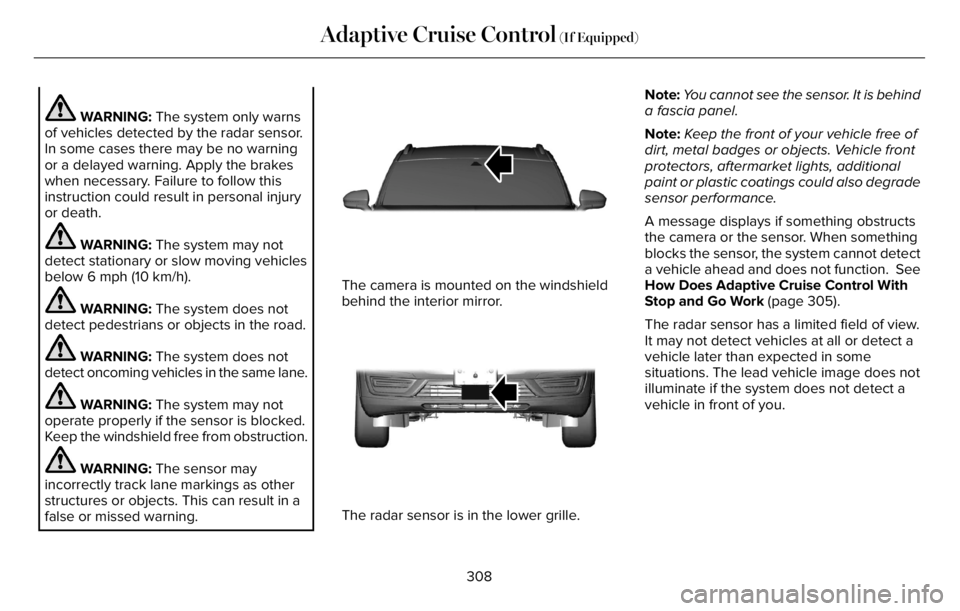
The camera is mounted on the windshield
behind the interior mirror.
E307892E307892
The radar sensor is in the lower grille.Note:You cannot see the sensor. It is behind
a fascia panel.
Note:Keep the front of your vehicle free of
dirt, metal badges or objects. Vehicle front
protectors, aftermarket lights, additional
paint or plastic coatings could also degrade
sensor performance.
A message displays if something obstructs
the camera or the sensor. When something
blocks the sensor, the system cannot detect
a vehicle ahead and does not function. See
How Does Adaptive Cruise Control With
Stop and Go Work (page 305).
The radar sensor has a limited field of view.
It may not detect vehicles at all or detect a
vehicle later than expected in some
situations. The lead vehicle image does not
illuminate if the system does not detect a
vehicle in front of you.
308
Adaptive Cruise Control (If Equipped)
Page 313 of 681
The system may cancel and set the parking
brake if:
• You unbuckle the seatbelt and open the
driver door after you stop your vehicle.
• Your vehicle is at a stop continuously for
more than three minutes.
The system may turn off or prevent activating
when requested if:
• The vehicle has a blocked sensor.
• The brake temperature is too high.
• There is a failure in the system or a
related system.
SETTING THE ADAPTIVE CRUISE
CONTROL SPEED
Drive to the speed you prefer.
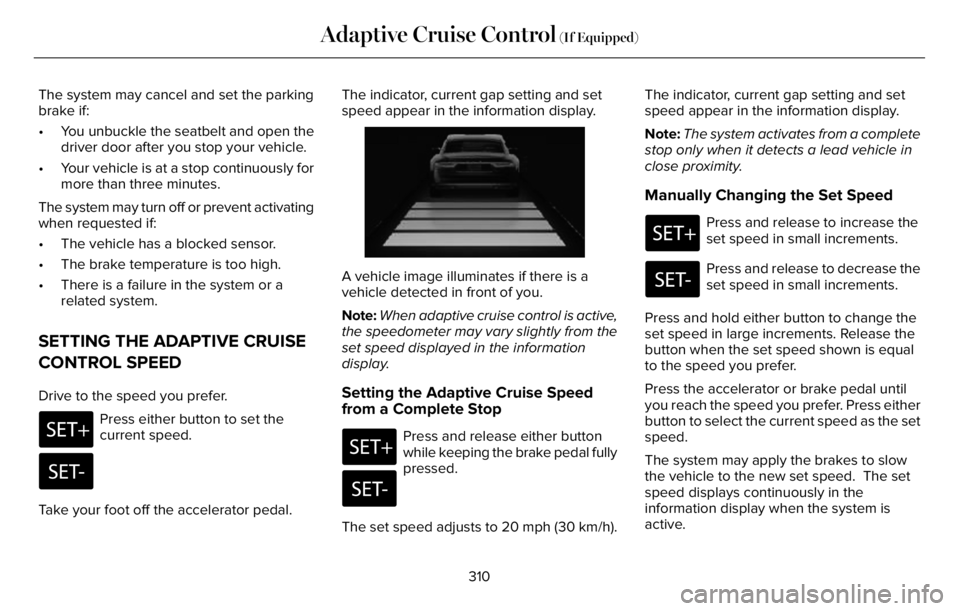
Press either button to set the
current speed.
Take your foot off the accelerator pedal.The indicator, current gap setting and set
speed appear in the information display.
E2556686E25566866
A vehicle image illuminates if there is a
vehicle detected in front of you.
Note:When adaptive cruise control is active,
the speedometer may vary slightly from the
set speed displayed in the information
display.
Setting the Adaptive Cruise Speed
from a Complete Stop
Press and release either button
while keeping the brake pedal fully
pressed.
The set speed adjusts to 20 mph (30 km/h).The indicator, current gap setting and set
speed appear in the information display.
Note:The system activates from a complete
stop only when it detects a lead vehicle in
close proximity.
Manually Changing the Set Speed
Press and release to increase the
set speed in small increments.
Press and release to decrease the
set speed in small increments.
Press and hold either button to change the
set speed in large increments. Release the
button when the set speed shown is equal
to the speed you prefer.
Press the accelerator or brake pedal until
you reach the speed you prefer. Press either
button to select the current speed as the set
speed.
The system may apply the brakes to slow
the vehicle to the new set speed. The set
speed displays continuously in the
information display when the system is
active.
310
Adaptive Cruise Control (If Equipped)
Page 320 of 681
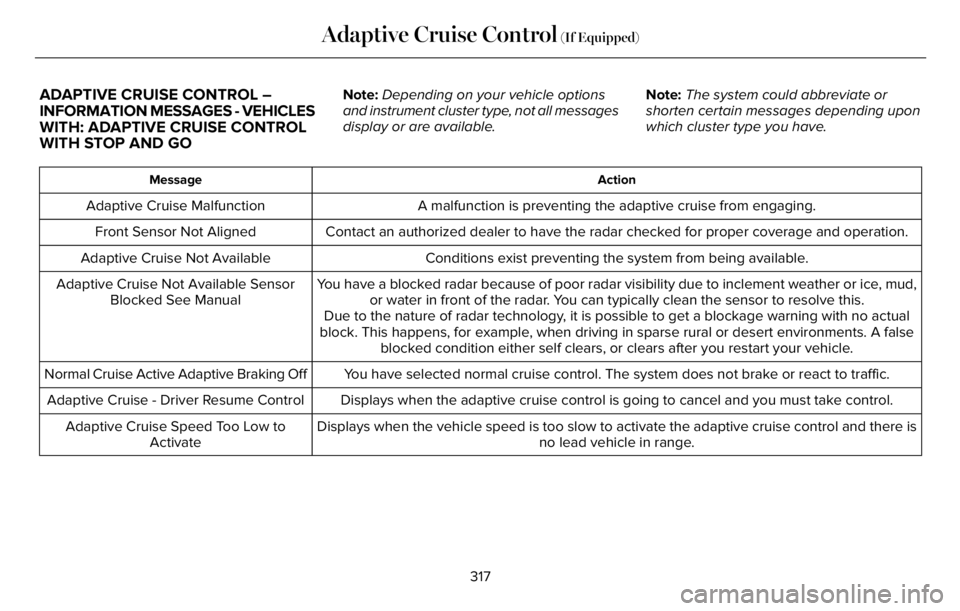
ADAPTIVE CRUISE CONTROL –
INFORMATION MESSAGES - VEHICLES
WITH: ADAPTIVE CRUISE CONTROL
WITH STOP AND GONote:Depending on your vehicle options
and instrument cluster type, not all messages
display or are available.Note:The system could abbreviate or
shorten certain messages depending upon
which cluster type you have.
Action Message
A malfunction is preventing the adaptive cruise from engaging. Adaptive Cruise Malfunction
Front Sensor Not Aligned Contact an authorized dealer to have the radar checked for proper coverage and operation.
Conditions exist preventing the system from being available. Adaptive Cruise Not Available
You have a blocked radar because of poor radar visibility due to inclement weather or ice, mud,
or water in front of the radar. You can typically clean the sensor to resolve this. Adaptive Cruise Not Available Sensor
Blocked See Manual
Due to the nature of radar technology, it is possible to get a blockage warning with no actual
block. This happens, for example, when driving in sparse rural or desert environments. A false
blocked condition either self clears, or clears after you restart your vehicle.
You have selected normal cruise control. The system does not brake or react to traffic. Normal Cruise Active Adaptive Braking Off
Displays when the adaptive cruise control is going to cancel and you must take control. Adaptive Cruise - Driver Resume Control
Displays when the vehicle speed is too slow to activate the adaptive cruise control and there is
no lead vehicle in range. Adaptive Cruise Speed Too Low to
Activate
317
Adaptive Cruise Control (If Equipped)
Page 341 of 681
WARNING: In situations where the
vehicle camera has limited detection
capability, this may reduce system
performance. These situations include but
are not limited to direct or low sunlight,
vehicles at night without tail lights,
unconventional vehicle types, pedestrians
with complex backgrounds, running
pedestrians, partly obscured pedestrians,
or pedestrians that the system cannot
distinguish from a group. Failure to take
care may result in the loss of control of
your vehicle, serious personal injury or
death.
WARNING: The system cannot help
prevent all crashes. Do not rely on this
system to replace driver judgment and the
need to maintain a safe distance and
speed.
Using the Pre-Collision Assist System
The system is active at speeds above
approximately3 mph (5 km/h)and pedestrian
detection is active at speeds up to 50 mph
(80 km/h).
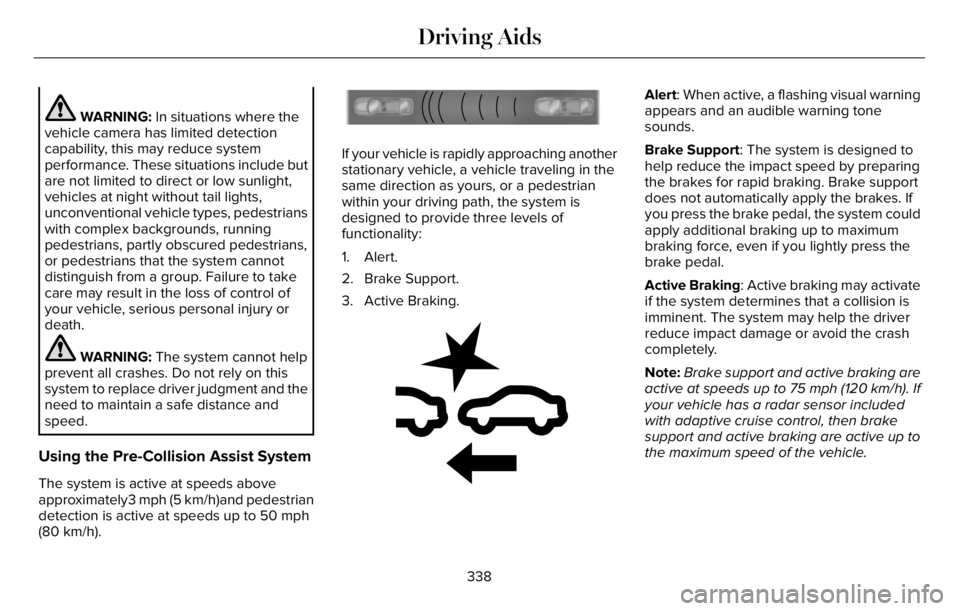
E156130
If your vehicle is rapidly approaching another
stationary vehicle, a vehicle traveling in the
same direction as yours, or a pedestrian
within your driving path, the system is
designed to provide three levels of
functionality:
1. Alert.
2. Brake Support.
3. Active Braking.
E255268E255268
Alert: When active, a flashing visual warning
appears and an audible warning tone
sounds.
Brake Support: The system is designed to
help reduce the impact speed by preparing
the brakes for rapid braking. Brake support
does not automatically apply the brakes. If
you press the brake pedal, the system could
apply additional braking up to maximum
braking force, even if you lightly press the
brake pedal.
Active Braking: Active braking may activate
if the system determines that a collision is
imminent. The system may help the driver
reduce impact damage or avoid the crash
completely.
Note:Brake support and active braking are
active at speeds up to 75 mph (120 km/h). If
your vehicle has a radar sensor included
with adaptive cruise control, then brake
support and active braking are active up to
the maximum speed of the vehicle.
338
Driving Aids
Page 343 of 681
Note:Road users are defined as another
stationary vehicle in the same lane or a
vehicle traveling in the same lane in the
same direction as you.
Evasive steering assist only activates when
all the following occur:
• Automatic emergency braking and
evasive steering assist are on.
• The system detects a road user ahead
and starts to apply the brakes.
• You significantly turn the steering wheel
to steer around a road user.
Note:The system does not automatically
steer around a road user. If you do not turn
the steering wheel, the system does not
activate.
Note:The system does not activate if the
distance to the road user ahead is too small
and the system cannot avoid a crash.
Note:The system does not activate with
cyclists or pedestrians.Adjusting the Pre-Collision Assist
Settings
You can adjust the following settings by
using the touchscreen. See General
Information (page 136).
• You can change alert and distance alert
sensitivity to one of three possible
settings.
• You can switch distance indication and
alert on or off.
• If required, you can switch active braking
on or off.
• If required, you can switch evasive
steering assist on or off.
Note:Active braking and evasive steering
assist automatically turn on every time you
switch the ignition on.
Note:If you switch active braking off, evasive
steering assist turns off.
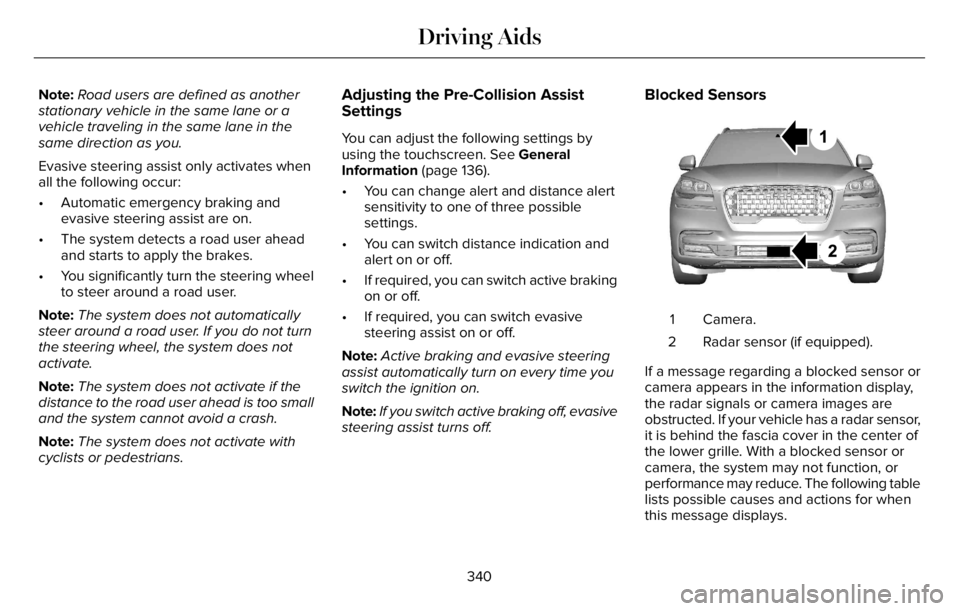
Blocked Sensors
E288869E288869
Camera. 1
Radar sensor (if equipped). 2
If a message regarding a blocked sensor or
camera appears in the information display,
the radar signals or camera images are
obstructed. If your vehicle has a radar sensor,
it is behind the fascia cover in the center of
the lower grille. With a blocked sensor or
camera, the system may not function, or
performance may reduce. The following table
lists possible causes and actions for when
this message displays.
340
Driving Aids
Page 388 of 681
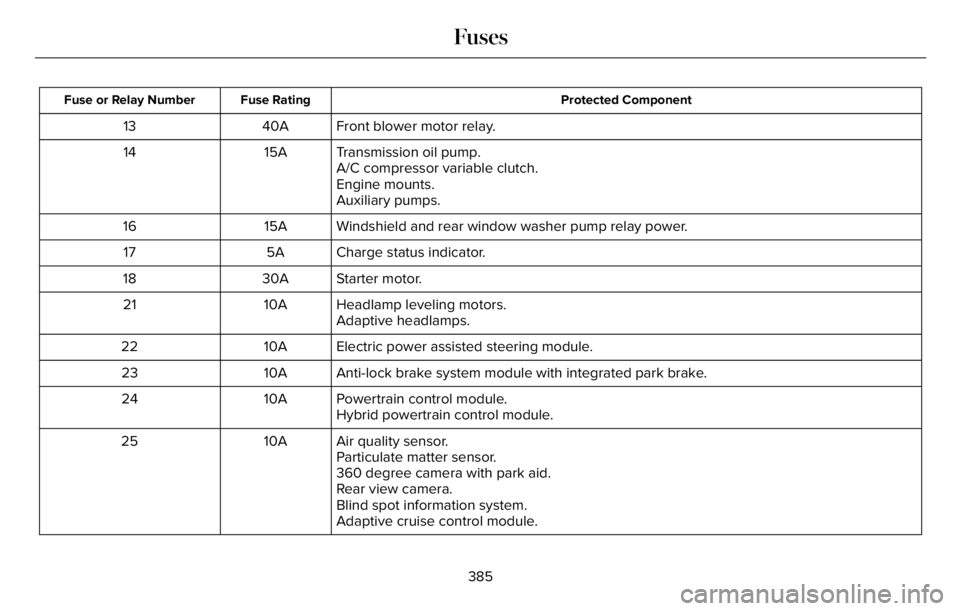
Protected Component Fuse Rating Fuse or Relay Number
Front blower motor relay. 40A 13
Transmission oil pump. 15A 14
A/C compressor variable clutch.
Engine mounts.
Auxiliary pumps.
Windshield and rear window washer pump relay power. 15A 16
Charge status indicator. 5A 17
Starter motor. 30A 18
Headlamp leveling motors. 10A 21
Adaptive headlamps.
Electric power assisted steering module. 10A 22
Anti-lock brake system module with integrated park brake. 10A 23
Powertrain control module. 10A 24
Hybrid powertrain control module.
Air quality sensor. 10A 25
Particulate matter sensor.
360 degree camera with park aid.
Rear view camera.
Blind spot information system.
Adaptive cruise control module.
385
Fuses
Page 414 of 681
For longer, trouble-free operation, keep the
top of the battery clean and dry and the
battery cables tightly fastened to the battery
terminals. If any corrosion is present on the
battery or terminals, remove the cables from
the terminals and clean with a wire brush.
You can neutralize the acid with a solution
of baking soda and water.
We recommend that you disconnect the
negative battery cable terminal from the
battery if you plan to store your vehicle for
an extended period.
Note:If you only disconnect the negative
battery cable terminal, make sure it is
isolated or placed away from the battery
terminal to avoid unintended connection or
arcing.
If you replace the battery make sure it
matches the electrical requirements of your
vehicle.If you disconnect or replace the battery and
your vehicle has an automatic transmission,
it must relearn its adaptive strategy. Because
of this, the transmission may shift firmly when
first driven. This is normal operation while
the transmission fully updates its operation
to optimum shift feel.
Battery Sensor Reset
When you install a new battery, reset the
battery sensor by doing the following:
1. Switch the ignition on, and leave the
engine off.
Note:Complete Steps 2 and 3 within 10
seconds.
2. Flash the high beam headlamps five
times, ending with the high beams off.
3. Press and release the brake pedal three
times.
The battery warning lamp flashes three times
to confirm that the reset is successful.
Battery Management System (If Equipped)
The system monitors battery conditions and
takes actions to extend battery life. If
excessive battery drain is detected, the
system temporarily disables some electrical
systems to protect the battery.
Systems included are:
• Heated rear window.
• Heated seats.
• Climate control.
• Heated steering wheel.
• Audio unit.
• Navigation system.
A message may appear in the information
display to alert you that battery protection
actions are active. This message is only for
notification that an action is taking place, and
not intended to indicate an electrical problem
or that the battery requires replacement.
411
Maintenance
Page 417 of 681
39E371794
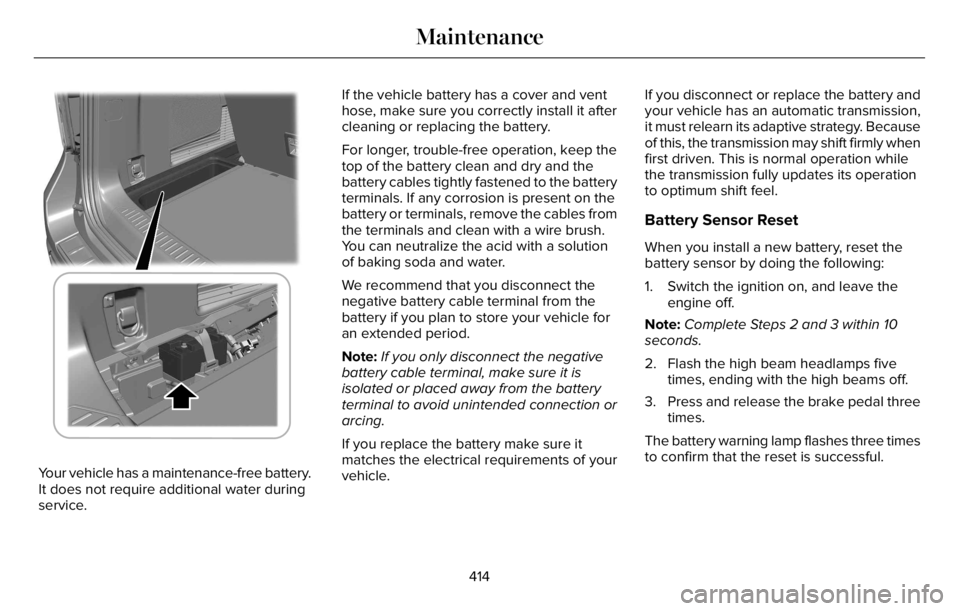
Your vehicle has a maintenance-free battery.
It does not require additional water during
service.If the vehicle battery has a cover and vent
hose, make sure you correctly install it after
cleaning or replacing the battery.
For longer, trouble-free operation, keep the
top of the battery clean and dry and the
battery cables tightly fastened to the battery
terminals. If any corrosion is present on the
battery or terminals, remove the cables from
the terminals and clean with a wire brush.
You can neutralize the acid with a solution
of baking soda and water.
We recommend that you disconnect the
negative battery cable terminal from the
battery if you plan to store your vehicle for
an extended period.
Note:If you only disconnect the negative
battery cable terminal, make sure it is
isolated or placed away from the battery
terminal to avoid unintended connection or
arcing.
If you replace the battery make sure it
matches the electrical requirements of your
vehicle.If you disconnect or replace the battery and
your vehicle has an automatic transmission,
it must relearn its adaptive strategy. Because
of this, the transmission may shift firmly when
first driven. This is normal operation while
the transmission fully updates its operation
to optimum shift feel.
Battery Sensor Reset
When you install a new battery, reset the
battery sensor by doing the following:
1. Switch the ignition on, and leave the
engine off.
Note:Complete Steps 2 and 3 within 10
seconds.
2. Flash the high beam headlamps five
times, ending with the high beams off.
3. Press and release the brake pedal three
times.
The battery warning lamp flashes three times
to confirm that the reset is successful.
414
Maintenance
Page 454 of 681
When Inflating Your Tires
WARNING: Do not use the tire
pressure displayed in the information
display as a tire pressure gauge. Failure to
follow this instruction could result in
personal injury or death.
When putting air into your tires (such as at a
gas station or in your garage), the tire
pressure monitoring system may not respond
immediately to the air added to your tires.
It may take up to two minutes of driving over
20 mph (32 km/h) for the light to turn off after
you have filled your tires to the
recommended inflation pressure.
How Temperature Affects Your Tire
Pressure
The tire pressure monitoring system monitors
tire pressure in each pneumatic tire. While
driving in a normal manner, a typical
passenger tire inflation pressure may
increase about 2–4 psi (14–28 kPa) from a
cold start situation. If the vehicle is stationary
overnight with the outside temperaturesignificantly lower than the daytime
temperature, the tire pressure may decrease
about 3 psi (21 kPa) for a drop of 30°F (17°C)
in ambient temperature. This lower pressure
value may be detected by the tire pressure
monitoring system as being significantly
lower than the recommended inflation
pressure and activate the system warning
light for low tire pressure. If the low tire
pressure warning light is on, visually check
each tire to verify that no tire is flat. If one or
more tires are flat, repair as necessary.
Check the air pressure in the road tires. If
any tire is under-inflated, carefully drive the
vehicle to the nearest location where air can
be added to the tires. Inflate all the tires to
the recommended inflation pressure.
CHANGING A ROAD WHEEL
If you get a flat tire when driving, do not
apply the brake heavily. Instead, gradually
decrease your speed. Hold the steering
wheel firmly and slowly move to a safe place
on the side of the road.Have a flat serviced by an authorized dealer
in order to prevent damage to the tire
pressure monitoring system sensors. See
Tire Pressure Monitoring System (page 447).
Replace the spare tire with a road tire as
soon as possible. During repairing or
replacing of the flat tire, have the authorized
dealer inspect the tire pressure monitoring
system sensor for damage.
Note:You should only use tire sealants in
roadside emergencies as they may cause
damage to the tire pressure monitoring
system sensor.
Note:The tire pressure monitoring system
indicator light illuminates when the spare
tire is in use. To restore the full function of
the monitoring system, all road wheels
equipped with tire pressure monitoring
sensors must be mounted on the vehicle.Dissimilar Spare Wheel and Tire
Assembly Information
WARNING: Failure to follow these
guidelines could result in an increased risk
of loss of vehicle control, injury or death.
451
Wheels and Tires