charging LINCOLN AVIATOR 2023 Owners Manual
[x] Cancel search | Manufacturer: LINCOLN, Model Year: 2023, Model line: AVIATOR, Model: LINCOLN AVIATOR 2023Pages: 681, PDF Size: 9.33 MB
Page 7 of 681
Rear Seats ......................................................187
Heated Seats ..................................................191
Ventilated Seats ...........................................192
Rear Occupant Alert System
What is the Rear Occupant Alert System
.......................................................................193
How Does the Rear Occupant Alert System
Work ............................................................193
Rear Occupant Alert System Precautions
.......................................................................193
Rear Occupant Alert System Limitations
.......................................................................193
Switching Rear Occupant Alert System On
and Off ........................................................194
Rear Occupant Alert System Indicators
.......................................................................194
Rear Occupant Alert System Audible
Warnings ....................................................194
Garage Door Opener
Garage Door Opener Introduction ..........195
Garage Door Opener Precautions and
Frequencies ..............................................195Programming the Garage Door Opener
.......................................................................196
Auxiliary Power Points
Auxiliary Power Points ...............................200
Wireless Accessory Charger
What Is the Wireless Accessory Charger
......................................................................202
Wireless Accessory Charger Precautions
......................................................................202
Locating the Wireless Accessory Charger
......................................................................202
Charging a Wireless Device .....................202
Storage Compartments
Overhead Console .....................................204
Starting and Stopping the Engine
General Information ...................................205
Keyless Starting ...........................................205
Starting a Gasoline Engine .......................206Starting a Hybrid Electric Vehicle System
.......................................................................210
Engine Block Heater ...................................213
Unique Driving Characteristics
Auto-Start-Stop - Excluding: Plug-In Hybrid
Electric Vehicle (PHEV) ...........................215
Hybrid Vehicle Operation ...........................217
Plug-In Hybrid Vehicle Operation ............219
Hybrid Vehicle Frequently Asked
Questions ...................................................221
Fuel and Refueling
Safety Precautions ......................................223
Fuel Quality ...................................................224
Fuel Filler Funnel Location .......................224
Running Out of Fuel ...................................225
Refueling - Excluding: Hybrid Electric
Vehicle (HEV) ...........................................226
Refueling - Plug-In Hybrid Electric Vehicle
(PHEV) ........................................................229
Fuel Consumption .......................................233
4
Table of Contents
Page 8 of 681
Engine Emission Control
Emission Law ................................................234
Catalytic Converter .....................................235
High Voltage Battery - Plug-In
Hybrid Electric Vehicle (PHEV)
General Information ....................................238
Charging the High Voltage Battery -
Plug-In Hybrid Electric Vehicle (PHEV)
......................................................................238
Transmission
Automatic Transmission ............................259
All-Wheel Drive
Using All-Wheel Drive ................................264
Brakes
General Information .....................................271
Hints on Driving With Anti-Lock Brakes
......................................................................2 7 2
Electric Parking Brake ................................272
Hill Start Assist .............................................274Auto Hold ......................................................275
Reverse Braking Assist
What Is Reverse Braking Assist ...............277
How Does Reverse Braking Assist Work
.......................................................................277
Reverse Braking Assist Precautions .......277
Switching Reverse Braking Assist On and
Off ...............................................................278
Overriding Reverse Braking Assist .........278
Reverse Braking Assist Indicators ..........278
Reverse Braking Assist – Troubleshooting
......................................................................2 7 9
Traction Control
Principle of Operation .................................281
Using Traction Control ................................281
Stability Control
Principle of Operation ................................282
Using Stability Control ...............................283
Hill Descent Control
What Is Hill Descent Control ....................284Switching Hill Descent Control On and Off
......................................................................284
Setting the Hill Descent Speed ...............284
Hill Descent Control Indicator .................285
Parking Aids
Principle of Operation ................................286
Rear Parking Aid ..........................................286
Front Parking Aid ........................................288
Side Sensing System .................................290
Active Park Assist .......................................292
Rear View Camera ......................................297
360 Degree Camera ..................................300
Cruise Control
What Is Cruise Control ...............................303
Switching Cruise Control On and Off .....303
Setting the Cruise Control Speed ...........303
Canceling the Set Speed ..........................304
Resuming the Set Speed ..........................304
Cruise Control Indicators ..........................304
5
Table of Contents
Page 142 of 681
Navigation (If Equipped)
Navigation
Menu options covered in the SYNC chapter. See Navigation (page 538).
Hybrid Display Information
Displays unique hybrid vehicle information
when you shut off your vehicle or come to a
stop.
Brake Coach
Appears after the vehicle has come to a stop.
It coaches you to brake in a manner that
maximizes the amount of energy returned
through the regenerative braking system.The percent displayed is an indication of the
regenerative braking efficiency with 100%
representing the maximum amount of energy
recovery. Brake Coach can be turned on or
off in the settings menu.
Trip Summary
Displays when you shut off your vehicle. The
values are cumulative since you last started
your vehicle.The information shown is the same as the
This Trip on demand screen. See
Personalized Settings (page 140).
Vehicle Charging Status
Displays when you shut off your vehicle and
when you turn on your vehicle while plugged
in. Charging status includes the charge start
or charge end time as appropriate. You can
modify your vehicle's charge settings through
the touchscreen. See SYNC™ 3 (page 507).
139
Information Displays
Page 149 of 681
Battery and Charging System (12 volt)
Action Message
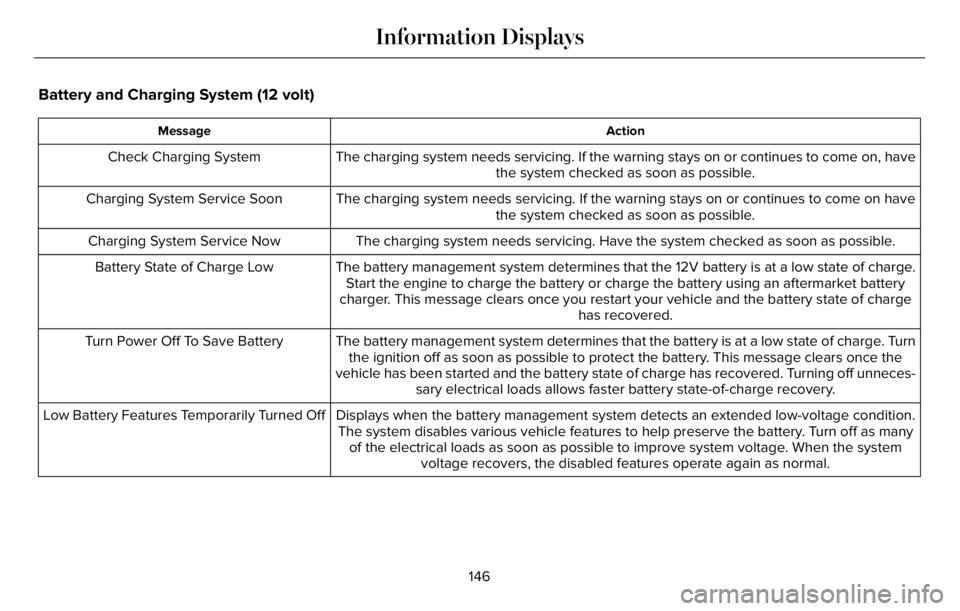
The charging system needs servicing. If the warning stays on or continues to come on, have
the system checked as soon as possible. Check Charging System
The charging system needs servicing. If the warning stays on or continues to come on have
the system checked as soon as possible. Charging System Service Soon
The charging system needs servicing. Have the system checked as soon as possible. Charging System Service Now
The battery management system determines that the 12V battery is at a low state of charge.
Start the engine to charge the battery or charge the battery using an aftermarket battery
charger. This message clears once you restart your vehicle and the battery state of charge
has recovered. Battery State of Charge Low
The battery management system determines that the battery is at a low state of charge. Turn
the ignition off as soon as possible to protect the battery. This message clears once the
vehicle has been started and the battery state of charge has recovered. Turning off unneces-
sary electrical loads allows faster battery state-of-charge recovery. Turn Power Off To Save Battery
Displays when the battery management system detects an extended low-voltage condition.
The system disables various vehicle features to help preserve the battery. Turn off as many
of the electrical loads as soon as possible to improve system voltage. When the system
voltage recovers, the disabled features operate again as normal. Low Battery Features Temporarily Turned Off
146
Information Displays
Page 150 of 681
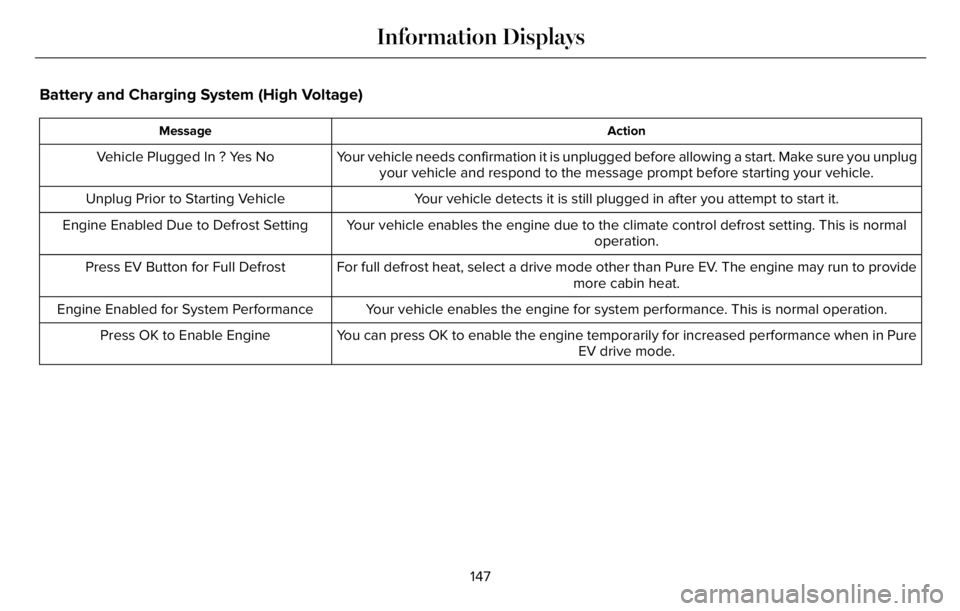
Battery and Charging System (High Voltage)
Action Message
Your vehicle needs confirmation it is unplugged before allowing a start. Make sure you unplug
your vehicle and respond to the message prompt before starting your vehicle. Vehicle Plugged In ? Yes No
Your vehicle detects it is still plugged in after you attempt to start it. Unplug Prior to Starting Vehicle
Your vehicle enables the engine due to the climate control defrost setting. This is normal
operation. Engine Enabled Due to Defrost Setting
For full defrost heat, select a drive mode other than Pure EV. The engine may run to provide
more cabin heat. Press EV Button for Full Defrost
Your vehicle enables the engine for system performance. This is normal operation. Engine Enabled for System Performance
You can press OK to enable the engine temporarily for increased performance when in Pure
EV drive mode. Press OK to Enable Engine
147
Information Displays
Page 165 of 681
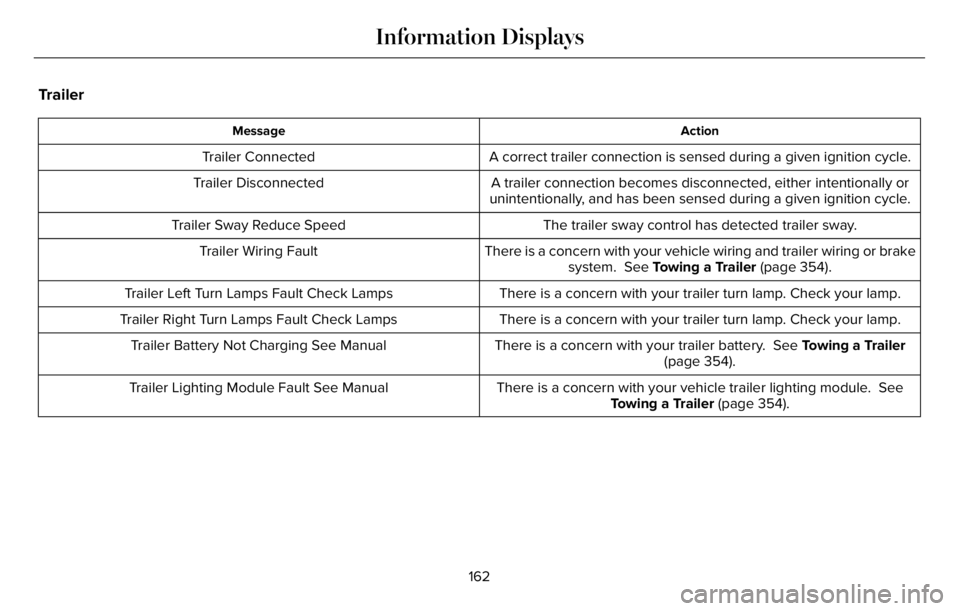
Trailer
Action Message
A correct trailer connection is sensed during a given ignition cycle. Trailer Connected
A trailer connection becomes disconnected, either intentionally or
unintentionally, and has been sensed during a given ignition cycle. Trailer Disconnected
The trailer sway control has detected trailer sway. Trailer Sway Reduce Speed
There is a concern with your vehicle wiring and trailer wiring or brake
system. See Towing a Trailer (page 354). Trailer Wiring Fault
There is a concern with your trailer turn lamp. Check your lamp. Trailer Left Turn Lamps Fault Check Lamps
There is a concern with your trailer turn lamp. Check your lamp. Trailer Right Turn Lamps Fault Check Lamps
There is a concern with your trailer battery. See Towing a Trailer
(page 354). Trailer Battery Not Charging See Manual
There is a concern with your vehicle trailer lighting module. See
Towing a Trailer (page 354). Trailer Lighting Module Fault See Manual
162
Information Displays
Page 166 of 681
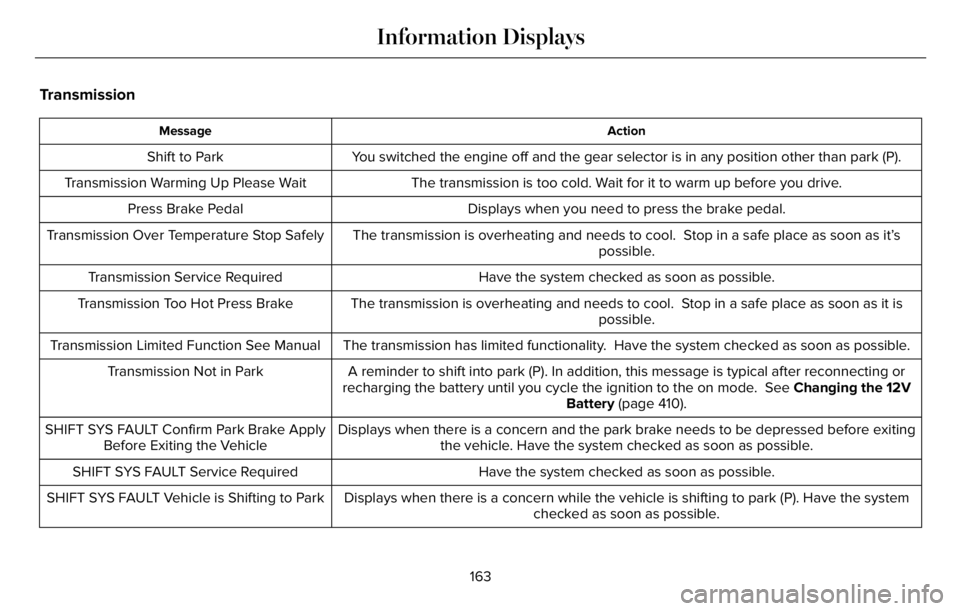
Transmission
Action Message
You switched the engine off and the gear selector is in any position other than park (P). Shift to Park
The transmission is too cold. Wait for it to warm up before you drive. Transmission Warming Up Please Wait
Displays when you need to press the brake pedal. Press Brake Pedal
The transmission is overheating and needs to cool. Stop in a safe place as soon as it’s
possible. Transmission Over Temperature Stop Safely
Have the system checked as soon as possible. Transmission Service Required
The transmission is overheating and needs to cool. Stop in a safe place as soon as it is
possible. Transmission Too Hot Press Brake
The transmission has limited functionality. Have the system checked as soon as possible. Transmission Limited Function See Manual
A reminder to shift into park (P). In addition, this message is typical after reconnecting or
recharging the battery until you cycle the ignition to the on mode. See Changing the 12V
Battery (page 410). Transmission Not in Park
Displays when there is a concern and the park brake needs to be depressed before exiting
the vehicle. Have the system checked as soon as possible. SHIFT SYS FAULT Confirm Park Brake Apply
Before Exiting the Vehicle
Have the system checked as soon as possible. SHIFT SYS FAULT Service Required
Displays when there is a concern while the vehicle is shifting to park (P). Have the system
checked as soon as possible. SHIFT SYS FAULT Vehicle is Shifting to Park
163
Information Displays
Page 205 of 681
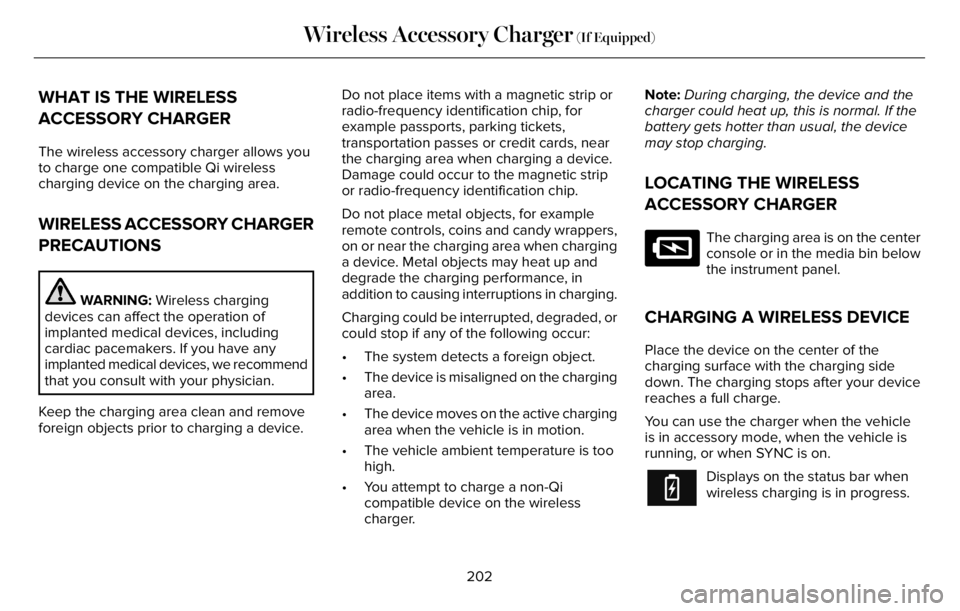
WHAT IS THE WIRELESS
ACCESSORY CHARGER
The wireless accessory charger allows you
to charge one compatible Qi wireless
charging device on the charging area.
WIRELESS ACCESSORY CHARGER
PRECAUTIONS
WARNING: Wireless charging
devices can affect the operation of
implanted medical devices, including
cardiac pacemakers. If you have any
implanted medical devices, we recommend
that you consult with your physician.
Keep the charging area clean and remove
foreign objects prior to charging a device.Do not place items with a magnetic strip or
radio-frequency identification chip, for
example passports, parking tickets,
transportation passes or credit cards, near
the charging area when charging a device.
Damage could occur to the magnetic strip
or radio-frequency identification chip.
Do not place metal objects, for example
remote controls, coins and candy wrappers,
on or near the charging area when charging
a device. Metal objects may heat up and
degrade the charging performance, in
addition to causing interruptions in charging.
Charging could be interrupted, degraded, or
could stop if any of the following occur:
• The system detects a foreign object.
• The device is misaligned on the charging
area.
• The device moves on the active charging
area when the vehicle is in motion.
• The vehicle ambient temperature is too
high.
• You attempt to charge a non-Qi
compatible device on the wireless
charger.Note:During charging, the device and the
charger could heat up, this is normal. If the
battery gets hotter than usual, the device
may stop charging.
LOCATING THE WIRELESS
ACCESSORY CHARGER
E297549
The charging area is on the center
console or in the media bin below
the instrument panel.
CHARGING A WIRELESS DEVICE
Place the device on the center of the
charging surface with the charging side
down. The charging stops after your device
reaches a full charge.
You can use the charger when the vehicle
is in accessory mode, when the vehicle is
running, or when SYNC is on.
Displays on the status bar when
wireless charging is in progress.
202
Wireless Accessory Charger (If Equipped)
Page 206 of 681
Note:The charging performance may be
affected if your device is in a case. It may be
necessary to remove the case to wirelessly
charge your device.
Note:Software and firmware updates may
affect device compatibility, including the use
of unofficial software or firmware. You should
verify charging functionality with your
specific devices in-vehicle.
203
Wireless Accessory Charger (If Equipped)
Page 222 of 681
• Keep the tires properly inflated and only
use the recommended size.
• Aggressive driving increases the amount
of energy required to move your vehicle.
In general, you can achieve better fuel
economy with mild to moderate
acceleration and deceleration. Moderate
braking is particularly important since it
allows you to maximize the energy
captured by the regenerative braking
system.
Additional Tips:
• Do not carry extra loads.
• Be mindful of adding external
accessories that may increase
aerodynamic drag.
• Observe posted speed limits.
• Perform all scheduled maintenance.
• There is no need to wait for your engine
to warm up. The vehicle is ready to drive
immediately after starting.PLUG-IN HYBRID VEHICLE
OPERATION
Regularly plug in your vehicle to get optimal
electric-only range capability from the high
voltage battery. Charging your vehicle adds
electrical energy. This energy propels the
vehicle.
Estimated electric-only driving range shows
in blue next to the gasoline range on the
information display.
The system maximizes the use of
electric-only operation in normal drive mode.
System conditions could require the engine
to operate, however, the system uses the
available electric range whenever possible.
In Pure EV drive mode, your vehicle only
uses electric power unless you enable the
engine, or system conditions require the
engine to operate.Preserve EV drive mode saves the electric
range for later use. If you select this mode
and the battery is at full or near full charge,
it uses some electric-only range to discharge
the battery. This allows the regenerative
braking system to fully operate. If the battery
charge is low when selecting Preserve EV
mode, the engine charges the high voltage
battery to a minimum level. This provides
additional electric driving range. When the
battery charges to this level, Preserve EV
saves the electric range for later use.
Other drive modes appropriately make use
of electric power to help deliver the selected
drive mode experience. It could use available
electric-only range, if needed. See What Is
Drive Mode Control (page 343).
219
Unique Driving Characteristics