trailer LINCOLN AVIATOR 2023 User Guide
[x] Cancel search | Manufacturer: LINCOLN, Model Year: 2023, Model line: AVIATOR, Model: LINCOLN AVIATOR 2023Pages: 681, PDF Size: 9.33 MB
Page 281 of 681
WARNING: Do not use the system
with accessories that extend beyond the
front or rear of your vehicle, for example a
trailer hitch or bike rack. The system is not
able to make corrections for the additional
length of the accessories.
The system only applies the brakes for a
short period of time when an event occurs.
Act as soon as you notice the brakes apply
to remain in control of the vehicle. If you do
not intervene the vehicle may start to move
again.
Note:Certain add-on devices around the
bumper or fascia may create false alerts. For
example, large trailer hitches, bicycle or
surfboard racks, license plate brackets,
bumper covers or any other device that may
block the normal detection zone of the
system. Remove the add-on device to
prevent false alerts.
Note:The system does not react to small or
moving objects, particularly those close to
the ground.Note:The system does not operate during
hard acceleration or steering.
Note:If your vehicle sustains damage to the
bumper or fascia leaving it misaligned or
bent, it could alter the sensing zone causing
inaccurate measurement of obstacles or
false alerts.
Note:Vehicle loading and suspension
changes can impact the angle of the sensors
and may change the normal detection zone
of the system resulting in inaccurate
measurement of obstacles or false alerts.
Note:When you connect a trailer, the system
may detect the trailer and provide an alert,
or the system turns off. If the system does
not turn off, manually switch the system off
after you connect the trailer.
Note:You may experience reduced system
performance on road surfaces that limit
deceleration. For example, roads with ice,
loose gravel, mud or sand.
SWITCHING REVERSE BRAKING
ASSIST ON AND OFF
You can switch the system on or off through
the touchscreen. See Settings (page 555).
Note:The system is unavailable when rear
parking aid or cross traffic alert is off.
OVERRIDING REVERSE BRAKING
ASSIST
There could be instances when unexpected
or unwanted braking occurs. Firmly pressing
the accelerator pedal or switching the feature
off overrides the system.
REVERSE BRAKING ASSIST
INDICATORS
If the system determines that a collision with
an obstacle may occur, full braking may
apply.
E293490
A message and warning indicator
appear when the system applies
the brakes.
278
Reverse Braking Assist (If Equipped)
Page 283 of 681
REVERSE BRAKING ASSIST –
FREQUENTLY ASKED QUESTIONS
Why is reverse braking assist unavailable?
• Make sure you switch the system on.
See Switching Reverse Braking Assist
On and Off (page 278).
• Make sure that the liftgate, hood and all
doors are closed.
• Make sure the cross traffic alert system
is on. See Cross Traffic Alert (page 330).
• Make sure the rear parking aid system is
on. See Rear Parking Aid (page 286).
• Make sure traction control is on. See
Using Traction Control (page 281).
• The vehicle has sustained a rear end
impact. Have the sensors checked for
proper coverage and operation.
• An ABS, traction control or stability
control event may have occurred. The
system resumes operation when the
event is complete.• Make sure the rear view camera and 360
degree camera are not dirty or
obstructed. If it is dirty, clean the camera.
See Rear View Camera (page 297). See
360 Degree Camera (page 300). If the
message still appears after cleaning the
camera, wait a short time and the
message should clear. If the message
does not clear, have the system checked.
• Make sure the sensors are not blocked
or faulted. See Cross Traffic Alert (page
330). See Rear Parking Aid (page 286).
• You recently had your vehicle serviced,
or the battery disconnected. Drive your
vehicle a short distance to resume
system operation.
• The system does not function when you
connect a trailer. Operation resumes
when you disconnect the trailer.
Note:If the answers to why the system is
unavailable do not assist in returning reverse
braking assist to available, have the system
checked as soon as possible.
280
Reverse Braking Assist (If Equipped)
Page 289 of 681
PRINCIPLE OF OPERATION
WARNING: To help avoid personal
injury, always use caution when in reverse
(R) and when using the sensing system.
WARNING: The system may not
detect objects with surfaces that absorb
reflection. Always drive with due care and
attention. Failure to take care may result
in a crash.
WARNING: Traffic control systems,
inclement weather, air brakes, external
motors and fans may affect the correct
operation of the sensing system. This may
cause reduced performance or false alerts.
WARNING: The system may not
detect small or moving objects, particularly
those close to the ground.
Note:If your vehicle has MyKey™, the sensing
system cannot be switched off when a
MyKey™ is present. See Principle of
Operation (page 78).Note:Keep the sensors on the bumper or
fascia free from snow, ice and large
accumulations of dirt. If the sensors are
covered, the system’s accuracy can be
affected. Do not clean the sensors with sharp
objects.
Note:If your vehicle sustains damage to the
bumper or fascia, leaving it misaligned or
bent, the sensing zone may be altered
causing inaccurate measurement of
obstacles or false alerts.
Note:Certain add-on devices installed
around the bumper or fascia may create
false alerts. For example, large trailer
hitches, bike or surfboard racks, license plate
brackets, bumper covers or any other device
that may block the normal detection zone
of the system. Remove the add-on device to
prevent false alerts.
Note:When you connect a trailer to your
vehicle, the rear parking aid may detect the
trailer and therefore provide an alert. Disable
the rear parking aid when you connect a
trailer to prevent the alert.The sensing system warns the driver of
obstacles within a certain range of your
vehicle. The system turns on automatically
whenever you switch the ignition on.
You can switch the system off through the
touchscreen, information display or from the
pop-up message that appears once you shift
the transmission into reverse (R). If your
vehicle has a parking aid button, you can
switch the system off by pressing the button.
If a fault is present in the system, a warning
message appears in the information display.
See Information Messages (page 142).
REAR PARKING AID
WARNING: The system may not
detect objects with surfaces that absorb
reflection. Always drive with due care and
attention. Failure to take care may result
in a crash.
WARNING: The system may not
detect small or moving objects, particularly
those close to the ground.
286
Parking Aids
Page 290 of 681
WARNING: To help avoid personal
injury, always use caution when in reverse
(R) and when using the sensing system.
WARNING: The parking aid system
can only assist you to detect objects when
your vehicle is moving at parking speeds.
To help avoid personal injury you must
take care when using the parking aid
system.
Note:Keep the sensors free from snow, ice
and large accumulations of dirt.
Note:Do not cover up the sensors.
Note:Do not clean the sensors with sharp
objects.
Note:If your vehicle sustains damage
leaving the sensors misaligned, this may
cause inaccurate measurements or false
alerts.
Note:Some accessories, for example large
trailer hitches or bike or surfboard racks, can
cause reduced performance or false alerts.
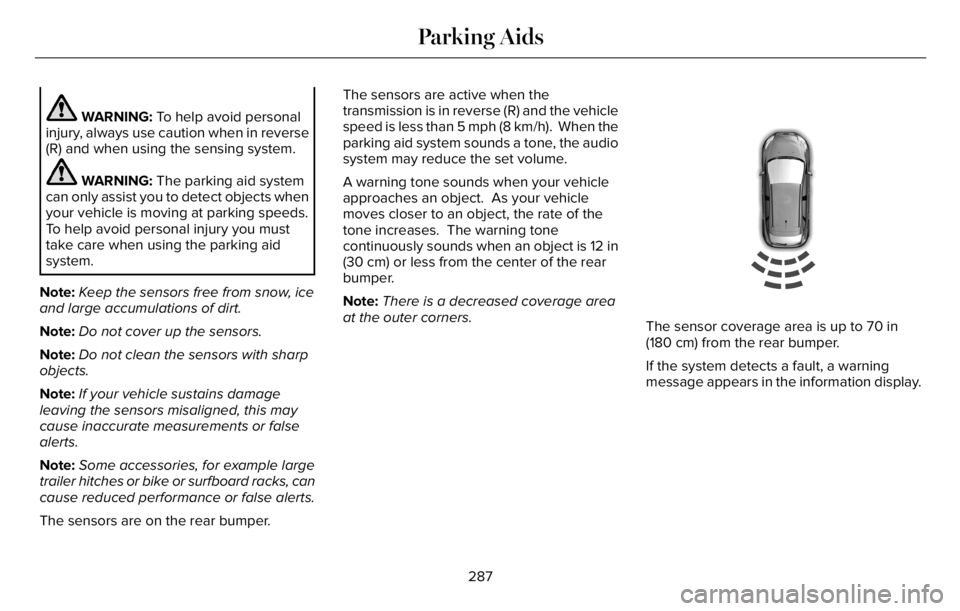
The sensors are on the rear bumper.The sensors are active when the
transmission is in reverse (R) and the vehicle
speed is less than 5 mph (8 km/h). When the
parking aid system sounds a tone, the audio
system may reduce the set volume.
A warning tone sounds when your vehicle
approaches an object. As your vehicle
moves closer to an object, the rate of the
tone increases. The warning tone
continuously sounds when an object is 12 in
(30 cm) or less from the center of the rear
bumper.
Note:There is a decreased coverage area
at the outer corners.
E130178
The sensor coverage area is up to 70 in
(180 cm) from the rear bumper.
If the system detects a fault, a warning
message appears in the information display.
287
Parking Aids
Page 292 of 681
WARNING: The parking aid system
can only assist you to detect objects when
your vehicle is moving at parking speeds.
To help avoid personal injury you must
take care when using the parking aid
system.
Note:Keep the sensors free from snow, ice
and large accumulations of dirt.
Note:Do not cover up the sensors.
Note:Do not clean the sensors with sharp
objects.
Note:If your vehicle sustains damage
leaving the sensors misaligned, this may
cause inaccurate measurements or false
alerts.
Note:Some accessories, for example large
trailer hitches or bike or surfboard racks can
cause reduced performance or false alerts.
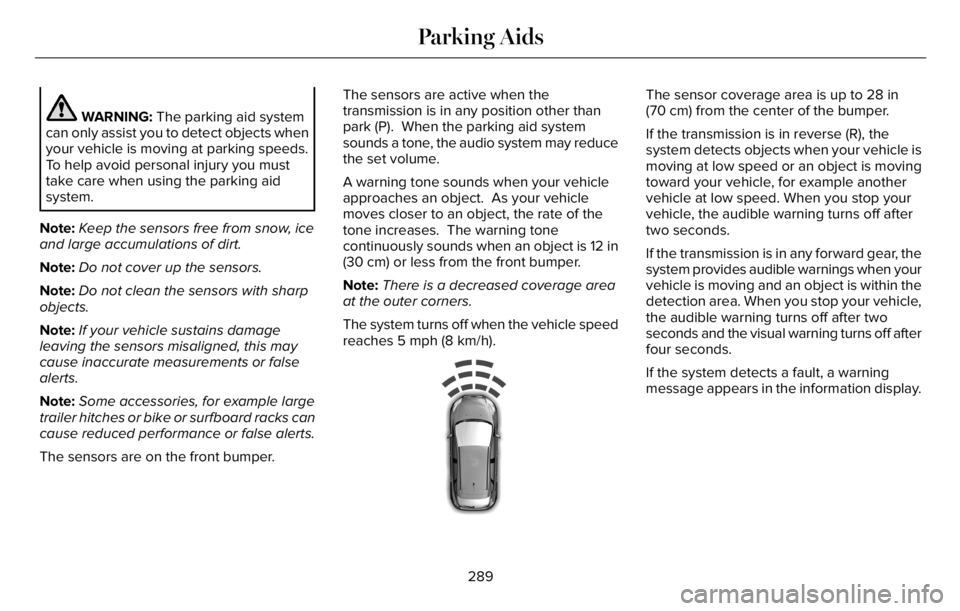
The sensors are on the front bumper.The sensors are active when the
transmission is in any position other than
park (P). When the parking aid system
sounds a tone, the audio system may reduce
the set volume.
A warning tone sounds when your vehicle
approaches an object. As your vehicle
moves closer to an object, the rate of the
tone increases. The warning tone
continuously sounds when an object is 12 in
(30 cm) or less from the front bumper.
Note:There is a decreased coverage area
at the outer corners.
The system turns off when the vehicle speed
reaches 5 mph (8 km/h).
E187330
The sensor coverage area is up to 28 in
(70 cm) from the center of the bumper.
If the transmission is in reverse (R), the
system detects objects when your vehicle is
moving at low speed or an object is moving
toward your vehicle, for example another
vehicle at low speed. When you stop your
vehicle, the audible warning turns off after
two seconds.
If the transmission is in any forward gear, the
system provides audible warnings when your
vehicle is moving and an object is within the
detection area. When you stop your vehicle,
the audible warning turns off after two
seconds and the visual warning turns off after
four seconds.
If the system detects a fault, a warning
message appears in the information display.
289
Parking Aids
Page 294 of 681
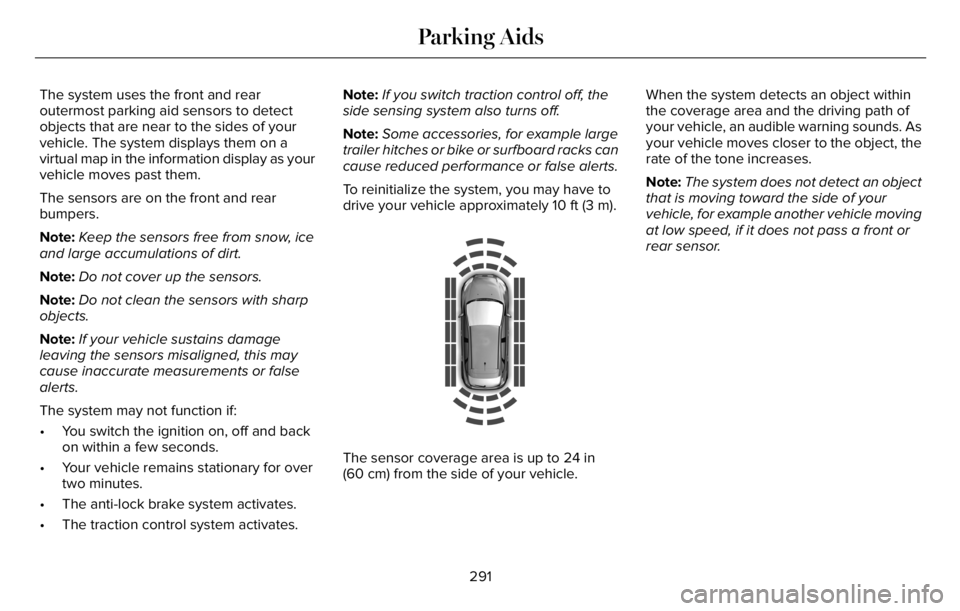
The system uses the front and rear
outermost parking aid sensors to detect
objects that are near to the sides of your
vehicle. The system displays them on a
virtual map in the information display as your
vehicle moves past them.
The sensors are on the front and rear
bumpers.
Note:Keep the sensors free from snow, ice
and large accumulations of dirt.
Note:Do not cover up the sensors.
Note:Do not clean the sensors with sharp
objects.
Note:If your vehicle sustains damage
leaving the sensors misaligned, this may
cause inaccurate measurements or false
alerts.
The system may not function if:
• You switch the ignition on, off and back
on within a few seconds.
• Your vehicle remains stationary for over
two minutes.
• The anti-lock brake system activates.
• The traction control system activates.Note:If you switch traction control off, the
side sensing system also turns off.
Note:Some accessories, for example large
trailer hitches or bike or surfboard racks can
cause reduced performance or false alerts.
To reinitialize the system, you may have to
drive your vehicle approximately 10 ft (3 m).
E190458
The sensor coverage area is up to 24 in
(60 cm) from the side of your vehicle.When the system detects an object within
the coverage area and the driving path of
your vehicle, an audible warning sounds. As
your vehicle moves closer to the object, the
rate of the tone increases.
Note:The system does not detect an object
that is moving toward the side of your
vehicle, for example another vehicle moving
at low speed, if it does not pass a front or
rear sensor.
291
Parking Aids
Page 296 of 681
WARNING: Do not use the system
with accessories that extend beyond the
front or rear of your vehicle, for example a
trailer hitch, bike rack or side mirror
extensions such as telescoping mirrors or
towing mirrors. The system is not able to
make corrections for the additional length
of the accessories.
The system assists parking into and out of
parking spaces. Sensors are used to detect
parking spaces. The system then steers,
accelerates, brakes and shifts gear as
required to maneuver into or out of a parking
space.
Using Active Park Assist
E301E301111212
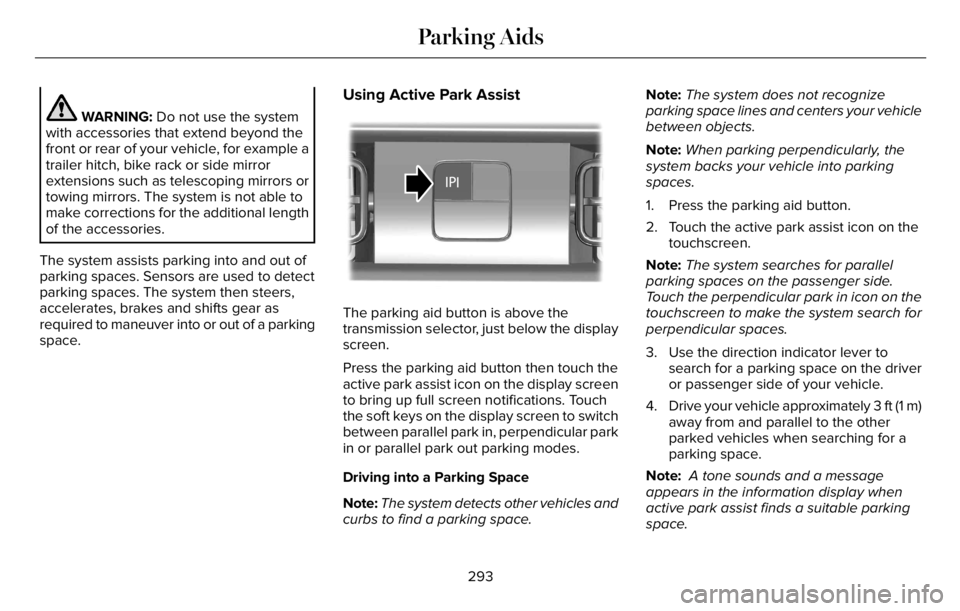
The parking aid button is above the
transmission selector, just below the display
screen.
Press the parking aid button then touch the
active park assist icon on the display screen
to bring up full screen notifications. Touch
the soft keys on the display screen to switch
between parallel park in, perpendicular park
in or parallel park out parking modes.
Driving into a Parking Space
Note:The system detects other vehicles and
curbs to find a parking space.Note:The system does not recognize
parking space lines and centers your vehicle
between objects.
Note:When parking perpendicularly, the
system backs your vehicle into parking
spaces.
1. Press the parking aid button.
2. Touch the active park assist icon on the
touchscreen.
Note:The system searches for parallel
parking spaces on the passenger side.
Touch the perpendicular park in icon on the
touchscreen to make the system search for
perpendicular spaces.
3. Use the direction indicator lever to
search for a parking space on the driver
or passenger side of your vehicle.
4. Drive your vehicle approximately 3 ft (1 m)
away from and parallel to the other
parked vehicles when searching for a
parking space.
Note: A tone sounds and a message
appears in the information display when
active park assist finds a suitable parking
space.
293
Parking Aids
Page 301 of 681
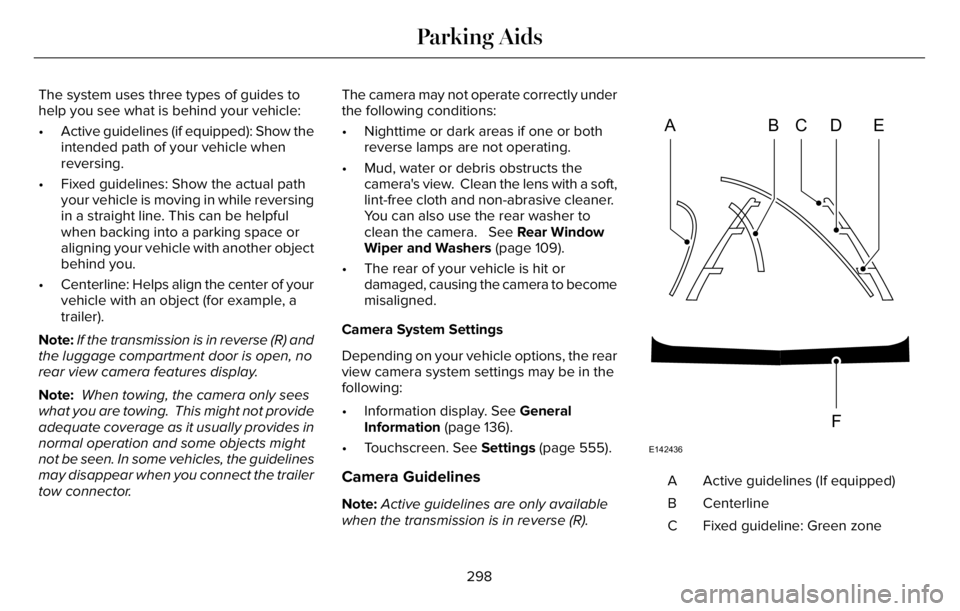
The system uses three types of guides to
help you see what is behind your vehicle:
• Active guidelines (if equipped): Show the
intended path of your vehicle when
reversing.
• Fixed guidelines: Show the actual path
your vehicle is moving in while reversing
in a straight line. This can be helpful
when backing into a parking space or
aligning your vehicle with another object
behind you.
• Centerline: Helps align the center of your
vehicle with an object (for example, a
trailer).
Note:If the transmission is in reverse (R) and
the luggage compartment door is open, no
rear view camera features display.
Note: When towing, the camera only sees
what you are towing. This might not provide
adequate coverage as it usually provides in
normal operation and some objects might
not be seen. In some vehicles, the guidelines
may disappear when you connect the trailer
tow connector.The camera may not operate correctly under
the following conditions:
• Nighttime or dark areas if one or both
reverse lamps are not operating.
• Mud, water or debris obstructs the
camera's view. Clean the lens with a soft,
lint-free cloth and non-abrasive cleaner.
You can also use the rear washer to
clean the camera. See Rear Window
Wiper and Washers (page 109).
• The rear of your vehicle is hit or
damaged, causing the camera to become
misaligned.
Camera System Settings
Depending on your vehicle options, the rear
view camera system settings may be in the
following:
• Information display. See General
Information (page 136).
• Touchscreen. See Settings (page 555).
Camera Guidelines
Note:Active guidelines are only available
when the transmission is in reverse (R).
ABCD
F
E
E142436
Active guidelines (If equipped) A
Centerline B
Fixed guideline: Green zone C
298
Parking Aids
Page 308 of 681
HOW DOES ADAPTIVE CRUISE
CONTROL WITH STOP AND GO
WORK
Adaptive cruise control with stop and go
uses radar and camera sensors to adjust the
speed of your vehicle to maintain a set gap
from the vehicle in front of you in the same
lane while following it to a complete stop.
You can also engage the system to follow a
vehicle in front of you and adjust set speed
while stopped.
WHAT IS ADAPTIVE CRUISE
CONTROL WITH LANE CENTERING
Adaptive cruise control with lane centering
uses radar and camera sensors to help keep
your vehicle in the lane by applying
continuous assistance steering torque input
toward the lane center on highways.
Note:The adaptive cruise control gap setting
operates normally.
WHAT IS INTELLIGENT ADAPTIVE
CRUISE CONTROL
Intelligent adaptive cruise control combines
speed sign recognition with adaptive cruise
control to adjust the cruise set speed to the
speed limit detected by the speed sign
recognition system. For example, if the speed
sign recognition system detects a 50 mph
(80 km/h) speed limit, the cruise set speed
is updated to 50 mph (80 km/h) +/- the
driver's selected speed offset.
Note:The adaptive cruise control gap setting
operates normally.
ADAPTIVE CRUISE CONTROL
PRECAUTIONS - VEHICLES WITH:
ADAPTIVE CRUISE CONTROL
WITH LANE CENTERING
Adaptive cruise control precautions apply to
lane centering unless stated otherwise or
contradicted by a lane centering precaution.
See Adaptive Cruise Control Precautions
(page 306).
WARNING: Do not use the system
when towing a trailer. Failure to follow this
instruction could result in the loss of
control of your vehicle, personal injury or
death.
WARNING: Do not use the system if
any changes or modifications to the
steering wheel have been made. Any
changes or modifications to the steering
wheel could affect the functionality or
performance of the system. Failure to
follow this instruction could result in the
loss of control of your vehicle, personal
injury or death.
305
Adaptive Cruise Control (If Equipped)
Page 309 of 681
ADAPTIVE CRUISE CONTROL
PRECAUTIONS - VEHICLES WITH:
ADAPTIVE CRUISE CONTROL
WITH STOP AND GO
WARNING: You are responsible for
controlling your vehicle at all times. The
system is designed to be an aid and does
not relieve you of your responsibility to
drive with due care and attention. Failure
to follow this instruction could result in the
loss of control of your vehicle, personal
injury or death.
WARNING: Pay close attention to
changing road conditions such as entering
or leaving a highway, on roads with
intersections or roundabouts, roads
without visible lanes of travel, roads that
are winding, slippery, unpaved, or steep
slopes.
WARNING: The system does not
control speed in low traction conditions or
extremely steep slopes. The system is
designed to be an aid and does not relieve
you of your responsibility to drive with due
care and attention. Failure to follow this
instruction could result in personal injury.
WARNING: The system is not a crash
warning or avoidance system.
WARNING: Do not use the system
when towing a trailer that has aftermarket
electronic trailer brake controls. Failure to
follow this instruction could result in the
loss of control of your vehicle, personal
injury or death.
WARNING: Do not use tire sizes
other than those recommended because
this can affect the normal operation of the
system. Failure to do so may result in a loss
of vehicle control, which could result in
serious injury.
WARNING: Do not use the system
with a snow plow blade installed.
WARNING: Do not use the system in
poor visibility, for example fog, heavy rain,
spray or snow.
When Following a Vehicle
WARNING: When following a vehicle
that is braking, your vehicle does not
always decelerate quickly enough to avoid
a crash without driver intervention. Apply
the brakes when necessary. Failure to
follow this instruction could result in
personal injury or death.
306
Adaptive Cruise Control (If Equipped)