cruise control LINCOLN AVIATOR 2023 Owner's Manual
[x] Cancel search | Manufacturer: LINCOLN, Model Year: 2023, Model line: AVIATOR, Model: LINCOLN AVIATOR 2023Pages: 681, PDF Size: 9.33 MB
Page 315 of 681
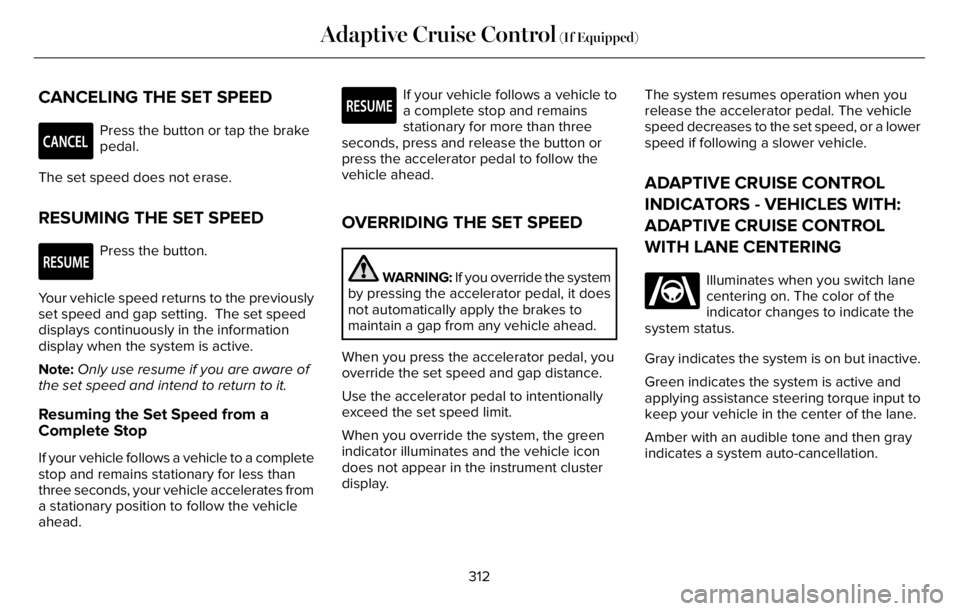
CANCELING THE SET SPEED
E281471
Press the button or tap the brake
pedal.
The set speed does not erase.
RESUMING THE SET SPEED
E281472
Press the button.
Your vehicle speed returns to the previously
set speed and gap setting. The set speed
displays continuously in the information
display when the system is active.
Note:Only use resume if you are aware of
the set speed and intend to return to it.
Resuming the Set Speed from a
Complete Stop
If your vehicle follows a vehicle to a complete
stop and remains stationary for less than
three seconds, your vehicle accelerates from
a stationary position to follow the vehicle
ahead.
E281472
If your vehicle follows a vehicle to
a complete stop and remains
stationary for more than three
seconds, press and release the button or
press the accelerator pedal to follow the
vehicle ahead.
OVERRIDING THE SET SPEED
WARNING: If you override the system
by pressing the accelerator pedal, it does
not automatically apply the brakes to
maintain a gap from any vehicle ahead.
When you press the accelerator pedal, you
override the set speed and gap distance.
Use the accelerator pedal to intentionally
exceed the set speed limit.
When you override the system, the green
indicator illuminates and the vehicle icon
does not appear in the instrument cluster
display.The system resumes operation when you
release the accelerator pedal. The vehicle
speed decreases to the set speed, or a lower
speed if following a slower vehicle.
ADAPTIVE CRUISE CONTROL
INDICATORS - VEHICLES WITH:
ADAPTIVE CRUISE CONTROL
WITH LANE CENTERING
E262175
Illuminates when you switch lane
centering on. The color of the
indicator changes to indicate the
system status.
Gray indicates the system is on but inactive.
Green indicates the system is active and
applying assistance steering torque input to
keep your vehicle in the center of the lane.
Amber with an audible tone and then gray
indicates a system auto-cancellation.
312
Adaptive Cruise Control (If Equipped)
Page 316 of 681
ADAPTIVE CRUISE CONTROL
INDICATORS - VEHICLES WITH:
ADAPTIVE CRUISE CONTROL
WITH STOP AND GO
E144529
Illuminates when you switch
adaptive cruise control on. The
color of the indicator changes to
indicate the system status.
White indicates the system is on but inactive.
Green indicates that you set the speed and
the system is active.
ADAPTIVE CRUISE CONTROL
INDICATORS - VEHICLES WITH:
INTELLIGENT ADAPTIVE CRUISE
CONTROL
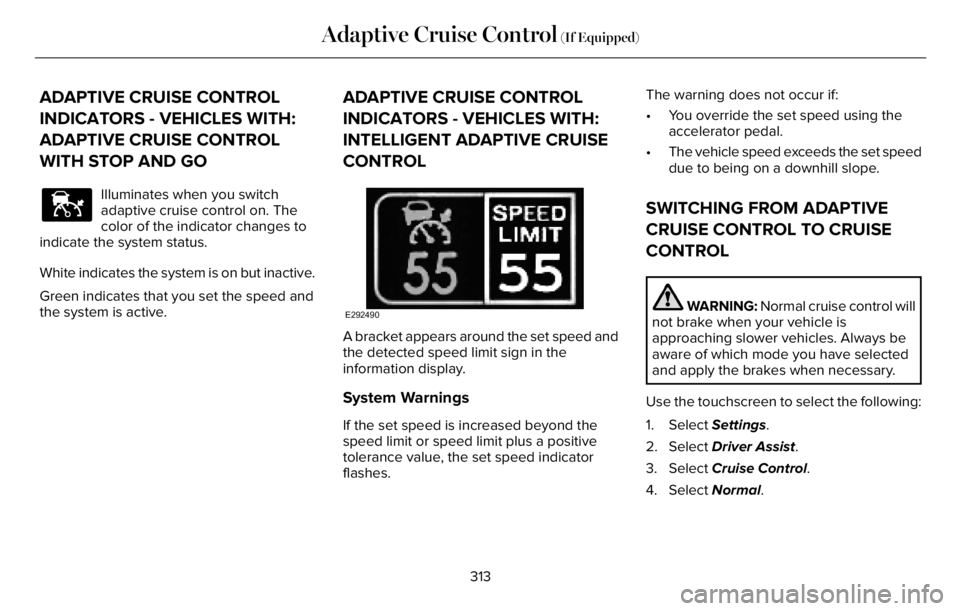
E292490
A bracket appears around the set speed and
the detected speed limit sign in the
information display.
System Warnings
If the set speed is increased beyond the
speed limit or speed limit plus a positive
tolerance value, the set speed indicator
flashes.The warning does not occur if:
• You override the set speed using the
accelerator pedal.
• The vehicle speed exceeds the set speed
due to being on a downhill slope.
SWITCHING FROM ADAPTIVE
CRUISE CONTROL TO CRUISE
CONTROL
WARNING: Normal cruise control will
not brake when your vehicle is
approaching slower vehicles. Always be
aware of which mode you have selected
and apply the brakes when necessary.
Use the touchscreen to select the following:
1. Select Settings.
2. Select Driver Assist.
3. Select Cruise Control.
4. Select Normal.
313
Adaptive Cruise Control (If Equipped)
Page 317 of 681
E71340
The cruise control indicator
replaces the adaptive cruise
control indicator if you select
normal cruise control. The gap setting does
not display, and the system does not respond
to lead vehicles. Automatic braking remains
active to maintain set speed. The system
remembers the last setting when you start
your vehicle.
SWITCHING LANE CENTERING ON
AND OFF
The cruise controls are on the steering
wheel. See Cruise Control (page 104).
E297977
Press the button.
The indicator appears in the information
display. When the system is on, the color of
the indicator changes to indicate the system
status. See Adaptive Cruise Control
Indicators (page 312).
Note:Adaptive cruise control must be on
before you can switch lane centering on.
Activating Lane Centering
The system only activates when all of the
following occur:
• You have adaptive cruise control with
stop-and-go on.
• The vehicle is centered in the lane.
• Your hands are on the steering wheel at
all times.
• The system detects both lane markings.
Note:If it does not detect valid lane
markings, the system stays inactive until
valid markings are available.
You can override the system at any time by
steering your vehicle.
When lane centering is active and the
direction indicator is switched on, the system
immediately cancels. The system remains in
standby mode as long as the direction
indicator is engaged. The system re-activates
automatically once the vehicle is centered
in a lane and the direction indicator is
switched off.
System Alerts and Automatic
Cancellation
You must keep your hands on the steering
wheel at all times.
When the system is active and detects no
steering activity for a certain period of time,
the system alerts you to put your hands on
the steering wheel. If you do not react to the
warnings the system cancels and slows your
vehicle down to idle speeds while
maintaining steering control.
The system also alerts you if your vehicle
crosses lane markings without detected
steering activity.
Note:The system may detect a light grip or
touch on the steering wheel as hands-off
driving.
When the system is cancelled due to an
external condition, for example, no lane
markings are available and your hands are
not on the steering wheel, the system
immediately alerts you to take control of the
vehicle. If this alert is ignored, the system
slows the vehicle while maintaining steering
control.
314
Adaptive Cruise Control (If Equipped)
Page 318 of 681
Note:There are instances where the system
can cancel without displaying a message in
the information display.
E281472
If your vehicle starts to slow down,
you must provide steering input to
the wheel and press and release
the button to regain full system performance.
Automatic cancellation can also occur if:
• The lane becomes too wide or too
narrow.
• The system cannot detect valid lane
markings.
• Lane markings are crossed.
Note:The system disables until the next key
cycle if your vehicle slows down due to driver
inactivity twice within a key cycle.
SWITCHING INTELLIGENT MODE
ON AND OFF
WARNING: You are responsible for
controlling your vehicle at all times. The
system is designed to be an aid and does
not relieve you of your responsibility to
drive with due care and attention. Failure
to follow this instruction could result in the
loss of control of your vehicle, personal
injury or death.
1. Press Settings on the touchscreen.
2. Press Driver Assistance.
3. Press Cruise Control.
4. Press Intelligent.
Changing the Set Speed with
Intelligent Adaptive Cruise Control
When intelligent mode is on, the system
adjusts the set speed to the speed limit
detected by the camera and the speed limit
information provided by the navigation
system.Note:The set speed adjusts when the
system detects a different maximum speed
limit.
Note:The speed limit information provided
by the navigation map data may be
inaccurate or out of date. See Navigation
(page 538).
Note:The system alerts you if the set speed
increases beyond the speed limit. See
Adaptive Cruise Control Indicators (page
312).
If the system does not detect a speed limit,
the vehicle speed remains at the current set
speed.
You can override the set speed at any time.
You may need to override or cancel the
system in certain situations such as inclement
weather or if an incorrect speed is set.
Note:The system may not detect and read
speed limit signs with conditional
information, for example, when a sign is
flashing, during specific time ranges, or when
children are present.
315
Adaptive Cruise Control (If Equipped)
Page 319 of 681
Note:Under certain conditions, the system
may not adjust the vehicle speed until after
your vehicle passes the speed limit sign.
ADJUSTING THE SET SPEED
TOLERANCE
You can set a permanent speed tolerance
that is above or below the detected speed
limit.
1. Press Settings on the touchscreen.
2. Press Driver Assistance.
3. Press Cruise Control.4. Press Intelligent.
5. Press Tolerance.
6. Use + and - to set the tolerance.
Note:You cannot set the tolerance more
than 20 mph (30 km/h) above or below the
recognized speed.
ADAPTIVE CRUISE CONTROL –
TROUBLESHOOTING
ADAPTIVE CRUISE CONTROL –
INFORMATION MESSAGES - VEHICLES
WITH: ADAPTIVE CRUISE CONTROL
WITH LANE CENTERING
Note:Depending on your vehicle options
and instrument cluster type, not all messages
display or are available.
Note:The system could abbreviate or
shorten certain messages depending upon
which cluster type you have.
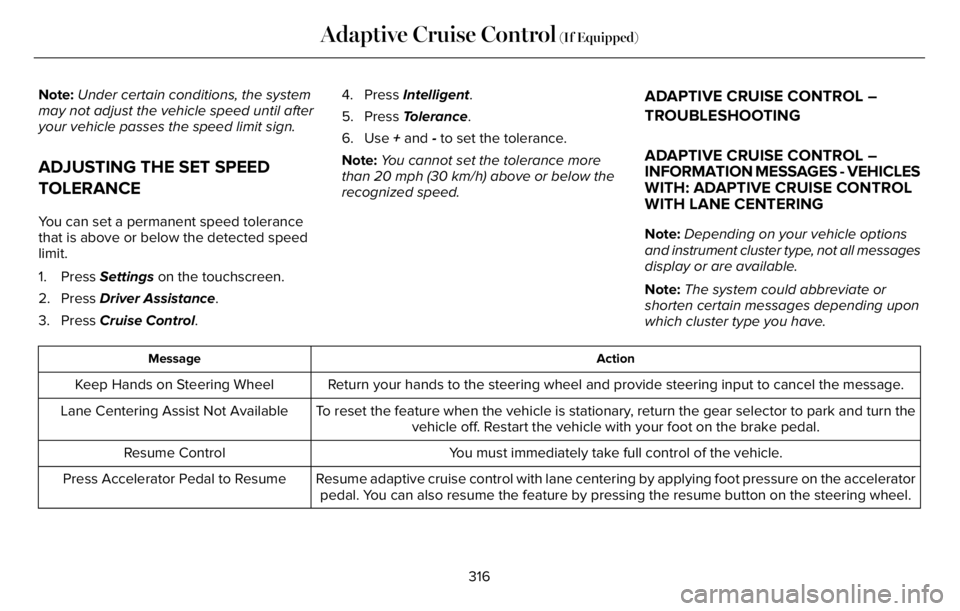
Action Message
Return your hands to the steering wheel and provide steering input to cancel the message. Keep Hands on Steering Wheel
To reset the feature when the vehicle is stationary, return the gear selector to park and turn the
vehicle off. Restart the vehicle with your foot on the brake pedal. Lane Centering Assist Not Available
You must immediately take full control of the vehicle. Resume Control
Resume adaptive cruise control with lane centering by applying foot pressure on the accelerator
pedal. You can also resume the feature by pressing the resume button on the steering wheel. Press Accelerator Pedal to Resume
316
Adaptive Cruise Control (If Equipped)
Page 320 of 681
ADAPTIVE CRUISE CONTROL –
INFORMATION MESSAGES - VEHICLES
WITH: ADAPTIVE CRUISE CONTROL
WITH STOP AND GONote:Depending on your vehicle options
and instrument cluster type, not all messages
display or are available.Note:The system could abbreviate or
shorten certain messages depending upon
which cluster type you have.
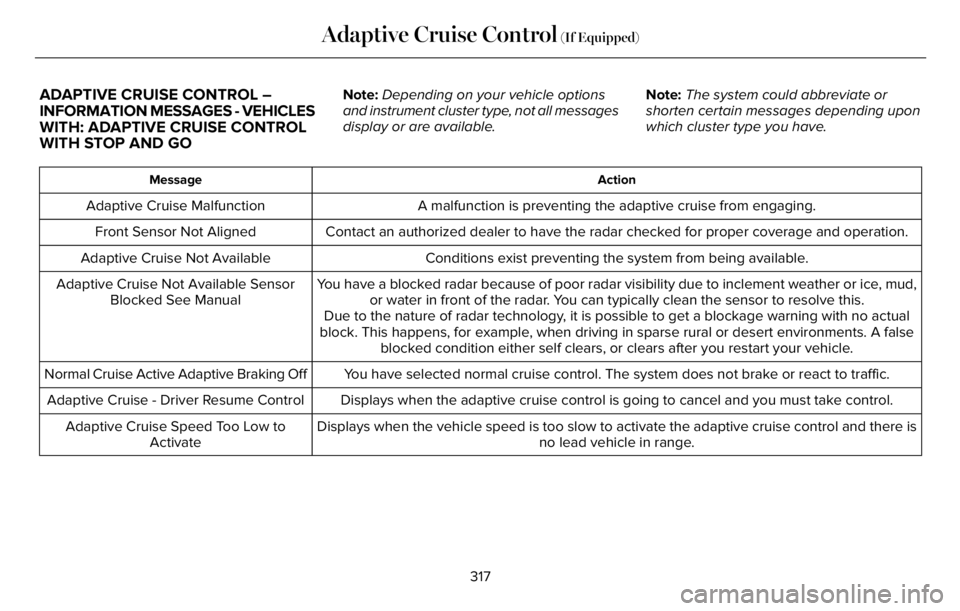
Action Message
A malfunction is preventing the adaptive cruise from engaging. Adaptive Cruise Malfunction
Front Sensor Not Aligned Contact an authorized dealer to have the radar checked for proper coverage and operation.
Conditions exist preventing the system from being available. Adaptive Cruise Not Available
You have a blocked radar because of poor radar visibility due to inclement weather or ice, mud,
or water in front of the radar. You can typically clean the sensor to resolve this. Adaptive Cruise Not Available Sensor
Blocked See Manual
Due to the nature of radar technology, it is possible to get a blockage warning with no actual
block. This happens, for example, when driving in sparse rural or desert environments. A false
blocked condition either self clears, or clears after you restart your vehicle.
You have selected normal cruise control. The system does not brake or react to traffic. Normal Cruise Active Adaptive Braking Off
Displays when the adaptive cruise control is going to cancel and you must take control. Adaptive Cruise - Driver Resume Control
Displays when the vehicle speed is too slow to activate the adaptive cruise control and there is
no lead vehicle in range. Adaptive Cruise Speed Too Low to
Activate
317
Adaptive Cruise Control (If Equipped)
Page 321 of 681
ADAPTIVE CRUISE CONTROL –
INFORMATION MESSAGES - VEHICLES
WITH: INTELLIGENT ADAPTIVE
CRUISE CONTROLNote:Depending on your vehicle options
and instrument cluster type, not all messages
display or are available.Note:Certain messages may be abbreviated
or shortened depending upon which cluster
type you have.
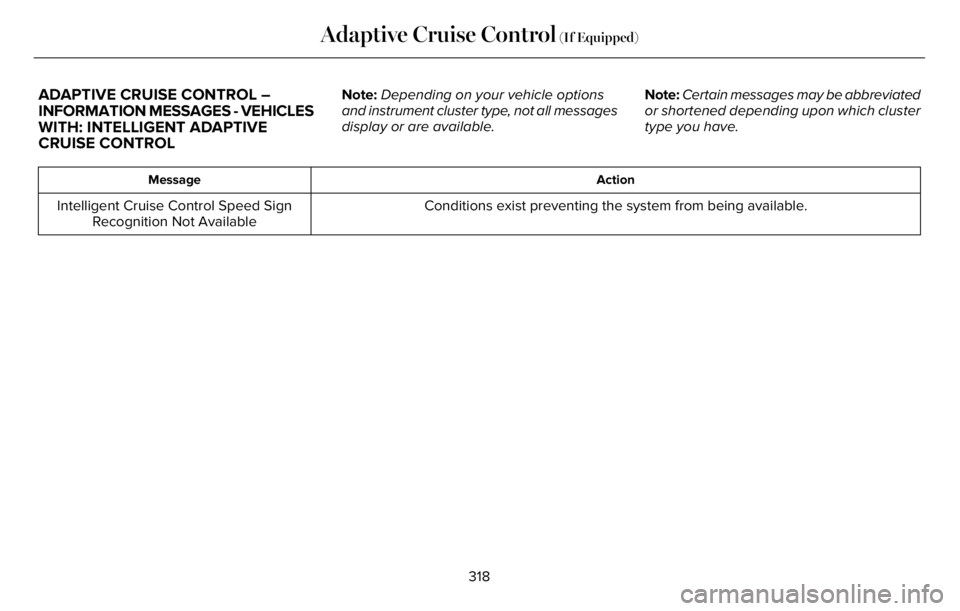
Action Message
Conditions exist preventing the system from being available. Intelligent Cruise Control Speed Sign
Recognition Not Available
318
Adaptive Cruise Control (If Equipped)
Page 341 of 681
WARNING: In situations where the
vehicle camera has limited detection
capability, this may reduce system
performance. These situations include but
are not limited to direct or low sunlight,
vehicles at night without tail lights,
unconventional vehicle types, pedestrians
with complex backgrounds, running
pedestrians, partly obscured pedestrians,
or pedestrians that the system cannot
distinguish from a group. Failure to take
care may result in the loss of control of
your vehicle, serious personal injury or
death.
WARNING: The system cannot help
prevent all crashes. Do not rely on this
system to replace driver judgment and the
need to maintain a safe distance and
speed.
Using the Pre-Collision Assist System
The system is active at speeds above
approximately3 mph (5 km/h)and pedestrian
detection is active at speeds up to 50 mph
(80 km/h).
E156130
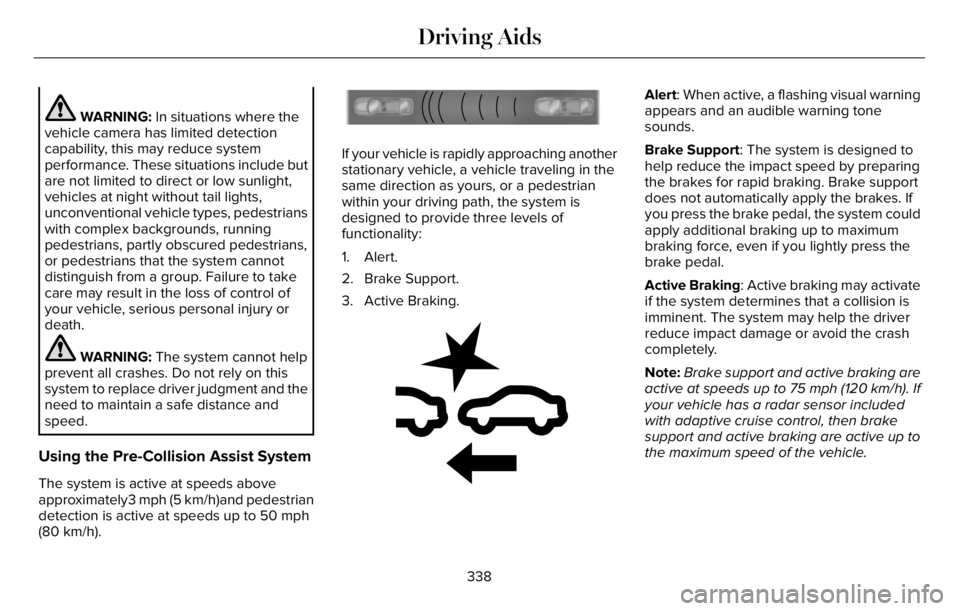
If your vehicle is rapidly approaching another
stationary vehicle, a vehicle traveling in the
same direction as yours, or a pedestrian
within your driving path, the system is
designed to provide three levels of
functionality:
1. Alert.
2. Brake Support.
3. Active Braking.
E255268E255268
Alert: When active, a flashing visual warning
appears and an audible warning tone
sounds.
Brake Support: The system is designed to
help reduce the impact speed by preparing
the brakes for rapid braking. Brake support
does not automatically apply the brakes. If
you press the brake pedal, the system could
apply additional braking up to maximum
braking force, even if you lightly press the
brake pedal.
Active Braking: Active braking may activate
if the system determines that a collision is
imminent. The system may help the driver
reduce impact damage or avoid the crash
completely.
Note:Brake support and active braking are
active at speeds up to 75 mph (120 km/h). If
your vehicle has a radar sensor included
with adaptive cruise control, then brake
support and active braking are active up to
the maximum speed of the vehicle.
338
Driving Aids
Page 342 of 681
Note:If you perceive the pre-collision assist
alert as being too frequent or disturbing, you
can reduce the alert sensitivity. The low
sensitivity causes fewer and later warnings
of a potential forward collision. The
manufacturer recommends using the high
sensitivity setting where possible.
Note:The sensitivity setting does not affect
the performance of the automatic
emergency braking.
Note:The system turns off when you select
deep conditions or deep sand mode.
Distance Indication and Alert (If Equipped)
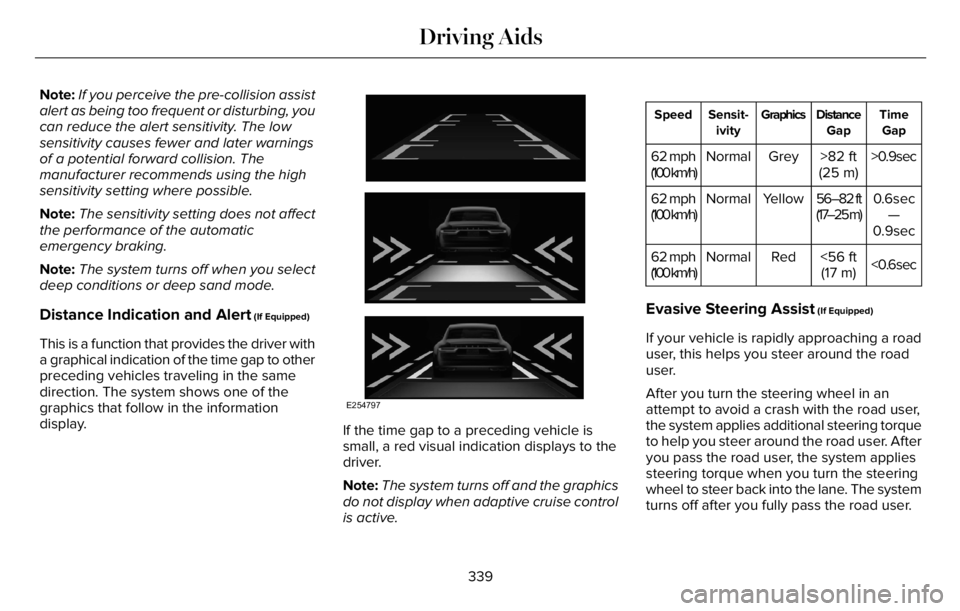
This is a function that provides the driver with
a graphical indication of the time gap to other
preceding vehicles traveling in the same
direction. The system shows one of the
graphics that follow in the information
display.
E254797
If the time gap to a preceding vehicle is
small, a red visual indication displays to the
driver.
Note:The system turns off and the graphics
do not display when adaptive cruise control
is active.
Time
Gap Distance
Gap Graphics Sensit-
ivity Speed
>0.9sec >82 ft
(25 m) Grey Normal 62 mph
(100 km/h)
0.6sec
—
0.9sec 56–82 ft
(17–25 m) Yellow Normal 62 mph
(100 km/h)
<0.6sec <56 ft
(17 m) Red Normal 62 mph
(100 km/h)
Evasive Steering Assist (If Equipped)
If your vehicle is rapidly approaching a road
user, this helps you steer around the road
user.
After you turn the steering wheel in an
attempt to avoid a crash with the road user,
the system applies additional steering torque
to help you steer around the road user. After
you pass the road user, the system applies
steering torque when you turn the steering
wheel to steer back into the lane. The system
turns off after you fully pass the road user.
339
Driving Aids
Page 388 of 681
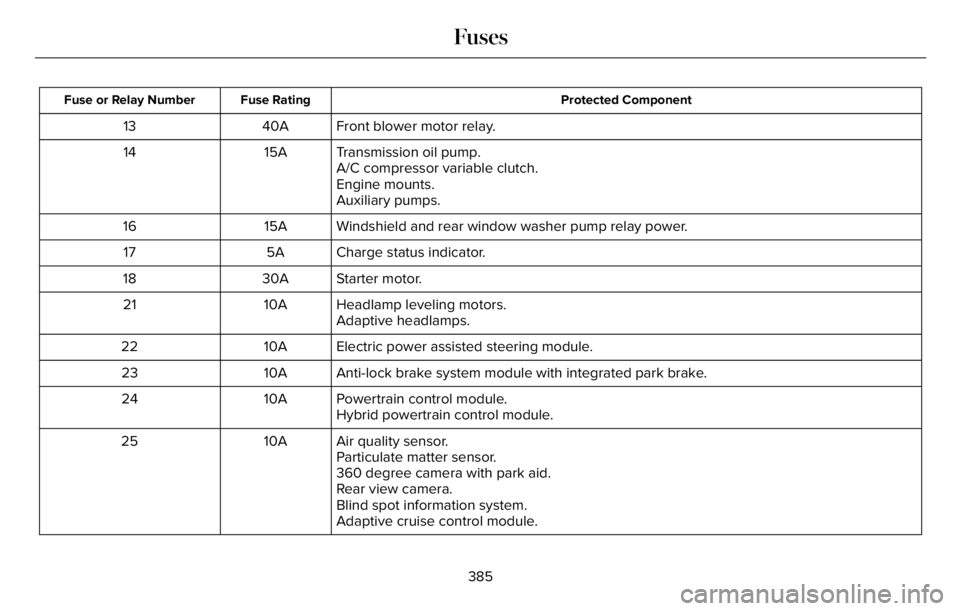
Protected Component Fuse Rating Fuse or Relay Number
Front blower motor relay. 40A 13
Transmission oil pump. 15A 14
A/C compressor variable clutch.
Engine mounts.
Auxiliary pumps.
Windshield and rear window washer pump relay power. 15A 16
Charge status indicator. 5A 17
Starter motor. 30A 18
Headlamp leveling motors. 10A 21
Adaptive headlamps.
Electric power assisted steering module. 10A 22
Anti-lock brake system module with integrated park brake. 10A 23
Powertrain control module. 10A 24
Hybrid powertrain control module.
Air quality sensor. 10A 25
Particulate matter sensor.
360 degree camera with park aid.
Rear view camera.
Blind spot information system.
Adaptive cruise control module.
385
Fuses