power steering LINCOLN AVIATOR 2023 Owner's Manual
[x] Cancel search | Manufacturer: LINCOLN, Model Year: 2023, Model line: AVIATOR, Model: LINCOLN AVIATOR 2023Pages: 681, PDF Size: 9.33 MB
Page 412 of 681
BRAKE FLUID CHECK
WARNING: Do not use any fluid other
than the recommended brake fluid as this
will reduce brake efficiency. Use of
incorrect fluid could result in the loss of
vehicle control, serious personal injury or
death.
WARNING: Only use brake fluid from
a sealed container. Contamination with dirt,
water, petroleum products or other
materials may result in brake system
damage or failure. Failure to adhere to this
warning could result in the loss of vehicle
control, serious personal injury or death.
WARNING: Do not allow the fluid to
touch your skin or eyes. If this happens,
rinse the affected areas immediately with
plenty of water and contact your physician.
WARNING: The brake system could
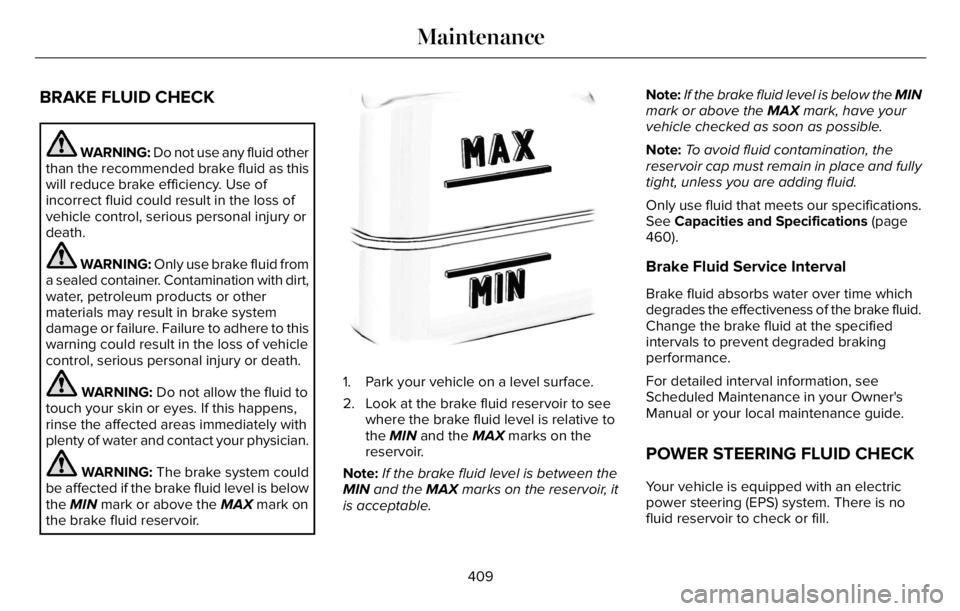
be affected if the brake fluid level is below
the MIN mark or above the MAX mark on
the brake fluid reservoir.
E170684
1. Park your vehicle on a level surface.
2. Look at the brake fluid reservoir to see
where the brake fluid level is relative to
the MIN and the MAX marks on the
reservoir.
Note:If the brake fluid level is between the
MIN and the MAX marks on the reservoir, it
is acceptable.Note:If the brake fluid level is below the MIN
mark or above the MAX mark, have your
vehicle checked as soon as possible.
Note:To avoid fluid contamination, the
reservoir cap must remain in place and fully
tight, unless you are adding fluid.
Only use fluid that meets our specifications.
See Capacities and Specifications (page
460).
Brake Fluid Service Interval
Brake fluid absorbs water over time which
degrades the effectiveness of the brake fluid.
Change the brake fluid at the specified
intervals to prevent degraded braking
performance.
For detailed interval information, see
Scheduled Maintenance in your Owner's
Manual or your local maintenance guide.
POWER STEERING FLUID CHECK
Your vehicle is equipped with an electric
power steering (EPS) system. There is no
fluid reservoir to check or fill.
409
Maintenance
Page 418 of 681
Battery Management System (If Equipped)
The system monitors battery conditions and
takes actions to extend battery life. If
excessive battery drain is detected, the
system temporarily disables some electrical
systems to protect the battery.
Systems included are:
• Heated rear window.
• Heated seats.
• Climate control.
• Heated steering wheel.
• Audio unit.
• Navigation system.
A message may appear in the information
display to alert you that battery protection
actions are active. This message is only for
notification that an action is taking place, and
not intended to indicate an electrical problem
or that the battery requires replacement.After battery replacement, or in some cases
after charging the battery with an external
charger, the battery management system
requires eight hours of vehicle sleep time to
relearn the battery state of charge. During
this time, your vehicle must remain fully
locked with the ignition switched off.
Note:Prior to relearning the battery state of
charge, the battery management system
may temporarily disable some electrical
systems.
Electrical Accessory Installation
To make sure the battery management
system works correctly, do not connect an
electrical device ground connection directly
to the battery negative post. This can cause
inaccurate measurements of the battery
condition and potential incorrect system
operation.
Note:If you add electrical accessories or
components to the vehicle, it may adversely
affect battery performance and durability.
This may also affect the performance of
other electrical systems in the vehicle.
Remove and Reinstall the Battery
Install a battery approved for use by our
specifications. See Capacities and
Specifications (page 460).
To disconnect or remove the battery, do the
following:
1. Apply the parking brake and switch the
ignition off.
2. Switch all electrical equipment off, for
example lights and radio.
3. Wait a minimum of two minutes before
disconnecting the battery.
Note:The engine management system has
a power hold function and remains powered
for a period of time after you switch the
ignition off. This is to allow the system to
store diagnostic and adaptive tables.
Disconnecting the battery without waiting
can cause damage not covered by the
vehicle warranty.
4. Disconnect the negative battery cable
terminal.
5. Disconnect the positive battery cable
terminal.
415
Maintenance
Page 434 of 681
Study your owner's manual and any
supplements for specific information about
equipment features, instructions for safe
driving and additional precautions to reduce
the risk of an accident or serious injury.
All-wheel drive system (if equipped)
WARNING: Do not become
overconfident in the ability of all-wheel
drive vehicles. Although an all-wheel drive
vehicle may accelerate better than a
two-wheel drive vehicle in low traction
situations, it won't stop any faster than
two-wheel drive vehicles. Always drive at
a safe speed.A vehicle equipped with all-wheel drive has
the ability to use all four wheels to power
itself. This increases traction which may
enable you to safely drive over terrain and
road conditions that a conventional
two-wheel drive vehicle cannot. Power is
supplied to all four wheels through a transfer
case operation and drive mode selection.
See All-Wheel Drive (page 264). You should
become thoroughly familiar with this
information before you operate your vehicle.
Some limited All Wheel Drive (AWD) traction
may be provided if a temporary spare is
installed on one of the front wheels. If you
are in driving conditions where limited All
Wheel Drive (AWD) traction needed while a
temporary wheel is installed, it is
recommended the temporary spare be
installed on the front axle.
For all-wheel-drive vehicles, a spare tire of
a different size other than the tire provided
should never be used. A dissimilar spare tire
size; other than the spare tire provided or
major dissimilar tire sized between the front
and rear axles could cause the
all-wheel-drive system to stop functioning
and default to rear-wheel drive.
How your vehicle differs from other
vehicles
Sport utility vehicles and trucks can differ
from some other vehicles in a few noticeable
ways. Your vehicle could be:
• Higher - to allow higher load carrying
capacity and to allow it to travel over
rough terrain without getting hung up or
damaging underbody components.
• Shorter - to give it the capability to
approach inclines and drive over the
crest of a hill without getting hung up or
damaging underbody components. All
other things held equal, a shorter
wheelbase could make your vehicle
quicker to respond to steering inputs
than a vehicle with a longer wheelbase.
• Narrower - to provide greater
maneuverability in tight spaces,
particularly in off-road use.
431
Wheels and Tires
Page 448 of 681
conditions. Like any tire, summer tire
performance is affected by tire wear and
environmental conditions. If you must drive
in those conditions, we recommend using
Mud and Snow (M+S, M/S), All-season or
Snow tires.
Always store your summer tires indoors at
temperatures above 19°F (-7°C). The rubber
compounds used in these tires lose flexibility
and may develop surface cracks in the tread
area at temperatures below 19°F (-7°C). If the
tires have been subjected to 19°F (-7°C) or
less, warm them in a heated space to at least
41°F (5°C) for at least 24 hours before
installing them on a vehicle, or moving the
vehicle with the tires installed, or checking
tire inflation. Do not place tires near heaters
or heating devices used to warm the room
where the tires are stored. Do not apply heat
or blow heated air directly on the tires.
Always inspect the tires after storage periods
and before use.USING SNOW CHAINS
WARNING: Do not exceed 30 mph
(50 km/h). Failure to follow this instruction
could result in the loss of control of your
vehicle, personal injury or death.
WARNING: Do not use snow chains
on snow-free roads.
WARNING: Only fit snow chains to
specified tires.
WARNING: If your vehicle is fitted
with wheel trims, remove them before
fitting snow chains.
WARNING: Wheels and tires must
be the same size, load index and speed
rating as those originally fitted on the
vehicle. Use of any other tire or wheel can
affect the safety and performance of your
vehicle. Additionally, the use of
non-recommended tires and wheels can
cause steering, suspension, axle, transfer
case or power transfer unit failure. Follow
the recommended tire inflation pressures
found on the Safety Compliance
Certification label, or the Tire Label on the
B-Pillar or the edge of the driver door.
Failure to follow this instruction could result
in loss of vehicle control, vehicle rollover,
or personal injury or death.
Only use snow chains on rear wheels. Install
snow chains in pairs. Do not use
self-tensioning snow chains.
Only use snow chains on the following
specified tire sizes:
• 255/60R19
• Only install chains that are 10 mm or
less.
• 255/55R20
• Only install chains that are 10 mm or
less.
We recommend you use steel wheels of the
same size and specification if snow chains
are required because chains may chip
aluminum wheels.
Follow these guidelines when using snow
tires and traction devices:
445
Wheels and Tires
Page 555 of 681
you have selected your preferred times
then press Next to return to the Preferred
Charge Times screen. Repeat for
WEEKEND or WEEKDAY as desired.
Once you are done setting preferred
charge times, press Save.
Note:Selecting all or none of the 24 hours
results in any time of day given equal priority
for charging.
8. Your saved location now shows on the
Charge Times screen. Select Done to
return to the main charge settings screen.
Whenever your vehicle is at a saved
charging location, the charge settings
screen displays the location name, and
the charging times are based on your
Charge Time settings for that location
plus the next Departure Time.
Note:A 100% charge by your next Departure
Time is always the priority. When Charge
Times are set, charging outside your
preferred charging time windows could be
necessary in order to finish by your next
Departure Time. A notification appears when
this condition occurs.Note:When a 100% charge cannot be done
by your next departure time, a notification
appears which includes an estimate of the
charge level you will have at your departure
time.
Departure Time Settings
1. Select Charge Preferences on the
Charge Settings screen.
2. Select Departure Time Setup on the Edit
Charge Preferences screen.
3. Two time settings show for each day of
the week on the Departure Times
schedule screen. Select any one.
4. On the Departure Time settings screen,
set your desired departure time, cabin
temperature and days of the week to
repeat. Press Save.
5. Your settings are now shown on the
Departure Times schedule screen. Press
Back two times to return to the main
charge settings screen. The next
departure time and cabin temperature
setting display.Note:Cabin conditioning can perform
differently depending on if you plug in with
the included convenience cord or a higher
power charging station. The power available
for conditioning is limited to the charging
station power available.
Note:Your vehicle may not always reach
the set cabin temperature due to charging
and ambient temperature conditions. This is
normal operation
APPS
The system allows you interact with select
mobile apps while keeping your eyes on the
road. Voice commands, your steering wheel
buttons, or a quick tap on your touchscreen
give you advanced control of compatible
mobile apps. You can also stream your
favorite music or podcasts, share your time
of arrival with friends, and keep connected
safely.
552
SYNC™ 3
Page 670 of 681
3
360 Degree Camera...................................300
9
911 Assist...........................................................66
A
A/CSee: Climate Control..........................................165
About This Manual...........................................11
ABS
See: Brakes...........................................................271
ABS driving hintsSee: Hints on Driving With Anti-Lock
Brakes...............................................................272
Accessories....................................................574
Accessories
See: Replacement Parts Recommendation.....14
Active Park Assist.........................................292
Adaptive Cruise Control.............................305
Adaptive Cruise Control –
Troubleshooting..............................................316
Adaptive Cruise Control Indicators -
Vehicles With: Adaptive Cruise Control
With Lane Centering..................................312Adaptive Cruise Control Indicators -
Vehicles With: Adaptive Cruise Control
With Stop and Go.......................................313
Adaptive Cruise Control Indicators -
Vehicles With: Intelligent Adaptive Cruise
Control...........................................................313
Adaptive Cruise Control Limitations -
Vehicles With: Adaptive Cruise Control
With Lane Centering.................................307
Adaptive Cruise Control Limitations -
Vehicles With: Adaptive Cruise Control
With Stop and Go......................................307
Adaptive Cruise Control Precautions -
Vehicles With: Adaptive Cruise Control
With Lane Centering.................................305
Adaptive Cruise Control Precautions -
Vehicles With: Adaptive Cruise Control
With Stop and Go......................................306
Adaptive Cruise Control –
Troubleshooting..........................................316
Adaptive Cruise Control – Information
Messages..........................................................316
Adaptive Headlamps.....................................114
Adjusting the Headlamps............................416
Adjusting the Set Speed Tolerance..........316
Adjusting the Steering Wheel - Vehicles
With: Manual Adjustable Steering
Column..........................................................102Adjusting the Steering Wheel - Vehicles
With: Power Adjustable Steering
Column..........................................................102
AFS
See: Adaptive Headlamps.................................114
Airbag Disposal...............................................64
Air Conditioning
See: Climate Control..........................................165
Air FilterSee: Changing the Engine Air Filter..............402
Air Suspension..............................................352
Alarm
See: Anti-Theft Alarm.........................................100
All-Wheel Drive.............................................264
Ambient Lighting............................................117
Anti-Theft Alarm............................................100
Appendices...................................................630
Apps................................................................552
At a Glance.......................................................24
Audible Warnings and Indicators..............135
Audio Control.................................................104
Audio System................................................496
General Information...........................................496
Audio Unit.......................................................497
Auto Air Refresh Hints..................................175
Auto Air Refresh Indicators.........................174
Auto Hold.......................................................275
Autolamps........................................................112
667
Index
Page 675 of 681

Motorcraft Parts - Plug-In Hybrid Electric
Vehicle (PHEV)...........................................464
MyKey – Troubleshooting..............................81
MyKey™..............................................................78
Principle of Operation..........................................78
N
Navigation......................................................538
Network Connectivity.................................490
Connecting the Vehicle to a Mobile
Network............................................................490
Network Connectivity –
Troubleshooting..........................................491
Normal Scheduled Maintenance.............583
O
Oil Change Indicator Reset.......................402
Oil Check
See: Engine Oil Check.......................................401
Opening and Closing the Hood...............398
Opening the Doors........................................90
Ordering Additional Owner's
Literature......................................................379
Overhead Console......................................204
Overriding Automatic High Beam
Control..........................................................120Overriding Reverse Braking Assist..........278
Overriding the Set Speed...........................312
P
Parking Aids..................................................286Principle of Operation.......................................286
Passive Anti-Theft System............................99
PA T S
See: Passive Anti-Theft System........................99
Pedestrian Alert System...............................65
Pedestrian Protection....................................65
Perchlorate........................................................14
Personalized Settings..................................140
Personal Safety System™..............................54
Phone as a Key Limitations..........................74
Phone as a Key................................................74
Phone as a Key – Troubleshooting..................76
Phone as a Key – Troubleshooting............76Phone as a Key – Frequently Asked
Questions...........................................................76
Phone..............................................................536
Plug-In Hybrid Vehicle Operation.............219
Post-Crash Alert System.............................370
Post Impact Braking.....................................372
How Does Post Impact Braking Work...........372
Overriding Post Impact Braking......................372
Post Impact Braking Indicators.......................372Post Impact Braking Limitations.....................372
Power Door LocksSee: Locking and Unlocking..............................83
Power Liftgate..................................................94
Power Seats....................................................179
Power Steering Fluid Check.....................409
Power Windows..............................................121
Pre-Collision Assist.......................................337
Programming the Garage Door
Opener..........................................................196
Programming Your Phone.............................74
Protecting the Environment.........................23
Puncture
See: Changing a Road Wheel..........................451
R
Radio Frequency Certification
Labels............................................................591
Blind Spot Information System Sensors........591
Body Control Module........................................600
Cruise Control Module......................................603
Garage Door Opener........................................607
Keys and Remote Controls..............................608
Radio Transceiver Module.................................611
Remote Function Actuator...............................600
SYNC......................................................................615
Telematics Control Unit....................................620
672
Index