instrument panel LINCOLN AVIATOR 2023 Owner's Guide
[x] Cancel search | Manufacturer: LINCOLN, Model Year: 2023, Model line: AVIATOR, Model: LINCOLN AVIATOR 2023Pages: 681, PDF Size: 9.33 MB
Page 537 of 681
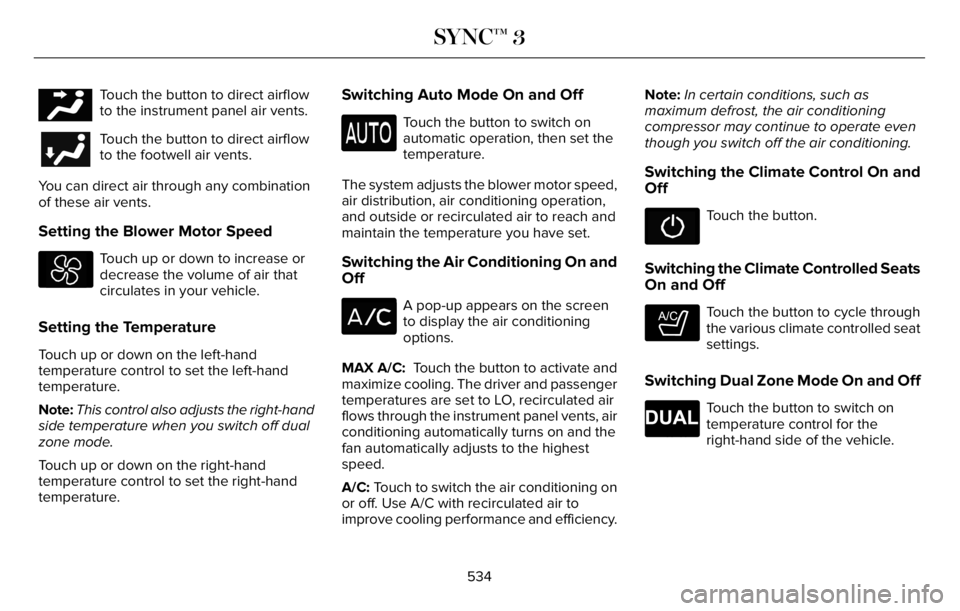
E244097Touch the button to direct airflow
to the instrument panel air vents.
Touch the button to direct airflow
to the footwell air vents.
You can direct air through any combination
of these air vents.
Setting the Blower Motor Speed
Touch up or down to increase or
decrease the volume of air that
circulates in your vehicle.
Setting the Temperature
Touch up or down on the left-hand
temperature control to set the left-hand
temperature.
Note:This control also adjusts the right-hand
side temperature when you switch off dual
zone mode.
Touch up or down on the right-hand
temperature control to set the right-hand
temperature.
Switching Auto Mode On and Off
Touch the button to switch on
automatic operation, then set the
temperature.
The system adjusts the blower motor speed,
air distribution, air conditioning operation,
and outside or recirculated air to reach and
maintain the temperature you have set.
Switching the Air Conditioning On and
Off
A pop-up appears on the screen
to display the air conditioning
options.
MAX A/C: Touch the button to activate and
maximize cooling. The driver and passenger
temperatures are set to LO, recirculated air
flows through the instrument panel vents, air
conditioning automatically turns on and the
fan automatically adjusts to the highest
speed.
A/C: Touch to switch the air conditioning on
or off. Use A/C with recirculated air to
improve cooling performance and efficiency.Note:In certain conditions, such as
maximum defrost, the air conditioning
compressor may continue to operate even
though you switch off the air conditioning.
Switching the Climate Control On and
Off
Touch the button.
Switching the Climate Controlled Seats
On and Off
E265282
Touch the button to cycle through
the various climate controlled seat
settings.
Switching Dual Zone Mode On and Off
E265280
Touch the button to switch on
temperature control for the
right-hand side of the vehicle.
534
SYNC™ 3
Page 538 of 681
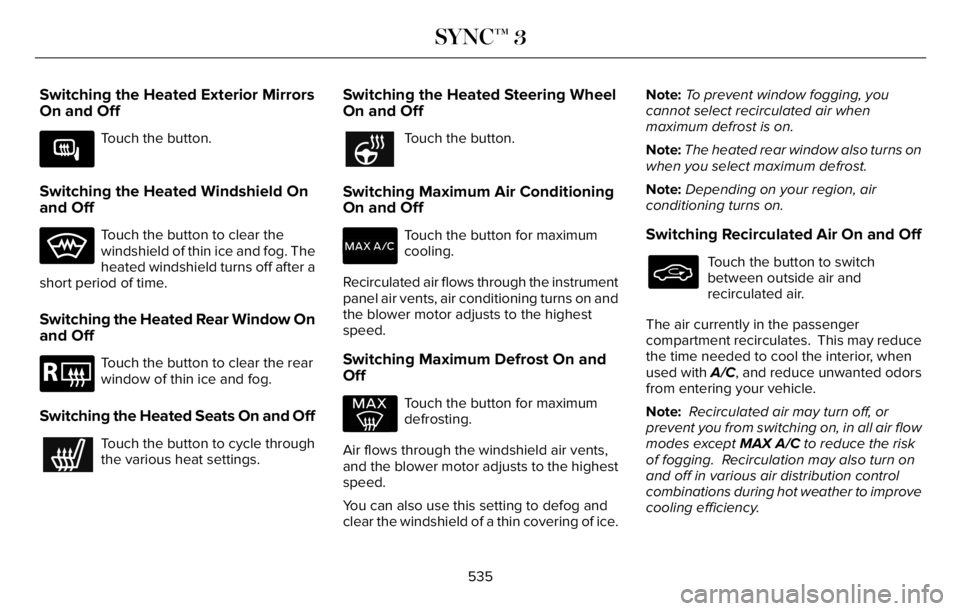
Switching the Heated Exterior Mirrors
On and Off
E266189
Touch the button.
Switching the Heated Windshield On
and Off
Touch the button to clear the
windshield of thin ice and fog. The
heated windshield turns off after a
short period of time.
Switching the Heated Rear Window On
and Off
E184884
Touch the button to clear the rear
window of thin ice and fog.
Switching the Heated Seats On and Off
Touch the button to cycle through
the various heat settings.
Switching the Heated Steering Wheel
On and Off
Touch the button.
Switching Maximum Air Conditioning
On and Off
Touch the button for maximum
cooling.
Recirculated air flows through the instrument
panel air vents, air conditioning turns on and
the blower motor adjusts to the highest
speed.
Switching Maximum Defrost On and
Off
Touch the button for maximum
defrosting.
Air flows through the windshield air vents,
and the blower motor adjusts to the highest
speed.
You can also use this setting to defog and
clear the windshield of a thin covering of ice.Note:To prevent window fogging, you
cannot select recirculated air when
maximum defrost is on.
Note:The heated rear window also turns on
when you select maximum defrost.
Note:Depending on your region, air
conditioning turns on.
Switching Recirculated Air On and Off
Touch the button to switch
between outside air and
recirculated air.
The air currently in the passenger
compartment recirculates. This may reduce
the time needed to cool the interior, when
used with A/C, and reduce unwanted odors
from entering your vehicle.
Note: Recirculated air may turn off, or
prevent you from switching on, in all air flow
modes except MAX A/C to reduce the risk
of fogging. Recirculation may also turn on
and off in various air distribution control
combinations during hot weather to improve
cooling efficiency.
535
SYNC™ 3
Page 671 of 681
Automatic Climate Control.........................165
Automatic High Beam Control....................119
Automatic High Beam Control
Indicators......................................................120
Automatic Transmission.............................259
Automatic Transmission Fluid
Check...........................................................408
Auto-Start-Stop - Excluding: Plug-In Hybrid
Electric Vehicle (PHEV).............................215
Autowipers......................................................108
Auxiliary Power Points................................200
AWD
See: All-Wheel Drive..........................................264
B
BatterySee: Changing the 12V Battery - Gasoline....410
See: Changing the 12V Battery - Plug-In Hybrid
Electric Vehicle (PHEV)..................................413
Blind Spot Information System.................326
BLIS
See: Blind Spot Information System..............326
Body Styling Kits...........................................429
Bonnet Lock
See: Opening and Closing the Hood............398
Booster Seats..................................................40
Brake Fluid Check.......................................409Brakes..............................................................271
General Information............................................271
Breaking-In......................................................361
Bulb Specification Chart.............................488
C
Canceling the Set Speed...........................304
Capacities and Specifications...................460
Capacities and Specifications - Excluding:
Plug-In Hybrid Electric Vehicle
(PHEV)..........................................................465
Capacities and Specifications - Plug-In
Hybrid Electric Vehicle (PHEV)...............477
Car Wash
See: Cleaning the Exterior...............................422
Catalytic Converter......................................235
Changing a Bulb...........................................420
Changing a Fuse..........................................395
Changing a Road Wheel.............................451
Changing the 12V Battery - Gasoline.......410
Changing the 12V Battery - Plug-In Hybrid
Electric Vehicle (PHEV)..............................413
Changing the Engine Air Filter.................402
Changing the Front Wiper Blades -
Vehicles With: Heated Wiper
Blades............................................................419Changing the Front Wiper Blades -
Vehicles Without: Heated Wiper
Blades............................................................418
Changing the Rear Wiper Blades..............419
Changing the Vehicle Wi-Fi Hotspot Name
or Password................................................494
Charging a Wireless Device......................202
Charging the High Voltage Battery - Plug-In
Hybrid Electric Vehicle (PHEV)...............238
Checking MyKey System Status.................80
Checking the Interior Air Quality...............173
Checking the Wiper Blades........................418
Child Restraint and Seatbelt
Maintenance.................................................52
Child Restraint Positioning...........................42
Child Safety......................................................27General Information.............................................27
Child Safety Locks..........................................44
Cleaning Leather Seats..............................426
Cleaning Products.........................................421
Cleaning the Engine....................................424
Cleaning the Exterior..................................422
Cleaning the Instrument Panel and
Instrument Cluster Lens...........................425
Cleaning the Interior....................................425
Cleaning the Wheels...................................427
Cleaning the Windows and Wiper
Blades...........................................................424
668
Index
Page 674 of 681
Hood LockSee: Opening and Closing the Hood............398
Horn..................................................................106
How Does 911 Assist Work...........................66
How Does Adaptive Cruise Control With
Stop and Go Work.....................................305
How Does Auto Air Refresh Work.............173
How Does Reverse Braking Assist
Work..............................................................277
How Does the Rear Occupant Alert System
Work...............................................................193
Hybrid Vehicle Frequently Asked
Questions.....................................................221
Hybrid Vehicle Operation............................217
I
In California (U.S. Only)................................374
Information Display Control........................106
Information Displays.....................................136
General Information............................................136
Information Messages..................................142
Installing Child Restraints.............................29
Installing the Vehicle Identification
Card..............................................................489
Instrument Cluster.........................................128
Instrument Lighting Dimmer........................112
Instrument Panel.............................................24Interior Air Quality.........................................173
Interior Air Quality – Troubleshooting............175
Refreshing the Interior Air.................................174
Interior Air Quality –
Troubleshooting..........................................175
Interior Air Quality – Information
Messages..........................................................175
Interior Lamps..................................................117
Interior Mirror..................................................124
Introduction........................................................11
J
Jump Starting the Vehicle..........................366
K
Keyless Entry.....................................................91
Keyless Starting............................................205
Keys and Remote Controls..........................68
L
Lane Keeping System.................................320
Liftgate...............................................................94
Lighting Control...............................................111
Lighting..............................................................111
General Information..............................................111
Lincoln Automotive Financial Services......14
Lincoln Protect..............................................576
Load Carriers
See: Roof Racks and Load Carriers...............347
Load Carrying................................................346
Load Limit.......................................................348
Locating the Wireless Accessory
Charger........................................................202
Locking and Unlocking..................................83
Luggage Covers...........................................346
Lug Nuts
See: Changing a Road Wheel..........................451
M
Maintenance..................................................398General Information...........................................398
Memory Function..........................................184
Message Center
See: Information Displays.................................136
MirrorsSee: Windows and Mirrors.................................121
Mobile Communications Equipment..........16
Mobile Device Data.........................................21
Moonroof.........................................................125
Motorcraft Parts - Excluding: Plug-In Hybrid
Electric Vehicle (PHEV)............................462
671
Index