air suspension LINCOLN AVIATOR 2023 Owners Manual
[x] Cancel search | Manufacturer: LINCOLN, Model Year: 2023, Model line: AVIATOR, Model: LINCOLN AVIATOR 2023Pages: 681, PDF Size: 9.33 MB
Page 9 of 681
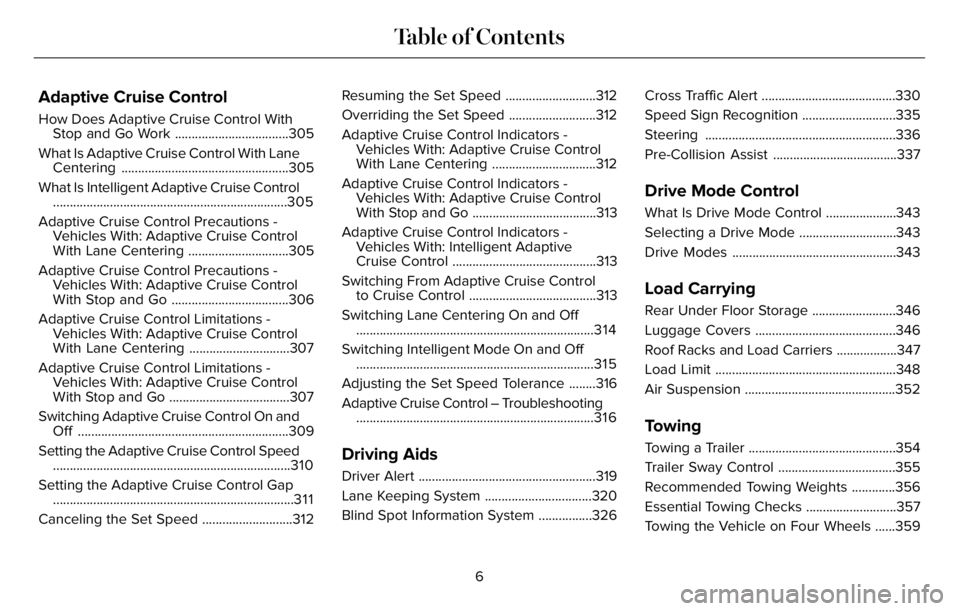
Adaptive Cruise Control
How Does Adaptive Cruise Control With
Stop and Go Work ..................................305
What Is Adaptive Cruise Control With Lane
Centering ..................................................305
What Is Intelligent Adaptive Cruise Control
......................................................................305
Adaptive Cruise Control Precautions -
Vehicles With: Adaptive Cruise Control
With Lane Centering ..............................305
Adaptive Cruise Control Precautions -
Vehicles With: Adaptive Cruise Control
With Stop and Go ...................................306
Adaptive Cruise Control Limitations -
Vehicles With: Adaptive Cruise Control
With Lane Centering ..............................307
Adaptive Cruise Control Limitations -
Vehicles With: Adaptive Cruise Control
With Stop and Go ....................................307
Switching Adaptive Cruise Control On and
Off ...............................................................309
Setting the Adaptive Cruise Control Speed
.......................................................................310
Setting the Adaptive Cruise Control Gap
........................................................................3 1 1
Canceling the Set Speed ...........................312Resuming the Set Speed ...........................312
Overriding the Set Speed ..........................312
Adaptive Cruise Control Indicators -
Vehicles With: Adaptive Cruise Control
With Lane Centering ...............................312
Adaptive Cruise Control Indicators -
Vehicles With: Adaptive Cruise Control
With Stop and Go .....................................313
Adaptive Cruise Control Indicators -
Vehicles With: Intelligent Adaptive
Cruise Control ...........................................313
Switching From Adaptive Cruise Control
to Cruise Control ......................................313
Switching Lane Centering On and Off
.......................................................................3 1 4
Switching Intelligent Mode On and Off
.......................................................................315
Adjusting the Set Speed Tolerance ........316
Adaptive Cruise Control – Troubleshooting
.......................................................................316
Driving Aids
Driver Alert .....................................................319
Lane Keeping System ................................320
Blind Spot Information System ................326Cross Traffic Alert ........................................330
Speed Sign Recognition ............................335
Steering .........................................................336
Pre-Collision Assist .....................................337
Drive Mode Control
What Is Drive Mode Control .....................343
Selecting a Drive Mode .............................343
Drive Modes .................................................343
Load Carrying
Rear Under Floor Storage .........................346
Luggage Covers ..........................................346
Roof Racks and Load Carriers ..................347
Load Limit ......................................................348
Air Suspension .............................................352
Towing
Towing a Trailer ............................................354
Trailer Sway Control ...................................355
Recommended Towing Weights .............356
Essential Towing Checks ...........................357
Towing the Vehicle on Four Wheels ......359
6
Table of Contents
Page 273 of 681
Make sure you allow sufficient distance
between you and other vehicles for stopping.
Drive slower than usual and consider using
one of the lower gears. In emergency
stopping situations, apply the brake steadily.
Since your vehicle is equipped with a four
wheel (ABS), do not “pump” the brakes. See
Hints on Driving With Anti-Lock Brakes
(page 272).
Maintenance and Modifications
The suspension and steering systems on
your vehicle have been designed and tested
to provide predictable performance whether
loaded or empty and durable load carrying
capability. For this reason, we strongly
recommend that you do not make
modifications such as adding or removing
parts (such as lowering kits or stabilizer bars)
or by using replacement parts not equivalent
to the original factory equipment.Any modifications to a vehicle that raise the
center of gravity can make it more likely the
vehicle will rollover as a result of a loss of
control. We strongly recommend that caution
be used with any vehicle equipped with a
high load or device (such as ladder or
luggage racks).
Failure to maintain your vehicle properly
could void the warranty, increase your repair
cost, reduce vehicle performance and
operational capabilities and adversely affect
driver and passenger safety. Frequent
inspection of vehicle chassis components is
recommended if the vehicle is subjected to
off-highway usage.
270
All-Wheel Drive (If Equipped)
Page 338 of 681
SPEED SIGN RECOGNITION (IF
EQUIPPED)
Principle of Operation
WARNING: You are responsible for
controlling your vehicle at all times. The
system is designed to be an aid and does
not relieve you of your responsibility to
drive with due care and attention. Failure
to follow this instruction could result in the
loss of control of your vehicle, personal
injury or death.
WARNING: In cold and severe
weather conditions the system may not
function. Rain, snow and spray can all limit
sensor performance.
WARNING: The system may not
operate properly if the sensor is blocked.
Keep the windshield free from obstruction.The system is designed to detect speed limit
signs to inform you of the current speed limit.
Detected speed signs appear in the
information display. The sensor is behind the
interior mirror.
Note:Do not carry out windshield repairs in
the immediate area surrounding the sensor.
Note:Speed sign data provided by the
navigation system contains information
integrated to the data carrier release.
Note:The system may not detect or correctly
read all speed signs.
Note:If your vehicle has a suspension kit
not approved by us, the system may not
correctly function.
Note:Always replace headlamp bulbs with
those specifically designed for your vehicle.
Other bulbs could reduce system
performance.
The system turns on when you switch the
ignition on, and you cannot switch the system
off.
Using Speed Sign Recognition
Setting the System Speed Warning
You can set the system speed warning to
alert you when the vehicle speed exceeds
the speed limit recognized by the system by
a certain speed tolerance.
Note:The system remembers the last setting
when you start your vehicle.
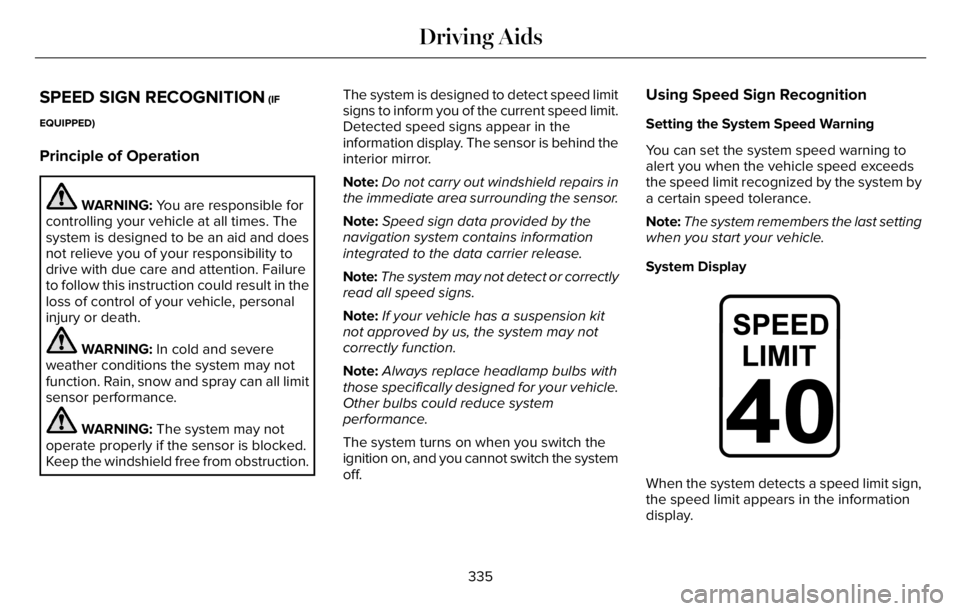
System Display
E317824E317824
When the system detects a speed limit sign,
the speed limit appears in the information
display.
335
Driving Aids
Page 346 of 681
WHAT IS DRIVE MODE CONTROL
The system delivers a driving experience
through a suite of sophisticated electronic
vehicle systems. These systems optimize
steering, handling and powertrain response.
This provides a single location to control
multiple systems performance settings.
Changing the drive mode automatically
changes the functionality of the following
systems:
• Electronically power-assisted steering
system adjusts steering effort and feel
based on the mode you select. See
Steering (page 336).
• Electronic stability control and traction
control maintains your vehicle control in
adverse conditions or high performance
driving. See Stability Control (page 282).
• Electronic throttle control enhances the
powertrain response to your driving
inputs.
• Transmission controls optimize with shift
schedules tuned to each mode.
• AWD settings become optimized and
tuned to each mode.The system automatically tailors your vehicle
configuration for each mode you select.
Note:Not all settings, or modes, may be
available.
Note:The system has diagnostic checks that
continuously monitor the system for proper
operation. If a mode is unavailable due to a
system fault, the mode defaults to Normal.
SELECTING A DRIVE MODE
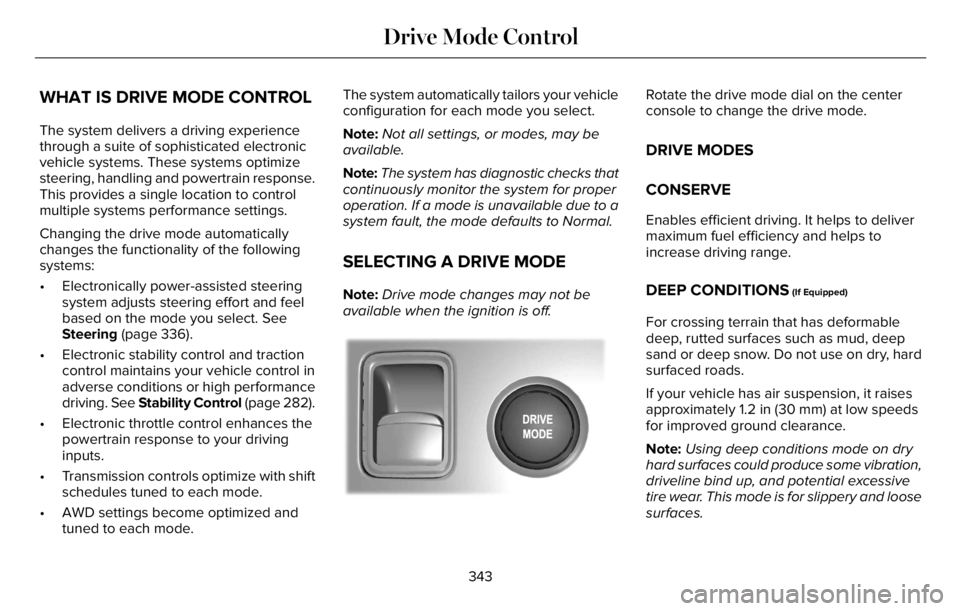
Note:Drive mode changes may not be
available when the ignition is off.
E297680E297680
Rotate the drive mode dial on the center
console to change the drive mode.
DRIVE MODES
CONSERVE
Enables efficient driving. It helps to deliver
maximum fuel efficiency and helps to
increase driving range.
DEEP CONDITIONS (If Equipped)
For crossing terrain that has deformable
deep, rutted surfaces such as mud, deep
sand or deep snow. Do not use on dry, hard
surfaced roads.
If your vehicle has air suspension, it raises
approximately 1.2 in (30 mm) at low speeds
for improved ground clearance.
Note:Using deep conditions mode on dry
hard surfaces could produce some vibration,
driveline bind up, and potential excessive
tire wear. This mode is for slippery and loose
surfaces.
343
Drive Mode Control
Page 347 of 681
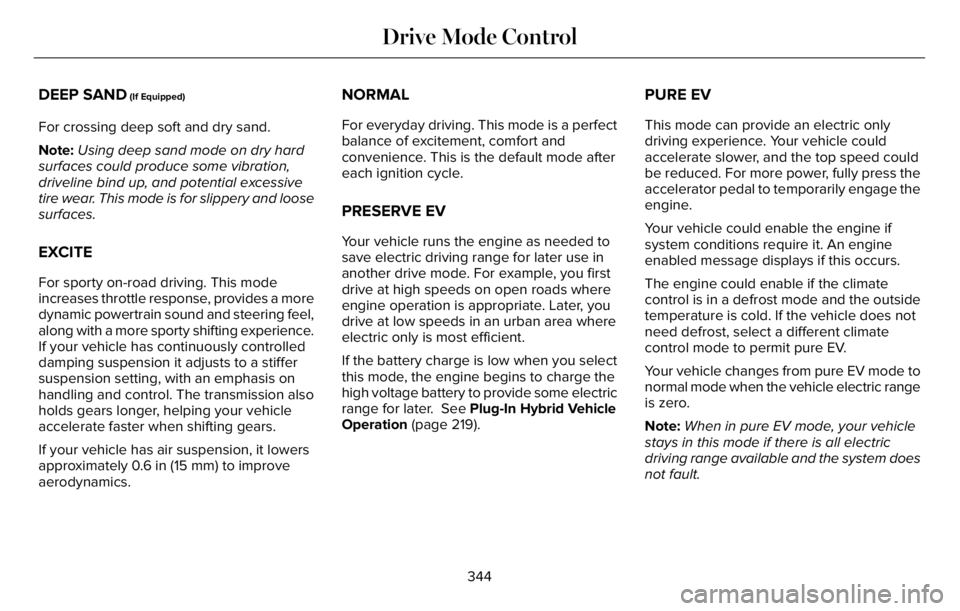
DEEP SAND (If Equipped)
For crossing deep soft and dry sand.
Note:Using deep sand mode on dry hard
surfaces could produce some vibration,
driveline bind up, and potential excessive
tire wear. This mode is for slippery and loose
surfaces.
EXCITE
For sporty on-road driving. This mode
increases throttle response, provides a more
dynamic powertrain sound and steering feel,
along with a more sporty shifting experience.
If your vehicle has continuously controlled
damping suspension it adjusts to a stiffer
suspension setting, with an emphasis on
handling and control. The transmission also
holds gears longer, helping your vehicle
accelerate faster when shifting gears.
If your vehicle has air suspension, it lowers
approximately 0.6 in (15 mm) to improve
aerodynamics.
NORMAL
For everyday driving. This mode is a perfect
balance of excitement, comfort and
convenience. This is the default mode after
each ignition cycle.
PRESERVE EV
Your vehicle runs the engine as needed to
save electric driving range for later use in
another drive mode. For example, you first
drive at high speeds on open roads where
engine operation is appropriate. Later, you
drive at low speeds in an urban area where
electric only is most efficient.
If the battery charge is low when you select
this mode, the engine begins to charge the
high voltage battery to provide some electric
range for later. See Plug-In Hybrid Vehicle
Operation (page 219).
PURE EV
This mode can provide an electric only
driving experience. Your vehicle could
accelerate slower, and the top speed could
be reduced. For more power, fully press the
accelerator pedal to temporarily engage the
engine.
Your vehicle could enable the engine if
system conditions require it. An engine
enabled message displays if this occurs.
The engine could enable if the climate
control is in a defrost mode and the outside
temperature is cold. If the vehicle does not
need defrost, select a different climate
control mode to permit pure EV.
Your vehicle changes from pure EV mode to
normal mode when the vehicle electric range
is zero.
Note:When in pure EV mode, your vehicle
stays in this mode if there is all electric
driving range available and the system does
not fault.
344
Drive Mode Control
Page 355 of 681
Special Loading Instructions for
Owners of Pick-up Trucks and Utility-
type Vehicles
WARNING: When loading the
roof racks, we recommend you evenly
distribute the load, as well as maintain
a low center of gravity. Loaded
vehicles, with higher centers of gravity,
may handle differently than unloaded
vehicles. Take extra precautions, such
as slower speeds and increased
stopping distance, when driving a
heavily loaded vehicle.
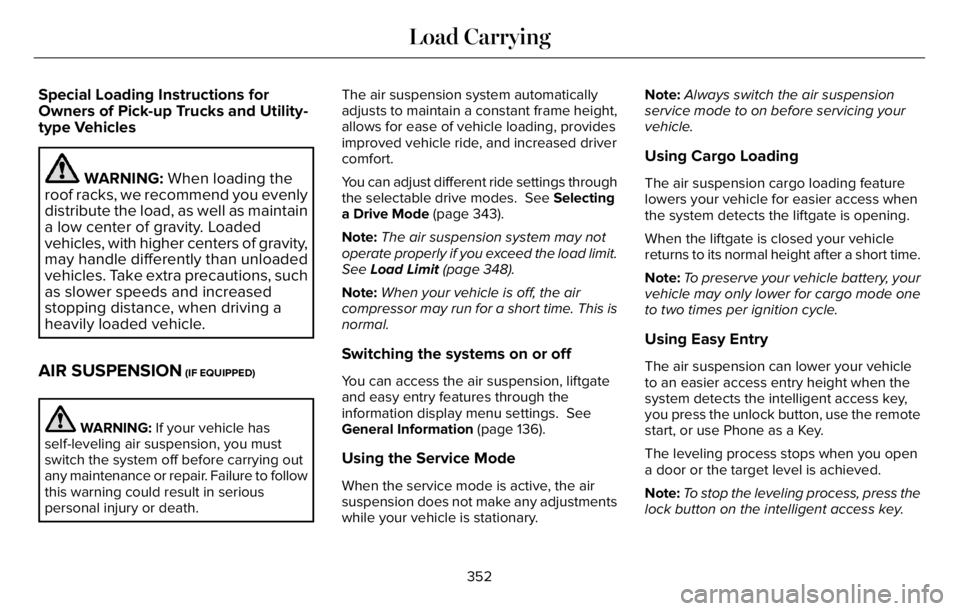
AIR SUSPENSION (IF EQUIPPED)
WARNING: If your vehicle has
self-leveling air suspension, you must
switch the system off before carrying out
any maintenance or repair. Failure to follow
this warning could result in serious
personal injury or death.The air suspension system automatically
adjusts to maintain a constant frame height,
allows for ease of vehicle loading, provides
improved vehicle ride, and increased driver
comfort.
You can adjust different ride settings through
the selectable drive modes. See Selecting
a Drive Mode (page 343).
Note:The air suspension system may not
operate properly if you exceed the load limit.
See Load Limit (page 348).
Note:When your vehicle is off, the air
compressor may run for a short time. This is
normal.
Switching the systems on or off
You can access the air suspension, liftgate
and easy entry features through the
information display menu settings. See
General Information (page 136).
Using the Service Mode
When the service mode is active, the air
suspension does not make any adjustments
while your vehicle is stationary.Note:Always switch the air suspension
service mode to on before servicing your
vehicle.
Using Cargo Loading
The air suspension cargo loading feature
lowers your vehicle for easier access when
the system detects the liftgate is opening.
When the liftgate is closed your vehicle
returns to its normal height after a short time.
Note:To preserve your vehicle battery, your
vehicle may only lower for cargo mode one
to two times per ignition cycle.
Using Easy Entry
The air suspension can lower your vehicle
to an easier access entry height when the
system detects the intelligent access key,
you press the unlock button, use the remote
start, or use Phone as a Key.
The leveling process stops when you open
a door or the target level is achieved.
Note:To stop the leveling process, press the
lock button on the intelligent access key.
352
Load Carrying
Page 390 of 681
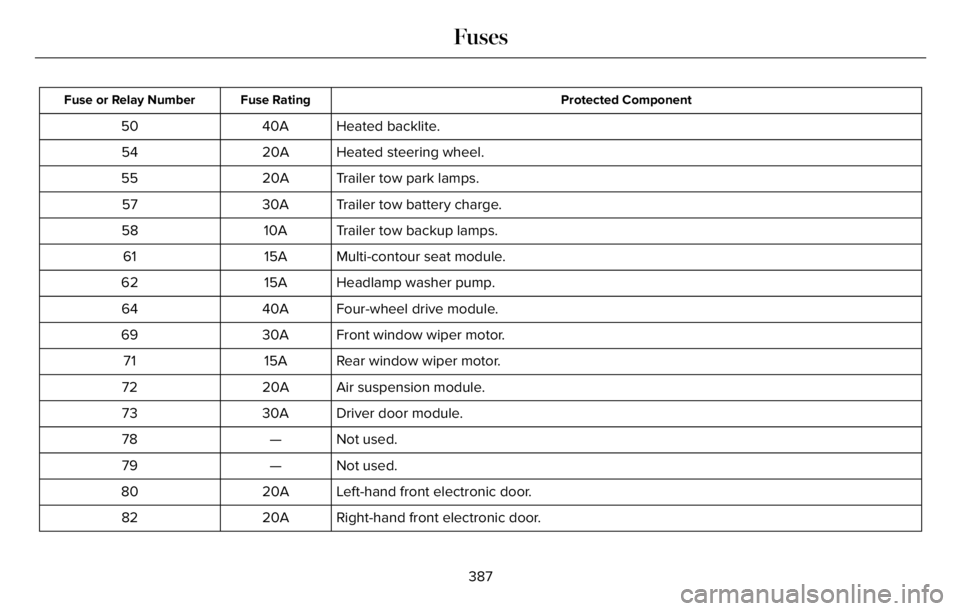
Protected Component Fuse Rating Fuse or Relay Number
Heated backlite. 40A 50
Heated steering wheel. 20A 54
Trailer tow park lamps. 20A 55
Trailer tow battery charge. 30A 57
Trailer tow backup lamps. 10A 58
Multi-contour seat module. 15A 61
Headlamp washer pump. 15A 62
Four-wheel drive module. 40A 64
Front window wiper motor. 30A 69
Rear window wiper motor. 15A 71
Air suspension module. 20A 72
Driver door module. 30A 73
Not used. — 78
Not used. — 79
Left-hand front electronic door. 20A 80
Right-hand front electronic door. 20A 82
387
Fuses
Page 392 of 681
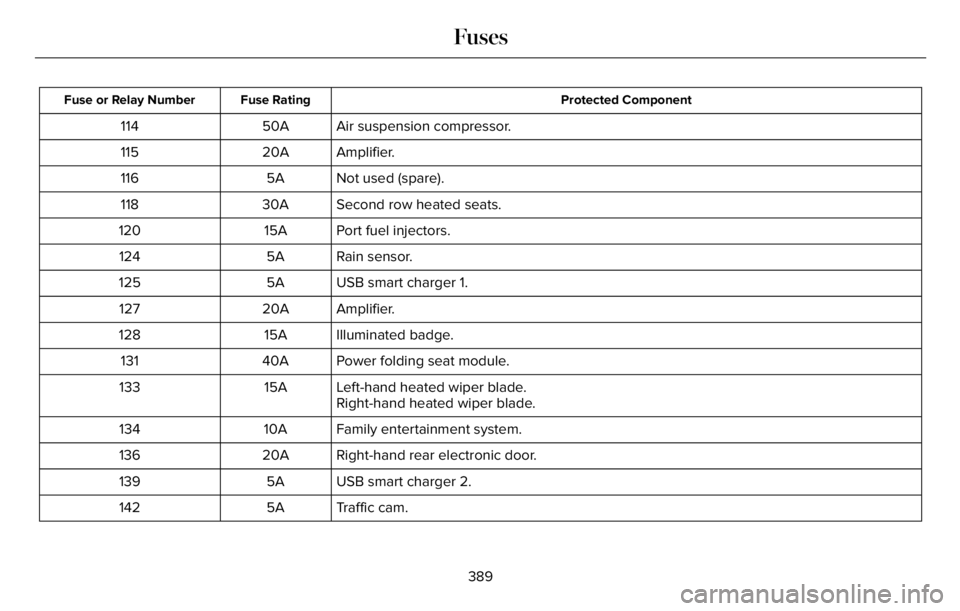
Protected Component Fuse Rating Fuse or Relay Number
Air suspension compressor. 50A 114
Amplifier. 20A 115
Not used (spare). 5A 116
Second row heated seats. 30A 118
Port fuel injectors. 15A 120
Rain sensor. 5A 124
USB smart charger 1. 5A 125
Amplifier. 20A 127
Illuminated badge. 15A 128
Power folding seat module. 40A 131
Left-hand heated wiper blade. 15A 133
Right-hand heated wiper blade.
Family entertainment system. 10A 134
Right-hand rear electronic door. 20A 136
USB smart charger 2. 5A 139
Traffic cam. 5A 142
389
Fuses
Page 446 of 681
Safety Practices
WARNING: If your vehicle is
stuck in snow, mud or sand, do not
rapidly spin the tires; spinning the tires
can tear the tire and cause an
explosion. A tire can explode in as little
as three to five seconds.
WARNING: Do not spin the
wheels at over 34 mph (55 km/h). The
tires may fail and injure a passenger
or bystander.
Driving habits have a great deal to do
with your tire mileage and safety.
*Observe posted speed limits
*Avoid fast starts, stops and turns
*Avoid potholes and objects on the road
*Do not run over curbs or hit the tire
against a curb when parkingHighway Hazards
No matter how carefully you drive, there
is always the possibility that you may
eventually have a flat tire on the
highway. Drive slowly to the closest safe
area out of traffic. This may further
damage the flat tire, but your safety is
more important.
If you feel a sudden vibration or ride
disturbance while driving, or you suspect
your tire or vehicle has been damaged,
immediately reduce your speed. Drive
with caution until you can safely pull off
the road. Stop and inspect the tires for
damage. If a tire is under-inflated or
damaged, deflate it, remove wheel and
replace it with your spare tire and wheel.
If you cannot detect a cause, have the
vehicle towed to the nearest repair
facility or tire dealer to have the vehicle
inspected.Tire and Wheel Alignment
A bad jolt from hitting a curb or pothole
can cause the front end of your vehicle
to become misaligned or cause damage
to your tires. If your vehicle seems to
pull to one side when you are driving,
the wheels may be out of alignment.
Have an authorized dealer check the
wheel alignment periodically.
Wheel misalignment in the front or the
rear can cause uneven and rapid
treadwear of your tires and should be
corrected by an authorized dealer.
Front-wheel drive vehicles and those
with an independent rear suspension (if
equipped) may require alignment of all
four wheels.
The tires should also be balanced
periodically. An unbalanced tire and
wheel assembly may result in irregular
tire wear.
443
Wheels and Tires
Page 448 of 681
conditions. Like any tire, summer tire
performance is affected by tire wear and
environmental conditions. If you must drive
in those conditions, we recommend using
Mud and Snow (M+S, M/S), All-season or
Snow tires.
Always store your summer tires indoors at
temperatures above 19°F (-7°C). The rubber
compounds used in these tires lose flexibility
and may develop surface cracks in the tread
area at temperatures below 19°F (-7°C). If the
tires have been subjected to 19°F (-7°C) or
less, warm them in a heated space to at least
41°F (5°C) for at least 24 hours before
installing them on a vehicle, or moving the
vehicle with the tires installed, or checking
tire inflation. Do not place tires near heaters
or heating devices used to warm the room
where the tires are stored. Do not apply heat
or blow heated air directly on the tires.
Always inspect the tires after storage periods
and before use.USING SNOW CHAINS
WARNING: Do not exceed 30 mph
(50 km/h). Failure to follow this instruction
could result in the loss of control of your
vehicle, personal injury or death.
WARNING: Do not use snow chains
on snow-free roads.
WARNING: Only fit snow chains to
specified tires.
WARNING: If your vehicle is fitted
with wheel trims, remove them before
fitting snow chains.
WARNING: Wheels and tires must
be the same size, load index and speed
rating as those originally fitted on the
vehicle. Use of any other tire or wheel can
affect the safety and performance of your
vehicle. Additionally, the use of
non-recommended tires and wheels can
cause steering, suspension, axle, transfer
case or power transfer unit failure. Follow
the recommended tire inflation pressures
found on the Safety Compliance
Certification label, or the Tire Label on the
B-Pillar or the edge of the driver door.
Failure to follow this instruction could result
in loss of vehicle control, vehicle rollover,
or personal injury or death.
Only use snow chains on rear wheels. Install
snow chains in pairs. Do not use
self-tensioning snow chains.
Only use snow chains on the following
specified tire sizes:
• 255/60R19
• Only install chains that are 10 mm or
less.
• 255/55R20
• Only install chains that are 10 mm or
less.
We recommend you use steel wheels of the
same size and specification if snow chains
are required because chains may chip
aluminum wheels.
Follow these guidelines when using snow
tires and traction devices:
445
Wheels and Tires