tire pressure LINCOLN AVIATOR 2023 Owner's Guide
[x] Cancel search | Manufacturer: LINCOLN, Model Year: 2023, Model line: AVIATOR, Model: LINCOLN AVIATOR 2023Pages: 681, PDF Size: 9.33 MB
Page 454 of 681
When Inflating Your Tires
WARNING: Do not use the tire
pressure displayed in the information
display as a tire pressure gauge. Failure to
follow this instruction could result in
personal injury or death.
When putting air into your tires (such as at a
gas station or in your garage), the tire
pressure monitoring system may not respond
immediately to the air added to your tires.
It may take up to two minutes of driving over
20 mph (32 km/h) for the light to turn off after
you have filled your tires to the
recommended inflation pressure.
How Temperature Affects Your Tire
Pressure
The tire pressure monitoring system monitors
tire pressure in each pneumatic tire. While
driving in a normal manner, a typical
passenger tire inflation pressure may
increase about 2–4 psi (14–28 kPa) from a
cold start situation. If the vehicle is stationary
overnight with the outside temperaturesignificantly lower than the daytime
temperature, the tire pressure may decrease
about 3 psi (21 kPa) for a drop of 30°F (17°C)
in ambient temperature. This lower pressure
value may be detected by the tire pressure
monitoring system as being significantly
lower than the recommended inflation
pressure and activate the system warning
light for low tire pressure. If the low tire
pressure warning light is on, visually check
each tire to verify that no tire is flat. If one or
more tires are flat, repair as necessary.
Check the air pressure in the road tires. If
any tire is under-inflated, carefully drive the
vehicle to the nearest location where air can
be added to the tires. Inflate all the tires to
the recommended inflation pressure.
CHANGING A ROAD WHEEL
If you get a flat tire when driving, do not
apply the brake heavily. Instead, gradually
decrease your speed. Hold the steering
wheel firmly and slowly move to a safe place
on the side of the road.Have a flat serviced by an authorized dealer
in order to prevent damage to the tire
pressure monitoring system sensors. See
Tire Pressure Monitoring System (page 447).
Replace the spare tire with a road tire as
soon as possible. During repairing or
replacing of the flat tire, have the authorized
dealer inspect the tire pressure monitoring
system sensor for damage.
Note:You should only use tire sealants in
roadside emergencies as they may cause
damage to the tire pressure monitoring
system sensor.
Note:The tire pressure monitoring system
indicator light illuminates when the spare
tire is in use. To restore the full function of
the monitoring system, all road wheels
equipped with tire pressure monitoring
sensors must be mounted on the vehicle.Dissimilar Spare Wheel and Tire
Assembly Information
WARNING: Failure to follow these
guidelines could result in an increased risk
of loss of vehicle control, injury or death.
451
Wheels and Tires
Page 584 of 681
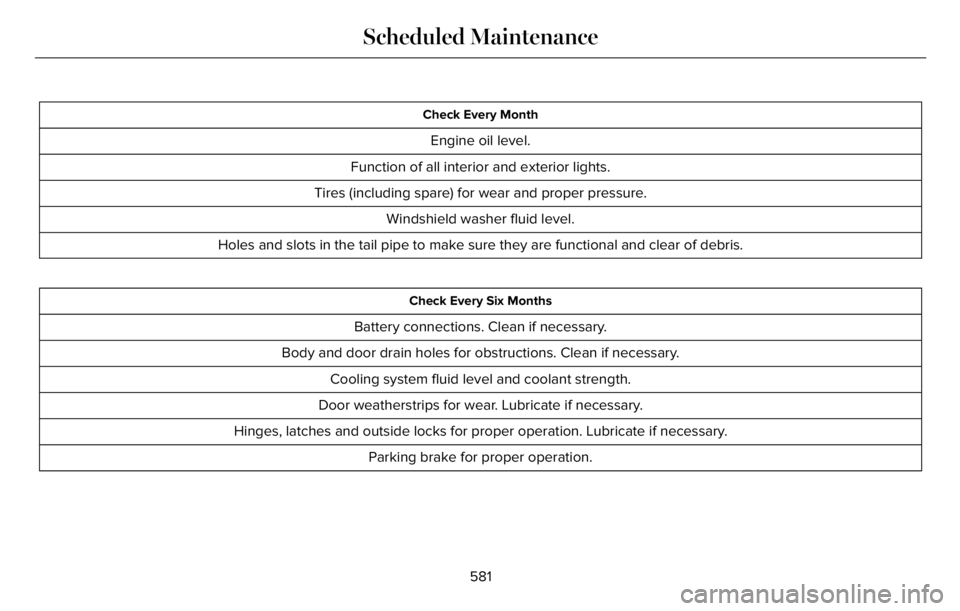
Check Every Month
Engine oil level.
Function of all interior and exterior lights.
Tires (including spare) for wear and proper pressure.
Windshield washer fluid level.
Holes and slots in the tail pipe to make sure they are functional and clear of debris.
Check Every Six Months
Battery connections. Clean if necessary.
Body and door drain holes for obstructions. Clean if necessary.
Cooling system fluid level and coolant strength.
Door weatherstrips for wear. Lubricate if necessary.
Hinges, latches and outside locks for proper operation. Lubricate if necessary.
Parking brake for proper operation.
581
Scheduled Maintenance
Page 586 of 681
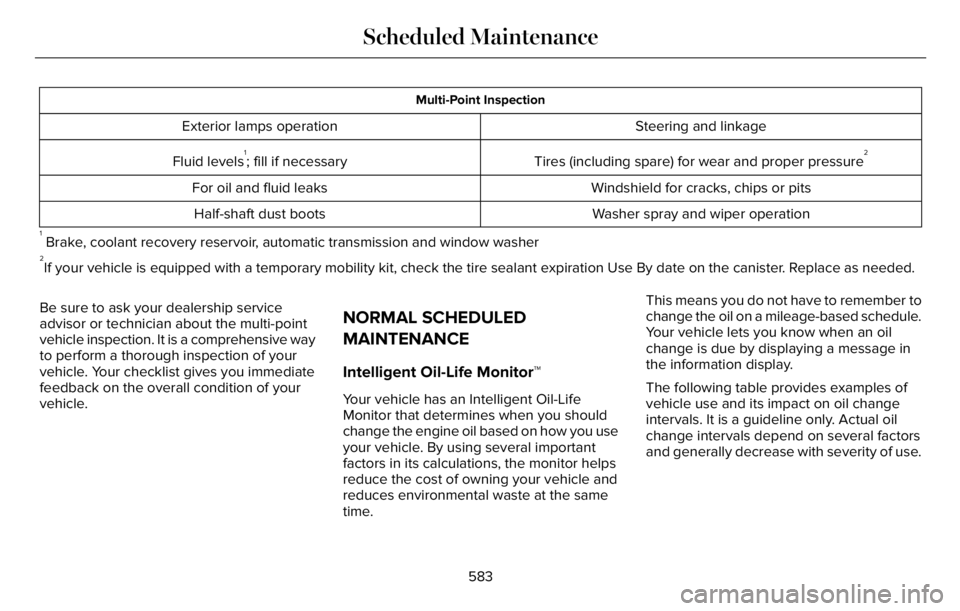
Multi-Point Inspection
Steering and linkage Exterior lamps operation
Tires (including spare) for wear and proper pressure
2Fluid levels1; fill if necessary
Windshield for cracks, chips or pits For oil and fluid leaks
Washer spray and wiper operation Half-shaft dust boots
1 Brake, coolant recovery reservoir, automatic transmission and window washer2If your vehicle is equipped with a temporary mobility kit, check the tire sealant expiration Use By date on the canister. Replace as needed.
Be sure to ask your dealership service
advisor or technician about the multi-point
vehicle inspection. It is a comprehensive way
to perform a thorough inspection of your
vehicle. Your checklist gives you immediate
feedback on the overall condition of your
vehicle.
NORMAL SCHEDULED
MAINTENANCE
Intelligent Oil-Life Monitor™
Your vehicle has an Intelligent Oil-Life
Monitor that determines when you should
change the engine oil based on how you use
your vehicle. By using several important
factors in its calculations, the monitor helps
reduce the cost of owning your vehicle and
reduces environmental waste at the same
time.This means you do not have to remember to
change the oil on a mileage-based schedule.
Your vehicle lets you know when an oil
change is due by displaying a message in
the information display.
The following table provides examples of
vehicle use and its impact on oil change
intervals. It is a guideline only. Actual oil
change intervals depend on several factors
and generally decrease with severity of use.
583
Scheduled Maintenance
Page 624 of 681
This device complies with Part 15 of the FCC
Rules and with Innovation, Science and
Economic Development Canada’s
licence-exempt RSS(s). Operation is subject
to the following two conditions:
1. This device may not cause harmful
interference, and
2. This device must accept any interference
received, including interference that may
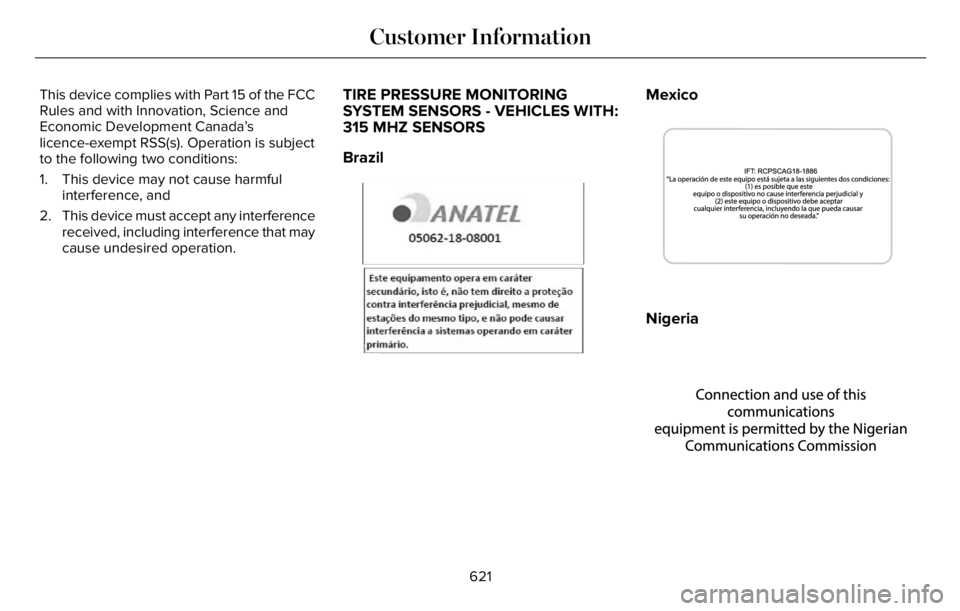
cause undesired operation.TIRE PRESSURE MONITORING
SYSTEM SENSORS - VEHICLES WITH:
315 MHZ SENSORS
Brazil
E3339820E339999999999999999999999999999999982088888888828882222222282000000082888208200888888828888882888208828288888822208888888222222088888882222222039820
Mexico
E342359E342359
Nigeria
E337972E337972
621
Customer Information
Page 625 of 681
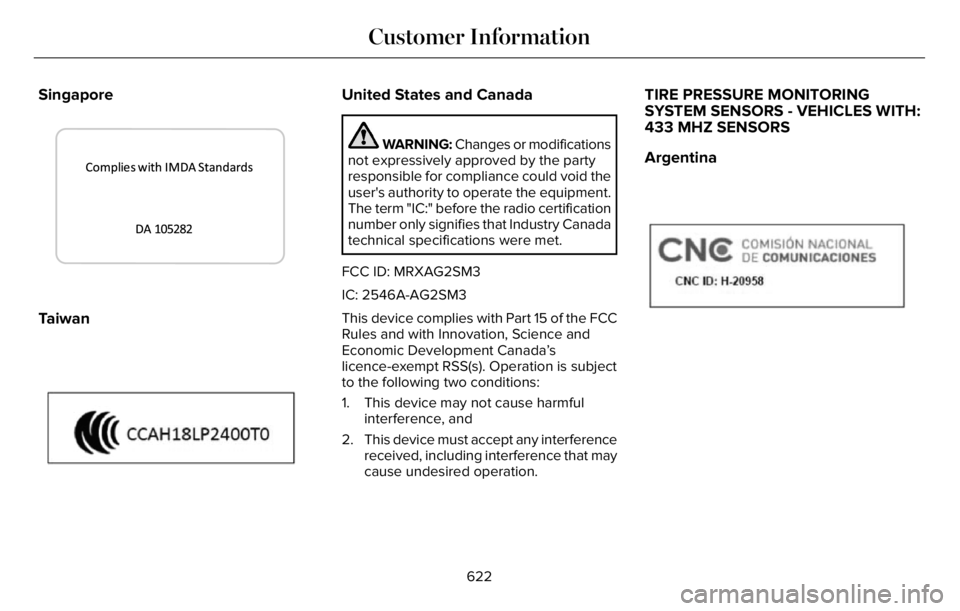
Singapore
3399E339944
Taiwan
E339821E339821
United States and Canada
WARNING: Changes or modifications
not expressively approved by the party
responsible for compliance could void the
user's authority to operate the equipment.
The term "IC:" before the radio certification
number only signifies that Industry Canada
technical specifications were met.
FCC ID: MRXAG2SM3
IC: 2546A-AG2SM3
This device complies with Part 15 of the FCC
Rules and with Innovation, Science and
Economic Development Canada’s
licence-exempt RSS(s). Operation is subject
to the following two conditions:
1. This device may not cause harmful
interference, and
2. This device must accept any interference
received, including interference that may
cause undesired operation.
TIRE PRESSURE MONITORING
SYSTEM SENSORS - VEHICLES WITH:
433 MHZ SENSORS
Argentina
E339822E339822
622
Customer Information
Page 633 of 681
ELECTROMAGNETIC
COMPATIBILITY
WARNING: Do not place objects or
mount equipment on or near the airbag
cover, on the side of the front or rear
seatbacks, or in areas that may come into
contact with a deploying airbag. Failure to
follow these instructions may increase the
risk of personal injury in the event of a
crash.
WARNING: Do not fasten antenna
cables to vehicle wiring, fuel pipes and
brake pipes.
WARNING: Keep antenna and power
cables at least 4 in (10 cm) from any
electronic modules and airbags.
Note:We test and certify your vehicle to
meet electromagnetic compatibility
legislation. It is your responsibility to make
sure that any equipment an authorized
dealer installs on your vehicle complies with
applicable local legislation and other
requirements. Installation of some
aftermarket electronic devices could
degrade the performance of vehicle
functions, which use radio frequency signals
such as broadcast radio receiver, tire
pressure monitoring system, push button
start, Bluetooth® connectivity or satellite
navigation.Note:Any radio frequency transmitter
equipment in your vehicle (such as cellular
telephones and amateur radio transmitters)
must keep to the parameters in the following
illustrations and table. We do not provide
any other special provisions or conditions
for installations or use.
630
Appendices
Page 676 of 681
Tire Pressure Monitoring System
Sensors..............................................................621
Wireless Accessory Charging Module..........627
Rear Occupant Alert System Audible
Warnings.......................................................194
Rear Occupant Alert System
Indicators......................................................194
Rear Occupant Alert System
Limitations....................................................193
Rear Occupant Alert System
Precautions..................................................193
Rear Occupant Alert System......................193
Rear Parking Aid...........................................286
Rear Passenger Climate Controls -
Vehicles With: Quadruple Zone
Automatic Temperature Control.............169
Rear Passenger Climate Controls -
Vehicles With: Triple Zone Automatic
Temperature Control..................................170
Rear Seats.......................................................187
Rear Under Floor Storage..........................346
Rear View Camera.......................................297
Rear View Camera
See: Rear View Camera....................................297
Rear Window Wiper and Washers............109
Rear Wiper Blades
See: Changing the Rear Wiper Blades..........419
Recommended Towing Weights..............356Reduced Engine Performance...................361
Refreshing the Interior Air...........................174
Automatically Refreshing the Interior Air.......174
Manually Refreshing the Interior Air...............174
Refueling - Excluding: Hybrid Electric
Vehicle (HEV)..............................................226
Refueling - Plug-In Hybrid Electric Vehicle
(PHEV)..........................................................229
Remote Control...............................................69
Remote Start...................................................172
Repairing Minor Paint Damage.................427
Replacement Parts Recommendation........14
Replacing a Lost Key or Remote
Control.............................................................73
Replacing the Cabin Air Filter.....................173
Reporting Safety Defects (Canada
Only)..............................................................380
Reporting Safety Defects (U.S. Only)......380
Resuming the Set Speed...........................304
Reverse Braking Assist Indicators...........278
Reverse Braking Assist Precautions........277
Reverse Braking Assist...............................277
Reverse Braking Assist –
Troubleshooting.............................................279
Reverse Braking Assist –
Troubleshooting.........................................279
Reverse Braking Assist – Frequently Asked
Questions........................................................280Reverse Braking Assist – Information
Messages.........................................................279
Roadside Assistance...................................364
Roadside Emergencies...............................364
Rollover Warning...........................................591
Roof Racks and Load Carriers...................347
Running-In
See: Breaking-In..................................................361
Running Out of Fuel....................................225
S
Safety Canopy™................................................61
Safety Precautions.......................................223
Satellite Radio...............................................502
Scheduled Maintenance............................579
Seatbelt Extensions.......................................53
Seatbelt Height Adjustment.........................49
Seatbelt Reminder..........................................50
Seatbelts...........................................................46
Principle of Operation..........................................46
Seatbelt Warning Lamp and Indicator
Chime..............................................................49
Seats.................................................................176
Security.............................................................99
Selecting a Drive Mode..............................343
Service Data......................................................19
Settings Data...................................................20
673
Index
Page 677 of 681
Settings...........................................................555
Setting the Adaptive Cruise Control
Gap..................................................................311
Setting the Adaptive Cruise Control
Speed............................................................310
Setting the Cruise Control Speed............303
Setting the Hill Descent Speed................284
Side Airbags.....................................................60
Side Sensing System..................................290
Sitting in the Correct Position....................176
Snow Chains
See: Using Snow Chains..................................445
Soft Closing Door............................................91
Spare Wheel
See: Changing a Road Wheel..........................451
Special Notices................................................15
Special Operating Conditions Scheduled
Maintenance...............................................587
Speed Control
See: Cruise Control............................................303
Speed Sign Recognition.............................335
Stability Control............................................282
Principle of Operation.......................................282
Starting a Gasoline Engine........................206
Starting a Hybrid Electric Vehicle
System...........................................................210
Starting and Stopping the Engine...........205
General Information..........................................205
Steering...........................................................336
Steering Wheel..............................................102
Storage Compartments..............................204
Sunroof
See: Moonroof.....................................................125
Sun Visors.......................................................125
Supplementary Restraints System.............55
Principle of Operation.........................................55
Switching Adaptive Cruise Control On and
Off..................................................................309
Switching Automatic High Beam Control
On and Off.....................................................119
Switching Cruise Control On and
Off..................................................................303
Switching From Adaptive Cruise Control
to Cruise Control.........................................313
Switching Hill Descent Control On and
Off..................................................................284
Switching Intelligent Mode On and
Off...................................................................315
Switching Lane Centering On and
Off...................................................................314
Switching Rear Occupant Alert System On
and Off...........................................................194
Switching Reverse Braking Assist On and
Off..................................................................278
Symbols Glossary.............................................11SYNC™ 3..........................................................507
General Information...........................................507
SYNC™ 3 Troubleshooting..........................557
T
Technical SpecificationsSee: Capacities and Specifications...............460
The Better Business Bureau (BBB) Auto
Line Program (U.S. Only)..........................375
Tire Care.........................................................432
Tire Pressure Monitoring System.............447
Tires
See: Wheels and Tires......................................430
Towing a Trailer.............................................354
Towing the Vehicle on Four Wheels.......359
Towing.............................................................354
Traction Control.............................................281
Principle of Operation........................................281
Trailer Sway Control....................................355
Transmission..................................................259
Transporting the Vehicle............................370
U
Under Hood Overview...............................400
Unique Driving Characteristics..................215
USB Port.........................................................505
674
Index