battery LINCOLN AVIATOR 2023 Workshop Manual
[x] Cancel search | Manufacturer: LINCOLN, Model Year: 2023, Model line: AVIATOR, Model: LINCOLN AVIATOR 2023Pages: 681, PDF Size: 9.33 MB
Page 246 of 681
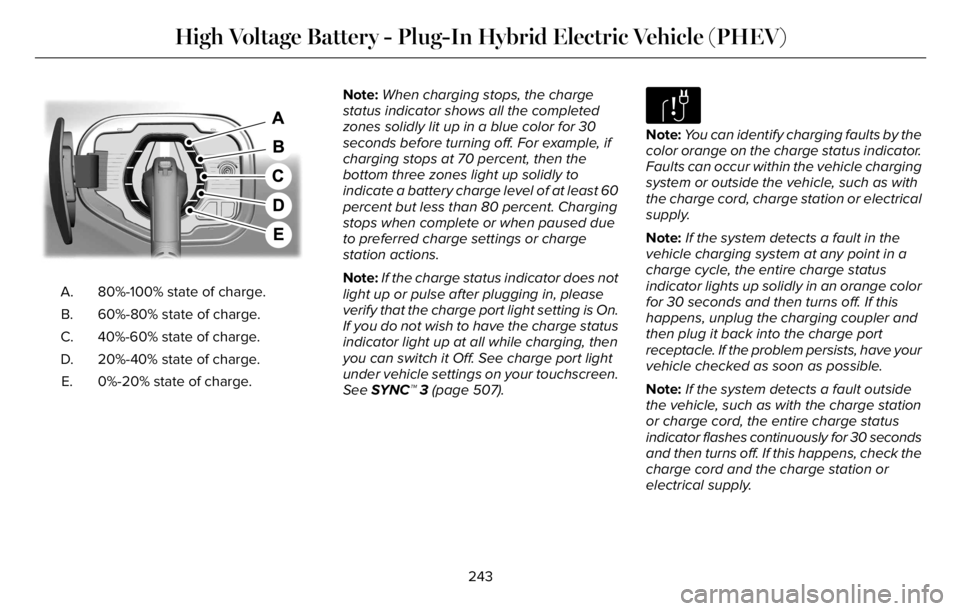
E301E301E301E301E301E301E3E301E301330101971971971971971971979197
80%-100% state of charge. A.
60%-80% state of charge. B.
40%-60% state of charge. C.
20%-40% state of charge. D.
0%-20% state of charge. E.Note:When charging stops, the charge
status indicator shows all the completed
zones solidly lit up in a blue color for 30
seconds before turning off. For example, if
charging stops at 70 percent, then the
bottom three zones light up solidly to
indicate a battery charge level of at least 60
percent but less than 80 percent. Charging
stops when complete or when paused due
to preferred charge settings or charge
station actions.
Note:If the charge status indicator does not
light up or pulse after plugging in, please
verify that the charge port light setting is On.
If you do not wish to have the charge status
indicator light up at all while charging, then
you can switch it Off. See charge port light
under vehicle settings on your touchscreen.
See SYNC™ 3 (page 507).
E306677
Note:You can identify charging faults by the
color orange on the charge status indicator.
Faults can occur within the vehicle charging
system or outside the vehicle, such as with
the charge cord, charge station or electrical
supply.
Note:If the system detects a fault in the
vehicle charging system at any point in a
charge cycle, the entire charge status
indicator lights up solidly in an orange color
for 30 seconds and then turns off. If this
happens, unplug the charging coupler and
then plug it back into the charge port
receptacle. If the problem persists, have your
vehicle checked as soon as possible.
Note:If the system detects a fault outside
the vehicle, such as with the charge station
or charge cord, the entire charge status
indicator flashes continuously for 30 seconds
and then turns off. If this happens, check the
charge cord and the charge station or
electrical supply.
243
High Voltage Battery - Plug-In Hybrid Electric Vehicle (PHEV)
Page 247 of 681
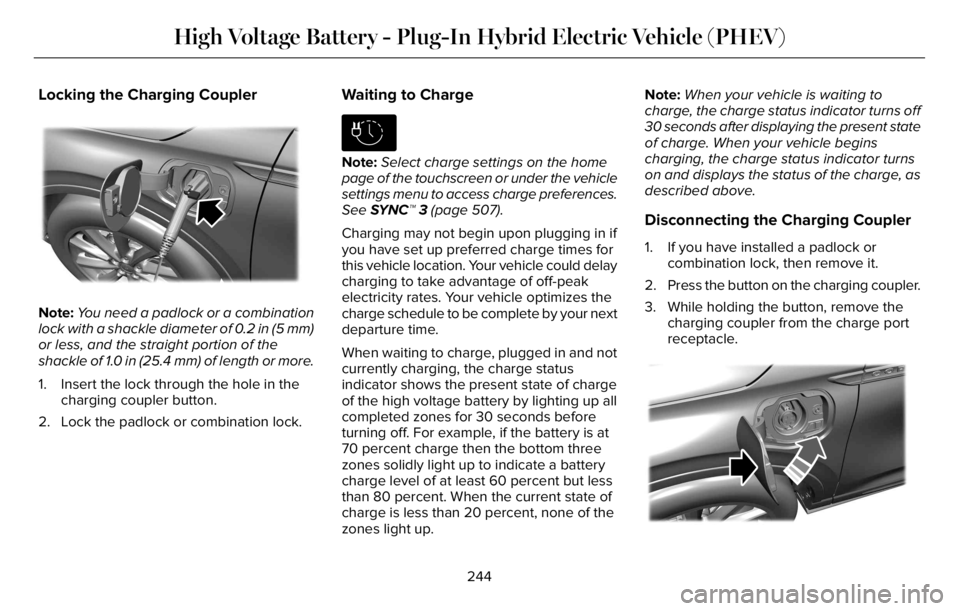
Locking the Charging Coupler
E295451E295451E295451
Note:You need a padlock or a combination
lock with a shackle diameter of 0.2 in (5 mm)
or less, and the straight portion of the
shackle of 1.0 in (25.4 mm) of length or more.
1. Insert the lock through the hole in the
charging coupler button.
2. Lock the padlock or combination lock.
Waiting to Charge
E306678
Note:Select charge settings on the home
page of the touchscreen or under the vehicle
settings menu to access charge preferences.
See SYNC™ 3 (page 507).
Charging may not begin upon plugging in if
you have set up preferred charge times for
this vehicle location. Your vehicle could delay
charging to take advantage of off-peak
electricity rates. Your vehicle optimizes the
charge schedule to be complete by your next
departure time.
When waiting to charge, plugged in and not
currently charging, the charge status
indicator shows the present state of charge
of the high voltage battery by lighting up all
completed zones for 30 seconds before
turning off. For example, if the battery is at
70 percent charge then the bottom three
zones solidly light up to indicate a battery
charge level of at least 60 percent but less
than 80 percent. When the current state of
charge is less than 20 percent, none of the
zones light up.Note:When your vehicle is waiting to
charge, the charge status indicator turns off
30 seconds after displaying the present state
of charge. When your vehicle begins
charging, the charge status indicator turns
on and displays the status of the charge, as
described above.
Disconnecting the Charging Coupler
1. If you have installed a padlock or
combination lock, then remove it.
2. Press the button on the charging coupler.
3. While holding the button, remove the
charging coupler from the charge port
receptacle.
E295444E295444E295444
244
High Voltage Battery - Plug-In Hybrid Electric Vehicle (PHEV)
Page 248 of 681
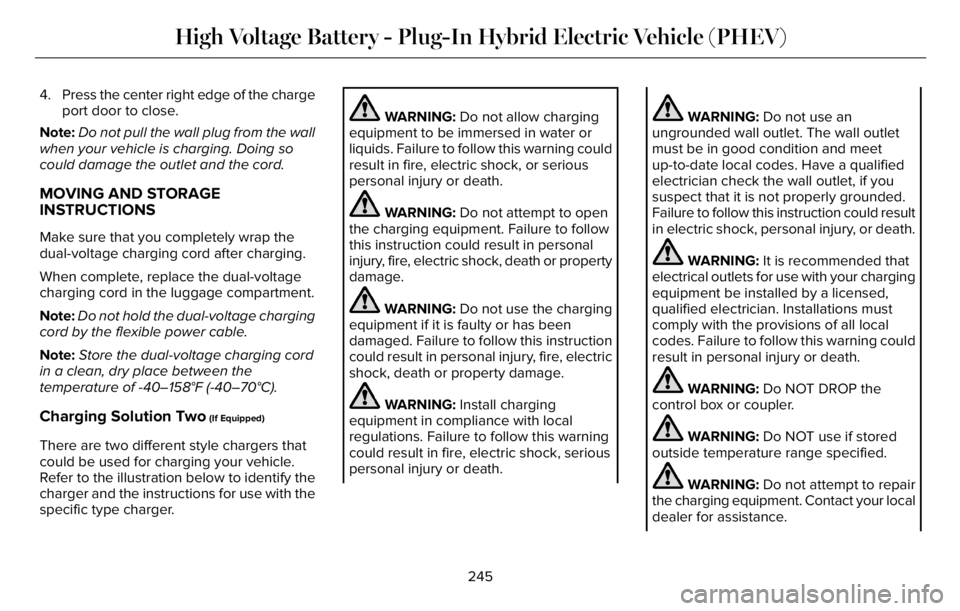
4. Press the center right edge of the charge
port door to close.
Note:Do not pull the wall plug from the wall
when your vehicle is charging. Doing so
could damage the outlet and the cord.
MOVING AND STORAGE
INSTRUCTIONS
Make sure that you completely wrap the
dual-voltage charging cord after charging.
When complete, replace the dual-voltage
charging cord in the luggage compartment.
Note:Do not hold the dual-voltage charging
cord by the flexible power cable.
Note:Store the dual-voltage charging cord
in a clean, dry place between the
temperature of -40–158°F (-40–70°C).
Charging Solution Two (If Equipped)
There are two different style chargers that
could be used for charging your vehicle.
Refer to the illustration below to identify the
charger and the instructions for use with the
specific type charger.
WARNING: Do not allow charging
equipment to be immersed in water or
liquids. Failure to follow this warning could
result in fire, electric shock, or serious
personal injury or death.
WARNING: Do not attempt to open
the charging equipment. Failure to follow
this instruction could result in personal
injury, fire, electric shock, death or property
damage.
WARNING: Do not use the charging
equipment if it is faulty or has been
damaged. Failure to follow this instruction
could result in personal injury, fire, electric
shock, death or property damage.
WARNING: Install charging
equipment in compliance with local
regulations. Failure to follow this warning
could result in fire, electric shock, serious
personal injury or death.
WARNING: Do not use an
ungrounded wall outlet. The wall outlet
must be in good condition and meet
up-to-date local codes. Have a qualified
electrician check the wall outlet, if you
suspect that it is not properly grounded.
Failure to follow this instruction could result
in electric shock, personal injury, or death.
WARNING: It is recommended that
electrical outlets for use with your charging
equipment be installed by a licensed,
qualified electrician. Installations must
comply with the provisions of all local
codes. Failure to follow this warning could
result in personal injury or death.
WARNING: Do NOT DROP the
control box or coupler.
WARNING: Do NOT use if stored
outside temperature range specified.
WARNING: Do not attempt to repair
the charging equipment. Contact your local
dealer for assistance.
245
High Voltage Battery - Plug-In Hybrid Electric Vehicle (PHEV)
Page 249 of 681
WARNING: Read all warnings on the
charging equipment before using for the
first time.
WARNING: Read all instructions in
this publication before using the charging
equipment.
WARNING: To reduce the risk of fire,
connect only to a circuit provided with 40
amps maximum branch circuit overcurrent
protection installed in accordance with
NEC and local electrical code.
WARNING: Do not use the charging
equipment with an extension cord, surge
protector, timer or other adapter. Failure
to follow this instruction could result in
electric shock or fire.
WARNING: The wall plug must fit
firmly into the outlet. If the connection feels
loose, worn or the outlet is damaged, have
a qualified electrician replace the outlet.
Using charging equipment with a worn
outlet may cause burns, property damage
and increase the risk of electric shock.
WARNING: Fully insert the plug into
the wall outlet. Failure to follow this
instruction could result in electric shock.
WARNING: Children should be
supervised when in the vicinity of the
charging equipment while plugged in.
WARNING: Do not put fingers into
the electric charge coupler. Failure to
follow this instruction could result in
electric shock.
WARNING: This equipment has
arcing or sparking parts. Do not expose to
flammable vapors. Position this equipment
at least 18 in (450 mm) above the floor.
WARNING: Do not connect or
disconnect any pluggable components of
the charging equipment when in use or
charging. Failure to follow this instruct can
cause damage to the charging equipment.
WARNING: Do not use the charging
equipment in temperatures outside of the
operation range of -22°F (-30°C) to 122°F
(50°C).
WARNING: Store the charging
equipment in a clean dry place between
the temperatures of -22°F (-30°C) to 185°F
(85°C).
WARNING: Do not plug the charging
equipment into an electrical outlet that is
submerged in water or covered in snow.
WARNING: Do not use charging
equipment in severe rain, snow or
electrical storm.
246
High Voltage Battery - Plug-In Hybrid Electric Vehicle (PHEV)
Page 250 of 681
WARNING: Do not allow charging
equipment to be immersed in water or
liquids. Failure to follow this warning could
result in fire, electric shock, or serious
personal injury or death.
WARNING: When using the charging
equipment avoid moisture, water, snow
and foreign objects at all times.
WARNING: Do not replace the plug
on the connector. There are critical safety
devices in the plug, and the charging
equipment will not operate, if the plug is
replaced. Failure to follow this instruction
could result in electric shock, personal
injury, death, or fire.
WARNING: Charging equipment
contains no user modifiable or repairable
parts. If the charging equipment plug does
not properly fit into the wall outlet, have a
qualified electrician install the correct wall
outlet. Failure to follow this instruction
could result in personal injury or death.
WARNING: High voltage is present
in your electric meter housing and power
distribution service panel. Contact with
high voltage can cause death or serious
personal injury.
WARNING: Visually inspect the
charging equipment before each use. Do
not use the charging equipment if it is
damaged.
WARNING: Keep charging equipment
inside when not in use. Stow the control
box on the hanger or all the charging
equipment in the bag after use to prevent
damage to the charging equipment and
personal injury.
WARNING: Use the charger only to
supply power to electric vehicles equipped
with an SAE J1772 or IEC 62196-2
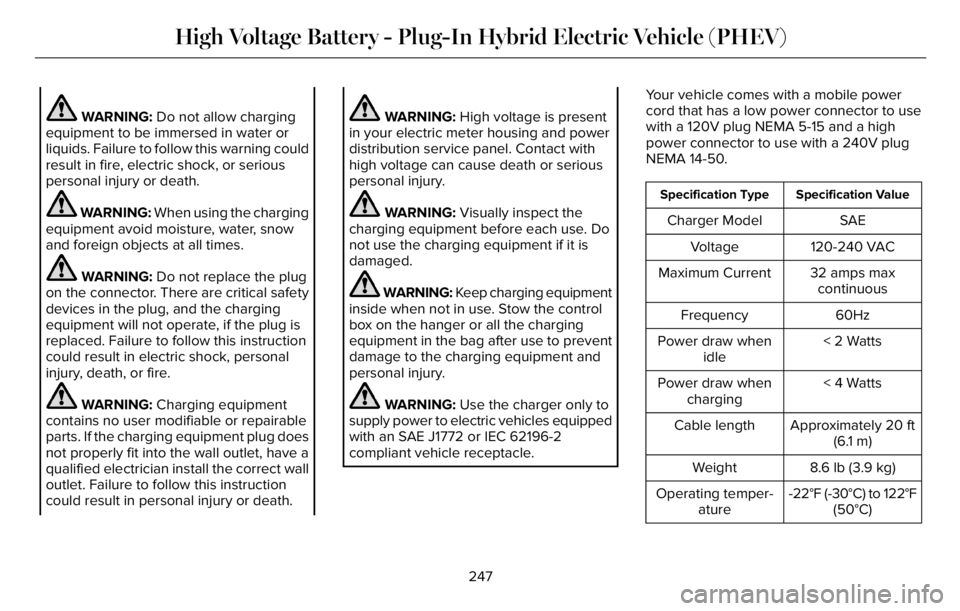
compliant vehicle receptacle.Your vehicle comes with a mobile power
cord that has a low power connector to use
with a 120V plug NEMA 5-15 and a high
power connector to use with a 240V plug
NEMA 14-50.
Specification Value Specification Type
SAE Charger Model
120-240 VAC Voltage
32 amps max
continuous Maximum Current
60Hz Frequency
< 2 Watts Power draw when
idle
< 4 Watts Power draw when
charging
Approximately 20 ft
(6.1 m) Cable length
8.6 lb (3.9 kg) Weight
-22°F (-30°C) to 122°F
(50°C) Operating temper-
ature
247
High Voltage Battery - Plug-In Hybrid Electric Vehicle (PHEV)
Page 251 of 681
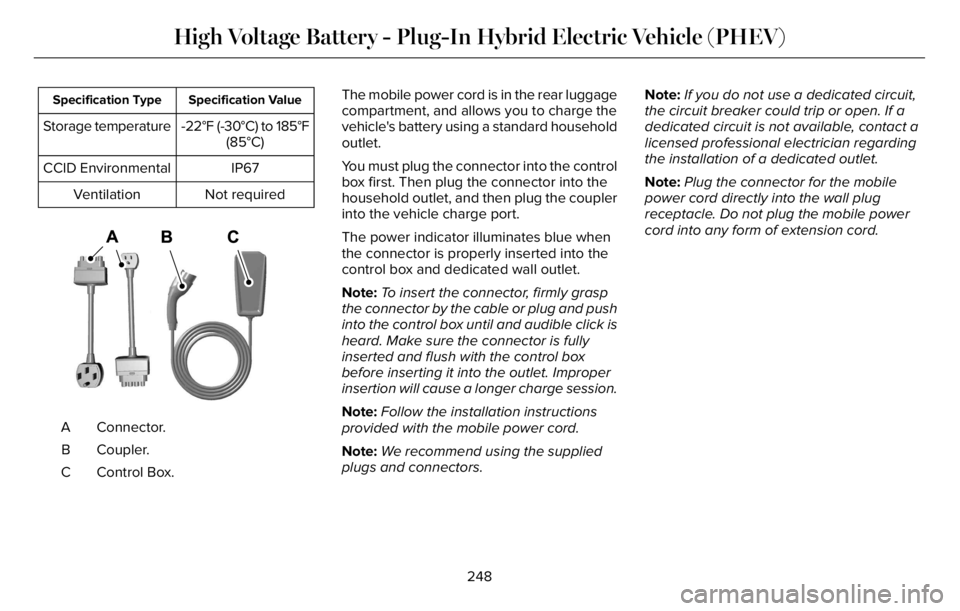
Specification Value Specification Type
-22°F (-30°C) to 185°F
(85°C) Storage temperature
IP67 CCID Environmental
Not required Ventilation
E356986E356986
Connector. A
Coupler. B
Control Box. CThe mobile power cord is in the rear luggage
compartment, and allows you to charge the
vehicle's battery using a standard household
outlet.
You must plug the connector into the control
box first. Then plug the connector into the
household outlet, and then plug the coupler
into the vehicle charge port.
The power indicator illuminates blue when
the connector is properly inserted into the
control box and dedicated wall outlet.
Note:To insert the connector, firmly grasp
the connector by the cable or plug and push
into the control box until and audible click is
heard. Make sure the connector is fully
inserted and flush with the control box
before inserting it into the outlet. Improper
insertion will cause a longer charge session.
Note:Follow the installation instructions
provided with the mobile power cord.
Note:We recommend using the supplied
plugs and connectors.Note:If you do not use a dedicated circuit,
the circuit breaker could trip or open. If a
dedicated circuit is not available, contact a
licensed professional electrician regarding
the installation of a dedicated outlet.
Note:Plug the connector for the mobile
power cord directly into the wall plug
receptacle. Do not plug the mobile power
cord into any form of extension cord.
248
High Voltage Battery - Plug-In Hybrid Electric Vehicle (PHEV)
Page 252 of 681
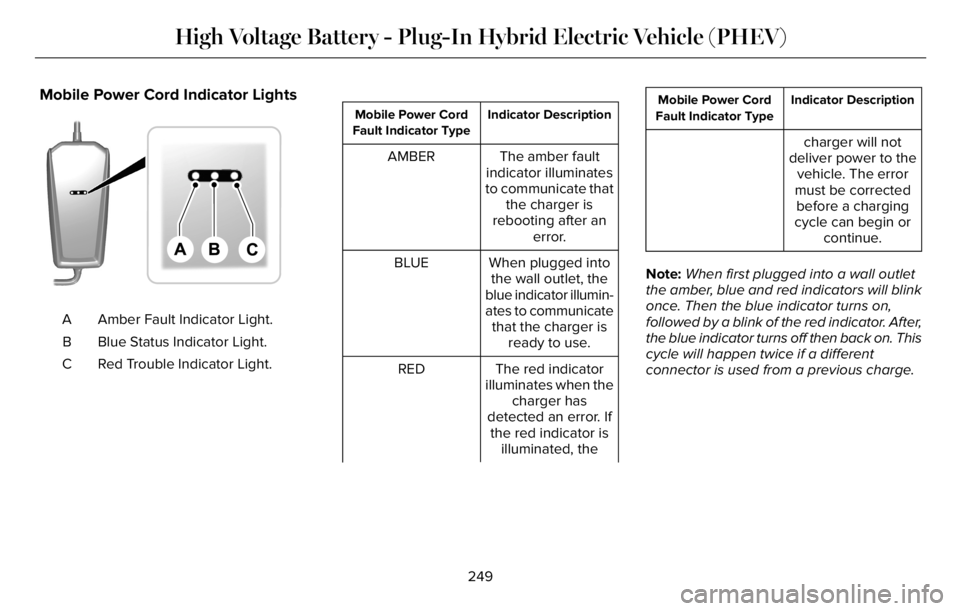
Mobile Power Cord Indicator Lights
E336515E336515
Amber Fault Indicator Light. A
Blue Status Indicator Light. B
Red Trouble Indicator Light. C
Indicator Description Mobile Power Cord
Fault Indicator Type
The amber fault
indicator illuminates
to communicate that
the charger is
rebooting after an
error. AMBER
When plugged into
the wall outlet, the
blue indicator illumin-
ates to communicate
that the charger is
ready to use. BLUE
The red indicator
illuminates when the
charger has
detected an error. If
the red indicator is
illuminated, the RED
Indicator Description Mobile Power Cord
Fault Indicator Type
charger will not
deliver power to the
vehicle. The error
must be corrected
before a charging
cycle can begin or
continue.
Note:When first plugged into a wall outlet
the amber, blue and red indicators will blink
once. Then the blue indicator turns on,
followed by a blink of the red indicator. After,
the blue indicator turns off then back on. This
cycle will happen twice if a different
connector is used from a previous charge.
249
High Voltage Battery - Plug-In Hybrid Electric Vehicle (PHEV)
Page 253 of 681
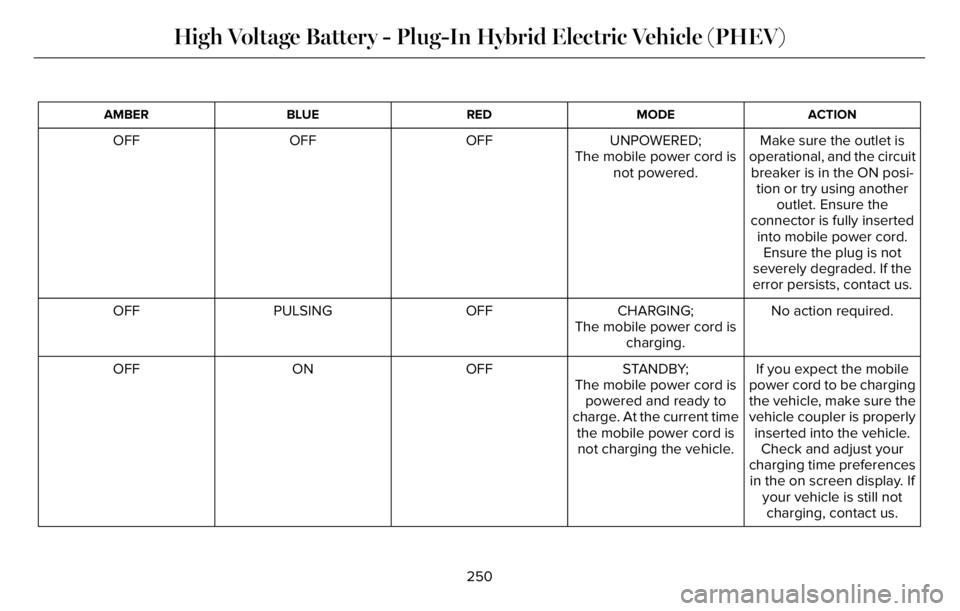
ACTION MODE RED BLUE AMBER
Make sure the outlet is
operational, and the circuit
breaker is in the ON posi-
tion or try using another
outlet. Ensure the
connector is fully inserted
into mobile power cord.
Ensure the plug is not
severely degraded. If the
error persists, contact us. UNPOWERED;
The mobile power cord is
not powered. OFF OFF OFF
No action required. CHARGING; OFF PULSING OFF
The mobile power cord is
charging.
If you expect the mobile
power cord to be charging
the vehicle, make sure the
vehicle coupler is properly
inserted into the vehicle.
Check and adjust your
charging time preferences
in the on screen display. If
your vehicle is still not
charging, contact us. STANDBY;
The mobile power cord is
powered and ready to
charge. At the current time
the mobile power cord is
not charging the vehicle. OFF ON OFF
250
High Voltage Battery - Plug-In Hybrid Electric Vehicle (PHEV)
Page 254 of 681
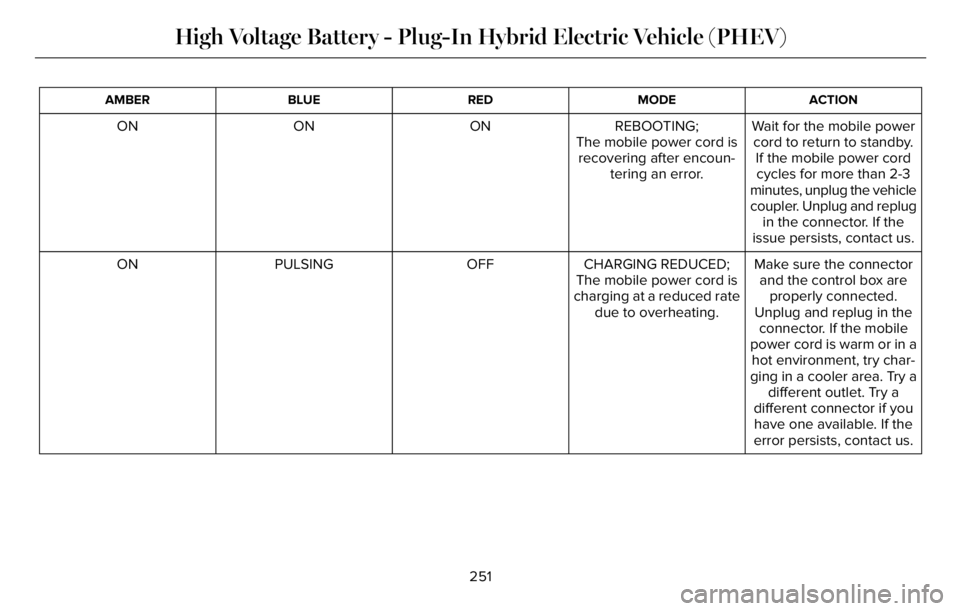
ACTION MODE RED BLUE AMBER
Wait for the mobile power
cord to return to standby.
If the mobile power cord
cycles for more than 2-3
minutes, unplug the vehicle
coupler. Unplug and replug
in the connector. If the
issue persists, contact us. REBOOTING;
The mobile power cord is
recovering after encoun-
tering an error. ON ON ON
Make sure the connector
and the control box are
properly connected.
Unplug and replug in the
connector. If the mobile
power cord is warm or in a CHARGING REDUCED;
The mobile power cord is
charging at a reduced rate
due to overheating. OFF PULSING ON
hot environment, try char-
ging in a cooler area. Try a
different outlet. Try a
different connector if you
have one available. If the
error persists, contact us.
251
High Voltage Battery - Plug-In Hybrid Electric Vehicle (PHEV)
Page 255 of 681
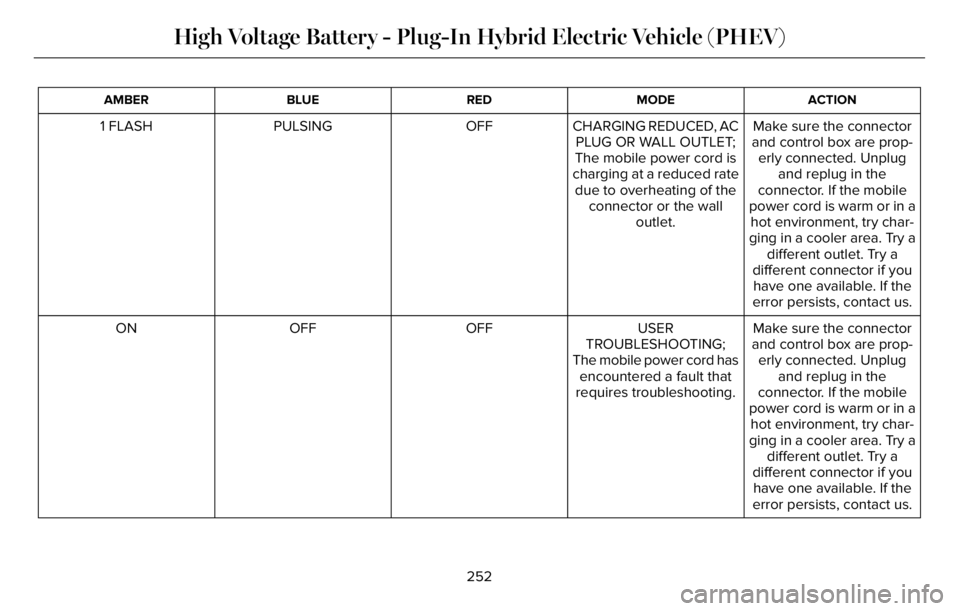
ACTION MODE RED BLUE AMBER
Make sure the connector
and control box are prop-
erly connected. Unplug
and replug in the
connector. If the mobile
power cord is warm or in a CHARGING REDUCED, AC
PLUG OR WALL OUTLET;
The mobile power cord is
charging at a reduced rate
due to overheating of the
connector or the wall
outlet. OFF PULSING 1 FLASH
hot environment, try char-
ging in a cooler area. Try a
different outlet. Try a
different connector if you
have one available. If the
error persists, contact us.
Make sure the connector
and control box are prop-
erly connected. Unplug
and replug in the
connector. If the mobile
power cord is warm or in a USER
TROUBLESHOOTING;
The mobile power cord has
encountered a fault that
requires troubleshooting. OFF OFF ON
hot environment, try char-
ging in a cooler area. Try a
different outlet. Try a
different connector if you
have one available. If the
error persists, contact us.
252
High Voltage Battery - Plug-In Hybrid Electric Vehicle (PHEV)