brake LINCOLN AVIATOR 2023 Owners Manual
[x] Cancel search | Manufacturer: LINCOLN, Model Year: 2023, Model line: AVIATOR, Model: LINCOLN AVIATOR 2023Pages: 681, PDF Size: 9.33 MB
Page 8 of 681
Engine Emission Control
Emission Law ................................................234
Catalytic Converter .....................................235
High Voltage Battery - Plug-In
Hybrid Electric Vehicle (PHEV)
General Information ....................................238
Charging the High Voltage Battery -
Plug-In Hybrid Electric Vehicle (PHEV)
......................................................................238
Transmission
Automatic Transmission ............................259
All-Wheel Drive
Using All-Wheel Drive ................................264
Brakes
General Information .....................................271
Hints on Driving With Anti-Lock Brakes
......................................................................2 7 2
Electric Parking Brake ................................272
Hill Start Assist .............................................274Auto Hold ......................................................275
Reverse Braking Assist
What Is Reverse Braking Assist ...............277
How Does Reverse Braking Assist Work
.......................................................................277
Reverse Braking Assist Precautions .......277
Switching Reverse Braking Assist On and
Off ...............................................................278
Overriding Reverse Braking Assist .........278
Reverse Braking Assist Indicators ..........278
Reverse Braking Assist – Troubleshooting
......................................................................2 7 9
Traction Control
Principle of Operation .................................281
Using Traction Control ................................281
Stability Control
Principle of Operation ................................282
Using Stability Control ...............................283
Hill Descent Control
What Is Hill Descent Control ....................284Switching Hill Descent Control On and Off
......................................................................284
Setting the Hill Descent Speed ...............284
Hill Descent Control Indicator .................285
Parking Aids
Principle of Operation ................................286
Rear Parking Aid ..........................................286
Front Parking Aid ........................................288
Side Sensing System .................................290
Active Park Assist .......................................292
Rear View Camera ......................................297
360 Degree Camera ..................................300
Cruise Control
What Is Cruise Control ...............................303
Switching Cruise Control On and Off .....303
Setting the Cruise Control Speed ...........303
Canceling the Set Speed ..........................304
Resuming the Set Speed ..........................304
Cruise Control Indicators ..........................304
5
Table of Contents
Page 10 of 681
Driving Hints
Reduced Engine Performance ..................361
Cold Weather Precautions .........................361
Breaking-In .....................................................361
Driving Economically ...................................361
Driving Through Shallow Water ..............362
Floor Mats .....................................................362
Roadside Emergencies
Roadside Assistance ..................................364
Hazard Flashers ..........................................365
Fuel Shutoff ..................................................365
Jump Starting the Vehicle .........................366
Collision, Damage or Fire Event ..............368
Post-Crash Alert System ............................370
Transporting the Vehicle ...........................370
Crash and Breakdown
Information
Post Impact Braking ....................................372
Customer Assistance
Getting the Services You Need ...............373In California (U.S. Only) ..............................374
The Better Business Bureau (BBB) Auto
Line Program (U.S. Only) .......................375
Utilizing the Mediation/Arbitration Program
(Canada Only) ..........................................376
Getting Assistance Outside the U.S. and
Canada .......................................................377
Ordering Additional Owner's Literature
......................................................................3 7 9
Reporting Safety Defects (U.S. Only) ......380
Reporting Safety Defects (Canada Only)
......................................................................380
Fuses
Fuse Specification Chart ...........................382
Changing a Fuse .........................................395
Maintenance
General Information ....................................398
Opening and Closing the Hood ..............398
Under Hood Overview ..............................400
Engine Oil Dipstick ......................................401
Engine Oil Check .........................................401
Oil Change Indicator Reset ......................402Changing the Engine Air Filter ................402
Engine Coolant Check ...............................404
Automatic Transmission Fluid Check ......408
Brake Fluid Check ......................................409
Power Steering Fluid Check ....................409
Changing the 12V Battery - Gasoline ......410
Changing the 12V Battery - Plug-In Hybrid
Electric Vehicle (PHEV) ...........................413
Adjusting the Headlamps ..........................416
Washer Fluid Check .....................................417
Fuel Filter ........................................................418
Checking the Wiper Blades .......................418
Changing the Front Wiper Blades -
Vehicles Without: Heated Wiper Blades
.......................................................................418
Changing the Front Wiper Blades -
Vehicles With: Heated Wiper Blades
.......................................................................419
Changing the Rear Wiper Blades ............419
Changing a Bulb ..........................................420
Vehicle Care
General Information .....................................421
Cleaning Products .......................................421
7
Table of Contents
Page 15 of 681
E231157
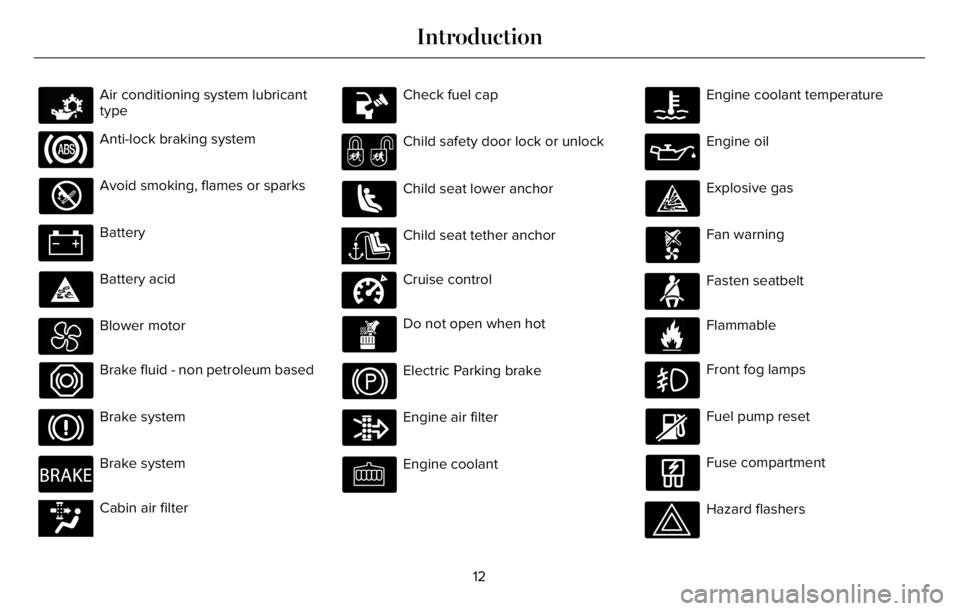
Air conditioning system lubricant
type
Anti-lock braking system
Avoid smoking, flames or sparks
Battery
Battery acid
Blower motor
Brake fluid - non petroleum based
Brake system
E270480
Brake system
E139223E139223Cabin air filter
Check fuel cap
Child safety door lock or unlock
Child seat lower anchor
E141E141128128Child seat tether anchor
E332905
Cruise control
Do not open when hot
Electric Parking brake
Engine air filter
Engine coolant
Engine coolant temperature
Engine oil
Explosive gas
Fan warning
E71880
Fasten seatbelt
E231160
Flammable
Front fog lamps
Fuel pump reset
Fuse compartment
Hazard flashers
12
Introduction
Page 21 of 681
WARNING: Do not connect wireless
plug-in devices to the data link connector.
Unauthorized third parties could gain
access to vehicle data and impair the
performance of safety related systems.
Only allow repair facilities that follow our
service and repair instructions to connect
their equipment to the data link connector.
We respect your privacy and are committed
to protecting it. The information contained
in this publication was correct at the time of
release, but as technology rapidly changes,
we recommend that you visit the local Ford
website for the latest information.
Your vehicle has electronic control units that
have data recording functionality and the
ability to permanently or temporarily store
data. This data could include information on
the condition and status of your vehicle,
vehicle maintenance requirements, events
and malfunctions. The types of data that can
be recorded are described in this section.
Some of the data recorded is stored in event
logs or error logs.Note:Error logs are reset following a service
or repair.
Note:We may provide information in
response to requests from law enforcement,
other government authorities and third
parties acting with lawful authority or through
a legal process. Such information could be
used by them in legal proceedings.
Data recorded includes, for example:
• Operating states of system components,
for example fuel level, tire pressure and
battery charge level.
• Vehicle and component status, for
example wheel speed, deceleration,
lateral acceleration and seatbelt status.
• Events or errors in essential systems, for
example headlamps and brakes.
• System responses to driving situations,
for example airbag deployment and
stability control.
• Environmental conditions, for example
temperature.Some of this data, when used in combination
with other information, for example an
accident report, damage to a vehicle or
eyewitness statements, could be associated
with a specific person.
Services That We Provide
If you use our services, we collect and use
data, for example account information,
vehicle location and driving characteristics,
that could identify you. We transmit this data
through a dedicated, protected connection.
We only collect and use data to enable your
use of our services to which you have
subscribed, with your consent or where
permitted by law. For additional information,
see the terms and conditions of the services
to which you have subscribed.
For additional information about our privacy
policy, refer to the local Ford website.
18
Data Privacy
Page 22 of 681
Services That Third Parties Provide
We recommend that you review the terms
and conditions and data privacy information
for any services equipped with your vehicle
or to which you subscribe. We take no
responsibility for services that third parties
provide.
SERVICE DATA
Service data recorders in your vehicle are
capable of collecting and storing diagnostic
information about your vehicle. This
potentially includes information about the
performance or status of various systems
and modules in the vehicle, such as engine,
throttle, steering or brake systems. In order
to properly diagnose and service your
vehicle, Ford Motor Company (Ford of
Canada in Canada), and service and repair
facilities may access or share among them
vehicle diagnostic information received
through a direct connection to your vehicle
when diagnosing or servicing your vehicle.
Additionally, Ford Motor Company (Ford of
Canada, in Canada) may, where permitted
by law, use vehicle diagnostic informationfor vehicle improvement or with other
information we may have about you, for
example, your contact information, to offer
you products or services that may interest
you. Data may be provided to our service
providers such as part suppliers that may
help diagnose malfunctions, and who are
similarly obligated to protect data. We retain
this data only as long as necessary to
perform these functions or to comply with
law. We may provide information where
required in response to official requests to
law enforcement or other government
authorities or third parties acting with lawful
authority or court order, and such information
may be used in legal proceedings. For U.S.
only (if equipped), if you choose to use
connected apps and services, you consent
that certain diagnostic information may also
be accessed electronically by Ford Motor
Company and Ford authorized service
facilities, and that the diagnostic information
may be used to provide services to you,
personalizing your experience, troubleshoot,
and to improve products and services and
offer you products and services that may
interest you, where permitted by law. For
Canada only, for more information, pleasereview the Ford of Canada privacy policy at
www.ford.ca, including our U.S. data storage
and use of service providers in other
jurisdictions who may be subject to legal
requirements in Canada, the United States
and other countries applicable to them, for
example, lawful requirements to disclose
personal information to governmental
authorities in those countries.EVENT DATA
This vehicle is equipped with an event data
recorder. The main purpose of an event data
recorder is to record, in certain crash or near
crash-like situations, such as an airbag
deployment or hitting a road obstacle; this
data will assist in understanding how a
vehicle’s systems performed. The event data
recorder is designed to record data related
to vehicle dynamics and safety systems for
a short period of time, typically 30 seconds
or less.
19
Data Privacy
Page 23 of 681
The event data recorder in this vehicle is
designed to record such data as:
• How various systems in your vehicle
were operating.
• Whether or not the driver and passenger
seatbelts were buckled/fastened.
• How far (if at all) the driver was
depressing the accelerator and/or the
brake pedal.
• How fast the vehicle was traveling.
• Where the driver was positioning the
steering wheel.
This data can help provide a better
understanding of the circumstances in which
crashes and injuries occur.Note:Event data recorder data is recorded
by your vehicle only if a non-trivial crash
situation occurs; no data is recorded by the
event data recorder under normal driving
conditions and no personal data or
information (for example name, gender, age,
and crash location) is recorded. However,
parties, such as law enforcement, could
combine the event data recorder data with
the type of personally identifying data
routinely acquired during a crash
investigation.
To read data recorded by an event data
recorder, special equipment is required, and
access to the vehicle or the event data
recorder is needed. In addition to the vehicle
manufacturer, other parties, such as law
enforcement, that have such special
equipment, can read the information if they
have access to the vehicle or the event data
recorder.SETTINGS DATA
Your vehicle has electronic control units that
have the ability to store data based on your
personalized settings. The data is stored
locally in the vehicle or on devices that you
connect to it, for example, a USB drive or
digital music player. You can delete some of
this data and also choose whether to share
it through the services to which you
subscribe. See Settings (page 555).
Comfort and Convenience Data
Data recorded includes, for example:
• Seat and steering wheel position.
• Climate control settings.
• Radio presets.
Entertainment Data
Data recorded includes, for example:
• Music, videos or album art.
• Contacts and corresponding address
book entries.
• Navigation destinations.
20
Data Privacy
Page 51 of 681
E1422590
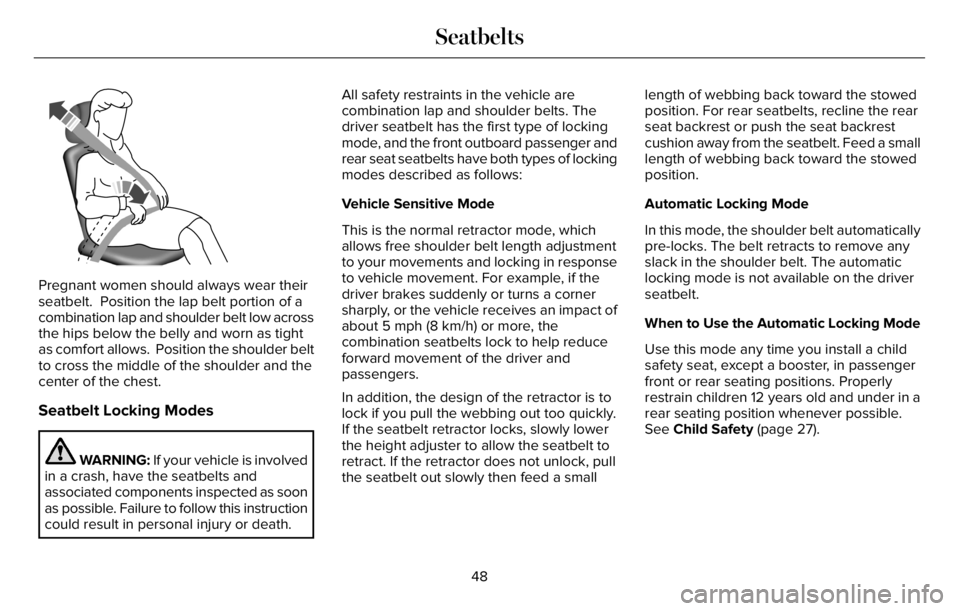
Pregnant women should always wear their
seatbelt. Position the lap belt portion of a
combination lap and shoulder belt low across
the hips below the belly and worn as tight
as comfort allows. Position the shoulder belt
to cross the middle of the shoulder and the
center of the chest.
Seatbelt Locking Modes
WARNING: If your vehicle is involved
in a crash, have the seatbelts and
associated components inspected as soon
as possible. Failure to follow this instruction
could result in personal injury or death.All safety restraints in the vehicle are
combination lap and shoulder belts. The
driver seatbelt has the first type of locking
mode, and the front outboard passenger and
rear seat seatbelts have both types of locking
modes described as follows:
Vehicle Sensitive Mode
This is the normal retractor mode, which
allows free shoulder belt length adjustment
to your movements and locking in response
to vehicle movement. For example, if the
driver brakes suddenly or turns a corner
sharply, or the vehicle receives an impact of
about 5 mph (8 km/h) or more, the
combination seatbelts lock to help reduce
forward movement of the driver and
passengers.
In addition, the design of the retractor is to
lock if you pull the webbing out too quickly.
If the seatbelt retractor locks, slowly lower
the height adjuster to allow the seatbelt to
retract. If the retractor does not unlock, pull
the seatbelt out slowly then feed a smalllength of webbing back toward the stowed
position. For rear seatbelts, recline the rear
seat backrest or push the seat backrest
cushion away from the seatbelt. Feed a small
length of webbing back toward the stowed
position.
Automatic Locking Mode
In this mode, the shoulder belt automatically
pre-locks. The belt retracts to remove any
slack in the shoulder belt. The automatic
locking mode is not available on the driver
seatbelt.
When to Use the Automatic Locking Mode
Use this mode any time you install a child
safety seat, except a booster, in passenger
front or rear seating positions. Properly
restrain children 12 years old and under in a
rear seating position whenever possible.
See Child Safety (page 27).
48
Seatbelts
Page 55 of 681
Note:The driver and front passenger
warnings switch on and off independently.
When you perform this procedure for one
seating position, do not buckle the other
position as this terminates the process.
Read Steps 1 - 4 before starting the
procedure.
Make sure that:
• You set the parking brake.
• The transmission is in park (P).
• The ignition is off.
• You close all vehicle doors.
• You unbuckle the driver and front
passenger seatbelts.
1. Switch the ignition on. Do not start the
engine.
2. Wait until the seatbelt warning lamp turns
off (about one minute). After Step 2, wait
an additional five seconds before
proceeding with Step 3. Once you start
Step 3, you must complete the procedure
within 60 seconds.3. For the seating position you are switching
off, buckle then unbuckle the seatbelt
three times at a moderate speed, ending
in the unbuckled state. After Step 3, the
seatbelt warning lamp turns on.
4. When the seatbelt warning lamp is on,
buckle then unbuckle the seatbelt. After
Step 4, the seatbelt warning lamp flashes
for confirmation.
• This switches the feature off if it is
currently on.
• This switches the feature on if it is
currently off.
CHILD RESTRAINT AND SEATBELT
MAINTENANCE
Inspect the vehicle seatbelts and child safety
seat systems periodically to make sure they
work properly and are not damaged. Inspect
the vehicle and child restraint seatbelts to
make sure there are no nicks, tears or cuts.
Replace if necessary. All vehicle seatbelt
assemblies, including retractors, buckles,
front seatbelt buckle assemblies, buckle
support assemblies (slide bar-if equipped),shoulder belt height adjusters (if equipped),
shoulder belt guide on seat backrest (if
equipped), child safety seat LATCH and
tether anchors, and attaching hardware,
should be inspected after a crash. Read the
child restraint manufacturer's instructions for
additional inspection and maintenance
information specific to the child restraint.
We recommend that all seatbelt assemblies
in use in vehicles involved in a crash be
replaced. However, if the crash was minor
and an authorized dealer finds that the belts
do not show damage and continue to
operate properly, they do not need to be
replaced. Seatbelt assemblies not in use
during a crash should also be inspected and
replaced if either damage or improper
operation is noted.
Properly care for seatbelts. See Vehicle
Care (page 421).
52
Seatbelts
Page 75 of 681
The remote start system does not work if any
of the following occur:
• The ignition is on.
• The anti-theft alarm triggers.
• You switch the feature off through the
touchscreen.
• The hood is open.
• The transmission is not in park (P).
• The battery voltage is below the
minimum operating voltage.
Note:Do not use remote start if your fuel
level is low.
Remote Control Feedback
An LED on the remote control provides status
feedback of remote start or stop commands.
Status LED
Remote start
successful Solid green
Remote stop
successful Solid red
Request failed or
status not received Blinking red
Status incomplete Blinking green
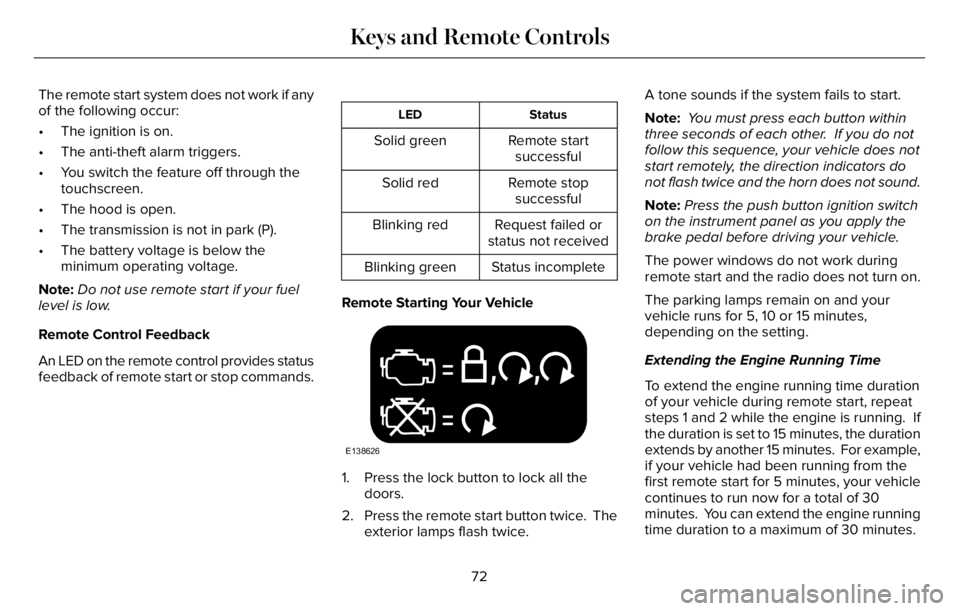
Remote Starting Your Vehicle
E138626
1. Press the lock button to lock all the
doors.
2. Press the remote start button twice. The
exterior lamps flash twice.A tone sounds if the system fails to start.
Note: You must press each button within
three seconds of each other. If you do not
follow this sequence, your vehicle does not
start remotely, the direction indicators do
not flash twice and the horn does not sound.
Note:Press the push button ignition switch
on the instrument panel as you apply the
brake pedal before driving your vehicle.
The power windows do not work during
remote start and the radio does not turn on.
The parking lamps remain on and your
vehicle runs for 5, 10 or 15 minutes,
depending on the setting.
Extending the Engine Running Time
To extend the engine running time duration
of your vehicle during remote start, repeat
steps 1 and 2 while the engine is running. If
the duration is set to 15 minutes, the duration
extends by another 15 minutes. For example,
if your vehicle had been running from the
first remote start for 5 minutes, your vehicle
continues to run now for a total of 30
minutes. You can extend the engine running
time duration to a maximum of 30 minutes.
72
Keys and Remote Controls
Page 78 of 681
8. Confirm you are aware you are
de-authorizing all authorized users and
Lincoln Way Connect settings.
9. Press Continue.
USING THE VALET MODE
Classic Valet Mode
Enabling Valet Mode
Make sure the remote control is in your
vehicle.
1. Press Settings on the touchscreen.
2. Press Valet Mode.
3. Enter a four digit code to lock the
touchscreen.
4. Re-enter the same four digit code to
complete enabling valet mode.
Disabling Valet Mode
1. Press Exit Valet Mode.
2. Enter your four digit code to disable valet
mode and unlock your touchscreen.
Enhanced Valet Mode
Enabling Valet Mode
Have your backup start passcode completely
set up before using valet mode.
Note:If your vehicle detects a remote
control, the system defaults to classic valet
mode.
1. Press Settings on the touchscreen.
2. Press Valet Mode.
Note:If the system detects a valid phone as
a key, the temporary passcode displays in
both the touchscreen and mobile app.
Note:If the system does not detect a valid
phone as a key, it prompts you to enter your
backup start passcode on the touchscreen.
Once validated, the temporary passcode
displays on the touchscreen.
3. Provide the valet the first five digits of the
passcode to enter on the keyless entry
keypad to unlock your vehicle.
4. Provide the valet the eight-digit passcode
to enter on the touchscreen to start and
drive your vehicle.Disabling Valet Mode
1. Press Exit Valet Mode.
Note:If the system detects an authorized
phone as a key, valet mode disables.
Note:If the system does not detect a valid
phone as a key, it prompts you to enter your
backup start passcode. Once validated, valet
mode disables.
USING THE BACKUP START
PASSCODE
Make sure you have phone as a key active
on at least one phone to use the previously
created backup start passcode.
1. Press the brake pedal and the push
button ignition switch. If the system does
not detect a valid phone as a key or
remote control, a message appears on
the touchscreen and the system prompts
you for your backup start passcode.
Note:The touchscreen times out after 30
seconds with no interaction.
75
Phone as a Key (If Equipped)