door lock LINCOLN AVIATOR 2023 Owners Manual
[x] Cancel search | Manufacturer: LINCOLN, Model Year: 2023, Model line: AVIATOR, Model: LINCOLN AVIATOR 2023Pages: 681, PDF Size: 9.33 MB
Page 5 of 681
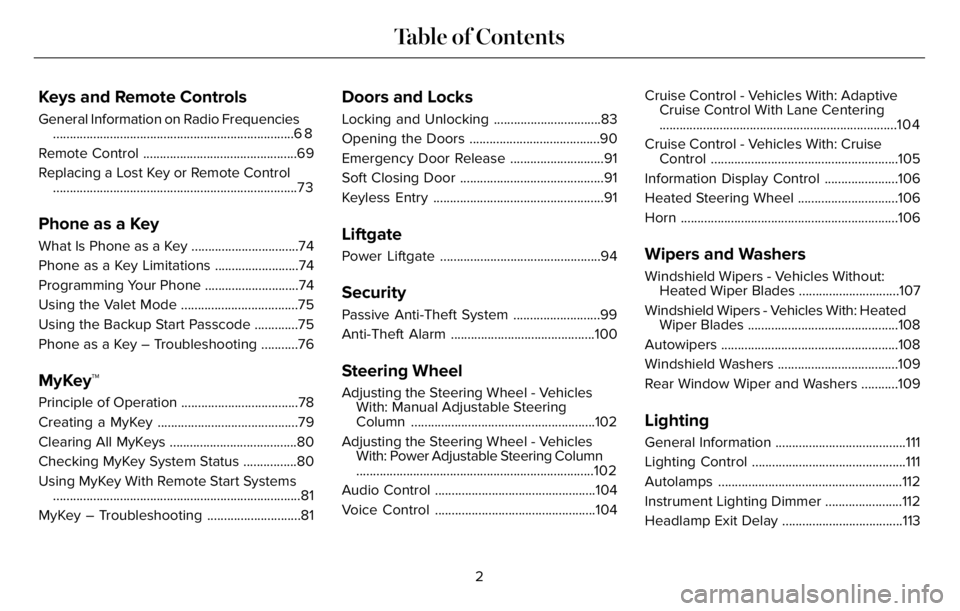
Keys and Remote Controls
General Information on Radio Frequencies
........................................................................6 8
Remote Control ..............................................69
Replacing a Lost Key or Remote Control
.........................................................................73
Phone as a Key
What Is Phone as a Key ................................74
Phone as a Key Limitations .........................74
Programming Your Phone ............................74
Using the Valet Mode ...................................75
Using the Backup Start Passcode .............75
Phone as a Key – Troubleshooting ...........76
MyKey™
Principle of Operation ...................................78
Creating a MyKey ..........................................79
Clearing All MyKeys ......................................80
Checking MyKey System Status ................80
Using MyKey With Remote Start Systems
..........................................................................81
MyKey – Troubleshooting ............................81
Doors and Locks
Locking and Unlocking ................................83
Opening the Doors .......................................90
Emergency Door Release ............................91
Soft Closing Door ...........................................91
Keyless Entry ...................................................91
Liftgate
Power Liftgate ................................................94
Security
Passive Anti-Theft System ..........................99
Anti-Theft Alarm ...........................................100
Steering Wheel
Adjusting the Steering Wheel - Vehicles
With: Manual Adjustable Steering
Column .......................................................102
Adjusting the Steering Wheel - Vehicles
With: Power Adjustable Steering Column
.......................................................................102
Audio Control ................................................104
Voice Control ................................................104Cruise Control - Vehicles With: Adaptive
Cruise Control With Lane Centering
.......................................................................104
Cruise Control - Vehicles With: Cruise
Control ........................................................105
Information Display Control ......................106
Heated Steering Wheel ..............................106
Horn .................................................................106
Wipers and Washers
Windshield Wipers - Vehicles Without:
Heated Wiper Blades ..............................107
Windshield Wipers - Vehicles With: Heated
Wiper Blades .............................................108
Autowipers .....................................................108
Windshield Washers ....................................109
Rear Window Wiper and Washers ...........109
Lighting
General Information .......................................111
Lighting Control ..............................................111
Autolamps .......................................................112
Instrument Lighting Dimmer .......................112
Headlamp Exit Delay ....................................113
2
Table of Contents
Page 7 of 681
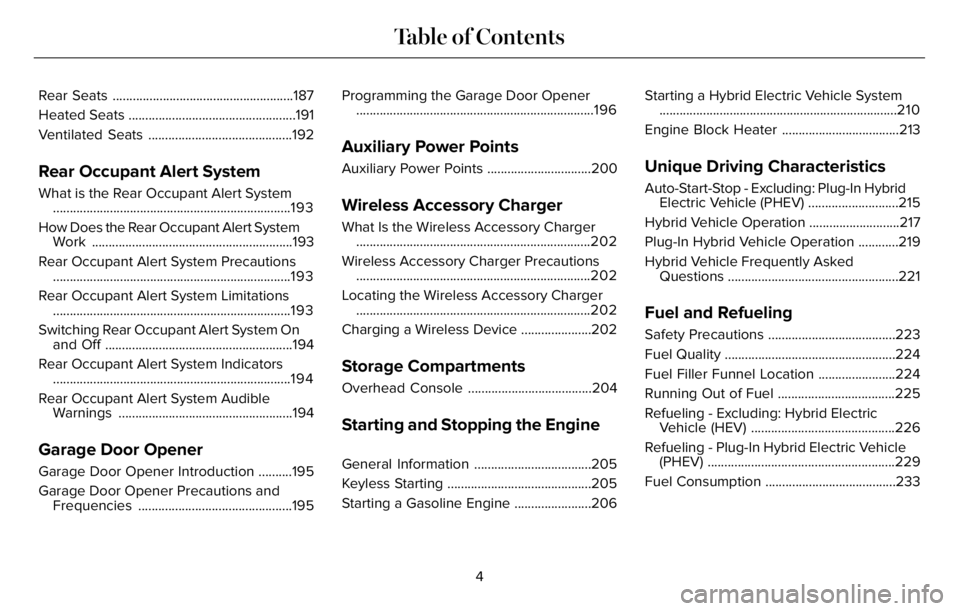
Rear Seats ......................................................187
Heated Seats ..................................................191
Ventilated Seats ...........................................192
Rear Occupant Alert System
What is the Rear Occupant Alert System
.......................................................................193
How Does the Rear Occupant Alert System
Work ............................................................193
Rear Occupant Alert System Precautions
.......................................................................193
Rear Occupant Alert System Limitations
.......................................................................193
Switching Rear Occupant Alert System On
and Off ........................................................194
Rear Occupant Alert System Indicators
.......................................................................194
Rear Occupant Alert System Audible
Warnings ....................................................194
Garage Door Opener
Garage Door Opener Introduction ..........195
Garage Door Opener Precautions and
Frequencies ..............................................195Programming the Garage Door Opener
.......................................................................196
Auxiliary Power Points
Auxiliary Power Points ...............................200
Wireless Accessory Charger
What Is the Wireless Accessory Charger
......................................................................202
Wireless Accessory Charger Precautions
......................................................................202
Locating the Wireless Accessory Charger
......................................................................202
Charging a Wireless Device .....................202
Storage Compartments
Overhead Console .....................................204
Starting and Stopping the Engine
General Information ...................................205
Keyless Starting ...........................................205
Starting a Gasoline Engine .......................206Starting a Hybrid Electric Vehicle System
.......................................................................210
Engine Block Heater ...................................213
Unique Driving Characteristics
Auto-Start-Stop - Excluding: Plug-In Hybrid
Electric Vehicle (PHEV) ...........................215
Hybrid Vehicle Operation ...........................217
Plug-In Hybrid Vehicle Operation ............219
Hybrid Vehicle Frequently Asked
Questions ...................................................221
Fuel and Refueling
Safety Precautions ......................................223
Fuel Quality ...................................................224
Fuel Filler Funnel Location .......................224
Running Out of Fuel ...................................225
Refueling - Excluding: Hybrid Electric
Vehicle (HEV) ...........................................226
Refueling - Plug-In Hybrid Electric Vehicle
(PHEV) ........................................................229
Fuel Consumption .......................................233
4
Table of Contents
Page 15 of 681
E231157
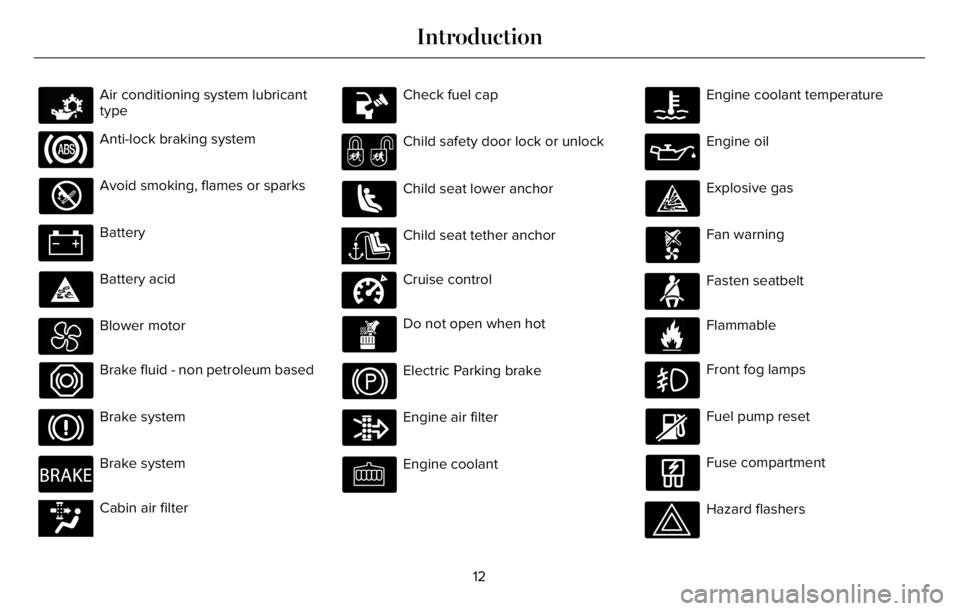
Air conditioning system lubricant
type
Anti-lock braking system
Avoid smoking, flames or sparks
Battery
Battery acid
Blower motor
Brake fluid - non petroleum based
Brake system
E270480
Brake system
E139223E139223Cabin air filter
Check fuel cap
Child safety door lock or unlock
Child seat lower anchor
E141E141128128Child seat tether anchor
E332905
Cruise control
Do not open when hot
Electric Parking brake
Engine air filter
Engine coolant
Engine coolant temperature
Engine oil
Explosive gas
Fan warning
E71880
Fasten seatbelt
E231160
Flammable
Front fog lamps
Fuel pump reset
Fuse compartment
Hazard flashers
12
Introduction
Page 47 of 681
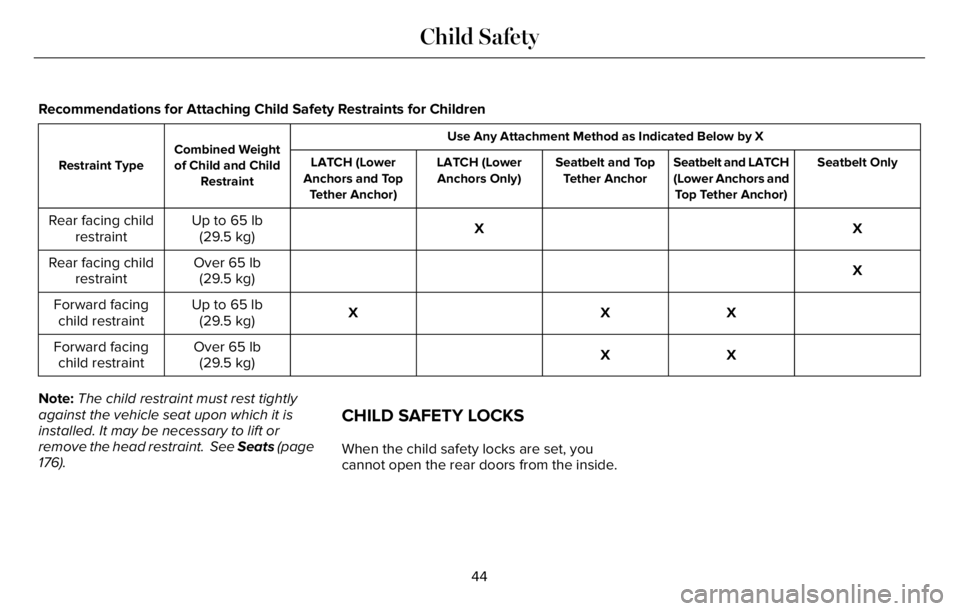
Recommendations for Attaching Child Safety Restraints for Children
Use Any Attachment Method as Indicated Below by X
Combined Weight
of Child and Child
Restraint Restraint TypeSeatbelt Only Seatbelt and LATCH
(Lower Anchors and
Top Tether Anchor) Seatbelt and Top
Tether Anchor LATCH (Lower
Anchors Only) LATCH (Lower
Anchors and Top
Tether Anchor)
X X Up to 65 lb
(29.5 kg) Rear facing child
restraint
X Over 65 lb
(29.5 kg) Rear facing child
restraint
X X X Up to 65 lb
(29.5 kg) Forward facing
child restraint
X X Over 65 lb
(29.5 kg) Forward facing
child restraint
Note:The child restraint must rest tightly
against the vehicle seat upon which it is
installed. It may be necessary to lift or
remove the head restraint. See Seats (page
176).
CHILD SAFETY LOCKS
When the child safety locks are set, you
cannot open the rear doors from the inside.
44
Child Safety
Page 48 of 681
E295318
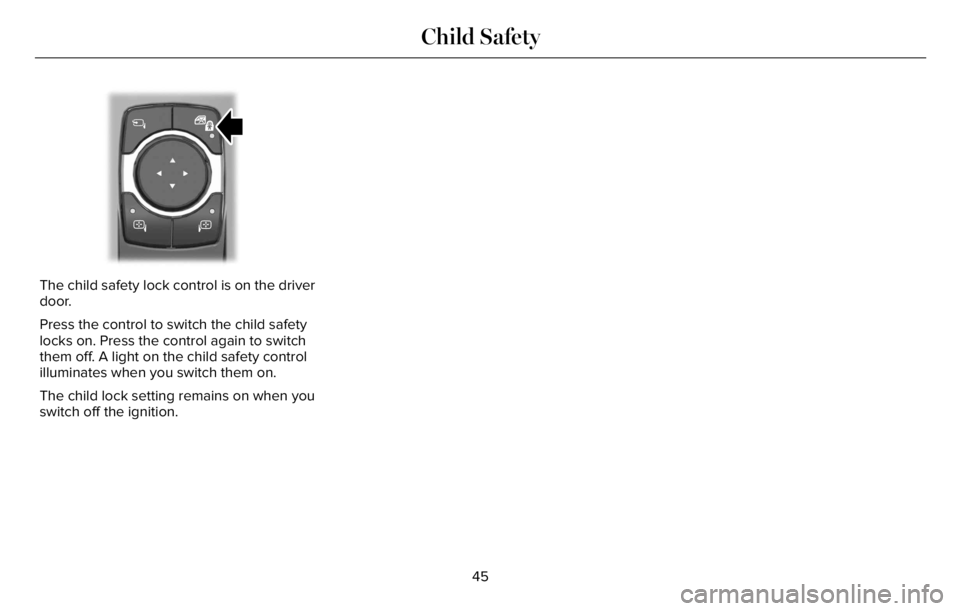
The child safety lock control is on the driver
door.
Press the control to switch the child safety
locks on. Press the control again to switch
them off. A light on the child safety control
illuminates when you switch them on.
The child lock setting remains on when you
switch off the ignition.
45
Child Safety
Page 71 of 681
GENERAL INFORMATION ON
RADIO FREQUENCIES
This device complies with Part 15 of the FCC
Rules and with Industry Canada
license-exempt RSS standard(s). Operation
is subject to the following two conditions: (1)
This device may not cause harmful
interference, and (2) This device must accept
any interference received, including
interference that may cause undesired
operation.
WARNING: Changes or modifications
not expressively approved by the party
responsible for compliance could void the
user's authority to operate the equipment.
The term "IC:" before the radio certification
number only signifies that Industry Canada
technical specifications were met.
The typical operating range for your
transmitter is approximately 33 ft (10 m).
Vehicles with the remote start feature will
have a greater range.One of the following could cause a decrease
in operating range:
• Weather conditions.
• Nearby radio towers.
• Structures around the vehicle.
• Other vehicles parked next to your
vehicle.
The radio frequency used by your remote
control can also be used by other radio
transmitters, for example amateur radios,
medical equipment, wireless headphones,
wireless remote controls, cell phones, battery
chargers and alarm systems. If the
frequencies are jammed, you will not be able
to use your remote control. You can lock and
unlock the doors with the key.
Note:Make sure to lock your vehicle before
leaving it unattended.
Note:If you are in range, the remote control
will operate if you press any button
unintentionally.
Note:The remote control contains sensitive
electrical components. Exposure to moisture
or impact may cause permanent damage.
Intelligent Access (If Equipped)
The system uses a radio frequency signal to
communicate with your vehicle and authorize
your vehicle to unlock when one of the
following conditions are met:
• You activate the front exterior door
handle switch.
• You press the luggage compartment
button.
• You press a button on the transmitter.
If excessive radio frequency interference is
present in the area or if the transmitter
battery is low, you may need to mechanically
unlock your door. You can use the
mechanical key blade in your intelligent
access key to open the driver door in this
situation. See Remote Control (page 69).
68
Keys and Remote Controls
Page 75 of 681
The remote start system does not work if any
of the following occur:
• The ignition is on.
• The anti-theft alarm triggers.
• You switch the feature off through the
touchscreen.
• The hood is open.
• The transmission is not in park (P).
• The battery voltage is below the
minimum operating voltage.
Note:Do not use remote start if your fuel
level is low.
Remote Control Feedback
An LED on the remote control provides status
feedback of remote start or stop commands.
Status LED
Remote start
successful Solid green
Remote stop
successful Solid red
Request failed or
status not received Blinking red
Status incomplete Blinking green
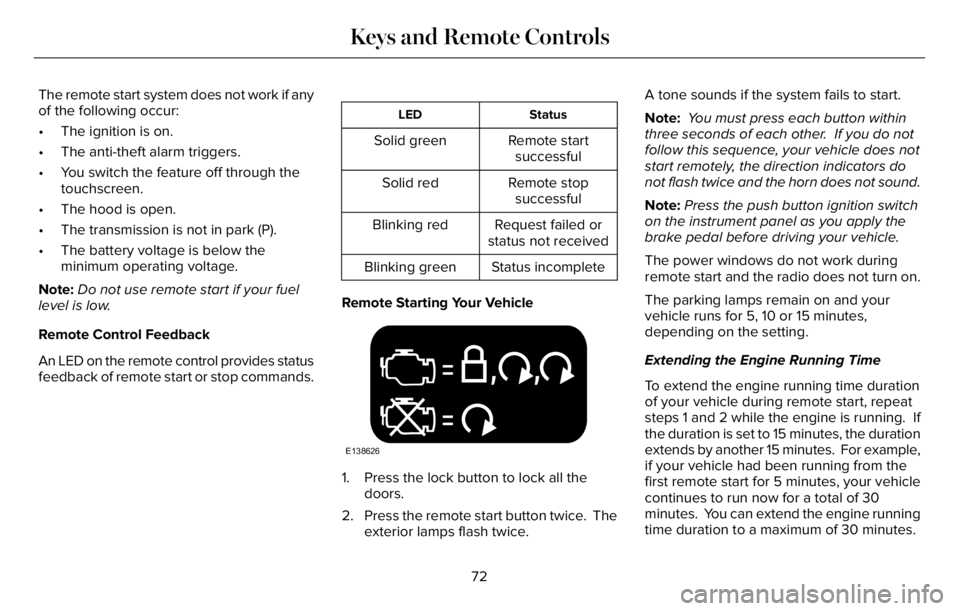
Remote Starting Your Vehicle
E138626
1. Press the lock button to lock all the
doors.
2. Press the remote start button twice. The
exterior lamps flash twice.A tone sounds if the system fails to start.
Note: You must press each button within
three seconds of each other. If you do not
follow this sequence, your vehicle does not
start remotely, the direction indicators do
not flash twice and the horn does not sound.
Note:Press the push button ignition switch
on the instrument panel as you apply the
brake pedal before driving your vehicle.
The power windows do not work during
remote start and the radio does not turn on.
The parking lamps remain on and your
vehicle runs for 5, 10 or 15 minutes,
depending on the setting.
Extending the Engine Running Time
To extend the engine running time duration
of your vehicle during remote start, repeat
steps 1 and 2 while the engine is running. If
the duration is set to 15 minutes, the duration
extends by another 15 minutes. For example,
if your vehicle had been running from the
first remote start for 5 minutes, your vehicle
continues to run now for a total of 30
minutes. You can extend the engine running
time duration to a maximum of 30 minutes.
72
Keys and Remote Controls
Page 77 of 681
WHAT IS PHONE AS A KEY
Phone as a Key allows you to use your phone
in place of a passive key.
You can use your phone for the following
functions:
• Remote locking and unlocking.
• Passive entry and exit.
• Passive start and drive the vehicle.
• Remote start.
• Memory function recall.
PHONE AS A KEY LIMITATIONS
Limitations can vary based on the make and
model of your phone, phone location and
physical obstructions.
The following items could impact Phone as
a Key performance or prevent functionality
in some cases:
• The typical operating range for Phone as
a Key is 131 ft (40 m).• Your Bluetooth® connection is not
enabled, is disrupted, or out of range.
• Your Phone as a Key is not active or
enabled on at least one phone.
• Your vehicle battery has depleted.
• Your phone battery has depleted.
• Interference from other devices using
radio frequencies or physical
obstructions.
• Your phone is too close to metal objects
or other electronic devices.
Note:Do not leave a duplicate coded key
in the vehicle. Always take your keys and
phone and lock all doors when leaving the
vehicle.
PROGRAMMING YOUR PHONE
To program your smartphone as phone as a
key:
1. Visit your device's app store to download
the Lincoln Way app.
2. Create a new account or sign in to an
existing account on the Lincoln Way app.3. Add the vehicle identification number to
your account and follow the prompts in
the Lincoln Way app to complete the
Sync Connect Authorization process.
4. After the authorization is complete, you
can set up phone as a key following the
prompts in the Lincoln Way app.
5. After phone as a key is set up, you can
set up the backup start passcode by
following the prompts on your
touchscreen.
Note:Keep your new backup start passcode
with you in case of an emergency.
Resetting Phone as a Key
1. Press Settings on the touchscreen.
2. Press General.
3. Press Reset.
4. Press the app connect reset option.
5. Press Phone as a Key Reset.
6. Confirm you would like to continue with
erasing all phone as a key, keys and
backup start passcodes.
7. Press Continue.
74
Phone as a Key (If Equipped)
Page 86 of 681
LOCKING AND UNLOCKING
Your vehicle has an intelligent electronically
controlled door system that is in constant
communication with overall vehicle systems.
When you lock your vehicle using either the
lock switch on each door interior trim panel,
the keyless entry keypad or the lock sensor
on each exterior door trim panel, the exterior
door handle switches do not release the
doors. This helps secure your vehicle and
prevent unauthorized entry. Also, when your
vehicle reaches a speed greater than 12 mph
(20 km/h), the exterior door handle switches
do not release the doors.
If the airbags deploy or the fuel pump shutoff
switch activates, all interior and exterior
unlock switches do not unlock your door for
six seconds. This helps secure the doors in
the event of a crash. After six seconds, all
switches reset and you can open the doors
using the interior and exterior unlatch
switches.
Door Lock Indicator
An LED on each door lock switch illuminates
when you lock the doors. It remains on for
2 to 5 seconds after you switch the ignition
off.
Door Lock Switch Inhibitor
When you electronically lock your vehicle,
the door lock switches and the interior
luggage compartment release switch do not
operate after 20 seconds. To restore
function to these switches, you must unlock
your vehicle with the remote control or
keyless entry keypad, or switch the ignition
on.
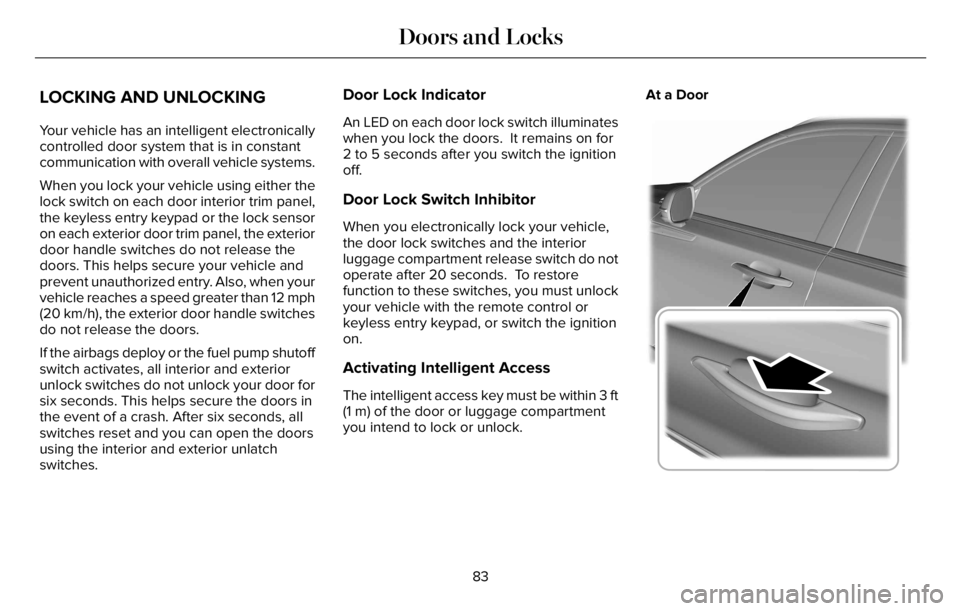
Activating Intelligent Access
The intelligent access key must be within 3 ft
(1 m) of the door or luggage compartment
you intend to lock or unlock.At a Door
E295769
83
Doors and Locks
Page 87 of 681
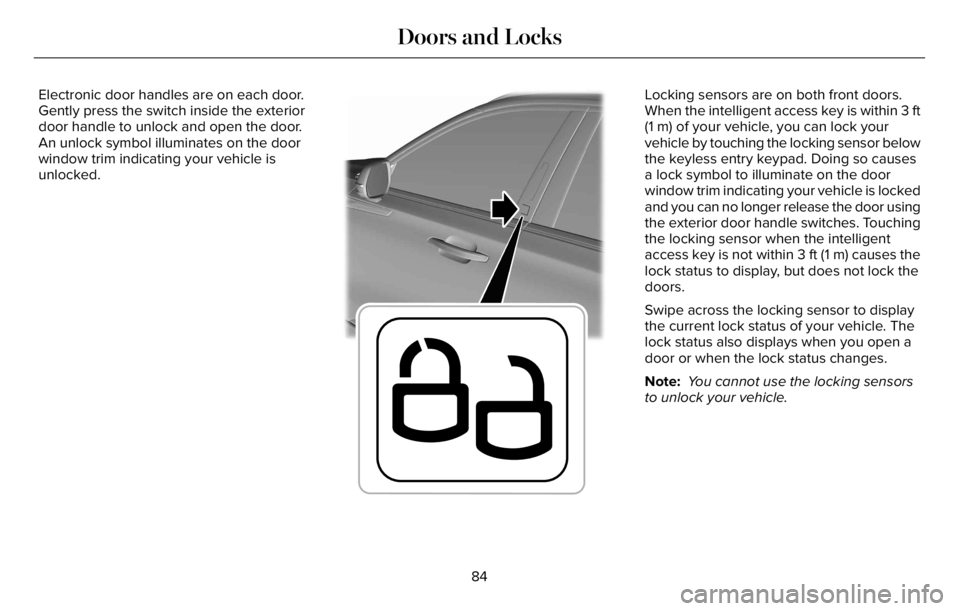
Electronic door handles are on each door.
Gently press the switch inside the exterior
door handle to unlock and open the door.
An unlock symbol illuminates on the door
window trim indicating your vehicle is
unlocked.
E295770
Locking sensors are on both front doors.
When the intelligent access key is within 3 ft
(1 m) of your vehicle, you can lock your
vehicle by touching the locking sensor below
the keyless entry keypad. Doing so causes
a lock symbol to illuminate on the door
window trim indicating your vehicle is locked
and you can no longer release the door using
the exterior door handle switches. Touching
the locking sensor when the intelligent
access key is not within 3 ft (1 m) causes the
lock status to display, but does not lock the
doors.
Swipe across the locking sensor to display
the current lock status of your vehicle. The
lock status also displays when you open a
door or when the lock status changes.
Note: You cannot use the locking sensors
to unlock your vehicle.
84
Doors and Locks