roof LINCOLN AVIATOR 2023 Owners Manual
[x] Cancel search | Manufacturer: LINCOLN, Model Year: 2023, Model line: AVIATOR, Model: LINCOLN AVIATOR 2023Pages: 681, PDF Size: 9.33 MB
Page 6 of 681
Daytime Running Lamps - Vehicles With:
Configurable Daytime Running Lamps
........................................................................1 1 3
Daytime Running Lamps - Vehicles With:
Daytime Running Lamps (DRL) ..............113
Front Fog Lamps ...........................................113
Adaptive Headlamps ....................................114
Direction Indicators ......................................116
Welcome Lighting .........................................116
Interior Lamps .................................................117
Ambient Lighting ...........................................117
Automatic High Beam Control
What Is Automatic High Beam Control
........................................................................119
Switching Automatic High Beam Control
On and Off ..................................................119
Automatic High Beam Control Indicators
.......................................................................120
Overriding Automatic High Beam Control
.......................................................................120
Windows and Mirrors
Power Windows .............................................121
Global Opening and Closing ....................122Exterior Mirrors .............................................122
Interior Mirror ................................................124
Sun Visors ......................................................125
Moonroof ........................................................125
Instrument Cluster
Gauges ...........................................................128
Warning Lamps and Indicators ..................131
Audible Warnings and Indicators .............135
Information Displays
General Information .....................................136
Personalized Settings .................................140
Information Messages ................................142
Climate Control
Automatic Climate Control ........................165
Hints on Controlling the Interior Climate
.......................................................................168
Rear Passenger Climate Controls -
Vehicles With: Quadruple Zone
Automatic Temperature Control ..........169Rear Passenger Climate Controls -
Vehicles With: Triple Zone Automatic
Temperature Control ...............................170
Heated Rear Window ...................................171
Heated Exterior Mirrors ...............................171
Remote Start ..................................................172
Interior Air Quality
What Is the Cabin Air Filter ........................173
Replacing the Cabin Air Filter ...................173
What Is Auto Air Refresh .............................173
How Does Auto Air Refresh Work ............173
Checking the Interior Air Quality ..............173
Auto Air Refresh Indicators ........................174
Refreshing the Interior Air ..........................174
Auto Air Refresh Hints .................................175
Interior Air Quality – Troubleshooting
.......................................................................1 7 5
Seats
Sitting in the Correct Position ...................176
Head Restraints .............................................177
Power Seats ...................................................179
Memory Function .........................................184
3
Table of Contents
Page 9 of 681
Adaptive Cruise Control
How Does Adaptive Cruise Control With
Stop and Go Work ..................................305
What Is Adaptive Cruise Control With Lane
Centering ..................................................305
What Is Intelligent Adaptive Cruise Control
......................................................................305
Adaptive Cruise Control Precautions -
Vehicles With: Adaptive Cruise Control
With Lane Centering ..............................305
Adaptive Cruise Control Precautions -
Vehicles With: Adaptive Cruise Control
With Stop and Go ...................................306
Adaptive Cruise Control Limitations -
Vehicles With: Adaptive Cruise Control
With Lane Centering ..............................307
Adaptive Cruise Control Limitations -
Vehicles With: Adaptive Cruise Control
With Stop and Go ....................................307
Switching Adaptive Cruise Control On and
Off ...............................................................309
Setting the Adaptive Cruise Control Speed
.......................................................................310
Setting the Adaptive Cruise Control Gap
........................................................................3 1 1
Canceling the Set Speed ...........................312Resuming the Set Speed ...........................312
Overriding the Set Speed ..........................312
Adaptive Cruise Control Indicators -
Vehicles With: Adaptive Cruise Control
With Lane Centering ...............................312
Adaptive Cruise Control Indicators -
Vehicles With: Adaptive Cruise Control
With Stop and Go .....................................313
Adaptive Cruise Control Indicators -
Vehicles With: Intelligent Adaptive
Cruise Control ...........................................313
Switching From Adaptive Cruise Control
to Cruise Control ......................................313
Switching Lane Centering On and Off
.......................................................................3 1 4
Switching Intelligent Mode On and Off
.......................................................................315
Adjusting the Set Speed Tolerance ........316
Adaptive Cruise Control – Troubleshooting
.......................................................................316
Driving Aids
Driver Alert .....................................................319
Lane Keeping System ................................320
Blind Spot Information System ................326Cross Traffic Alert ........................................330
Speed Sign Recognition ............................335
Steering .........................................................336
Pre-Collision Assist .....................................337
Drive Mode Control
What Is Drive Mode Control .....................343
Selecting a Drive Mode .............................343
Drive Modes .................................................343
Load Carrying
Rear Under Floor Storage .........................346
Luggage Covers ..........................................346
Roof Racks and Load Carriers ..................347
Load Limit ......................................................348
Air Suspension .............................................352
Towing
Towing a Trailer ............................................354
Trailer Sway Control ...................................355
Recommended Towing Weights .............356
Essential Towing Checks ...........................357
Towing the Vehicle on Four Wheels ......359
6
Table of Contents
Page 65 of 681
WARNING: All occupants of your
vehicle, including the driver, should always
properly wear their seatbelts, even when
an airbag supplemental restraint system is
provided. Failure to properly wear your
seatbelt could seriously increase the risk
of injury or death.
WARNING: To reduce risk of injury,
do not obstruct or place objects in the
deployment path of the airbag.
WARNING: If a supplementary
restraint system component has deployed,
it will not function again. Have the system
and associated components inspected as
soon as possible. Failure to follow this
instruction could result in personal injury
or death.
The Safety Canopy will deploy during
significant side crashes or when a certain
likelihood of a rollover event is detected by
the rollover sensor. The Safety Canopy is
mounted to the roof side-rail sheet metal,
behind the headliner, above each row of
seats. In certain sideways crashes or rolloverevents, the Safety Canopy will be activated,
regardless of which seats are occupied. The
Safety Canopy is designed to inflate between
the side window area and occupants to
further enhance protection provided in side
impact crashes and rollover events.
E75004E75004
The system consists of the following:
€ Safety canopy curtain airbags above the
trim panels over the front and rear side
windows identified by a label or wording
on the headliner or roof-pillar trim.
€ A flexible headliner which opens above
the side doors to allow air curtain
deployment
E67017
· Crash sensors and monitoring
system with readiness indicator.
See Crash Sensors and Airbag
Indicator (page 63).
Always properly restrain children 12 years
old and under in the rear seats. The Safety
Canopy will not interfere with children
restrained using a properly installed child or
booster seat because it is designed to inflate
downward from the headliner above the
doors along the side window opening.
The design and development of the Safety
Canopy included recommended testing
procedures that were developed by a group
of automotive safety experts known as the
Side Airbag Technical Working Group. These
recommended testing procedures help
reduce the risk of injuries related to the
deployment of side airbags (including the
Safety Canopy).
62
Supplementary Restraints System
Page 128 of 681
SUN VISORS
E138666
Rotate the sun visor toward the side window
and extend it rearward for extra shade.
Illuminated Vanity Mirror
E162197
Lift the cover to switch the lamp on.
MOONROOF (IF EQUIPPED)
WARNING: Do not leave children
unattended in your vehicle and do not let
them play with the moonroof. Failure to
follow this instruction could result in
personal injury.
WARNING: When closing the
moonroof, verify that it is free of
obstruction and make sure that children
and pets are not in the proximity of the roof
opening.
The moonroof controls are on the overhead
console and have a one-touch open and
close feature. To stop it during one-touch
operation, press the control a second time.
125
Windows and Mirrors
Page 129 of 681
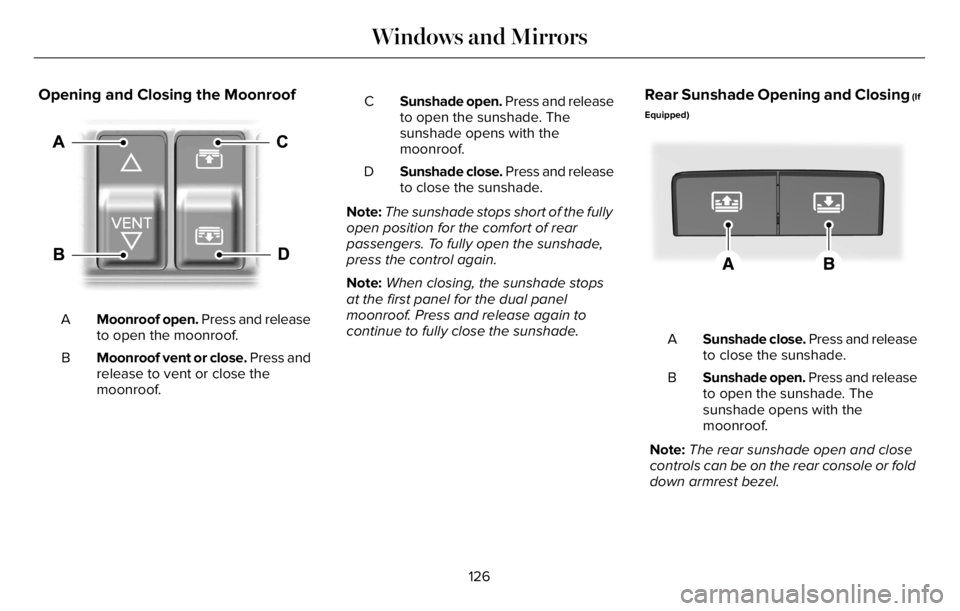
Opening and Closing the Moonroof
E295253
Moonroof open. Press and release
to open the moonroof. A
Moonroof vent or close. Press and
release to vent or close the
moonroof. BSunshade open. Press and release
to open the sunshade. The
sunshade opens with the
moonroof. C
Sunshade close. Press and release
to close the sunshade. D
Note:The sunshade stops short of the fully
open position for the comfort of rear
passengers. To fully open the sunshade,
press the control again.
Note:When closing, the sunshade stops
at the first panel for the dual panel
moonroof. Press and release again to
continue to fully close the sunshade.
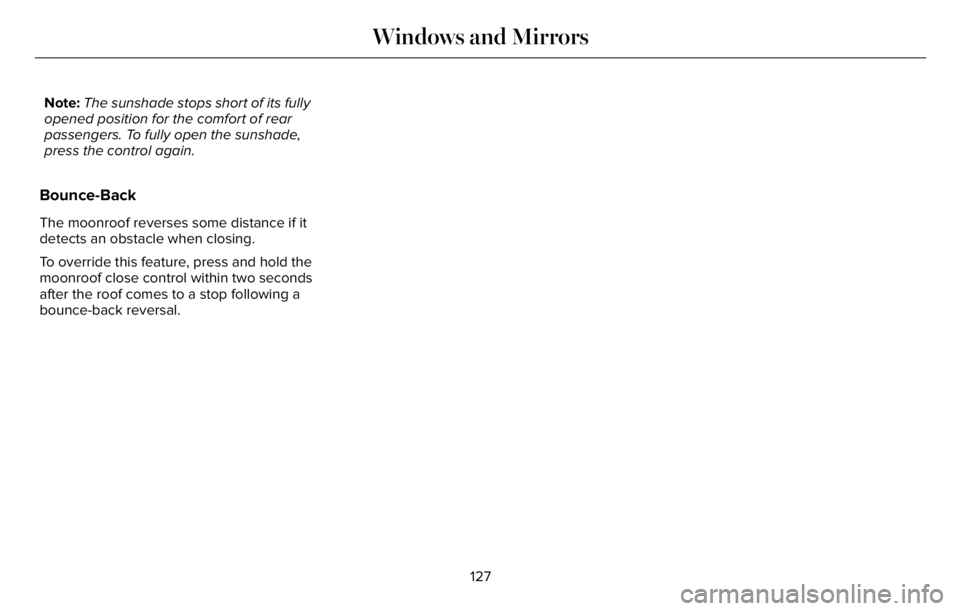
Rear Sunshade Opening and Closing (If
Equipped)
E297640E297640
Sunshade close. Press and release
to close the sunshade. A
Sunshade open. Press and release
to open the sunshade. The
sunshade opens with the
moonroof. B
Note:The rear sunshade open and close
controls can be on the rear console or fold
down armrest bezel.
126
Windows and Mirrors
Page 130 of 681
Note:The sunshade stops short of its fully
opened position for the comfort of rear
passengers. To fully open the sunshade,
press the control again.
Bounce-Back
The moonroof reverses some distance if it
detects an obstacle when closing.
To override this feature, press and hold the
moonroof close control within two seconds
after the roof comes to a stop following a
bounce-back reversal.
127
Windows and Mirrors
Page 178 of 681
AUTO AIR REFRESH HINTS (IF
EQUIPPED)
To further improve the quality of air in the
cabin:
• Adjust the windows and other cabin
openings such as the moonroof.
• Switch recirculated air on or off.
• Manually refresh the interior air.• Adjust the blower motor speed.
• Replace the cabin air filter at regular
intervals.
INTERIOR AIR QUALITY –
TROUBLESHOOTING
INTERIOR AIR QUALITY –
INFORMATION MESSAGES
(If Equipped)
Note: Depending on your vehicle options,
not all messages display or are available.
Certain messages may be abbreviated or
shortened depending upon which cluster
type you have.
Action Message
Allow time for the cabin PM2.5 sensor to cool down, warm up, or dry
out. Environmental Limit
Allow a few seconds for the cabin PM2.5 sensor to start up. Initializing
175
Interior Air Quality
Page 285 of 681
PRINCIPLE OF OPERATION
WARNING: Vehicle modifications
involving braking system, aftermarket roof
racks, suspension, steering system, tire
construction and wheel and tire size may
change the handling characteristics of your
vehicle and may adversely affect the
performance of the electronic stability
control system. In addition, installing any
stereo loudspeakers may interfere with
and adversely affect the electronic stability
control system. Install any aftermarket
stereo loudspeaker as far as possible from
the front center console, the tunnel, and
the front seats in order to minimize the risk
of interfering with the electronic stability
control sensors. Reducing the
effectiveness of the electronic stability
control system could lead to an increased
risk of loss of vehicle control, vehicle
rollover, personal injury and death.
WARNING: Remember that even
advanced technology cannot defy the laws
of physics. It’s always possible to lose
control of a vehicle due to inappropriate
driver input for the conditions. Aggressive
driving on any road condition can cause
you to lose control of your vehicle
increasing the risk of personal injury or
property damage. Activation of the
electronic stability control system is an
indication that at least some of the tires
have exceeded their ability to grip the
road; this could reduce the operator’s
ability to control the vehicle potentially
resulting in a loss of vehicle control, vehicle
rollover, personal injury and death. If your
electronic stability control system activates,
SLOW DOWN.
The system automatically turns on each time
you switch the ignition on.
If a driving condition activates either the
stability control or the traction control system
you may experience the following conditions:• The stability and traction control light
flashes.
• Your vehicle slows down.
• Reduced engine power.
• A vibration in the brake pedal.
• The brake pedal is stiffer than usual.
• If the driving condition is severe and your
foot is not on the brake, the brake pedal
may move as the systems applies higher
brake forces.
The stability control system has several
features built into it to help you maintain
control of your vehicle:
Electronic Stability Control
The system enhances your vehicle’s ability
to prevent skids or lateral slides by applying
brakes to one or more of the wheels
individually and, if necessary, reducing
engine power.
282
Stability Control
Page 350 of 681
ROOF RACKS AND LOAD
CARRIERS
WARNING: When loading the roof
racks, we recommend you evenly distribute
the load, as well as maintain a low center
of gravity. Loaded vehicles, with higher
centers of gravity, may handle differently
than unloaded vehicles. Take extra
precautions, such as slower speeds and
increased stopping distance, when driving
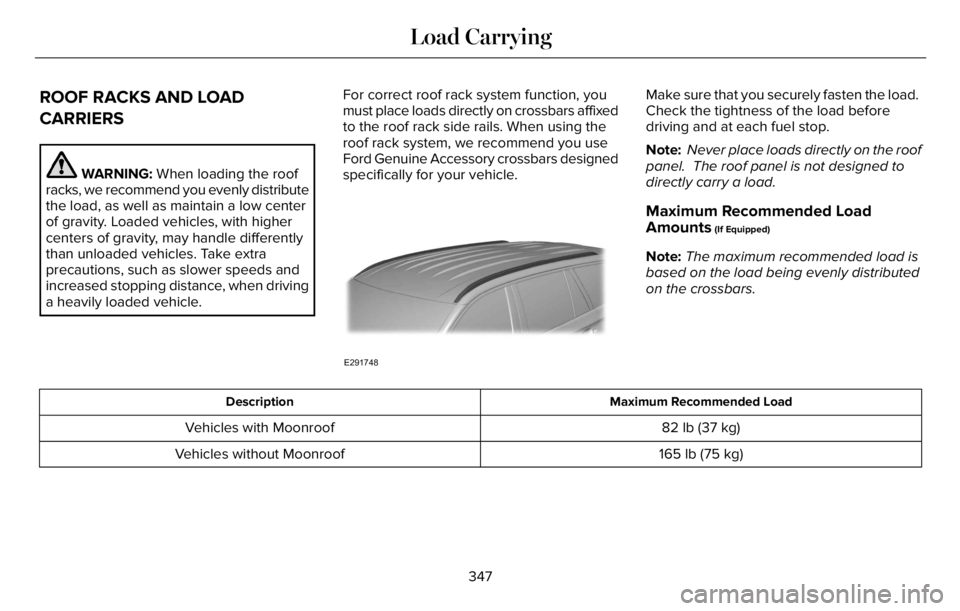
a heavily loaded vehicle.For correct roof rack system function, you
must place loads directly on crossbars affixed
to the roof rack side rails. When using the
roof rack system, we recommend you use
Ford Genuine Accessory crossbars designed
specifically for your vehicle.
E291748
Make sure that you securely fasten the load.
Check the tightness of the load before
driving and at each fuel stop.
Note: Never place loads directly on the roof
panel. The roof panel is not designed to
directly carry a load.
Maximum Recommended Load
Amounts
(If Equipped)
Note:The maximum recommended load is
based on the load being evenly distributed
on the crossbars.
Maximum Recommended Load Description
82 lb (37 kg) Vehicles with Moonroof
165 lb (75 kg) Vehicles without Moonroof
347
Load Carrying
Page 355 of 681
Special Loading Instructions for
Owners of Pick-up Trucks and Utility-
type Vehicles
WARNING: When loading the
roof racks, we recommend you evenly
distribute the load, as well as maintain
a low center of gravity. Loaded
vehicles, with higher centers of gravity,
may handle differently than unloaded
vehicles. Take extra precautions, such
as slower speeds and increased
stopping distance, when driving a
heavily loaded vehicle.
AIR SUSPENSION (IF EQUIPPED)
WARNING: If your vehicle has
self-leveling air suspension, you must
switch the system off before carrying out
any maintenance or repair. Failure to follow
this warning could result in serious
personal injury or death.The air suspension system automatically
adjusts to maintain a constant frame height,
allows for ease of vehicle loading, provides
improved vehicle ride, and increased driver
comfort.
You can adjust different ride settings through
the selectable drive modes. See Selecting
a Drive Mode (page 343).
Note:The air suspension system may not
operate properly if you exceed the load limit.
See Load Limit (page 348).
Note:When your vehicle is off, the air
compressor may run for a short time. This is
normal.
Switching the systems on or off
You can access the air suspension, liftgate
and easy entry features through the
information display menu settings. See
General Information (page 136).
Using the Service Mode
When the service mode is active, the air
suspension does not make any adjustments
while your vehicle is stationary.Note:Always switch the air suspension
service mode to on before servicing your
vehicle.
Using Cargo Loading
The air suspension cargo loading feature
lowers your vehicle for easier access when
the system detects the liftgate is opening.
When the liftgate is closed your vehicle
returns to its normal height after a short time.
Note:To preserve your vehicle battery, your
vehicle may only lower for cargo mode one
to two times per ignition cycle.
Using Easy Entry
The air suspension can lower your vehicle
to an easier access entry height when the
system detects the intelligent access key,
you press the unlock button, use the remote
start, or use Phone as a Key.
The leveling process stops when you open
a door or the target level is achieved.
Note:To stop the leveling process, press the
lock button on the intelligent access key.
352
Load Carrying