roof LINCOLN AVIATOR 2023 User Guide
[x] Cancel search | Manufacturer: LINCOLN, Model Year: 2023, Model line: AVIATOR, Model: LINCOLN AVIATOR 2023Pages: 681, PDF Size: 9.33 MB
Page 365 of 681
• Do not add unnecessary accessories to
the exterior of your vehicle, for example
running boards. If you use a roof rack,
remember to fold it down or remove it
when not in use.
• Do not shift into neutral when you are
braking or when your vehicle is slowing
down.
• Shut all windows when driving at high
speeds.
• Switch off all electric systems when not
in use, for example air conditioning. Make
sure that you unplug any accessories
from the auxiliary power points when not
in use.
DRIVING THROUGH SHALLOW
WATER
WARNING: Do not attempt to cross
a deep or flowing body of water. Failure to
follow this instruction could result in the
loss of control of your vehicle, personal
injury or death.Note:Driving through standing water can
cause vehicle damage.
Note:Engine damage can occur if water
enters the air filter.
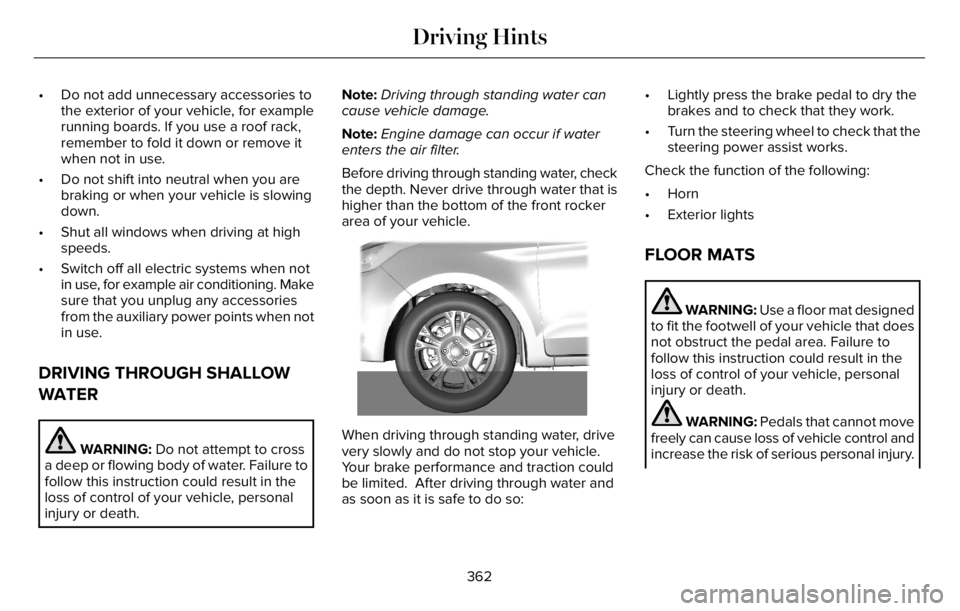
Before driving through standing water, check
the depth. Never drive through water that is
higher than the bottom of the front rocker
area of your vehicle.
66E266447
When driving through standing water, drive
very slowly and do not stop your vehicle.
Your brake performance and traction could
be limited. After driving through water and
as soon as it is safe to do so:• Lightly press the brake pedal to dry the
brakes and to check that they work.
• Turn the steering wheel to check that the
steering power assist works.
Check the function of the following:
• Horn
• Exterior lights
FLOOR MATS
WARNING: Use a floor mat designed
to fit the footwell of your vehicle that does
not obstruct the pedal area. Failure to
follow this instruction could result in the
loss of control of your vehicle, personal
injury or death.
WARNING: Pedals that cannot move
freely can cause loss of vehicle control and
increase the risk of serious personal injury.
362
Driving Hints
Page 379 of 681
Disputes submitted to the BBB AUTO LINE
program are usually decided within 40 days
after you file your claim with the BBB. You
are not bound by the decision, and may
reject the decision and proceed to court
where all findings of the BBB Auto Line
dispute, and decision, are admissible in the
court action. Should you choose to accept
the BBB AUTO LINE decision, Ford is then
bound by the decision, and must comply with
the decision within 30 days of receipt of your
acceptance letter.
BBB AUTO LINE Application: Using the
information that follows, please call or write
to request a program application. You will
be asked for your name and address, general
information about your new vehicle,
information about your warranty concerns,
and any steps you have already taken to try
to resolve them. A Customer Claim Form will
be mailed that needs to be completed,
signed and returned to the BBB along with
proof of ownership. Upon receipt, the BBB
reviews the claim for eligibility under the
Program Summary Guidelines.You can get more information by calling
BBB AUTO LINE at 1-800-955-5100, or
writing to:
BBB AUTO LINE a Division of BBB National
Programs, Inc.
1676 International Drive, Suite 550
McLean, VA 22102
BBB AUTO LINE applications can also be
requested by calling the Ford Motor
Company Customer Relationship Center at
1-800-392-3673.
For additional information, refer to the Better
Business Bureau website.
Note:Ford Motor Company reserves the
right to change eligibility limitations, modify
procedures, or to discontinue this process
at any time without notice and without
obligation.UTILIZING THE
MEDIATION/ARBITRATION
PROGRAM (CANADA ONLY)
For vehicles delivered to authorized
Canadian dealers. In those cases where you
continue to feel that the efforts by Ford of
Canada and the authorized dealer to resolve
a factory-related vehicle service concern
have been unsatisfactory, Ford of Canada
participates in an impartial third party
mediation/arbitration program administered
by the Canadian Motor Vehicle Arbitration
Plan (CAMVAP).
The CAMVAP program is a straight forward
and relatively speedy alternative to resolve
a disagreement when all other efforts to
produce a settlement have failed. This
procedure is without cost to you and is
designed to eliminate the need for lengthy
and expensive legal proceedings.
376
Customer Assistance
Page 394 of 681
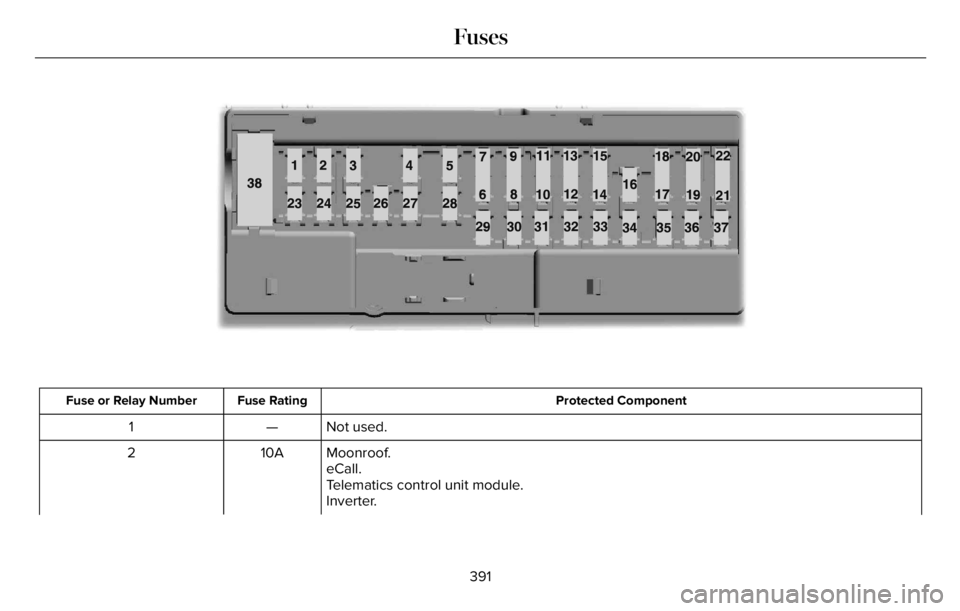
598E145984
Protected Component Fuse Rating Fuse or Relay Number
Not used. — 1
Moonroof. 10A 2
eCall.
Telematics control unit module.
Inverter.
391
Fuses
Page 396 of 681
Protected Component Fuse Rating Fuse or Relay Number
Switch interface module A.
Smart datalink connector.
Instrument cluster.
Not used (spare). 15A 14
SYNC. 15A 15
Electronic finish panel.
Not used. — 16
Headlamp control module. 7.5A 17
Not used (spare). 7.5A 18
Headlamp switch. 5A 19
Push button ignition switch.
Telematics control unit module. 5A 20
eCall.
Bluetooth low energy module.
Not used (spare). 5A 21
Not used (spare). 5A 22
Not used (spare). 30A 23
Moonroof. 30A 24
393
Fuses
Page 427 of 681
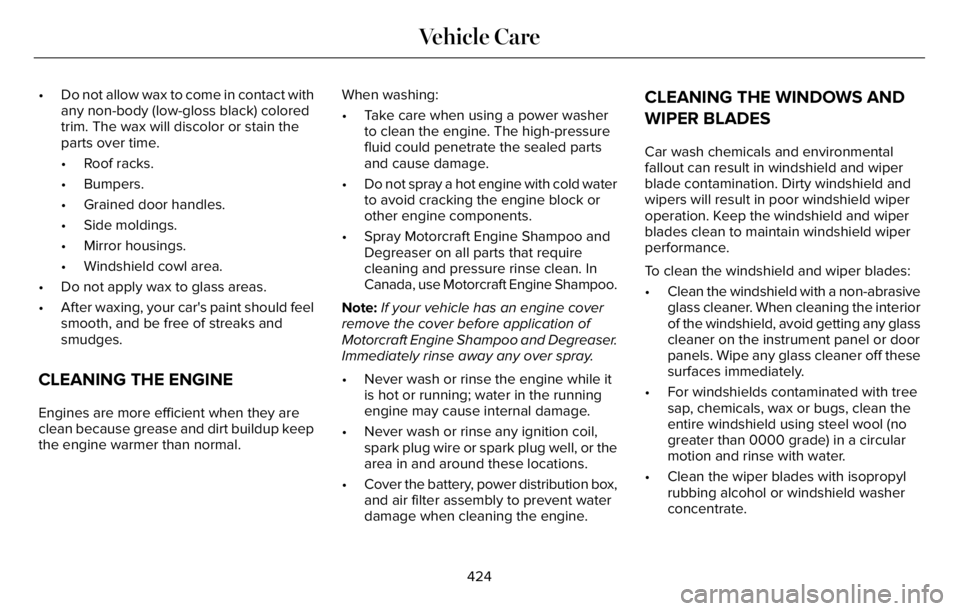
• Do not allow wax to come in contact with
any non-body (low-gloss black) colored
trim. The wax will discolor or stain the
parts over time.
• Roof racks.
• Bumpers.
• Grained door handles.
• Side moldings.
• Mirror housings.
• Windshield cowl area.
• Do not apply wax to glass areas.
• After waxing, your car's paint should feel
smooth, and be free of streaks and
smudges.
CLEANING THE ENGINE
Engines are more efficient when they are
clean because grease and dirt buildup keep
the engine warmer than normal.When washing:
• Take care when using a power washer
to clean the engine. The high-pressure
fluid could penetrate the sealed parts
and cause damage.
• Do not spray a hot engine with cold water
to avoid cracking the engine block or
other engine components.
• Spray Motorcraft Engine Shampoo and
Degreaser on all parts that require
cleaning and pressure rinse clean. In
Canada, use Motorcraft Engine Shampoo.
Note:If your vehicle has an engine cover
remove the cover before application of
Motorcraft Engine Shampoo and Degreaser.
Immediately rinse away any over spray.
• Never wash or rinse the engine while it
is hot or running; water in the running
engine may cause internal damage.
• Never wash or rinse any ignition coil,
spark plug wire or spark plug well, or the
area in and around these locations.
• Cover the battery, power distribution box,
and air filter assembly to prevent water
damage when cleaning the engine.
CLEANING THE WINDOWS AND
WIPER BLADES
Car wash chemicals and environmental
fallout can result in windshield and wiper
blade contamination. Dirty windshield and
wipers will result in poor windshield wiper
operation. Keep the windshield and wiper
blades clean to maintain windshield wiper
performance.
To clean the windshield and wiper blades:
• Clean the windshield with a non-abrasive
glass cleaner. When cleaning the interior
of the windshield, avoid getting any glass
cleaner on the instrument panel or door
panels. Wipe any glass cleaner off these
surfaces immediately.
• For windshields contaminated with tree
sap, chemicals, wax or bugs, clean the
entire windshield using steel wool (no
greater than 0000 grade) in a circular
motion and rinse with water.
• Clean the wiper blades with isopropyl
rubbing alcohol or windshield washer
concentrate.
424
Vehicle Care
Page 505 of 681
HD Radio Technology manufactured under
license from iBiquity Digital Corporation and
foreign patents. HD Radio and the HD and
HD Radio logos are proprietary trademarks
of DTS. Ford and DTS are not responsible
for the content sent using HD Radio
technology. Content may be changed, added
or deleted at any time at the station owner's
discretion.SATELLITE RADIO
SiriusXM® Satellite Radio broadcasts a
variety of music, news, sports, weather, traffic
and entertainment satellite radio channels.
For more information and a complete list of
SiriusXM satellite radio channels, visit
www.siriusxm.com in the United States,
www.siriusxm.ca in Canada, or call SiriusXM
at 1-888-539-7474.Note:This receiver includes the eCos
real-time operating system. eCos is
published under the eCos License.
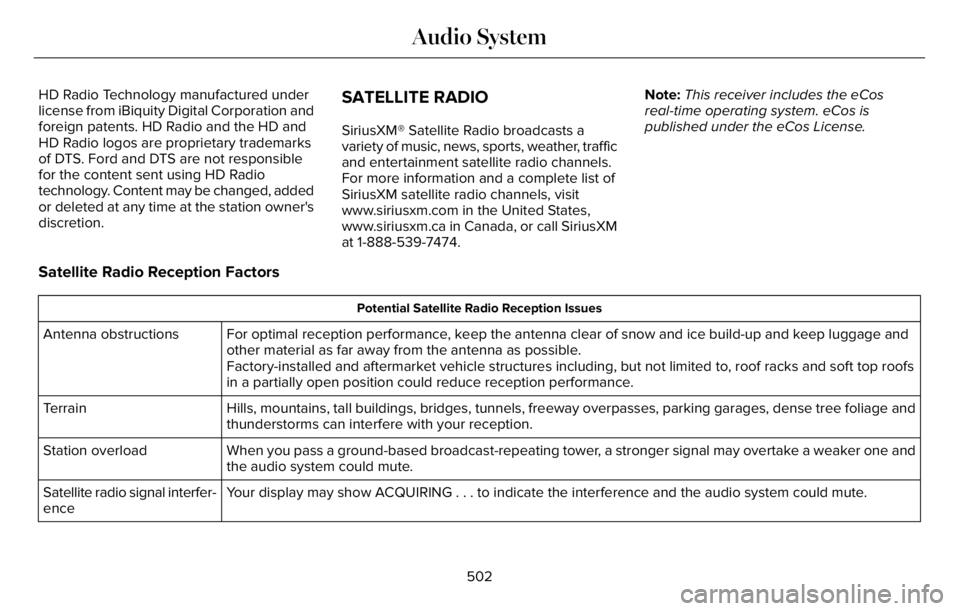
Satellite Radio Reception Factors
Potential Satellite Radio Reception Issues
For optimal reception performance, keep the antenna clear of snow and ice build-up and keep luggage and
other material as far away from the antenna as possible.
Factory-installed and aftermarket vehicle structures including, but not limited to, roof racks and soft top roofs
in a partially open position could reduce reception performance. Antenna obstructions
Hills, mountains, tall buildings, bridges, tunnels, freeway overpasses, parking garages, dense tree foliage and
thunderstorms can interfere with your reception. Terrain
When you pass a ground-based broadcast-repeating tower, a stronger signal may overtake a weaker one and
the audio system could mute. Station overload
Your display may show ACQUIRING . . . to indicate the interference and the audio system could mute. Satellite radio signal interfer-
ence
502
Audio System
Page 663 of 681
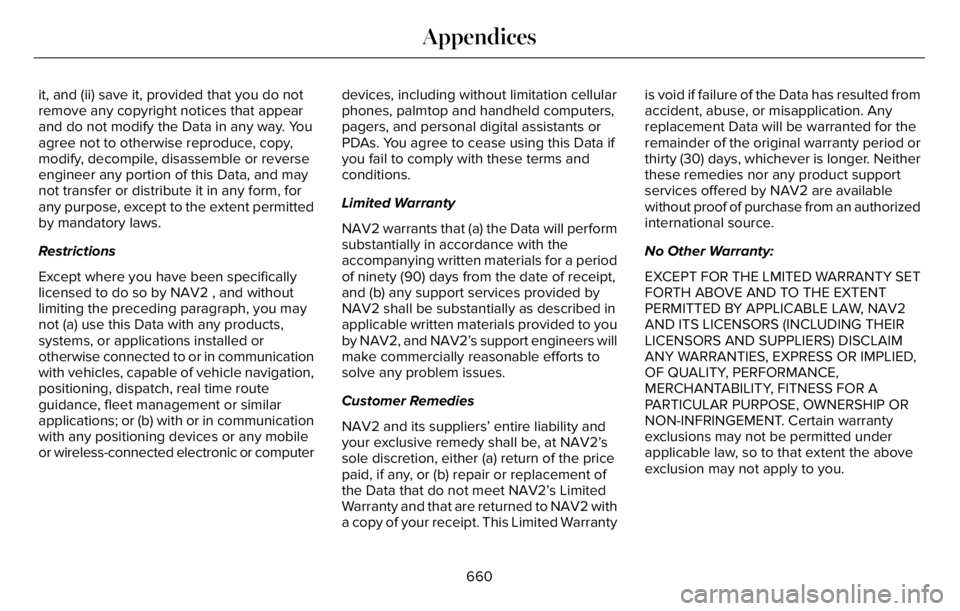
it, and (ii) save it, provided that you do not
remove any copyright notices that appear
and do not modify the Data in any way. You
agree not to otherwise reproduce, copy,
modify, decompile, disassemble or reverse
engineer any portion of this Data, and may
not transfer or distribute it in any form, for
any purpose, except to the extent permitted
by mandatory laws.
Restrictions
Except where you have been specifically
licensed to do so by NAV2 , and without
limiting the preceding paragraph, you may
not (a) use this Data with any products,
systems, or applications installed or
otherwise connected to or in communication
with vehicles, capable of vehicle navigation,
positioning, dispatch, real time route
guidance, fleet management or similar
applications; or (b) with or in communication
with any positioning devices or any mobile
or wireless-connected electronic or computerdevices, including without limitation cellular
phones, palmtop and handheld computers,
pagers, and personal digital assistants or
PDAs. You agree to cease using this Data if
you fail to comply with these terms and
conditions.
Limited Warranty
NAV2 warrants that (a) the Data will perform
substantially in accordance with the
accompanying written materials for a period
of ninety (90) days from the date of receipt,
and (b) any support services provided by
NAV2 shall be substantially as described in
applicable written materials provided to you
by NAV2, and NAV2’s support engineers will
make commercially reasonable efforts to
solve any problem issues.
Customer Remedies
NAV2 and its suppliers’ entire liability and
your exclusive remedy shall be, at NAV2’s
sole discretion, either (a) return of the price
paid, if any, or (b) repair or replacement of
the Data that do not meet NAV2’s Limited
Warranty and that are returned to NAV2 with
a copy of your receipt. This Limited Warrantyis void if failure of the Data has resulted from
accident, abuse, or misapplication. Any
replacement Data will be warranted for the
remainder of the original warranty period or
thirty (30) days, whichever is longer. Neither
these remedies nor any product support
services offered by NAV2 are available
without proof of purchase from an authorized
international source.
No Other Warranty:
EXCEPT FOR THE LMITED WARRANTY SET
FORTH ABOVE AND TO THE EXTENT
PERMITTED BY APPLICABLE LAW, NAV2
AND ITS LICENSORS (INCLUDING THEIR
LICENSORS AND SUPPLIERS) DISCLAIM
ANY WARRANTIES, EXPRESS OR IMPLIED,
OF QUALITY, PERFORMANCE,
MERCHANTABILITY, FITNESS FOR A
PARTICULAR PURPOSE, OWNERSHIP OR
NON-INFRINGEMENT. Certain warranty
exclusions may not be permitted under
applicable law, so to that extent the above
exclusion may not apply to you.
660
Appendices
Page 674 of 681
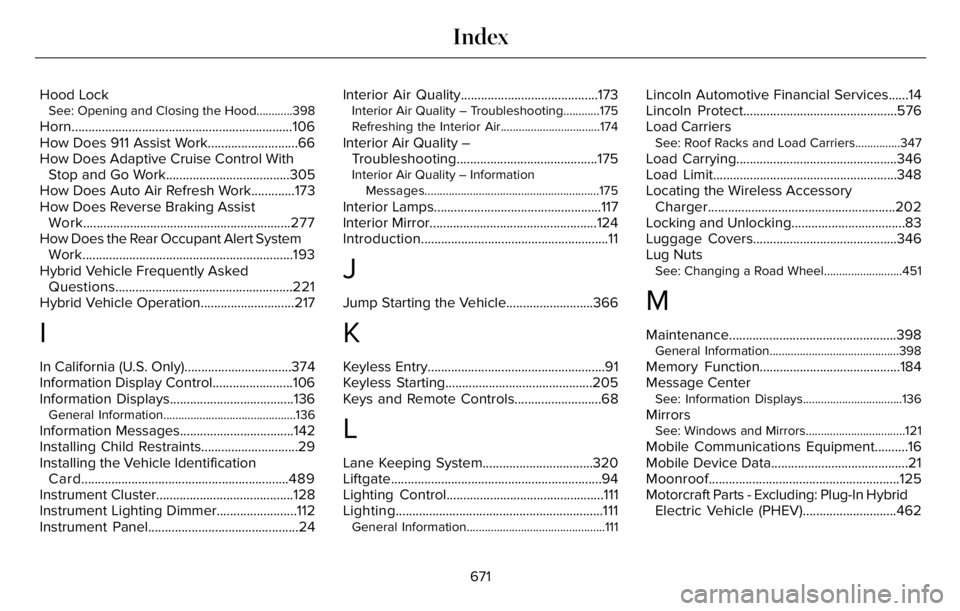
Hood LockSee: Opening and Closing the Hood............398
Horn..................................................................106
How Does 911 Assist Work...........................66
How Does Adaptive Cruise Control With
Stop and Go Work.....................................305
How Does Auto Air Refresh Work.............173
How Does Reverse Braking Assist
Work..............................................................277
How Does the Rear Occupant Alert System
Work...............................................................193
Hybrid Vehicle Frequently Asked
Questions.....................................................221
Hybrid Vehicle Operation............................217
I
In California (U.S. Only)................................374
Information Display Control........................106
Information Displays.....................................136
General Information............................................136
Information Messages..................................142
Installing Child Restraints.............................29
Installing the Vehicle Identification
Card..............................................................489
Instrument Cluster.........................................128
Instrument Lighting Dimmer........................112
Instrument Panel.............................................24Interior Air Quality.........................................173
Interior Air Quality – Troubleshooting............175
Refreshing the Interior Air.................................174
Interior Air Quality –
Troubleshooting..........................................175
Interior Air Quality – Information
Messages..........................................................175
Interior Lamps..................................................117
Interior Mirror..................................................124
Introduction........................................................11
J
Jump Starting the Vehicle..........................366
K
Keyless Entry.....................................................91
Keyless Starting............................................205
Keys and Remote Controls..........................68
L
Lane Keeping System.................................320
Liftgate...............................................................94
Lighting Control...............................................111
Lighting..............................................................111
General Information..............................................111
Lincoln Automotive Financial Services......14
Lincoln Protect..............................................576
Load Carriers
See: Roof Racks and Load Carriers...............347
Load Carrying................................................346
Load Limit.......................................................348
Locating the Wireless Accessory
Charger........................................................202
Locking and Unlocking..................................83
Luggage Covers...........................................346
Lug Nuts
See: Changing a Road Wheel..........................451
M
Maintenance..................................................398General Information...........................................398
Memory Function..........................................184
Message Center
See: Information Displays.................................136
MirrorsSee: Windows and Mirrors.................................121
Mobile Communications Equipment..........16
Mobile Device Data.........................................21
Moonroof.........................................................125
Motorcraft Parts - Excluding: Plug-In Hybrid
Electric Vehicle (PHEV)............................462
671
Index
Page 676 of 681
Tire Pressure Monitoring System
Sensors..............................................................621
Wireless Accessory Charging Module..........627
Rear Occupant Alert System Audible
Warnings.......................................................194
Rear Occupant Alert System
Indicators......................................................194
Rear Occupant Alert System
Limitations....................................................193
Rear Occupant Alert System
Precautions..................................................193
Rear Occupant Alert System......................193
Rear Parking Aid...........................................286
Rear Passenger Climate Controls -
Vehicles With: Quadruple Zone
Automatic Temperature Control.............169
Rear Passenger Climate Controls -
Vehicles With: Triple Zone Automatic
Temperature Control..................................170
Rear Seats.......................................................187
Rear Under Floor Storage..........................346
Rear View Camera.......................................297
Rear View Camera
See: Rear View Camera....................................297
Rear Window Wiper and Washers............109
Rear Wiper Blades
See: Changing the Rear Wiper Blades..........419
Recommended Towing Weights..............356Reduced Engine Performance...................361
Refreshing the Interior Air...........................174
Automatically Refreshing the Interior Air.......174
Manually Refreshing the Interior Air...............174
Refueling - Excluding: Hybrid Electric
Vehicle (HEV)..............................................226
Refueling - Plug-In Hybrid Electric Vehicle
(PHEV)..........................................................229
Remote Control...............................................69
Remote Start...................................................172
Repairing Minor Paint Damage.................427
Replacement Parts Recommendation........14
Replacing a Lost Key or Remote
Control.............................................................73
Replacing the Cabin Air Filter.....................173
Reporting Safety Defects (Canada
Only)..............................................................380
Reporting Safety Defects (U.S. Only)......380
Resuming the Set Speed...........................304
Reverse Braking Assist Indicators...........278
Reverse Braking Assist Precautions........277
Reverse Braking Assist...............................277
Reverse Braking Assist –
Troubleshooting.............................................279
Reverse Braking Assist –
Troubleshooting.........................................279
Reverse Braking Assist – Frequently Asked
Questions........................................................280Reverse Braking Assist – Information
Messages.........................................................279
Roadside Assistance...................................364
Roadside Emergencies...............................364
Rollover Warning...........................................591
Roof Racks and Load Carriers...................347
Running-In
See: Breaking-In..................................................361
Running Out of Fuel....................................225
S
Safety Canopy™................................................61
Safety Precautions.......................................223
Satellite Radio...............................................502
Scheduled Maintenance............................579
Seatbelt Extensions.......................................53
Seatbelt Height Adjustment.........................49
Seatbelt Reminder..........................................50
Seatbelts...........................................................46
Principle of Operation..........................................46
Seatbelt Warning Lamp and Indicator
Chime..............................................................49
Seats.................................................................176
Security.............................................................99
Selecting a Drive Mode..............................343
Service Data......................................................19
Settings Data...................................................20
673
Index
Page 677 of 681
Settings...........................................................555
Setting the Adaptive Cruise Control
Gap..................................................................311
Setting the Adaptive Cruise Control
Speed............................................................310
Setting the Cruise Control Speed............303
Setting the Hill Descent Speed................284
Side Airbags.....................................................60
Side Sensing System..................................290
Sitting in the Correct Position....................176
Snow Chains
See: Using Snow Chains..................................445
Soft Closing Door............................................91
Spare Wheel
See: Changing a Road Wheel..........................451
Special Notices................................................15
Special Operating Conditions Scheduled
Maintenance...............................................587
Speed Control
See: Cruise Control............................................303
Speed Sign Recognition.............................335
Stability Control............................................282
Principle of Operation.......................................282
Starting a Gasoline Engine........................206
Starting a Hybrid Electric Vehicle
System...........................................................210
Starting and Stopping the Engine...........205
General Information..........................................205
Steering...........................................................336
Steering Wheel..............................................102
Storage Compartments..............................204
Sunroof
See: Moonroof.....................................................125
Sun Visors.......................................................125
Supplementary Restraints System.............55
Principle of Operation.........................................55
Switching Adaptive Cruise Control On and
Off..................................................................309
Switching Automatic High Beam Control
On and Off.....................................................119
Switching Cruise Control On and
Off..................................................................303
Switching From Adaptive Cruise Control
to Cruise Control.........................................313
Switching Hill Descent Control On and
Off..................................................................284
Switching Intelligent Mode On and
Off...................................................................315
Switching Lane Centering On and
Off...................................................................314
Switching Rear Occupant Alert System On
and Off...........................................................194
Switching Reverse Braking Assist On and
Off..................................................................278
Symbols Glossary.............................................11SYNC™ 3..........................................................507
General Information...........................................507
SYNC™ 3 Troubleshooting..........................557
T
Technical SpecificationsSee: Capacities and Specifications...............460
The Better Business Bureau (BBB) Auto
Line Program (U.S. Only)..........................375
Tire Care.........................................................432
Tire Pressure Monitoring System.............447
Tires
See: Wheels and Tires......................................430
Towing a Trailer.............................................354
Towing the Vehicle on Four Wheels.......359
Towing.............................................................354
Traction Control.............................................281
Principle of Operation........................................281
Trailer Sway Control....................................355
Transmission..................................................259
Transporting the Vehicle............................370
U
Under Hood Overview...............................400
Unique Driving Characteristics..................215
USB Port.........................................................505
674
Index